Unlock
€6.49
One-time payment. No subscription. The code works on the watch whose ID you enter.
- Install the face from Connect IQ (7 days free).
- On the watch: face settings > Buy / Unlock, scan the QR code.
- Pay and paste the code in the face settings.
- Pay.
- Copy the code.
- Paste it in Connect IQ: this face > Settings > Unlock code.
Payment works best in Safari or Chrome: menu (three dots) > Open in browser
Read it in this face, it is not the serial number of the watch.
Your ID, compare it with the watch:
Where do I find the ID?
On the watch: settings of this face > Buy / Unlock (first item). Scan the QR code with your phone or type the 10 digits. The ID is also at the top of the face settings in the Connect IQ app.
Code not working on your watch? Write to me and I refund within 14 days.
Payments by Stripe. Seller: Mateusz Kolarz, Lublin, Poland.
Paid. Code:
Copying did not work. The code is selected: copy it by hand.
The face unlocks by itself when the watch connects to the phone (usually within an hour; if the trial is still running, the purchase starts working when it ends).
Do not want to wait, or have an older watch? Paste the code in the Connect IQ app:
Connect IQ (or Garmin Connect) > My Device > Watch faces > Day Frame > Settings > Unlock code > paste > Save
We show the code here too. If the e-mail does not arrive (check spam), you can recover the code in the Recover code section with the Face ID and e-mail from your order. Recover code
Like it? Rate this face in the Garmin store
Want to try new faces and apps before the release, for free? Join the testers program
7-day free trial, then a one-time unlock at dialforge.dev. No subscription.
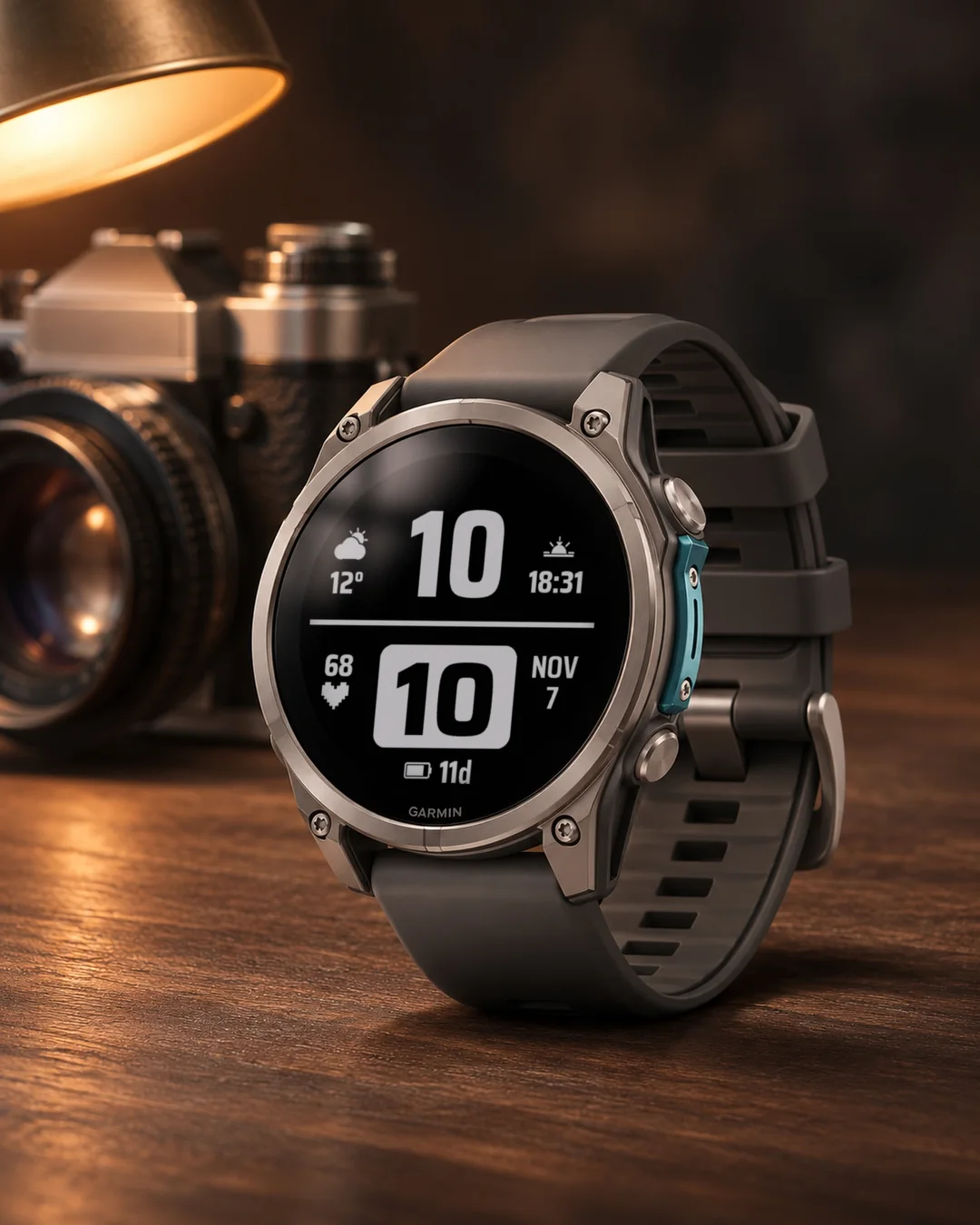
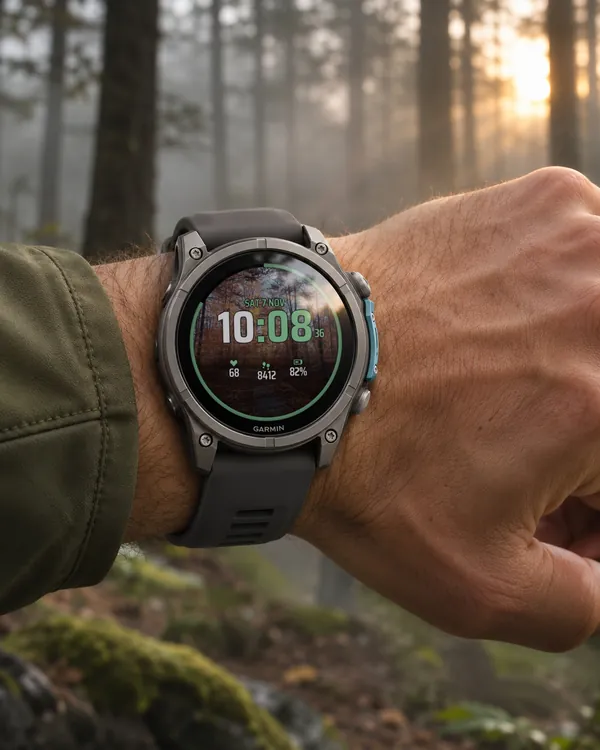
Day Frame is a clear, high-contrast watch face with everything big: a huge hour at the top, the minutes in a white frame with dark digits, and icons and digits of about 8% of the screen height. A thin line splits the face in two. Made for people who want to read the watch at a glance, outdoors and without glasses.
- Weather on the left of the big hour: a moon at night, sun and clouds by day, with the temperature under it.
- Sunrise until the sun is up, then the coming sunset, and after sunset the next sunrise. One field on the right, always the next event.
- Heart rate on the left, month and day of the month on the right, battery in days (or percent) at the bottom.
- Older weather stays on screen with a ~ sign, so you know it is not fresh. Switch on Field labels to see the name of your town under the temperature.
- The four fields (weather, sun, heart rate, battery) can show any of 32 data types or stay empty: steps, body battery, stress, altitude, pressure, floors, calories, notifications, time zones and more.
- Data refresh: a profile (More often, Economy, Less often) or your own interval for weather, sensor history, heart rate, steps and battery (sun times: On or Off), with an Off option for each source. The profile lowers how often the face reads data and asks for the weather; the watch sensors keep working. Seconds are off by default. The biggest influence on the battery comes from seconds, backlight, heart rate monitoring and GPS, which the watch controls, so the difference between profiles is usually small.
- Three sizes of field values, colours for the hour, frame, text, line, icons and battery. Press and hold a field on touch watches to open the matching Garmin screen (heart rate, weather, calendar).
- MIP screens (Enduro 3, Enduro 2, fenix 7, fenix 8 Solar, Forerunner 255 and 955) use the 64 colour palette and thick lines that read well in the sun. AMOLED watches get an always-on mode: time and date, the whole face dimmed, or the time only, moved a little every minute.
- Menu in 35 languages, month in your language, 12 or 24 hour time.
All settings are in Garmin Connect (Connect IQ, watch face settings), including own intervals and Off for every data source. On the watch: Customise for the four fields, field value size, data refresh profile, seconds, battery unit, field labels and the always-on screen.
When the watch has no reading, the field shows --. Weather needs the phone connected from time to time.
7 dni za darmo, potem jednorazowe odblokowanie na dialforge.dev. Bez abonamentu.
Day Frame to czytelna, kontrastowa tarcza, w której wszystko jest duże: ogromna godzina u góry, minuty w białej ramce z ciemnymi cyframi oraz ikony i cyfry wysokie na około 8% ekranu. Cienka linia dzieli tarczę na pół. Dla tych, którzy chcą odczytać zegarek jednym spojrzeniem, w terenie i bez okularów.
- Pogoda po lewej od dużej godziny: księżyc w nocy, słońce i chmury w dzień, z temperaturą pod spodem.
- Wschód słońca aż do wschodu, potem nadchodzący zachód, a po zachodzie kolejny wschód. Jedno pole po prawej, zawsze najbliższe wydarzenie.
- Tętno po lewej, miesiąc i dzień miesiąca po prawej, bateria w dniach (albo w procentach) na dole.
- Starsza pogoda zostaje na ekranie ze znakiem ~, żeby było widać, że nie jest świeża. Włącz Podpisy pól, a pod temperaturą zobaczysz nazwę swojej miejscowości.
- Cztery pola (pogoda, słońce, tętno, bateria) pokażą dowolną z 32 danych albo zostaną puste: kroki, Body Battery, stres, wysokość, ciśnienie, piętra, kalorie, powiadomienia, strefy czasowe i inne.
- Odświeżanie danych: profil (Częściej, Oszczędny, Rzadziej) albo własny interwał dla pogody, historii czujników, tętna, kroków i baterii (czasy słońca: Włączone albo Wyłączone), z opcją Wyłączone dla każdego źródła. Profil zmniejsza liczbę odczytów i pytań o pogodę, które wykonuje tarcza; czujniki zegarka pracują dalej. Sekundy są domyślnie wyłączone. Największy wpływ na baterię mają sekundy, podświetlenie, pomiar tętna i GPS, którymi steruje zegarek, więc różnica między profilami jest zwykle niewielka.
- Trzy wielkości wartości pól, kolory godziny, ramki, tekstu, linii, ikon i baterii. Na zegarkach dotykowych przytrzymaj pole, żeby otworzyć odpowiedni ekran Garmina (tętno, pogoda, kalendarz).
- Ekrany MIP (Enduro 3, Enduro 2, fenix 7, fenix 8 Solar, Forerunner 255 i 955) używają palety 64 kolorów i grubych linii, które dobrze czyta się w słońcu. Zegarki AMOLED mają tryb ekranu wygaszonego: godzina i data, cała tarcza przygaszona albo sama godzina, przesuwana co minutę.
- Menu w 35 językach, miesiąc w Twoim języku, godzina 12- lub 24-godzinna.
Wszystkie ustawienia są w Garmin Connect (Connect IQ, ustawienia tarczy), także własne interwały i Wyłączone dla każdego źródła danych. Na zegarku w Dostosuj: cztery pola, wielkość wartości pól, profil odświeżania danych, sekundy, jednostka baterii, podpisy pól i ekran wygaszony.
Gdy zegarek nie ma odczytu, pole pokazuje --. Pogoda wymaga, żeby telefon był co jakiś czas połączony.
7 Tage kostenlos testen, danach einmalige Freischaltung auf dialforge.dev. Kein Abo.
Day Frame ist ein klares Zifferblatt mit hohem Kontrast, bei dem alles groß ist: eine riesige Stunde oben, die Minuten in einem weißen Rahmen mit dunklen Ziffern sowie Symbole und Ziffern von etwa 8 % der Bildschirmhöhe. Eine dünne Linie teilt das Zifferblatt in zwei Hälften. Für alle, die die Uhr mit einem Blick ablesen wollen, draußen und ohne Brille.
- Das Wetter links neben der großen Stunde: nachts ein Mond, tagsüber Sonne und Wolken, darunter die Temperatur.
- Sonnenaufgang, bis die Sonne aufgegangen ist, dann der kommende Sonnenuntergang und nach dem Sonnenuntergang der nächste Sonnenaufgang. Ein Feld rechts, immer das nächste Ereignis.
- Herzfrequenz links, Monat und Tag des Monats rechts, Akku in Tagen (oder in Prozent) unten.
- Ältere Wetterdaten bleiben mit dem Zeichen ~ auf dem Bildschirm, damit du weißt, dass sie nicht frisch sind. Schalte Feldbeschriftungen ein, dann siehst du unter der Temperatur den Namen deines Ortes.
- Die vier Felder (Wetter, Sonne, Herzfrequenz, Akku) können jede von 32 Datenarten anzeigen oder leer bleiben: Schritte, Body Battery, Stress, Höhe, Druck, Etagen, Kalorien, Benachrichtigungen, Zeitzonen und mehr.
- Datenaktualisierung: ein Profil (Häufiger, Sparsam, Seltener) oder ein eigenes Intervall für Wetter, Sensorverlauf, Herzfrequenz, Schritte, Akku (Sonnenzeiten: Ein oder Aus), mit der Option Aus für jede Quelle. Das Profil verringert, wie oft das Zifferblatt Daten liest und das Wetter abfragt, die Sensoren der Uhr arbeiten weiter. Sekunden sind standardmäßig aus. Den größten Einfluss auf den Akku haben Sekunden, Beleuchtung, Herzfrequenzmessung und GPS, die die Uhr steuert, daher ist der Unterschied zwischen den Profilen meist gering.
- Drei Größen für die Feldwerte, Farben für Stunde, Rahmen, Text, Linie, Symbole und Akku. Auf Touch-Uhren ein Feld gedrückt halten, um den passenden Garmin-Bildschirm zu öffnen (Herzfrequenz, Wetter, Kalender).
Alle Einstellungen findest du in Garmin Connect (Connect IQ, Einstellungen des Zifferblatts), auch eigene Intervalle und Aus für jede Datenquelle. Auf der Uhr: Anpassen für die vier Felder, Größe der Feldwerte, Profil der Datenaktualisierung, Sekunden, Akku-Einheit, Feldbeschriftungen und den Always-on-Bildschirm.
Wenn die Uhr keinen Messwert hat, zeigt das Feld --. Für das Wetter muss das Smartphone von Zeit zu Zeit verbunden sein.
Essai gratuit de 7 jours, puis un déverrouillage unique sur dialforge.dev. Sans abonnement.
Day Frame est un cadran clair et très contrasté où tout est grand : une énorme heure en haut, les minutes dans un cadre blanc avec des chiffres sombres, et des icônes et des chiffres d'environ 8 % de la hauteur de l'écran. Une ligne fine partage le cadran en deux. Pour ceux qui veulent lire la montre d'un coup d'œil, en extérieur et sans lunettes.
- La météo à gauche de la grande heure : une lune la nuit, soleil et nuages le jour, avec la température en dessous.
- Lever du soleil jusqu'à son apparition, puis prochain coucher et, après le coucher, lever suivant. Un champ à droite, toujours le prochain événement.
- Fréquence cardiaque à gauche, mois et jour du mois à droite, batterie en jours (ou en pourcentage) en bas.
- Une météo plus ancienne reste à l'écran avec le signe ~, pour que vous sachiez qu'elle n'est pas récente. Activez Libellés des champs pour voir le nom de votre ville sous la température.
- Les quatre champs (météo, soleil, fréquence cardiaque, batterie) peuvent afficher l'un des 32 types de données ou rester vides : pas, Body Battery, stress, altitude, pression, étages, calories, notifications, fuseaux horaires et plus.
- Actualisation : un profil (Plus souvent, Économie, Moins souvent) ou votre intervalle pour la météo, les capteurs, le pouls, les pas, la batterie (soleil : Activé ou Désactivé), avec Désactivé pour chaque source. Le profil réduit les lectures et les demandes météo du cadran, les capteurs de la montre continuent de fonctionner. Secondes désactivées par défaut. La batterie dépend surtout des secondes, du rétroéclairage, du pouls et du GPS, gérés par la montre : l'écart entre profils est faible.
- Trois tailles pour les valeurs des champs et des couleurs pour l'heure, le cadre, le texte, la ligne, les icônes et la batterie. Sur les montres tactiles, appuyez longuement sur un champ pour ouvrir l'écran Garmin correspondant (fréquence cardiaque, météo, calendrier).
- Les écrans MIP (Enduro 3, Enduro 2, fenix 7, fenix 8 Solar, Forerunner 255 et 955) utilisent la palette de 64 couleurs et des traits épais, bien lisibles au soleil. Les montres AMOLED ont un mode toujours actif : heure et date, tout le cadran atténué, ou seulement l'heure, déplacée un peu chaque minute.
Tous les réglages sont dans Garmin Connect (Connect IQ, réglages du cadran), avec intervalles personnalisés et Désactivé pour chaque source. Sur la montre : Personnaliser (quatre champs, taille des valeurs, profil d'actualisation, secondes, unité de la batterie, libellés, écran toujours actif).
Quand la montre n'a aucune mesure, le champ affiche --. La météo nécessite que le téléphone soit connecté de temps en temps.
Prueba gratuita de 7 días y luego un desbloqueo único en dialforge.dev. Sin suscripción.
Day Frame es una esfera clara y de alto contraste en la que todo es grande: una hora enorme arriba, los minutos en un marco blanco con cifras oscuras, e iconos y cifras de cerca del 8 % de la altura de la pantalla. Una línea fina divide la esfera en dos. Pensada para quien quiere leer el reloj de un vistazo, al aire libre y sin gafas.
- El tiempo a la izquierda de la hora grande: una luna de noche, sol y nubes de día, con la temperatura debajo.
- Amanecer hasta que sale el sol, después el próximo atardecer y, tras el atardecer, el siguiente amanecer. Un campo a la derecha, siempre el próximo evento.
- Frecuencia cardiaca a la izquierda, mes y día del mes a la derecha, batería en días (o en porcentaje) abajo.
- El tiempo más antiguo se queda en pantalla con el signo ~, para que sepas que no es reciente. Activa Etiquetas de campos y verás el nombre de tu localidad bajo la temperatura.
- Los cuatro campos (tiempo, sol, frecuencia cardiaca, batería) pueden mostrar cualquiera de 32 tipos de datos o quedar vacíos: pasos, Body Battery, estrés, altitud, presión, pisos, calorías, notificaciones, zonas horarias y más.
- Actualización de datos: un perfil (Más a menudo, Economía, Menos a menudo) o tu intervalo para el tiempo, historial de sensores, frecuencia cardiaca, pasos, batería (horas del sol: Activado o Desactivado), con Desactivado para cada fuente. El perfil reduce las lecturas y las consultas del tiempo, y los sensores del reloj siguen funcionando. Los segundos vienen desactivados por defecto. Lo que más influye en la batería son los segundos, la retroiluminación, la frecuencia cardiaca y el GPS, que controla el reloj, por eso la diferencia entre perfiles suele ser pequeña.
- Tres tamaños para los valores de los campos y colores para la hora, el marco, el texto, la línea, los iconos y la batería. En los relojes táctiles, mantén pulsado un campo para abrir la pantalla de Garmin correspondiente (frecuencia cardiaca, tiempo, calendario).
- Las pantallas MIP (Enduro 3, Enduro 2, fenix 7, fenix 8 Solar, Forerunner 255 y 955) usan la paleta de 64 colores y líneas gruesas que se leen bien al sol. Los relojes AMOLED tienen un modo siempre activo: hora y fecha, toda la esfera atenuada, o solo la hora, desplazada un poco cada minuto.
Todos los ajustes están en Garmin Connect (Connect IQ, ajustes de la esfera), con intervalos propios y Desactivado para cada fuente. En el reloj: Personalizar para los cuatro campos, tamaño de valores, perfil de actualización, segundos, unidad de la batería, etiquetas y pantalla siempre activa.
Cuando el reloj no tiene lectura, el campo muestra --. El tiempo necesita que el teléfono esté conectado de vez en cuando.
7 dagen gratis proberen, daarna een eenmalige ontgrendeling op dialforge.dev. Geen abonnement.
Day Frame is een duidelijke wijzerplaat met veel contrast waarop alles groot is: een reusachtig uur bovenaan, de minuten in een wit kader met donkere cijfers, en pictogrammen en cijfers van ongeveer 8 % van de schermhoogte. Een dunne lijn verdeelt de wijzerplaat in tweeën. Gemaakt voor wie het horloge in één oogopslag wil lezen, buiten en zonder bril.
- Het weer links van het grote uur: een maan 's nachts, zon en wolken overdag, met de temperatuur eronder.
- Zonsopkomst tot de zon op is, daarna de aanstaande zonsondergang en na zonsondergang de volgende zonsopkomst. Eén veld rechts, altijd de volgende gebeurtenis.
- Hartslag links, maand en dag van de maand rechts, batterij in dagen (of procenten) onderaan.
- Ouder weer blijft met het teken ~ op het scherm staan, zodat je weet dat het niet vers is. Zet Veldlabels aan en je ziet de naam van je woonplaats onder de temperatuur.
- De vier velden (weer, zon, hartslag, batterij) kunnen elk van 32 soorten gegevens tonen of leeg blijven: stappen, Body Battery, stress, hoogte, luchtdruk, verdiepingen, calorieën, meldingen, tijdzones en meer.
- Gegevens vernieuwen: een profiel (Vaker, Zuinig, Minder vaak) of een eigen interval voor weer, sensorgeschiedenis, hartslag, stappen, batterij (zonnetijden: Aan of Uit), met een optie Uit voor elke bron. Het profiel verlaagt hoe vaak de wijzerplaat gegevens leest en het weer opvraagt, terwijl de sensoren van het horloge blijven werken. Seconden staan standaard uit. De grootste invloed op de batterij komt van seconden, achtergrondverlichting, hartslagmeting en gps, die het horloge aanstuurt, dus het verschil tussen de profielen is meestal klein.
- Drie groottes voor de veldwaarden en kleuren voor het uur, het kader, de tekst, de lijn, de pictogrammen en de batterij. Houd op horloges met aanraakscherm een veld ingedrukt om het bijbehorende Garmin-scherm te openen (hartslag, weer, agenda).
Alle instellingen staan in Garmin Connect (Connect IQ, instellingen van de wijzerplaat), ook eigen intervallen en Uit voor elke gegevensbron. Op het horloge: Aanpassen voor de vier velden, grootte van de veldwaarden, profiel voor gegevensvernieuwing, seconden, batterij-eenheid, veldlabels en het altijd-aan-scherm.
Als het horloge geen meting heeft, toont het veld --. Voor het weer moet de telefoon af en toe verbonden zijn.
7日間無料でお試しいただけます。その後はdialforge.devで解除を一度だけ購入(サブスクリプションなし)。
Day Frame は、すべてが大きいコントラストの高いウォッチフェイスです。上部の特大の時、白い枠に入った濃い色の分、画面の高さの約 8 % のアイコンと数字を表示します。細い線でフェイスを 2 つに分けています。屋外でもメガネなしでも、ひと目で時計を読みたい方のために作りました。
- 大きな時の左に天気を表示します。夜は月、昼は太陽と雲で、その下に気温が出ます。
- 日の出は太陽が昇るまで、その後は次の日の入り、日の入り後は次の日の出を表示します。右側の 1 つのフィールドに、常に次のイベントが出ます。
- 左に心拍数、右に月と日付、下にバッテリー (日数またはパーセント) を表示します。
- 古い天気データは ~ マーク付きで画面に残るので、最新でないことがわかります。フィールドのラベルをオンにすると、気温の下にお住まいの地域名が表示されます。
- 4 つのフィールド (天気、太陽、心拍数、バッテリー) には、32 種類のデータのどれでも表示でき、空にもできます。歩数、Body Battery、ストレス、高度、気圧、階数、カロリー、通知、タイムゾーンなどです。
- データ更新: プロファイル (頻繁、節約、低頻度) か独自の間隔を、天気、センサー履歴、心拍数、歩数、バッテリーごとに選べ (日の出・日の入り時刻はオンまたはオフ)、各データソースにはオフの選択肢があります。プロファイルは、ウォッチフェイスがデータを読み取る頻度と天気を問い合わせる頻度を下げます。時計のセンサーは動き続けます。秒表示は初期設定でオフです。バッテリーへの影響が最も大きいのは、時計が制御する秒表示、バックライト、心拍数の測定、GPS なので、プロファイル間の差は通常小さくなります。
- フィールドの値は 3 段階のサイズから選べ、時、枠、テキスト、線、アイコン、バッテリーの色も変えられます。タッチ操作の時計では、フィールドを長押しすると対応する Garmin の画面 (心拍数、天気、カレンダー) が開きます。
- MIP 画面 (Enduro 3、Enduro 2、fenix 7、fenix 8 Solar、Forerunner 255 と 955) では 64 色パレットと、日差しの下でも読みやすい太い線を使います。AMOLED の時計にはAlways-onモードがあります: 時刻と日付、フェイス全体を暗くした表示、または毎分少しずつ位置を動かす時刻のみの表示です。
- 35 言語のメニュー、お使いの言語の曜日と月、12 時間または 24 時間表示。
すべての設定は Garmin Connect (Connect IQ、ウォッチフェイスの設定) にあり、独自の間隔や各データソースのオフもそこで設定できます。時計ではカスタマイズから、4 つのフィールド、フィールドの値のサイズ、データ更新プロファイル、秒表示、バッテリーの単位、フィールドのラベル、常時表示画面を設定します。
時計に測定値がないときは、フィールドに -- と表示されます。天気は、ときどきスマートフォンと接続している必要があります。
Prova gratuita di 7 giorni, poi uno sblocco una tantum su dialforge.dev. Nessun abbonamento.
Day Frame è un quadrante chiaro e ad alto contrasto in cui tutto è grande: un'enorme ora in alto, i minuti in un riquadro bianco con cifre scure, e icone e cifre alte circa l'8 % dello schermo. Una linea sottile divide il quadrante in due. Pensato per chi vuole leggere l'orologio a colpo d'occhio, all'aperto e senza occhiali.
- Il meteo a sinistra della grande ora: una luna di notte, sole e nuvole di giorno, con la temperatura sotto.
- L'alba finché il sole non è sorto, poi il prossimo tramonto e, dopo il tramonto, l'alba successiva. Un campo a destra, sempre il prossimo evento.
- Frequenza cardiaca a sinistra, mese e giorno del mese a destra, batteria in giorni (o in percentuale) in basso.
- Il meteo più vecchio resta sullo schermo con il segno ~, così sai che non è aggiornato. Attiva Etichette dei campi e vedrai il nome della tua città sotto la temperatura.
- I quattro campi (meteo, sole, frequenza cardiaca, batteria) possono mostrare uno qualsiasi di 32 tipi di dati o restare vuoti: passi, Body Battery, stress, altitudine, pressione, piani, calorie, notifiche, fusi orari e altro.
- Aggiornamento dei dati: un profilo (Più spesso, Risparmio, Meno spesso) o un intervallo tuo per meteo, cronologia sensori, frequenza cardiaca, passi, batteria (orari del sole: Attivato o Disattivato), con Disattivato per ogni fonte. Il profilo riduce le letture e le richieste del meteo, e i sensori dell'orologio continuano a funzionare. I secondi sono disattivati di default. Sulla batteria influiscono di più secondi, retroilluminazione, misurazione del battito e GPS, che controlla l'orologio, quindi la differenza tra i profili è di solito piccola.
- Tre dimensioni per i valori dei campi e colori per l'ora, il riquadro, il testo, la linea, le icone e la batteria. Sugli orologi touch, tieni premuto un campo per aprire la schermata Garmin corrispondente (frequenza cardiaca, meteo, calendario).
- Gli schermi MIP (Enduro 3, Enduro 2, fenix 7, fenix 8 Solar, Forerunner 255 e 955) usano la tavolozza a 64 colori e linee spesse che si leggono bene al sole. Gli orologi AMOLED hanno una modalità sempre attiva: ora e data, tutto il quadrante attenuato, oppure solo l'ora, spostata un po' ogni minuto.
Tutte le impostazioni sono in Garmin Connect (Connect IQ, impostazioni del quadrante), con intervalli personalizzati e Disattivato per ogni fonte di dati. Sull'orologio: Personalizza per i quattro campi, dimensione dei valori, profilo di aggiornamento, secondi, unità della batteria, etichette dei campi e schermo sempre attivo.
Quando l'orologio non ha una lettura, il campo mostra --. Il meteo richiede che il telefono sia collegato di tanto in tanto.
7 天免费试用,之后在 dialforge.dev 一次性解锁。无需订阅。
Day Frame 是一款清晰、高对比度的表盘,所有内容都很大:顶部超大的小时数字,白色方框里的深色分钟,以及约为屏幕高度 8 % 的图标和数字。一条细线把表盘分成两半。适合想在户外、不戴眼镜、一眼就看清手表的人。
- 天气在大小时数字的左边:夜里显示月亮,白天显示太阳和云,下面是温度。
- 太阳升起前显示日出,之后显示即将到来的日落,日落之后显示下一次日出。右边一个字段,始终是下一个事件。
- 左边是心率,右边是月份和当月日期,底部是以天计(或百分比)的电量。
- 较旧的天气会带着 ~ 标记留在屏幕上,让你知道它不是最新的。打开字段标签,就能在温度下面看到你所在城镇的名称。
- 四个字段(天气、太阳、心率、电量)可以显示 32 种数据中的任意一种,也可以留空:步数、Body Battery、压力、海拔、气压、楼层、卡路里、通知、时区等。
- 数据刷新:配置(更频繁、节能、较少)或自定义间隔,可用于天气、传感器记录、心率、步数、电量(日出日落时间:开启或关闭),每个来源都有关闭选项。配置会降低表盘读取数据和请求天气的频率,手表传感器继续工作。秒默认关闭。对电量影响最大的是秒、背光、心率监测和 GPS,它们由手表控制,因此各配置之间的差别通常很小。
- 字段数值有三种大小,小时数字、方框、文字、线条、图标和电量都可以选颜色。在触屏手表上,长按某个字段即可打开对应的 Garmin 界面(心率、天气、日历)。
- MIP 屏幕(Enduro 3、Enduro 2、fenix 7、fenix 8 Solar、Forerunner 255 和 955)使用 64 色调色板和粗线条,在阳光下也很易读。AMOLED 手表有息屏常亮模式:显示时间和日期,整个表盘调暗,或者只显示时间,并且每分钟稍微移动一点位置。
- 菜单支持 35 种语言,星期和月份使用你的语言,支持 12 或 24 小时制。
所有设置都在 Garmin Connect 中(Connect IQ,表盘设置),包括自定义间隔和每个数据来源的关闭选项。在手表上:通过自定义来设置四个字段、字段数值大小、数据刷新配置、秒显示、电量单位、字段标签和息屏常亮。
当手表没有读数时,字段显示 --。天气需要手机时不时连接一下。
7-дневный бесплатный пробный период, затем разовая разблокировка на dialforge.dev. Без подписки.
Циферблат Day Frame чёткий и контрастный, на нём всё крупное: огромная цифра часа сверху, минуты в белой рамке с тёмными цифрами, значки и цифры высотой около 8 % экрана. Тонкая линия делит циферблат на две части. Для тех, кто хочет читать часы одним взглядом, на улице и без очков.
- Погода слева от большой цифры часа: луна ночью, солнце и облака днём, а под ними температура.
- Восход до тех пор, пока солнце не взошло, затем ближайший закат, а после заката следующий восход. Одно поле справа, всегда ближайшее событие.
- Пульс слева, месяц и число месяца справа, батарея в днях (или в процентах) внизу.
- Устаревшая погода остаётся на экране со значком ~, чтобы вы знали, что она не свежая. Включите Подписи полей, и под температурой появится название вашего города.
- Четыре поля (погода, солнце, пульс, батарея) могут показывать любой из 32 типов данных или оставаться пустыми: шаги, Body Battery, стресс, высоту, давление, этажи, калории, уведомления, часовые пояса и другое.
- Обновление данных: профиль (Чаще, Экономия, Реже) или свой интервал для погоды, истории датчиков, пульса, шагов, батареи (время солнца: Вкл или Выкл), с вариантом Выкл для каждого источника. Профиль уменьшает, как часто циферблат считывает данные и запрашивает погоду, а датчики часов продолжают работать. Секунды по умолчанию выключены. Наибольшее влияние на батарею оказывают секунды, подсветка, измерение пульса и GPS, которыми управляют часы, поэтому разница между профилями обычно невелика.
- Три размера значений полей и цвета для часа, рамки, текста, линии, значков и батареи. На часах с сенсорным экраном нажмите и удерживайте поле, чтобы открыть соответствующий экран Garmin (пульс, погода, календарь).
- Экраны MIP (Enduro 3, Enduro 2, fenix 7, fenix 8 Solar, Forerunner 255 и 955) используют палитру из 64 цветов и толстые линии, которые хорошо читаются на солнце. У часов с AMOLED есть режим always-on: время и дата, весь циферблат приглушён или только время, каждую минуту немного смещаемое.
- Меню на 35 языках, дни недели и месяцы на вашем языке, 12- или 24-часовой формат времени.
Все настройки находятся в Garmin Connect (Connect IQ, настройки циферблата), включая собственные интервалы и Выкл для каждого источника данных. На часах: Настроить для четырёх полей, размера значений полей, профиля обновления данных, секунд, единицы батареи, подписей полей и экрана always-on.
Когда у часов нет показаний, поле показывает --. Для погоды нужно, чтобы телефон время от времени был подключён.
Teste grátis de 7 dias, depois um desbloqueio único em dialforge.dev. Sem assinatura.
O Day Frame é um mostrador claro e de alto contraste em que tudo é grande: uma hora enorme no alto, os minutos em uma moldura branca com números escuros, e ícones e números com cerca de 8 % da altura da tela. Uma linha fina divide o mostrador em dois. Feito para quem quer ler o relógio num relance, ao ar livre e sem óculos.
- O clima à esquerda da hora grande: uma lua à noite, sol e nuvens de dia, com a temperatura embaixo.
- Nascer do sol até o sol aparecer, depois o próximo pôr do sol e, depois do pôr do sol, o próximo nascer. Um campo à direita, sempre o próximo evento.
- Frequência cardíaca à esquerda, mês e dia do mês à direita, bateria em dias (ou em porcentagem) embaixo.
- O clima mais antigo fica na tela com o sinal ~, para você saber que não é recente. Ative Rótulos dos campos para ver o nome da sua cidade embaixo da temperatura.
- Os quatro campos (clima, sol, frequência cardíaca, bateria) podem mostrar qualquer um de 32 tipos de dados ou ficar vazios: passos, Body Battery, estresse, altitude, pressão, andares, calorias, notificações, fusos horários e mais.
- Atualização de dados: um perfil (Com mais frequência, Economia, Com menos frequência) ou seu intervalo para clima, histórico dos sensores, frequência cardíaca, passos, bateria (horários do sol: Ativado ou Desativado), com Desativado para cada fonte. O perfil reduz a frequência com que o mostrador lê dados e pede o clima, e os sensores do relógio continuam funcionando. Os segundos vêm desativados por padrão. A maior influência na bateria vem dos segundos, da luz de fundo, da medição da frequência cardíaca e do GPS, que o relógio controla, então a diferença entre os perfis costuma ser pequena.
- Três tamanhos para os valores dos campos e cores para a hora, a moldura, o texto, a linha, os ícones e a bateria. Nos relógios com tela sensível ao toque, mantenha um campo pressionado para abrir a tela correspondente da Garmin (frequência cardíaca, clima, calendário).
- As telas MIP (Enduro 3, Enduro 2, fenix 7, fenix 8 Solar, Forerunner 255 e 955) usam a paleta de 64 cores e linhas grossas que são fáceis de ler no sol. Os relógios AMOLED têm um modo sempre ligado: hora e data, o mostrador inteiro escurecido, ou só a hora, deslocada um pouco a cada minuto.
Todas as configurações ficam no Garmin Connect (Connect IQ, configurações do mostrador), incluindo intervalos próprios e Desativado para cada fonte de dados. No relógio: Personalizar para os quatro campos, tamanho dos valores, perfil de atualização de dados, segundos, unidade da bateria, rótulos dos campos e tela sempre ligada.
Quando o relógio não tem leitura, o campo mostra --. O clima precisa que o celular esteja conectado de vez em quando.
7denní bezplatná zkušební verze, poté jednorázové odemknutí na dialforge.dev. Žádné předplatné.
Day Frame je přehledný kontrastní ciferník, na kterém je všechno velké: obrovská hodina nahoře, minuty v bílém rámečku s tmavými číslicemi a ikony i číslice vysoké asi 8 % výšky displeje. Tenká čára dělí ciferník na dvě poloviny. Pro každého, kdo chce hodinky přečíst jedním pohledem, venku a bez brýlí.
- Počasí vlevo od velké hodiny: měsíc v noci, slunce a mraky ve dne, pod tím teplota.
- Východ slunce, dokud slunce nevyjde, potom nadcházející západ a po západu další východ. Jedno pole vpravo, vždy nejbližší událost.
- Tep vlevo, měsíc a den v měsíci vpravo, baterie ve dnech (nebo v procentech) dole.
- Starší počasí zůstává na displeji se znakem ~, abyste věděli, že není čerstvé. Zapněte Popisky polí a pod teplotou uvidíte název svého města.
- Čtyři pole (počasí, slunce, tep, baterie) mohou ukázat kterýkoli z 32 typů dat nebo zůstat prázdná: kroky, Body Battery, stres, nadmořskou výšku, tlak, patra, kalorie, oznámení, časová pásma a další.
- Obnovení dat: profil (Častěji, Úsporný, Méně často) nebo vlastní interval pro počasí, historii senzorů, tep, kroky, baterii (časy slunce: Zapnuto nebo Vypnuto), s volbou Vypnuto pro každý zdroj. Profil snižuje, jak často ciferník čte data a ptá se na počasí, senzory hodinek pracují dál. Sekundy jsou ve výchozím stavu vypnuté. Největší vliv na baterii mají sekundy, podsvícení, měření tepu a GPS, které řídí hodinky, takže rozdíl mezi profily je obvykle malý.
- Tři velikosti hodnot v polích, barvy pro hodinu, rámeček, text, čáru, ikony a baterii. Na dotykových hodinkách podržte pole a otevře se příslušná obrazovka Garminu (tep, počasí, kalendář).
- Displeje MIP (Enduro 3, Enduro 2, fenix 7, fenix 8 Solar, Forerunner 255 a 955) používají paletu 64 barev a silné čáry, které jsou na slunci dobře čitelné. Hodinky s AMOLED mají režim stále zapnuto: čas a datum, celý ciferník ztlumený, nebo jen čas, každou minutu mírně posunutý.
- Menu ve 35 jazycích, dny v týdnu a měsíce ve vašem jazyce, 12hodinový nebo 24hodinový čas.
Všechna nastavení jsou v Garmin Connect (Connect IQ, nastavení ciferníku), včetně vlastních intervalů a volby Vypnuto pro každý zdroj dat. Na hodinkách: Přizpůsobit pro čtyři pole, velikost hodnot v polích, profil obnovení dat, sekundy, jednotku baterie, popisky polí a displej stále zapnutý.
Když hodinky nemají žádnou hodnotu, pole ukazuje --. Počasí potřebuje, aby byl telefon čas od času připojený.
7 dias de teste gratuito, depois um desbloqueio único em dialforge.dev. Sem subscrição.
O Day Frame é um mostrador claro e de alto contraste onde tudo é grande: uma hora enorme em cima, os minutos numa moldura branca com números escuros, e ícones e números com cerca de 8 % da altura do ecrã. Uma linha fina divide o mostrador em dois. Feito para quem quer ler o relógio num relance, ao ar livre e sem óculos.
- O tempo à esquerda da hora grande: uma lua à noite, sol e nuvens de dia, com a temperatura por baixo.
- Nascer do sol até o sol aparecer, depois o próximo pôr do sol e, depois do pôr do sol, o próximo nascer. Um campo à direita, sempre o próximo evento.
- Frequência cardíaca à esquerda, mês e dia do mês à direita, bateria em dias (ou em percentagem) em baixo.
- O tempo mais antigo fica no ecrã com o sinal ~, para saberes que não é recente. Ativa as Etiquetas dos campos para veres o nome da tua localidade por baixo da temperatura.
- Os quatro campos (tempo, sol, frequência cardíaca, bateria) podem mostrar qualquer um de 32 tipos de dados ou ficar vazios: passos, Body Battery, stresse, altitude, pressão, andares, calorias, notificações, fusos horários e mais.
- Atualização de dados: um perfil (Com mais frequência, Economia, Com menos frequência) ou o teu próprio intervalo para tempo, histórico dos sensores, frequência cardíaca, passos, bateria (horários do sol: Ativado ou Desativado), com a opção Desativado para cada fonte. O perfil reduz a frequência com que o mostrador lê dados e pede o tempo, e os sensores do relógio continuam a funcionar. Os segundos vêm desativados por predefinição. A maior influência na bateria vem dos segundos, da luz de fundo, da medição da frequência cardíaca e do GPS, que o relógio controla, por isso a diferença entre os perfis costuma ser pequena.
- Três tamanhos para os valores dos campos e cores para a hora, a moldura, o texto, a linha, os ícones e a bateria. Nos relógios com ecrã tátil, mantém premido um campo para abrir o ecrã Garmin correspondente (frequência cardíaca, tempo, calendário).
- Os ecrãs MIP (Enduro 3, Enduro 2, fenix 7, fenix 8 Solar, Forerunner 255 e 955) usam a paleta de 64 cores e linhas grossas que se leem bem ao sol. Os relógios AMOLED têm um modo sempre ligado: hora e data, o mostrador todo esbatido, ou só a hora, deslocada um pouco a cada minuto.
Todas as definições estão no Garmin Connect (Connect IQ, definições do mostrador), incluindo intervalos próprios e Desativado para cada fonte de dados. No relógio: Personalizar para os quatro campos, tamanho dos valores, perfil de atualização de dados, segundos, unidade da bateria, etiquetas dos campos e ecrã sempre ligado.
Quando o relógio não tem leitura, o campo mostra --. O tempo precisa que o telemóvel esteja ligado de vez em quando.
7일 무료 체험 후, dialforge.dev에서 일회성 잠금 해제를 구매하세요. 구독은 없습니다.
Day Frame은 모든 것이 큰 선명한 고대비 워치 페이스입니다. 맨 위의 아주 큰 시 숫자, 어두운 숫자가 들어간 흰색 프레임 안의 분, 화면 높이의 약 8 %인 아이콘과 숫자를 보여 줍니다. 가는 선이 페이스를 둘로 나눕니다. 야외에서 안경 없이도 시계를 한눈에 읽고 싶은 분을 위해 만들었습니다.
- 큰 시 숫자 왼쪽에 날씨가 표시됩니다. 밤에는 달, 낮에는 해와 구름이 나오고 그 아래에 기온이 표시됩니다.
- 해가 뜰 때까지는 일출, 그다음에는 다가오는 일몰, 일몰 뒤에는 다음 일출을 표시합니다. 오른쪽의 필드 하나가 항상 다음 이벤트를 보여 줍니다.
- 왼쪽에 심박수, 오른쪽에 월과 날짜, 아래에 일 단위(또는 퍼센트) 배터리가 표시됩니다.
- 오래된 날씨는 ~ 표시와 함께 화면에 남아 있어서 최신 데이터가 아님을 알 수 있습니다. 필드 라벨을 켜면 기온 아래에 내 지역 이름이 표시됩니다.
- 네 개의 필드(날씨, 해, 심박수, 배터리)에는 32가지 데이터 중 무엇이든 표시하거나 비워 둘 수 있습니다. 걸음 수, Body Battery, 스트레스, 고도, 기압, 층수, 칼로리, 알림, 시간대 등이 있습니다.
- 데이터 갱신: 프로필(더 자주, 절약, 덜 자주) 또는 직접 정한 간격을 날씨, 센서 기록, 심박수, 걸음 수, 배터리(해 뜨고 지는 시간은 켜기 또는 끄기)에 적용할 수 있으며, 각 소스마다 끄기 옵션이 있습니다. 프로필은 워치 페이스가 데이터를 읽고 날씨를 요청하는 빈도를 낮추며, 워치 센서는 계속 작동합니다. 초 표시는 기본적으로 꺼져 있습니다. 배터리에 가장 큰 영향을 주는 것은 워치가 제어하는 초 표시, 백라이트, 심박수 측정, GPS이므로 프로필 간 차이는 보통 작습니다.
- 필드 값 크기는 세 가지이고, 시, 프레임, 텍스트, 선, 아이콘, 배터리의 색을 바꿀 수 있습니다. 터치 워치에서는 필드를 길게 누르면 해당하는 Garmin 화면(심박수, 날씨, 캘린더)이 열립니다.
- MIP 화면(Enduro 3, Enduro 2, fenix 7, fenix 8 Solar, Forerunner 255 및 955)은 64색 팔레트와 햇빛 아래에서도 잘 읽히는 굵은 선을 사용합니다. AMOLED 워치에는 상시 표시 모드가 있습니다: 시간과 날짜, 전체 페이스를 어둡게 하거나 시간만 표시하며 매분 조금씩 위치를 옮깁니다.
- 35개 언어의 메뉴, 내 언어로 표시되는 요일과 월, 12시간 또는 24시간 시계.
모든 설정은 Garmin Connect(Connect IQ, 워치 페이스 설정)에 있으며, 직접 정한 간격과 모든 데이터 소스의 끄기도 여기서 설정합니다. 워치에서는 사용자 지정에서 네 개의 필드, 필드 값 크기, 데이터 갱신 프로필, 초 표시, 배터리 단위, 필드 라벨, 상시 표시 화면을 설정합니다.
워치에 측정값이 없으면 필드에 --가 표시됩니다. 날씨는 가끔 휴대폰이 연결되어 있어야 합니다.
7 dagars gratis provperiod, sedan en engångsupplåsning på dialforge.dev. Ingen prenumeration.
Day Frame är en tydlig urtavla med hög kontrast där allt är stort: en jättestor timme överst, minuterna i en vit ram med mörka siffror samt ikoner och siffror på cirka 8 % av skärmhöjden. En tunn linje delar urtavlan i två. Gjord för dig som vill läsa klockan med en blick, utomhus och utan glasögon.
- Vädret till vänster om den stora timmen: en måne på natten, sol och moln på dagen, med temperaturen under.
- Soluppgång tills solen är uppe, sedan kommande solnedgång och efter solnedgången nästa soluppgång. Ett fält till höger, alltid nästa händelse.
- Puls till vänster, månad och dag i månaden till höger, batteri i dagar (eller procent) längst ner.
- Äldre väder blir kvar på skärmen med tecknet ~, så att du ser att det inte är färskt. Slå på Fältetiketter, så ser du namnet på din ort under temperaturen.
- De fyra fälten (väder, sol, puls, batteri) kan visa vilken som helst av 32 datatyper eller vara tomma: steg, Body Battery, stress, höjd, tryck, våningar, kalorier, aviseringar, tidszoner och mer.
- Datauppdatering: en profil (Oftare, Sparläge, Mer sällan) eller ett eget intervall för väder, sensorhistorik, puls, steg, batteri (soltider: På eller Av), med alternativet Av för varje källa. Profilen minskar hur ofta urtavlan läser data och frågar efter vädret, medan klockans sensorer fortsätter att arbeta. Sekunder är avstängda som standard. Störst påverkan på batteriet har sekunder, bakgrundsljus, pulsmätning och GPS, som klockan styr, så skillnaden mellan profilerna är oftast liten.
- Tre storlekar för fältvärdena och färger för timmen, ramen, texten, linjen, ikonerna och batteriet. Tryck och håll på ett fält på klockor med pekskärm för att öppna motsvarande Garmin-skärm (puls, väder, kalender).
- MIP-skärmar (Enduro 3, Enduro 2, fenix 7, fenix 8 Solar, Forerunner 255 och 955) använder paletten med 64 färger och tjocka linjer som är lätta att läsa i solen. AMOLED-klockor får ett alltid-på-läge: klockan och datum, hela urtavlan dämpad, eller bara klockan, flyttad lite varje minut.
- Meny på 35 språk, veckodagar och månader på ditt språk, 12- eller 24-timmarsklocka.
Alla inställningar finns i Garmin Connect (Connect IQ, urtavlans inställningar), även egna intervall och Av för varje datakälla. På klockan: Anpassa för de fyra fälten, storleken på fältvärdena, profil för datauppdatering, sekunder, batterienhet, fältetiketter och alltid-på-skärmen.
När klockan inte har något värde visar fältet --. Vädret kräver att telefonen är ansluten då och då.
7 dages gratis prøveperiode, derefter en engangsoplåsning på dialforge.dev. Intet abonnement.
Day Frame er en overskuelig urskive med høj kontrast, hvor alt er stort: en kæmpe time øverst, minutterne i en hvid ramme med mørke cifre og ikoner og tal på omkring 8 % af skærmhøjden. En tynd streg deler urskiven i to. Til dig, der vil aflæse uret med et enkelt blik, udendørs og uden briller.
- Vejret til venstre for den store time: en måne om natten, sol og skyer om dagen, med temperaturen under.
- Solopgang, indtil solen er oppe, derefter den kommende solnedgang, og efter solnedgang den næste solopgang. Ét felt til højre, altid den næste begivenhed.
- Puls til venstre, måned og dagen i måneden til højre, batteri i dage (eller procent) nederst.
- Ældre vejrdata bliver på skærmen med tegnet ~, så du kan se, at de ikke er friske. Slå Feltetiketter til, så ser du navnet på din by under temperaturen.
- De fire felter (vejr, sol, puls, batteri) kan vise en af 32 datatyper eller være tomme: skridt, Body Battery, stress, højde, tryk, etager, kalorier, notifikationer, tidszoner og mere.
- Dataopdatering: en profil (Oftere, Økonomi, Sjældnere) eller dit eget interval for vejr, sensorhistorik, puls, skridt, batteri (soltider: Til eller Fra), med valget Fra for hver kilde. Profilen nedsætter, hvor ofte urskiven aflæser data og spørger om vejret, mens urets sensorer arbejder videre. Sekunder er slået fra som standard. Den største indflydelse på batteriet kommer fra sekunder, baggrundslys, pulsmåling og GPS, som uret styrer, så forskellen mellem profilerne er som regel lille.
- Tre størrelser til feltværdier og farver til timen, rammen, teksten, linjen, ikonerne og batteriet. Tryk og hold på et felt på ure med touchskærm for at åbne den tilsvarende Garmin-skærm (puls, vejr, kalender).
- MIP-skærme (Enduro 3, Enduro 2, fenix 7, fenix 8 Solar, Forerunner 255 og 955) bruger paletten med 64 farver og tykke linjer, der er letlæselige i solen. AMOLED-ure får en altid-tændt-tilstand: klokkeslæt og dato, hele urskiven dæmpet, eller kun klokkeslættet, flyttet lidt hvert minut.
- Menu på 35 sprog, ugedage og måneder på dit sprog, 12- eller 24-timers ur.
Alle indstillinger findes i Garmin Connect (Connect IQ, urskiveindstillinger), også egne intervaller og Fra for hver datakilde. På uret: Tilpas til de fire felter, størrelsen på feltværdier, profil for dataopdatering, sekunder, batteri-enhed, feltetiketter og den altid-tændte skærm.
Når uret ikke har nogen aflæsning, viser feltet --. Vejret kræver, at telefonen er forbundet en gang imellem.
7 dagers gratis prøveperiode, deretter en engangsopplåsing på dialforge.dev. Ingen abonnement.
Day Frame er en tydelig urskive med høy kontrast der alt er stort: en diger time øverst, minuttene i en hvit ramme med mørke sifre, og ikoner og sifre på omtrent 8 % av skjermhøyden. En tynn strek deler urskiven i to. Laget for deg som vil lese klokken med et blikk, utendørs og uten briller.
- Været til venstre for den store timen: en måne om natten, sol og skyer om dagen, med temperaturen under.
- Soloppgang til solen er oppe, så den kommende solnedgangen, og etter solnedgang neste soloppgang. Ett felt til høyre, alltid den neste hendelsen.
- Puls til venstre, måned og dag i måneden til høyre, batteri i dager (eller prosent) nederst.
- Eldre vær blir stående på skjermen med tegnet ~, så du ser at det ikke er ferskt. Slå på Feltetiketter, så ser du navnet på stedet ditt under temperaturen.
- De fire feltene (vær, sol, puls, batteri) kan vise en av 32 datatyper eller stå tomme: skritt, Body Battery, stress, høyde, trykk, etasjer, kalorier, varsler, tidssoner og mer.
- Dataoppdatering: en profil (Oftere, Sparemodus, Sjeldnere) eller ditt eget intervall for vær, sensorhistorikk, puls, skritt, batteri (soltider: På eller Av), med valget Av for hver kilde. Profilen reduserer hvor ofte urskiven leser data og spør etter været, mens sensorene i klokken fortsetter å jobbe. Sekunder er av som standard. Størst innvirkning på batteriet har sekunder, bakgrunnslys, pulsmåling og GPS, som klokken styrer, så forskjellen mellom profilene er vanligvis liten.
- Tre størrelser for feltverdiene og farger for timen, rammen, teksten, streken, ikonene og batteriet. Trykk og hold på et felt på klokker med berøringsskjerm for å åpne den tilhørende Garmin-skjermen (puls, vær, kalender).
- MIP-skjermer (Enduro 3, Enduro 2, fenix 7, fenix 8 Solar, Forerunner 255 og 955) bruker paletten med 64 farger og tykke linjer som er lette å lese i sol. AMOLED-klokker får en alltid-på-modus: klokkeslett og dato, hele urskiven dempet, eller bare klokkeslettet, flyttet litt hvert minutt.
- Meny på 35 språk, ukedager og måneder på ditt språk, 12- eller 24-timers klokke.
Alle innstillinger finnes i Garmin Connect (Connect IQ, urskiveinnstillinger), også egne intervaller og Av for hver datakilde. På klokken: Tilpass for de fire feltene, størrelsen på feltverdiene, profil for dataoppdatering, sekunder, batterienhet, feltetiketter og alltid-på-skjermen.
Når klokken ikke har noen avlesning, viser feltet --. Været krever at telefonen er koblet til av og til.
7 天免費試用,之後在 dialforge.dev 一次性解鎖。不需訂閱。
Day Frame 是一款清晰、高對比度的錶面,所有內容都很大:頂部超大的小時數字,白色方框裡的深色分鐘,以及約為螢幕高度 8 % 的圖示和數字。一條細線把錶面分成兩半。適合想在戶外、不戴眼鏡、一眼就看清手錶的人。
- 天氣在大小時數字的左邊:夜裡顯示月亮,白天顯示太陽和雲,下面是溫度。
- 太陽升起前顯示日出,之後顯示即將到來的日落,日落之後顯示下一次日出。右邊一個欄位,始終是下一個事件。
- 左邊是心率,右邊是月份和當月日期,底部是以天計(或百分比)的電量。
- 較舊的天氣會帶著 ~ 標記留在螢幕上,讓你知道它不是最新的。開啟欄位標籤,就能在溫度下面看到你所在城鎮的名稱。
- 四個欄位(天氣、太陽、心率、電量)可以顯示 32 種資料中的任意一種,也可以留空:步數、Body Battery、壓力、海拔、氣壓、樓層、卡路里、通知、時區等。
- 資料更新:設定檔(較頻繁、省電、較少)或自訂間隔,可用於天氣、感測器記錄、心率、步數、電量(日出日落時間:開啟或關閉),每個來源都有關閉選項。設定檔會降低錶面讀取資料和請求天氣的頻率,手錶感測器繼續運作。秒數預設關閉。對電量影響最大的是秒數、背光、心率監測和 GPS,它們由手錶控制,因此各設定檔之間的差別通常很小。
- 欄位數值有三種大小,小時數字、方框、文字、線條、圖示和電量都可以選顏色。在觸控手錶上,長按某個欄位即可開啟對應的 Garmin 畫面(心率、天氣、行事曆)。
- MIP 螢幕(Enduro 3、Enduro 2、fenix 7、fenix 8 Solar、Forerunner 255 和 955)使用 64 色調色盤和粗線條,在陽光下也很好讀。AMOLED 手錶有螢幕常亮模式:顯示時間和日期,整個錶面調暗,或只顯示時間,並且每分鐘稍微移動一點位置。
- 選單支援 35 種語言,星期和月份使用你的語言,支援 12 或 24 小時制。
所有設定都在 Garmin Connect 中(Connect IQ,錶面設定),包括自訂間隔和每個資料來源的關閉選項。在手錶上:透過自訂來設定四個欄位、欄位數值大小、資料更新設定檔、秒數、電量單位、欄位標籤和螢幕常亮。
當手錶沒有讀數時,欄位會顯示 --。天氣需要手機偶爾連線一下。
7 päivän ilmainen kokeilu, sen jälkeen kertaluonteinen avaus osoitteessa dialforge.dev. Ei tilausta.
Day Frame on selkeä, korkeakontrastinen kellotaulu, jossa kaikki on isoa: valtava tunti ylhäällä, minuutit valkoisessa kehyksessä tummilla numeroilla sekä kuvakkeet ja numerot, joiden korkeus on noin 8 % näytön korkeudesta. Ohut viiva jakaa kellotaulun kahtia. Sinulle, joka haluat lukea kellon yhdellä silmäyksellä, ulkona ja ilman silmälaseja.
- Sää ison tunnin vasemmalla puolella: kuu yöllä, aurinko ja pilvet päivällä, lämpötila alapuolella.
- Auringonnousu, kunnes aurinko on noussut, sitten tuleva auringonlasku ja laskun jälkeen seuraava nousu. Yksi kenttä oikealla, aina seuraava tapahtuma.
- Syke vasemmalla, kuukausi ja kuukauden päivä oikealla, akku päivinä (tai prosentteina) alhaalla.
- Vanhempi säätieto pysyy näytöllä ~-merkillä, jotta näet, ettei se ole tuore. Ota Kenttien nimiöt käyttöön, niin näet paikkakuntasi nimen lämpötilan alla.
- Neljä kenttää (sää, aurinko, syke, akku) voi näyttää minkä tahansa 32 tietotyypistä tai olla tyhjä: askeleet, Body Battery, stressi, korkeus, ilmanpaine, kerrokset, kalorit, ilmoitukset, aikavyöhykkeet ja muuta.
- Tietojen päivitys: profiili (Useammin, Säästö, Harvemmin) tai oma aikaväli säälle, anturihistorialle, sykkeelle, askelille, akulle (auringon ajat: Päällä tai Pois), ja jokaiselle lähteelle on valinta Pois. Profiili vähentää sitä, kuinka usein kellotaulu lukee tietoja ja kysyy säätä, mutta kellon anturit toimivat edelleen. Sekunnit ovat oletuksena pois. Suurin vaikutus akkuun on sekunneilla, taustavalolla, sykkeen mittauksella ja GPS:llä, joita kello ohjaa, joten profiilien ero on yleensä pieni.
- Kolme kokoa kenttien arvoille sekä värit tunnille, kehykselle, tekstille, viivalle, kuvakkeille ja akulle. Kosketusnäytöllisillä kelloilla pidä kenttää painettuna, niin vastaava Garminin näyttö aukeaa (syke, sää, kalenteri).
- MIP-näytöt (Enduro 3, Enduro 2, fenix 7, fenix 8 Solar, Forerunner 255 ja 955) käyttävät 64 värin paletia ja paksuja viivoja, jotka näkyvät hyvin auringossa. AMOLED-kelloissa on aina päällä -tila: kellonaika ja päivämäärä, koko kellotaulu himmennettynä tai pelkkä kellonaika, joka siirtyy hieman joka minuutti.
- Valikko 35 kielellä, viikonpäivät ja kuukaudet omalla kielelläsi, 12 tai 24 tunnin kello.
Kaikki asetukset ovat Garmin Connectissa (Connect IQ, kellotaulun asetukset), myös omat aikavälit ja Pois jokaiselle tietolähteelle. Kellossa: Mukauta neljää kenttää, kenttien arvojen kokoa, tietojen päivitysprofiilia, sekunteja, akun yksikköä, kenttien nimiöitä ja aina päällä olevaa näyttöä varten.
Kun kellolla ei ole lukemaa, kenttä näyttää --. Sää vaatii, että puhelin on yhdistettynä aina silloin tällöin.
7-dňová bezplatná skúška, potom jednorazové odomknutie na dialforge.dev. Bez predplatného.
Day Frame je prehľadný kontrastný ciferník, na ktorom je všetko veľké: obrovská hodina hore, minúty v bielom rámiku s tmavými číslicami a ikony i číslice vysoké asi 8 % výšky displeja. Tenká čiara delí ciferník na polovicu. Pre každého, kto chce hodinky prečítať jediným pohľadom, vonku a bez okuliarov.
- Počasie vľavo od veľkej hodiny: mesiac v noci, slnko a oblaky cez deň, pod tým teplota.
- Východ slnka, kým slnko nevyjde, potom nadchádzajúci západ a po západe ďalší východ. Jedno pole vpravo, vždy najbližšia udalosť.
- Tep vľavo, mesiac a deň v mesiaci vpravo, batéria v dňoch (alebo v percentách) dole.
- Staršie počasie zostáva na displeji so znakom ~, aby ste vedeli, že nie je čerstvé. Zapnite Popisky polí a pod teplotou uvidíte názov svojho mesta.
- Štyri polia (počasie, slnko, tep, batéria) môžu ukázať ktorýkoľvek z 32 typov údajov alebo zostať prázdne: kroky, Body Battery, stres, nadmorskú výšku, tlak, poschodia, kalórie, upozornenia, časové pásma a ďalšie.
- Obnovenie údajov: profil (Častejšie, Úsporný, Menej často) alebo vlastný interval pre počasie, históriu senzorov, tep, kroky, batériu (časy slnka: Zapnuté alebo Vypnuté), s možnosťou Vypnuté pre každý zdroj. Profil znižuje, ako často ciferník číta údaje a pýta si počasie, a senzory hodiniek pracujú ďalej. Sekundy sú predvolene vypnuté. Najväčší vplyv na batériu majú sekundy, podsvietenie, meranie tepu a GPS, ktoré riadia hodinky, takže rozdiel medzi profilmi je zvyčajne malý.
- Tri veľkosti hodnôt v poliach, farby pre hodinu, rámik, text, čiaru, ikony a batériu. Na dotykových hodinkách podržte pole a otvorí sa príslušná obrazovka Garminu (tep, počasie, kalendár).
- Displeje MIP (Enduro 3, Enduro 2, fenix 7, fenix 8 Solar, Forerunner 255 a 955) používajú paletu 64 farieb a hrubé čiary, ktoré sú na slnku dobre čitateľné. Hodinky s AMOLED majú režim stále zapnuté: čas a dátum, celý ciferník stlmený, alebo len čas, každú minútu mierne posunutý.
- Ponuka v 35 jazykoch, dni v týždni a mesiace vo vašom jazyku, 12-hodinový alebo 24-hodinový čas.
Všetky nastavenia sú v Garmin Connect (Connect IQ, nastavenia ciferníka), vrátane vlastných intervalov a možnosti Vypnuté pre každý zdroj údajov. Na hodinkách: Prispôsobiť pre štyri polia, veľkosť hodnôt v poliach, profil obnovenia údajov, sekundy, jednotku batérie, popisky polí a displej stále zapnutý.
Keď hodinky nemajú žiadnu hodnotu, pole ukazuje --. Počasie potrebuje, aby bol telefón raz za čas pripojený.
7-dnevni brezplačni preizkus, nato enkratno odklepanje na dialforge.dev. Brez naročnine.
Day Frame je pregleden kazalčnik z visokim kontrastom, na katerem je vse veliko: ogromna številka ure zgoraj, minute v belem okvirju s temnimi številkami ter ikone in številke, visoke približno 8 % višine zaslona. Tanka črta deli kazalčnik na dva dela. Za vse, ki želijo uro prebrati na en pogled, na prostem in brez očal.
- Vreme levo od velike številke ure: luna ponoči, sonce in oblaki podnevi, pod tem temperatura.
- Sončni vzhod, dokler sonce ne vzide, nato prihajajoči zahod in po zahodu naslednji vzhod. Eno polje na desni, vedno naslednji dogodek.
- Srčni utrip levo, mesec in dan v mesecu desno, baterija v dneh (ali v odstotkih) spodaj.
- Starejše vreme ostane na zaslonu z znakom ~, da veste, da ni sveže. Vklopite Oznake polj in pod temperaturo boste videli ime svojega kraja.
- Štiri polja (vreme, sonce, srčni utrip, baterija) lahko prikažejo katero koli od 32 vrst podatkov ali ostanejo prazna: korake, Body Battery, stres, nadmorsko višino, tlak, nadstropja, kalorije, obvestila, časovne pasove in več.
- Osveževanje podatkov: profil (Pogosteje, Varčno, Redkeje) ali lasten interval za vreme, zgodovino senzorjev, srčni utrip, korake, baterijo (sončni časi: Vklopljeno ali Izklopljeno), z možnostjo Izklopljeno za vsak vir. Profil zmanjša, kako pogosto kazalčnik bere podatke in sprašuje po vremenu, senzorji ure pa delujejo naprej. Sekunde so privzeto izklopljene. Največji vpliv na baterijo imajo sekunde, osvetlitev ozadja, merjenje srčnega utripa in GPS, ki jih nadzoruje ura, zato je razlika med profili običajno majhna.
- Tri velikosti vrednosti polj ter barve za številko ure, okvir, besedilo, črto, ikone in baterijo. Na urah z zaslonom na dotik pridržite polje, da se odpre ustrezen Garminov zaslon (srčni utrip, vreme, koledar).
- Zasloni MIP (Enduro 3, Enduro 2, fenix 7, fenix 8 Solar, Forerunner 255 in 955) uporabljajo paleto 64 barv in debele črte, ki so na soncu dobro berljive. Ure AMOLED imajo način vedno vklopljeno: čas in datum, celoten kazalčnik zatemnjen ali samo čas, vsako minuto malo premaknjen.
- Meni v 35 jezikih, dnevi v tednu in meseci v vašem jeziku, 12-urni ali 24-urni čas.
Vse nastavitve so v aplikaciji Garmin Connect (Connect IQ, nastavitve kazalčnika), tudi lastni intervali in Izklopljeno za vsak vir podatkov. Na uri: Prilagodi za štiri polja, velikost vrednosti polj, profil osveževanja podatkov, sekunde, enoto baterije, oznake polj in zaslon, ki je vedno vklopljen.
Ko ura nima meritve, polje prikaže --. Vreme zahteva, da je telefon občasno povezan.
Uji coba gratis 7 hari, lalu buka kunci sekali bayar di dialforge.dev. Tanpa langganan.
Day Frame adalah tampilan jam yang jelas dan berkontras tinggi, dengan semuanya serba besar: jam yang sangat besar di bagian atas, menit dalam satu bingkai putih dengan angka gelap, serta ikon dan angka setinggi sekitar 8% tinggi layar. Garis tipis membagi tampilan menjadi dua. Dibuat untuk kamu yang ingin membaca jam sekilas, di luar ruangan dan tanpa kacamata.
- Cuaca di sebelah kiri jam yang besar: bulan di malam hari, matahari dan awan di siang hari, dengan suhu di bawahnya.
- Matahari terbit sampai matahari naik, lalu matahari terbenam berikutnya, dan setelah matahari terbenam, matahari terbit berikutnya. Satu bidang di sebelah kanan, selalu peristiwa berikutnya.
- Detak jantung di kiri, bulan dan tanggal di kanan, baterai dalam hari (atau persen) di bawah.
- Cuaca yang lebih lama tetap tampil di layar dengan tanda ~, jadi kamu tahu datanya tidak baru. Nyalakan Label bidang untuk melihat nama kotamu di bawah suhu.
- Keempat bidang (cuaca, matahari, detak jantung, baterai) dapat menampilkan salah satu dari 32 jenis data atau dibiarkan kosong: langkah, Body Battery, stres, ketinggian, tekanan, lantai, kalori, notifikasi, zona waktu, dan lainnya.
- Pembaruan data: profil (Lebih sering, Hemat, Lebih jarang) atau interval sendiri untuk cuaca, riwayat sensor, detak jantung, langkah, dan baterai (waktu matahari: Nyala atau Mati), dengan opsi Mati untuk setiap sumber. Profil mengurangi seberapa sering tampilan jam membaca data dan meminta cuaca, sementara sensor jam tetap bekerja. Detik dimatikan secara default. Pengaruh terbesar pada baterai berasal dari detik, lampu latar, pemantauan detak jantung, dan GPS, yang dikendalikan oleh jam, sehingga selisih antarprofil biasanya kecil.
- Tiga ukuran nilai bidang, serta warna untuk jam, bingkai, teks, garis, ikon, dan baterai. Tekan dan tahan sebuah bidang pada jam layar sentuh untuk membuka layar Garmin yang sesuai (detak jantung, cuaca, kalender).
- Layar MIP (Enduro 3, Enduro 2, fenix 7, fenix 8 Solar, Forerunner 255 dan 955) memakai palet 64 warna dan garis tebal yang terbaca jelas di bawah matahari. Jam AMOLED punya mode selalu menyala: waktu dan tanggal, seluruh tampilan diredupkan, atau hanya waktu yang bergeser sedikit setiap menit.
- Menu dalam 35 bahasa, hari dan bulan dalam bahasamu, waktu 12 atau 24 jam.
Semua pengaturan ada di Garmin Connect (Connect IQ, pengaturan tampilan jam), termasuk interval sendiri dan Mati untuk setiap sumber data. Di jam: Sesuaikan untuk empat bidang, ukuran nilai bidang, profil pembaruan data, detik, satuan baterai, label bidang, dan layar selalu menyala.
Jika jam tidak punya data bacaan, bidang menampilkan --. Cuaca membutuhkan ponsel yang sesekali terhubung.
7 napos ingyenes próba, utána egyszeri feloldás a dialforge.dev oldalon. Nincs előfizetés.
A Day Frame áttekinthető, nagy kontrasztú számlap, amelyen minden nagy: hatalmas óraszám felül, a percek egy fehér keretben sötét számjegyekkel, valamint a képernyő magasságának körülbelül 8 %-át kitevő ikonok és számjegyek. Egy vékony vonal kettéosztja a számlapot. Azoknak, akik egy pillantással le akarják olvasni az órát, szabad ég alatt és szemüveg nélkül.
- Az időjárás a nagy óraszámtól balra: éjjel hold, nappal nap és felhők, alatta a hőmérséklet.
- Napkelte, amíg fel nem kel a nap, utána a következő napnyugta, napnyugta után pedig a következő napkelte. Egy mező jobbra, mindig a következő esemény.
- Pulzus balra, hónap és a hónap napja jobbra, akkumulátor napokban (vagy százalékban) lent.
- A régebbi időjárás ~ jellel marad a képernyőn, hogy tudd, nem friss. Kapcsold be a Mezőcímkék beállítást, és a hőmérséklet alatt látod a településed nevét.
- A négy mező (időjárás, nap, pulzus, akkumulátor) a 32 adattípus bármelyikét megjelenítheti, vagy üres maradhat: lépések, Body Battery, stressz, magasság, légnyomás, emeletek, kalóriák, értesítések, időzónák és más.
- Adatfrissítés: egy profil (Gyakrabban, Takarékos, Ritkábban) vagy saját időköz az időjáráshoz, a szenzorelőzményekhez, a pulzushoz, a lépésekhez, az akkumulátorhoz (a nap időpontjai: Be vagy Ki), minden forráshoz Ki lehetőséggel. A profil csökkenti, hogy a számlap milyen gyakran olvas adatokat és kér időjárást, az óra szenzorai pedig tovább működnek. A másodpercek alapértelmezés szerint ki vannak kapcsolva. Az akkumulátorra a legnagyobb hatással a másodpercek, a háttérvilágítás, a pulzusmérés és a GPS van, amelyeket az óra vezérel, ezért a profilok közti különbség általában kicsi.
- Három méret a mezőértékeknek, színek az óraszámnak, a keretnek, a szövegnek, a vonalnak, az ikonoknak és az akkumulátornak. Érintőképernyős órákon tartsd nyomva egy mezőt, hogy megnyíljon a megfelelő Garmin képernyő (pulzus, időjárás, naptár).
- A MIP kijelzők (Enduro 3, Enduro 2, fenix 7, fenix 8 Solar, Forerunner 255 és 955) a 64 színű palettát és vastag vonalakat használnak, amelyek napfényben is jól olvashatók. Az AMOLED órák always-on módot kapnak: idő és dátum, a teljes számlap tompítva, vagy csak az idő, percenként kissé eltolva.
Minden beállítás a Garmin Connectben található (Connect IQ, számlap beállításai), a saját időközökkel és a minden adatforráshoz tartozó Ki lehetőséggel együtt. Az órán: Testreszabás a négy mezőhöz, a mezőértékek méretéhez, az adatfrissítési profilhoz, a másodpercekhez, az akkumulátor egységéhez, a mezőcímkékhez és a mindig bekapcsolt képernyőhöz.
Ha az óra nem kap mérést, a mező -- jelet mutat. Az időjárás megköveteli, hogy a telefon időnként csatlakozva legyen.
ทดลองใช้ฟรี 7 วัน จากนั้นปลดล็อกครั้งเดียวที่ dialforge.dev ไม่มีค่าสมัครสมาชิก
Day Frame เป็นหน้าปัดที่ชัดเจนและคอนทราสต์สูง ทุกอย่างมีขนาดใหญ่: ตัวเลขชั่วโมงขนาดใหญ่มากด้านบน นาทีในกรอบสีขาวพร้อมตัวเลขสีเข้ม และไอคอนกับตัวเลขที่สูงประมาณ 8% ของความสูงหน้าจอ เส้นบาง ๆ แบ่งหน้าปัดเป็นสองส่วน เหมาะสำหรับคนที่อยากอ่านนาฬิกาได้ในพริบตา กลางแจ้ง และไม่ต้องใส่แว่น
- สภาพอากาศอยู่ทางซ้ายของตัวเลขชั่วโมงขนาดใหญ่: พระจันทร์ตอนกลางคืน ดวงอาทิตย์และเมฆตอนกลางวัน พร้อมอุณหภูมิอยู่ด้านล่าง
- แสดงเวลาดวงอาทิตย์ขึ้นจนกว่าดวงอาทิตย์จะขึ้น จากนั้นเป็นเวลาดวงอาทิตย์ตกที่กำลังจะมาถึง และหลังดวงอาทิตย์ตกจะเป็นเวลาดวงอาทิตย์ขึ้นครั้งถัดไป ช่องเดียวทางขวา แสดงเหตุการณ์ถัดไปเสมอ
- อัตราการเต้นของหัวใจอยู่ทางซ้าย เดือนและวันที่ อยู่ทางขวา และแบตเตอรี่เป็นวัน (หรือเปอร์เซ็นต์) อยู่ด้านล่าง
- สภาพอากาศที่เก่ากว่าจะยังอยู่บนหน้าจอพร้อมเครื่องหมาย ~ เพื่อให้รู้ว่าไม่ใช่ข้อมูลล่าสุด เปิดป้ายชื่อของช่อง แล้วจะเห็นชื่อเมืองของคุณใต้อุณหภูมิ
- ทั้งสี่ช่อง (สภาพอากาศ ดวงอาทิตย์ อัตราการเต้นของหัวใจ แบตเตอรี่) แสดงข้อมูลได้ทุกชนิดจาก 32 ชนิด หรือเว้นว่างไว้ก็ได้: จำนวนก้าว Body Battery ความเครียด ความสูง ความดันอากาศ จำนวนชั้น แคลอรี การแจ้งเตือน เขตเวลา และอื่น ๆ
- รีเฟรชข้อมูล: โปรไฟล์ (บ่อยขึ้น, ประหยัด, น้อยลง) หรือช่วงเวลาที่คุณกำหนดเองสำหรับสภาพอากาศ ประวัติเซนเซอร์ อัตราการเต้นของหัวใจ จำนวนก้าว และแบตเตอรี่ (เวลาพระอาทิตย์: เปิดหรือปิด) โดยมีตัวเลือกปิดสำหรับทุกแหล่งข้อมูล โปรไฟล์จะลดความถี่ที่หน้าปัดอ่านข้อมูลและขอข้อมูลสภาพอากาศ ส่วนเซนเซอร์ของนาฬิกายังทำงานต่อไป วินาทีปิดอยู่โดยค่าเริ่มต้น ปัจจัยที่ส่งผลต่อแบตเตอรี่มากที่สุดคือวินาที แสงพื้นหลัง การวัดอัตราการเต้นของหัวใจ และ GPS ซึ่งนาฬิกาเป็นผู้ควบคุม ดังนั้นความแตกต่างระหว่างโปรไฟล์จึงมักไม่มากนัก
- ขนาดของค่าในช่องมีสามขนาด และเลือกสีของตัวเลขชั่วโมง กรอบ ข้อความ เส้น ไอคอน และแบตเตอรี่ได้ บนนาฬิกาแบบสัมผัส ให้แตะค้างที่ช่องเพื่อเปิดหน้าจอ Garmin ที่ตรงกัน (อัตราการเต้นของหัวใจ สภาพอากาศ ปฏิทิน)
- หน้าจอ MIP (Enduro 3, Enduro 2, fenix 7, fenix 8 Solar, Forerunner 255 และ 955) ใช้จานสี 64 สีและเส้นหนาที่อ่านได้ชัดเจนกลางแดด นาฬิกา AMOLED มีโหมดแสดงผลตลอดเวลา: เวลาและวันที่ หน้าปัดทั้งหมดหรี่ลง หรือแสดงเฉพาะเวลาที่ขยับเล็กน้อยทุกนาที
- เมนู 35 ภาษา วันในสัปดาห์และเดือนเป็นภาษาของคุณ เวลาแบบ 12 หรือ 24 ชั่วโมง
การตั้งค่าทั้งหมดอยู่ใน Garmin Connect (Connect IQ, การตั้งค่าหน้าปัด) รวมถึงช่วงเวลาที่กำหนดเองและตัวเลือกปิดสำหรับทุกแหล่งข้อมูล บนนาฬิกา: ปรับแต่ง สำหรับสี่ช่อง ขนาดของค่าในช่อง โปรไฟล์การรีเฟรชข้อมูล วินาที หน่วยของแบตเตอรี่ ป้ายชื่อของช่อง และหน้าจอแสดงผลตลอดเวลา
เมื่อนาฬิกาไม่มีค่าที่อ่านได้ ช่องจะแสดง -- สภาพอากาศต้องเชื่อมต่อโทรศัพท์เป็นครั้งคราว
Δωρεάν δοκιμή 7 ημερών και στη συνέχεια εφάπαξ ξεκλείδωμα στο dialforge.dev. Χωρίς συνδρομή.
Το Day Frame είναι ένα καθαρό πρόσωπο ρολογιού με υψηλή αντίθεση, όπου όλα είναι μεγάλα: μια τεράστια ώρα στο πάνω μέρος, τα λεπτά σε ένα λευκό πλαίσιο με σκούρα ψηφία, και εικονίδια και ψηφία ύψους περίπου 8 % της οθόνης. Μια λεπτή γραμμή χωρίζει το πρόσωπο στα δύο. Για όσους θέλουν να διαβάζουν το ρολόι με μια ματιά, σε εξωτερικό χώρο και χωρίς γυαλιά.
- Ο καιρός αριστερά από τη μεγάλη ώρα: φεγγάρι τη νύχτα, ήλιος και σύννεφα τη μέρα, με τη θερμοκρασία από κάτω.
- Ανατολή ηλίου μέχρι να ανατείλει ο ήλιος, μετά η επόμενη δύση και, μετά τη δύση, η επόμενη ανατολή. Ένα πεδίο δεξιά, πάντα το επόμενο γεγονός.
- Καρδιακοί παλμοί αριστερά, μήνας και ημέρα του μήνα δεξιά, μπαταρία σε ημέρες (ή σε ποσοστό) κάτω.
- Ο παλαιότερος καιρός μένει στην οθόνη με το σημάδι ~, ώστε να φαίνεται ότι δεν είναι πρόσφατος. Ενεργοποίησε τις Ετικέτες πεδίων και θα δεις το όνομα της πόλης σου κάτω από τη θερμοκρασία.
- Τα τέσσερα πεδία (καιρός, ήλιος, καρδιακοί παλμοί, μπαταρία) μπορούν να δείχνουν οποιοδήποτε από 32 είδη δεδομένων ή να μένουν κενά: βήματα, Body Battery, στρες, υψόμετρο, πίεση, ορόφους, θερμίδες, ειδοποιήσεις, ζώνες ώρας και άλλα.
- Ανανέωση δεδομένων: προφίλ (Συχνότερα, Οικονομία, Πιο σπάνια) ή δικό σου διάστημα για καιρό, ιστορικό αισθητήρων, παλμούς, βήματα, μπαταρία (ώρες ηλίου: Ενεργό ή Απενεργοποιημένο), με Απενεργοποιημένο για κάθε πηγή. Το προφίλ μειώνει τις αναγνώσεις και τα αιτήματα καιρού, οι αισθητήρες συνεχίζουν να λειτουργούν. Τα δευτερόλεπτα είναι απενεργοποιημένα εξ ορισμού. Στη μπαταρία επηρεάζουν περισσότερο τα δευτερόλεπτα, ο φωτισμός, η μέτρηση παλμών και το GPS, που ελέγχει το ρολόι, άρα η διαφορά προφίλ είναι μικρή.
- Τρία μεγέθη για τις τιμές των πεδίων και χρώματα για την ώρα, το πλαίσιο, το κείμενο, τη γραμμή, τα εικονίδια και τη μπαταρία. Στα ρολόγια με οθόνη αφής, πάτησε παρατεταμένα ένα πεδίο για να ανοίξει η αντίστοιχη οθόνη της Garmin (καρδιακοί παλμοί, καιρός, ημερολόγιο).
Όλες οι ρυθμίσεις είναι στο Garmin Connect (Connect IQ, ρυθμίσεις του προσώπου ρολογιού), και δικά σου διαστήματα και Απενεργοποιημένο για κάθε πηγή. Στο ρολόι: Προσαρμογή για τα τέσσερα πεδία, μέγεθος τιμών, προφίλ ανανέωσης, δευτερόλεπτα, μονάδα μπαταρίας, ετικέτες πεδίων και πάντα ενεργή οθόνη.
Όταν το ρολόι δεν έχει μέτρηση, το πεδίο δείχνει --. Ο καιρός χρειάζεται το τηλέφωνο να είναι συνδεδεμένο από καιρό σε καιρό.
7 dana besplatnog probnog razdoblja, zatim jednokratno otključavanje na dialforge.dev. Bez pretplate.
Day Frame je pregledan brojčanik visokog kontrasta na kojem je sve veliko: golema brojka sati gore, minute u bijelom okviru s tamnim brojkama te ikone i brojke visoke oko 8 % visine zaslona. Tanka crta dijeli brojčanik na dva dijela. Za sve koji žele pročitati sat jednim pogledom, vani i bez naočala.
- Vrijeme lijevo od velike brojke sati: mjesec noću, sunce i oblaci danju, a ispod temperatura.
- Izlazak sunca dok sunce ne izađe, zatim nadolazeći zalazak, a nakon zalaska sljedeći izlazak. Jedno polje desno, uvijek sljedeći događaj.
- Puls lijevo, mjesec i dan u mjesecu desno, baterija u danima (ili u postocima) dolje.
- Starije vrijeme ostaje na zaslonu sa znakom ~, da znaš da nije svježe. Uključi Oznake polja i ispod temperature vidjet ćeš naziv svog grada.
- Četiri polja (vrijeme, sunce, puls, baterija) mogu prikazati bilo koju od 32 vrste podataka ili ostati prazna: korake, Body Battery, stres, visinu, tlak, katove, kalorije, obavijesti, vremenske zone i više.
- Osvježavanje podataka: profil (Češće, Štednja, Rjeđe) ili vlastiti interval za vrijeme, povijest senzora, puls, korake, bateriju (vrijeme sunca: Uključeno ili Isključeno), s opcijom Isključeno za svaki izvor. Profil smanjuje koliko često brojčanik čita podatke i traži vrijeme, a senzori sata nastavljaju raditi. Sekunde su prema zadanim postavkama isključene. Najveći utjecaj na bateriju imaju sekunde, pozadinsko osvjetljenje, mjerenje pulsa i GPS, kojima upravlja sat, pa je razlika među profilima obično mala.
- Tri veličine vrijednosti polja te boje za sate, okvir, tekst, liniju, ikone i bateriju. Na satovima s dodirnim zaslonom pritisni i drži polje da otvoriš odgovarajući Garminov zaslon (puls, vrijeme, kalendar).
- MIP zasloni (Enduro 3, Enduro 2, fenix 7, fenix 8 Solar, Forerunner 255 i 955) koriste paletu od 64 boje i debele linije koje se dobro čitaju na suncu. AMOLED satovi imaju način rada uvijek uključeno: vrijeme i datum, cijeli brojčanik zatamnjen ili samo vrijeme, malo pomaknuto svake minute.
- Izbornik na 35 jezika, dani u tjednu i mjeseci na tvom jeziku, 12-satno ili 24-satno vrijeme.
Sve postavke su u aplikaciji Garmin Connect (Connect IQ, postavke brojčanika), uključujući vlastite intervale i Isključeno za svaki izvor podataka. Na satu: Prilagodi za četiri polja, veličinu vrijednosti polja, profil osvježavanja podataka, sekunde, jedinicu baterije, oznake polja i zaslon uvijek uključen.
Kad sat nema očitanje, polje prikazuje --. Vrijeme traži da je telefon povremeno povezan.
7 ימי ניסיון חינם, ואז פתיחה חד-פעמית באתר dialforge.dev. ללא מנוי.
Day Frame היא תצוגת שעון ברורה ובעלת ניגודיות גבוהה, שבה הכול גדול: שעה ענקית למעלה, הדקות במסגרת לבנה עם ספרות כהות, וסמלים וספרות בגובה של כ-8% מגובה המסך. קו דק מחלק את התצוגה לשניים. מיועדת למי שרוצה לקרוא את השעון במבט אחד, בחוץ ובלי משקפיים.
- מזג האוויר משמאל לשעה הגדולה: ירח בלילה, שמש וענן ביום, והטמפרטורה מתחתיו.
- זריחה עד שהשמש עולה, אחר כך השקיעה הקרובה, ואחרי השקיעה הזריחה הבאה. שדה אחד בצד ימין, תמיד האירוע הבא.
- דופק משמאל, חודש ויום בחודש מימין, סוללה בימים (או באחוזים) למטה.
- מזג אוויר ישן יותר נשאר על המסך עם הסימן ~, כדי שתדעו שהוא לא עדכני. הפעילו את תוויות השדות ותראו את שם היישוב שלכם מתחת לטמפרטורה.
- ארבעת השדות (מזג אוויר, שמש, דופק, סוללה) יכולים להציג כל אחד מ-32 סוגי נתונים או להישאר ריקים: צעדים, Body Battery, מתח, גובה, לחץ, קומות, קלוריות, התראות, אזורי זמן ועוד.
- רענון נתונים: פרופיל (לעיתים קרובות יותר, חיסכון, לעיתים רחוקות יותר) או מרווח משלך עבור מזג אוויר, היסטוריית חיישנים, דופק, צעדים, סוללה (זמני שמש: פועל או כבוי), עם אפשרות כבוי לכל מקור. הפרופיל מפחית את תדירות הקריאה של הנתונים ובקשות מזג האוויר שמבצעת תצוגת השעון, וחיישני השעון ממשיכים לפעול. שניות כבויות כברירת מחדל. ההשפעה הגדולה ביותר על הסוללה נובעת משניות, תאורה אחורית, מדידת דופק ו-GPS, שהשעון שולט בהם, ולכן ההבדל בין הפרופילים בדרך כלל קטן.
- שלושה גדלים לערכי השדות, וצבעים לשעה, למסגרת, לטקסט, לקו, לסמלים ולסוללה. בשעונים עם מסך מגע, לחיצה ארוכה על שדה פותחת את מסך Garmin המתאים (דופק, מזג אוויר, לוח שנה).
- מסכי MIP (Enduro 3, Enduro 2, fenix 7, fenix 8 Solar, Forerunner 255 ו-955) משתמשים בפלטה של 64 צבעים ובקווים עבים שקריאים היטב בשמש. בשעוני AMOLED יש מצב תצוגה תמידית: שעה ותאריך, כל התצוגה מעומעמת, או רק השעה, שזזה מעט בכל דקה.
- תפריט ב-35 שפות, ימי השבוע והחודשים בשפה שלך, שעון של 12 או 24 שעות.
כל ההגדרות נמצאות ב-Garmin Connect (Connect IQ, הגדרות תצוגת השעון), כולל מרווחים משלך והאפשרות כבוי לכל מקור נתונים. בשעון: התאמה אישית לארבעת השדות, לגודל ערכי השדות, לפרופיל רענון הנתונים, לשניות, ליחידת הסוללה, לתוויות השדות ולמסך התצוגה התמידית.
כשאין לשעון קריאה, השדה מציג --. מזג האוויר דורש שהטלפון יהיה מחובר מדי פעם.
Percubaan percuma 7 hari, kemudian buka kunci sekali bayar di dialforge.dev. Tiada langganan.
Day Frame ialah wajah jam yang jelas dan berkontras tinggi dengan segalanya besar: jam yang sangat besar di bahagian atas, minit dalam satu bingkai putih dengan digit gelap, serta ikon dan digit setinggi kira-kira 8% tinggi skrin. Satu garisan nipis membahagikan wajah jam kepada dua. Dibuat untuk anda yang mahu membaca jam sekali pandang, di luar rumah dan tanpa cermin mata.
- Cuaca di sebelah kiri jam yang besar: bulan pada waktu malam, matahari dan awan pada waktu siang, dengan suhu di bawahnya.
- Matahari terbit sehingga matahari naik, kemudian matahari terbenam yang akan datang, dan selepas matahari terbenam, matahari terbit seterusnya. Satu medan di sebelah kanan, sentiasa peristiwa seterusnya.
- Kadar denyutan jantung di kiri, bulan dan hari dalam bulan di kanan, bateri dalam hari (atau peratus) di bawah.
- Cuaca yang lebih lama kekal pada skrin dengan tanda ~, supaya anda tahu ia bukan data terkini. Hidupkan Label medan untuk melihat nama bandar anda di bawah suhu.
- Empat medan (cuaca, matahari, kadar denyutan jantung, bateri) boleh menunjukkan mana-mana daripada 32 jenis data atau dibiarkan kosong: langkah, Body Battery, stres, ketinggian, tekanan udara, tingkat, kalori, pemberitahuan, zon waktu dan lain-lain.
- Muat semula data: profil (Lebih kerap, Jimat, Kurang kerap) atau selang anda sendiri untuk cuaca, sejarah penderia, kadar denyutan jantung, langkah, bateri (waktu matahari: Hidup atau Mati), dengan Mati untuk setiap sumber. Profil mengurangkan kekerapan wajah jam membaca data dan meminta cuaca, manakala penderia jam terus berfungsi. Paparan saat dimatikan secara lalai. Pengaruh terbesar pada bateri datang daripada paparan saat, lampu latar, pemantauan kadar denyutan jantung dan GPS, yang dikawal jam, jadi perbezaan antara profil biasanya kecil.
- Tiga saiz nilai medan, serta warna untuk jam, bingkai, teks, garisan, ikon dan bateri. Tekan dan tahan sesuatu medan pada jam skrin sentuh untuk membuka skrin Garmin yang sepadan (kadar denyutan jantung, cuaca, kalendar).
- Skrin MIP (Enduro 3, Enduro 2, fenix 7, fenix 8 Solar, Forerunner 255 dan 955) menggunakan palet 64 warna dan garisan tebal yang jelas dibaca di bawah matahari. Jam AMOLED mendapat mod sentiasa hidup: masa dan tarikh, seluruh wajah jam dimalapkan, atau masa sahaja, dianjak sedikit setiap minit.
Semua tetapan terdapat dalam Garmin Connect (Connect IQ, tetapan wajah jam), termasuk selang sendiri dan Mati untuk setiap sumber data. Pada jam: Suaikan untuk empat medan, saiz nilai medan, profil muat semula data, paparan saat, unit bateri, label medan dan skrin sentiasa hidup.
Apabila jam tiada bacaan, medan memaparkan --. Cuaca memerlukan telefon disambungkan dari semasa ke semasa.
Rate this face (only I see the rating)
Permissions and privacy
This product asks the watch for the permissions below. Connect IQ shows them when you install it.
- Sensor history: Reads recent values stored by the watch (for example Body Battery, stress, heart rate, steps trend).Odczytuje ostatnie wartości zapisane przez zegarek (na przykład Body Battery, stres, tętno, trend kroków).
- Your profile: Reads your Garmin profile on the watch (for example age, weight, heart rate zones) to calculate values for you.Odczytuje Twój profil Garmin na zegarku (na przykład wiek, wagę, strefy tętna), żeby liczyć wartości dla Ciebie.
- Watch data (complications): Shows data from other watch features, such as battery or steps, on the face.Pokazuje na tarczy dane z innych funkcji zegarka, takie jak bateria czy kroki.
- Location (GPS): Uses the watch location for distance, speed or sun and moon times. The location is not sent anywhere.Używa lokalizacji zegarka do dystansu, prędkości albo godzin słońca i księżyca. Lokalizacja nigdzie nie jest wysyłana.
This product does not use the internet and sends no data to our servers.
The full manual and the detailed permission descriptions are available in English and Polish.
More faces
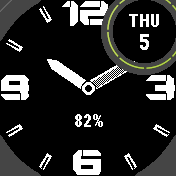 Black & White
Brick Dial
A bold analog face for black and white screens: big block numerals, slotted hour marks
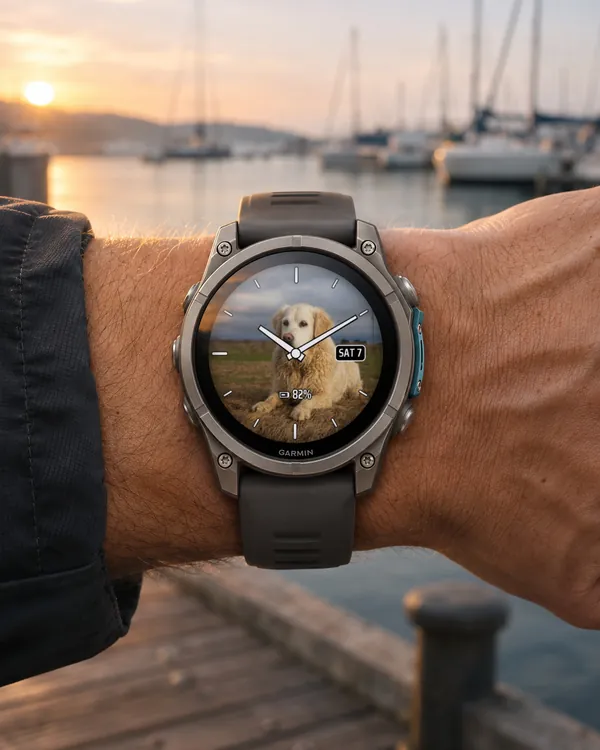 Photo
Photo Analog
Analog hands on your own photo: classic hands with an outline
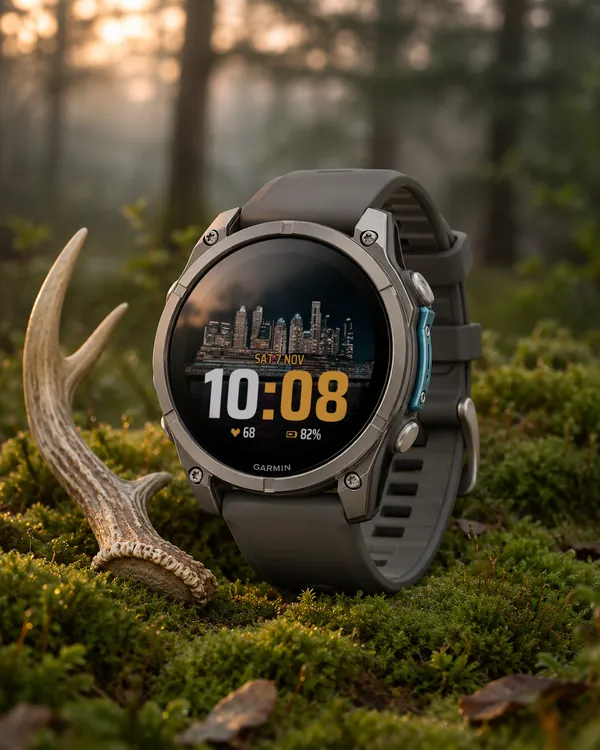 Photo
Photo Big Time
A big digital time on your own photo: at the bottom or at the top
 Photo
Photo Sport
A sport face on your own photo: the time