Set up the face before you download
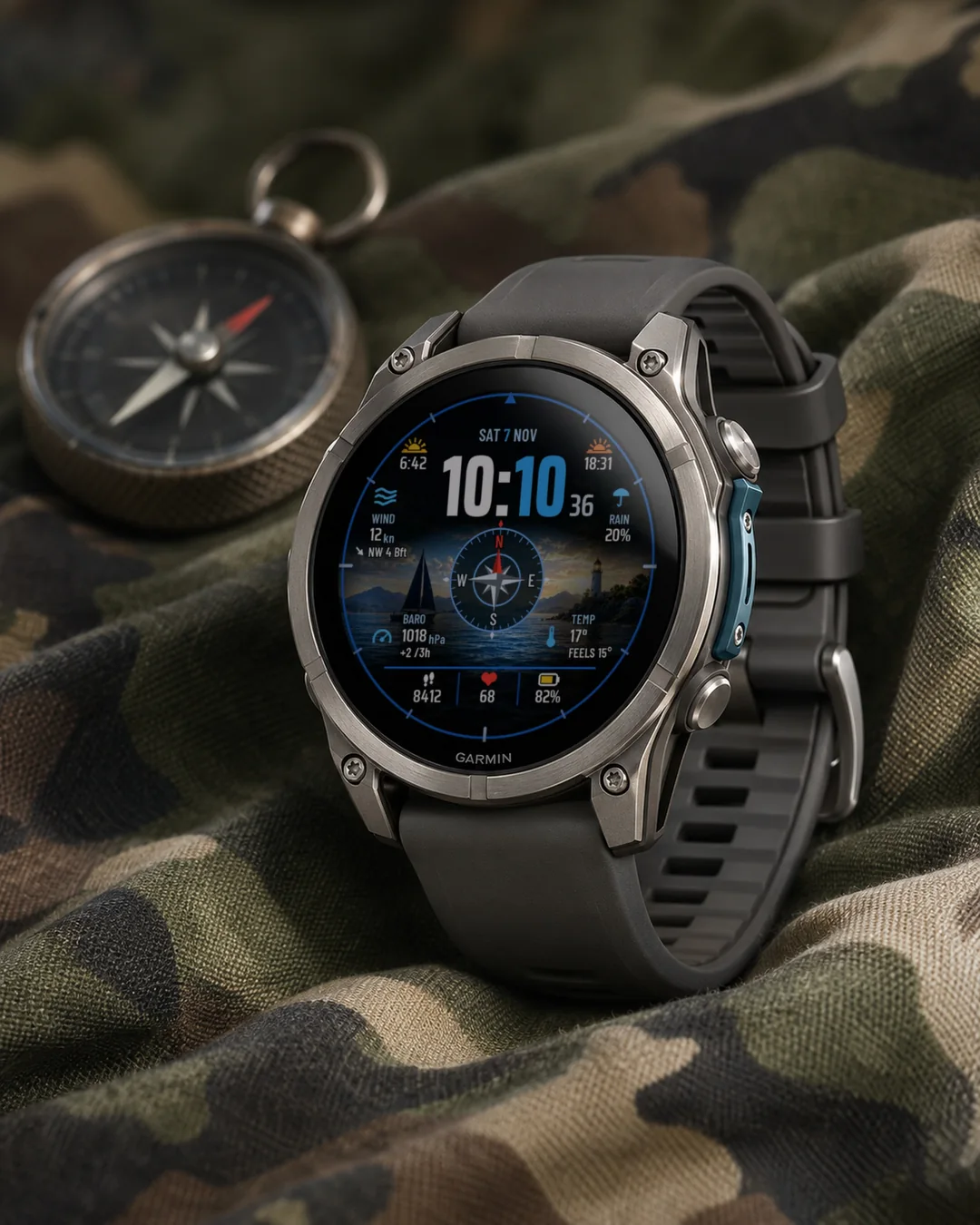
A lighthouse watch face with a big clock over a photo of the sea, where the scene follows the time of day and your Garmin weather, from dawn and sun to fog, storm and night.
Free. No trial, no subscription.
Harbor Light shows a big clock over a photo of the sea with a lighthouse. In Auto mode the scene follows the time of day and the Garmin weather: dawn, sun, golden hour, clouds, fog, rain, storm, sunset and night.
- 10 sea scenes or a black background.
- 2 layouts: Full and Clean.
- Up to 10 fields you choose: wind in knots with Beaufort, pressure with a 3 h trend, chance of rain, temperature, sun times, moon, steps, heart rate, battery and more.
- A colour for each element: hours, minutes, date, icons, values, ring.
- The compass rose is a decoration, not a compass.
- Seconds only while the screen is awake. Always-on mode shows only the dimmed time.
- Made for AMOLED screens.
Optional online sea data, off by default: wave height and period, sea temperature and tide. When you turn it on, the watch sends an approximate position (rounded to about 11 km) through your phone to open-meteo.com every 30 minutes. No name and no watch ID are sent. It is a model forecast, not a measurement, and not for navigation. Data: Open-Meteo.com and DWD, CC BY 4.0.
The watch cannot measure waves, tide or depth on its own, so without online data these fields show "--".
Settings: on the watch (hold MENU, then Watch face, then Customize) or in the Connect IQ app.
If you like the face, you can buy me a coffee at buycoffee.to/iwannaflysohigh (also as a QR code in the face settings on the watch).
Ideas or problems? Write to me at https://dialforge.dev/faces/harborlight/ and I will fix it.
Works on fenix 9, fenix 8, Forerunner 970, epix Pro, fenix 7, Venu X1 and more.
Tarcza z latarnią morską: duży zegar na zdjęciu morza, a scena zmienia się z porą dnia i pogodą z Garmina, od świtu i słońca po mgłę, burzę i noc.
Darmowa. Bez próby i subskrypcji.
Harbor Light pokazuje dużą godzinę na zdjęciu morza z latarnią. W trybie Auto scena zmienia się z porą dnia i pogodą Garmina: świt, słońce, złota godzina, chmury, mgła, deszcz, burza, zachód i noc.
- 10 scen morskich albo czarne tło.
- 2 układy: Pełny i Czysty.
- Do 10 pól do wyboru: wiatr w węzłach ze skalą Beauforta, ciśnienie z trendem z 3 h, szansa opadów, temperatura, wschód i zachód słońca, księżyc, kroki, tętno, bateria i inne.
- Własny kolor każdego elementu: godzin, minut, daty, ikon, wartości, pierścienia.
- Róża wiatrów to ozdoba, a nie kompas.
- Sekundy tylko przy aktywnym ekranie. Tryb zawsze włączony pokazuje tylko przygaszoną godzinę.
- Tylko dla ekranów AMOLED.
Opcjonalne dane morskie online, domyślnie wyłączone: wysokość i okres fali, temperatura wody i pływy. Po włączeniu zegarek co 30 minut wysyła przez telefon przybliżoną pozycję (zaokrągloną do ok. 11 km) do open-meteo.com. Bez imienia i bez numeru zegarka. To prognoza z modelu, a nie pomiar, i nie nadaje się do nawigacji. Dane: Open-Meteo.com i DWD, CC BY 4.0.
Sam zegarek nie mierzy fal, pływów ani głębokości, więc bez danych online te pola pokazują "--".
Ustawienia: na zegarku (przytrzymaj MENU, potem Tarcza zegarka, potem Dostosuj) albo w aplikacji Connect IQ.
Jeśli tarcza Ci się podoba, możesz postawić mi kawę na buycoffee.to/iwannaflysohigh (kod QR jest też w ustawieniach tarczy na zegarku).
Pomysły albo problemy? Napisz do mnie na https://dialforge.dev/faces/harborlight/, a naprawię to.
Działa na: fenix 9, fenix 8, Forerunner 970, epix Pro, fenix 7, Venu X1 i innych.
Ein Leuchtturm-Zifferblatt mit großer Uhr über einem Meeresfoto, dessen Szene der Tageszeit und dem Garmin-Wetter folgt, von Morgendämmerung und Sonne bis Nebel, Sturm und Nacht.
Kostenlos. Keine Testversion, kein Abo.
Harbor Light zeigt eine große Uhr über einem Foto vom Meer mit Leuchtturm. Im Auto-Modus folgt die Szene der Tageszeit und dem Garmin-Wetter: Morgendämmerung, Sonne, goldene Stunde, Wolken, Nebel, Regen, Sturm, Sonnenuntergang und Nacht.
- 10 Meeresszenen oder ein schwarzer Hintergrund.
- 2 Layouts: Full und Clean.
- Bis zu 10 Felder nach Wahl: Wind in Knoten mit Beaufort, Luftdruck mit 3-h-Trend, Regenwahrscheinlichkeit, Temperatur, Sonnenzeiten, Mond, Schritte, Herzfrequenz, Akku und mehr.
- Eine Farbe für jedes Element: Stunden, Minuten, Datum, Symbole, Werte, Ring.
- Die Kompassrose ist nur Dekoration, kein Kompass.
- Sekunden nur bei aktivem Display. Der Always-on-Modus zeigt nur die gedimmte Uhrzeit.
- Für AMOLED-Displays gemacht.
Optionale Online-Meeresdaten, standardmäßig aus: Wellenhöhe und -periode, Meerestemperatur und Gezeiten. Wenn du sie einschaltest, sendet die Uhr alle 30 Minuten eine ungefähre Position (auf etwa 11 km gerundet) über dein Handy an open-meteo.com. Es werden weder ein Name noch eine Geräte-ID gesendet. Es ist eine Modellvorhersage, keine Messung, und nicht zur Navigation gedacht. Daten: Open-Meteo.com und DWD, CC BY 4.0.
Die Uhr kann Wellen, Gezeiten oder Tiefe nicht selbst messen, deshalb zeigen diese Felder ohne Online-Daten "--".
Einstellungen: auf der Uhr (MENU gedrückt halten, dann Uhrdesign, dann Anpassen) oder in der Connect IQ App.
Wenn dir das Design gefällt, kannst du mir unter buycoffee.to/iwannaflysohigh einen Kaffee spendieren (auch als QR-Code in den Einstellungen des Designs auf der Uhr).
Ideen oder Probleme? Schreib mir unter https://dialforge.dev/faces/harborlight/, ich kümmere mich darum.
Läuft auf fenix 9, fenix 8, Forerunner 970, epix Pro, fenix 7, Venu X1 und weiteren Modellen.
Un cadran phare en mer : une grande horloge sur une photo de l'océan, dont la scène suit l'heure du jour et la météo Garmin, de l'aube au soleil, au brouillard, à l'orage et à la nuit.
Gratuit. Sans essai, sans abonnement.
Harbor Light affiche une grande horloge sur une photo de la mer avec un phare. En mode Auto, la scène suit l'heure de la journée et la météo Garmin : aube, soleil, heure dorée, nuages, brouillard, pluie, orage, coucher de soleil et nuit.
- 10 scènes de mer ou un fond noir.
- 2 mises en page : Full et Clean.
- Jusqu'à 10 champs au choix : vent en nœuds avec Beaufort, pression avec tendance sur 3 h, risque de pluie, température, heures du soleil, lune, pas, fréquence cardiaque, batterie et plus encore.
- Une couleur pour chaque élément : heures, minutes, date, icônes, valeurs, anneau.
- La rose des vents est un élément décoratif, pas une boussole.
- Les secondes s'affichent seulement quand l'écran est actif. Le mode toujours actif n'affiche que l'heure atténuée.
- Conçu pour les écrans AMOLED.
Données marines en ligne facultatives, désactivées par défaut : hauteur et période des vagues, température de la mer et marée. Si vous les activez, la montre envoie une position approximative (arrondie à environ 11 km) via votre téléphone à open-meteo.com toutes les 30 minutes. Aucun nom et aucun identifiant de montre ne sont envoyés. Il s'agit d'une prévision de modèle, pas d'une mesure, et elle n'est pas destinée à la navigation. Données : Open-Meteo.com et DWD, CC BY 4.0.
La montre ne peut pas mesurer seule les vagues, la marée ou la profondeur, donc sans données en ligne ces champs affichent "--".
Réglages : sur la montre (maintenez MENU, puis Cadran, puis Personnaliser) ou dans l'application Connect IQ.
Si le cadran vous plaît, vous pouvez m'offrir un café sur buycoffee.to/iwannaflysohigh (aussi sous forme de QR code dans les réglages du cadran sur la montre).
Des idées ou des problèmes ? Écrivez-moi sur https://dialforge.dev/faces/harborlight/ et je corrigerai ça.
Compatible avec fenix 9, fenix 8, Forerunner 970, epix Pro, fenix 7, Venu X1 et d'autres modèles.
Una esfera con faro: un reloj grande sobre una foto del mar cuya escena sigue la hora del día y el tiempo de Garmin, del amanecer y el sol a la niebla, la tormenta y la noche.
Gratis. Sin prueba, sin suscripción.
Harbor Light muestra un reloj grande sobre una foto del mar con un faro. En modo Auto, la escena sigue la hora del día y el tiempo de Garmin: amanecer, sol, hora dorada, nubes, niebla, lluvia, tormenta, atardecer y noche.
- 10 escenas de mar o un fondo negro.
- 2 diseños: Full y Clean.
- Hasta 10 campos a tu elección: viento en nudos con Beaufort, presión con tendencia de 3 h, probabilidad de lluvia, temperatura, horas del sol, luna, pasos, frecuencia cardiaca, batería y más.
- Un color para cada elemento: horas, minutos, fecha, iconos, valores, anillo.
- La rosa de los vientos es solo decoración, no una brújula.
- Segundos solo con la pantalla activa. El modo siempre activo muestra únicamente la hora atenuada.
- Hecho para pantallas AMOLED.
Datos marinos en línea opcionales, desactivados por defecto: altura y periodo de las olas, temperatura del mar y marea. Al activarlos, el reloj envía una posición aproximada (redondeada a unos 11 km) a través del teléfono a open-meteo.com cada 30 minutos. No se envía ningún nombre ni ID del reloj. Es una previsión de modelo, no una medición, y no es para navegar. Datos: Open-Meteo.com y DWD, CC BY 4.0.
El reloj no puede medir por sí solo las olas, la marea ni la profundidad, así que sin datos en línea esos campos muestran "--".
Ajustes: en el reloj (mantén pulsado MENU, luego Esfera y después Personalizar) o en la app Connect IQ.
Si te gusta la esfera, puedes invitarme a un café en buycoffee.to/iwannaflysohigh (también como código QR en los ajustes de la esfera en el reloj).
¿Ideas o problemas? Escríbeme en https://dialforge.dev/faces/harborlight/ y lo arreglaré.
Compatible con fenix 9, fenix 8, Forerunner 970, epix Pro, fenix 7, Venu X1 y más.
Een wijzerplaat met vuurtoren: een grote klok over een foto van de zee, waarvan het tafereel de tijd van de dag en het Garmin-weer volgt, van zonsopgang en zon tot mist, storm en nacht.
Gratis. Geen proefperiode, geen abonnement.
Harbor Light toont een grote klok over een foto van de zee met een vuurtoren. In de Auto-modus volgt het tafereel de tijd van de dag en het Garmin-weer: zonsopgang, zon, gouden uur, wolken, mist, regen, storm, zonsondergang en nacht.
- 10 zeetaferelen of een zwarte achtergrond.
- 2 indelingen: Full en Clean.
- Tot 10 velden naar keuze: wind in knopen met Beaufort, luchtdruk met een trend van 3 uur, kans op regen, temperatuur, zonnetijden, maan, stappen, hartslag, batterij en meer.
- Een kleur voor elk element: uren, minuten, datum, pictogrammen, waarden, ring.
- De windroos is alleen decoratie, geen kompas.
- Seconden alleen als het scherm actief is. De altijd-aan-modus toont alleen de gedimde tijd.
- Gemaakt voor AMOLED-schermen.
Optionele online zeegegevens, standaard uit: golfhoogte en golfperiode, zeetemperatuur en getij. Als je dit aanzet, stuurt het horloge elke 30 minuten een geschatte positie (afgerond op ongeveer 11 km) via je telefoon naar open-meteo.com. Er wordt geen naam en geen horloge-ID verstuurd. Het is een modelvoorspelling, geen meting, en niet bedoeld voor navigatie. Gegevens: Open-Meteo.com en DWD, CC BY 4.0.
Het horloge kan golven, getij of diepte niet zelf meten, dus zonder online gegevens tonen deze velden "--".
Instellingen: op het horloge (houd MENU ingedrukt, dan Wijzerplaat, dan Aanpassen) of in de Connect IQ-app.
Als je de wijzerplaat mooi vindt, kun je een kopje koffie voor me kopen op buycoffee.to/iwannaflysohigh (ook als QR-code in de instellingen van de wijzerplaat op het horloge).
Ideeën of problemen? Schrijf me op https://dialforge.dev/faces/harborlight/, dan los ik het op.
Werkt op fenix 9, fenix 8, Forerunner 970, epix Pro, fenix 7, Venu X1 en meer.
海の写真の上に大きな時計を重ねた灯台の文字盤。時間帯と Garmin の天気に合わせて、夜明けや晴れから霧、嵐、夜まで情景が変わります。
無料です。トライアルもサブスクリプションもありません。
Harbor Lightは、灯台のある海の写真の上に大きな時計を表示します。オートモードでは、時刻とGarminの天気に合わせて風景が変わります。夜明け、晴れ、ゴールデンアワー、曇り、霧、雨、嵐、夕焼け、夜に対応しています。
- 10種類の海のシーン、または黒い背景。
- 2つのレイアウト:フルとクリーン。
- 好きな項目を最大10個まで表示できます。ビューフォート風力階級付きのノット表示の風速、3時間の傾向付きの気圧、降水確率、気温、日の出日の入り時刻、月、歩数、心拍数、バッテリーなど。
- 時、分、日付、アイコン、数値、リングなど、要素ごとに色を選べます。
- コンパスローズは飾りで、コンパスではありません。
- 秒表示は画面が点灯している間だけです。常時表示モードでは、暗くした時刻だけを表示します。
- AMOLED画面向けに作られています。
オンラインの海況データは任意で、初期設定ではオフです。波の高さと周期、海水温、潮汐を表示できます。オンにすると、時計は30分ごとに、スマートフォン経由でopen-meteo.comへおおよその位置(約11 kmに丸めたもの)を送信します。名前や時計のIDは送信されません。これは予測モデルの値であり、実測値ではなく、航行には使えません。データ提供:Open-Meteo.comとDWD、CC BY 4.0。
時計単体では波、潮汐、水深を測定できないため、オンラインデータがない場合、これらの項目には"--"と表示されます。
設定:時計本体(MENUを長押し→文字盤→カスタマイズ)またはConnect IQアプリから。
このウォッチフェイスを気に入っていただけたら、buycoffee.to/iwannaflysohighでコーヒーをおごっていただけます(時計のウォッチフェイス設定にあるQRコードからも開けます)。
ご要望や問題がありましたら、https://dialforge.dev/faces/harborlight/からご連絡ください。対応します。
対応モデル:fenix 9, fenix 8, Forerunner 970, epix Pro, fenix 7, Venu X1 ほか
Un quadrante con faro: un grande orologio su una foto del mare, con una scena che segue l'ora del giorno e il meteo Garmin, dall'alba e il sole alla nebbia, alla tempesta e alla notte.
Gratuito. Nessuna prova, nessun abbonamento.
Harbor Light mostra un grande orologio sopra una foto del mare con un faro. In modalità Auto la scena segue l'ora del giorno e il meteo Garmin: alba, sole, ora d'oro, nuvole, nebbia, pioggia, temporale, tramonto e notte.
- 10 scene di mare o uno sfondo nero.
- 2 layout: Full e Clean.
- Fino a 10 campi a scelta: vento in nodi con Beaufort, pressione con tendenza a 3 h, probabilità di pioggia, temperatura, orari del sole, luna, passi, frequenza cardiaca, batteria e altro.
- Un colore per ogni elemento: ore, minuti, data, icone, valori, anello.
- La rosa dei venti è solo una decorazione, non una bussola.
- Secondi solo a schermo attivo. La modalità sempre attiva mostra solo l'ora attenuata.
- Pensato per gli schermi AMOLED.
Dati marini online facoltativi, disattivati per impostazione predefinita: altezza e periodo delle onde, temperatura del mare e marea. Se li attivi, l'orologio invia una posizione approssimativa (arrotondata a circa 11 km) tramite il telefono a open-meteo.com ogni 30 minuti. Non vengono inviati né un nome né l'ID dell'orologio. È una previsione di un modello, non una misurazione, e non è adatta alla navigazione. Dati: Open-Meteo.com e DWD, CC BY 4.0.
L'orologio non può misurare da solo onde, marea o profondità, quindi senza dati online questi campi mostrano "--".
Impostazioni: sull'orologio (tieni premuto MENU, poi Quadrante, poi Personalizza) oppure nell'app Connect IQ.
Se il quadrante ti piace, puoi offrirmi un caffè su buycoffee.to/iwannaflysohigh (anche come codice QR nelle impostazioni del quadrante sull'orologio).
Idee o problemi? Scrivimi su https://dialforge.dev/faces/harborlight/ e lo sistemo.
Compatibile con fenix 9, fenix 8, Forerunner 970, epix Pro, fenix 7, Venu X1 e altri.
灯塔表盘,大号时钟叠在海景照片上,画面随一天中的时间和 Garmin 天气变化,从黎明、晴天到大雾、风暴和夜晚。
免费。没有试用期,也没有订阅。
Harbor Light 在带灯塔的海景照片上显示一个大号时钟。在自动模式下,画面会随一天中的时间和 Garmin 天气变化:黎明、晴天、黄金时刻、多云、雾、雨、风暴、日落和夜晚。
- 10 种海景,或纯黑背景。
- 2 种布局:完整和简洁。
- 最多 10 个自选数据项:以节为单位并附蒲福风级的风速、带 3 小时趋势的气压、降雨概率、温度、日出日落时间、月相、步数、心率、电量等。
- 每个元素都可单独设色:小时、分钟、日期、图标、数值、圆环。
- 罗盘玫瑰图只是装饰,不是指南针。
- 只有在屏幕亮起时才显示秒。息屏常亮模式只显示调暗的时间。
- 专为 AMOLED 屏幕设计。
可选的在线海况数据,默认关闭:浪高和周期、海水温度和潮汐。开启后,手表每 30 分钟通过手机向 open-meteo.com 发送一次大致位置(取整到约 11 公里)。不会发送姓名和手表 ID。这是模型预报,不是实测数据,不能用于导航。数据来源:Open-Meteo.com 和 DWD,CC BY 4.0。
手表本身无法测量海浪、潮汐或水深,所以没有在线数据时,这些数据项显示为"--"。
设置:在手表上,长按 MENU,然后依次点击表盘、自定义;或在 Connect IQ 应用中设置。
如果你喜欢这款表盘,可以在 buycoffee.to/iwannaflysohigh 请我喝杯咖啡(也可以通过手表上表盘设置里的二维码打开)。
有想法或遇到问题?请到 https://dialforge.dev/faces/harborlight/ 联系我,我会修复。
适用于 fenix 9, fenix 8, Forerunner 970, epix Pro, fenix 7, Venu X1 等。
Циферблат с маяком: крупные часы поверх фото моря, а сцена меняется со временем суток и погодой Garmin, от рассвета и солнца до тумана, шторма и ночи.
Бесплатно. Без пробного периода и без подписки.
Harbor Light показывает крупные часы на фоне фотографии моря с маяком. В режиме Авто сцена меняется вместе со временем суток и погодой Garmin: рассвет, солнце, золотой час, облака, туман, дождь, шторм, закат и ночь.
- 10 морских сцен или чёрный фон.
- 2 макета: Full и Clean.
- До 10 полей на ваш выбор: ветер в узлах со шкалой Beaufort, давление с трендом за 3 ч, вероятность дождя, температура, время солнца, луна, шаги, пульс, заряд батареи и другое.
- Свой цвет для каждого элемента: часы, минуты, дата, значки, значения, кольцо.
- Роза ветров только украшение, это не компас.
- Секунды показываются, только пока экран активен. В режиме постоянного отображения виден только приглушённый вид времени.
- Создан для экранов AMOLED.
Необязательные онлайн-данные о море, по умолчанию выключены: высота и период волн, температура воды и приливы. Когда вы их включаете, часы каждые 30 минут отправляют через телефон на open-meteo.com примерное местоположение (округлённое примерно до 11 км). Имя и ID часов не передаются. Это прогноз модели, а не измерение, и не для навигации. Данные: Open-Meteo.com и DWD, CC BY 4.0.
Часы сами не могут измерить волны, прилив или глубину, поэтому без онлайн-данных в этих полях отображается "--".
Настройки: на часах (удерживайте MENU, затем Циферблат, затем Настроить) или в приложении Connect IQ.
Если вам нравится этот циферблат, можете угостить меня кофе на buycoffee.to/iwannaflysohigh (также в виде QR-кода в настройках циферблата на часах).
Есть идеи или проблемы? Напишите мне на https://dialforge.dev/faces/harborlight/, и я всё исправлю.
Работает на fenix 9, fenix 8, Forerunner 970, epix Pro, fenix 7, Venu X1 и других.
Um mostrador com farol: um relógio grande sobre uma foto do mar, cuja cena acompanha a hora do dia e o clima do Garmin, do amanhecer e sol até neblina, tempestade e noite.
Grátis. Sem teste, sem assinatura.
O Harbor Light mostra um relógio grande sobre uma foto do mar com um farol. No modo Auto, a cena acompanha a hora do dia e o clima da Garmin: amanhecer, sol, hora dourada, nuvens, neblina, chuva, tempestade, pôr do sol e noite.
- 10 cenas de mar ou um fundo preto.
- 2 layouts: Full e Clean.
- Até 10 campos à sua escolha: vento em nós com Beaufort, pressão com tendência de 3 h, chance de chuva, temperatura, horários do sol, lua, passos, frequência cardíaca, bateria e mais.
- Uma cor para cada elemento: horas, minutos, data, ícones, valores, anel.
- A rosa dos ventos é só decoração, não uma bússola.
- Segundos só com a tela ativa. O modo sempre ativo mostra apenas a hora escurecida.
- Feito para telas AMOLED.
Dados online do mar opcionais, desativados por padrão: altura e período das ondas, temperatura do mar e maré. Ao ativar, o relógio envia uma posição aproximada (arredondada para cerca de 11 km) pelo celular para open-meteo.com a cada 30 minutos. Nenhum nome e nenhum ID do relógio são enviados. É uma previsão de modelo, não uma medição, e não serve para navegação. Dados: Open-Meteo.com e DWD, CC BY 4.0.
O relógio não consegue medir ondas, maré ou profundidade sozinho, então sem dados online esses campos mostram "--".
Configurações: no relógio (segure MENU, depois Mostrador, depois Personalizar) ou no aplicativo Connect IQ.
Se você gostar do mostrador, pode me pagar um café em buycoffee.to/iwannaflysohigh (também como QR code nas configurações do mostrador no relógio).
Ideias ou problemas? Escreva para mim em https://dialforge.dev/faces/harborlight/ que eu resolvo.
Funciona em fenix 9, fenix 8, Forerunner 970, epix Pro, fenix 7, Venu X1 e outros.
Ciferník s majákem: velké hodiny nad fotkou moře, jehož scéna se mění podle denní doby a počasí z Garminu, od úsvitu a slunce po mlhu, bouři a noc.
Zdarma. Bez zkušební doby, bez předplatného.
Harbor Light zobrazuje velké hodiny přes fotku moře s majákem. V režimu Auto scéna sleduje denní dobu a počasí od Garminu: svítání, slunce, zlatá hodinka, mraky, mlha, déšť, bouře, západ slunce a noc.
- 10 mořských scén nebo černé pozadí.
- 2 rozvržení: Full a Clean.
- Až 10 polí podle vašeho výběru: vítr v uzlech s Beaufortem, tlak s trendem za 3 h, pravděpodobnost deště, teplota, časy slunce, měsíc, kroky, tepová frekvence, baterie a další.
- Barva pro každý prvek: hodiny, minuty, datum, ikony, hodnoty, kruh.
- Růžice je jen dekorace, ne kompas.
- Sekundy jen při aktivním displeji. Režim stále zapnuto ukazuje jen ztlumený čas.
- Vytvořeno pro displeje AMOLED.
Volitelná online data o moři, ve výchozím stavu vypnutá: výška a perioda vln, teplota moře a příliv. Po zapnutí hodinky každých 30 minut odešlou přibližnou polohu (zaokrouhlenou na zhruba 11 km) přes telefon na open-meteo.com. Neodesílá se žádné jméno ani ID hodinek. Jde o předpověď modelu, ne o měření, a není určena k navigaci. Data: Open-Meteo.com a DWD, CC BY 4.0.
Hodinky samy neumějí měřit vlny, příliv ani hloubku, takže bez online dat tato pole zobrazují "--".
Nastavení: v hodinkách (podržte MENU, pak Vzhled hodinek, pak Upravit) nebo v aplikaci Connect IQ.
Pokud se vám ciferník líbí, můžete mi koupit kávu na buycoffee.to/iwannaflysohigh (také jako QR kód v nastavení ciferníku v hodinkách).
Nápady nebo problémy? Napište mi na https://dialforge.dev/faces/harborlight/ a opravím to.
Funguje na fenix 9, fenix 8, Forerunner 970, epix Pro, fenix 7, Venu X1 a dalších.
Um mostrador com farol: um relógio grande sobre uma foto do mar, cuja cena acompanha a hora do dia e o tempo do Garmin, do amanhecer e sol ao nevoeiro, tempestade e noite.
Grátis. Sem período de teste, sem subscrição.
O Harbor Light mostra um relógio grande sobre uma fotografia do mar com um farol. No modo Auto, a cena acompanha a hora do dia e o estado do tempo da Garmin: amanhecer, sol, hora dourada, nuvens, nevoeiro, chuva, tempestade, pôr do sol e noite.
- 10 cenas de mar ou um fundo preto.
- 2 disposições: Full e Clean.
- Até 10 campos à sua escolha: vento em nós com Beaufort, pressão com tendência de 3 h, probabilidade de chuva, temperatura, horas do sol, lua, passos, frequência cardíaca, bateria e mais.
- Uma cor para cada elemento: horas, minutos, data, ícones, valores, anel.
- A rosa dos ventos é apenas decoração, não é uma bússola.
- Segundos apenas com o ecrã ativo. O modo sempre ligado mostra só a hora escurecida.
- Feito para ecrãs AMOLED.
Dados online do mar opcionais, desativados por predefinição: altura e período das ondas, temperatura do mar e maré. Ao ativá-los, o relógio envia uma posição aproximada (arredondada para cerca de 11 km) através do telemóvel para open-meteo.com a cada 30 minutos. Não é enviado nenhum nome nem ID do relógio. É uma previsão de modelo, não uma medição, e não serve para navegação. Dados: Open-Meteo.com e DWD, CC BY 4.0.
O relógio não consegue medir sozinho ondas, maré ou profundidade, por isso sem dados online estes campos mostram "--".
Definições: no relógio (mantenha premido MENU, depois Mostrador e depois Personalizar) ou na aplicação Connect IQ.
Se gostar do mostrador, pode pagar-me um café em buycoffee.to/iwannaflysohigh (também como código QR nas definições do mostrador no relógio).
Ideias ou problemas? Escreva-me em https://dialforge.dev/faces/harborlight/ e eu resolvo.
Funciona em fenix 9, fenix 8, Forerunner 970, epix Pro, fenix 7, Venu X1 e outros.
바다 사진 위에 큰 시계가 놓인 등대 워치 페이스로, 하루 시간대와 Garmin 날씨에 따라 새벽, 맑음, 안개, 폭풍, 밤으로 장면이 바뀝니다.
무료입니다. 체험 기간도 구독도 없습니다.
Harbor Light는 등대가 있는 바다 사진 위에 큰 시계를 보여 줍니다. 자동 모드에서는 시간대와 Garmin 날씨에 따라 장면이 바뀝니다. 새벽, 맑음, 골든아워, 구름, 안개, 비, 폭풍, 일몰, 밤을 표시합니다.
- 바다 장면 10가지 또는 검은 배경.
- 레이아웃 2가지: 전체와 깔끔.
- 직접 고르는 항목을 최대 10개까지 표시합니다. 보퍼트 풍력 등급과 함께 노트 단위 풍속, 3시간 추세가 있는 기압, 강수 확률, 기온, 일출 일몰 시각, 달, 걸음 수, 심박수, 배터리 등.
- 요소마다 색을 지정할 수 있습니다. 시, 분, 날짜, 아이콘, 수치, 링.
- 나침반 장미는 장식일 뿐, 나침반이 아닙니다.
- 초는 화면이 켜져 있을 때만 표시됩니다. 상시 표시 모드에서는 어둡게 처리된 시간만 보입니다.
- AMOLED 화면용으로 만들었습니다.
온라인 바다 데이터는 선택 사항이며 기본값은 꺼짐입니다. 파고와 주기, 해수 온도, 조석을 표시합니다. 켜면 시계가 30분마다 휴대전화를 통해 open-meteo.com으로 대략적인 위치(약 11 km 단위로 반올림)를 보냅니다. 이름과 시계 ID는 전송되지 않습니다. 이는 모델 예보이지 실측값이 아니며, 항해용이 아닙니다. 데이터 출처: Open-Meteo.com과 DWD, CC BY 4.0.
시계 혼자서는 파도, 조석, 수심을 측정할 수 없으므로, 온라인 데이터가 없으면 이 항목에는 "--"가 표시됩니다.
설정: 시계에서(MENU를 길게 누른 다음 워치페이스, 사용자 설정) 또는 Connect IQ 앱에서 변경할 수 있습니다.
이 워치페이스가 마음에 드신다면 buycoffee.to/iwannaflysohigh 에서 커피 한 잔 사 주실 수 있습니다(시계의 워치페이스 설정에 있는 QR 코드로도 열 수 있습니다).
의견이나 문제가 있으신가요? https://dialforge.dev/faces/harborlight/ 에서 알려 주시면 고치겠습니다.
지원 모델: fenix 9, fenix 8, Forerunner 970, epix Pro, fenix 7, Venu X1 외
En fyrurtavla med en stor klocka över ett foto av havet, där scenen följer tiden på dygnet och Garmin-vädret, från gryning och sol till dimma, storm och natt.
Gratis. Ingen provperiod, ingen prenumeration.
Harbor Light visar en stor klocka över ett foto av havet med en fyr. I Auto-läge följer scenen tiden på dygnet och Garmins väder: gryning, sol, gyllene timmen, moln, dimma, regn, storm, solnedgång och natt.
- 10 havsscener eller svart bakgrund.
- 2 layouter: Full och Ren.
- Upp till 10 fält som du väljer: vind i knop med Beaufort, lufttryck med 3 h-trend, regnrisk, temperatur, soltider, måne, steg, puls, batteri med mera.
- En färg för varje element: timmar, minuter, datum, ikoner, värden, ring.
- Kompassrosen är en dekoration, inte en kompass.
- Sekunder bara när skärmen är vaken. Always-on-läget visar bara den dämpade tiden.
- Gjord för AMOLED-skärmar.
Valfri onlinedata om havet, avstängd som standard: våghöjd och vågperiod, havstemperatur och tidvatten. När du slår på den skickar klockan en ungefärlig position (avrundad till cirka 11 km) via din telefon till open-meteo.com var 30:e minut. Inget namn och inget klock-ID skickas. Det är en modellprognos, inte en mätning, och inte avsedd för navigation. Data: Open-Meteo.com och DWD, CC BY 4.0.
Klockan kan inte mäta vågor, tidvatten eller djup på egen hand, så utan onlinedata visar de här fälten "--".
Inställningar: på klockan (håll in MENU, sedan Urtavla, sedan Anpassa) eller i Connect IQ-appen.
Om du gillar urtavlan kan du bjuda mig på en kaffe på buycoffee.to/iwannaflysohigh (även som QR-kod i urtavlans inställningar på klockan).
Idéer eller problem? Skriv till mig på https://dialforge.dev/faces/harborlight/ så fixar jag det.
Fungerar på fenix 9, fenix 8, Forerunner 970, epix Pro, fenix 7, Venu X1 med flera.
En fyrtårnsurskive med et stort ur over et foto af havet, hvor scenen følger tidspunktet på dagen og Garmin-vejret, fra daggry og sol til tåge, storm og nat.
Gratis. Ingen prøveperiode, intet abonnement.
Harbor Light viser et stort ur over et foto af havet med et fyrtårn. I Auto-tilstand følger scenen tidspunktet på dagen og Garmin-vejret: daggry, sol, gyldne time, skyer, tåge, regn, storm, solnedgang og nat.
- 10 havscener eller en sort baggrund.
- 2 layouts: Full og Ren.
- Op til 10 felter, du selv vælger: vind i knob med Beaufort, tryk med 3 timers tendens, risiko for regn, temperatur, soltider, måne, skridt, puls, batteri og mere.
- En farve til hvert element: timer, minutter, dato, ikoner, værdier, ring.
- Kompasrosen er en dekoration, ikke et kompas.
- Sekunder kun mens skærmen er vågen. Always-on-tilstand viser kun den dæmpede tid.
- Lavet til AMOLED-skærme.
Valgfri online havdata, slået fra som standard: bølgehøjde og bølgeperiode, havtemperatur og tidevand. Når du slår den til, sender uret en omtrentlig position (afrundet til cirka 11 km) via din telefon til open-meteo.com hvert 30. minut. Intet navn og intet ur-ID sendes. Det er en modelprognose, ikke en måling, og ikke til navigation. Data: Open-Meteo.com og DWD, CC BY 4.0.
Uret kan ikke selv måle bølger, tidevand eller dybde, så uden onlinedata viser disse felter "--".
Indstillinger: på uret (hold MENU, derefter Urskive, derefter Tilpas) eller i Connect IQ-appen.
Hvis du kan lide urskiven, kan du give mig en kop kaffe på buycoffee.to/iwannaflysohigh (også som QR-kode i urskivens indstillinger på uret).
Ideer eller problemer? Skriv til mig på https://dialforge.dev/faces/harborlight/, så retter jeg det.
Virker på fenix 9, fenix 8, Forerunner 970, epix Pro, fenix 7, Venu X1 og flere.
En fyrtårn-urskive med en stor klokke over et bilde av havet, der scenen følger tiden på døgnet og Garmin-været, fra daggry og sol til tåke, storm og natt.
Gratis. Ingen prøveperiode, intet abonnement.
Harbor Light viser en stor klokke over et bilde av havet med et fyrtårn. I Auto-modus følger scenen tiden på døgnet og Garmin-været: daggry, sol, gyllen time, skyer, tåke, regn, storm, solnedgang og natt.
- 10 havscener eller svart bakgrunn.
- 2 oppsett: Full og Ren.
- Opptil 10 felt du velger selv: vind i knop med Beaufort, trykk med 3 timers trend, regnsjanse, temperatur, soltider, måne, skritt, puls, batteri og mer.
- En farge for hvert element: timer, minutter, dato, ikoner, verdier, ring.
- Kompassrosen er en dekorasjon, ikke et kompass.
- Sekunder bare mens skjermen er våken. Always-on-modus viser bare den dempede tiden.
- Laget for AMOLED-skjermer.
Valgfrie nettdata om havet, av som standard: bølgehøyde og bølgeperiode, havtemperatur og tidevann. Når du slår det på, sender klokken en omtrentlig posisjon (rundet av til cirka 11 km) via telefonen din til open-meteo.com hvert 30. minutt. Ikke noe navn og ingen klokke-ID sendes. Det er en modellprognose, ikke en måling, og ikke til navigasjon. Data: Open-Meteo.com og DWD, CC BY 4.0.
Klokken kan ikke måle bølger, tidevann eller dybde på egen hånd, så uten nettdata viser disse feltene "--".
Innstillinger: på klokken (hold MENU, deretter Urskive, deretter Tilpass) eller i Connect IQ-appen.
Liker du urskiven, kan du spandere en kaffe på meg på buycoffee.to/iwannaflysohigh (også som QR-kode i urskivens innstillinger på klokken).
Ideer eller problemer? Skriv til meg på https://dialforge.dev/faces/harborlight/, så fikser jeg det.
Fungerer på fenix 9, fenix 8, Forerunner 970, epix Pro, fenix 7, Venu X1 og flere.
燈塔錶面,大型時鐘疊在海景照片上,畫面隨一天中的時間和 Garmin 天氣變化,從黎明、晴天到大霧、風暴和夜晚。
免費。沒有試用期,也沒有訂閱。
Harbor Light 在帶有燈塔的海景照片上顯示大型時鐘。在自動模式下,畫面會隨一天中的時間和 Garmin 天氣變化:黎明、晴天、黃金時刻、多雲、霧、雨、風暴、日落和夜晚。
- 10 種海景,或純黑背景。
- 2 種版面:完整和簡潔。
- 最多 10 個自選資料欄位:以節為單位並附蒲福風級的風速、含 3 小時趨勢的氣壓、降雨機率、溫度、日出日落時間、月相、步數、心率、電量等。
- 每個元素都可單獨設定顏色:小時、分鐘、日期、圖示、數值、圓環。
- 羅盤玫瑰圖只是裝飾,不是指南針。
- 只有在螢幕亮起時才顯示秒數。螢幕常亮模式只顯示調暗的時間。
- 專為 AMOLED 螢幕設計。
可選的線上海況資料,預設為關閉:浪高和週期、海水溫度和潮汐。開啟後,手錶每 30 分鐘透過手機向 open-meteo.com 傳送一次大致位置(四捨五入到約 11 公里)。不會傳送姓名和手錶 ID。這是模型預報,不是實測數據,不能用於導航。資料來源:Open-Meteo.com 和 DWD,CC BY 4.0。
手錶本身無法測量海浪、潮汐或水深,所以沒有線上資料時,這些欄位會顯示"--"。
設定:在手錶上(長按 MENU,依序選擇錶面、自訂)或在 Connect IQ 應用程式中設定。
如果你喜歡這款錶面,可以在 buycoffee.to/iwannaflysohigh 請我喝杯咖啡(也可以透過手錶上錶面設定裡的 QR 碼開啟)。
有想法或遇到問題嗎?請到 https://dialforge.dev/faces/harborlight/ 聯絡我,我會修正。
適用於 fenix 9, fenix 8, Forerunner 970, epix Pro, fenix 7, Venu X1 等。
Majakkakellotaulu, jossa iso kello on meren valokuvan päällä ja näkymä seuraa vuorokaudenaikaa ja Garmin-säätä aamunkoitosta ja auringosta sumuun, myrskyyn ja yöhön.
Ilmainen. Ei kokeilujaksoa, ei tilausta.
Harbor Light näyttää ison kellon merikuvan päällä, jossa on majakka. Auto-tilassa näkymä seuraa vuorokaudenaikaa ja Garminin säätä: aamunkoitto, aurinko, kultainen hetki, pilvet, sumu, sade, myrsky, auringonlasku ja yö.
- 10 merinäkymää tai musta tausta.
- 2 asettelua: Täysi ja Puhdas.
- Jopa 10 itse valittavaa kenttää: tuuli solmuina Beaufortin asteikolla, ilmanpaine 3 tunnin trendillä, sateen todennäköisyys, lämpötila, auringon ajat, kuu, askeleet, syke, akku ja muuta.
- Oma väri jokaiselle elementille: tunnit, minuutit, päivämäärä, kuvakkeet, arvot, rengas.
- Kompassiruusu on koriste, ei kompassi.
- Sekunnit vain kun näyttö on hereillä. Always-on-tila näyttää vain himmennetyn ajan.
- Tehty AMOLED-näytöille.
Valinnainen verkosta haettava meridata, oletuksena pois päältä: aallonkorkeus ja aaltojakso, meriveden lämpötila ja vuorovesi. Kun otat sen käyttöön, kello lähettää likimääräisen sijainnin (pyöristettynä noin 11 km:iin) puhelimesi kautta osoitteeseen open-meteo.com 30 minuutin välein. Nimeä tai kellon tunnusta ei lähetetä. Se on mallin ennuste, ei mittaus, eikä sitä ole tarkoitettu navigointiin. Data: Open-Meteo.com ja DWD, CC BY 4.0.
Kello ei pysty itse mittaamaan aaltoja, vuorovettä eikä syvyyttä, joten ilman verkkodataa nämä kentät näyttävät "--".
Asetukset: kellossa (pidä MENU painettuna, sitten Kellotaulu, sitten Mukauta) tai Connect IQ -sovelluksessa.
Jos pidät kellotaulusta, voit tarjota minulle kahvit osoitteessa buycoffee.to/iwannaflysohigh (myös QR-koodina kellotaulun asetuksissa kellossa).
Ideoita tai ongelmia? Kirjoita minulle osoitteeseen https://dialforge.dev/faces/harborlight/, niin korjaan asian.
Toimii malleissa fenix 9, fenix 8, Forerunner 970, epix Pro, fenix 7, Venu X1 ja muissa.
Ciferník s majákom: veľké hodiny nad fotkou mora, ktorého scéna sa mení podľa dennej doby a počasia z Garminu, od úsvitu a slnka po hmlu, búrku a noc.
Zadarmo. Bez skúšobnej doby, bez predplatného.
Harbor Light zobrazuje veľké hodiny cez fotku mora s majákom. V režime Auto scéna sleduje dennú dobu a počasie od Garminu: svitanie, slnko, zlatá hodinka, oblaky, hmla, dážď, búrka, západ slnka a noc.
- 10 morských scén alebo čierne pozadie.
- 2 rozloženia: Full a Clean.
- Až 10 polí podľa vášho výberu: vietor v uzloch s Beaufortom, tlak s trendom za 3 h, pravdepodobnosť dažďa, teplota, časy slnka, mesiac, kroky, tepová frekvencia, batéria a ďalšie.
- Farba pre každý prvok: hodiny, minúty, dátum, ikony, hodnoty, kruh.
- Ružica je len dekorácia, nie kompas.
- Sekundy len pri aktívnom displeji. Režim stále zapnuté ukazuje iba stlmený čas.
- Vytvorené pre displeje AMOLED.
Voliteľné online dáta o mori, predvolene vypnuté: výška a perióda vĺn, teplota mora a príliv. Po zapnutí hodinky každých 30 minút odošlú približnú polohu (zaokrúhlenú na zhruba 11 km) cez telefón na open-meteo.com. Neodosiela sa žiadne meno ani ID hodiniek. Ide o predpoveď modelu, nie o meranie, a nie je určená na navigáciu. Dáta: Open-Meteo.com a DWD, CC BY 4.0.
Hodinky samy nevedia merať vlny, príliv ani hĺbku, takže bez online dát tieto polia zobrazujú "--".
Nastavenia: na hodinkách (podržte MENU, potom Ciferník, potom Prispôsobiť) alebo v aplikácii Connect IQ.
Ak sa vám ciferník páči, môžete mi kúpiť kávu na buycoffee.to/iwannaflysohigh (aj ako QR kód v nastaveniach ciferníka v hodinkách).
Nápady alebo problémy? Napíšte mi na https://dialforge.dev/faces/harborlight/ a opravím to.
Funguje na fenix 9, fenix 8, Forerunner 970, epix Pro, fenix 7, Venu X1 a ďalších.
Številčnica z lučjo: velika ura nad fotografijo morja, katere prizor sledi uri dneva in vremenu iz Garmina, od zore in sonca do megle, nevihte in noči.
Brezplačno. Brez preizkusnega obdobja, brez naročnine.
Harbor Light prikazuje veliko uro nad fotografijo morja s svetilnikom. V načinu Auto prizor sledi dobi dneva in Garminovi vremenski napovedi: zora, sonce, zlata ura, oblaki, megla, dež, nevihta, sončni zahod in noč.
- 10 morskih prizorov ali črno ozadje.
- 2 postavitvi: Polna in Čista.
- Do 10 polj po vaši izbiri: veter v vozlih z Beaufortom, tlak s 3-urnim trendom, verjetnost padavin, temperatura, časi sonca, luna, koraki, srčni utrip, baterija in drugo.
- Ena barva za vsak element: ure, minute, datum, ikone, vrednosti, obroč.
- Kompasna roža je okras, ne kompas.
- Sekunde samo, ko je zaslon budan. Način Always-on prikazuje samo zatemnjen čas.
- Narejeno za zaslone AMOLED.
Izbirni spletni podatki o morju, privzeto izklopljeni: višina in perioda valov, temperatura morja in plima. Ko jih vklopite, ura prek telefona vsakih 30 minut pošlje približen položaj (zaokrožen na okoli 11 km) na open-meteo.com. Ime in ID ure se ne pošljeta. Gre za modelno napoved, ne meritev, in ni namenjena navigaciji. Podatki: Open-Meteo.com in DWD, CC BY 4.0.
Ura sama ne more meriti valov, plime ali globine, zato ta polja brez spletnih podatkov kažejo "--".
Nastavitve: na uri (držite MENU, nato Watch face, nato Customize) ali v aplikaciji Connect IQ.
Če vam je številčnica všeč, mi lahko kupite kavo na buycoffee.to/iwannaflysohigh (tudi kot koda QR v nastavitvah številčnice na uri).
Ideje ali težave? Pišite mi na https://dialforge.dev/faces/harborlight/ in bom poskrbel za popravek.
Deluje na fenix 9, fenix 8, Forerunner 970, epix Pro, fenix 7, Venu X1 in drugih.
Tampilan jam mercusuar dengan jam besar di atas foto laut, yang suasananya mengikuti waktu dan cuaca Garmin, dari fajar dan matahari sampai kabut, badai, dan malam.
Gratis. Tanpa masa percobaan, tanpa langganan.
Harbor Light menampilkan jam besar di atas foto laut dengan mercusuar. Dalam mode Auto, pemandangan mengikuti waktu dalam sehari dan cuaca Garmin: fajar, matahari, golden hour, awan, kabut, hujan, badai, matahari terbenam, dan malam.
- 10 pemandangan laut atau latar hitam.
- 2 tata letak: Penuh dan Bersih.
- Hingga 10 kolom pilihan Anda: angin dalam knot dengan Beaufort, tekanan dengan tren 3 jam, peluang hujan, suhu, waktu matahari, bulan, langkah, detak jantung, baterai, dan lainnya.
- Satu warna untuk setiap elemen: jam, menit, tanggal, ikon, nilai, cincin.
- Mawar kompas hanya hiasan, bukan kompas.
- Detik hanya saat layar menyala. Mode Always-on hanya menampilkan waktu yang diredupkan.
- Dibuat untuk layar AMOLED.
Data laut online opsional, nonaktif secara default: tinggi dan periode gelombang, suhu laut, dan pasang surut. Saat Anda mengaktifkannya, jam mengirim perkiraan posisi (dibulatkan hingga sekitar 11 km) lewat ponsel Anda ke open-meteo.com setiap 30 menit. Tidak ada nama dan ID jam yang dikirim. Ini adalah prakiraan model, bukan pengukuran, dan tidak untuk navigasi. Data: Open-Meteo.com dan DWD, CC BY 4.0.
Jam tidak dapat mengukur gelombang, pasang surut, atau kedalaman sendiri, jadi tanpa data online kolom ini menampilkan "--".
Pengaturan: di jam (tahan MENU, lalu Watch face, lalu Customize) atau di aplikasi Connect IQ.
Jika Anda suka tampilan jam ini, Anda bisa mentraktir saya kopi di buycoffee.to/iwannaflysohigh (juga sebagai kode QR di pengaturan tampilan jam pada jam).
Ada ide atau masalah? Tulis ke saya di https://dialforge.dev/faces/harborlight/ dan saya akan memperbaikinya.
Berfungsi di fenix 9, fenix 8, Forerunner 970, epix Pro, fenix 7, Venu X1 dan lainnya.
Világítótornyos számlap nagy órával egy tengeri fotó fölött, amelynek jelenete követi a napszakot és a Garmin-időjárást, a hajnaltól és a naptól a ködön és viharon át az éjszakáig.
Ingyenes. Nincs próbaidőszak, nincs előfizetés.
A Harbor Light egy nagy órát mutat egy tengerről készült fotó felett, amelyen világítótorony látható. Auto módban a jelenet követi a napszakot és a Garmin időjárását: hajnal, napsütés, aranyóra, felhők, köd, eső, vihar, naplemente és éjszaka.
- 10 tengeri jelenet vagy fekete háttér.
- 2 elrendezés: Teljes és Letisztult.
- Legfeljebb 10 általad választott mező: szél csomóban Beaufort-skálával, légnyomás 3 órás trenddel, esőesély, hőmérséklet, napidők, hold, lépések, pulzus, akkumulátor és más.
- Minden elemnek külön színe lehet: órák, percek, dátum, ikonok, értékek, gyűrű.
- A szélrózsa dísz, nem iránytű.
- Másodpercek csak akkor, amikor a képernyő ébren van. Az Always-on mód csak a tompított időt mutatja.
- AMOLED kijelzőkhöz készült.
Opcionális online tengeri adatok, alapból kikapcsolva: hullámmagasság és hullámperiódus, tengerhőmérséklet és dagály. Ha bekapcsolod, az óra körülbelül 11 km-re kerekített hozzávetőleges pozíciót küld a telefonodon keresztül az open-meteo.com felé 30 percenként. Név és óraazonosító nem kerül elküldésre. Ez modellelőrejelzés, nem mérés, és nem navigációra való. Adatok: Open-Meteo.com és DWD, CC BY 4.0.
Az óra magától nem tud hullámot, dagályt vagy mélységet mérni, ezért online adatok nélkül ezek a mezők "--" értéket mutatnak.
Beállítások: az órán (tartsd lenyomva a MENU gombot, majd Watch face, aztán Customize) vagy a Connect IQ alkalmazásban.
Ha tetszik az óraszámlap, meghívhatsz egy kávéra a buycoffee.to/iwannaflysohigh oldalon (QR-kódként is az óraszámlap beállításai között az órán).
Ötletek vagy gondok? Írj nekem itt: https://dialforge.dev/faces/harborlight/, és kijavítom.
Működik ezeken: fenix 9, fenix 8, Forerunner 970, epix Pro, fenix 7, Venu X1 és továbbiak.
หน้าปัดประภาคารที่มีนาฬิกาใหญ่เหนือภาพทะเล ฉากเปลี่ยนตามช่วงเวลาของวันและสภาพอากาศจาก Garmin ตั้งแต่รุ่งอรุณและแดดจ้า ไปจนถึงหมอก พายุ และกลางคืน
ฟรี ไม่มีช่วงทดลองใช้ และไม่มีการสมัครสมาชิก
Harbor Light แสดงนาฬิกาขนาดใหญ่บนภาพถ่ายทะเลที่มีประภาคาร ในโหมดอัตโนมัติ ฉากจะเปลี่ยนตามช่วงเวลาของวันและสภาพอากาศจาก Garmin ได้แก่ รุ่งอรุณ แดดจ้า ช่วงโกลเดนอาวร์ เมฆ หมอก ฝน พายุ พระอาทิตย์ตก และกลางคืน
- ฉากทะเล 10 แบบ หรือพื้นหลังสีดำ
- เลย์เอาต์ 2 แบบ: เต็ม และ เรียบ
- เลือกช่องข้อมูลได้สูงสุด 10 ช่อง: ความเร็วลมเป็นนอตพร้อมระดับโบฟอร์ต ความกดอากาศพร้อมแนวโน้ม 3 ชม. โอกาสฝนตก อุณหภูมิ เวลาพระอาทิตย์ขึ้นและตก ดวงจันทร์ จำนวนก้าว อัตราการเต้นของหัวใจ แบตเตอรี่ และอื่นๆ
- เลือกสีได้ทีละองค์ประกอบ: ชั่วโมง นาที วันที่ ไอคอน ค่าตัวเลข วงแหวน
- ดอกจันทิศเป็นเพียงของตกแต่ง ไม่ใช่เข็มทิศ
- แสดงวินาทีเฉพาะตอนที่หน้าจอสว่างอยู่ โหมดแสดงตลอดเวลาจะแสดงเฉพาะเวลาแบบหรี่แสง
- ออกแบบมาสำหรับหน้าจอ AMOLED
ข้อมูลทะเลออนไลน์เป็นตัวเลือก ปิดไว้เป็นค่าเริ่มต้น ได้แก่ ความสูงและคาบของคลื่น อุณหภูมิน้ำทะเล และน้ำขึ้นน้ำลง เมื่อเปิดใช้งาน นาฬิกาจะส่งตำแหน่งโดยประมาณ (ปัดเศษเป็นประมาณ 11 กม.) ผ่านโทรศัพท์ไปยัง open-meteo.com ทุก 30 นาที โดยไม่ส่งชื่อและไม่ส่งรหัสนาฬิกา ข้อมูลนี้เป็นการพยากรณ์จากแบบจำลอง ไม่ใช่ค่าที่วัดได้ และไม่เหมาะสำหรับใช้นำทาง ข้อมูลจาก: Open-Meteo.com และ DWD, CC BY 4.0
นาฬิกาวัดคลื่น น้ำขึ้นน้ำลง หรือความลึกด้วยตัวเองไม่ได้ ดังนั้นหากไม่มีข้อมูลออนไลน์ ช่องเหล่านี้จะแสดง "--"
การตั้งค่า: บนนาฬิกา (กด MENU ค้างไว้ แล้วเลือกหน้าปัดนาฬิกา จากนั้นเลือกปรับแต่ง) หรือในแอป Connect IQ
หากคุณชอบหน้าปัดนี้ คุณเลี้ยงกาแฟผมได้ที่ buycoffee.to/iwannaflysohigh (เปิดได้จากคิวอาร์โค้ดในการตั้งค่าหน้าปัดบนนาฬิกาด้วย)
มีไอเดียหรือพบปัญหา? เขียนมาหาผมได้ที่ https://dialforge.dev/faces/harborlight/ แล้วผมจะแก้ไขให้
ใช้ได้กับ fenix 9, fenix 8, Forerunner 970, epix Pro, fenix 7, Venu X1 และรุ่นอื่น
Καντράν με φάρο: ένα μεγάλο ρολόι πάνω από φωτογραφία της θάλασσας, με σκηνή που ακολουθεί την ώρα της ημέρας και τον καιρό του Garmin, από την αυγή και τον ήλιο έως την ομίχλη, την καταιγίδα και τη νύχτα.
Δωρεάν. Χωρίς δοκιμαστική περίοδο, χωρίς συνδρομή.
Το Harbor Light εμφανίζει ένα μεγάλο ρολόι πάνω από μια φωτογραφία θάλασσας με φάρο. Στη λειτουργία Auto η σκηνή ακολουθεί την ώρα της ημέρας και τον καιρό του Garmin: αυγή, ήλιος, χρυσή ώρα, σύννεφα, ομίχλη, βροχή, καταιγίδα, ηλιοβασίλεμα και νύχτα.
- 10 σκηνές θάλασσας ή μαύρο φόντο.
- 2 διατάξεις: Full και Clean.
- Έως 10 πεδία της επιλογής σας: άνεμος σε κόμβους με Beaufort, πίεση με τάση 3 ωρών, πιθανότητα βροχής, θερμοκρασία, ώρες ήλιου, σελήνη, βήματα, καρδιακός ρυθμός, μπαταρία και άλλα.
- Ένα χρώμα για κάθε στοιχείο: ώρες, λεπτά, ημερομηνία, εικονίδια, τιμές, δακτύλιος.
- Η πυξίδα είναι διακοσμητική, δεν λειτουργεί ως πυξίδα.
- Τα δευτερόλεπτα εμφανίζονται μόνο όσο η οθόνη είναι ενεργή. Η λειτουργία πάντα ενεργής οθόνης δείχνει μόνο την αμυδρή ώρα.
- Φτιαγμένο για οθόνες AMOLED.
Προαιρετικά διαδικτυακά δεδομένα θάλασσας, απενεργοποιημένα από προεπιλογή: ύψος και περίοδος κύματος, θερμοκρασία θάλασσας και παλίρροια. Όταν τα ενεργοποιήσετε, το ρολόι στέλνει μια προσεγγιστική θέση (στρογγυλοποιημένη στα περίπου 11 χλμ.) μέσω του τηλεφώνου στο open-meteo.com κάθε 30 λεπτά. Δεν αποστέλλονται όνομα ούτε αναγνωριστικό ρολογιού. Είναι πρόγνωση μοντέλου, όχι μέτρηση, και δεν προορίζεται για πλοήγηση. Δεδομένα: Open-Meteo.com και DWD, CC BY 4.0.
Το ρολόι δεν μπορεί από μόνο του να μετρήσει κύματα, παλίρροια ή βάθος, οπότε χωρίς διαδικτυακά δεδομένα τα πεδία αυτά δείχνουν "--".
Ρυθμίσεις: στο ρολόι (κράτα πατημένο το MENU, μετά Όψη ρολογιού, μετά Προσαρμογή) ή στην εφαρμογή Connect IQ.
Αν σας αρέσει το πρόσωπο ρολογιού, μπορείτε να μου κεράσετε έναν καφέ στο buycoffee.to/iwannaflysohigh (και ως κωδικός QR στις ρυθμίσεις του προσώπου ρολογιού στο ρολόι).
Ιδέες ή προβλήματα; Γράψτε μου στο https://dialforge.dev/faces/harborlight/ και θα το διορθώσω.
Λειτουργεί σε fenix 9, fenix 8, Forerunner 970, epix Pro, fenix 7, Venu X1 και άλλα.
Brojčanik s svjetionikom: veliki sat preko fotografije mora, čija scena prati doba dana i Garmin vrijeme, od zore i sunca do magle, oluje i noći.
Besplatno. Bez probnog razdoblja, bez pretplate.
Harbor Light prikazuje veliki sat preko fotografije mora sa svjetionikom. U načinu Auto prizor prati doba dana i Garminovu vremensku prognozu: zora, sunce, zlatni sat, oblaci, magla, kiša, oluja, zalazak sunca i noć.
- 10 morskih prizora ili crna pozadina.
- 2 rasporeda: Puni i Čisti.
- Do 10 polja koja sami birate: vjetar u čvorovima s Beaufortom, tlak s trendom od 3 h, vjerojatnost kiše, temperatura, vrijeme sunca, mjesec, koraci, puls, baterija i više.
- Jedna boja za svaki element: sati, minute, datum, ikone, vrijednosti, prsten.
- Kompasna ruža je ukras, a ne kompas.
- Sekunde samo dok je zaslon budan. Način Always-on prikazuje samo prigušeno vrijeme.
- Napravljeno za AMOLED zaslone.
Neobavezni mrežni podaci o moru, prema zadanim postavkama isključeni: visina i period valova, temperatura mora i plima. Kad ih uključite, sat putem telefona svakih 30 minuta šalje približan položaj (zaokružen na oko 11 km) na open-meteo.com. Ne šalju se ime ni ID sata. Riječ je o prognozi modela, a ne o mjerenju, i nije za navigaciju. Podaci: Open-Meteo.com i DWD, CC BY 4.0.
Sat sam ne može mjeriti valove, plimu ni dubinu, pa bez mrežnih podataka ta polja prikazuju "--".
Postavke: na satu (držite MENU, zatim Brojčanik, zatim Prilagodi) ili u aplikaciji Connect IQ.
Ako vam se sviđa brojčanik, možete mi kupiti kavu na buycoffee.to/iwannaflysohigh (i kao QR kod u postavkama brojčanika na satu).
Ideje ili problemi? Pišite mi na https://dialforge.dev/faces/harborlight/ i ispravit ću to.
Radi na fenix 9, fenix 8, Forerunner 970, epix Pro, fenix 7, Venu X1 i drugima.
פני שעון עם מגדלור: שעון גדול מעל תצלום של הים, והסצנה משתנה לפי השעה ביום ומזג האוויר של Garmin, משחר ושמש ועד ערפל, סערה ולילה.
חינם. בלי תקופת ניסיון ובלי מנוי.
Harbor Light מציג שעון גדול מעל תצלום של הים עם מגדלור. במצב אוטומטי הסצנה משתנה לפי השעה ביום ומזג האוויר של Garmin: עלות השחר, שמש, שעת הזהב, עננים, ערפל, גשם, סערה, שקיעה ולילה.
- 10 סצנות ים או רקע שחור.
- 2 פריסות: מלא ונקי.
- עד 10 שדות לבחירתך: רוח בקשרים עם Beaufort, לחץ אוויר עם מגמה של 3 שעות, סיכוי לגשם, טמפרטורה, שעות שמש, ירח, צעדים, דופק, סוללה ועוד.
- צבע לכל רכיב: שעות, דקות, תאריך, סמלים, ערכים, טבעת.
- שושנת הרוחות היא קישוט בלבד, לא מצפן.
- שניות מוצגות רק כשהמסך פעיל. במצב תצוגה תמידית מוצגת רק השעה בעמעום.
- מיועד למסכי AMOLED.
נתוני ים מקוונים הם אופציונליים וכבויים כברירת מחדל: גובה ותדירות גלים, טמפרטורת מים ושפל וגאות. כשמפעילים אותם, השעון שולח מיקום משוער (מעוגל לכ-11 ק"מ) דרך הטלפון אל open-meteo.com כל 30 דקות. לא נשלחים שם ולא מזהה שעון. זו תחזית של מודל, לא מדידה, ואינה מיועדת לניווט. נתונים: Open-Meteo.com ו-DWD, CC BY 4.0.
השעון לא יכול למדוד גלים, גאות או עומק בכוחות עצמו, ולכן בלי נתונים מקוונים השדות האלה מציגים "--".
הגדרות: בשעון (לחיצה ארוכה על MENU, אחר כך Watch face, ואז Customize) או באפליקציית Connect IQ.
אם אהבתם את הפנים, אפשר לקנות לי קפה ב-buycoffee.to/iwannaflysohigh (וגם כקוד QR בהגדרות הפנים בשעון).
יש רעיון או בעיה? כתבו לי ב-https://dialforge.dev/faces/harborlight/ ואתקן.
עובד על fenix 9, fenix 8, Forerunner 970, epix Pro, fenix 7, Venu X1 ועוד.
Muka jam rumah api dengan jam besar di atas foto laut, yang suasananya mengikut waktu siang dan cuaca Garmin, dari fajar dan matahari hingga kabus, ribut dan malam.
Percuma. Tiada percubaan, tiada langganan.
Harbor Light memaparkan jam besar di atas foto laut dengan rumah api. Dalam mod Auto, pemandangan mengikut waktu dalam sehari dan cuaca Garmin: fajar, matahari, waktu emas, awan, kabus, hujan, ribut, matahari terbenam dan malam.
- 10 pemandangan laut atau latar belakang hitam.
- 2 susun atur: Penuh dan Ringkas.
- Sehingga 10 medan pilihan anda: angin dalam knot dengan Beaufort, tekanan dengan aliran 3 j, kebarangkalian hujan, suhu, waktu matahari, bulan, langkah, kadar denyutan jantung, bateri dan banyak lagi.
- Satu warna untuk setiap elemen: jam, minit, tarikh, ikon, nilai, cincin.
- Ros kompas hanyalah hiasan, bukan kompas.
- Saat hanya dipaparkan semasa skrin aktif. Mod sentiasa hidup hanya menunjukkan masa yang dimalapkan.
- Dibuat untuk skrin AMOLED.
Data laut dalam talian adalah pilihan dan dimatikan secara lalai: ketinggian dan tempoh ombak, suhu laut dan air pasang. Apabila anda menghidupkannya, jam menghantar kedudukan anggaran (dibundarkan kepada kira-kira 11 km) melalui telefon anda ke open-meteo.com setiap 30 minit. Tiada nama dan tiada ID jam dihantar. Ia ramalan model, bukan ukuran, dan bukan untuk navigasi. Data: Open-Meteo.com dan DWD, CC BY 4.0.
Jam tidak dapat mengukur ombak, air pasang atau kedalaman dengan sendirinya, jadi tanpa data dalam talian medan ini menunjukkan "--".
Tetapan: pada jam (tahan MENU, kemudian Muka jam, kemudian Sesuaikan) atau dalam aplikasi Connect IQ.
Jika anda suka muka jam ini, anda boleh belanja saya kopi di buycoffee.to/iwannaflysohigh (juga sebagai kod QR dalam tetapan muka jam pada jam).
Ada idea atau masalah? Tulis kepada saya di https://dialforge.dev/faces/harborlight/ dan saya akan membetulkannya.
Berfungsi pada fenix 9, fenix 8, Forerunner 970, epix Pro, fenix 7, Venu X1 dan lain-lain.
Rate this face (only I see the rating)
Permissions and privacy
This product asks the watch for the permissions below. Connect IQ shows them when you install it.
- Sensor history: Reads recent values stored by the watch (for example Body Battery, stress, heart rate, steps trend).Odczytuje ostatnie wartości zapisane przez zegarek (na przykład Body Battery, stres, tętno, trend kroków).
- Your profile: Reads your Garmin profile on the watch (for example age, weight, heart rate zones) to calculate values for you.Odczytuje Twój profil Garmin na zegarku (na przykład wiek, wagę, strefy tętna), żeby liczyć wartości dla Ciebie.
- Watch data (complications): Shows data from other watch features, such as battery or steps, on the face.Pokazuje na tarczy dane z innych funkcji zegarka, takie jak bateria czy kroki.
- Location (GPS): Uses the watch location for sun and moon times. If you turn on Free online data, an approximate position (rounded to about 11 km) is sent to open-meteo.com, as described below.Używa lokalizacji zegarka do godzin słońca i księżyca. Jeśli włączysz Darmowe dane online, przybliżona pozycja (zaokrąglona do ok. 11 km) trafia do open-meteo.com, jak opisano niżej.
- Background process: Lets the face fetch the optional sea data in the background, about every 30 minutes, only when you turn it on.Pozwala tarczy pobierać opcjonalne dane morskie w tle, mniej więcej co 30 minut, tylko gdy je włączysz.
- Internet through the phone: Lets the watch make a web request through your phone. Used only for the optional sea data described below.Pozwala zegarkowi wysłać zapytanie internetowe przez telefon. Używane wyłącznie do opcjonalnych danych morskich opisanych niżej.
Online sea data (Open-Meteo)Dane morskie online (Open-Meteo)
Off by default. When you turn on Free online data and put the WAVES, WATER or TIDE field on the face, the watch asks open-meteo.com about every 30 minutes, through your phone, for sea data at an approximate position (rounded to 0.1 degree, about 11 km). The request goes directly to Open-Meteo, not to dialforge.dev. It contains no name, no watch ID and no unlock code; Open-Meteo sees the IP address of your phone, as with any internet request. It is a model forecast, not for navigation. Data: Open-Meteo.com and DWD, CC BY 4.0. Details: privacy policy.Domyślnie wyłączone. Gdy włączysz Darmowe dane online i ustawisz na tarczy pole FALA, WODA albo PŁYW, zegarek mniej więcej co 30 minut pyta przez telefon serwis open-meteo.com o dane morskie dla przybliżonej pozycji (zaokrąglonej do 0,1 stopnia, czyli ok. 11 km). Zapytanie idzie bezpośrednio do Open-Meteo, nie do dialforge.dev. Nie zawiera imienia, numeru zegarka ani kodu odblokowania; Open-Meteo widzi adres IP telefonu, jak przy każdym połączeniu z internetem. To prognoza z modelu, nie do nawigacji. Dane: Open-Meteo.com i DWD, CC BY 4.0. Szczegóły: polityka prywatności.
The full manual and the detailed permission descriptions are available in English and Polish.
Video
More faces
 Classic
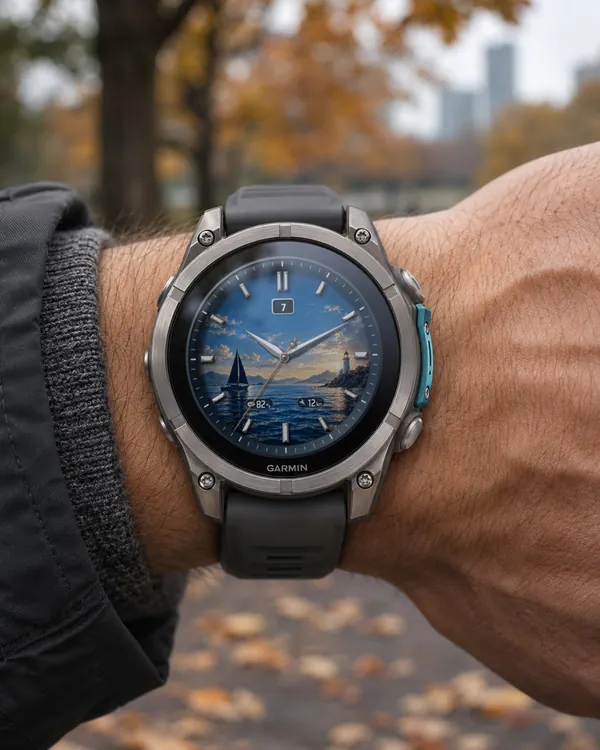
Harbor Light Classic
The analog sister of Harbor Light
 Sailing
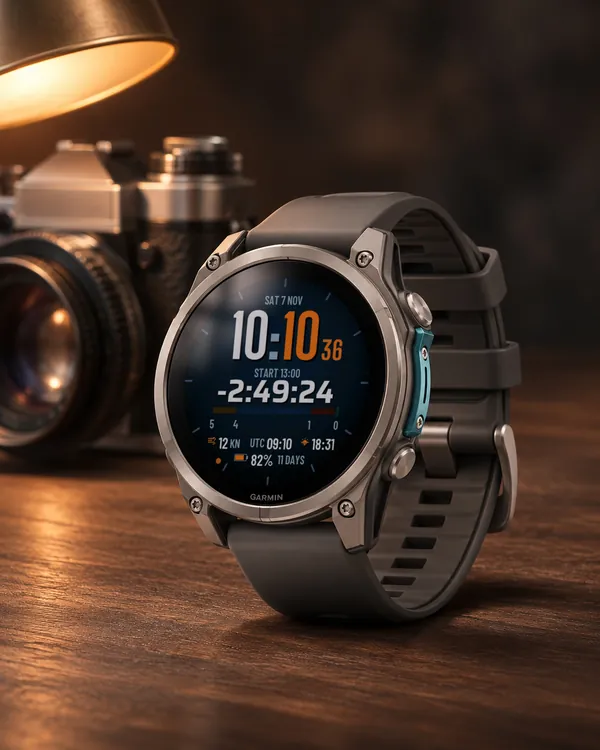
Regatta Start
A start-line watch face for sailors: a big clock with seconds and a race-start countdown
 Barometer
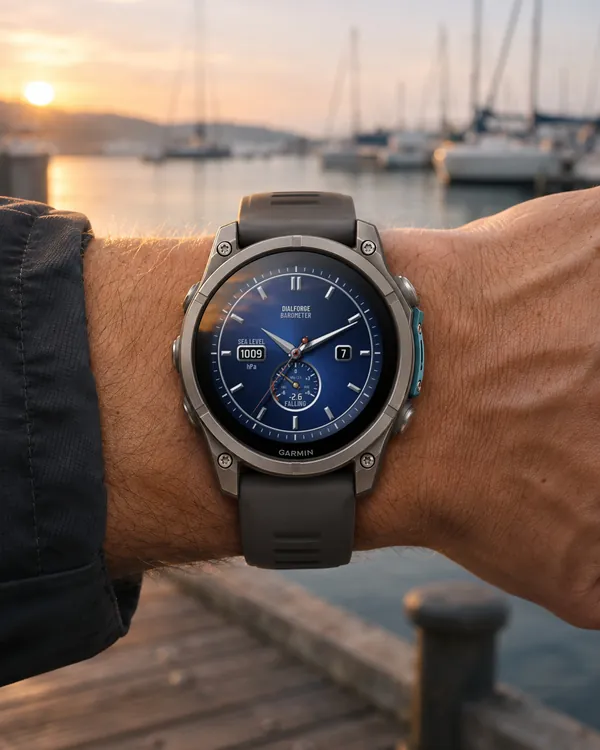
 Watch
A classic analog face built around your watch's barometer: pressure window
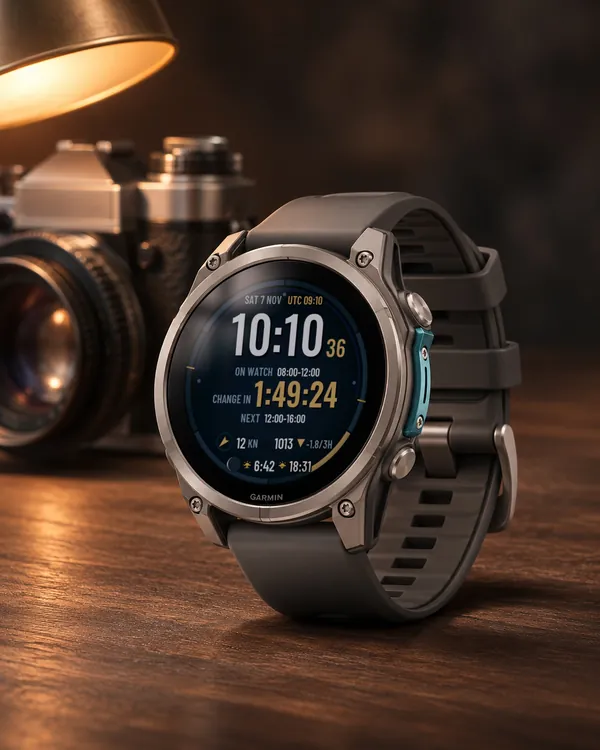 Watchkeeper
Watch Keeper
For passages and night watches: when your watch ends