Unlock
€6.49
One-time payment. No subscription. The code works on the watch whose ID you enter.
- Install the face from Connect IQ (7 days free).
- On the watch: face settings > Buy / Unlock, scan the QR code.
- Pay and paste the code in the face settings.
- Pay.
- Copy the code.
- Paste it in Connect IQ: this face > Settings > Unlock code.
Payment works best in Safari or Chrome: menu (three dots) > Open in browser
Read it in this face, it is not the serial number of the watch.
Your ID, compare it with the watch:
Where do I find the ID?
On the watch: settings of this face > Buy / Unlock (first item). Scan the QR code with your phone or type the 10 digits. The ID is also at the top of the face settings in the Connect IQ app.
Code not working on your watch? Write to me and I refund within 14 days.
Payments by Stripe. Seller: Mateusz Kolarz, Lublin, Poland.
Paid. Code:
Copying did not work. The code is selected: copy it by hand.
The face unlocks by itself when the watch connects to the phone (usually within an hour; if the trial is still running, the purchase starts working when it ends).
Do not want to wait, or have an older watch? Paste the code in the Connect IQ app:
Connect IQ (or Garmin Connect) > My Device > Watch faces > Hex Tactical V2 Big > Settings > Unlock code > paste > Save
We show the code here too. If the e-mail does not arrive (check spam), you can recover the code in the Recover code section with the Face ID and e-mail from your order. Recover code
Like it? Rate this face in the Garmin store
Want to try new faces and apps before the release, for free? Join the testers program
7-day free trial, then a one-time unlock at dialforge.dev. No subscription.
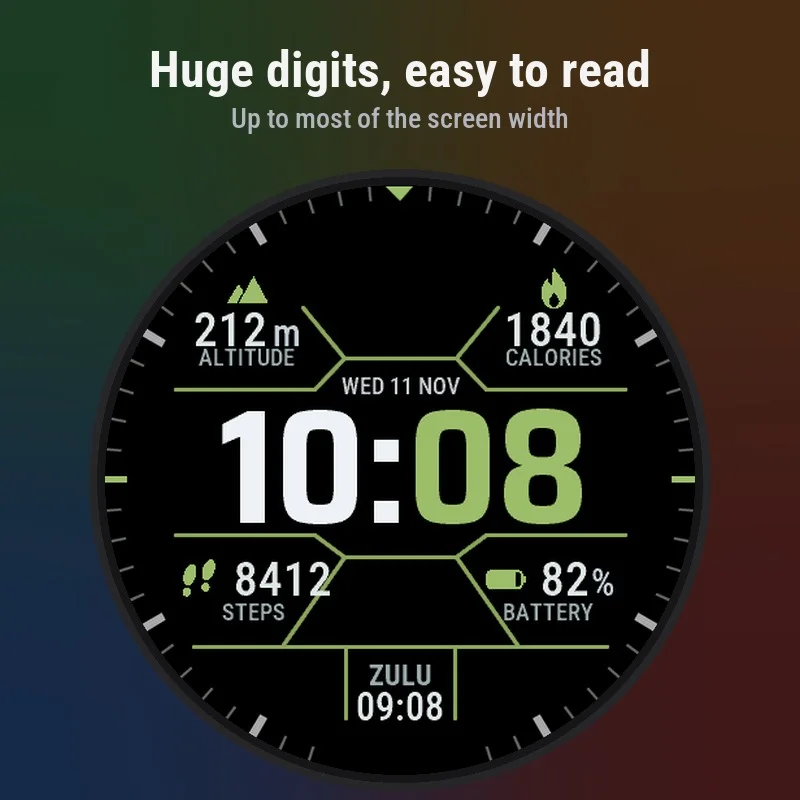
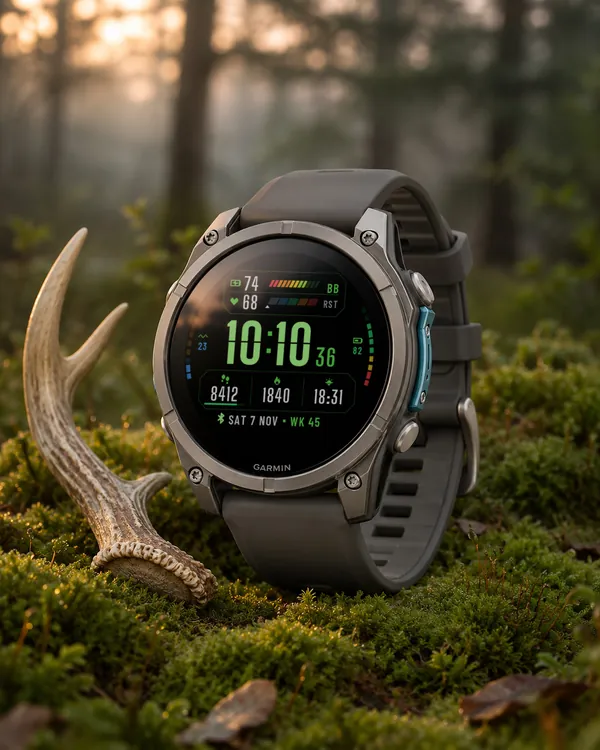
Hex Tactical V2 Big is a tactical face with hexagon frames and one aim: a time you can read at a glance, also without glasses and in bright sun. The digits are very large and set in a bold condensed font. On newer watches you can choose three sizes, up to two thirds of the screen width, and the contrast is high. Pick one of seven accent colours. On MIP screens you can switch to black digits on a white background, which reads best in strong sun. Minute marks reach the edge of the screen, every field has a label with its unit, and on AMOLED the always-on screen shows an outline of the time. An independent face by dialforge.dev.
- Very large time. Newer watches have three sizes, from standard to extra large, up to two thirds of the screen width; older ones have one large size.
- High contrast on black, bold digits, each value with its unit and a label under it.
- Seven accent colours: green, orange, blue, red, cyan, yellow and white.
- MIP screens: black digits on a white background as an option, for reading in strong sun.
- Four data fields and a bottom box with a time zone (ZULU = UTC) or a field of your choice: steps, battery, altitude, calories and more.
- Minute marks reach the edge of the screen, also on rectangular screens.
- Always-on screen on AMOLED: an outline or solid time with the date, shifted every minute to protect the display.
- Menu in 35 languages.
Settings are in Garmin Connect (Connect IQ, watch face settings) and on the watch under Customise: accent colour, text size, fields, hexagon frames, minute marks, labels, seconds, always-on style and data refresh. The light background for MIP screens is set in Garmin Connect.
When the watch has no reading, a field shows --. This is a watch face, not a medical device.
7 dni za darmo, potem jednorazowe odblokowanie na dialforge.dev. Bez abonamentu.
Hex Tactical V2 Big to taktyczna tarcza z sześciokątnymi ramkami i jednym celem: godzina, którą odczytasz jednym spojrzeniem, także bez okularów i w ostrym słońcu. Cyfry są bardzo duże, w grubej, wąskiej czcionce. Na nowszych zegarkach wybierzesz jeden z trzech rozmiarów, aż do dwóch trzecich szerokości ekranu, a kontrast jest wysoki. Wybierasz jeden z siedmiu kolorów akcentu. Na ekranach MIP możesz przełączyć się na czarne cyfry na białym tle, które najlepiej czyta się w mocnym słońcu. Znaczniki minut sięgają krawędzi ekranu, każde pole ma podpis z jednostką, a na AMOLED ekran wygaszony pokazuje obrys godziny. Niezależna tarcza dialforge.dev.
- Bardzo duża godzina. Nowsze zegarki mają trzy rozmiary, od standardowego po bardzo duży, do dwóch trzecich szerokości ekranu; starsze mają jeden duży rozmiar.
- Duży kontrast na czerni, grube cyfry, przy każdej wartości jednostka i podpis pod spodem.
- Siedem kolorów akcentu: zielony, pomarańczowy, niebieski, czerwony, cyjan, żółty i biały.
- Ekrany MIP: czarne cyfry na białym tle jako opcja, do czytania w mocnym słońcu.
- Cztery pola z danymi i dolne okienko ze strefą czasową (ZULU = UTC) albo polem do wyboru: kroki, bateria, wysokość, kalorie i inne.
- Znaczniki minut sięgają krawędzi ekranu, także na ekranach prostokątnych.
- Ekran wygaszony na AMOLED: obrys albo pełna godzina z datą, przesuwane co minutę, żeby oszczędzać wyświetlacz.
- Menu w 35 językach.
Ustawienia są w Garmin Connect (Connect IQ, ustawienia tarczy) i na zegarku w Dostosuj: kolor akcentu, rozmiar tekstu, pola, ramki sześciokątne, znaczniki minut, podpisy, sekundy, styl ekranu wygaszonego i odświeżanie danych. Jasne tło dla ekranów MIP ustawisz w Garmin Connect.
Gdy zegarek nie ma odczytu, pole pokazuje --. To tarcza, nie wyrób medyczny.
7 Tage kostenlos testen, danach einmalige Freischaltung auf dialforge.dev. Kein Abo.
Hex Tactical V2 Big ist ein taktisches Zifferblatt mit sechseckigen Rahmen und einem Ziel: eine Uhrzeit, die du auf einen Blick liest, auch ohne Brille und in grellem Sonnenlicht. Die Ziffern sind sehr groß und in einer fetten, schmalen Schrift gesetzt. Auf neueren Uhren kannst du aus drei Größen wählen, bis zu zwei Dritteln der Bildschirmbreite, und der Kontrast ist hoch. Wähle eine von sieben Akzentfarben. Auf MIP-Displays kannst du auf schwarze Ziffern auf weißem Grund umschalten, die in starker Sonne am besten zu lesen sind. Die Minutenmarken reichen bis zum Bildschirmrand, jedes Feld hat eine Beschriftung mit Einheit, und bei AMOLED zeigt das Always-On-Display den Umriss der Uhrzeit. Ein unabhängiges Zifferblatt von dialforge.dev.
- Sehr große Uhrzeit. Neuere Uhren haben drei Größen, von Standard bis Extragroß, bis zu zwei Dritteln der Bildschirmbreite; ältere haben eine große Größe.
- Hoher Kontrast auf Schwarz, fette Ziffern und eine Beschriftung mit Einheit unter jedem Wert.
- Sieben Akzentfarben: Grün, Orange, Blau, Rot, Cyan, Gelb und Weiß.
- MIP-Displays: schwarze Ziffern auf weißem Grund als Option, zum Ablesen in starker Sonne.
- Vier Datenfelder und ein unteres Feld mit einer Zeitzone (ZULU = UTC) oder einem Feld deiner Wahl: Schritte, Akku, Höhe, Kalorien und mehr.
- Die Minutenmarken reichen bis zum Bildschirmrand, auch bei rechteckigen Displays.
- Always-On-Display bei AMOLED: Uhrzeit als Umriss oder gefüllt mit Datum, jede Minute verschoben, um das Display zu schonen.
- Menü in 35 Sprachen.
Die Einstellungen findest du in Garmin Connect (Connect IQ, Zifferblatt-Einstellungen) und auf der Uhr unter Anpassen: Akzentfarbe, Textgröße, Felder, sechseckige Rahmen, Minutenmarken, Beschriftungen, Sekunden, Stil des Always-On-Displays und Datenaktualisierung. Den hellen Hintergrund für MIP-Displays stellst du in Garmin Connect ein.
Wenn die Uhr keinen Messwert hat, zeigt ein Feld -- an. Dies ist ein Zifferblatt, kein Medizinprodukt.
Essai gratuit de 7 jours, puis un déverrouillage unique sur dialforge.dev. Sans abonnement.
Hex Tactical V2 Big est un cadran tactique à cadres hexagonaux avec un seul but : une heure que tu lis d'un coup d'œil, même sans lunettes et en plein soleil. Les chiffres sont très grands, dans une police grasse et étroite. Sur les montres plus récentes, tu peux choisir parmi trois tailles, jusqu'aux deux tiers de la largeur de l'écran, et le contraste est élevé. Choisis l'une des sept couleurs d'accent. Sur les écrans MIP, tu peux passer à des chiffres noirs sur fond blanc, qui se lisent le mieux en plein soleil. Les repères de minutes atteignent le bord de l'écran, chaque champ a une étiquette avec son unité et, sur AMOLED, l'écran toujours allumé affiche le contour de l'heure. Un cadran indépendant de dialforge.dev.
- Heure très grande. Les montres plus récentes ont trois tailles, de standard à très grande, jusqu'aux deux tiers de la largeur de l'écran ; les plus anciennes ont une seule grande taille.
- Fort contraste sur fond noir, chiffres gras, chaque valeur avec son unité et une étiquette dessous.
- Sept couleurs d'accent : vert, orange, bleu, rouge, cyan, jaune et blanc.
- Écrans MIP : chiffres noirs sur fond blanc en option, pour lire en plein soleil.
- Quatre champs de données et une case en bas avec un fuseau horaire (ZULU = UTC) ou un champ de ton choix : pas, batterie, altitude, calories et plus.
- Les repères de minutes vont jusqu'au bord de l'écran, aussi sur les écrans rectangulaires.
- Écran toujours allumé sur AMOLED : heure en contour ou pleine avec la date, déplacée chaque minute pour protéger l'écran.
- Menu en 35 langues.
Les réglages se trouvent dans Garmin Connect (Connect IQ, réglages du cadran) et sur la montre sous Personnaliser : couleur d'accent, taille du texte, champs, cadres hexagonaux, repères de minutes, étiquettes, secondes, style de l'écran toujours allumé et actualisation des données. Le fond clair pour les écrans MIP se règle dans Garmin Connect.
Quand la montre n'a pas de mesure, un champ affiche --. Ceci est un cadran, pas un dispositif médical.
Prueba gratuita de 7 días y luego un desbloqueo único en dialforge.dev. Sin suscripción.
Hex Tactical V2 Big es una esfera táctica con marcos hexagonales y un solo objetivo: una hora que se lee de un vistazo, también sin gafas y bajo un sol intenso. Los dígitos son muy grandes y están en una tipografía gruesa y estrecha. En los relojes más nuevos puedes elegir entre tres tamaños, de hasta dos tercios del ancho de la pantalla, y el contraste es alto. Elige uno de siete colores de acento. En las pantallas MIP puedes cambiar a dígitos negros sobre fondo blanco, que se leen mejor con sol intenso. Las marcas de minutos llegan al borde de la pantalla, cada campo tiene una etiqueta con su unidad y en AMOLED la pantalla siempre activa muestra el contorno de la hora. Una esfera independiente de dialforge.dev.
- Hora muy grande. Los relojes más nuevos tienen tres tamaños, de estándar a extragrande, de hasta dos tercios del ancho de la pantalla; los más antiguos tienen un solo tamaño grande.
- Alto contraste sobre negro, dígitos gruesos, cada valor con su unidad y una etiqueta debajo.
- Siete colores de acento: verde, naranja, azul, rojo, cian, amarillo y blanco.
- Pantallas MIP: dígitos negros sobre fondo blanco como opción, para leer con sol fuerte.
- Cuatro campos de datos y un recuadro inferior con una zona horaria (ZULU = UTC) o un campo a tu elección: pasos, batería, altitud, calorías y más.
- Las marcas de minutos llegan hasta el borde de la pantalla, también en pantallas rectangulares.
- Pantalla siempre activa en AMOLED: hora en contorno o rellena con la fecha, desplazada cada minuto para proteger la pantalla.
- Menú en 35 idiomas.
Los ajustes están en Garmin Connect (Connect IQ, ajustes de la esfera) y en el reloj, en Personalizar: color de acento, tamaño del texto, campos, marcos hexagonales, marcas de minutos, etiquetas, segundos, estilo de la pantalla siempre activa y actualización de datos. El fondo claro para pantallas MIP se ajusta en Garmin Connect.
Cuando el reloj no tiene una lectura, un campo muestra --. Esto es una esfera, no un producto sanitario.
7 dagen gratis proberen, daarna een eenmalige ontgrendeling op dialforge.dev. Geen abonnement.
Hex Tactical V2 Big is een tactische wijzerplaat met zeshoekige kaders en één doel: een tijd die je in één oogopslag leest, ook zonder bril en in felle zon. De cijfers zijn heel groot en staan in een vet, smal lettertype. Op nieuwere horloges kies je uit drie formaten, tot twee derde van de schermbreedte, en het contrast is hoog. Kies een van zeven accentkleuren. Op MIP-schermen kun je overschakelen naar zwarte cijfers op een witte achtergrond, wat het best leest in felle zon. De minuutmarkeringen reiken tot de rand van het scherm, elk veld heeft een label met zijn eenheid, en op AMOLED toont het always-on scherm de omtrek van de tijd. Een onafhankelijke wijzerplaat van dialforge.dev.
- Heel grote tijd. Nieuwere horloges hebben drie formaten, van standaard tot extra groot, tot twee derde van de schermbreedte; oudere hebben één groot formaat.
- Hoog contrast op zwart, vette cijfers, bij elke waarde de eenheid en een label eronder.
- Zeven accentkleuren: groen, oranje, blauw, rood, cyaan, geel en wit.
- MIP-schermen: zwarte cijfers op een witte achtergrond als optie, voor lezen in felle zon.
- Vier gegevensvelden en een onderste vak met een tijdzone (ZULU = UTC) of een veld naar keuze: stappen, batterij, hoogte, calorieën en meer.
- De minuutmarkeringen reiken tot de rand van het scherm, ook op rechthoekige schermen.
- Always-on scherm op AMOLED: een omtrek of volle tijd met de datum, elke minuut verschoven om het scherm te beschermen.
- Menu in 35 talen.
De instellingen vind je in Garmin Connect (Connect IQ, instellingen van de wijzerplaat) en op het horloge onder Aanpassen: accentkleur, tekstgrootte, velden, zeshoekige kaders, minuutmarkeringen, labels, seconden, stijl van het always-on scherm en het verversen van gegevens. De lichte achtergrond voor MIP-schermen stel je in via Garmin Connect.
Als het horloge geen meting heeft, toont een veld --. Dit is een wijzerplaat, geen medisch hulpmiddel.
7日間無料でお試しいただけます。その後はdialforge.devで解除を一度だけ購入(サブスクリプションなし)。
Hex Tactical V2 Bigは、六角形のフレームを持つタクティカルなウォッチフェイスで、目的はひとつです。メガネなしでも、強い日差しの下でも、ひと目で読める時刻です。数字はとても大きく、太く細身の書体で表示されます。新しめの時計では、画面幅の3分の2までの3つのサイズから選べて、コントラストも高めです。アクセントカラーは7色から選べます。MIP画面では白地に黒の数字に切り替えられ、強い日差しの下で最も読みやすくなります。分の目盛りは画面の端まで届き、各フィールドには単位付きのラベルがあり、AMOLEDでは常時表示画面に時刻の輪郭が表示されます。dialforge.devの独立したウォッチフェイスです。
- とても大きな時刻。新しめの時計には標準から特大まで3つのサイズがあり、画面幅の3分の2まで大きくできます。古い時計には大きなサイズが1つあります。
- 黒地で高いコントラスト、太い数字、各値に単位と下にラベルが付きます。
- 7色のアクセントカラー:緑、オレンジ、青、赤、シアン、黄、白。
- MIP画面:強い日差しの下で読みやすい、白地に黒の数字をオプションで選べます。
- 4つのデータフィールドと、タイムゾーン(ZULU = UTC)または好きなフィールドを表示する下部ボックス:歩数、バッテリー、高度、カロリーなど。
- 分の目盛りは画面の端まで届き、角型の画面でも同じです。
- AMOLEDの常時表示:輪郭または塗りつぶしの時刻と日付を表示し、画面保護のため1分ごとに位置をずらします。
- 35言語のメニュー。
設定はGarmin Connect(Connect IQ、ウォッチフェイス設定)と、時計のカスタマイズで行います:アクセントカラー、文字サイズ、フィールド、六角形フレーム、分の目盛り、ラベル、秒、常時表示のスタイル、データ更新。MIP画面の明るい背景はGarmin Connectで設定します。
時計に測定値がないときは、フィールドに--と表示されます。これはウォッチフェイスであり、医療機器ではありません。
Prova gratuita di 7 giorni, poi uno sblocco una tantum su dialforge.dev. Nessun abbonamento.
Hex Tactical V2 Big è un quadrante tattico con cornici esagonali e un solo obiettivo: un'ora che leggi a colpo d'occhio, anche senza occhiali e sotto il sole forte. Le cifre sono molto grandi, in un carattere spesso e stretto. Sugli orologi più recenti puoi scegliere tra tre dimensioni, fino a due terzi della larghezza dello schermo, e il contrasto è alto. Scegli uno dei sette colori d'accento. Sugli schermi MIP puoi passare alle cifre nere su sfondo bianco, che si leggono meglio sotto il sole forte. I segni dei minuti arrivano fino al bordo dello schermo, ogni campo ha un'etichetta con l'unità e su AMOLED lo schermo sempre attivo mostra il contorno dell'ora. Un quadrante indipendente di dialforge.dev.
- Ora molto grande. Gli orologi più recenti hanno tre dimensioni, da standard a extra large, fino a due terzi della larghezza dello schermo; quelli più vecchi hanno una sola dimensione grande.
- Alto contrasto sul nero, cifre spesse, ogni valore con la sua unità e un'etichetta sotto.
- Sette colori d'accento: verde, arancione, blu, rosso, ciano, giallo e bianco.
- Schermi MIP: cifre nere su sfondo bianco come opzione, per leggere con il sole forte.
- Quattro campi dati e un riquadro in basso con un fuso orario (ZULU = UTC) o un campo a tua scelta: passi, batteria, altitudine, calorie e altro.
- I segni dei minuti arrivano fino al bordo dello schermo, anche sugli schermi rettangolari.
- Schermo sempre attivo su AMOLED: ora a contorno o piena con la data, spostata ogni minuto per proteggere lo schermo.
- Menu in 35 lingue.
Le impostazioni si trovano in Garmin Connect (Connect IQ, impostazioni del quadrante) e sull'orologio in Personalizza: colore d'accento, dimensione del testo, campi, cornici esagonali, segni dei minuti, etichette, secondi, stile dello schermo sempre attivo e aggiornamento dei dati. Lo sfondo chiaro per gli schermi MIP si imposta in Garmin Connect.
Quando l'orologio non ha una lettura, un campo mostra --. Questo è un quadrante, non un dispositivo medico.
7 天免费试用,之后在 dialforge.dev 一次性解锁。无需订阅。
Hex Tactical V2 Big 是带六边形边框的战术表盘,只有一个目标:让你一眼读出时间,不戴眼镜、在强烈阳光下也一样。数字非常大,使用粗窄字体。较新的手表可选三种大小,最大可达屏幕宽度的三分之二,对比度也很高。可从七种强调色中任选一种。在 MIP 屏幕上可以切换为白底黑字,在强烈阳光下最易阅读。分钟刻度延伸到屏幕边缘,每个数据栏都有带单位的标签,在 AMOLED 上,熄屏常亮显示会显示时间的轮廓。来自 dialforge.dev 的独立表盘。
- 超大的时间。较新的手表有三种大小,从标准到特大,最宽可达屏幕宽度的三分之二;较旧的手表只有一种大号。
- 黑底高对比度,粗体数字,每个数值都带单位,下方有标签。
- 七种强调色:绿色、橙色、蓝色、红色、青色、黄色和白色。
- MIP 屏幕:可选白底黑字,适合在强光下阅读。
- 四个数据栏,以及底部的时区框(ZULU = UTC)或你自选的数据栏:步数、电量、海拔、卡路里等。
- 分钟刻度延伸到屏幕边缘,矩形屏幕也一样。
- AMOLED 息屏常亮显示:轮廓或实心的时间加日期,每分钟移动一次位置以保护屏幕。
- 支持 35 种语言的菜单。
设置位于 Garmin Connect(Connect IQ,表盘设置)以及手表上的自定义菜单:强调色、文字大小、数据栏、六边形边框、分钟刻度、标签、秒、息屏常亮样式和数据刷新。MIP 屏幕的浅色背景在 Garmin Connect 中设置。
当手表没有读数时,数据栏显示 --。这是表盘,不是医疗设备。
7-дневный бесплатный пробный период, затем разовая разблокировка на dialforge.dev. Без подписки.
Hex Tactical V2 Big: тактический циферблат с шестиугольными рамками и одной целью: время, которое читается с одного взгляда, даже без очков и на ярком солнце. Цифры очень крупные, жирным узким шрифтом. На новых часах можно выбрать один из трёх размеров, до двух третей ширины экрана, а контраст высокий. Выберите один из семи цветов акцента. На экранах MIP можно включить чёрные цифры на белом фоне, их лучше всего видно на сильном солнце. Деления минут доходят до края экрана, у каждого поля есть подпись с единицей, а на AMOLED постоянно включённый экран показывает контур времени. Независимый циферблат от dialforge.dev.
- Очень крупное время. На новых часах три размера, от стандартного до очень большого, до двух третей ширины экрана; на старых один большой размер.
- Высокий контраст на чёрном, жирные цифры, у каждого значения есть единица и подпись под ним.
- Семь акцентных цветов: зелёный, оранжевый, синий, красный, голубой, жёлтый и белый.
- Экраны MIP: чёрные цифры на белом фоне как вариант, для чтения на сильном солнце.
- Четыре поля с данными и нижнее окно с часовым поясом (ZULU = UTC) или полем на выбор: шаги, батарея, высота, калории и другие.
- Отметки минут доходят до края экрана, в том числе на прямоугольных экранах.
- Режим Always-On на AMOLED: контур или сплошное время с датой, сдвигается каждую минуту, чтобы беречь дисплей.
- Меню на 35 языках.
Настройки находятся в Garmin Connect (Connect IQ, настройки циферблата) и на часах в разделе «Настроить»: акцентный цвет, размер текста, поля, шестиугольные рамки, отметки минут, подписи, секунды, стиль Always-On и обновление данных. Светлый фон для экранов MIP включается в Garmin Connect.
Когда у часов нет показания, поле показывает --. Это циферблат, а не медицинское устройство.
Teste grátis de 7 dias, depois um desbloqueio único em dialforge.dev. Sem assinatura.
O Hex Tactical V2 Big é um mostrador tático com molduras hexagonais e um só objetivo: uma hora que você lê num relance, até sem óculos e sob sol forte. Os números são muito grandes, em uma fonte grossa e estreita. Nos relógios mais novos você escolhe entre três tamanhos, até dois terços da largura da tela, e o contraste é alto. Escolha uma das sete cores de destaque. Nas telas MIP você pode trocar para números pretos sobre fundo branco, que se lê melhor sob sol forte. As marcas de minutos chegam à borda da tela, cada campo tem um rótulo com a unidade e, no AMOLED, a tela sempre ativa mostra o contorno da hora. Um mostrador independente da dialforge.dev.
- Hora muito grande. Os relógios mais novos têm três tamanhos, do padrão ao extragrande, até dois terços da largura da tela; os mais antigos têm um tamanho grande.
- Alto contraste sobre preto, números grossos, cada valor com sua unidade e um rótulo embaixo.
- Sete cores de destaque: verde, laranja, azul, vermelho, ciano, amarelo e branco.
- Telas MIP: números pretos sobre fundo branco como opção, para ler sob sol forte.
- Quatro campos de dados e uma caixa inferior com um fuso horário (ZULU = UTC) ou um campo à sua escolha: passos, bateria, altitude, calorias e mais.
- As marcas de minutos chegam até a borda da tela, também em telas retangulares.
- Tela sempre ativa em AMOLED: contorno ou hora cheia com a data, deslocada a cada minuto para proteger a tela.
- Menu em 35 idiomas.
As configurações ficam no Garmin Connect (Connect IQ, configurações do mostrador) e no relógio em Personalizar: cor de destaque, tamanho do texto, campos, molduras hexagonais, marcas de minutos, rótulos, segundos, estilo da tela sempre ativa e atualização dos dados. O fundo claro para telas MIP é definido no Garmin Connect.
Quando o relógio não tem leitura, o campo mostra --. Este é um mostrador, não um dispositivo médico.
7denní bezplatná zkušební verze, poté jednorázové odemknutí na dialforge.dev. Žádné předplatné.
Hex Tactical V2 Big je taktický ciferník se šestihrannými rámečky a jedním cílem: čas, který přečteš jedním pohledem, i bez brýlí a na ostrém slunci. Číslice jsou velmi velké, v tučném úzkém písmu. Na novějších hodinkách si vybereš ze tří velikostí, až do dvou třetin šířky displeje, a kontrast je vysoký. Vyber si jednu ze sedmi barev akcentu. Na displejích MIP můžeš přepnout na černé číslice na bílém pozadí, které se nejlépe čtou na silném slunci. Značky minut sahají až k okraji displeje, každé pole má popisek s jednotkou a na AMOLED zobrazuje vždy zapnutý displej obrys času. Nezávislý ciferník od dialforge.dev.
- Velmi velký čas. Novější hodinky mají tři velikosti, od standardní po extra velkou, až do dvou třetin šířky displeje; starší mají jednu velkou velikost.
- Vysoký kontrast na černé, tučné číslice, u každé hodnoty jednotka a popisek pod ní.
- Sedm akcentních barev: zelená, oranžová, modrá, červená, azurová, žlutá a bílá.
- Displeje MIP: černé číslice na bílém pozadí jako volba, pro čtení na silném slunci.
- Čtyři datová pole a spodní okénko s časovým pásmem (ZULU = UTC) nebo polem podle tvého výběru: kroky, baterie, nadmořská výška, kalorie a další.
- Značky minut sahají až k okraji displeje, i na obdélníkových displejích.
- Stále zapnutý displej na AMOLED: obrys nebo plný čas s datem, posouvaný každou minutu, aby se displej chránil.
- Menu v 35 jazycích.
Nastavení najdeš v Garmin Connect (Connect IQ, nastavení ciferníku) a v hodinkách v části Upravit: akcentní barva, velikost textu, pole, šestiúhelníkové rámečky, značky minut, popisky, sekundy, styl stále zapnutého displeje a obnovování dat. Světlé pozadí pro displeje MIP se nastavuje v Garmin Connect.
Když hodinky nemají žádnou hodnotu, pole ukazuje --. Toto je ciferník, ne zdravotnický prostředek.
7 dias de teste gratuito, depois um desbloqueio único em dialforge.dev. Sem subscrição.
O Hex Tactical V2 Big é um mostrador tático com molduras hexagonais e um só objetivo: uma hora que se lê de relance, mesmo sem óculos e sob sol forte. Os números são muito grandes, num tipo de letra grosso e estreito. Nos relógios mais recentes pode escolher entre três tamanhos, até dois terços da largura do ecrã, e o contraste é alto. Escolha uma das sete cores de destaque. Nos ecrãs MIP pode mudar para números pretos sobre fundo branco, que se lê melhor sob sol forte. As marcas dos minutos chegam ao limite do ecrã, cada campo tem uma etiqueta com a unidade e, no AMOLED, o ecrã sempre ligado mostra o contorno da hora. Um mostrador independente da dialforge.dev.
- Hora muito grande. Os relógios mais recentes têm três tamanhos, do padrão ao extragrande, até dois terços da largura do ecrã; os mais antigos têm um tamanho grande.
- Alto contraste sobre preto, números grossos, cada valor com a sua unidade e uma etiqueta por baixo.
- Sete cores de destaque: verde, laranja, azul, vermelho, ciano, amarelo e branco.
- Ecrãs MIP: algarismos pretos sobre fundo branco como opção, para ler sob sol forte.
- Quatro campos de dados e uma caixa inferior com um fuso horário (ZULU = UTC) ou um campo à sua escolha: passos, bateria, altitude, calorias e mais.
- As marcas dos minutos chegam ao limite do ecrã, também em ecrãs retangulares.
- Ecrã sempre ligado em AMOLED: contorno ou hora cheia com a data, deslocada a cada minuto para proteger o ecrã.
- Menu em 35 idiomas.
As definições estão no Garmin Connect (Connect IQ, definições do mostrador) e no relógio em Personalizar: cor de destaque, tamanho do texto, campos, molduras hexagonais, marcas dos minutos, legendas, segundos, estilo do ecrã sempre ligado e atualização dos dados. O fundo claro para ecrãs MIP define-se no Garmin Connect.
Quando o relógio não tem leitura, o campo mostra --. Isto é um mostrador, não um dispositivo médico.
7일 무료 체험 후, dialforge.dev에서 일회성 잠금 해제를 구매하세요. 구독은 없습니다.
Hex Tactical V2 Big은 육각형 프레임이 있는 전술 워치페이스이고 목표는 하나입니다. 안경 없이도, 밝은 햇빛 아래에서도 한눈에 읽히는 시간입니다. 숫자는 매우 크고 굵고 좁은 글꼴로 표시됩니다. 최신 시계에서는 화면 너비의 3분의 2까지 커지는 세 가지 크기 중에서 고를 수 있고, 대비도 높습니다. 일곱 가지 강조 색 중 하나를 고르세요. MIP 화면에서는 흰 바탕에 검은 숫자로 바꿀 수 있어, 강한 햇빛에서 가장 잘 읽힙니다. 분 눈금은 화면 가장자리까지 이어지고, 모든 필드에는 단위가 붙은 라벨이 있으며, AMOLED에서는 상시 표시 화면에 시간의 윤곽이 나타납니다. dialforge.dev의 독립 워치페이스입니다.
- 아주 큰 시간. 최신 시계는 표준부터 특대까지 세 가지 크기이며 화면 너비의 3분의 2까지 커집니다. 구형 시계는 큰 크기 하나입니다.
- 검은 배경의 높은 대비, 굵은 숫자, 각 값마다 단위와 아래에 라벨이 있습니다.
- 일곱 가지 강조 색상: 초록, 주황, 파랑, 빨강, 청록, 노랑, 흰색.
- MIP 화면: 강한 햇빛에서 읽기 좋은 흰 배경 검은 숫자를 옵션으로 제공합니다.
- 데이터 필드 네 개와 시간대(ZULU = UTC) 또는 원하는 필드를 보여 주는 하단 박스: 걸음 수, 배터리, 고도, 칼로리 등.
- 분 눈금이 화면 가장자리까지 이어지며 직사각형 화면에서도 마찬가지입니다.
- AMOLED 상시 표시 화면: 윤곽 또는 채워진 시간과 날짜를 표시하고, 디스플레이 보호를 위해 매분 위치를 옮깁니다.
- 35개 언어 메뉴.
설정은 Garmin Connect(Connect IQ, 워치페이스 설정)와 시계의 맞춤 설정에서 할 수 있습니다. 강조 색상, 글자 크기, 필드, 육각형 프레임, 분 눈금, 라벨, 초, 상시 표시 스타일, 데이터 새로고침을 설정합니다. MIP 화면의 밝은 배경은 Garmin Connect에서 설정합니다.
시계에 측정값이 없으면 필드에 --가 표시됩니다. 이것은 워치페이스이며 의료기기가 아닙니다.
7 dagars gratis provperiod, sedan en engångsupplåsning på dialforge.dev. Ingen prenumeration.
Hex Tactical V2 Big är en taktisk urtavla med sexkantiga ramar och ett mål: en tid som du läser med en blick, även utan glasögon och i stark sol. Siffrorna är mycket stora och i ett fet, smalt typsnitt. På nyare klockor kan du välja mellan tre storlekar, upp till två tredjedelar av skärmbredden, och kontrasten är hög. Välj en av sju accentfärger. På MIP-skärmar kan du byta till svarta siffror på vit bakgrund, som läses bäst i stark sol. Minutmarkeringarna når skärmens kant, varje fält har en etikett med enhet, och på AMOLED visar alltid-på-skärmen tidens kontur. En oberoende urtavla från dialforge.dev.
- Mycket stor tid. Nyare klockor har tre storlekar, från standard till extra stor, upp till två tredjedelar av skärmbredden; äldre har en stor storlek.
- Hög kontrast på svart, feta siffror, varje värde med enhet och en etikett under.
- Sju accentfärger: grön, orange, blå, röd, cyan, gul och vit.
- MIP-skärmar: svarta siffror på vit bakgrund som alternativ, för läsning i stark sol.
- Fyra datafält och en nedre ruta med en tidszon (ZULU = UTC) eller ett fält som du väljer: steg, batteri, höjd, kalorier och mer.
- Minutmarkeringarna når skärmens kant, även på rektangulära skärmar.
- Alltid-på-skärm på AMOLED: en kontur eller full tid med datum, flyttad varje minut för att skona skärmen.
- Meny på 35 språk.
Inställningarna finns i Garmin Connect (Connect IQ, urtavlans inställningar) och på klockan under Anpassa: accentfärg, textstorlek, fält, sexkantiga ramar, minutmarkeringar, etiketter, sekunder, stil för alltid-på-skärmen och uppdatering av data. Den ljusa bakgrunden för MIP-skärmar ställer du in i Garmin Connect.
När klockan inte har något mätvärde visar ett fält --. Det här är en urtavla, inte en medicinteknisk produkt.
7 dages gratis prøveperiode, derefter en engangsoplåsning på dialforge.dev. Intet abonnement.
Hex Tactical V2 Big er en taktisk urskive med sekskantede rammer og ét mål: et klokkeslæt, du kan læse med et blik, også uden briller og i skarpt sollys. Cifrene er meget store og sat i en fed, smal skrift. På nyere ure kan du vælge mellem tre størrelser, op til to tredjedele af skærmens bredde, og kontrasten er høj. Vælg en af syv accentfarver. På MIP-skærme kan du skifte til sorte cifre på hvid baggrund, som er nemmest at læse i stærkt sollys. Minutmarkeringerne når helt ud til skærmkanten, hvert felt har en etiket med enhed, og på AMOLED viser always-on-skærmen en kontur af klokkeslættet. En uafhængig urskive fra dialforge.dev.
- Meget stort klokkeslæt. Nyere ure har tre størrelser, fra standard til ekstra stor, op til to tredjedele af skærmens bredde; ældre ure har én stor størrelse.
- Høj kontrast på sort, fede cifre, hver værdi med enhed og en etiket under.
- Syv accentfarver: grøn, orange, blå, rød, cyan, gul og hvid.
- MIP-skærme: sorte cifre på hvid baggrund som valgmulighed, til aflæsning i stærkt sollys.
- Fire datafelter og en nederste boks med en tidszone (ZULU = UTC) eller et felt efter eget valg: skridt, batteri, højde, kalorier og mere.
- Minutmærkerne når ud til skærmkanten, også på rektangulære skærme.
- Altid-tændt skærm på AMOLED: et konturtal eller helt udfyldt klokkeslæt med dato, flyttet hvert minut for at skåne skærmen.
- Menu på 35 sprog.
Indstillingerne findes i Garmin Connect (Connect IQ, urskiveindstillinger) og på uret under Tilpas: accentfarve, tekststørrelse, felter, sekskantede rammer, minutmærker, etiketter, sekunder, stil for altid-tændt skærm og opdatering af data. Den lyse baggrund til MIP-skærme indstilles i Garmin Connect.
Når uret ikke har en måling, viser et felt --. Dette er en urskive, ikke medicinsk udstyr.
7 dagers gratis prøveperiode, deretter en engangsopplåsing på dialforge.dev. Ingen abonnement.
Hex Tactical V2 Big er en taktisk urskive med sekskantede rammer og ett mål: et klokkeslett du leser med et blikk, også uten briller og i skarp sol. Sifrene er veldig store og står i en tykk, smal skrift. På nyere klokker kan du velge mellom tre størrelser, opptil to tredjedeler av skjermbredden, og kontrasten er høy. Velg en av sju aksentfarger. På MIP-skjermer kan du bytte til svarte sifre på hvit bakgrunn, som er best å lese i sterk sol. Minuttmarkeringene når kanten av skjermen, hvert felt har en etikett med enhet, og på AMOLED viser alltid-på-skjermen omrisset av klokkeslettet. En uavhengig urskive fra dialforge.dev.
- Veldig stort klokkeslett. Nyere klokker har tre størrelser, fra standard til ekstra stor, opptil to tredjedeler av skjermbredden; eldre har én stor størrelse.
- Høy kontrast på svart, tykke sifre, hver verdi med enhet og en etikett under.
- Sju aksentfarger: grønn, oransje, blå, rød, cyan, gul og hvit.
- MIP-skjermer: svarte siffer på hvit bakgrunn som valg, for lesing i sterk sol.
- Fire datafelt og en nedre boks med en tidssone (ZULU = UTC) eller et felt du velger selv: skritt, batteri, høyde, kalorier og mer.
- Minuttmarkeringene når kanten av skjermen, også på rektangulære skjermer.
- Alltid-på-skjerm på AMOLED: et omriss eller fullt klokkeslett med dato, flyttet hvert minutt for å skåne skjermen.
- Meny på 35 språk.
Innstillingene finner du i Garmin Connect (Connect IQ, innstillinger for urskiven) og på klokken under Tilpass: aksentfarge, tekststørrelse, felt, sekskantede rammer, minuttmarkeringer, etiketter, sekunder, stil for alltid-på-skjermen og oppdatering av data. Den lyse bakgrunnen for MIP-skjermer stiller du inn i Garmin Connect.
Når klokken ikke har en måling, viser et felt --. Dette er en urskive, ikke medisinsk utstyr.
7 天免費試用,之後在 dialforge.dev 一次性解鎖。不需訂閱。
Hex Tactical V2 Big 是帶六角形邊框的戰術錶面,只有一個目標:讓你一眼讀出時間,不戴眼鏡、在強烈陽光下也一樣。數字非常大,使用粗窄字體。較新的手錶可選三種大小,最大可達螢幕寬度的三分之二,對比也很高。可從七種強調色中任選一種。在 MIP 螢幕上可以切換為白底黑字,在強烈陽光下最容易閱讀。分鐘刻度延伸到螢幕邊緣,每個資料欄都有附單位的標籤,在 AMOLED 上,螢幕常亮顯示會顯示時間的輪廓。來自 dialforge.dev 的獨立錶面。
- 超大的時間。較新的手錶有三種大小,從標準到特大,最寬可達螢幕寬度的三分之二;較舊的手錶只有一種大號。
- 黑底高對比,粗體數字,每個數值都附單位,下方有標籤。
- 七種強調色:綠色、橙色、藍色、紅色、青色、黃色和白色。
- MIP 螢幕:可選白底黑字,適合在強光下閱讀。
- 四個資料欄,以及底部的時區框(ZULU = UTC)或你自選的資料欄:步數、電量、海拔、卡路里等。
- 分鐘刻度延伸到螢幕邊緣,矩形螢幕也一樣。
- AMOLED 螢幕常亮顯示:輪廓或實心的時間加日期,每分鐘移動一次位置以保護螢幕。
- 支援 35 種語言的選單。
設定位於 Garmin Connect(Connect IQ,錶面設定)以及手錶上的自訂選單:強調色、文字大小、資料欄、六角形邊框、分鐘刻度、標籤、秒、螢幕常亮樣式和資料更新。MIP 螢幕的淺色背景在 Garmin Connect 中設定。
當手錶沒有讀數時,資料欄顯示 --。這是錶面,不是醫療器材。
7 päivän ilmainen kokeilu, sen jälkeen kertaluonteinen avaus osoitteessa dialforge.dev. Ei tilausta.
Hex Tactical V2 Big on taktinen kellotaulu kuusikulmaisilla kehyksillä ja yhdellä tavoitteella: kellonaika, jonka luet yhdellä silmäyksellä, myös ilman silmälaseja ja kirkkaassa auringossa. Numerot ovat hyvin isoja ja lihavalla, kapealla fontilla. Uudemmissa kelloissa voit valita kolmesta koosta, jopa kahteen kolmasosaan näytön leveydestä, ja kontrasti on korkea. Valitse yksi seitsemästä korostusväristä. MIP-näytöillä voit vaihtaa mustiin numeroihin valkoisella taustalla, jotka näkyvät parhaiten kovassa auringossa. Minuuttimerkit yltävät näytön reunaan, jokaisella kentällä on nimiö ja yksikkö, ja AMOLEDilla aina päällä oleva näyttö näyttää ajan ääriviivan. Itsenäinen kellotaulu osoitteesta dialforge.dev.
- Hyvin iso kellonaika. Uudemmissa kelloissa on kolme kokoa, tavallisesta erittäin isoon, jopa kaksi kolmasosaa näytön leveydestä; vanhemmissa on yksi iso koko.
- Korkea kontrasti mustalla, lihavat numerot, jokaisella arvolla yksikkö ja nimiö alla.
- Seitsemän korostusväriä: vihreä, oranssi, sininen, punainen, syaani, keltainen ja valkoinen.
- MIP-näytöt: mustat numerot valkoisella taustalla valinnaisena, lukemiseen voimakkaassa auringossa.
- Neljä tietokenttää ja alalaatikko aikavyöhykkeellä (ZULU = UTC) tai valitsemallasi kentällä: askeleet, akku, korkeus, kalorit ja muuta.
- Minuuttimerkit yltävät näytön reunaan, myös suorakulmaisilla näytöillä.
- Aina päällä oleva näyttö AMOLEDilla: ääriviiva tai täysi aika päivämäärän kanssa, siirretään minuutin välein näytön säästämiseksi.
- Valikko 35 kielellä.
Asetukset löytyvät Garmin Connectista (Connect IQ, kellotaulun asetukset) ja kellosta kohdasta Mukauta: korostusväri, tekstin koko, kentät, kuusikulmaiset kehykset, minuuttimerkit, nimiöt, sekunnit, aina päällä olevan näytön tyyli ja tietojen päivitys. MIP-näyttöjen vaalean taustan asetat Garmin Connectissa.
Kun kellolla ei ole lukemaa, kenttä näyttää --. Tämä on kellotaulu, ei lääkinnällinen laite.
7-dňová bezplatná skúška, potom jednorazové odomknutie na dialforge.dev. Bez predplatného.
Hex Tactical V2 Big je taktický ciferník so šesťhrannými rámikmi a jedným cieľom: čas, ktorý prečítate jediným pohľadom, aj bez okuliarov a na ostrom slnku. Číslice sú veľmi veľké, v hrubom úzkom písme. Na novších hodinkách si vyberiete z troch veľkostí, až do dvoch tretín šírky displeja, a kontrast je vysoký. Vyberte si jednu zo siedmich akcentových farieb. Na displejoch MIP môžete prepnúť na čierne číslice na bielom pozadí, ktoré sa na silnom slnku čítajú najlepšie. Značky minút siahajú až na okraj displeja, každé pole má popis s jednotkou a na AMOLED stále zapnutý displej ukazuje obrys času. Nezávislý ciferník od dialforge.dev.
- Veľmi veľký čas. Novšie hodinky majú tri veľkosti, od štandardnej po extra veľkú, do dvoch tretín šírky displeja; staršie majú jednu veľkú veľkosť.
- Vysoký kontrast na čiernej, hrubé číslice, pri každej hodnote jednotka a popis pod ňou.
- Sedem akcentových farieb: zelená, oranžová, modrá, červená, tyrkysová, žltá a biela.
- Displeje MIP: čierne číslice na bielom pozadí ako možnosť, na čítanie na silnom slnku.
- Štyri dátové polia a dolné okienko s časovým pásmom (ZULU = UTC) alebo poľom podľa výberu: kroky, batéria, výška, kalórie a ďalšie.
- Značky minút siahajú až po okraj displeja, aj na obdĺžnikových displejoch.
- Stále zapnutý displej na AMOLED: obrys alebo plný čas s dátumom, posúvaný každú minútu, aby sa šetril displej.
- Menu v 35 jazykoch.
Nastavenia nájdeš v Garmin Connect (Connect IQ, nastavenia ciferníka) a na hodinkách v časti Prispôsobiť: akcentová farba, veľkosť textu, polia, šesťhranné rámiky, značky minút, popisy, sekundy, štýl stále zapnutého displeja a obnovovanie údajov. Svetlé pozadie pre displeje MIP nastavíš v Garmin Connect.
Keď hodinky nemajú meranie, pole ukáže --. Toto je ciferník, nie zdravotnícka pomôcka.
7-dnevni brezplačni preizkus, nato enkratno odklepanje na dialforge.dev. Brez naročnine.
Hex Tactical V2 Big je taktični kazalčnik s šestkotnimi okvirji in enim ciljem: čas, ki ga preberete z enim pogledom, tudi brez očal in na močnem soncu. Številke so zelo velike, v debeli ozki pisavi. Na novejših urah izberete eno od treh velikosti, do dveh tretjin širine zaslona, kontrast pa je visok. Izberite eno od sedmih poudarnih barv. Na zaslonih MIP lahko preklopite na črne številke na belem ozadju, ki se na močnem soncu berejo najbolje. Oznake minut segajo do roba zaslona, vsako polje ima oznako z enoto, na AMOLED pa vedno vklopljen zaslon prikaže obris časa. Neodvisen kazalčnik dialforge.dev.
- Zelo velik čas. Novejše ure imajo tri velikosti, od običajne do zelo velike, do dveh tretjin širine zaslona; starejše imajo eno veliko velikost.
- Visok kontrast na črni podlagi, debele številke, pri vsaki vrednosti enota in oznaka pod njo.
- Sedem poudarnih barv: zelena, oranžna, modra, rdeča, cian, rumena in bela.
- Zasloni MIP: črne številke na belem ozadju kot možnost, za branje na močnem soncu.
- Štiri podatkovna polja in spodnje okence s časovnim pasom (ZULU = UTC) ali poljem po izbiri: koraki, baterija, višina, kalorije in drugo.
- Oznake minut segajo do roba zaslona, tudi na pravokotnih zaslonih.
- Vedno vklopljen zaslon na AMOLED: obris ali poln čas z datumom, premaknjen vsako minuto, da se zaslon varuje.
- Meni v 35 jezikih.
Nastavitve so v aplikaciji Garmin Connect (Connect IQ, nastavitve ciferblata) in na uri pod Prilagodi: poudarna barva, velikost besedila, polja, šesterokotni okvirji, oznake minut, oznake polj, sekunde, slog vedno vklopljenega zaslona in osveževanje podatkov. Svetlo ozadje za zaslone MIP nastavite v aplikaciji Garmin Connect.
Ko ura nima meritve, polje prikaže --. To je ciferblat, ne medicinski pripomoček.
Uji coba gratis 7 hari, lalu buka kunci sekali bayar di dialforge.dev. Tanpa langganan.
Hex Tactical V2 Big adalah tampilan jam taktis dengan bingkai segi enam dan satu tujuan: waktu yang bisa kamu baca sekilas, juga tanpa kacamata dan di bawah terik matahari. Angkanya sangat besar dan memakai huruf tebal yang ramping. Pada jam yang lebih baru kamu bisa memilih tiga ukuran, hingga dua pertiga lebar layar, dan kontrasnya tinggi. Pilih satu dari tujuh warna aksen. Pada layar MIP kamu bisa beralih ke angka hitam di atas latar putih, yang paling mudah dibaca di bawah matahari kuat. Penanda menit mencapai tepi layar, setiap kolom punya label dengan satuannya, dan pada AMOLED layar always-on menampilkan garis tepi waktu. Tampilan jam independen dari dialforge.dev.
- Waktu sangat besar. Jam yang lebih baru punya tiga ukuran, dari standar hingga ekstra besar, sampai dua pertiga lebar layar; jam yang lebih lama punya satu ukuran besar.
- Kontras tinggi di atas hitam, angka tebal, setiap nilai dengan satuan dan label di bawahnya.
- Tujuh warna aksen: hijau, oranye, biru, merah, cyan, kuning, dan putih.
- Layar MIP: angka hitam di latar putih sebagai pilihan, untuk dibaca di bawah matahari kuat.
- Empat kolom data dan kotak bawah dengan zona waktu (ZULU = UTC) atau kolom pilihanmu: langkah, baterai, ketinggian, kalori, dan lainnya.
- Penanda menit sampai ke tepi layar, juga di layar persegi panjang.
- Layar always-on di AMOLED: jam berupa garis tepi atau penuh beserta tanggal, digeser setiap menit untuk melindungi layar.
- Menu dalam 35 bahasa.
Pengaturan ada di Garmin Connect (Connect IQ, pengaturan watch face) dan di jam pada menu Sesuaikan: warna aksen, ukuran teks, kolom, bingkai segi enam, penanda menit, label, detik, gaya layar always-on, dan penyegaran data. Latar terang untuk layar MIP diatur di Garmin Connect.
Saat jam tidak punya data bacaan, kolom menampilkan --. Ini watch face, bukan alat medis.
7 napos ingyenes próba, utána egyszeri feloldás a dialforge.dev oldalon. Nincs előfizetés.
A Hex Tactical V2 Big hatszögletű keretekkel készült taktikai számlap, egyetlen céllal: az időt egy pillantással leolvashatod, szemüveg nélkül is és erős napfényben is. A számjegyek nagyon nagyok, vastag, keskeny betűtípussal. Az újabb órákon három méret közül választhatsz, a képernyő szélességének kétharmadáig, és a kontraszt erős. Válassz egyet a hét kiemelőszín közül. MIP kijelzőkön átválthatsz fekete számjegyekre fehér háttéren, amelyek erős napfényben a legjobban olvashatók. A percjelölők a kijelző széléig érnek, minden mező alatt címke van a mértékegységgel, AMOLED-en pedig az always-on kijelző az idő körvonalát mutatja. Független számlap a dialforge.dev-től.
- Nagyon nagy időkijelzés. Az újabb órákon három méret van, a szabványostól az extra nagyig, a képernyő szélességének kétharmadáig; a régebbieken egy nagy méret van.
- Erős kontraszt feketén, vastag számjegyek, minden érték alatt címke a mértékegységgel.
- Hét kiemelő szín: zöld, narancs, kék, piros, cián, sárga és fehér.
- MIP kijelzők: fekete számjegyek fehér háttéren opcióként, erős napfényben való olvasáshoz.
- Négy adatmező és egy alsó ablak időzónával (ZULU = UTC) vagy egy szabadon választott mezővel: lépések, akkumulátor, magasság, kalória és más.
- A percjelölők a kijelző széléig érnek, négyszögletes kijelzőn is.
- Always-on képernyő AMOLED kijelzőn: körvonalas vagy teli idő dátummal, percenként eltolva, hogy védje a kijelzőt.
- Menü 35 nyelven.
A beállítások a Garmin Connectben (Connect IQ, számlap beállításai) és az órán a Testreszabás menüben vannak: kiemelő szín, szövegméret, mezők, hatszögletű keretek, percjelölők, címkék, másodpercek, az always-on képernyő stílusa és az adatok frissítése. A MIP kijelzők világos hátterét a Garmin Connectben állíthatod be.
Ha az órának nincs mérése, a mező -- jelet mutat. Ez egy számlap, nem orvosi eszköz.
ทดลองใช้ฟรี 7 วัน จากนั้นปลดล็อกครั้งเดียวที่ dialforge.dev ไม่มีค่าสมัครสมาชิก
Hex Tactical V2 Big เป็นหน้าปัดแนวยุทธวิธีที่มีกรอบหกเหลี่ยมและเป้าหมายเดียว คือเวลาที่อ่านได้ในพริบตา แม้ไม่ใส่แว่นและในแดดจ้า ตัวเลขใหญ่มาก ใช้ฟอนต์หนาและแคบ บนนาฬิการุ่นใหม่เลือกได้สามขนาด ใหญ่สุดถึงสองในสามของความกว้างหน้าจอ และคอนทราสต์สูง เลือกสีเน้นได้หนึ่งในเจ็ดสี บนหน้าจอ MIP สลับเป็นตัวเลขสีดำบนพื้นขาวได้ ซึ่งอ่านง่ายที่สุดในแดดแรง ขีดนาทีไปถึงขอบหน้าจอ ทุกช่องมีป้ายกำกับพร้อมหน่วย และบน AMOLED หน้าจอแสดงตลอดจะแสดงเส้นขอบของเวลา หน้าปัดอิสระจาก dialforge.dev
- เวลาใหญ่มาก นาฬิการุ่นใหม่มีสามขนาด ตั้งแต่ขนาดมาตรฐานถึงใหญ่พิเศษ ใหญ่สุดถึงสองในสามของความกว้างหน้าจอ ส่วนรุ่นเก่ามีขนาดใหญ่ขนาดเดียว
- คอนทราสต์สูงบนพื้นดำ ตัวเลขหนา ทุกค่ามีหน่วยและป้ายกำกับอยู่ด้านล่าง
- สีเน้น 7 สี: เขียว ส้ม น้ำเงิน แดง ฟ้าอมเขียว เหลือง และขาว
- หน้าจอ MIP: มีตัวเลือกตัวเลขสีดำบนพื้นขาว สำหรับอ่านในแดดแรง
- ช่องข้อมูล 4 ช่อง และกล่องด้านล่างที่แสดงเขตเวลา (ZULU = UTC) หรือช่องที่คุณเลือก เช่น ก้าวเดิน แบตเตอรี่ ความสูง แคลอรี และอื่น ๆ
- เส้นนาทีไปถึงขอบหน้าจอ รวมถึงหน้าจอทรงสี่เหลี่ยม
- หน้าจอ Always-On บน AMOLED: แสดงเวลาแบบเส้นขอบหรือแบบทึบพร้อมวันที่ และขยับทุกนาทีเพื่อถนอมจอ
- เมนู 35 ภาษา
การตั้งค่าอยู่ใน Garmin Connect (Connect IQ, การตั้งค่าหน้าปัด) และบนนาฬิกาในเมนูปรับแต่ง: สีเน้น ขนาดข้อความ ช่องข้อมูล กรอบหกเหลี่ยม เส้นนาที ป้ายกำกับ วินาที สไตล์ Always-On และการรีเฟรชข้อมูล พื้นหลังสีสว่างสำหรับหน้าจอ MIP ตั้งค่าได้ใน Garmin Connect
เมื่อนาฬิกายังไม่มีค่าที่อ่านได้ ช่องจะแสดง -- นี่คือหน้าปัดนาฬิกา ไม่ใช่อุปกรณ์ทางการแพทย์
Δωρεάν δοκιμή 7 ημερών και στη συνέχεια εφάπαξ ξεκλείδωμα στο dialforge.dev. Χωρίς συνδρομή.
Το Hex Tactical V2 Big είναι ένα ταχτικό καντράν με εξαγωνικά πλαίσια και έναν στόχο: μια ώρα που διαβάζεται με μια ματιά, ακόμη και χωρίς γυαλιά και στο δυνατό ήλιο. Τα ψηφία είναι πολύ μεγάλα, σε έντονη, στενή γραμματοσειρά. Στα νεότερα ρολόγια διαλέγετε ανάμεσα σε τρία μεγέθη, μέχρι τα δύο τρίτα του πλάτους της οθόνης, και η αντίθεση είναι υψηλή. Διαλέξτε ένα από τα επτά χρώματα έμφασης. Στις οθόνες MIP μπορείτε να αλλάξετε σε μαύρα ψηφία σε λευκό φόντο, που διαβάζονται καλύτερα στο δυνατό ήλιο. Οι ενδείξεις λεπτών φτάνουν μέχρι την άκρη της οθόνης, κάθε πεδίο έχει ετικέτα με τη μονάδα του και σε AMOLED η πάντα ενεργή οθόνη δείχνει το περίγραμμα της ώρας. Ένα ανεξάρτητο καντράν από το dialforge.dev.
- Πολύ μεγάλη ώρα. Τα νεότερα ρολόγια έχουν τρία μεγέθη, από το κανονικό ως το πολύ μεγάλο, μέχρι τα δύο τρίτα του πλάτους της οθόνης. Τα παλαιότερα έχουν ένα μεγάλο μέγεθος.
- Υψηλή αντίθεση σε μαύρο, έντονα ψηφία, κάθε τιμή με τη μονάδα της και ετικέτα από κάτω.
- Επτά χρώματα έμφασης: πράσινο, πορτοκαλί, μπλε, κόκκινο, κυανό, κίτρινο και λευκό.
- Οθόνες MIP: μαύρα ψηφία σε λευκό φόντο ως επιλογή, για ανάγνωση σε δυνατό ήλιο.
- Τέσσερα πεδία δεδομένων και ένα κάτω πλαίσιο με ζώνη ώρας (ZULU = UTC) ή πεδίο της επιλογής σου: βήματα, μπαταρία, υψόμετρο, θερμίδες και άλλα.
- Οι ενδείξεις λεπτών φτάνουν μέχρι την άκρη της οθόνης, και σε ορθογώνιες οθόνες.
- Always-on οθόνη σε AMOLED: περίγραμμα ή γεμάτη ώρα με την ημερομηνία, που μετακινείται κάθε λεπτό για να προστατεύεται η οθόνη.
- Μενού σε 35 γλώσσες.
Οι ρυθμίσεις βρίσκονται στο Garmin Connect (Connect IQ, ρυθμίσεις ρολογιού) και στο ρολόι, στο Προσαρμογή: χρώμα έμφασης, μέγεθος κειμένου, πεδία, εξαγωνικά πλαίσια, ενδείξεις λεπτών, ετικέτες, δευτερόλεπτα, στυλ always-on οθόνης και ανανέωση δεδομένων. Το ανοιχτό φόντο για οθόνες MIP ρυθμίζεται στο Garmin Connect.
Όταν το ρολόι δεν έχει μέτρηση, το πεδίο δείχνει --. Αυτό είναι ένα ρολόι προβολής ώρας, όχι ιατρική συσκευή.
7 dana besplatnog probnog razdoblja, zatim jednokratno otključavanje na dialforge.dev. Bez pretplate.
Hex Tactical V2 Big je taktički brojčanik sa šesterokutnim okvirima i jednim ciljem: vrijeme koje čitaš jednim pogledom, i bez naočala i na jakom suncu. Znamenke su vrlo velike, u podebljanom uskom fontu. Na novijim satovima možeš birati između triju veličina, do dvije trećine širine zaslona, a kontrast je visok. Odaberi jednu od sedam boja naglaska. Na MIP zaslonima možeš prijeći na crne znamenke na bijeloj pozadini, koje se najbolje čitaju na jakom suncu. Oznake minuta sežu do ruba zaslona, svako polje ima oznaku s jedinicom, a na AMOLED-u uvijek uključen zaslon prikazuje obris vremena. Neovisni brojčanik s dialforge.dev.
- Vrlo veliko vrijeme. Noviji satovi imaju tri veličine, od standardne do vrlo velike, do dvije trećine širine zaslona; stariji imaju jednu veliku veličinu.
- Visok kontrast na crnoj pozadini, podebljane znamenke, uz svaku vrijednost jedinica i oznaka ispod.
- Sedam akcentnih boja: zelena, narančasta, plava, crvena, cijan, žuta i bijela.
- MIP zasloni: crne znamenke na bijeloj pozadini kao opcija, za čitanje na jakom suncu.
- Četiri podatkovna polja i donji okvir s vremenskom zonom (ZULU = UTC) ili poljem po tvom izboru: koraci, baterija, visina, kalorije i drugo.
- Oznake minuta sežu do ruba zaslona, i na pravokutnim zaslonima.
- Uvijek uključen zaslon na AMOLED-u: vrijeme kao obris ili puno, s datumom, pomiče se svake minute radi zaštite zaslona.
- Izbornik na 35 jezika.
Postavke su u aplikaciji Garmin Connect (Connect IQ, postavke brojčanika) i na satu pod Prilagodi: akcentna boja, veličina teksta, polja, šesterokutni okviri, oznake minuta, oznake, sekunde, stil uvijek uključenog zaslona i osvježavanje podataka. Svijetla pozadina za MIP zaslone postavlja se u aplikaciji Garmin Connect.
Kad sat nema očitanje, polje prikazuje --. Ovo je brojčanik, a ne medicinski proizvod.
7 ימי ניסיון חינם, ואז פתיחה חד-פעמית באתר dialforge.dev. ללא מנוי.
Hex Tactical V2 Big הוא שעון טקטי עם מסגרות משושה ומטרה אחת: שעה שאפשר לקרוא במבט אחד, גם בלי משקפיים ובשמש חזקה. הספרות גדולות מאוד, בגופן עבה וצר. בשעונים חדשים יותר אפשר לבחור אחד משלושה גדלים, עד שני שלישים מרוחב המסך, והניגודיות גבוהה. בוחרים אחד משבעה צבעי הדגשה. במסכי MIP אפשר לעבור לספרות שחורות על רקע לבן, שנקראות הכי טוב בשמש חזקה. סימני הדקות מגיעים עד קצה המסך, לכל שדה יש תווית עם יחידה, וב-AMOLED המסך התמיד דלוק מציג מתאר של השעה. שעון עצמאי מ-dialforge.dev.
- שעה גדולה מאוד. בשעונים חדשים יותר יש שלושה גדלים, מרגיל ועד גדול במיוחד, עד שני שלישים מרוחב המסך; בשעונים ישנים יותר יש גודל גדול אחד.
- ניגודיות גבוהה על רקע שחור, ספרות עבות, ולכל ערך יש יחידה ותווית מתחתיו.
- שבעה צבעי הדגשה: ירוק, כתום, כחול, אדום, תכלת, צהוב ולבן.
- מסכי MIP: ספרות שחורות על רקע לבן כאפשרות, לקריאה בשמש חזקה.
- ארבעה שדות נתונים ותיבה תחתונה עם אזור זמן (ZULU = UTC) או שדה לבחירתך: צעדים, סוללה, גובה, קלוריות ועוד.
- סימני הדקות מגיעים עד קצה המסך, גם במסכים מלבניים.
- מסך Always-On ב-AMOLED: קו מתאר או שעה מלאה עם התאריך, מוזזים בכל דקה כדי להגן על התצוגה.
- תפריט ב-35 שפות.
ההגדרות נמצאות ב-Garmin Connect (Connect IQ, הגדרות השעון) ובשעון תחת התאמה אישית: צבע הדגשה, גודל טקסט, שדות, מסגרות משושות, סימני דקות, תוויות, שניות, סגנון Always-On ורענון נתונים. הרקע הבהיר למסכי MIP מוגדר ב-Garmin Connect.
כשאין לשעון קריאה, השדה מציג --. זהו שעון תצוגה, לא מכשיר רפואי.
Percubaan percuma 7 hari, kemudian buka kunci sekali bayar di dialforge.dev. Tiada langganan.
Hex Tactical V2 Big ialah muka jam taktikal dengan bingkai heksagon dan satu matlamat: masa yang boleh anda baca sekali pandang, juga tanpa cermin mata dan di bawah matahari terik. Angkanya sangat besar dan menggunakan fon tebal yang sempit. Pada jam yang lebih baharu anda boleh memilih tiga saiz, sehingga dua pertiga lebar skrin, dan kontrasnya tinggi. Pilih satu daripada tujuh warna aksen. Pada skrin MIP anda boleh bertukar kepada angka hitam di atas latar putih, yang paling mudah dibaca di bawah matahari kuat. Penanda minit sampai ke tepi skrin, setiap medan ada label dengan unitnya, dan pada AMOLED skrin sentiasa hidup menunjukkan garis luar masa. Muka jam bebas daripada dialforge.dev.
- Masa sangat besar. Jam yang lebih baharu ada tiga saiz, dari standard hingga ekstra besar, sehingga dua pertiga lebar skrin; jam yang lebih lama ada satu saiz besar.
- Kontras tinggi pada latar hitam, angka tebal, setiap nilai dengan unit dan label di bawahnya.
- Tujuh warna aksen: hijau, oren, biru, merah, sian, kuning dan putih.
- Skrin MIP: digit hitam di atas latar putih sebagai pilihan, untuk bacaan di bawah matahari kuat.
- Empat medan data dan kotak bawah dengan zon waktu (ZULU = UTC) atau medan pilihan anda: langkah, bateri, altitud, kalori dan lain-lain.
- Penanda minit sampai ke tepi skrin, juga pada skrin segi empat tepat.
- Skrin always-on pada AMOLED: masa berbentuk garis luar atau penuh bersama tarikh, dianjak setiap minit untuk melindungi paparan.
- Menu dalam 35 bahasa.
Tetapan ada dalam Garmin Connect (Connect IQ, tetapan muka jam) dan pada jam di bawah Suaikan: warna aksen, saiz teks, medan, bingkai heksagon, penanda minit, label, saat, gaya always-on dan kesegaran data. Latar cerah untuk skrin MIP ditetapkan dalam Garmin Connect.
Apabila jam tiada bacaan, medan menunjukkan --. Ini muka jam, bukan peranti perubatan.
Rate this face (only I see the rating)
Permissions and privacy
This product asks the watch for the permissions below. Connect IQ shows them when you install it.
- Sensor history: Reads recent values stored by the watch (for example Body Battery, stress, heart rate, steps trend).Odczytuje ostatnie wartości zapisane przez zegarek (na przykład Body Battery, stres, tętno, trend kroków).
- Your profile: Reads your Garmin profile on the watch (for example age, weight, heart rate zones) to calculate values for you.Odczytuje Twój profil Garmin na zegarku (na przykład wiek, wagę, strefy tętna), żeby liczyć wartości dla Ciebie.
- Watch data (complications): Shows data from other watch features, such as battery or steps, on the face.Pokazuje na tarczy dane z innych funkcji zegarka, takie jak bateria czy kroki.
- Location (GPS): Uses the watch location for distance, speed or sun and moon times. The location is not sent anywhere.Używa lokalizacji zegarka do dystansu, prędkości albo godzin słońca i księżyca. Lokalizacja nigdzie nie jest wysyłana.
This product does not use the internet and sends no data to our servers.
The full manual and the detailed permission descriptions are available in English and Polish.
More faces
 Tactical
Field Log
5.0 (22)
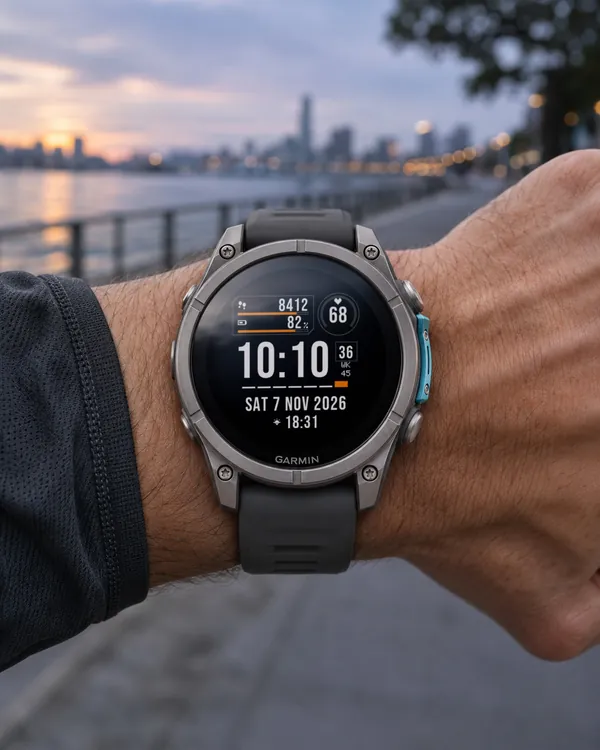
Tactical data card with progress bars, a round gauge and a week strip
 Military
DTG Clock
4.8 (16)
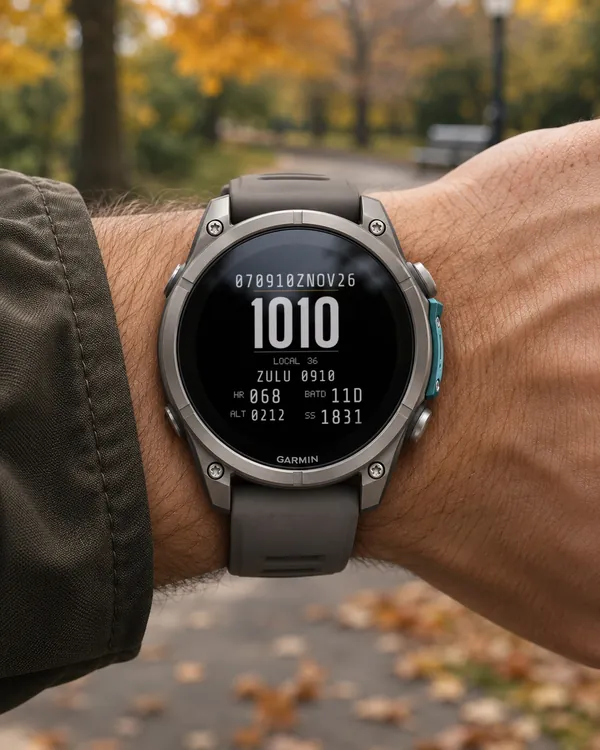
24-hour military time with a date-time group, Zulu time and red night mode
 Aviation
Zulu Chrono
5.0 (18)
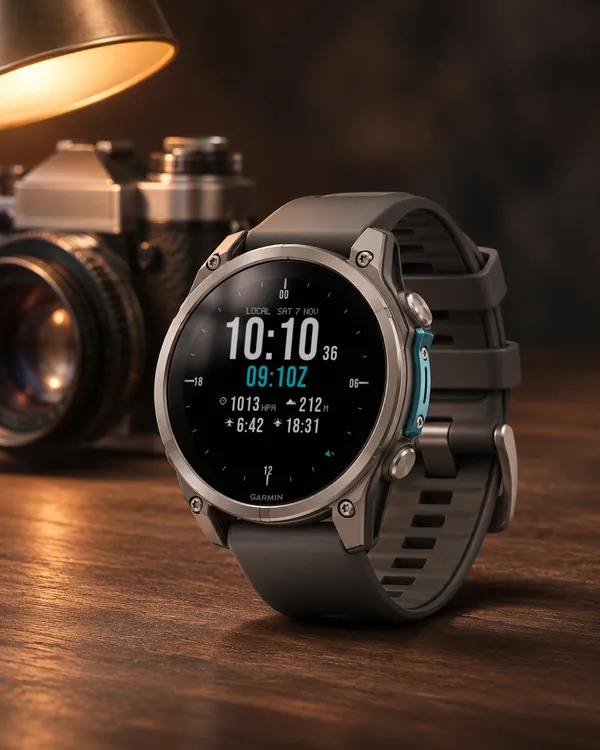
Local time and UTC on a 24-hour bezel, with pressure and altitude
 Tactical
Signal Ops
Tactical data panel with colour zone bars for Body Battery and heart rate