Unlock
€6.49
One-time payment. No subscription. The code works on the watch whose ID you enter.
- Install the face from Connect IQ (7 days free).
- On the watch: face settings > Buy / Unlock, scan the QR code.
- Pay and paste the code in the face settings.
- Pay.
- Copy the code.
- Paste it in Connect IQ: this face > Settings > Unlock code.
Payment works best in Safari or Chrome: menu (three dots) > Open in browser
Read it in this face, it is not the serial number of the watch.
The code works only in the watch face it was bought for: a Summit Rings code will not work in Summit Tactic.
Your ID, compare it with the watch:
Where do I find the ID?
On the watch: settings of this face > Buy / Unlock (first item). Scan the QR code with your phone or type the 10 digits. The ID is also at the top of the face settings in the Connect IQ app.
Code not working on your watch? Write to me and I will fix it.
Payments by Stripe. Seller: Mateusz Kolarz, Lublin, Poland.
Paid. Code:
We show the code here too. If the e-mail does not arrive (check spam), you can recover the code in the Recover code section with just the Face ID. Recover code
Copying did not work. The code is selected: copy it by hand.
The face unlocks by itself when the watch connects to the phone (usually within an hour; if the trial is still running, the purchase starts working when it ends).
Do not want to wait, or have an older watch? Paste the code in the Connect IQ app:
Connect IQ (or Garmin Connect) > My Device > Watch faces > Zulu Chrono > Settings > Unlock code > paste > Save
Like it? Rate this face in the Garmin store
Want to try new faces and apps before the release, for free? Join the testers program
Set up the face before you download
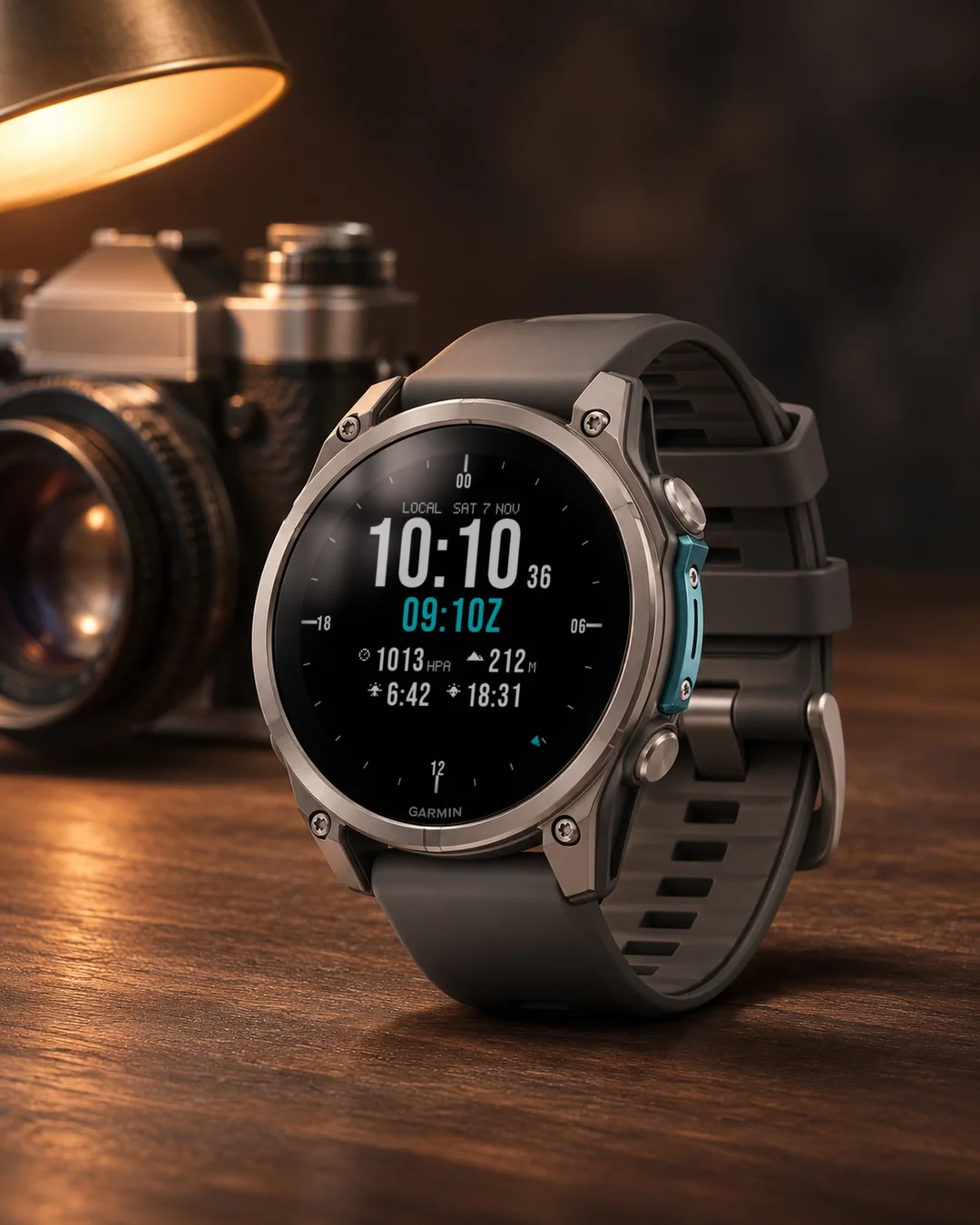
A pilot-style digital chronograph watch face that shows local time and UTC (Zulu) together, with an optional second time zone and data fields for pressure, altitude and sunrise.
7-day free trial, then a one-time unlock at dialforge.dev. No subscription.
Zulu Chrono: a pilot-style digital chronograph. Local time and UTC (Zulu), always on screen together.
Features:
- Big local time with seconds and the date, plus a UTC line marked with Z.
- Optional second time zone (Off, or any offset from UTC-12 to UTC+14), labelled "UTC+1 09:08", on a small third line.
- "Second time" setting: the line under the local time shows UTC (default), the second zone instead, or nothing.
- Round watches get an outer 24-hour bezel ring with a pointer marking the current UTC hour.
- On square and rectangular watches, UTC sits in a band above the local time.
- Two rows, 4 fields you choose from 45 data types (or leave empty): pressure, altitude, sunrise, sunset, heart rate, steps, battery, body battery, stress, VO2 max and more.
- Pressure shown in hPa or inHg, your choice.
- Accent color, seconds on or off, interface language (auto, English or Polish).
- Tuned for AMOLED (dim, shifted always-on mode) and for MIP displays.
A convenience display for reading two time zones and a few numbers at a glance. Not an aviation or navigation instrument, and not for flight planning or navigation.
Data fields: heart rate, steps, battery, distance, calories, floors, active minutes, body battery, stress, altitude, notifications, solar, battery days, temperature, sunrise, sunset, next sunrise/sunset, respiration, pulse ox, recovery time, pressure, resting heart rate, VO2 max, sleep score, 5K prediction, weekly run distance, moon phase, week number, day of year.
Sunrise and sunset: the times are worked out from the last known location of your watch, so the face asks for the Location permission. If a field shows --, start GPS once, for example with an outdoor activity.
Garmin does not give watch faces access to HRV status or Training Readiness, so no Connect IQ watch face can show them.
Trial: 7 days with everything working, then a reminder (days 8 to 14), a simple screen with the time and your Face ID (days 15 to 29), and from day 30 a lock screen with a QR code. Buy the code at dialforge.dev for the Face ID shown there and in the face settings.
Code not working? Write to kontakt@dialforge.dev and we fix it.
Settings: on the watch (hold MENU, then Watch face, then Customize) or in the Connect IQ app.
Popular color sets: for that list only an anonymous color number is sent.
After the trial, the face asks dialforge.dev whether an unlock exists for your Face ID (your watch number and the face name are sent, nothing else). Popular color sets are also fetched, as before.
From the maker
I am a student and I build Dialforge watch faces myself, after classes. I do not own every watch model, so if something looks wrong on yours, write to me at https://dialforge.dev/faces/zuluchrono/ and I will usually fix it within 24 hours. If you like the face, you can buy me a coffee: https://buycoffee.to/iwannaflysohigh
Works on fenix 9, fenix 8, Forerunner 970, Forerunner 570, Venu 4, Forerunner 965, Forerunner 265, Venu 3 and more.
Pilotska tarcza z cyfrowym chronografem, która pokazuje czas lokalny i UTC (Zulu) razem, z opcjonalną drugą strefą czasową oraz polami z ciśnieniem, wysokością i wschodem słońca.
7 dni za darmo, potem jednorazowe odblokowanie na dialforge.dev. Bez abonamentu.
Zulu Chrono to cyfrowy chronograf w stylu pilotów. Czas lokalny i UTC (Zulu) zawsze razem na ekranie.
Co jest na tarczy:
- Duża godzina lokalna z sekundami i datą oraz linia UTC oznaczona literą Z.
- Opcjonalna druga strefa czasu (wyłączona albo dowolne przesunięcie od UTC-12 do UTC+14), opisana jako "UTC+1 09:08", w małej trzeciej linii.
- Ustawienie "Drugi czas": pod godziną lokalną UTC (domyślnie), zamiast niego druga strefa albo nic.
- Okrągłe zegarki dostają zewnętrzny 24-godzinny pierścień ze wskaźnikiem bieżącej godziny UTC.
- Na kwadratowych i prostokątnych zegarkach UTC jest w pasku nad czasem lokalnym.
- Dwa rzędy, 4 pola do wyboru spośród 45 rodzajów danych (albo zostaw puste): ciśnienie, wysokość, wschód słońca, zachód słońca, tętno, kroki, bateria, Body Battery, stres, VO2 max i inne.
- Ciśnienie w hPa albo inHg, do wyboru.
- Kolor akcentu, sekundy włączone lub wyłączone, język interfejsu (automatyczny, angielski lub polski).
- Dopracowana pod AMOLED (przygaszony, przesuwany tryb zawsze włączony) i pod ekrany MIP.
Wygodny wyświetlacz do odczytu dwóch stref czasu i kilku liczb jednym spojrzeniem. To nie jest przyrząd lotniczy ani nawigacyjny i nie służy do planowania lotu ani nawigacji.
Pola danych: tętno, kroki, bateria, dystans, kalorie, piętra, aktywne minuty, Body Battery, stres, wysokość, powiadomienia, nasłonecznienie, dni na baterii, temperatura, wschód słońca, zachód słońca, następny wschód i zachód, oddech, Pulse Ox, czas regeneracji, ciśnienie, tętno spoczynkowe, VO2 max, ocena snu, prognoza na 5 km, kilometry biegu w tygodniu, faza księżyca, numer tygodnia, dzień roku.
Wschód i zachód słońca: czasy są liczone z ostatniej znanej lokalizacji zegarka, dlatego tarcza prosi o uprawnienie Lokalizacja. Jeśli pole pokazuje --, uruchom raz GPS, na przykład przy dowolnej aktywności na zewnątrz.
Garmin nie udostępnia tarczom statusu HRV ani gotowości treningowej, więc żadna tarcza Connect IQ ich nie pokaże.
Próba: 7 dni pełnego działania, potem przypomnienie (dni 8 do 14), prosty ekran z godziną i numerem ID tarczy (dni 15 do 29), a od 30. dnia ekran blokady z kodem QR. Kod kupisz na dialforge.dev dla numeru ID tarczy widocznego tam i w ustawieniach tarczy.
Kod nie działa? Napisz na kontakt@dialforge.dev, a naprawimy problem.
Ustawienia: na zegarku (przytrzymaj MENU, Tarcza zegarka, Dostosuj) albo w aplikacji Connect IQ.
Popularne zestawy kolorów: do tej listy wysyłany jest tylko anonimowy numer koloru.
Po okresie próby tarcza pyta dialforge.dev, czy dla Twojego numeru ID tarczy istnieje odblokowanie (wysyłany jest numer zegarka i nazwa tarczy, nic więcej). Popularne zestawy kolorów są pobierane tak jak dotąd.
Od autora
Jestem studentem i robię tarcze Dialforge sam, po zajęciach. Nie mam każdego modelu zegarka, więc jeśli coś wygląda źle na Twoim, napisz na https://dialforge.dev/faces/zuluchrono/, zwykle poprawiam to w ciągu 24 godzin. Jeśli tarcza Ci się podoba, możesz postawić mi kawę: https://buycoffee.to/iwannaflysohigh
Działa na: fenix 9, fenix 8, Forerunner 970, Forerunner 570, Venu 4, Forerunner 965, Forerunner 265, Venu 3 i innych.
Digitales Chronograph-Zifferblatt im Piloten-Stil, das Ortszeit und UTC (Zulu) zusammen zeigt, mit optionaler zweiter Zeitzone und Datenfeldern für Luftdruck, Höhe und Sonnenaufgang.
7 Tage kostenlos testen, danach einmalige Freischaltung auf dialforge.dev. Kein Abo.
Zulu Chrono: ein digitaler Chronograf im Piloten-Stil. Lokale Zeit und UTC (Zulu), immer gemeinsam auf dem Bildschirm.
Funktionen:
- Große lokale Zeit mit Sekunden und Datum, dazu eine UTC-Zeile mit dem Kennbuchstaben Z.
- Optionale zweite Zeitzone (Aus, oder ein beliebiger Versatz von UTC-12 bis UTC+14), angezeigt als "UTC+1 09:08", in einer kleinen dritten Zeile.
- Einstellung "Zweite Zeit": Die Zeile unter der Ortszeit zeigt UTC (Standard), stattdessen die zweite Zone oder nichts.
- Runde Uhren bekommen einen äußeren 24-Stunden-Ring mit einem Zeiger, der die aktuelle UTC-Stunde markiert.
- Bei eckigen und rechteckigen Uhren sitzt UTC in einem Band über der lokalen Zeit.
- Zwei Zeilen, 4 frei wählbare Felder aus 45 Datentypen (oder leer lassen): Luftdruck, Höhe, Sonnenaufgang, Sonnenuntergang, Herzfrequenz, Schritte, Akku, Body Battery, Stress, VO2 max und mehr.
- Luftdruck in hPa oder inHg, ganz nach Wahl.
- Akzentfarbe, Sekunden ein oder aus, Sprache der Oberfläche (automatisch, Englisch oder Polnisch).
- Abgestimmt auf AMOLED (gedimmter, verschobener Always-on-Modus) und auf MIP-Displays.
Eine praktische Anzeige, um zwei Zeitzonen und ein paar Zahlen auf einen Blick zu lesen. Kein Luftfahrt- oder Navigationsinstrument, nicht für Flugplanung oder Navigation gedacht.
Datenfelder: Herzfrequenz, Schritte, Akku, Distanz, Kalorien, Etagen, aktive Minuten, Body Battery, Stress, Höhe, Benachrichtigungen, Sonnenintensität, Akkutage, Temperatur, Sonnenaufgang, Sonnenuntergang, nächster Sonnenauf- oder -untergang, Atmung, Pulse Ox, Erholungszeit, Luftdruck, Ruhepuls, VO2 max, Schlafwert, 5K-Prognose, wöchentliche Laufdistanz, Mondphase, Wochennummer, Tag des Jahres.
Sonnenaufgang und Sonnenuntergang: Die Zeiten werden aus dem zuletzt bekannten Standort deiner Uhr berechnet, daher fragt das Zifferblatt nach der Berechtigung Location. Zeigt ein Feld --, starte einmal GPS, zum Beispiel mit einer Outdoor-Aktivität.
Garmin gibt Zifferblättern keinen Zugriff auf den HRV-Status oder die Trainingsbereitschaft, daher kann kein Connect IQ Zifferblatt sie anzeigen.
Testphase: 7 Tage lang funktioniert alles, danach folgen eine Erinnerung (Tage 8 bis 14), ein einfacher Bildschirm mit Uhrzeit und deiner Watch ID (Tage 15 bis 29) und ab Tag 30 ein Sperrbildschirm mit QR-Code. Den Code kaufst du auf dialforge.dev für die Watch ID, die dort und in den Zifferblatt-Einstellungen angezeigt wird.
Code funktioniert nicht? Schreib an kontakt@dialforge.dev, wir beheben es.
Einstellungen: auf der Uhr (MENU gedrückt halten, dann Watch face, dann Customize) oder in der Connect IQ App.
Beliebte Farbsets: Für diese Liste wird nur eine anonyme Farbnummer gesendet.
Nach der Testphase fragt das Zifferblatt bei dialforge.dev nach, ob eine Freischaltung für deine Watch ID vorliegt (die Nummer deiner Uhr und der Name des Zifferblatts werden gesendet, sonst nichts). Beliebte Farbsets werden wie bisher ebenfalls abgerufen.
Cadran chronographe numérique de style pilote qui affiche l'heure locale et l'UTC (Zulu) ensemble, avec un second fuseau horaire en option et des champs pour la pression, l'altitude et le lever du soleil.
Essai gratuit de 7 jours, puis un déverrouillage unique sur dialforge.dev. Sans abonnement.
Zulu Chrono : un chronographe numérique de style aviateur. Heure locale et UTC (Zulu), toujours affichées ensemble.
Caractéristiques :
- Grande heure locale avec secondes et date, plus une ligne UTC marquée du repère Z.
- Deuxième fuseau horaire en option (désactivé, ou n'importe quel décalage entre UTC-12 et UTC+14), affiché sous la forme "UTC+1 09:08", sur une petite troisième ligne.
- Réglage "Deuxième heure" : la ligne sous l'heure locale affiche UTC (par défaut), à la place le second fuseau, ou rien.
- Les montres rondes ont un anneau extérieur 24 heures avec une aiguille marquant l'heure UTC actuelle.
- Sur les montres carrées et rectangulaires, l'UTC se loge dans une bande au-dessus de l'heure locale.
- Deux lignes, 4 champs à choisir parmi 45 types de données (ou laisser vide) : pression, altitude, lever du soleil, coucher du soleil, fréquence cardiaque, pas, batterie, body battery, stress, VO2 max et plus.
- Pression affichée en hPa ou en inHg, à votre choix.
- Couleur d'accent, secondes activées ou non, langue de l'interface (auto, anglais ou polonais).
- Optimisé pour l'AMOLED (mode toujours actif atténué et décalé) et pour les écrans MIP.
Un affichage pratique pour lire deux fuseaux horaires et quelques chiffres d'un coup d'œil. Ce n'est ni un instrument d'aviation ni de navigation, et il n'est pas destiné à la planification de vol ni à la navigation.
Champs de données : fréquence cardiaque, pas, batterie, distance, calories, étages, minutes actives, body battery, stress, altitude, notifications, solaire, jours de batterie, température, lever du soleil, coucher du soleil, prochain lever ou coucher, respiration, pulse ox, temps de récupération, pression, fréquence cardiaque au repos, VO2 max, score de sommeil, prédiction 5 km, distance de course hebdomadaire, phase lunaire, numéro de semaine, jour de l'année.
Lever et coucher du soleil : les heures sont calculées à partir de la dernière position connue de votre montre, le cadran demande donc l'autorisation Location. Si un champ affiche --, lancez le GPS une fois, par exemple avec une activité en extérieur.
Garmin ne donne pas aux cadrans l'accès au statut VFC ni à la disponibilité d'entraînement, aucun cadran Connect IQ ne peut donc les afficher.
Essai : 7 jours avec tout qui fonctionne, puis un rappel (jours 8 à 14), un écran simple avec l'heure et ton Watch ID (jours 15 à 29), et dès le jour 30 un écran de verrouillage avec un QR code. Tu achètes le code sur dialforge.dev pour le Watch ID affiché là et dans les réglages du cadran.
Le code ne fonctionne pas ? Écrivez à kontakt@dialforge.dev, nous le réparons.
Réglages : sur la montre (maintenez MENU, puis Watch face, puis Customize) ou dans l'application Connect IQ.
Jeux de couleurs populaires : pour cette liste, seul un numéro de couleur anonyme est envoyé.
Après la période d'essai, le cadran demande à dialforge.dev si un déverrouillage existe pour votre Watch ID (le numéro de votre montre et le nom du cadran sont envoyés, rien d'autre). Les palettes de couleurs populaires sont aussi récupérées, comme avant.
Compatible avec fenix 9, fenix 8, Forerunner 970, Forerunner 570, Venu 4, Forerunner 965, Forerunner 265, Venu 3 et d'autres modèles.
Esfera cronógrafo digital de estilo piloto que muestra la hora local y la UTC (Zulu) a la vez, con una segunda zona horaria opcional y campos de presión, altitud y amanecer.
Prueba gratuita de 7 días y luego un desbloqueo único en dialforge.dev. Sin suscripción.
Zulu Chrono: un cronógrafo digital de estilo aviador. Hora local y UTC (Zulu), siempre juntas en pantalla.
Características:
- Hora local grande con segundos y fecha, más una línea UTC marcada con la letra Z.
- Segunda zona horaria opcional (desactivada, o cualquier desfase entre UTC-12 y UTC+14), mostrada como "UTC+1 09:08", en una pequeña tercera línea.
- Ajuste "Segunda hora": la línea bajo la hora local muestra UTC (por defecto), en su lugar la segunda zona, o nada.
- Los relojes redondos tienen un anillo exterior de 24 horas con una aguja que marca la hora UTC actual.
- En relojes cuadrados y rectangulares, la UTC va en una banda sobre la hora local.
- Dos líneas, 4 campos a elegir entre 45 tipos de datos (o dejar vacío): presión, altitud, amanecer, atardecer, frecuencia cardiaca, pasos, batería, body battery, estrés, VO2 max y más.
- Presión en hPa o inHg, a tu elección.
- Color de acento, segundos activados o no, idioma de la interfaz (automático, inglés o polaco).
- Ajustado para AMOLED (modo siempre activo atenuado y desplazado) y para pantallas MIP.
Una pantalla práctica para leer dos zonas horarias y algunos datos de un vistazo. No es un instrumento de aviación ni de navegación, y no sirve para planificar vuelos ni para navegar.
Campos de datos: frecuencia cardiaca, pasos, batería, distancia, calorías, pisos, minutos activos, body battery, estrés, altitud, notificaciones, solar, días de batería, temperatura, amanecer, atardecer, próximo amanecer o atardecer, respiración, pulse ox, tiempo de recuperación, presión, frecuencia cardiaca en reposo, VO2 max, puntuación de sueño, predicción de 5 km, distancia semanal de carrera, fase lunar, número de semana, día del año.
Amanecer y atardecer: las horas se calculan a partir de la última ubicación conocida de tu reloj, por eso la esfera pide el permiso Location. Si un campo muestra --, inicia el GPS una vez, por ejemplo con una actividad al aire libre.
Garmin no da a las esferas acceso al estado de VFC ni a la disponibilidad para entrenar, así que ninguna esfera Connect IQ puede mostrarlos.
Prueba: 7 días con todo funcionando, luego un recordatorio (días 8 a 14), una pantalla sencilla con la hora y tu Watch ID (días 15 a 29) y, desde el día 30, una pantalla de bloqueo con un código QR. Compras el código en dialforge.dev para el Watch ID que se muestra allí y en los ajustes de la esfera.
¿El código no funciona? Escribe a kontakt@dialforge.dev y lo arreglamos.
Ajustes: en el reloj (mantén pulsado MENU, luego Watch face, luego Customize) o en la app Connect IQ.
Combinaciones populares: para esa lista solo se envía un número de color anónimo.
Tras la prueba, la esfera consulta a dialforge.dev si existe un desbloqueo para tu Watch ID (se envían el número de tu reloj y el nombre de la esfera, nada más).
Del autor
Soy estudiante y hago las esferas Dialforge yo solo, después de clase. No tengo todos los modelos de reloj, así que si algo se ve mal en el tuyo, escríbeme en https://dialforge.dev/faces/zuluchrono/ y normalmente lo arreglo en 24 horas. Si te gusta la esfera, puedes invitarme a un café: https://buycoffee.to/iwannaflysohigh
Compatible con fenix 9, fenix 8, Forerunner 970, Forerunner 570, Venu 4, Forerunner 965, Forerunner 265, Venu 3 y más.
Digitale chronograaf-wijzerplaat in piloot-stijl die lokale tijd en UTC (Zulu) samen toont, met een optionele tweede tijdzone en datavelden voor luchtdruk, hoogte en zonsopkomst.
7 dagen gratis proberen, daarna een eenmalige ontgrendeling op dialforge.dev. Geen abonnement.
Zulu Chrono: een digitale chronograaf in pilotenstijl. Lokale tijd en UTC (Zulu), altijd samen op het scherm.
Functies:
- Grote lokale tijd met seconden en datum, plus een UTC-regel met de letter Z.
- Optionele tweede tijdzone (uit, of elke offset van UTC-12 tot UTC+14), weergegeven als "UTC+1 09:08", op een kleine derde regel.
- Instelling "Tweede tijd": de regel onder de lokale tijd toont UTC (standaard), in plaats daarvan de tweede zone, of niets.
- Ronde horloges krijgen een buitenste 24-uursring met een wijzer die het huidige UTC-uur markeert.
- Op vierkante en rechthoekige horloges staat UTC in een balk boven de lokale tijd.
- Twee regels, 4 velden naar keuze uit 45 datatypes (of laat leeg): luchtdruk, hoogte, zonsopkomst, zonsondergang, hartslag, stappen, batterij, body battery, stress, VO2 max en meer.
- Luchtdruk in hPa of inHg, naar keuze.
- Accentkleur, seconden aan of uit, taal van de interface (automatisch, Engels of Pools).
- Afgestemd op AMOLED (gedimde, verschoven always-on modus) en op MIP-schermen.
Een handig scherm om twee tijdzones en een paar cijfers in één oogopslag te lezen. Geen luchtvaart- of navigatie-instrument, en niet bedoeld voor vluchtplanning of navigatie.
Datavelden: hartslag, stappen, batterij, afstand, calorieën, verdiepingen, actieve minuten, body battery, stress, hoogte, meldingen, zon, batterijdagen, temperatuur, zonsopkomst, zonsondergang, volgende zonsopkomst of -ondergang, ademhaling, pulse ox, hersteltijd, luchtdruk, rusthartslag, VO2 max, slaapscore, 5K-voorspelling, wekelijkse hardloopafstand, maanfase, weeknummer, dag van het jaar.
Zonsopgang en zonsondergang: de tijden worden berekend uit de laatst bekende locatie van je horloge, dus de wijzerplaat vraagt om de toestemming Location. Toont een veld --, start dan eenmalig GPS, bijvoorbeeld met een buitenactiviteit.
Garmin geeft wijzerplaten geen toegang tot de HRV-status of trainingsgereedheid, dus geen enkele Connect IQ-wijzerplaat kan die tonen.
Proefperiode: 7 dagen waarin alles werkt, daarna een herinnering (dag 8 tot 14), een eenvoudig scherm met de tijd en je Watch ID (dag 15 tot 29) en vanaf dag 30 een vergrendelscherm met een QR-code. De code koop je op dialforge.dev voor de Watch ID die daar en in de instellingen van de wijzerplaat staat.
Werkt de code niet? Mail naar kontakt@dialforge.dev en we lossen het op.
Instellingen: op het horloge (houd MENU ingedrukt, dan Watch face, dan Customize) of in de Connect IQ-app.
Populaire kleurensets: voor die lijst wordt alleen een anoniem kleurnummer verstuurd.
Na de proefperiode vraagt de watch face aan dialforge.dev of er een ontgrendeling bestaat voor je Watch ID (alleen je horlogenummer en de naam van de watch face worden verzonden, verder niets). Populaire kleursets worden ook opgehaald, net als voorheen.
Van de maker
Ik ben student en maak de Dialforge-wijzerplaten zelf, na de colleges. Ik heb niet elk horlogemodel, dus ziet er iets verkeerd uit op het jouwe, schrijf me dan via https://dialforge.dev/faces/zuluchrono/. Meestal los ik het binnen 24 uur op. Vind je de wijzerplaat mooi, dan kun je me een koffie trakteren: https://buycoffee.to/iwannaflysohigh
Werkt op fenix 9, fenix 8, Forerunner 970, Forerunner 570, Venu 4, Forerunner 965, Forerunner 265, Venu 3 en meer.
ローカル時間とUTC(Zulu)を同時に表示するパイロット風のデジタルクロノグラフ文字盤。第2タイムゾーン(任意)と、気圧・高度・日の出のデータ表示欄付きです。
7日間無料でお試しいただけます。その後はdialforge.devで解除を一度だけ購入(サブスクリプションなし)。
Zulu Chrono:パイロットスタイルのデジタルクロノグラフ。現地時間とUTC(ズールー時間)を常に画面に並べて表示します。
特長:
- 秒と日付付きの大きな現地時間表示に加え、Zマークの付いたUTCライン
- 小さな第三行に、任意で表示できるもう一つのタイムゾーン(オフ、または UTC-12 から UTC+14 までの任意のオフセット)。表示は「UTC+1 09:08」の形式です。
- 「Second time」設定:現地時刻の下の行に、UTC(初期設定)、代わりに第2タイムゾーン、または何も表示しない、から選べます。
- 丸型時計では外周に24時間ベゼルリングがあり、現在のUTC時刻を指すポインターが付いています
- 角型・長方形の時計では、UTCは現地時間の上のバンドに表示されます
- 二行、4つのフィールドを45種類のデータタイプから選択(空欄も可): 気圧、高度、日の出、日の入り、心拍数、歩数、バッテリー、Body Battery、ストレス、VO2 max など。
- 気圧はhPaまたはinHgから選択可能
- アクセントカラー、秒表示のオン・オフ、インターフェース言語(自動、英語、ポーランド語)
- AMOLED(暗く、位置がずれる常時表示モード)およびMIPディスプレイの両方に最適化
二つのタイムゾーンと数値をひと目で確認するための便利表示です。航空用や航法用の計器ではなく、飛行計画や航法には使えません。
データフィールド:心拍数、歩数、バッテリー、距離、カロリー、階数、強度分、Body Battery、ストレス、高度、通知、ソーラー、バッテリー残日数、気温、日の出、日没、次の日の出・日没、呼吸数、Pulse Ox、回復時間、気圧、安静時心拍数、VO2 max、睡眠スコア、5kmタイム予測、週間走行距離、月相、週番号、年間通算日
日の出と日の入り: 時刻はウォッチが最後に取得した位置情報から計算されるため、このウォッチフェイスは位置情報(Location)の権限を求めます。フィールドに--と表示される場合は、屋外アクティビティなどでGPSを一度起動してください。
GarminはウォッチフェイスにHRVステータスやトレーニングレディネスを公開していないため、Connect IQのウォッチフェイスでは表示できません。
お試し:最初の7日間はすべての機能が使えます。その後、8日目から14日目はリマインダー、15日目から29日目は時刻とWatch IDだけのシンプルな画面、30日目からはQRコード付きのロック画面になります。コードはdialforge.devで、そこやウォッチフェイスの設定に表示されるWatch ID用に購入します。
コードが使えない場合はkontakt@dialforge.devまでご連絡ください。問題を解決いたします。
設定:時計側(MENUを長押し、Watch face、Customizeの順)またはConnect IQアプリから。
人気のカラーセット:この一覧のために送信されるのは匿名の色番号だけです。
トライアル終了後、ウォッチフェイスはdialforge.devにお使いのWatch IDのロック解除が存在するかどうか問い合わせます(送信されるのは時計の番号とウォッチフェイス名のみで、それ以外は送信されません)。これまで通り、人気のカラーセットも取得されます。
作者より
私は学生で、Dialforgeの文字盤を授業のあとに一人で作っています。すべての時計モデルを持っているわけではないので、お使いの時計で表示がおかしい場合は https://dialforge.dev/faces/zuluchrono/ からご連絡ください。通常24時間以内に修正します。文字盤を気に入っていただけたら、コーヒーをおごっていただけるとうれしいです: https://buycoffee.to/iwannaflysohigh
対応モデル:fenix 9, fenix 8, Forerunner 970, Forerunner 570, Venu 4, Forerunner 965, Forerunner 265, Venu 3 ほか
Quadrante cronografo digitale in stile pilota che mostra insieme ora locale e UTC (Zulu), con un secondo fuso orario opzionale e campi dati per pressione, altitudine e alba.
Prova gratuita di 7 giorni, poi uno sblocco una tantum su dialforge.dev. Nessun abbonamento.
Zulu Chrono: un cronografo digitale in stile aviatore. Ora locale e UTC (Zulu), sempre insieme sullo schermo.
Caratteristiche:
- Ora locale grande con secondi e data, più una riga UTC contrassegnata dalla lettera Z.
- Secondo fuso orario opzionale (disattivato, oppure qualsiasi scarto da UTC-12 a UTC+14), indicato come "UTC+1 09:08", su una piccola terza riga.
- Impostazione "Seconda ora": la riga sotto l'ora locale mostra UTC (predefinito), al suo posto il secondo fuso, oppure niente.
- Gli orologi rotondi hanno una ghiera esterna a 24 ore con una lancetta che indica l'ora UTC corrente.
- Sugli orologi quadrati e rettangolari, l'UTC sta in una fascia sopra l'ora locale.
- Due righe, 4 campi a scelta tra 45 tipi di dati (o lascia vuoto): pressione, altitudine, alba, tramonto, frequenza cardiaca, passi, batteria, body battery, stress, VO2 max e altro.
- Pressione in hPa o inHg, a tua scelta.
- Colore di accento, secondi attivi o no, lingua dell'interfaccia (automatica, inglese o polacco).
- Ottimizzato per AMOLED (modalità always-on attenuata e spostata) e per schermi MIP.
Non è uno strumento di aviazione né di navigazione, e non serve per pianificare voli o per navigare.
Campi dati: frequenza cardiaca, passi, batteria, distanza, calorie, piani, minuti attivi, body battery, stress, altitudine, notifiche, solare, giorni di batteria, temperatura, alba, tramonto, prossima alba o tramonto, respirazione, pulse ox, tempo di recupero, pressione, frequenza cardiaca a riposo, VO2 max, punteggio del sonno, previsione sui 5 km, distanza di corsa settimanale, fase lunare, numero di settimana, giorno dell'anno.
Alba e tramonto: gli orari sono calcolati dall'ultima posizione nota del tuo orologio, quindi il quadrante richiede l'autorizzazione Location. Se un campo mostra --, avvia il GPS una volta, per esempio con un'attività all'aperto.
Garmin non dà ai quadranti accesso allo stato HRV né alla Training Readiness, quindi nessun quadrante Connect IQ può mostrarli.
Prova: 7 giorni con tutto funzionante, poi un promemoria (giorni da 8 a 14), una schermata semplice con l'ora e il tuo Watch ID (giorni da 15 a 29) e dal giorno 30 una schermata di blocco con un codice QR. Il codice si acquista su dialforge.dev per il Watch ID mostrato lì e nelle impostazioni del quadrante.
Il codice non funziona? Scrivi a kontakt@dialforge.dev e lo sistemiamo.
Impostazioni: sull'orologio (tieni premuto MENU, poi Watch face, poi Customize) o nell'app Connect IQ.
Set di colori popolari: per quell'elenco viene inviato solo un numero di colore anonimo.
Dopo il periodo di prova, il quadrante chiede a dialforge.dev se esiste uno sblocco per il tuo Watch ID (vengono inviati il numero del tuo orologio e il nome del quadrante, nient'altro).
Dall'autore
Sono uno studente e creo da solo i quadranti Dialforge, dopo le lezioni. Non ho tutti i modelli di orologio, quindi se qualcosa sembra sbagliato sul tuo, scrivimi su https://dialforge.dev/faces/zuluchrono/, di solito lo correggo entro 24 ore. Se il quadrante ti piace, puoi offrirmi un caffè: https://buycoffee.to/iwannaflysohigh
Compatibile con fenix 9, fenix 8, Forerunner 970, Forerunner 570, Venu 4, Forerunner 965, Forerunner 265, Venu 3 e altri.
飞行员风格的数字计时表盘,同时显示本地时间和UTC(Zulu),可选第二时区,并有气压、海拔和日出数据栏。
7 天免费试用,之后在 dialforge.dev 一次性解锁。无需订阅。
Zulu Chrono:飞行员风格的数字计时表。本地时间与 UTC(祖鲁时间)始终并排显示在屏幕上。
功能特色:
- 大字体本地时间,带秒针和日期,外加标有 Z 的 UTC 行
- 可选的第二时区(关闭,或 UTC-12 至 UTC+14 之间的任意偏移),显示在较小的第三行,格式为 "UTC+1 09:08"
- "Second time" 设置:本地时间下方的一行显示 UTC(默认)、改为显示第二时区,或不显示
- 圆形手表带有外圈 24 小时表圈环,指针标示当前 UTC 小时
- 方形和长方形手表上,UTC 显示在本地时间上方的横条中
- 两行 4 个字段,可从 45 种数据类型中挑选(也可留空):气压、海拔、日出、日落、心率、步数、电量、Body Battery、压力、VO2 max 等等
- 气压单位可选 hPa 或 inHg
- 强调色、秒针开关、界面语言(自动、英语或波兰语)
- 针对 AMOLED(变暗且偏移的常亮模式)以及 MIP 屏幕做了优化
这是一个方便一眼读取两个时区和几项数值的显示界面,不是航空或导航仪器,不可用于飞行规划或导航。
数据字段:心率、步数、电量、距离、卡路里、楼层、强度分钟、Body Battery、压力、海拔、通知、太阳能、电池可用天数、温度、日出、日落、下一次日出/日落、呼吸频率、Pulse Ox、恢复时间、气压、静息心率、VO2 max、睡眠评分、5 公里成绩预测、每周跑步距离、月相、周数、全年第几天
日出和日落:时间根据手表最近一次已知的位置计算,因此表盘会请求位置(Location)权限。如果某个字段显示 --,请启动一次 GPS,例如开始一项户外活动。
Garmin 不向表盘开放 HRV 状态和训练准备度,因此任何 Connect IQ 表盘都无法显示。
试用:7 天内一切功能正常,之后依次是提醒(第 8 至 14 天)、只显示时间和你的 Watch ID 的简易屏幕(第 15 至 29 天),从第 30 天起是带 QR 码的锁屏。请在 dialforge.dev 为那里和表盘设置中显示的 Watch ID 购买解锁码。
兑换码无法使用?请写信至 kontakt@dialforge.dev,我们会修复问题。
设置:在手表上完成(长按 MENU,依次选择 Watch face、Customize)或在 Connect IQ 应用中完成。
热门配色:该列表只会发送匿名的颜色编号。
试用期结束后,表盘会向 dialforge.dev 查询您的 Watch ID 是否已解锁(仅发送您的手表编号和表盘名称,不包含其他任何内容)。热门配色方案也会像之前一样正常获取。
作者的话
我是一名学生,利用课余时间独自制作 Dialforge 表盘。我没有每一款手表,所以如果表盘在您的手表上显示不对,请到 https://dialforge.dev/faces/zuluchrono/ 告诉我,我通常会在 24 小时内修复。如果您喜欢这款表盘,可以请我喝杯咖啡:https://buycoffee.to/iwannaflysohigh
适用于 fenix 9, fenix 8, Forerunner 970, Forerunner 570, Venu 4, Forerunner 965, Forerunner 265, Venu 3 等。
Цифровой циферблат-хронограф в пилотском стиле: местное время и UTC (Zulu) на одном экране, дополнительный часовой пояс по желанию и поля данных с давлением, высотой и восходом солнца.
7-дневный бесплатный пробный период, затем разовая разблокировка на dialforge.dev. Без подписки.
Zulu Chrono: цифровой хронограф в авиационном стиле. Местное время и UTC (Zulu) всегда на экране вместе.
Особенности:
- Крупное местное время с секундами и датой, а также строка UTC с отметкой Z.
- Дополнительный второй часовой пояс (выключен или любое смещение от UTC-12 до UTC+14) на небольшой третьей строке, в виде "UTC+1 09:08".
- Настройка "Second time": в строке под местным временем показывается UTC (по умолчанию), вместо него второй пояс или ничего.
- На круглых часах отображается внешний 24-часовой безель со стрелкой-указателем текущего часа по UTC.
- На квадратных и прямоугольных часах время UTC расположено на плашке над местным временем.
- Два ряда, 4 поля на выбор из 45 типов данных (или оставьте пустым): давление, высота, восход, закат, пульс, шаги, батарея, Body Battery, стресс, VO2 max и многое другое.
- Давление отображается в hPa или inHg на ваш выбор.
- Цвет акцента, включение или отключение секунд, язык интерфейса (автоматический, английский или польский).
- Оптимизировано для AMOLED (приглушенный режим Always-on со сдвигом) и для экранов MIP.
Удобный циферблат для быстрого просмотра двух часовых поясов и основных показателей с одного взгляда. Не является авиационным или навигационным прибором и не предназначен для планирования полетов или навигации.
Поля данных: пульс, шаги, батарея, расстояние, калории, этажи, активные минуты, Body Battery, стресс, высота, уведомления, уровень солнечной энергии, дни работы от батареи, температура, восход, закат, следующий восход/закат, частота дыхания, Pulse Ox, время восстановления, давление, пульс в покое, VO2 max, оценка сна, прогноз на 5K, дистанция бега за неделю, фаза луны, номер недели, день года.
Восход и закат: время рассчитывается по последнему известному местоположению часов, поэтому циферблат запрашивает разрешение Location. Если в поле показано --, один раз запустите GPS, например с помощью активности на улице.
Garmin не предоставляет циферблатам доступ к HRV status или Training Readiness, поэтому ни один циферблат Connect IQ не может их отображать.
Пробный период: 7 дней всё работает, затем напоминание (дни с 8 по 14), простой экран со временем и вашим Watch ID (дни с 15 по 29), а с 30-го дня экран блокировки с QR-кодом. Код покупается на dialforge.dev для Watch ID, который показан там и в настройках циферблата.
Не работает код? Напишите на kontakt@dialforge.dev, и мы все исправим.
Настройки: на часах (удерживайте MENU, затем Циферблат, затем Настройка) или в приложении Connect IQ.
Популярные цветовые наборы: для этого списка отправляется только анонимный номер цвета.
После пробного периода циферблат проверяет на dialforge.dev наличие разблокировки для вашего Watch ID (отправляются только номер часов и название циферблата, ничего лишнего). Популярные наборы цветов также загружаются, как и раньше.
От автора
Я студент и делаю циферблаты Dialforge сам, после занятий. У меня есть не все модели часов, поэтому если на ваших что-то выглядит неправильно, напишите мне на https://dialforge.dev/faces/zuluchrono/, обычно я исправляю это в течение 24 часов. Если циферблат вам нравится, можете угостить меня кофе: https://buycoffee.to/iwannaflysohigh
Работает на fenix 9, fenix 8, Forerunner 970, Forerunner 570, Venu 4, Forerunner 965, Forerunner 265, Venu 3 и других.
Mostrador cronógrafo digital estilo piloto que mostra a hora local e o UTC (Zulu) juntos, com um segundo fuso horário opcional e campos de pressão, altitude e nascer do sol.
Teste grátis de 7 dias, depois um desbloqueio único em dialforge.dev. Sem assinatura.
Zulu Chrono: um cronógrafo digital estilo aviador. Hora local e UTC (Zulu), sempre juntas na tela.
Recursos:
- Hora local grande com segundos e data, mais uma linha UTC marcada com a letra Z.
- Segundo fuso horário opcional (desligado, ou qualquer diferença de UTC-12 a UTC+14), exibido como "UTC+1 09:08", em uma pequena terceira linha.
- Ajuste "Segunda hora": a linha abaixo da hora local mostra UTC (padrão), o segundo fuso no lugar dele, ou nada.
- Relógios redondos ganham um anel externo de 24 horas com um ponteiro marcando a hora UTC atual.
- Em relógios quadrados e retangulares, o UTC fica em uma faixa acima da hora local.
- Duas linhas, 4 campos à sua escolha entre 45 tipos de dados (ou deixe vazio): pressão, altitude, nascer do sol, pôr do sol, frequência cardíaca, passos, bateria, body battery, estresse, VO2 max e mais.
- Pressão em hPa ou inHg, como preferir.
- Cor de destaque, segundos ligados ou desligados, idioma da interface (automático, inglês ou polonês).
- Ajustado para AMOLED (modo sempre ativo atenuado e deslocado) e para telas MIP.
Uma tela prática para ler dois fusos horários e alguns números de relance. Não é um instrumento de aviação nem de navegação, e não serve para planejamento de voo ou navegação.
Campos de dados: frequência cardíaca, passos, bateria, distância, calorias, andares, minutos ativos, body battery, estresse, altitude, notificações, solar, dias de bateria, temperatura, nascer do sol, pôr do sol, próximo nascer ou pôr do sol, respiração, pulse ox, tempo de recuperação, pressão, frequência cardíaca em repouso, VO2 max, pontuação de sono, previsão de 5 km, distância semanal de corrida, fase da lua, número da semana, dia do ano.
Nascer e pôr do sol: os horários são calculados a partir da última localização conhecida do seu relógio, por isso o mostrador pede a permissão Location. Se um campo mostrar --, ligue o GPS uma vez, por exemplo com uma atividade ao ar livre.
A Garmin não dá aos mostradores acesso ao status de VFC nem à prontidão para treino, então nenhum mostrador Connect IQ consegue exibi-los.
Teste: 7 dias com tudo funcionando, depois um lembrete (dias 8 a 14), uma tela simples com a hora e o seu Watch ID (dias 15 a 29) e, a partir do dia 30, uma tela de bloqueio com QR code. O código é comprado em dialforge.dev para o Watch ID mostrado lá e nas configurações do mostrador.
O código não funciona? Escreva para kontakt@dialforge.dev e a gente resolve.
Configurações: no relógio (segure MENU, depois Watch face, depois Customize) ou no app Connect IQ.
Conjuntos de cores populares: para essa lista só é enviado um número de cor anônimo.
Após o período de teste, o mostrador consulta dialforge.dev para verificar se existe um desbloqueio para seu Watch ID (são enviados o número do seu relógio e o nome do mostrador, nada mais). Os conjuntos de cores populares também são baixados, como antes.
Do criador
Sou estudante e faço os mostradores Dialforge sozinho, depois das aulas. Não tenho todos os modelos de relógio, então se algo parecer errado no seu, escreva para mim em https://dialforge.dev/faces/zuluchrono/, normalmente eu corrijo em até 24 horas. Se você gostou do mostrador, pode me pagar um café: https://buycoffee.to/iwannaflysohigh
Funciona em fenix 9, fenix 8, Forerunner 970, Forerunner 570, Venu 4, Forerunner 965, Forerunner 265, Venu 3 e outros.
Digitální chronografový ciferník v pilotním stylu, který ukazuje místní čas a UTC (Zulu) zároveň, s volitelným druhým časovým pásmem a poli pro tlak, nadmořskou výšku a východ slunce.
7denní bezplatná zkušební verze, poté jednorázové odemknutí na dialforge.dev. Žádné předplatné.
Zulu Chrono: digitální chronograf v pilotním stylu. Místní čas a UTC (Zulu), vždy společně na displeji.
Funkce:
- Velký místní čas se sekundami a datem, plus řádek UTC označený písmenem Z.
- Volitelné druhé časové pásmo (Vypnuto nebo libovolný posun od UTC-12 do UTC+14) s popiskem "UTC+1 09:08" na malém třetím řádku.
- Nastavení "Druhý čas": řádek pod místním časem ukazuje UTC (výchozí), místo něj druhé pásmo, nebo nic.
- Kulaté hodinky získají vnější 24hodinový kroužek lunety s ukazatelem označujícím aktuální hodinu UTC.
- Na hranatých a obdélníkových hodinkách je UTC umístěno v pruhu nad místním časem.
- Dva řádky, 4 pole, která si vyberete ze 45 datových typů (nebo nechte prázdné): tlak, nadmořská výška, východ slunce, západ slunce, srdeční tep, kroky, baterie, Body Battery, stres, VO2 max a další.
- Tlak zobrazený v hPa nebo inHg, podle vaší volby.
- Doplňková barva, sekundy zapnuté nebo vypnuté, jazyk rozhraní (automaticky, angličtina nebo polština).
- Vyladěno pro AMOLED (ztlumený, posouvaný always-on režim) i pro MIP displeje.
Praktický displej pro rychlé odečtení dvou časových pásem a několika údajů na první pohled. Nejedná se o letecký ani navigační přístroj a není určen pro plánování letů ani navigaci.
Datová pole: srdeční tep, kroky, baterie, vzdálenost, kalorie, patra, aktivní minuty, Body Battery, stres, nadmořská výška, oznámení, sluneční svit, dny baterie, teplota, východ slunce, západ slunce, příští východ/západ slunce, dýchání, Pulse Ox, doba regenerace, tlak, klidový srdeční tep, VO2 max, skóre spánku, předpověď na 5K, týdenní běžecká vzdálenost, fáze měsíce, číslo týdne, den v roce.
Východ a západ slunce: časy se počítají z poslední známé polohy hodinek, proto ciferník žádá o oprávnění Location. Pokud pole zobrazuje --, jednou spusťte GPS, například venkovní aktivitou.
Garmin neposkytuje ciferníkům přístup ke stavu HRV ani k Training Readiness, takže je nemůže zobrazit žádný ciferník z Connect IQ.
Zkušební doba: 7 dní vše funguje, poté následuje připomenutí (dny 8 až 14), jednoduchá obrazovka s časem a vaším Watch ID (dny 15 až 29) a od 30. dne zamykací obrazovka s QR kódem. Kód zakoupíte na dialforge.dev pro Watch ID zobrazené tam i v nastavení ciferníku.
Kód nefunguje? Napište na kontakt@dialforge.dev a my vše vyřešíme.
Nastavení: v hodinkách (podržte MENU, pak Vzhled hodinek, pak Upravit) nebo v aplikaci Connect IQ.
Oblíbené barevné sady: pro tento seznam se odesílá pouze anonymní číslo barvy.
Po zkušební době se ciferník ptá dialforge.dev, zda pro vaše Watch ID existuje odemknutí (odesílá se číslo vašich hodinek a název ciferníku, nic jiného). Stahují se také oblíbené sady barev, stejně jako dříve.
Od autora
Jsem student a ciferníky Dialforge dělám sám, po škole. Nemám každý model hodinek, takže pokud na vašich něco nevypadá dobře, napište mi na https://dialforge.dev/faces/zuluchrono/, obvykle to opravím do 24 hodin. Pokud se vám ciferník líbí, můžete mi koupit kávu: https://buycoffee.to/iwannaflysohigh
Mostrador cronógrafo digital ao estilo de piloto que mostra a hora local e o UTC (Zulu) em conjunto, com um segundo fuso horário opcional e campos de pressão, altitude e nascer do sol.
7 dias de teste gratuito, depois um desbloqueio único em dialforge.dev. Sem subscrição.
Zulu Chrono: um cronógrafo digital ao estilo de piloto. Hora local e UTC (Zulu), sempre juntos no ecrã.
Funcionalidades:
- Hora local grande com segundos e a data, mais uma linha UTC assinalada com Z.
- Segundo fuso horário opcional (Desligado ou qualquer desvio de UTC-12 a UTC+14), apresentado como "UTC+1 09:08", numa terceira linha pequena.
- Definição "Segunda hora": a linha por baixo da hora local mostra UTC (predefinição), em vez disso o segundo fuso, ou nada.
- Os relógios redondos incluem um anel exterior de bisel de 24 horas com um ponteiro a indicar a hora UTC atual.
- Em relógios quadrados e retangulares, o UTC surge numa faixa acima da hora local.
- Duas linhas, 4 campos à sua escolha entre 45 tipos de dados (ou deixe vazio): pressão, altitude, nascer do sol, pôr do sol, frequência cardíaca, passos, bateria, Body Battery, stress, VO2 max e mais.
- Pressão apresentada em hPa ou inHg, à sua escolha.
- Cor de destaque, segundos ligados ou desligados, idioma da interface (automático, inglês ou polaco).
- Otimizado para AMOLED (modo sempre ligado atenuado e deslocado) e para ecrãs MIP.
Um mostrador prático para consultar dois fusos horários e alguns valores num relance. Não é um instrumento de aviação ou de navegação e não se destina ao planeamento de voos nem à navegação.
Campos de dados: frequência cardíaca, passos, bateria, distância, calorias, andares, minutos ativos, Body Battery, stress, altitude, notificações, solar, dias de bateria, temperatura, nascer do sol, pôr do sol, próximo nascer/pôr do sol, respiração, Pulse Ox, tempo de recuperação, pressão, frequência cardíaca em repouso, VO2 max, avaliação do sono, previsão de 5K, distância de corrida semanal, fase da lua, número da semana, dia do ano.
Nascer e pôr do sol: as horas são calculadas a partir da última localização conhecida do seu relógio, por isso o mostrador pede a permissão Location. Se um campo mostrar --, ligue o GPS uma vez, por exemplo com uma atividade ao ar livre.
A Garmin não dá aos mostradores acesso ao estado de HRV nem à Training Readiness, pelo que nenhum mostrador Connect IQ os pode apresentar.
Teste: 7 dias com tudo a funcionar, depois um lembrete (dias 8 a 14), um ecrã simples com a hora e o seu Watch ID (dias 15 a 29) e, a partir do dia 30, um ecrã de bloqueio com código QR. O código compra-se em dialforge.dev para o Watch ID mostrado aí e nas definições do mostrador.
O código não funciona? Escreva para kontakt@dialforge.dev e resolvemos o problema.
Definições: no relógio (mantenha premido MENU, depois Mostrador e depois Personalizar) ou na aplicação Connect IQ.
Conjuntos de cores populares: para essa lista, apenas é enviado um número de cor anónimo.
Após o período experimental, o mostrador pergunta a dialforge.dev se existe um desbloqueio para o seu Watch ID (são enviados o número do seu relógio e o nome do mostrador, nada mais). Os conjuntos de cores populares também são transferidos, como antes.
Funciona em fenix 9, fenix 8, Forerunner 970, Forerunner 570, Venu 4, Forerunner 965, Forerunner 265, Venu 3 e outros.
현지 시간과 UTC(Zulu)를 함께 보여 주는 파일럿 스타일 디지털 크로노그래프 워치 페이스입니다. 두 번째 시간대(선택)와 기압, 고도, 일출 데이터 필드가 있습니다.
7일 무료 체험 후, dialforge.dev에서 일회성 잠금 해제를 구매하세요. 구독은 없습니다.
Zulu Chrono: 파일럿 스타일의 디지털 크로노그래프. 현지 시간과 UTC(Zulu)가 항상 화면에 함께 표시됩니다.
기능:
- 초와 날짜가 있는 큰 현지 시간, 그리고 Z로 표시되는 UTC 줄.
- 작은 세 번째 줄에 표시되는 선택 사항인 두 번째 시간대(끔, 또는 UTC-12부터 UTC+14까지의 오프셋), "UTC+1 09:08" 형식으로 표시.
- "Second time" 설정: 현지 시각 아래 줄에 UTC(기본값), 대신 두 번째 시간대, 또는 아무것도 표시하지 않음.
- 원형 시계에는 현재 UTC 시각을 가리키는 바늘이 있는 바깥쪽 24시간 베젤 링이 표시됩니다.
- 정사각형 및 직사각형 시계에서는 UTC가 현지 시간 위의 띠에 표시됩니다.
- 두 줄, 45가지 데이터 유형(또는 비움) 중에서 고르는 4개 필드: 기압, 고도, 일출, 일몰, 심박수, 걸음 수, 배터리, Body Battery, 스트레스, VO2 max 등.
- 기압을 hPa 또는 inHg 중에서 선택해 표시합니다.
- 강조 색상, 초 켜기/끄기, 인터페이스 언어(자동, 영어 또는 폴란드어).
- AMOLED(어두운, 위치가 이동하는 상시 표시 모드)와 MIP 디스플레이에 맞게 최적화되었습니다.
두 개의 시간대와 몇 가지 숫자를 한눈에 읽기 위한 편의용 표시입니다. 항공 또는 내비게이션 기기가 아니며, 비행 계획이나 항법에 사용할 수 없습니다.
데이터 필드: 심박수, 걸음 수, 배터리, 거리, 칼로리, 층수, 활동 시간, Body Battery, 스트레스, 고도, 알림, 태양광, 배터리 잔여 일수, 온도, 일출, 일몰, 다음 일출/일몰, 호흡, Pulse Ox, 회복 시간, 기압, 안정 시 심박수, VO2 max, 수면 점수, 5K 예측, 주간 달리기 거리, 월상, 주차, 연중 일수.
일출과 일몰: 시각은 워치가 마지막으로 확인한 위치로 계산하므로 이 워치페이스는 위치(Location) 권한을 요청합니다. 필드에 --가 표시되면 야외 활동 등으로 GPS를 한 번 켜 주세요.
Garmin은 워치페이스에 HRV 상태나 Training Readiness에 대한 접근을 허용하지 않으므로, 어떤 Connect IQ 워치페이스도 이를 표시할 수 없습니다.
체험: 7일 동안 모든 기능이 작동하고, 이후 알림(8일째부터 14일째), 시간과 Watch ID만 보이는 간단한 화면(15일째부터 29일째), 30일째부터는 QR 코드가 있는 잠금 화면이 표시됩니다. 코드는 dialforge.dev에서 그 화면과 시계 화면 설정에 표시된 Watch ID로 구매하세요.
코드가 작동하지 않나요? kontakt@dialforge.dev로 연락 주시면 해결해 드립니다.
설정: 시계에서(MENU를 길게 누른 다음 워치페이스, 사용자 설정) 또는 Connect IQ 앱에서 변경할 수 있습니다.
인기 색상 세트: 이 목록에는 익명의 색상 번호만 전송됩니다.
체험 기간이 끝나면 워치 페이스는 dialforge.dev에 사용자의 Watch ID에 대한 잠금 해제 여부를 확인합니다(워치 번호와 워치 페이스 이름만 전송되며, 그 외에는 아무것도 전송되지 않습니다). 이전과 마찬가지로 인기 색상 세트도 함께 가져옵니다.
제작자의 한마디
저는 학생이고 수업이 끝난 뒤 Dialforge 워치페이스를 혼자 만들고 있습니다. 모든 시계 모델을 갖고 있지는 않아서, 시계에서 이상하게 보이는 부분이 있으면 https://dialforge.dev/faces/zuluchrono/에서 알려 주세요. 보통 24시간 안에 고칩니다. 워치페이스가 마음에 드신다면 커피 한 잔 사주실 수 있습니다: https://buycoffee.to/iwannaflysohigh
지원 모델: fenix 9, fenix 8, Forerunner 970, Forerunner 570, Venu 4, Forerunner 965, Forerunner 265, Venu 3 외
Digital kronograf-urtavla i pilotstil som visar lokal tid och UTC (Zulu) tillsammans, med valfri andra tidszon och datafält för lufttryck, höjd och soluppgång.
7 dagars gratis provperiod, sedan en engångsupplåsning på dialforge.dev. Ingen prenumeration.
Zulu Chrono: en digital kronograf i pilotstil. Lokal tid och UTC (Zulu), alltid på skärmen samtidigt.
Funktioner:
- Stor lokal tid med sekunder och datum, plus en UTC-rad märkt med Z.
- Valfri andra tidszon (Av, eller valfri förskjutning från UTC-12 till UTC+14), visad som "UTC+1 09:08", på en liten tredje rad.
- Inställningen "Andra tid": raden under lokal tid visar UTC (standard), i stället den andra zonen, eller ingenting.
- Runda klockor får en yttre 24-timmars boettring med en visare som markerar aktuell UTC-timme.
- På fyrkantiga och rektangulära klockor visas UTC i ett band ovanför den lokala tiden.
- Två rader, 4 fält som du väljer bland 45 datatyper (eller lämna tomt): lufttryck, höjd, soluppgång, solnedgång, puls, steg, batteri, Body Battery, stress, VO2 max och mer.
- Lufttryck visas i hPa eller inHg, du väljer själv.
- Accentfärg, sekunder på eller av, gränssnittsspråk (auto, engelska eller polska).
- Optimerad för AMOLED (dämpat, förskjutet alltid på-läge) och för MIP-skärmar.
En praktisk visning för att läsa av två tidszoner och ett fåtal värden med ett ögonkast. Inte ett flyg- eller navigationsinstrument, och inte avsett för flygplanering eller navigering.
Datafält: puls, steg, batteri, distans, kalorier, våningar, aktiva minuter, Body Battery, stress, höjd, aviseringar, sol, batteridagar, temperatur, soluppgång, solnedgång, nästa soluppgång/solnedgång, andning, Pulse Ox, återhämtningstid, lufttryck, vilopuls, VO2 max, sömnresultat, 5K-prognos, löpdistans per vecka, månfas, veckonummer, dag på året.
Soluppgång och solnedgång: tiderna räknas ut från klockans senast kända plats, så urtavlan ber om behörigheten Location. Om ett fält visar -- startar du GPS en gång, till exempel med en utomhusaktivitet.
Garmin ger inte urtavlor åtkomst till HRV-status eller Training Readiness, så ingen Connect IQ-urtavla kan visa dem.
Provperiod: 7 dagar där allt fungerar, sedan en påminnelse (dag 8 till 14), en enkel skärm med tid och ditt Watch ID (dag 15 till 29) och från dag 30 en låsskärm med QR-kod. Du köper koden på dialforge.dev för det Watch ID som visas där och i urtavlans inställningar.
Fungerar inte koden? Skriv till kontakt@dialforge.dev så löser vi det.
Inställningar: på klockan (håll in MENU, sedan Urtavla, sedan Anpassa) eller i Connect IQ-appen.
Populära färgteman: för den listan skickas endast ett anonymt färgnummer.
Efter provperioden frågar urtavlan dialforge.dev om det finns en upplåsning för ditt Watch ID (klockans nummer och urtavlans namn skickas, inget annat). Populära färgteman hämtas också, precis som tidigare.
Från skaparen
Jag är student och gör Dialforge-urtavlorna själv, efter föreläsningarna. Jag har inte alla klockmodeller, så om något ser fel ut på din, skriv till mig på https://dialforge.dev/faces/zuluchrono/, oftast fixar jag det inom 24 timmar. Gillar du urtavlan kan du bjuda mig på en kaffe: https://buycoffee.to/iwannaflysohigh
Fungerar på fenix 9, fenix 8, Forerunner 970, Forerunner 570, Venu 4, Forerunner 965, Forerunner 265, Venu 3 med flera.
Digital kronograf-urskive i pilotstil, der viser lokal tid og UTC (Zulu) sammen, med valgfri anden tidszone og datafelter til lufttryk, højde og solopgang.
7 dages gratis prøveperiode, derefter en engangsoplåsning på dialforge.dev. Intet abonnement.
Zulu Chrono: en digital kronograf i pilotstil. Lokal tid og UTC (Zulu), altid på skærmen samtidig.
Funktioner:
- Stort lokalt klokkeslæt med sekunder og datoen, plus en UTC-linje markeret med Z.
- Valgfri ekstra tidszone (Fra eller enhver forskydning fra UTC-12 til UTC+14), vist som "UTC+1 09:08", på en lille tredje linje.
- Indstillingen "Anden tid": linjen under den lokale tid viser UTC (standard), i stedet den anden zone, eller ingenting.
- Runde ure får en ydre 24-timers lynette-ring med en viser, der markerer den aktuelle UTC-time.
- På firkantede og rektangulære ure er UTC placeret i et bånd over det lokale klokkeslæt.
- To rækker, 4 felter som du vælger blandt 45 muligheder: lufttryk, højde, solopgang, solnedgang, puls, skridt, batteri, Body Battery, stress, VO2 max og mere.
- Lufttryk vist i hPa eller inHg, dit valg.
- Accentfarve, sekunder til eller fra, grænsefladesprog (auto, engelsk eller polsk).
- Optimeret til AMOLED (dæmpet, forskudt always-on-tilstand) og til MIP-skærme.
En praktisk visning til hurtigt at aflæse to tidszoner og nogle få tal. Ikke et luftfarts- eller navigationsinstrument og ikke til flyveplanlægning eller navigation.
Datafelter: puls, skridt, batteri, distance, kalorier, etager, aktive minutter, Body Battery, stress, højde, notifikationer, sol, batteridage, temperatur, solopgang, solnedgang, næste solopgang/solnedgang, vejrtrækning, Pulse Ox, restitutionstid, lufttryk, hvilepuls, VO2 max, søvnscore, 5K-prognose, ugentlig løbedistance, månefase, ugenummer, dag på året.
Solopgang og solnedgang: tiderne beregnes ud fra urets senest kendte position, så urskiven beder om tilladelsen Location. Hvis et felt viser --, så start GPS én gang, for eksempel med en udendørsaktivitet.
Garmin giver ikke urskiver adgang til HRV status eller Training Readiness, så ingen Connect IQ-urskive kan vise dem.
Prøveperiode: 7 dage hvor alt virker, derefter en påmindelse (dag 8 til 14), en enkel skærm med tid og dit Watch ID (dag 15 til 29) og fra dag 30 en låseskærm med QR-kode. Du køber koden på dialforge.dev til det Watch ID, der vises dér og i urskivens indstillinger.
Virker koden ikke? Skriv til kontakt@dialforge.dev, så løser vi det.
Indstillinger: på uret (hold MENU, derefter Urskive, derefter Tilpas) eller i Connect IQ-appen.
Populære farvesæt: til denne liste sendes der kun et anonymt farvenummer.
Efter prøveperioden spørger urskiven dialforge.dev, om der findes en oplåsning til dit Watch ID (dit urnummer og urskivens navn sendes, intet andet). Populære farvesæt hentes også som hidtil.
Fra skaberen
Jeg er studerende og laver Dialforge-urskiverne selv, efter undervisningen. Jeg har ikke alle urmodeller, så hvis noget ser forkert ud på dit ur, så skriv til mig på https://dialforge.dev/faces/zuluchrono/. Som regel retter jeg det inden for 24 timer. Kan du lide urskiven, kan du give mig en kop kaffe: https://buycoffee.to/iwannaflysohigh
Virker på fenix 9, fenix 8, Forerunner 970, Forerunner 570, Venu 4, Forerunner 965, Forerunner 265, Venu 3 og flere.
Digital kronograf-urskive i pilotstil som viser lokal tid og UTC (Zulu) sammen, med valgfri andre tidssone og datafelt for lufttrykk, høyde og soloppgang.
7 dagers gratis prøveperiode, deretter en engangsopplåsing på dialforge.dev. Ingen abonnement.
Zulu Chrono: en digital kronograf i pilotstil. Lokal tid og UTC (Zulu), alltid på skjermen sammen.
Funksjoner:
- Stor lokal tid med sekunder og dato, pluss en UTC-linje merket med Z.
- Valgfri ekstra tidssone (Av, eller hvilken som helst forskyvning fra UTC-12 til UTC+14), vist som "UTC+1 09:08", på en liten tredje linje.
- Innstillingen "Andre tid": linjen under lokal tid viser UTC (standard), i stedet den andre sonen, eller ingenting.
- Runde klokker får en ytre 24-timers ring med en viser som markerer gjeldende UTC-time.
- På firkantede og rektangulære klokker ligger UTC i et bånd over lokal tid.
- To rader, 4 felt du velger blant 45 datatyper (eller lar stå tomme): trykk, høyde, soloppgang, solnedgang, puls, skritt, batteri, Body Battery, stress, VO2 max og mer.
- Trykk vist i hPa eller inHg, du velger.
- Aksentfarge, sekunder av eller på, grensesnittspråk (auto, engelsk eller polsk).
- Tilpasset AMOLED (dempet alltid-på-modus som flyttes) og MIP-skjermer.
En praktisk visning for å lese to tidssoner og noen få tall med et blikk. Ikke et luftfarts- eller navigasjonsinstrument, og ikke til flyplanlegging eller navigasjon.
Datafelt: puls, skritt, batteri, distanse, kalorier, etasjer, aktive minutter, Body Battery, stress, høyde, varsler, sol, batteridager, temperatur, soloppgang, solnedgang, neste soloppgang/solnedgang, respirasjon, Pulse Ox, restitusjonstid, trykk, hvilepuls, VO2 max, søvnskåre, 5K-prediksjon, ukentlig løpedistanse, månefase, ukenummer, dag i året.
Soloppgang og solnedgang: tidene regnes ut fra klokkens sist kjente posisjon, så urskiven ber om tillatelsen Location. Hvis et felt viser --, start GPS én gang, for eksempel med en utendørsaktivitet.
Garmin gir ikke urskiver tilgang til HRV-status eller Training Readiness, så ingen Connect IQ-urskive kan vise dem.
Prøveperiode: 7 dager der alt fungerer, deretter en påminnelse (dag 8 til 14), en enkel skjerm med klokkeslett og din Watch ID (dag 15 til 29) og fra dag 30 en låseskjerm med QR-kode. Du kjøper koden på dialforge.dev for den Watch ID-en som vises der og i innstillingene for urskiven.
Fungerer ikke koden? Skriv til kontakt@dialforge.dev, så fikser vi det.
Innstillinger: på klokken (hold MENU, deretter Urskive, deretter Tilpass) eller i Connect IQ-appen.
Populære fargesett: for den listen sendes bare et anonymt fargenummer.
Etter prøveperioden spør urskiven dialforge.dev om det finnes en opplåsing for din Watch ID (klokkenummeret ditt og navnet på urskiven sendes, ingenting annet). Populære fargesett hentes også, som før.
Fra utvikleren
Jeg er student og lager Dialforge-urskivene selv, etter forelesningene. Jeg har ikke alle klokkemodeller, så hvis noe ser feil ut på din, skriv til meg på https://dialforge.dev/faces/zuluchrono/, vanligvis fikser jeg det innen 24 timer. Liker du urskiven, kan du spandere en kaffe på meg: https://buycoffee.to/iwannaflysohigh
Fungerer på fenix 9, fenix 8, Forerunner 970, Forerunner 570, Venu 4, Forerunner 965, Forerunner 265, Venu 3 og flere.
飛行員風格的數位計時錶面,同時顯示當地時間和UTC(Zulu),可選第二時區,並有氣壓、海拔和日出資料欄。
7 天免費試用,之後在 dialforge.dev 一次性解鎖。不需訂閱。
Zulu Chrono:飛行員風格的數位計時錶。本地時間與 UTC(祖魯時間)始終並排顯示在螢幕上。
功能特色:
- 大字體本地時間,附秒針與日期,外加標有 Z 的 UTC 列
- 可選的第二時區(關閉,或 UTC-12 至 UTC+14 之間的任意偏移),顯示在較小的第三列,格式為 "UTC+1 09:08"
- "Second time" 設定:本地時間下方的一列顯示 UTC(預設)、改為顯示第二時區,或不顯示
- 圓形錶款帶有外圈 24 小時錶圈環,指針標示目前 UTC 小時
- 方形與長方形錶款上,UTC 顯示在本地時間上方的橫條中
- 兩列 4 個欄位,可從 45 種資料類型中挑選(或留空):氣壓、海拔、日出、日落、心率、步數、電量、Body Battery、壓力、VO2 max 等等
- 氣壓單位可選 hPa 或 inHg
- 強調色、秒針開關、介面語言(自動、英文或波蘭文)
- 針對 AMOLED(變暗且偏移的常亮模式)以及 MIP 螢幕做了最佳化
這是方便一眼讀取兩個時區與幾項數值的顯示介面,不是航空或導航儀器,不可用於飛行規劃或導航。
資料欄位:心率、步數、電量、距離、卡路里、樓層、強度分鐘、Body Battery、壓力、海拔、通知、太陽能、電池可用天數、溫度、日出、日落、下一次日出/日落、呼吸頻率、Pulse Ox、恢復時間、氣壓、靜息心率、VO2 max、睡眠評分、5 公里成績預測、每週跑步距離、月相、週數、全年第幾天
日出和日落:時間依據手錶最近一次已知的位置計算,因此錶面會要求位置(Location)權限。如果某個欄位顯示 --,請啟動一次 GPS,例如開始一項戶外活動。
Garmin 不向錶面開放 HRV 狀態與訓練準備度,因此任何 Connect IQ 錶面都無法顯示。
試用:7 天內一切功能正常,之後依序是提醒(第 8 至 14 天)、只顯示時間和你的 Watch ID 的簡易畫面(第 15 至 29 天),從第 30 天起是附 QR 碼的鎖定畫面。請在 dialforge.dev 為該畫面和錶面設定中顯示的 Watch ID 購買解鎖碼。
解鎖碼無法使用?請寫信至 kontakt@dialforge.dev,我們會修復問題。
設定:在手錶上完成(長按 MENU,依序選擇 Watch face、Customize)或在 Connect IQ 應用程式中完成。
熱門配色:該清單只會傳送匿名的顏色編號。
試用期過後,錶面會向 dialforge.dev 查詢您的 Watch ID 是否具有解鎖記錄(僅會傳送您的手錶號碼與錶面名稱,不含其他資訊)。同時也會和以往一樣取得熱門配色組合。
作者的話
我是一名學生,利用課餘時間獨自製作 Dialforge 錶面。我沒有每一款手錶,所以如果錶面在您的手錶上顯示不對,請到 https://dialforge.dev/faces/zuluchrono/ 告訴我,我通常會在 24 小時內修復。如果您喜歡這款錶面,可以請我喝杯咖啡:https://buycoffee.to/iwannaflysohigh
適用於 fenix 9, fenix 8, Forerunner 970, Forerunner 570, Venu 4, Forerunner 965, Forerunner 265, Venu 3 等。
Lentäjätyylinen digitaalinen kronografikellotaulu, joka näyttää paikallisen ajan ja UTC:n (Zulu) yhdessä, valinnaisella toisella aikavyöhykkeellä sekä ilmanpaineen, korkeuden ja auringonnousun tietokentillä.
7 päivän ilmainen kokeilu, sen jälkeen kertaluonteinen avaus osoitteessa dialforge.dev. Ei tilausta.
Zulu Chrono: lentäjätyylinen digitaalinen kronografi. Paikallinen aika ja UTC (Zulu) aina yhdessä näytöllä.
Ominaisuudet:
- Iso paikallinen aika sekunteineen ja päivämäärä sekä Z-kirjaimella merkitty UTC-rivi.
- Valinnainen toinen aikavyöhyke (pois tai mikä tahansa ero väliltä UTC-12 - UTC+14) pienellä kolmannella rivillä, merkintänä "UTC+1 09:08".
- Asetus "Toinen aika": paikallisen ajan alla oleva rivi näyttää UTC:n (oletus), sen sijaan toisen vyöhykkeen tai ei mitään.
- Pyöreissä kelloissa on ulompi 24 tunnin kehärengas, jonka osoitin näyttää nykyisen UTC-tunnin.
- Neliön ja suorakulmion muotoisissa kelloissa UTC on paikallisen ajan yläpuolella olevassa kaistassa.
- Kaksi riviä, 4 kenttää, jotka valitset 45 tietotyypistä (tai jätät tyhjäksi): ilmanpaine, korkeus, auringonnousu, auringonlasku, syke, askeleet, akku, Body Battery, stressi, VO2 max ja muita.
- Ilmanpaine hPa- tai inHg-yksiköissä, sinun valintasi.
- Korostusväri, sekunnit päälle tai pois, käyttöliittymän kieli (automaattinen, englanti tai puola).
- Viritetty AMOLED-näytöille (himmeä, siirtyvä always-on-tila) ja MIP-näytöille.
Käyttömukavuusnäyttö kahden aikavyöhykkeen ja muutaman luvun lukemiseen yhdellä silmäyksellä. Ei ilmailu- eikä navigointilaite, eikä sovellu lennon suunnitteluun tai navigointiin.
Tietokentät: syke, askeleet, akku, matka, kalorit, kerrokset, aktiiviset minuutit, Body Battery, stressi, korkeus, ilmoitukset, aurinko, akun päivät, lämpötila, auringonnousu, auringonlasku, seuraava auringonnousu/-lasku, hengitys, Pulse Ox, palautumisaika, ilmanpaine, leposyke, VO2 max, unipisteet, 5K-ennuste, viikon juoksumatka, kuun vaihe, viikkonumero, vuoden päivä.
Auringonnousu ja auringonlasku: ajat lasketaan kellosi viimeksi tunnetusta sijainnista, joten kellotaulu pyytää Location-oikeutta. Jos kenttä näyttää --, käynnistä GPS kerran, esimerkiksi ulkoilmaharjoituksella.
Garmin ei anna kellotauluille pääsyä HRV-tilaan eikä Training Readiness -tietoon, joten mikään Connect IQ -kellotaulu ei voi näyttää niitä.
Kokeilujakso: 7 päivää, jolloin kaikki toimii, sen jälkeen muistutus (päivästä 8 päivään 14), yksinkertainen näyttö, jossa on aika ja Watch ID (päivästä 15 päivään 29), ja päivästä 30 alkaen lukitusnäyttö QR-koodilla. Koodin ostat osoitteessa dialforge.dev sille Watch ID:lle, joka näkyy siellä ja kellotaulun asetuksissa.
Koodi ei toimi? Kirjoita osoitteeseen kontakt@dialforge.dev, niin korjaamme asian.
Asetukset: kellossa (pidä MENU painettuna, sitten Kellotaulu, sitten Mukauta) tai Connect IQ -sovelluksessa.
Suositut värisarjat: tätä listaa varten lähetetään vain nimetön värinumero.
Kokeilujakson jälkeen kellotaulu kysyy osoitteesta dialforge.dev, onko Watch ID -tunnuksellesi olemassa lukituksen avaus (kellosi numero ja kellotaulun nimi lähetetään, ei mitään muuta). Myös suositut väriyhdistelmät haetaan, kuten aiemminkin.
Tekijältä
Olen opiskelija ja teen Dialforge-kellotaulut itse, luentojen jälkeen. Minulla ei ole jokaista kellomallia, joten jos jokin näyttää kellossasi väärältä, kirjoita minulle osoitteessa https://dialforge.dev/faces/zuluchrono/. Korjaan sen yleensä 24 tunnin kuluessa. Jos pidät kellotaulusta, voit tarjota minulle kahvin: https://buycoffee.to/iwannaflysohigh
Toimii malleissa fenix 9, fenix 8, Forerunner 970, Forerunner 570, Venu 4, Forerunner 965, Forerunner 265, Venu 3 ja muissa.
Digitálny chronografový ciferník v pilotnom štýle, ktorý ukazuje miestny čas a UTC (Zulu) naraz, s voliteľným druhým časovým pásmom a poliami pre tlak, nadmorskú výšku a východ slnka.
7-dňová bezplatná skúška, potom jednorazové odomknutie na dialforge.dev. Bez predplatného.
Zulu Chrono: digitálny chronograf v štýle pilotov. Miestny čas a UTC (Zulu), vždy spolu na displeji.
Funkcie:
- Veľký miestny čas so sekundami a dátum, plus riadok UTC označený písmenom Z.
- Voliteľné druhé časové pásmo (Vypnuté, alebo ľubovoľný posun od UTC-12 do UTC+14) s označením "UTC+1 09:08" na malom treťom riadku.
- Nastavenie "Second time": riadok pod miestnym časom ukazuje UTC (predvolené), namiesto neho druhé pásmo, alebo nič.
- Okrúhle hodinky majú vonkajší 24-hodinový prstenec s ukazovateľom aktuálnej hodiny UTC.
- Na štvorcových a obdĺžnikových hodinkách je UTC v pásme nad miestnym časom.
- Dva riadky, 4 polia, ktoré si vyberiete z 45 typov údajov (alebo nechajte prázdne): tlak, nadmorská výška, východ slnka, západ slnka, tepová frekvencia, kroky, batéria, body battery, stres, VO2 max a ďalšie.
- Tlak v hPa alebo inHg, podľa vášho výberu.
- Farba zvýraznenia, sekundy zapnuté alebo vypnuté, jazyk rozhrania (automaticky, angličtina alebo poľština).
- Vyladené pre AMOLED (stlmený, posúvaný režim stále zapnutého displeja) aj pre displeje MIP.
Pohodlný displej na čítanie dvoch časových pásiem a pár čísel na prvý pohľad. Nie je to letecký ani navigačný prístroj a nie je určený na plánovanie letu ani navigáciu.
Dátové polia: tepová frekvencia, kroky, batéria, vzdialenosť, kalórie, podlažia, aktívne minúty, body battery, stres, nadmorská výška, oznámenia, solárna intenzita, dni batérie, teplota, východ slnka, západ slnka, nasledujúci východ/západ slnka, dýchanie, pulse ox, čas regenerácie, tlak, pokojová tepová frekvencia, VO2 max, skóre spánku, predikcia 5K, týždenná bežecká vzdialenosť, fáza mesiaca, číslo týždňa, deň v roku.
Východ a západ slnka: časy sa počítajú z poslednej známej polohy hodiniek, preto ciferník žiada o povolenie Location. Ak pole zobrazuje --, raz spustite GPS, napríklad vonkajšou aktivitou.
Garmin nedáva ciferníkom prístup k stavu HRV ani k Training Readiness, takže ich nemôže zobraziť žiadny ciferník Connect IQ.
Skúšobná doba: 7 dní všetko funguje, potom pripomienka (dni 8 až 14), jednoduchá obrazovka s časom a vaším Watch ID (dni 15 až 29) a od 30. dňa zamykacia obrazovka s QR kódom. Kód si kúpite na dialforge.dev pre Watch ID zobrazené tam aj v nastaveniach ciferníka.
Kód nefunguje? Napíšte na kontakt@dialforge.dev a opravíme to.
Nastavenia: na hodinkách (podržte MENU, potom Ciferník, potom Prispôsobiť) alebo v aplikácii Connect IQ.
Obľúbené farebné sady: pre tento zoznam sa odosiela iba anonymné číslo farby.
Po skončení skúšobnej verzie sa ciferník pýta dialforge.dev, či existuje odomknutie pre vaše Watch ID (odosiela sa číslo vašich hodiniek a názov ciferníka, nič iné). Takisto sa sťahujú populárne sady farieb, ako doteraz.
Od autora
Som študent a ciferníky Dialforge robím sám, po škole. Nemám každý model hodiniek, takže ak vám niečo na hodinkách nesedí, napíšte mi na https://dialforge.dev/faces/zuluchrono/, zvyčajne to opravím do 24 hodín. Ak sa vám ciferník páči, môžete mi kúpiť kávu: https://buycoffee.to/iwannaflysohigh
Digitalna kronografska številčnica v pilotskem slogu, ki hkrati prikazuje lokalni čas in UTC (Zulu), z izbirnim drugim časovnim pasom ter polji za zračni tlak, nadmorsko višino in sončni vzhod.
7-dnevni brezplačni preizkus, nato enkratno odklepanje na dialforge.dev. Brez naročnine.
Zulu Chrono: digitalni kronograf v pilotskem slogu. Lokalni čas in UTC (Zulu), vedno skupaj na zaslonu.
Funkcije:
- Velik lokalni čas s sekundami in datumom ter vrstica UTC, označena z Z.
- Neobvezen drugi časovni pas (izklopljen ali poljuben odmik od UTC-12 do UTC+14), z oznako "UTC+1 09:08", v majhni tretji vrstici.
- Nastavitev "Second time": vrstica pod lokalnim časom prikaže UTC (privzeto), namesto tega drugi pas ali nič.
- Okrogle ure dobijo zunanji 24-urni obroč s kazalcem, ki označuje trenutno uro UTC.
- Na kvadratnih in pravokotnih urah je UTC v traku nad lokalnim časom.
- Dve vrstici, 4 polja, ki jih izberete med 45 vrstami podatkov (ali pustite prazno): tlak, nadmorska višina, sončni vzhod, sončni zahod, srčni utrip, koraki, baterija, body battery, stres, VO2 max in več.
- Tlak v hPa ali inHg, po vaši izbiri.
- Barva poudarka, sekunde vklopljene ali izklopljene, jezik vmesnika (samodejno, angleščina ali poljščina).
- Prilagojeno za AMOLED (zatemnjen, premikan način vedno vklopljen) in za zaslone MIP.
Prikaz za udobje, ki omogoča branje dveh časovnih pasov in nekaj številk na prvi pogled. Ni letalski ali navigacijski instrument in ni namenjen načrtovanju letov ali navigaciji.
Podatkovna polja: srčni utrip, koraki, baterija, razdalja, kalorije, nadstropja, aktivne minute, body battery, stres, nadmorska višina, obvestila, sonce, dnevi baterije, temperatura, sončni vzhod, sončni zahod, naslednji sončni vzhod/zahod, dihanje, pulse ox, čas okrevanja, tlak, srčni utrip v mirovanju, VO2 max, ocena spanja, napoved za 5K, tedenska pretečena razdalja, luna, številka tedna, dan v letu.
Sončni vzhod in zahod: časi se izračunajo iz zadnje znane lokacije ure, zato številčnica zahteva dovoljenje Location. Če polje kaže --, enkrat zaženite GPS, na primer z aktivnostjo na prostem.
Garmin ne omogoča ciferblatom dostopa do stanja HRV ali Training Readiness, zato ju noben ciferblat Connect IQ ne more prikazati.
Preizkus: 7 dni vse deluje, nato opomnik (dnevi od 8 do 14), preprost zaslon z uro in vašim Watch ID (dnevi od 15 do 29) in od 30. dne zaklenjen zaslon s kodo QR. Kodo kupite na dialforge.dev za Watch ID, ki je prikazan tam in v nastavitvah številčnice.
Koda ne deluje? Pišite na kontakt@dialforge.dev in jo bomo popravili.
Nastavitve: na uri (držite MENU, nato Watch face, nato Customize) ali v aplikaciji Connect IQ.
Priljubljeni barvni nabori: za ta seznam se pošlje samo anonimna številka barve.
Po preizkusu številčnica vpraša dialforge.dev, ali obstaja odklep za vaš Watch ID (poslana sta številka vaše ure in ime številčnice, nič drugega). Kot prej se prenesejo tudi priljubljeni barvni nabori.
Od avtorja
Sem študent in ciferblate Dialforge izdelujem sam, po predavanjih. Nimam vseh modelov ur, zato mi, če kaj na vaši uri ni videti prav, pišite na https://dialforge.dev/faces/zuluchrono/, običajno to popravim v 24 urah. Če vam je ciferblat všeč, me lahko povabite na kavo: https://buycoffee.to/iwannaflysohigh
Deluje na fenix 9, fenix 8, Forerunner 970, Forerunner 570, Venu 4, Forerunner 965, Forerunner 265, Venu 3 in drugih.
Tampilan jam kronograf digital bergaya pilot yang menampilkan waktu lokal dan UTC (Zulu) bersamaan, dengan zona waktu kedua opsional serta kolom data untuk tekanan udara, ketinggian, dan matahari terbit.
Uji coba gratis 7 hari, lalu buka kunci sekali bayar di dialforge.dev. Tanpa langganan.
Zulu Chrono: kronograf digital ala pilot. Waktu lokal dan UTC (Zulu), selalu tampil bersama di layar.
Fitur:
- Waktu lokal besar dengan detik dan tanggal, plus baris UTC yang ditandai dengan Z.
- Zona waktu kedua (opsional): Mati, atau selisih apa pun dari UTC-12 sampai UTC+14, ditampilkan sebagai "UTC+1 09:08" di baris ketiga yang kecil.
- Pengaturan "Second time": baris di bawah waktu lokal menampilkan UTC (bawaan), zona kedua sebagai gantinya, atau tidak ada apa-apa.
- Jam bulat mendapat cincin bezel 24 jam di bagian luar dengan penunjuk yang menandai jam UTC saat ini.
- Pada jam persegi dan persegi panjang, UTC berada di pita di atas waktu lokal.
- Dua baris, 4 kolom yang kamu pilih dari 45 jenis data (atau dikosongkan): tekanan udara, ketinggian, matahari terbit, matahari terbenam, detak jantung, langkah, baterai, Body Battery, stres, VO2 max, dan lainnya.
- Tekanan udara ditampilkan dalam hPa atau inHg, sesuai pilihanmu.
- Warna aksen, detik nyala atau mati, bahasa antarmuka (otomatis, Inggris, atau Polandia).
- Disetel untuk AMOLED (mode always-on yang redup dan bergeser) dan untuk layar MIP.
Tampilan praktis untuk membaca dua zona waktu dan beberapa angka sekilas. Bukan instrumen penerbangan atau navigasi, dan tidak untuk perencanaan penerbangan atau navigasi.
Kolom data: detak jantung, langkah, baterai, jarak, kalori, lantai, menit aktif, Body Battery, stres, ketinggian, notifikasi, sinar matahari, hari baterai, suhu, matahari terbit, matahari terbenam, matahari terbit/terbenam berikutnya, pernapasan, Pulse Ox, waktu pemulihan, tekanan udara, detak jantung istirahat, VO2 max, skor tidur, prediksi 5K, jarak lari mingguan, fase bulan, nomor minggu, hari dalam setahun.
Matahari terbit dan terbenam: waktunya dihitung dari lokasi terakhir yang diketahui jam Anda, jadi tampilan jam meminta izin Location. Jika sebuah kolom menampilkan --, nyalakan GPS sekali, misalnya dengan aktivitas luar ruangan.
Garmin tidak memberi watch face akses ke status HRV maupun Training Readiness, jadi tidak ada watch face Connect IQ yang bisa menampilkannya.
Uji coba: 7 hari semua berfungsi, lalu pengingat (hari ke-8 sampai 14), layar sederhana dengan jam dan Watch ID Anda (hari ke-15 sampai 29), dan mulai hari ke-30 layar kunci dengan kode QR. Kode dibeli di dialforge.dev untuk Watch ID yang tampil di sana dan di pengaturan tampilan jam.
Kode tidak berfungsi? Tulis ke kontakt@dialforge.dev dan kami perbaiki.
Pengaturan: di jam (tahan MENU, lalu Watch face, lalu Customize) atau di aplikasi Connect IQ.
Set warna Populer: untuk daftar itu hanya nomor warna anonim yang dikirim.
Setelah masa uji coba, tampilan jam menanyakan ke dialforge.dev apakah buka kunci tersedia untuk Watch ID Anda (nomor jam tangan Anda dan nama tampilan jam dikirimkan, tidak ada yang lain). Set warna populer juga diambil, seperti sebelumnya.
Dari pembuatnya
Saya mahasiswa dan membuat watch face Dialforge sendiri, sepulang kuliah. Saya tidak punya semua model jam tangan, jadi kalau ada yang terlihat salah di jam Anda, tulis ke saya di https://dialforge.dev/faces/zuluchrono/, biasanya saya perbaiki dalam 24 jam. Kalau Anda suka watch face ini, Anda bisa mentraktir saya kopi: https://buycoffee.to/iwannaflysohigh
Berfungsi di fenix 9, fenix 8, Forerunner 970, Forerunner 570, Venu 4, Forerunner 965, Forerunner 265, Venu 3 dan lainnya.
Pilóta stílusú digitális kronográf számlap, amely a helyi időt és az UTC-t (Zulu) együtt mutatja, opcionális második időzónával, valamint légnyomás, magasság és napkelte adatmezőkkel.
7 napos ingyenes próba, utána egyszeri feloldás a dialforge.dev oldalon. Nincs előfizetés.
Zulu Chrono: pilóta stílusú digitális kronográf. Helyi idő és UTC (Zulu), mindig együtt a képernyőn.
Funkciók:
- Nagy helyi idő másodpercekkel és dátummal, mellette egy Z betűvel jelölt UTC sor.
- Opcionális második időzóna (Ki, vagy bármely eltolás UTC-12 és UTC+14 között) egy kis harmadik sorban, "UTC+1 09:08" felirattal.
- "Second time" beállítás: a helyi idő alatti sor UTC-t mutat (alapértelmezés), helyette a második zónát, vagy semmit.
- A kerek órákon külső 24 órás peremgyűrű van, a mutató az aktuális UTC órát jelöli.
- Négyzet és téglalap alakú órákon az UTC egy sávban jelenik meg a helyi idő fölött.
- Két sor, 4 mező, amelyeket 45 adattípusból választhatsz (vagy hagyhatod üresen): légnyomás, magasság, napkelte, napnyugta, pulzus, lépések, akkumulátor, Body Battery, stressz, VO2 max és más.
- A légnyomás hPa vagy inHg egységben, ahogy szeretnéd.
- Kiemelő szín, másodpercek be- vagy kikapcsolva, a felület nyelve (automatikus, angol vagy lengyel).
- AMOLED (tompított, eltolt mindig bekapcsolt mód) és MIP kijelzőkre hangolva.
Kényelmi kijelző két időzóna és néhány szám gyors leolvasásához. Nem repülési vagy navigációs műszer, repülés tervezésére és navigációra nem alkalmas.
Adatmezők: pulzus, lépések, akkumulátor, távolság, kalória, megtett emeletek, aktív percek, Body Battery, stressz, magasság, értesítések, napsugárzás, akkumulátor-napok, hőmérséklet, napkelte, napnyugta, következő napkelte/napnyugta, légzés, Pulse Ox, regenerációs idő, légnyomás, nyugalmi pulzus, VO2 max, alvási pontszám, 5K előrejelzés, heti futótávolság, holdfázis, hétszám, az év napja.
Napkelte és napnyugta: az időpontokat az óra utolsó ismert helyéből számolja, ezért a számlap a Location engedélyt kéri. Ha egy mező --, indítsa el egyszer a GPS-t, például egy szabadtéri tevékenységgel.
A Garmin nem ad hozzáférést az óralapoknak a HRV státuszhoz és a Training Readiness értékhez, ezért egyetlen Connect IQ óralap sem tudja megjeleníteni őket.
Próbaidőszak: 7 napig minden működik, utána emlékeztető (8. naptól 14. napig), egyszerű képernyő az idővel és a Watch ID-ddel (15. naptól 29. napig), a 30. naptól pedig zárolási képernyő QR-kóddal. A kódot a dialforge.dev oldalon vásárolhatod meg az ott és a számlap beállításaiban látható Watch ID-hez.
Nem működik a kód? Írj a kontakt@dialforge.dev címre, és kijavítjuk.
Beállítások: az órán (tartsd lenyomva a MENU gombot, majd Watch face, aztán Customize) vagy a Connect IQ alkalmazásban.
Népszerű színkészletek: ehhez a listához csak egy névtelen színszám kerül elküldésre.
A próbaidőszak után az óraszámlap lekérdezi a dialforge.dev oldalt, hogy létezik-e feloldás a Watch ID azonosítódhoz (az órád száma és a számlap neve kerül elküldésre, semmi más). A népszerű színkészletek is letöltődnek, mint korábban.
A készítőtől
Egyetemista vagyok, és a Dialforge óralapokat egyedül készítem, órák után. Nincs meg minden óramodellem, ezért ha valami rosszul néz ki a tiéden, írj nekem itt: https://dialforge.dev/faces/zuluchrono/, általában 24 órán belül kijavítom. Ha tetszik az óralap, meghívhatsz egy kávéra: https://buycoffee.to/iwannaflysohigh
Működik ezeken: fenix 9, fenix 8, Forerunner 970, Forerunner 570, Venu 4, Forerunner 965, Forerunner 265, Venu 3 és továbbiak.
หน้าปัดโครโนกราฟดิจิทัลสไตล์นักบิน แสดงเวลาท้องถิ่นและ UTC (Zulu) พร้อมกัน มีเขตเวลาที่สองให้เลือก และช่องข้อมูลความกดอากาศ ความสูง และเวลาพระอาทิตย์ขึ้น
ทดลองใช้ฟรี 7 วัน จากนั้นปลดล็อกครั้งเดียวที่ dialforge.dev ไม่มีค่าสมัครสมาชิก
Zulu Chrono: โครโนกราฟดิจิทัลสไตล์นักบิน เวลาท้องถิ่นและ UTC (Zulu) แสดงพร้อมกันบนหน้าจอเสมอ
คุณสมบัติ:
- เวลาท้องถิ่นตัวใหญ่พร้อมวินาทีและวันที่ บวกบรรทัด UTC ที่ทำเครื่องหมาย Z
- เขตเวลาที่สองแบบเลือกได้ (ปิด หรือค่าชดเชยใดก็ได้จาก UTC-12 ถึง UTC+14) บนบรรทัดเล็กที่สาม แสดงเป็น "UTC+1 09:08"
- การตั้งค่า "Second time": บรรทัดใต้เวลาท้องถิ่นแสดง UTC (ค่าเริ่มต้น) หรือแสดงเขตเวลาที่สองแทน หรือไม่แสดงอะไรเลย
- นาฬิกาทรงกลมมีวงแหวนขอบนอก 24 ชั่วโมง พร้อมเข็มชี้ชั่วโมง UTC ปัจจุบัน
- บนนาฬิกาทรงสี่เหลี่ยมจัตุรัสและสี่เหลี่ยมผืนผ้า UTC อยู่ในแถบเหนือเวลาท้องถิ่น
- สองแถว 4 ช่องที่คุณเลือกจากข้อมูล 45 ประเภท (หรือปล่อยว่าง): ความกดอากาศ ระดับความสูง เวลาพระอาทิตย์ขึ้น เวลาพระอาทิตย์ตก อัตราการเต้นของหัวใจ ก้าว แบตเตอรี่ Body Battery ความเครียด VO2 max และอื่น ๆ
- ความกดอากาศแสดงเป็น hPa หรือ inHg ตามที่คุณเลือก
- สีเน้น วินาทีเปิดหรือปิด ภาษาของหน้าจอ (อัตโนมัติ อังกฤษ หรือโปแลนด์)
- ปรับแต่งสำหรับ AMOLED (โหมดแสดงตลอดเวลาแบบหรี่แสงและขยับตำแหน่ง) และสำหรับหน้าจอ MIP
จอแสดงผลเพื่อความสะดวกสำหรับดูสองเขตเวลาและตัวเลขสองสามค่าได้ในพริบตา ไม่ใช่เครื่องมือการบินหรือการนำทาง และไม่ได้ใช้สำหรับวางแผนการบินหรือนำทาง
ช่องข้อมูล: อัตราการเต้นของหัวใจ ก้าว แบตเตอรี่ ระยะทาง แคลอรี่ ชั้น นาทีที่ออกแรง Body Battery ความเครียด ระดับความสูง การแจ้งเตือน แสงอาทิตย์ จำนวนวันของแบตเตอรี่ อุณหภูมิ เวลาพระอาทิตย์ขึ้น เวลาพระอาทิตย์ตก เวลาพระอาทิตย์ขึ้น/ตกครั้งถัดไป การหายใจ Pulse Ox เวลาฟื้นตัว ความกดอากาศ อัตราการเต้นของหัวใจขณะพัก VO2 max คะแนนการนอนหลับ คาดการณ์ 5K ระยะวิ่งรายสัปดาห์ ข้างขึ้นข้างแรม เลขสัปดาห์ วันที่ของปี
พระอาทิตย์ขึ้นและตก: เวลาคำนวณจากตำแหน่งล่าสุดที่นาฬิกาของคุณรู้จัก หน้าปัดจึงขอสิทธิ์ Location ถ้าช่องไหนแสดง -- ให้เปิด GPS สักครั้ง เช่น ด้วยกิจกรรมกลางแจ้ง
Garmin ไม่เปิดให้หน้าปัดนาฬิกาเข้าถึงสถานะ HRV หรือ Training Readiness ดังนั้นหน้าปัด Connect IQ ทุกแบบจึงแสดงสองค่านี้ไม่ได้
ช่วงทดลอง: 7 วันแรกใช้งานได้ครบทุกอย่าง จากนั้นจะมีการแจ้งเตือน (วันที่ 8 ถึง 14) หน้าจอแบบเรียบง่ายที่แสดงเวลาและ Watch ID ของคุณ (วันที่ 15 ถึง 29) และตั้งแต่วันที่ 30 เป็นหน้าจอล็อกพร้อม QR code ซื้อรหัสได้ที่ dialforge.dev สำหรับ Watch ID ที่แสดงบนหน้าจอนั้นและในการตั้งค่าหน้าปัด
รหัสใช้ไม่ได้ใช่ไหม เขียนมาที่ kontakt@dialforge.dev แล้วเราจะแก้ให้
การตั้งค่า: บนนาฬิกา (กด MENU ค้างไว้ แล้วเลือกหน้าปัดนาฬิกา จากนั้นเลือกปรับแต่ง) หรือในแอป Connect IQ
ชุดสียอดนิยม: สำหรับรายการนี้ ระบบจะส่งเฉพาะหมายเลขสีแบบไม่ระบุตัวตนเท่านั้น
หลังจากช่วงทดลองใช้ หน้าปัดจะสอบถามไปยัง dialforge.dev ว่ามีการปลดล็อกสำหรับ Watch ID ของคุณหรือไม่ (จะส่งเฉพาะหมายเลขนาฬิกาและชื่อหน้าปัดของคุณเท่านั้น ไม่มีการส่งข้อมูลอื่น) นอกจากนี้ยังมีการดึงข้อมูลชุดสียอดนิยมมาเช่นเดิม
จากผู้สร้าง
ผมเป็นนักศึกษาและสร้างหน้าปัด Dialforge เองหลังเลิกเรียน ผมไม่มีนาฬิกาทุกรุ่น ถ้ามีอะไรดูผิดปกติบนนาฬิกาของคุณ เขียนหาผมได้ที่ https://dialforge.dev/faces/zuluchrono/ ปกติผมแก้ให้ภายใน 24 ชั่วโมง ถ้าชอบหน้าปัดนี้ เลี้ยงกาแฟผมสักแก้วได้ที่ https://buycoffee.to/iwannaflysohigh
ใช้ได้กับ fenix 9, fenix 8, Forerunner 970, Forerunner 570, Venu 4, Forerunner 965, Forerunner 265, Venu 3 และรุ่นอื่น
Ψηφιακό καντράν χρονογράφου σε στιλ πιλότου που δείχνει μαζί την τοπική ώρα και την UTC (Zulu), με προαιρετική δεύτερη ζώνη ώρας και πεδία για πίεση, υψόμετρο και ανατολή ηλίου.
Δωρεάν δοκιμή 7 ημερών και στη συνέχεια εφάπαξ ξεκλείδωμα στο dialforge.dev. Χωρίς συνδρομή.
Zulu Chrono: ένα ψηφιακό χρονόμετρο σε στυλ πιλότου. Τοπική ώρα και UTC (Zulu), πάντα μαζί στην οθόνη.
Χαρακτηριστικά:
- Μεγάλη τοπική ώρα με δευτερόλεπτα και την ημερομηνία, συν μια γραμμή UTC με το σήμα Z.
- Προαιρετική δεύτερη ζώνη ώρας (Off ή οποιαδήποτε απόκλιση από UTC-12 έως UTC+14), με ένδειξη "UTC+1 09:08", σε μια μικρή τρίτη γραμμή.
- Ρύθμιση "Second time": η γραμμή κάτω από την τοπική ώρα δείχνει UTC (προεπιλογή), αντί γι' αυτό τη δεύτερη ζώνη, ή τίποτα.
- Τα στρογγυλά ρολόγια έχουν εξωτερικό δακτύλιο 24 ωρών με δείκτη που σημαίνει την τρέχουσα ώρα UTC.
- Στα τετράγωνα και ορθογώνια ρολόγια, το UTC βρίσκεται σε ζώνη πάνω από την τοπική ώρα.
- Δύο σειρές, 4 πεδία που διαλέγεις από 45 τύπους δεδομένων (ή τα αφήνεις κενά): πίεση, υψόμετρο, ανατολή, δύση, καρδιακός ρυθμός, βήματα, μπαταρία, Body Battery, στρες, VO2 max και άλλα.
- Η πίεση εμφανίζεται σε hPa ή inHg, κατά επιλογή σου.
- Χρώμα έμφασης, δευτερόλεπτα ενεργά ή ανενεργά, γλώσσα διεπαφής (αυτόματη, αγγλικά ή πολωνικά).
- Βελτιστοποιημένο για AMOLED (αμυδρή λειτουργία always-on με μετατόπιση) και για οθόνες MIP.
Μια βολική οθόνη για να διαβάζεις δύο ζώνες ώρας και λίγους αριθμούς με μια ματιά. Δεν είναι όργανο αεροπορίας ή πλοήγησης και δεν προορίζεται για σχεδιασμό πτήσης ή πλοήγηση.
Πεδία δεδομένων: καρδιακός ρυθμός, βήματα, μπαταρία, απόσταση, θερμίδες, όροφοι, ενεργά λεπτά, Body Battery, στρες, υψόμετρο, ειδοποιήσεις, ηλιακή ένταση, ημέρες μπαταρίας, θερμοκρασία, ανατολή, δύση, επόμενη ανατολή/δύση, αναπνοή, Pulse Ox, χρόνος αποκατάστασης, πίεση, καρδιακός ρυθμός ηρεμίας, VO2 max, βαθμολογία ύπνου, πρόβλεψη 5K, εβδομαδιαία απόσταση τρεξίματος, φάση σελήνης, αριθμός εβδομάδας, ημέρα του έτους.
Ανατολή και δύση: οι ώρες υπολογίζονται από την τελευταία γνωστή τοποθεσία του ρολογιού σας, γι' αυτό η όψη ζητά την άδεια Location. Αν ένα πεδίο δείχνει --, ξεκινήστε μία φορά το GPS, για παράδειγμα με μια δραστηριότητα σε εξωτερικό χώρο.
Η Garmin δεν δίνει στις ψηφιακές όψεις πρόσβαση στην κατάσταση HRV ή στο Training Readiness, επομένως καμία όψη Connect IQ δεν μπορεί να τα εμφανίσει.
Δοκιμή: 7 ημέρες με όλα να λειτουργούν, μετά υπενθύμιση (ημέρες 8 έως 14), μια απλή οθόνη με την ώρα και το Watch ID σου (ημέρες 15 έως 29) και από την ημέρα 30 οθόνη κλειδώματος με κωδικό QR. Τον κωδικό τον αγοράζεις στο dialforge.dev για το Watch ID που εμφανίζεται εκεί και στις ρυθμίσεις της όψης.
Ο κωδικός δεν λειτουργεί; Γράψε στο kontakt@dialforge.dev και θα το διορθώσουμε.
Ρυθμίσεις: στο ρολόι (κράτα πατημένο το MENU, μετά Όψη ρολογιού, μετά Προσαρμογή) ή στην εφαρμογή Connect IQ.
Δημοφιλή σετ χρωμάτων: για αυτή τη λίστα στέλνεται μόνο ένας ανώνυμος αριθμός χρώματος.
Μετά τη δοκιμή, το καντράν ρωτά το dialforge.dev αν υπάρχει ξεκλείδωμα για το Watch ID σας (αποστέλλονται ο αριθμός του ρολογιού σας και το όνομα του καντράν, τίποτα άλλο). Επίσης λαμβάνονται τα δημοφιλή σετ χρωμάτων, όπως και πριν.
Digitalni kronografski brojčanik u pilotskom stilu koji zajedno prikazuje lokalno vrijeme i UTC (Zulu), s izbornom drugom vremenskom zonom te poljima za tlak zraka, visinu i izlazak sunca.
7 dana besplatnog probnog razdoblja, zatim jednokratno otključavanje na dialforge.dev. Bez pretplate.
Zulu Chrono: digitalni kronograf u pilotskom stilu. Lokalno vrijeme i UTC (Zulu), uvijek zajedno na zaslonu.
Značajke:
- Veliko lokalno vrijeme sa sekundama i datumom, uz UTC redak označen slovom Z.
- Neobavezna druga vremenska zona (Off ili bilo koji pomak od UTC-12 do UTC+14), s oznakom "UTC+1 09:08", u malom trećem retku.
- Postavka "Second time": redak ispod lokalnog vremena prikazuje UTC (zadano), umjesto njega drugu zonu ili ništa.
- Okrugli satovi dobivaju vanjski 24-satni prsten s kazaljkom koja označava trenutni UTC sat.
- Na kvadratnim i pravokutnim satovima UTC je u traci iznad lokalnog vremena.
- Dva reda, 4 polja koja birate među 45 vrsta podataka (ili ih ostavite praznima): tlak zraka, nadmorska visina, izlazak sunca, zalazak sunca, puls, koraci, baterija, Body Battery, stres, VO2 max i drugo.
- Tlak se prikazuje u hPa ili inHg, po vašem izboru.
- Naglasna boja, sekunde uključene ili isključene, jezik sučelja (automatski, engleski ili poljski).
- Prilagođeno za AMOLED (prigušen, pomican uvijek uključen prikaz) i za MIP zaslone.
Praktičan prikaz za pregled dviju vremenskih zona i nekoliko brojki na prvi pogled. Nije zrakoplovni ni navigacijski instrument i nije namijenjen planiranju leta ni navigaciji.
Podatkovna polja: puls, koraci, baterija, udaljenost, kalorije, katovi, aktivne minute, Body Battery, stres, nadmorska visina, obavijesti, sunce, dani baterije, temperatura, izlazak sunca, zalazak sunca, sljedeći izlazak/zalazak sunca, disanje, Pulse Ox, vrijeme oporavka, tlak zraka, puls u mirovanju, VO2 max, ocjena sna, predviđanje za 5K, tjedna udaljenost trčanja, mjesečeva mijena, broj tjedna, dan u godini.
Izlazak i zalazak sunca: vremena se računaju iz zadnje poznate lokacije sata, pa brojčanik traži dopuštenje Location. Ako polje prikazuje --, jednom pokrenite GPS, na primjer vanjskom aktivnošću.
Garmin ne daje brojčanicima pristup HRV statusu ni Training Readiness, pa ih nijedan Connect IQ brojčanik ne može prikazati.
Probno razdoblje: 7 dana sve radi, zatim podsjetnik (dani 8 do 14), jednostavan zaslon s vremenom i vašim Watch ID-jem (dani 15 do 29), a od 30. dana zaslon zaključavanja s QR kodom. Kod kupujete na dialforge.dev za Watch ID koji se prikazuje ondje i u postavkama brojčanika.
Kod ne radi? Pišite na kontakt@dialforge.dev i popravit ćemo ga.
Postavke: na satu (držite MENU, zatim Brojčanik, zatim Prilagodi) ili u aplikaciji Connect IQ.
Popularni skupovi boja: za taj popis šalje se samo anoniman broj boje.
Nakon probnog razdoblja izgled sata pita dialforge.dev postoji li otključavanje za vaš Watch ID (šalju se broj vašeg sata i naziv izgleda sata, ništa drugo). Popularne kombinacije boja također se preuzimaju, kao i prije.
Od autora
Student sam i brojčanike Dialforge izrađujem sam, nakon nastave. Nemam svaki model sata, pa ako nešto na vašem ne izgleda dobro, pišite mi na https://dialforge.dev/faces/zuluchrono/, obično to popravim unutar 24 sata. Ako vam se brojčanik sviđa, možete me častiti kavom: https://buycoffee.to/iwannaflysohigh
פני שעון כרונוגרף דיגיטליים בסגנון טייסים, שמציגים יחד את השעה המקומית ו-UTC (Zulu), עם אזור זמן שני אופציונלי ושדות נתונים ללחץ אוויר, גובה וזריחה.
7 ימי ניסיון חינם, ואז פתיחה חד-פעמית באתר dialforge.dev. ללא מנוי.
Zulu Chrono: כרונוגרף דיגיטלי בסגנון טייסים. שעה מקומית ו-UTC (Zulu), תמיד יחד על המסך.
תכונות:
- שעה מקומית גדולה עם שניות ותאריך, ושורת UTC מסומנת באות Z.
- אזור זמן שני לבחירה (כבוי, או כל הפרש מ-UTC-12 עד UTC+14), בתצוגה "UTC+1 09:08", בשורה שלישית קטנה.
- הגדרת "Second time": השורה מתחת לשעה המקומית מציגה UTC (ברירת מחדל), במקומה את האזור השני, או כלום.
- בשעונים עגולים יש טבעת חיצונית של 24 שעות עם מחוג שמסמן את שעת ה-UTC הנוכחית.
- בשעונים מרובעים ומלבניים, ה-UTC נמצא ברצועה מעל השעה המקומית.
- שתי שורות, 4 שדות שאתם בוחרים מתוך 45 סוגי נתונים (או משאירים ריקים): לחץ אוויר, גובה, זריחה, שקיעה, דופק, צעדים, סוללה, Body Battery, מתח, VO2 max ועוד.
- לחץ אוויר ב-hPa או ב-inHg, לבחירתכם.
- צבע הדגשה, שניות פועלות או כבויות, שפת ממשק (אוטומטית, אנגלית או פולנית).
- מותאם ל-AMOLED (מצב תצוגה תמידית מעומעם ומוזז) ולמסכי MIP.
תצוגה נוחה לקריאת שני אזורי זמן ומספר נתונים במבט אחד. זה לא מכשיר טיסה או ניווט, ואין להשתמש בו לתכנון טיסה או לניווט.
שדות נתונים: דופק, צעדים, סוללה, מרחק, קלוריות, קומות, דקות פעילות, Body Battery, מתח, גובה, התראות, שמש, ימי סוללה, טמפרטורה, זריחה, שקיעה, הזריחה או השקיעה הבאה, נשימה, Pulse Ox, זמן התאוששות, לחץ אוויר, דופק במנוחה, VO2 max, ציון שינה, תחזית ל-5K, מרחק ריצה שבועי, שלב הירח, מספר שבוע, יום בשנה.
זריחה ושקיעה: השעות מחושבות לפי המיקום האחרון הידוע של השעון שלכם, ולכן פני השעון מבקשים את ההרשאה Location. אם שדה מציג --, הפעילו GPS פעם אחת, למשל עם פעילות בחוץ.
Garmin לא נותנת לפני שעון גישה לסטטוס HRV או ל-Training Readiness, ולכן שום פני שעון של Connect IQ לא יכולים להציג אותם.
תקופת ניסיון: 7 ימים שבהם הכול עובד, אחר כך תזכורת (ימים 8 עד 14), מסך פשוט עם השעה וה-Watch ID שלך (ימים 15 עד 29), ומיום 30 מסך נעילה עם קוד QR. את הקוד קונים ב-dialforge.dev עבור ה-Watch ID שמוצג שם ובהגדרות תצוגת השעון.
הקוד לא עובד? כתבו ל-kontakt@dialforge.dev ונתקן את זה.
הגדרות: בשעון (לחיצה ארוכה על MENU, אחר כך Watch face, ואז Customize) או באפליקציית Connect IQ.
סטים פופולריים של צבעים: לרשימה הזו נשלח רק מספר צבע אנונימי.
לאחר תקופת הניסיון, תצוגת השעון בודקת מול dialforge.dev אם קיים שחרור נעילה עבור ה-Watch ID שלך (נשלחים מספר השעון ושם התצוגה, שום דבר מעבר לכך). ערכות צבעים פופולריות נטענות גם הן, כמו קודם.
מהיוצר
אני סטודנט ובונה את פני השעון של Dialforge לבד, אחרי הלימודים. אין לי כל דגם שעון, אז אם משהו נראה לא טוב בשעון שלכם, כתבו לי ב-https://dialforge.dev/faces/zuluchrono/ ובדרך כלל אתקן תוך 24 שעות. אם פני השעון מוצאים חן בעיניכם, אפשר לקנות לי קפה: https://buycoffee.to/iwannaflysohigh
עובד על fenix 9, fenix 8, Forerunner 970, Forerunner 570, Venu 4, Forerunner 965, Forerunner 265, Venu 3 ועוד.
Muka jam kronograf digital bergaya juruterbang yang memaparkan waktu tempatan dan UTC (Zulu) bersama, dengan zon waktu kedua pilihan serta medan data untuk tekanan udara, altitud dan matahari terbit.
Percubaan percuma 7 hari, kemudian buka kunci sekali bayar di dialforge.dev. Tiada langganan.
Zulu Chrono: kronograf digital gaya juruterbang. Waktu tempatan dan UTC (Zulu), sentiasa bersama di skrin.
Ciri-ciri:
- Waktu tempatan besar dengan saat dan tarikh, serta baris UTC yang ditandai dengan Z.
- Zon waktu kedua pilihan (Mati, atau mana-mana ofset dari UTC-12 hingga UTC+14), dipaparkan sebagai "UTC+1 09:08", pada baris ketiga yang kecil.
- Tetapan "Second time": baris di bawah waktu tempatan menunjukkan UTC (lalai), zon kedua sebagai ganti, atau tiada apa-apa.
- Jam bulat mendapat cincin bezel 24 jam di luar dengan penunjuk yang menandakan jam UTC semasa.
- Pada jam segi empat sama dan segi empat tepat, UTC terletak dalam jalur di atas waktu tempatan.
- Dua baris, 4 medan yang anda pilih daripada 45 jenis data (atau biarkan kosong): tekanan udara, altitud, matahari terbit, matahari terbenam, kadar denyutan jantung, langkah, bateri, body battery, tekanan (stres), VO2 max dan banyak lagi.
- Tekanan udara ditunjukkan dalam hPa atau inHg, pilihan anda.
- Warna aksen, saat hidup atau mati, bahasa antara muka (auto, Inggeris atau Poland).
- Dioptimumkan untuk AMOLED (mod sentiasa hidup yang malap dan beralih) dan untuk paparan MIP.
Paparan yang memudahkan untuk membaca dua zon waktu dan beberapa angka sekali pandang. Bukan instrumen penerbangan atau navigasi, dan bukan untuk perancangan penerbangan atau navigasi.
Medan data: kadar denyutan jantung, langkah, bateri, jarak, kalori, tingkat, minit aktif, body battery, tekanan (stres), altitud, pemberitahuan, suria, hari bateri, suhu, matahari terbit, matahari terbenam, matahari terbit/terbenam seterusnya, pernafasan, pulse ox, masa pemulihan, tekanan udara, kadar denyutan jantung rehat, VO2 max, skor tidur, ramalan 5K, jarak larian mingguan, fasa bulan, nombor minggu, hari dalam tahun.
Matahari terbit dan terbenam: masa dikira daripada lokasi terakhir yang diketahui jam anda, jadi muka jam meminta kebenaran Location. Jika sesuatu medan menunjukkan --, hidupkan GPS sekali, contohnya dengan aktiviti luar.
Garmin tidak memberi akses kepada status HRV atau Training Readiness untuk muka jam, jadi tiada muka jam Connect IQ yang dapat menunjukkannya.
Percubaan: 7 hari semuanya berfungsi, kemudian peringatan (hari ke-8 hingga 14), skrin ringkas dengan masa dan Watch ID anda (hari ke-15 hingga 29), dan mulai hari ke-30 skrin kunci dengan kod QR. Kod dibeli di dialforge.dev untuk Watch ID yang dipaparkan di sana dan dalam tetapan muka jam.
Kod tidak berfungsi? Tulis kepada kontakt@dialforge.dev dan kami akan membetulkannya.
Tetapan: pada jam (tahan MENU, kemudian Muka jam, kemudian Sesuaikan) atau dalam aplikasi Connect IQ.
Set warna Popular: untuk senarai itu hanya nombor warna tanpa nama yang dihantar.
Selepas percubaan, muka jam bertanya kepada dialforge.dev sama ada terdapat buka kunci untuk Watch ID anda (nombor jam tangan anda dan nama muka jam dihantar, tiada apa-apa lagi). Set warna popular juga dimuat turun, seperti sebelum ini.
Berfungsi pada fenix 9, fenix 8, Forerunner 970, Forerunner 570, Venu 4, Forerunner 965, Forerunner 265, Venu 3 dan lain-lain.
Rate this face (only I see the rating)
Manual
The full manual and the detailed permission descriptions are available in English and Polish.
Zulu Chrono: user manual
What it does
Zulu Chrono is a pilot-style face: local time, UTC with a Z, two rows of two fields and an optional second time zone. Round watches add a 24-hour UTC ring.
Requirements and supported watches
Needs Connect IQ 3.3.0+ and the Connect IQ or Garmin Connect phone app. Supported watches:
- Round AMOLED: epix 2 and epix Pro 2, fēnix 8, E, Forerunner 165, 265, 570, 965, 970, Instinct 3 AMOLED, Crossover AMOLED, Venu 2, 3, 4, vivoactive 5, 6.
- Round MIP: enduro 3, fēnix 7 series, 8 Solar, Forerunner 55, 245, 255, vivoactive 4.
- Square and rectangular AMOLED: Venu Sq 2, Venu X1.
Installation
In the Connect IQ app on your phone (or Garmin Connect, then the Connect IQ Store) find "Zulu Chrono" by Dialforge, tap Install and sync the watch. Then hold the watch face (or the menu button), choose Watch Face and select Zulu Chrono.
First launch
Date, local time, UTC, pressure, altitude, sunrise, sunset. Seconds on, hPa. The 7-day trial starts the first time the face runs.
Controls
Watches with buttons (START, UP, DOWN, BACK)
- No actions of its own. Settings: menu button (UP), Watch Face, Customize.
Touch watches (tap, hold, swipe)
- Touch and hold a data field to open Garmin's screen for it. No matching screen, nothing happens.
- Touch spots: all four fields in the two rows.
Settings
Watch: menu button, Watch Face, Customize. Phone: Connect IQ app, Zulu Chrono, Settings (code fields only there).
- Row 1, left field, Row 1, right field, Row 2, left field, Row 2, right field: each shows one of 45 data types, from heart rate to weather, or stays empty. Defaults in that order: Pressure, Altitude, Sunrise, Sunset.
- Pressure unit: hPa, inHg. Default: hPa.
- Accent color: 10 color sets, White to Lime. Default: Teal. The watch menu adds "Popular", the sets others pick most.
- Seconds: on or off. Default: on.
- Time format: Automatic (watch setting), 12-hour, 24-hour. Default: Automatic.
- Second time zone: fixed UTC offset, UTC-12 to UTC+14 with half-hour zones, no automatic daylight saving.
- Date language: Automatic, English, Polski. Default: Automatic. It keeps working after the trial.
- Pressure unit applies when a field shows pressure.
- The second time zone appears under the rows as "UTC+1 09:08" (the offset counts from UTC, not from local time).
- Second time: what the line under the local time shows: UTC (default), the second zone (then the bottom line is not repeated) or nothing. The 24-hour ring on round watches always points at UTC.
License
- Trial: 7 days from the first launch, everything works.
- Price: 6.49 EUR once at dialforge.dev, no subscription. The 8-character code is tied to your watch's UID.
- Where to enter it: phone, Connect IQ app, Zulu Chrono, Settings. Read the UID in "UID (dialforge.dev)", buy the code, then type it into "Unlock code".
- After the trial without a code: settings return to defaults (the language setting stays) and UNLOCK DIALFORGE.DEV appears at the bottom. Time and data keep working.
Privacy and permissions
Permissions:
- Sensor history: recent body battery, stress and similar values.
- User profile: data like max heart rate and units.
- Complications: Garmin's own data for the fields.
- Background service: a periodic task.
- Internet: only for the color service below.
Color service (only faces with a color choice): every 6 hours the watch asks dialforge.dev for the popular color sets (the request carries only the face name). If you changed the set meanwhile, it also sends the set number and face version. No UID, e-mail or location.
Troubleshooting
The code does not work. Check that the UID you bought for matches "UID (dialforge.dev)" and type all 8 characters (case is ignored, no 0, O, 1 or I). A code for another face does not fit. Sync, then reopen.
A field shows --. The watch has no value for it right now: it may need a sensor reading, a connected phone (weather), a Garmin feature turned on, or a newer watch. The face never invents numbers.
Battery drain? Seconds are drawn only while the watch is awake, in low-power mode the face redraws once a minute.
What does always-on look like? On AMOLED, always-on shows only local time and the UTC line, dimmed and shifted every minute. MIP watches have no separate always-on mode.
12-hour or 24-hour? Automatic follows the watch's 12/24-hour setting. You can force 12 or 24 hours in the settings.
Contact
kontakt@dialforge.dev or dialforge.dev. Please write before leaving a low rating.
Zulu Chrono: instrukcja obsługi
Do czego służy
Zulu Chrono to tarcza w stylu pilota: czas lokalny z sekundami, UTC z literą Z, dwa wiersze po dwa pola i opcjonalna linia drugiej strefy. Okrągłe zegarki mają też pierścień 24 h ze wskaźnikiem godziny UTC.
Wymagania i obsługiwane zegarki
Wymaga Connect IQ 3.3.0+ i aplikacji Connect IQ albo Garmin Connect w telefonie. Obsługiwane zegarki:
- Okrągłe AMOLED: epix 2 i epix Pro 2, fēnix 8, E, Forerunner 165, 265, 570, 965, 970, Instinct 3 AMOLED, Crossover AMOLED, Venu 2, 3, 4, vivoactive 5, 6.
- Okrągłe MIP: enduro 3, seria fēnix 7, fēnix 8 Solar, Forerunner 55, 245, 255, vivoactive 4.
- Kwadratowe i prostokątne AMOLED: Venu Sq 2, Venu X1.
Instalacja
Na telefonie otwórz aplikację Connect IQ (albo Garmin Connect, a w niej sklep Connect IQ), wyszukaj "Zulu Chrono" od Dialforge, stuknij Zainstaluj i zsynchronizuj zegarek. Potem przytrzymaj obecną tarczę (albo przycisk menu), wybierz Tarcza zegarka i wskaż Zulu Chrono.
Pierwsze uruchomienie
Data, czas lokalny, UTC, ciśnienie i wysokość, niżej wschód i zachód. Sekundy włączone, ciśnienie w hPa. 7-dniowy okres próbny zaczyna się przy pierwszym uruchomieniu tarczy.
Sterowanie
Zegarki z przyciskami (START, GÓRA, DÓŁ, WSTECZ)
- Brak własnych akcji. Ustawienia: przycisk menu (GÓRA), Tarcza zegarka, Dostosuj.
Zegarki dotykowe (stuknięcie, przytrzymanie, przesunięcie)
- Przytrzymaj pole danych, żeby otworzyć jego ekran Garmina. Bez pasującego ekranu nic się nie dzieje.
- Punkty dotyku: wszystkie cztery pola w dwóch wierszach.
Ustawienia
Zegarek: przycisk menu, Tarcza zegarka, Dostosuj. Telefon: aplikacja Connect IQ, Zulu Chrono, Ustawienia (pola kodu tylko tam).
- Wiersz 1, lewe pole, Wiersz 1, prawe pole, Wiersz 2, lewe pole, Wiersz 2, prawe pole: każde pokazuje jeden z 45 rodzajów danych, od tętna po pogodę albo zostaje puste. Domyślnie w tej kolejności: Ciśnienie, Wysokość, Wschód słońca, Zachód słońca.
- Jednostka ciśnienia: hPa, inHg. Domyślnie: hPa.
- Kolor akcentu: 10 zestawów kolorów, od bieli po limonkę. Domyślnie: Turkusowy. Menu zegarka dodaje "Popularne", czyli zestawy najczęściej wybierane przez innych.
- Sekundy: włączone lub wyłączone. Domyślnie: włączone.
- Format godziny: Automatycznie (ustawienie zegarka), 12-godzinny, 24-godzinny. Domyślnie: Automatycznie.
- Druga strefa czasu: stałe przesunięcie od UTC-12 do UTC+14 z połówkami godzin, bez automatycznego czasu letniego.
- Język daty: Automatycznie, English, Polski. Domyślnie: Automatycznie. Działa też po okresie próbnym.
- Jednostka ciśnienia działa, gdy któreś pole pokazuje ciśnienie.
- Druga strefa czasu pojawia się pod wierszami jako "UTC+1 09:08" (przesunięcie liczy się od UTC, nie od czasu lokalnego).
- Drugi czas: co pokazuje linia pod godziną lokalną: UTC (domyślnie), drugą strefę (wtedy dolna linia się nie powtarza) albo nic. Pierścień 24 h na okrągłych zegarkach zawsze wskazuje UTC.
Licencja
- Okres próbny: 7 dni od pierwszego uruchomienia, wszystko działa.
- Cena: jednorazowo 6,49 EUR na dialforge.dev, bez abonamentu. 8-znakowy kod jest przypisany do UID zegarka.
- Gdzie wpisać: telefon, aplikacja Connect IQ, Zulu Chrono, Ustawienia. Odczytaj UID w polu "UID (dialforge.dev)", kup kod i wpisz go w "Kod odblokowania".
- Po okresie próbnym bez kodu: ustawienia wracają do domyślnych (zostaje ustawienie języka), a na dole pojawia się UNLOCK DIALFORGE.DEV. Czas i dane działają dalej.
Prywatność i uprawnienia
Uprawnienia:
- Historia czujników: ostatnie Body Battery, stres i podobne.
- Profil użytkownika: dane jak tętno maksymalne i jednostki.
- Komplikacje: dane Garmina dla pól.
- Usługa w tle: okresowe zadanie.
- Internet: tylko dla usługi kolorów niżej.
Usługa kolorów (tylko tarcze z wyborem koloru): co 6 godzin zegarek pyta dialforge.dev o popularne zestawy (zapytanie zawiera tylko nazwę tarczy). Jeśli w międzyczasie zmieniono zestaw, wysyła też jego numer i wersję tarczy. Bez UID, e-maila i lokalizacji.
Rozwiązywanie problemów
Kod nie działa. Sprawdź, czy UID, dla którego kupiono kod, zgadza się z polem "UID (dialforge.dev)", i wpisz wszystkie 8 znaków (wielkość liter bez znaczenia, bez 0, O, 1, I). Kod do innej tarczy nie pasuje. Zsynchronizuj i otwórz ponownie.
Pole pokazuje --. Zegarek nie ma teraz tej wartości: może brakować pomiaru czujnika, połączonego telefonu (pogoda), włączonej funkcji Garmina albo nowszego zegarka. Tarcza nie zmyśla liczb.
Zużycie baterii? Sekundy są rysowane tylko przy aktywnym zegarku, w trybie oszczędzania tarcza odświeża się raz na minutę.
Jak wygląda tryb zawsze włączony? Na AMOLED tryb zawsze włączony pokazuje tylko czas lokalny i linię UTC, przygaszone i przesuwane co minutę. Zegarki MIP nie mają osobnego trybu zawsze włączonego.
12 czy 24 godziny? Automatycznie idzie za ustawieniem zegarka. W ustawieniach możesz wymusić 12 lub 24 godziny.
Kontakt
kontakt@dialforge.dev albo dialforge.dev. Napisz, zanim wystawisz niską ocenę.
Permissions and privacy
This product asks the watch for the permissions below. Connect IQ shows them when you install it.
- Sensor history: Reads recent values stored by the watch (for example Body Battery, stress, heart rate, steps trend).Odczytuje ostatnie wartości zapisane przez zegarek (na przykład Body Battery, stres, tętno, trend kroków).
- Your profile: Reads your Garmin profile on the watch (for example age, weight, heart rate zones) to calculate values for you.Odczytuje Twój profil Garmin na zegarku (na przykład wiek, wagę, strefy tętna), żeby liczyć wartości dla Ciebie.
- Watch data (complications): Shows data from other watch features, such as battery or steps, on the face.Pokazuje na tarczy dane z innych funkcji zegarka, takie jak bateria czy kroki.
- Location (GPS): Uses the watch location for distance, speed or sun and moon times. The location is not sent anywhere.Używa lokalizacji zegarka do dystansu, prędkości albo godzin słońca i księżyca. Lokalizacja nigdzie nie jest wysyłana.
- Background process: Lets the app run short tasks in the background, for example reminders.Pozwala aplikacji wykonywać krótkie zadania w tle, na przykład przypomnienia.
- Internet through the phone: Lets the watch make a web request through your phone. Used only for the colour service described below.Pozwala zegarkowi wysłać zapytanie internetowe przez telefon. Używane wyłącznie do usługi kolorów opisanej niżej.
Popular colour sets service
Every 6 hours the face downloads the list of popular colour sets from dialforge.dev. If you changed the colour set, it also sends that set's number. The request contains only the number, the face name and the face version. It contains no watch ID, no unlock code and no e-mail. We count choices, not people. Details: privacy policy.Co 6 godzin tarcza pobiera z dialforge.dev listę popularnych zestawów kolorów. Jeśli zmienisz zestaw kolorów, wysyła też jego numer. Zapytanie zawiera tylko ten numer, nazwę tarczy i jej wersję. Nie ma w nim ID zegarka, kodu odblokowującego ani e-maila. Liczymy wybory, nie osoby. Szczegóły: polityka prywatności.
The full manual and the detailed permission descriptions are available in English and Polish.
Video
More faces
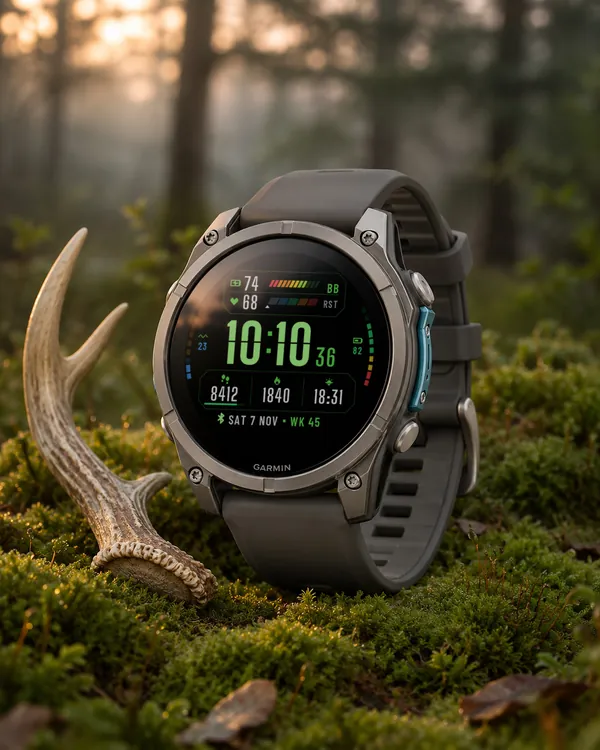 Tactical
Signal Ops
Tactical data panel with colour zone bars for Body Battery and heart rate
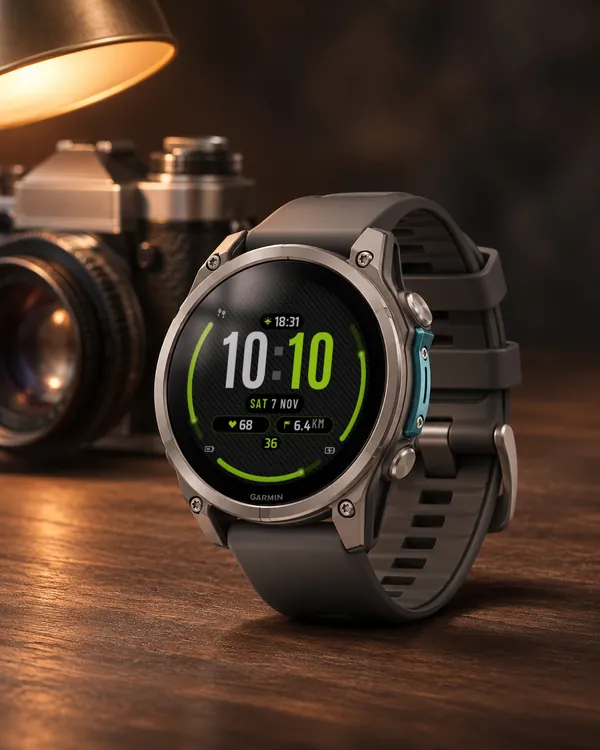 Carbon
 Arc
Carbon weave, huge digits and three glowing gauges
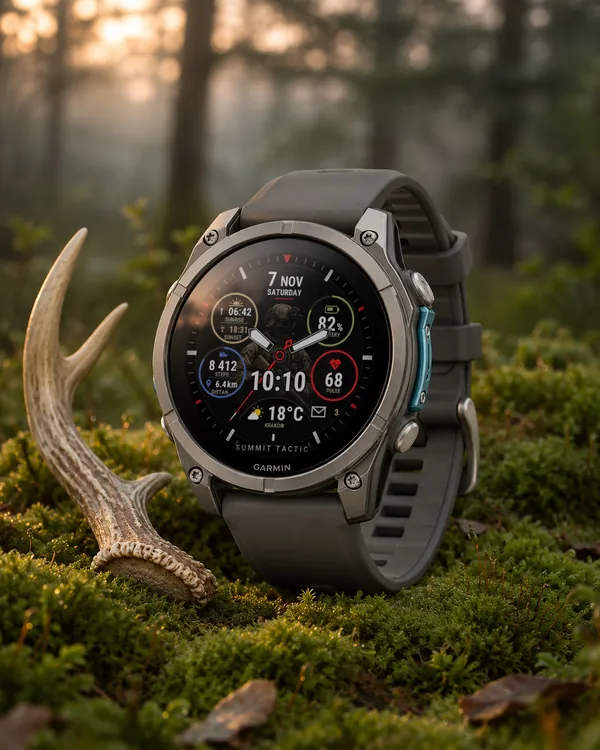 Tactical
Summit Tactic
Summit Rings in camo: a soldier in the middle, sand, olive and navy rings
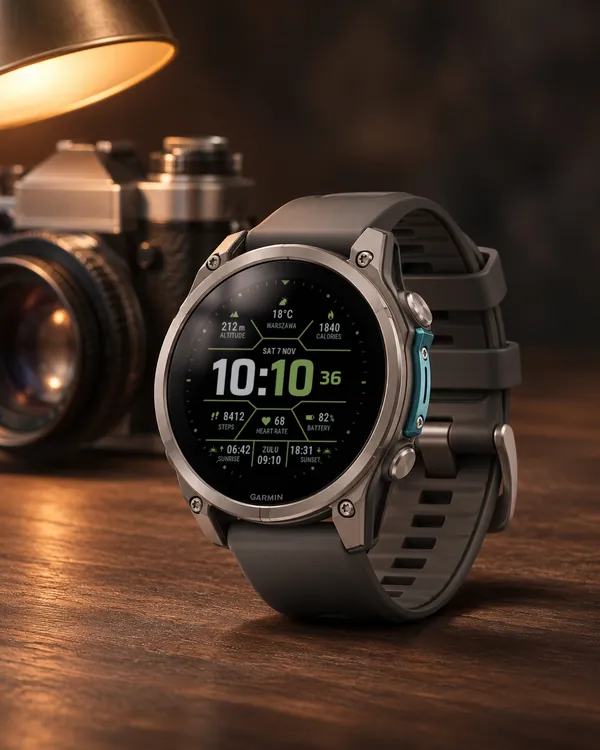 Tactical
Hex Tactical
Hexagon frames, a big time with accent minutes, weather, sunrise, sunset and ZULU time