Download and test free for 7 days
- Download the file yourself and install it on your watch with a cable. Test it free for 7 days.
- Like it? Buy a code once, yours forever. No subscription.
- Do not like it? Do nothing. The face simply stops working. Nobody takes any money from you.
How: enter your e-mail, click the link we send, download the file for your watch and copy it with a USB cable. The panel shows every step.
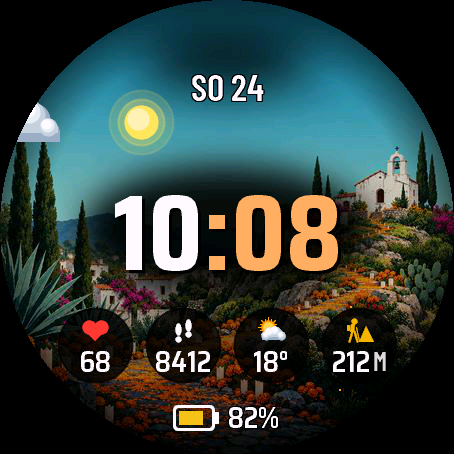
Marigold Night is a Day of the Dead watch face. Four painted scenes follow the real sky: dawn, day, dusk and a night street lit by candles and marigolds. Hour and minutes sit in one row: the hour in white, the minutes in your accent colour.
- Moving background while the screen is awake: twinkling stars, flickering candles, a butterfly, a bat, drifting petals, weather. The sun and moon cross the sky with the real time.
- You set how much moves: Off, Economy, Balanced, Intense, or your own level for each effect (stars, candles, creatures, petals, weather).
- Animation runs after you raise your wrist (about 12 seconds) or the whole time the screen is active. Longer means more battery.
- 4 scenes picked by time of day, or one fixed scene.
- 10 accent colours, picked on the watch with a live preview.
- 5 data fields to choose from. Heart rate, steps, battery, weather and more.
- Date in 13 languages, 12 or 24 hour time.
- Always-on mode: only the dimmed time on black, shifted every minute. No animation.
When Garmin has no data for a field, the face shows "--" instead of a made-up value. Weather needs a phone connection.
After 7 days without a code the face still shows the time, with default settings and a small UNLOCK DIALFORGE.DEV note.
Garmin does not give watch faces access to HRV status or Training Readiness, so no Connect IQ watch face can show them.
Settings: on the watch (hold MENU, then Watch face, then Customize) or in the Garmin Connect app on your phone.
From the maker
I am a student and I build Dialforge watch faces myself, after classes. I do not own every watch model, so if something looks wrong on yours, write to me at https://dialforge.dev/faces/marigoldnight/ and I will usually fix it within 24 hours. If you like the face, you can buy me a coffee: https://buycoffee.to/iwannaflysohigh
Marigold Night to tarcza na Święto Zmarłych. Cztery malowane sceny idą za prawdziwym niebem: świt, dzień, zmierzch i nocna uliczka oświetlona świecami i aksamitkami. Godzina i minuty stoją w jednym rzędzie: godzina na biało, minuty w kolorze akcentu.
- Ruchome tło, gdy ekran jest wybudzony: migoczące gwiazdy, drgające płomienie świec, motyl, nietoperz, płatki niesione wiatrem, pogoda. Słońce i księżyc wędrują po niebie razem z godziną.
- Sam ustawiasz, ile się rusza: Wyłączone, Oszczędny, Zrównoważony, Intensywny albo własny poziom dla każdego efektu (gwiazdy, świece, stworzenia, płatki, pogoda).
- Animacja działa po uniesieniu ręki (około 12 sekund) albo cały czas, gdy ekran jest aktywny. Im dłużej, tym szybciej schodzi bateria.
- 4 sceny wybierane wg pory dnia albo jedna stała.
- 10 kolorów akcentu, wybieranych na zegarku z podglądem na żywo.
- 5 pól danych do wyboru. Tętno, kroki, bateria, pogoda i inne.
- Data w 13 językach, godzina 12 lub 24 h.
- Tryb zawsze włączony: tylko przygaszona godzina na czarnym tle, przesuwana co minutę. Bez animacji.
Gdy Garmin nie ma danych dla pola, tarcza pokazuje "--" zamiast zmyślonej wartości. Pogoda wymaga połączenia z telefonem.
Po 7 dniach bez kodu tarcza dalej pokazuje czas, z ustawieniami domyślnymi i małym napisem UNLOCK DIALFORGE.DEV.
Garmin nie udostępnia tarczom statusu HRV ani gotowości treningowej, więc żadna tarcza Connect IQ ich nie pokaże.
Ustawienia: na zegarku (przytrzymaj MENU, potem Tarcza zegarka, potem Dostosuj) albo w aplikacji Garmin Connect w telefonie.
Od autora
Jestem studentem i robię tarcze Dialforge sam, po zajęciach. Nie mam każdego modelu zegarka, więc jeśli coś wygląda źle na Twoim, napisz na https://dialforge.dev/faces/marigoldnight/, zwykle poprawiam to w ciągu 24 godzin. Jeśli tarcza Ci się podoba, możesz postawić mi kawę: https://buycoffee.to/iwannaflysohigh
Funktioniert etwas nicht oder passt es nicht zu dir? Bitte hinterlasse keine negative Bewertung. Tippe stattdessen auf dieser Store-Seite auf "Entwickler kontaktieren". Ich repariere oder ändere es, und danach kannst du gut bewerten. Viele denken, eine Bewertung sei der Weg, mich zu erreichen, und schaden mir damit ungewollt. Du bist dir nicht sicher, ob du es willst, weil du etwas ändern würdest? Schreib mir auch dort, ich passe es an. Wenn es dir gefällt, gibt es im Einstellungsmenü einen QR-Code, über den du mir einen Kaffee spendieren kannst. Eine gute Bewertung hilft mir außerdem, im Store zu bleiben. Ich bin Student und mit dieser Arbeit finanziere ich mein Studium.
7 Tage kostenlos testen, danach einmalig 3,99 EUR für den Freischaltcode auf dialforge.dev. Kein Abo.
Marigold Night ist ein Watchface zum Día de los Muertos. Vier gemalte Szenen folgen dem echten Himmel: Morgendämmerung, Tag, Abenddämmerung und eine Nachtstraße im Licht von Kerzen und Studentenblumen. Stunde und Minuten stehen in einer Reihe: die Stunde in Weiß, die Minuten in deiner Akzentfarbe.
- Bewegter Hintergrund, solange der Bildschirm aktiv ist: funkelnde Sterne, flackernde Kerzen, ein Schmetterling, eine Fledermaus, treibende Blütenblätter, Wetter. Sonne und Mond ziehen mit der echten Uhrzeit über den Himmel.
- Du bestimmst, wie viel sich bewegt: Aus, Sparsam, Ausgewogen, Intensiv oder ein eigener Wert für jeden Effekt (Sterne, Kerzen, Tiere, Blütenblätter, Wetter).
- Die Animation läuft nach dem Anheben des Handgelenks (etwa 12 Sekunden) oder die ganze Zeit, solange der Bildschirm aktiv ist. Länger bedeutet mehr Akkuverbrauch.
- 4 Szenen nach Tageszeit oder eine feste Szene.
- 10 Akzentfarben, auf der Uhr mit Live-Vorschau auswählbar.
- 5 Datenfelder zur Auswahl. Herzfrequenz, Schritte, Akku, Wetter und mehr.
- Datum in 13 Sprachen, 12- oder 24-Stunden-Anzeige.
- Always-on-Modus: nur die gedimmte Uhrzeit auf Schwarz, jede Minute verschoben. Keine Animation.
Wenn Garmin für ein Feld keine Daten hat, zeigt das Watchface "--" statt eines erfundenen Werts. Für das Wetter ist eine Verbindung zum Handy nötig.
Nach 7 Tagen ohne Code zeigt das Watchface weiter die Uhrzeit an, mit Standardeinstellungen und einem kleinen Hinweis UNLOCK DIALFORGE.DEV.
Garmin gibt Watchfaces keinen Zugriff auf HRV-Status oder Training Readiness, deshalb kann sie kein Connect IQ Watchface anzeigen.
Einstellungen: auf der Uhr (MENU gedrückt halten, dann Watchface, dann Anpassen) oder in der Garmin Connect App auf dem Handy.
Vom entwickler
Ich bin Student und baue die Dialforge-Watchfaces selbst, nach den Vorlesungen. Ich besitze nicht jedes Uhrenmodell. Wenn bei dir etwas falsch aussieht, schreib mir unter https://dialforge.dev/faces/marigoldnight/, ich behebe es meistens innerhalb von 24 Stunden. Wenn dir das Watchface gefällt, kannst du mir einen Kaffee spendieren: https://buycoffee.to/iwannaflysohigh
Quelque chose ne marche pas, ou ne vous convient pas ? Merci de ne pas laisser d'avis négatif. Appuyez plutôt sur "Contacter le développeur" sur cette page du store. Je corrigerai ou modifierai, et vous pourrez ensuite noter correctement. Beaucoup de gens pensent qu'un avis est un moyen de me joindre, et ça me fait du tort sans le vouloir. Vous hésitez parce que vous changeriez quelque chose ? Écrivez-moi là aussi, j'adapterai. Si elle vous plaît, il y a un QR code dans le menu des réglages pour m'offrir un café. Une bonne note m'aide aussi à rester dans le store. Je suis étudiant et ce travail finance mes études.
Essai gratuit de 7 jours, puis un code de déverrouillage unique à 3,99 EUR sur dialforge.dev. Sans abonnement.
Marigold Night est un cadran sur le thème du Jour des Morts. Quatre scènes peintes suivent le vrai ciel : l'aube, le jour, le crépuscule et une rue de nuit éclairée par des bougies et des soucis. L'heure et les minutes sont sur une seule ligne : l'heure en blanc, les minutes dans votre couleur d'accent.
- Arrière-plan animé quand l'écran est allumé : étoiles qui scintillent, bougies qui vacillent, un papillon, une chauve-souris, des pétales qui dérivent, la météo. Le soleil et la lune traversent le ciel avec l'heure réelle.
- Vous choisissez ce qui bouge : Off, Économie, Équilibré, Intense, ou votre propre niveau pour chaque effet (étoiles, bougies, créatures, pétales, météo).
- L'animation tourne après un geste du poignet (environ 12 secondes) ou pendant tout le temps où l'écran est actif. Plus c'est long, plus la batterie en pâtit.
- 4 scènes selon l'heure de la journée, ou une scène fixe.
- 10 couleurs d'accent, choisies sur la montre avec aperçu en direct.
- 5 champs de données au choix. Fréquence cardiaque, pas, batterie, météo et plus encore.
- Date en 13 langues, heure au format 12 ou 24 heures.
- Mode Always-on : seulement l'heure atténuée sur fond noir, décalée chaque minute. Sans animation.
Quand Garmin n'a aucune donnée pour un champ, le cadran affiche "--" au lieu d'une valeur inventée. La météo nécessite une connexion au téléphone.
Après 7 jours sans code, le cadran affiche toujours l'heure, avec les réglages par défaut et une petite mention UNLOCK DIALFORGE.DEV.
Garmin ne donne pas aux cadrans l'accès au statut HRV ni à Training Readiness, donc aucun cadran Connect IQ ne peut les afficher.
Réglages : sur la montre (maintenez MENU, puis Cadran, puis Personnaliser) ou dans l'application Garmin Connect sur votre téléphone.
De la part du créateur
Je suis étudiant et je fabrique moi-même les cadrans Dialforge, après les cours. Je ne possède pas tous les modèles de montres, alors si quelque chose cloche sur la vôtre, écrivez-moi à https://dialforge.dev/faces/marigoldnight/ et je corrige en général sous 24 heures. Si le cadran vous plaît, vous pouvez m'offrir un café : https://buycoffee.to/iwannaflysohigh
Marigold Night es una esfera del Día de Muertos. Cuatro escenas pintadas siguen el cielo real: amanecer, día, atardecer y una calle nocturna iluminada con velas y cempasúchil. La hora y los minutos van en una sola fila: la hora en blanco y los minutos en tu color de acento.
- Fondo en movimiento mientras la pantalla está activa: estrellas que titilan, velas que parpadean, una mariposa, un murciélago, pétalos a la deriva, el tiempo. El sol y la luna cruzan el cielo con la hora real.
- Tú eliges cuánto se mueve: Desactivado, Económico, Equilibrado, Intenso, o tu propio nivel para cada efecto (estrellas, velas, criaturas, pétalos, tiempo).
- La animación funciona tras levantar la muñeca (unos 12 segundos) o todo el rato que la pantalla está activa. Más tiempo significa más batería.
- 4 escenas según la hora del día, o una escena fija.
- 10 colores de acento, elegidos en el reloj con vista previa en directo.
- 5 campos de datos a elegir. Frecuencia cardíaca, pasos, batería, tiempo y más.
- Fecha en 13 idiomas, hora de 12 o 24 horas.
- Modo siempre activo: solo la hora atenuada sobre negro, desplazada cada minuto. Sin animación.
Cuando Garmin no tiene datos para un campo, la esfera muestra "--" en lugar de un valor inventado. El tiempo necesita conexión con el teléfono.
Pasados 7 días sin código, la esfera sigue mostrando la hora, con los ajustes por defecto y una pequeña nota UNLOCK DIALFORGE.DEV.
Garmin no da a las esferas acceso al estado de HRV ni a Training Readiness, así que ninguna esfera de Connect IQ puede mostrarlos.
Ajustes: en el reloj (mantén MENU, luego Esfera de reloj, luego Personalizar) o en la app Garmin Connect del teléfono.
De parte del creador
Soy estudiante y hago yo mismo las esferas de Dialforge, después de clase. No tengo todos los modelos de reloj, así que si algo se ve mal en el tuyo, escríbeme en https://dialforge.dev/faces/marigoldnight/ y normalmente lo arreglo en 24 horas. Si te gusta la esfera, puedes invitarme a un café: https://buycoffee.to/iwannaflysohigh
Werkt er iets niet, of past het niet bij jou? Laat alsjeblieft geen negatieve review achter. Druk op deze winkelpagina op "Contact opnemen met ontwikkelaar". Ik los het op of pas het aan, en daarna kun je het goed beoordelen. Veel mensen denken dat een review de manier is om mij te bereiken, en dat doet me per ongeluk pijn. Twijfel je, omdat je iets zou veranderen? Schrijf me daar ook, ik pas het aan. Als je het mooi vindt, staat er in het instellingenmenu een QR-code waarmee je een koffie voor me kunt kopen. Een goede beoordeling helpt me ook om in de winkel te blijven. Ik ben student en met dit werk betaal ik mijn studie.
7 dagen gratis proberen, daarna eenmalig 3,99 EUR voor de ontgrendelcode op dialforge.dev. Geen abonnement.
Marigold Night is een wijzerplaat voor Dia de los Muertos. Vier geschilderde taferelen volgen de echte hemel: dageraad, dag, schemering en een nachtelijke straat verlicht door kaarsen en goudsbloemen. Uur en minuten staan op één rij: het uur in wit, de minuten in jouw accentkleur.
- Bewegende achtergrond zolang het scherm actief is: twinkelende sterren, flikkerende kaarsen, een vlinder, een vleermuis, zwevende bloemblaadjes, weer. Zon en maan trekken met de echte tijd over de hemel.
- Jij bepaalt hoeveel er beweegt: Uit, Zuinig, Gebalanceerd, Intens, of je eigen niveau per effect (sterren, kaarsen, dieren, bloemblaadjes, weer).
- De animatie loopt nadat je je pols optilt (ongeveer 12 seconden) of de hele tijd dat het scherm actief is. Langer betekent meer batterijverbruik.
- 4 taferelen op basis van het tijdstip, of één vast tafereel.
- 10 accentkleuren, te kiezen op het horloge met live voorbeeld.
- 5 gegevensvelden om uit te kiezen. Hartslag, stappen, batterij, weer en meer.
- Datum in 13 talen, 12- of 24-uursweergave.
- Always-on-modus: alleen de gedimde tijd op zwart, elke minuut verschoven. Geen animatie.
Als Garmin geen gegevens heeft voor een veld, toont de wijzerplaat "--" in plaats van een verzonnen waarde. Voor het weer is een verbinding met je telefoon nodig.
Na 7 dagen zonder code toont de wijzerplaat nog steeds de tijd, met standaardinstellingen en een klein bericht UNLOCK DIALFORGE.DEV.
Garmin geeft wijzerplaten geen toegang tot HRV-status of Training Readiness, dus geen enkele Connect IQ-wijzerplaat kan ze tonen.
Instellingen: op het horloge (houd MENU ingedrukt, dan Wijzerplaat, dan Aanpassen) of in de Garmin Connect-app op je telefoon.
Van de maker
Ik ben student en bouw de Dialforge-wijzerplaten zelf, na de colleges. Ik heb niet elk horlogemodel, dus als er op het jouwe iets raars uitziet, schrijf me dan via https://dialforge.dev/faces/marigoldnight/. Meestal los ik het binnen 24 uur op. Als je de wijzerplaat mooi vindt, kun je een koffie voor me kopen: https://buycoffee.to/iwannaflysohigh
うまく動かない、または自分に合わない場合は、低評価のレビューを書かないでください。代わりに、このストアページの「開発者に連絡」を押してください。直したり変更したりしますので、そのあとで評価していただけたら嬉しいです。レビューが私への連絡手段だと思っている方が多く、意図せず私が困ってしまいます。何か変えたいから迷っている、という場合もそこに書いてください。調整します。気に入っていただけたら、設定メニューのQRコードからコーヒーをごちそうしてもらえます。高評価はストアに残るための助けにもなります。私は学生で、この活動が学費になっています。
7日間の無料体験のあと、dialforge.devで一度きりの解除コード 3.99 EUR。サブスクリプションはありません。
Marigold Nightは死者の日をテーマにしたウォッチフェイスです。夜明け、昼、夕暮れ、そしてろうそくとマリーゴールドが灯る夜の通り。四つの描き込まれた情景が本物の空に合わせて変わります。時と分は一行に並び、時は白、分はあなたのアクセントカラーです。
- 画面が点灯している間は背景が動きます。またたく星、ゆれるろうそく、蝶、コウモリ、舞う花びら、天気。太陽と月は実際の時刻に合わせて空を横切ります。
- 動きの量は自分で決められます。オフ、節約、バランス、強め、または効果ごと(星、ろうそく、生き物、花びら、天気)に自分好みのレベル。
- アニメーションは手首を上げたあと(約12秒)、または画面がアクティブな間ずっと動きます。長いほどバッテリーを使います。
- 時間帯で切り替わる4 つの情景、または一つの固定シーン。
- アクセントカラーは10色。時計上でライブプレビューを見ながら選べます。
- 選べるデータフィールドは5つ。心拍数、歩数、バッテリー、天気など。
- 日付は13言語、12時間または24時間表示。
- 常時表示モード:黒地に暗くした時刻だけを、毎分位置をずらして表示します。アニメーションなし。
Garminからデータが取れないフィールドには、作り物の値ではなく「--」を表示します。天気にはスマートフォンとの接続が必要です。
コードなしで7日が過ぎても、時刻は表示されます。設定は初期値のままで、小さく UNLOCK DIALFORGE.DEV と出ます。
GarminはウォッチフェイスにHRVステータスやTraining Readinessへのアクセスを許可していないため、Connect IQのウォッチフェイスでは表示できません。
設定:時計本体(MENUを長押し、ウォッチフェイス、カスタマイズの順)、またはスマートフォンのGarmin Connectアプリから。
作者より
私は学生で、授業のあとにDialforgeのウォッチフェイスを自分で作っています。すべての時計を持っているわけではないので、お使いの機種で表示がおかしければ https://dialforge.dev/faces/marigoldnight/ まで連絡してください。たいてい24時間以内に直します。気に入ったらコーヒーをごちそうしてください:https://buycoffee.to/iwannaflysohigh
Marigold Night è un quadrante dedicato al Giorno dei Morti. Quattro scene dipinte seguono il cielo reale: alba, giorno, tramonto e una strada di notte illuminata da candele e tagete. Ore e minuti stanno su una sola riga: l'ora in bianco, i minuti nel colore d'accento.
- Sfondo in movimento mentre lo schermo è attivo: stelle che brillano, candele che tremolano, una farfalla, un pipistrello, petali che volano, il meteo. Sole e luna attraversano il cielo seguendo l'ora reale.
- Scegli tu quanto si muove: Off, Economia, Bilanciato, Intenso, oppure un livello tuo per ogni effetto (stelle, candele, creature, petali, meteo).
- L'animazione parte quando alzi il polso (circa 12 secondi) o per tutto il tempo in cui lo schermo è attivo. Più a lungo significa più batteria.
- 4 scene scelte in base all'ora del giorno, oppure una scena fissa.
- 10 colori d'accento, scelti sull'orologio con anteprima dal vivo.
- 5 campi dati tra cui scegliere. Frequenza cardiaca, passi, batteria, meteo e altro.
- Data in 13 lingue, ora a 12 o 24 ore.
- Modalità sempre attiva: solo l'ora attenuata su nero, spostata ogni minuto. Nessuna animazione.
Quando Garmin non ha dati per un campo, il quadrante mostra "--" invece di un valore inventato. Il meteo richiede la connessione al telefono.
Dopo 7 giorni senza codice il quadrante mostra ancora l'ora, con le impostazioni predefinite e una piccola nota UNLOCK DIALFORGE.DEV.
Garmin non dà ai quadranti accesso allo stato HRV né a Training Readiness, quindi nessun quadrante Connect IQ può mostrarli.
Impostazioni: sull'orologio (tieni premuto MENU, poi Quadrante, poi Personalizza) oppure nell'app Garmin Connect sul telefono.
Da chi lo fa
Sono uno studente e costruisco da solo i quadranti Dialforge, dopo le lezioni. Non ho tutti i modelli di orologio, quindi se sul tuo qualcosa non torna, scrivimi su https://dialforge.dev/faces/marigoldnight/ e di solito sistemo entro 24 ore. Se il quadrante ti piace, puoi offrirmi un caffè: https://buycoffee.to/iwannaflysohigh
有什么地方不好用,或者不适合你?请不要留下差评,而是在这个商店页面点击"联系开发者"。我会修复或修改,之后你就可以放心给好评了。很多人以为评论是联系我的方式,结果无意中伤到了我。想要但又想改点什么,拿不准?也请在那里告诉我,我来调整。如果你喜欢,设置菜单里有一个二维码,可以请我喝杯咖啡。好评也能帮我留在商店里。我是学生,这份工作是我的学费来源。
免费试用7天,之后在 dialforge.dev 一次性支付 3.99 EUR 获取解锁码。无需订阅。
Marigold Night 是一款亡灵节表盘。四幅手绘场景跟随真实天空变化:黎明、白天、黄昏,以及被蜡烛和万寿菊照亮的夜晚街道。小时和分钟排成一行:小时为白色,分钟为你选的强调色。
- 屏幕亮起时背景会动:闪烁的星星、摇曳的烛火、一只蝴蝶、一只蝙蝠、飘落的花瓣、天气。太阳和月亮随真实时间划过天空。
- 动多动少由你决定:关闭、节能、均衡、强烈,或为每种效果(星星、烛火、小动物、花瓣、天气)单独设定。
- 动画在你抬腕后运行(约12秒),或在屏幕亮起期间一直运行。时间越长越耗电。
- 4个场景按一天中的时间切换,也可以固定一个场景。
- 10种强调色,在手表上选择并实时预览。
- 5个数据栏可选。心率、步数、电量、天气等。
- 日期支持13种语言,12或24小时制。
- 息屏常亮模式:黑底上只显示调暗的时间,每分钟移动一次位置。没有动画。
当 Garmin 没有某个栏位的数据时,表盘会显示"--",而不是编造一个数值。天气需要连接手机。
7天内未输入解锁码,表盘仍会显示时间,使用默认设置,并带有一条小小的 UNLOCK DIALFORGE.DEV 提示。
Garmin 不允许表盘读取 HRV 状态或 Training Readiness,所以任何 Connect IQ 表盘都无法显示它们。
设置方式:在手表上(按住 MENU,然后选择表盘,再选择自定义),或在手机上的 Garmin Connect 应用中。
来自开发者
我是学生,Dialforge 的表盘都是我下课后自己做的。我没有所有型号的手表,所以如果在你的手表上看起来不对,请通过 https://dialforge.dev/faces/marigoldnight/ 联系我,我通常会在24小时内修好。如果你喜欢这款表盘,可以请我喝杯咖啡:https://buycoffee.to/iwannaflysohigh
Что-то не работает или не подходит? Пожалуйста, не оставляйте плохой отзыв. Лучше нажмите "Связаться с разработчиком" на этой странице магазина. Я исправлю или изменю, и после этого вы сможете поставить нормальную оценку. Многие думают, что отзыв это способ написать мне, и это невольно мне вредит. Не уверены, нужен ли он вам, потому что вы бы что-то поменяли? Пишите туда же, я подстрою. Если нравится, в меню настроек есть QR-код, по которому можно угостить меня кофе. Хорошая оценка также помогает мне остаться в магазине. Я студент, и эта работа оплачивает мою учёбу.
7 дней бесплатно, затем разовый код разблокировки за 3,99 EUR на dialforge.dev. Без подписки.
Marigold Night это циферблат в духе Дня мёртвых. Четыре нарисованные сцены следуют за настоящим небом: рассвет, день, закат и ночная улица, освещённая свечами и бархатцами. Часы и минуты стоят в одной строке: часы белым, минуты вашим акцентным цветом.
- Движущийся фон, пока экран включён: мерцающие звёзды, дрожащие огоньки свечей, бабочка, летучая мышь, плывущие лепестки, погода. Солнце и луна пересекают небо вместе с реальным временем.
- Вы сами решаете, сколько движения: Выкл, Экономия, Баланс, Интенсивно, или свой уровень для каждого эффекта (звёзды, свечи, существа, лепестки, погода).
- Анимация идёт после подъёма запястья (около 12 секунд) или всё время, пока экран активен. Чем дольше, тем быстрее садится батарея.
- 4 сцены по времени суток или одна фиксированная сцена.
- 10 акцентных цветов, выбираются на часах с живым предпросмотром.
- 5 полей данных на выбор. Пульс, шаги, батарея, погода и другое.
- Дата на 13 языках, 12- или 24-часовой формат времени.
- Режим Always-on: только приглушённое время на чёрном фоне, сдвигается каждую минуту. Без анимации.
Если у Garmin нет данных для поля, циферблат показывает "--", а не выдуманное значение. Для погоды нужно подключение к телефону.
Через 7 дней без кода циферблат всё равно показывает время, с настройками по умолчанию и небольшой надписью UNLOCK DIALFORGE.DEV.
Garmin не даёт циферблатам доступ к статусу HRV и Training Readiness, поэтому ни один циферблат Connect IQ не может их показывать.
Настройки: на часах (удерживайте MENU, затем Циферблат, затем Настроить) или в приложении Garmin Connect на телефоне.
От автора
Я студент и сам делаю циферблаты Dialforge после занятий. У меня нет всех моделей часов, поэтому если на вашей что-то выглядит не так, напишите мне на https://dialforge.dev/faces/marigoldnight/, и я обычно исправляю за 24 часа. Если циферблат нравится, можете угостить меня кофе: https://buycoffee.to/iwannaflysohigh
Marigold Night é um mostrador do Dia dos Mortos. Quatro cenas pintadas acompanham o céu de verdade: amanhecer, dia, entardecer e uma rua à noite iluminada por velas e cravos-de-defunto. Hora e minutos ficam na mesma linha: a hora em branco, os minutos na sua cor de destaque.
- Fundo em movimento enquanto a tela está ativa: estrelas cintilando, velas tremulando, uma borboleta, um morcego, pétalas à deriva, o clima. O sol e a lua cruzam o céu conforme a hora real.
- Você decide o quanto se mexe: Desligado, Econômico, Equilibrado, Intenso, ou seu próprio nível para cada efeito (estrelas, velas, criaturas, pétalas, clima).
- A animação roda depois que você levanta o pulso (cerca de 12 segundos) ou o tempo todo em que a tela está ativa. Quanto mais tempo, mais bateria.
- 4 cenas escolhidas pela hora do dia, ou uma cena fixa.
- 10 cores de destaque, escolhidas no relógio com pré-visualização ao vivo.
- 5 campos de dados para escolher. Frequência cardíaca, passos, bateria, clima e mais.
- Data em 13 idiomas, hora de 12 ou 24 horas.
- Modo sempre ativo: só a hora esmaecida sobre preto, deslocada a cada minuto. Sem animação.
Quando a Garmin não tem dados para um campo, o mostrador exibe "--" em vez de um valor inventado. O clima precisa de conexão com o celular.
Depois de 7 dias sem código, o mostrador ainda mostra a hora, com as configurações padrão e um pequeno aviso UNLOCK DIALFORGE.DEV.
A Garmin não dá aos mostradores acesso ao status de HRV nem ao Training Readiness, então nenhum mostrador do Connect IQ consegue exibi-los.
Configurações: no relógio (segure MENU, depois Mostrador, depois Personalizar) ou no app Garmin Connect no celular.
De quem fez
Sou estudante e faço os mostradores Dialforge sozinho, depois das aulas. Não tenho todos os modelos de relógio, então se algo estiver estranho no seu, escreva pra mim em https://dialforge.dev/faces/marigoldnight/ e normalmente eu resolvo em até 24 horas. Se você gostar do mostrador, pode me pagar um café: https://buycoffee.to/iwannaflysohigh
Něco nefunguje, nebo ti to nesedí? Prosím, nepiš negativní recenzi. Na této stránce obchodu místo toho stiskni "Kontaktovat vývojáře". Opravím to nebo upravím, a pak můžeš hodnotit dobře. Spousta lidí si myslí, že recenze je způsob, jak se mnou mluvit, a nechtěně mi tím ublíží. Nejsi si jistý, jestli to chceš, protože bys něco změnil? Napiš mi i tam, upravím to. Pokud se ti to líbí, v nabídce nastavení je QR kód, přes který mi můžeš koupit kávu. Dobré hodnocení mi také pomáhá zůstat v obchodě. Jsem student a tahle práce mi platí studium.
7 dní zdarma na zkoušku, potom jednorázově 3,99 EUR za odemykací kód na dialforge.dev. Žádné předplatné.
Marigold Night je ciferník ke Dni mrtvých. Čtyři malované scény sledují skutečnou oblohu: svítání, den, soumrak a noční ulici osvětlenou svíčkami a aksamitníky. Hodiny a minuty jsou v jedné řadě: hodiny bíle, minuty v tvé zvýrazňovací barvě.
- Pohyblivé pozadí, dokud je displej vzhůru: blikající hvězdy, mihotající se svíčky, motýl, netopýr, unášené okvětní lístky, počasí. Slunce a měsíc putují po obloze podle skutečného času.
- Ty rozhoduješ, kolik se hýbe: Vypnuto, Úsporně, Vyváženě, Intenzivně, nebo vlastní úroveň pro každý efekt (hvězdy, svíčky, tvorové, okvětní lístky, počasí).
- Animace běží po zvednutí zápěstí (asi 12 sekund) nebo po celou dobu, kdy je displej aktivní. Delší znamená větší spotřebu baterie.
- 4 scény podle denní doby, nebo jedna pevná scéna.
- 10 zvýrazňovacích barev, vybíraných na hodinkách s živým náhledem.
- 5 datových polí k výběru. Tepová frekvence, kroky, baterie, počasí a další.
- Datum v 13 jazycích, 12hodinový nebo 24hodinový formát.
- Režim Always-on: jen ztlumený čas na černé, posunutý každou minutu. Bez animace.
Když Garmin pro některé pole nemá data, ciferník zobrazí "--" místo vymyšlené hodnoty. Počasí potřebuje připojení k telefonu.
Po 7 dnech bez kódu ciferník stále ukazuje čas, s výchozím nastavením a malou poznámkou UNLOCK DIALFORGE.DEV.
Garmin nedává ciferníkům přístup ke stavu HRV ani k Training Readiness, takže je žádný ciferník Connect IQ zobrazit nemůže.
Nastavení: na hodinkách (podrž MENU, pak Ciferník, pak Přizpůsobit) nebo v aplikaci Garmin Connect v telefonu.
Od tvůrce
Jsem student a ciferníky Dialforge dělám sám, po škole. Nemám každý model hodinek, takže pokud něco na tvých vypadá špatně, napiš mi přes https://dialforge.dev/faces/marigoldnight/ a obvykle to opravím do 24 hodin. Pokud se ti ciferník líbí, můžeš mi koupit kávu: https://buycoffee.to/iwannaflysohigh
Algo não funciona, ou não é para si? Por favor, não deixe uma avaliação negativa. Prima antes "Contactar o programador" nesta página da loja. Eu corrijo ou altero, e depois pode avaliar bem. Muita gente pensa que uma avaliação é uma forma de falar comigo, e isso prejudica-me sem querer. Não tem a certeza se quer porque mudaria alguma coisa? Escreva também aí, eu ajusto. Se gostar, há um código QR no menu de definições para me pagar um café. Uma boa avaliação também ajuda-me a ficar na loja. Sou estudante e este trabalho paga os meus estudos.
7 dias grátis para experimentar, depois um código de desbloqueio único de 3,99 EUR em dialforge.dev. Sem subscrição.
Marigold Night é um mostrador sobre o Dia dos Mortos. Quatro cenas pintadas acompanham o céu real: madrugada, dia, entardecer e uma rua à noite iluminada por velas e cravos-de-defunto. A hora e os minutos ficam na mesma linha: a hora em branco, os minutos na sua cor de destaque.
- Fundo em movimento enquanto o ecrã está ligado: estrelas que cintilam, velas que tremeluzem, uma borboleta, um morcego, pétalas à deriva, meteorologia. O sol e a lua atravessam o céu com a hora real.
- Escolha quanto se mexe: Desligado, Economia, Equilibrado, Intenso, ou o seu próprio nível para cada efeito (estrelas, velas, criaturas, pétalas, meteorologia).
- A animação corre depois de levantar o pulso (cerca de 12 segundos) ou durante todo o tempo em que o ecrã está ativo. Quanto mais tempo, mais bateria gasta.
- 4 cenas escolhidas pela hora do dia, ou uma cena fixa.
- 10 cores de destaque, escolhidas no relógio com pré-visualização em direto.
- 5 campos de dados à escolha. Frequência cardíaca, passos, bateria, meteorologia e mais.
- Data em 13 idiomas, hora de 12 ou 24 horas.
- Modo sempre ligado: apenas a hora esbatida sobre preto, deslocada a cada minuto. Sem animação.
Quando a Garmin não tem dados para um campo, o mostrador mostra "--" em vez de um valor inventado. A meteorologia precisa de ligação ao telemóvel.
Passados 7 dias sem código, o mostrador continua a mostrar a hora, com as definições predefinidas e uma pequena nota UNLOCK DIALFORGE.DEV.
A Garmin não dá aos mostradores acesso ao estado de HRV nem ao Training Readiness, por isso nenhum mostrador Connect IQ os pode apresentar.
Definições: no relógio (mantenha MENU premido, depois Mostrador, depois Personalizar) ou na aplicação Garmin Connect no telemóvel.
Do criador
Sou estudante e faço eu próprio os mostradores Dialforge, depois das aulas. Não tenho todos os modelos de relógio, por isso se algo parecer errado no seu, escreva-me para https://dialforge.dev/faces/marigoldnight/ e normalmente corrijo em 24 horas. Se gostar do mostrador, pode pagar-me um café: https://buycoffee.to/iwannaflysohigh
Marigold Night은 죽은 자의 날을 담은 워치 페이스입니다. 손으로 그린 네 가지 장면이 실제 하늘을 따라갑니다. 새벽, 낮, 해질녘, 그리고 촛불과 메리골드로 밝힌 밤거리입니다. 시와 분은 한 줄에 놓입니다. 시는 흰색, 분은 강조 색입니다.
- 화면이 켜져 있는 동안 움직이는 배경: 반짝이는 별, 일렁이는 촛불, 나비, 박쥐, 흩날리는 꽃잎, 날씨. 해와 달은 실제 시간에 맞춰 하늘을 가로지릅니다.
- 움직임의 정도는 직접 정합니다: 끔, 절약, 균형, 강함, 또는 각 효과(별, 촛불, 생물, 꽃잎, 날씨)별로 직접 정한 단계.
- 애니메이션은 손목을 든 뒤 (약 12초) 또는 화면이 켜져 있는 내내 작동합니다. 길수록 배터리를 더 씁니다.
- 시간대에 따라 고르는 4가지 장면, 또는 고정 장면 하나.
- 시계에서 실시간 미리보기로 고르는 10가지 강조 색.
- 선택할 수 있는 5개의 데이터 필드. 심박수, 걸음 수, 배터리, 날씨 등.
- 13개 언어의 날짜, 12시간 또는 24시간 표시.
- 상시 표시 모드: 검은 배경에 흐린 시간만 표시하며 매분 위치가 바뀝니다. 애니메이션 없음.
Garmin에 해당 필드의 데이터가 없으면 지어낸 값 대신 "--"를 표시합니다. 날씨는 휴대폰 연결이 필요합니다.
코드 없이 7일이 지나도 시간은 계속 표시되며, 기본 설정과 작은 UNLOCK DIALFORGE.DEV 안내가 함께 나타납니다.
Garmin은 워치 페이스에 HRV 상태나 Training Readiness 접근을 허용하지 않으므로, 어떤 Connect IQ 워치 페이스도 이를 표시할 수 없습니다.
설정: 시계에서 (MENU를 길게 누르고, 워치 페이스, 사용자 설정 순서) 또는 휴대폰의 Garmin Connect 앱에서 하세요.
만든 사람의 한마디
저는 학생이고, 수업이 끝난 뒤에 Dialforge 워치 페이스를 직접 만들고 있습니다. 모든 시계 모델을 갖고 있지는 않아서, 사용 중인 모델에서 이상하게 보이면 https://dialforge.dev/faces/marigoldnight/로 알려 주세요. 보통 24시간 안에 고칩니다. 워치 페이스가 마음에 드신다면 커피 한 잔 사 주셔도 좋아요: https://buycoffee.to/iwannaflysohigh
Fungerar något inte, eller passar det inte dig? Lämna gärna ingen negativ recension. Tryck i stället på "Kontakta utvecklaren" på den här butikssidan. Jag fixar eller ändrar det, och sedan kan du ge ett bra betyg. Många tror att en recension är sättet att nå mig, och råkar skada mig. Osäker på om du vill ha den för att du skulle ändra något? Skriv till mig där också, jag justerar. Om du gillar den finns det en QR-kod i inställningsmenyn där du kan bjuda mig på en kaffe. Ett bra betyg hjälper mig också att stanna kvar i butiken. Jag är student och det här arbetet betalar mina studier.
7 dagars gratis provperiod, sedan en engångsbetalning på 3,99 EUR för upplåsningskoden på dialforge.dev. Ingen prenumeration.
Marigold Night är en urtavla för De dödas dag. Fyra målade scener följer den verkliga himlen: gryning, dag, skymning och en nattgata upplyst av ljus och tagetes. Timme och minuter står på en rad: timmen i vitt, minuterna i din accentfärg.
- Rörlig bakgrund medan skärmen är vaken: blinkande stjärnor, fladdrande ljus, en fjäril, en fladdermus, drivande kronblad, väder. Solen och månen vandrar över himlen med den verkliga tiden.
- Du bestämmer hur mycket som rör sig: Av, Sparsam, Balanserad, Intensiv, eller din egen nivå för varje effekt (stjärnor, ljus, varelser, kronblad, väder).
- Animationen körs när du lyfter handleden (cirka 12 sekunder) eller hela tiden medan skärmen är aktiv. Längre betyder mer batteriförbrukning.
- 4 scener som väljs efter tid på dygnet, eller en fast scen.
- 10 accentfärger, väljs på klockan med liveförhandsvisning.
- 5 datafält att välja bland. Puls, steg, batteri, väder och mer.
- Datum på 13 språk, 12- eller 24-timmarsvisning.
- Always-on-läge: bara den dämpade tiden på svart, flyttad varje minut. Ingen animation.
När Garmin saknar data för ett fält visar urtavlan "--" i stället för ett påhittat värde. Vädret kräver anslutning till telefonen.
Efter 7 dagar utan kod visar urtavlan fortfarande tiden, med standardinställningar och en liten notering UNLOCK DIALFORGE.DEV.
Garmin ger inte urtavlor åtkomst till HRV-status eller Training Readiness, så ingen Connect IQ-urtavla kan visa dem.
Inställningar: på klockan (håll in MENU, sedan Urtavla, sedan Anpassa) eller i appen Garmin Connect på telefonen.
Från skaparen
Jag är student och bygger Dialforge-urtavlorna själv, efter lektionerna. Jag äger inte alla klockmodeller, så om något ser fel ut på din, skriv till mig via https://dialforge.dev/faces/marigoldnight/ så fixar jag det oftast inom 24 timmar. Om du gillar urtavlan kan du bjuda mig på en kaffe: https://buycoffee.to/iwannaflysohigh
Virker noget ikke, eller passer det ikke til dig? Lad være med at give en dårlig anmeldelse. Tryk i stedet på "Kontakt udvikler" på denne butikside. Jeg retter eller ændrer det, og bagefter kan du give en god bedømmelse. Mange tror, at en anmeldelse er en måde at nå mig på, og det skader mig ved et uheld. Er du i tvivl, fordi du ville ændre noget? Skriv også dér, så tilpasser jeg det. Hvis du kan lide den, er der en QR-kode i indstillingsmenuen, hvor du kan give mig en kaffe. En god bedømmelse hjælper mig også med at blive i butikken. Jeg er studerende, og arbejdet her betaler for min uddannelse.
7 dages gratis prøve, derefter en engangskode til oplåsning på 3,99 EUR på dialforge.dev. Intet abonnement.
Marigold Night er en urskive om De Dødes Dag. Fire malede scener følger den rigtige himmel: daggry, dag, skumring og en natgade oplyst af stearinlys og morgenfruer. Timer og minutter står på én linje: timen i hvidt, minutterne i din accentfarve.
- Bevægelig baggrund, mens skærmen er tændt: blinkende stjerner, flakkende stearinlys, en sommerfugl, en flagermus, drivende kronblade, vejr. Solen og månen krydser himlen i takt med det rigtige klokkeslæt.
- Du bestemmer, hvor meget der bevæger sig: Fra, Økonomi, Afbalanceret, Intens, eller dit eget niveau for hver effekt (stjerner, stearinlys, væsner, kronblade, vejr).
- Animationen kører, når du løfter håndleddet (ca. 12 sekunder) eller hele tiden, mens skærmen er aktiv. Længere betyder mere batteriforbrug.
- 4 scener valgt efter tidspunkt på dagen, eller én fast scene.
- 10 accentfarver, valgt på uret med live-forhåndsvisning.
- 5 datafelter at vælge imellem. Puls, skridt, batteri, vejr og mere.
- Dato på 13 sprog, 12- eller 24-timers tid.
- Always-on-tilstand: kun det dæmpede klokkeslæt på sort, flyttet hvert minut. Ingen animation.
Når Garmin ikke har data til et felt, viser skiven "--" i stedet for en opdigtet værdi. Vejret kræver forbindelse til telefonen.
Efter 7 dage uden kode viser skiven stadig klokkeslættet, med standardindstillinger og en lille note UNLOCK DIALFORGE.DEV.
Garmin giver ikke urskiver adgang til HRV-status eller Training Readiness, så ingen Connect IQ-urskive kan vise dem.
Indstillinger: på uret (hold MENU nede, derefter Urskive, derefter Tilpas) eller i Garmin Connect-appen på din telefon.
Fra udvikleren
Jeg er studerende og laver Dialforge-urskiverne selv, efter undervisningen. Jeg ejer ikke alle urmodeller, så hvis noget ser forkert ud på dit, så skriv til mig på https://dialforge.dev/faces/marigoldnight/, så retter jeg det som regel inden for 24 timer. Kan du lide skiven, kan du give mig en kop kaffe: https://buycoffee.to/iwannaflysohigh
Marigold Night er en urskive om De dødes dag. Fire malte scener følger den virkelige himmelen: daggry, dag, skumring og en nattlig gate lyst opp av stearinlys og tagetes. Timer og minutter står på én rad: timen i hvitt, minuttene i aksentfargen din.
- Bevegelig bakgrunn mens skjermen er våken: tindrende stjerner, flakkende lys, en sommerfugl, en flaggermus, drivende kronblader, vær. Sol og måne krysser himmelen etter virkelig tid.
- Du bestemmer hvor mye som beveger seg: Av, Økonomi, Balansert, Intens, eller ditt eget nivå for hver effekt (stjerner, lys, skapninger, kronblader, vær).
- Animasjonen kjører etter at du løfter håndleddet (omtrent 12 sekunder) eller hele tiden skjermen er aktiv. Lengre betyr mer batteri.
- 4 scener valgt etter tid på døgnet, eller én fast scene.
- 10 aksentfarger, valgt på klokken med direkte forhåndsvisning.
- 5 datafelt å velge mellom. Puls, skritt, batteri, vær og mer.
- Dato på 13 språk, 12- eller 24-timers visning.
- Alltid-på-modus: bare dempet klokkeslett på svart, flyttet hvert minutt. Ingen animasjon.
Når Garmin ikke har data for et felt, viser urskiven "--" i stedet for en oppdiktet verdi. Vær krever tilkobling til telefonen.
Etter 7 dager uten kode viser urskiven fortsatt klokkeslettet, med standardinnstillinger og et lite UNLOCK DIALFORGE.DEV-merke.
Garmin gir ikke urskiver tilgang til HRV-status eller Training Readiness, så ingen Connect IQ-urskive kan vise dem.
Innstillinger: på klokken (hold inne MENU, deretter Urskive, deretter Tilpass) eller i Garmin Connect-appen på telefonen.
Fra utvikleren
Jeg er student og lager Dialforge-urskivene selv, etter forelesning. Jeg eier ikke alle klokkemodellene, så hvis noe ser feil ut på din, skriv til meg på https://dialforge.dev/faces/marigoldnight/, så fikser jeg det vanligvis innen 24 timer. Liker du urskiven, kan du gi meg en kaffe: https://buycoffee.to/iwannaflysohigh
有什麼地方不好用,或不適合你?請不要留下負評,而是在這個商店頁面點選「聯絡開發者」。我會修正或調整,之後你就可以安心給好評了。很多人以為評論是聯絡我的方式,結果無意間傷到了我。想要但又想改些什麼,拿不定主意?也請在那裡告訴我,我來調整。如果你喜歡,設定選單裡有一個 QR Code,可以請我喝杯咖啡。好評也能幫我留在商店裡。我是學生,這份工作是我的學費來源。
免費試用7天,之後在 dialforge.dev 一次性支付 3.99 EUR 取得解鎖碼。無需訂閱。
Marigold Night 是一款亡靈節錶面。四幅手繪場景跟隨真實天空變化:黎明、白天、黃昏,以及被蠟燭和萬壽菊照亮的夜晚街道。小時與分鐘排成一行:小時為白色,分鐘為你選的強調色。
- 螢幕亮起時背景會動:閃爍的星星、搖曳的燭火、一隻蝴蝶、一隻蝙蝠、飄落的花瓣、天氣。太陽和月亮隨真實時間劃過天空。
- 動多動少由你決定:關閉、節能、均衡、強烈,或為每種效果(星星、燭火、小動物、花瓣、天氣)單獨設定。
- 動畫在你抬腕後執行(約12秒),或在螢幕亮起期間一直執行。時間越長越耗電。
- 4個場景依一天中的時間切換,也可以固定一個場景。
- 10種強調色,在手錶上選擇並即時預覽。
- 5個資料欄可選。心率、步數、電量、天氣等。
- 日期支援13種語言,12或24小時制。
- 螢幕常亮模式:黑底上只顯示調暗的時間,每分鐘移動一次位置。沒有動畫。
當 Garmin 沒有某個欄位的資料時,錶面會顯示「--」,而不是編造一個數值。天氣需要連接手機。
7天內未輸入解鎖碼,錶面仍會顯示時間,使用預設設定,並帶有一則小小的 UNLOCK DIALFORGE.DEV 提示。
Garmin 不允許錶面讀取 HRV 狀態或 Training Readiness,所以任何 Connect IQ 錶面都無法顯示它們。
設定方式:在手錶上(按住 MENU,然後選擇錶面,再選擇自訂),或在手機上的 Garmin Connect 應用程式中。
來自開發者
我是學生,Dialforge 的錶面都是我下課後自己做的。我沒有所有型號的手錶,所以如果在你的手錶上看起來不對,請透過 https://dialforge.dev/faces/marigoldnight/ 聯絡我,我通常會在24小時內修好。如果你喜歡這款錶面,可以請我喝杯咖啡:https://buycoffee.to/iwannaflysohigh
Eikö jokin toimi tai sovi sinulle? Älä jätä huonoa arvostelua. Paina sen sijaan tämän kauppasivun kohtaa "Ota yhteyttä kehittäjään". Korjaan tai muutan asian, ja sen jälkeen voit antaa hyvän arvosanan. Moni luulee, että arvostelu on tapa tavoittaa minut, ja se haittaa minua vahingossa. Epäröitkö, koska muuttaisit jotain? Kirjoita myös sinne, mukautan. Jos pidät tästä, asetusvalikossa on QR-koodi, jolla voit tarjota minulle kahvin. Hyvä arvosana auttaa myös pysymään kaupassa. Olen opiskelija, ja tämä työ maksaa opintoni.
7 päivän ilmainen kokeilu, sen jälkeen kertaluonteinen avauskoodi 3,99 EUR osoitteessa dialforge.dev. Ei tilausta.
Marigold Night on kuolleiden päivästä kertova kellotaulu. Neljä maalattua näkymää seuraa oikeaa taivasta: aamunkoitto, päivä, ilta ja kynttilöiden ja samettikukkien valaisema yökatu. Tunnit ja minuutit ovat samalla rivillä: tunti valkoisena, minuutit korostusvärinäsi.
- Liikkuva tausta, kun näyttö on päällä: tuikkivat tähdet, lepattavat kynttilät, perhonen, lepakko, ajelehtivat terälehdet, sää. Aurinko ja kuu kulkevat taivaan yli oikean kellonajan mukaan.
- Päätät itse, kuinka paljon liikkuu: Pois, Säästö, Tasapainoinen, Voimakas tai oma tasosi jokaiselle tehosteelle (tähdet, kynttilät, otukset, terälehdet, sää).
- Animaatio toimii ranteen nostamisen jälkeen (noin 12 sekuntia) tai koko ajan, kun näyttö on aktiivinen. Pidempi tarkoittaa enemmän akunkulutusta.
- 4 näkymää vuorokaudenajan mukaan tai yksi kiinteä näkymä.
- 10 korostusväriä, valitaan kellossa livenä esikatselun kanssa.
- 5 tietokenttää valittavaksi. Syke, askeleet, akku, sää ja muuta.
- Päivämäärä 13 kielellä, 12 tai 24 tunnin kello.
- Always-on-tila: vain himmennetty kellonaika mustalla, siirtyy joka minuutti. Ei animaatiota.
Kun Garminilla ei ole tietoa kenttään, kellotaulu näyttää "--" keksityn arvon sijaan. Sää vaatii yhteyden puhelimeen.
Kun 7 päivää on kulunut ilman koodia, kellotaulu näyttää edelleen ajan oletusasetuksilla ja pienellä UNLOCK DIALFORGE.DEV -merkinnällä.
Garmin ei anna kellotauluille pääsyä HRV-tilaan tai Training Readiness -tietoon, joten mikään Connect IQ -kellotaulu ei voi näyttää niitä.
Asetukset: kellossa (pidä MENU painettuna, sitten Kellotaulu, sitten Mukauta) tai puhelimen Garmin Connect -sovelluksessa.
Tekijältä
Olen opiskelija ja teen Dialforge-kellotaulut itse tuntien jälkeen. Minulla ei ole kaikkia kellomalleja, joten jos jokin näyttää väärältä sinun kellossasi, kirjoita minulle osoitteessa https://dialforge.dev/faces/marigoldnight/, ja korjaan sen yleensä 24 tunnin sisällä. Jos pidät kellotaulusta, voit tarjota minulle kahvin: https://buycoffee.to/iwannaflysohigh
Marigold Night je ciferník o Dni mŕtvych. Štyri maľované scény sledujú skutočnú oblohu: úsvit, deň, súmrak a nočnú ulicu osvetlenú sviečkami a aksamietnicami. Hodiny a minúty sú v jednom riadku: hodiny bielou, minúty vo vašej akcentovej farbe.
- Pohyblivé pozadie, kým je displej aktívny: blikajúce hviezdy, mihotajúce sa sviečky, motýľ, netopier, unášané lupienky, počasie. Slnko a mesiac prechádzajú oblohou podľa skutočného času.
- Sám si nastavíš, koľko sa hýbe: Vyp., Úsporný, Vyvážený, Intenzívny, alebo vlastnú úroveň pre každý efekt (hviezdy, sviečky, tvory, lupienky, počasie).
- Animácia beží po zdvihnutí zápästia (asi 12 sekúnd) alebo celý čas, kým je displej aktívny. Dlhšie znamená vyššiu spotrebu batérie.
- 4 scény podľa dennej doby, alebo jedna pevná scéna.
- 10 akcentových farieb, vyberaných na hodinkách so živým náhľadom.
- 5 dátových polí na výber. Tep, kroky, batéria, počasie a ďalšie.
- Dátum v 13 jazykoch, 12- alebo 24-hodinový čas.
- Režim stále zapnutého displeja: iba stlmený čas na čiernej, posúvaný každú minútu. Bez animácie.
Keď Garmin nemá pre pole dáta, ciferník zobrazí "--" namiesto vymyslenej hodnoty. Počasie vyžaduje pripojenie k telefónu.
Po 7 dňoch bez kódu ciferník stále ukazuje čas, s predvolenými nastaveniami a malou poznámkou UNLOCK DIALFORGE.DEV.
Garmin nedáva ciferníkom prístup k stavu HRV ani k Training Readiness, takže ich nemôže zobraziť žiadny ciferník Connect IQ.
Nastavenia: na hodinkách (podrž MENU, potom Ciferník, potom Prispôsobiť) alebo v aplikácii Garmin Connect v telefóne.
Od tvorcu
Som študent a ciferníky Dialforge si robím sám, po vyučovaní. Nemám všetky modely hodiniek, takže ak niečo na tvojich vyzerá zle, napíš mi na https://dialforge.dev/faces/marigoldnight/ a zvyčajne to opravím do 24 hodín. Ak sa ti ciferník páči, môžeš ma pozvať na kávu: https://buycoffee.to/iwannaflysohigh
Nekaj ne deluje ali ti ne ustreza? Prosim, ne piši negativne ocene. Namesto tega na tej strani trgovine pritisni "Kontaktiraj razvijalca". Popravil ali spremenil bom, nato pa lahko oceniš dobro. Veliko ljudi misli, da je ocena način, kako me doseči, in me s tem nehote prizadene. Nisi prepričan, ali ga želiš, ker bi kaj spremenil? Piši mi tudi tam, prilagodil bom. Če ti je všeč, je v meniju nastavitev QR koda, prek katere mi lahko kupiš kavo. Dobra ocena mi pomaga tudi, da ostanem v trgovini. Sem študent in s tem delom plačujem študij.
7 dni brezplačnega preizkusa, nato enkratnih 3,99 EUR za kodo za odklep na dialforge.dev. Brez naročnine.
Marigold Night je številčnica za dan mrtvih. Štirje naslikani prizori sledijo pravemu nebu: zora, dan, mrak in nočna ulica, ki jo osvetljujejo sveče in žametnice. Ura in minute so v isti vrsti: ura v beli, minute v tvoji poudarni barvi.
- Premikajoče se ozadje, dokler je zaslon aktiven: utripajoče zvezde, plapolajoče sveče, metulj, netopir, plavajoči cvetni listi, vreme. Sonce in luna potujeta po nebu skladno s pravim časom.
- Sam določiš, koliko se premika: Izklopljeno, Varčno, Uravnoteženo, Intenzivno ali lastna raven za vsak učinek (zvezde, sveče, bitja, cvetni listi, vreme).
- Animacija teče po dvigu zapestja (približno 12 sekund) ali ves čas, ko je zaslon aktiven. Dlje pomeni več porabe baterije.
- 4 prizori glede na čas dneva ali en fiksen prizor.
- 10 poudarnih barv, izbereš jih na uri z živim predogledom.
- 5 podatkovnih polj za izbiro. Srčni utrip, koraki, baterija, vreme in več.
- Datum v 13 jezikih, 12- ali 24-urni prikaz.
- Način Always-on: samo zatemnjen čas na črnem, premaknjen vsako minuto. Brez animacije.
Kadar Garmin za polje nima podatkov, številčnica pokaže "--" namesto izmišljene vrednosti. Vreme potrebuje povezavo s telefonom.
Po 7 dneh brez kode številčnica še vedno kaže čas, s privzetimi nastavitvami in majhnim obvestilom UNLOCK DIALFORGE.DEV.
Garmin številčnicam ne omogoča dostopa do stanja HRV ali Training Readiness, zato ju nobena številčnica Connect IQ ne more prikazati.
Nastavitve: na uri (drži MENU, nato Številčnica, nato Prilagodi) ali v aplikaciji Garmin Connect na telefonu.
Od ustvarjalca
Sem študent in številčnice Dialforge delam sam, po predavanjih. Nimam vseh modelov ur, zato mi, če je kaj na tvoji videti narobe, piši prek https://dialforge.dev/faces/marigoldnight/, običajno popravim v 24 urah. Če ti je številčnica všeč, mi lahko kupiš kavo: https://buycoffee.to/iwannaflysohigh
Ada yang tidak berfungsi, atau kurang cocok untukmu? Tolong jangan beri ulasan negatif. Tekan "Hubungi pengembang" di halaman toko ini. Saya akan memperbaiki atau mengubahnya, lalu kamu bisa memberi nilai bagus. Banyak orang mengira ulasan adalah cara menghubungi saya, dan itu tanpa sengaja merugikan saya. Ragu karena ingin mengubah sesuatu? Tulis juga di sana, saya akan menyesuaikan. Kalau suka, ada kode QR di menu pengaturan untuk mentraktir saya kopi. Nilai bagus juga membantu saya tetap ada di toko. Saya mahasiswa dan pekerjaan ini membiayai kuliah saya.
Uji coba gratis 7 hari, lalu kode buka kunci sekali bayar 3,99 EUR di dialforge.dev. Tanpa langganan.
Marigold Night adalah tampilan jam bertema Hari Orang Mati. Empat adegan lukisan mengikuti langit yang sebenarnya: fajar, siang, senja, dan jalan malam yang diterangi lilin dan bunga marigold. Jam dan menit berada dalam satu baris: jam berwarna putih, menit dengan warna aksenmu.
- Latar bergerak selama layar menyala: bintang berkelip, lilin bergoyang, kupu-kupu, kelelawar, kelopak yang melayang, cuaca. Matahari dan bulan melintasi langit sesuai waktu sebenarnya.
- Kamu yang menentukan seberapa banyak yang bergerak: Mati, Hemat, Seimbang, Intens, atau level sendiri untuk setiap efek (bintang, lilin, makhluk, kelopak, cuaca).
- Animasi berjalan setelah kamu mengangkat pergelangan tangan (sekitar 12 detik) atau selama layar aktif. Makin lama, makin boros baterai.
- 4 adegan dipilih sesuai waktu dalam sehari, atau satu adegan tetap.
- 10 warna aksen, dipilih di jam dengan pratinjau langsung.
- 5 kolom data untuk dipilih. Detak jantung, langkah, baterai, cuaca, dan lainnya.
- Tanggal dalam 13 bahasa, waktu 12 atau 24 jam.
- Mode Always-on: hanya waktu yang diredupkan di atas latar hitam, bergeser setiap menit. Tanpa animasi.
Saat Garmin tidak punya data untuk sebuah kolom, tampilan jam menampilkan "--" dan bukan nilai karangan. Cuaca memerlukan koneksi ke ponsel.
Setelah 7 hari tanpa kode, tampilan jam tetap menampilkan waktu, dengan pengaturan bawaan dan catatan kecil UNLOCK DIALFORGE.DEV.
Garmin tidak memberi akses status HRV atau Training Readiness kepada tampilan jam, jadi tidak ada tampilan jam Connect IQ yang bisa menampilkannya.
Pengaturan: di jam (tahan MENU, lalu Tampilan jam, lalu Sesuaikan) atau di aplikasi Garmin Connect di ponselmu.
Dari pembuatnya
Saya mahasiswa dan membuat tampilan jam Dialforge sendiri, setelah kuliah. Saya tidak punya semua model jam, jadi kalau ada yang terlihat salah di jammu, tulis ke saya di https://dialforge.dev/faces/marigoldnight/ dan biasanya saya perbaiki dalam 24 jam. Kalau suka tampilannya, kamu bisa mentraktir saya kopi: https://buycoffee.to/iwannaflysohigh
A Marigold Night egy halottak napi számlap. Négy festett jelenet követi a valódi eget: hajnal, nappal, alkonyat és egy gyertyákkal és bársonyvirággal megvilágított éjszakai utca. Az óra és a perc egy sorban áll: az óra fehéren, a perc a kiemelő színedben.
- Mozgó háttér, amíg a képernyő ébren van: csillogó csillagok, lobogó gyertyák, egy pillangó, egy denevér, sodródó szirmok, időjárás. A nap és a hold a valós idő szerint halad át az égen.
- Te döntöd el, mennyi mozogjon: Ki, Takarékos, Kiegyensúlyozott, Intenzív, vagy saját szint minden effektre (csillagok, gyertyák, lények, szirmok, időjárás).
- Az animáció a csukló felemelése után fut (kb. 12 másodpercig), vagy végig, amíg a képernyő aktív. Minél hosszabb, annál több akkut fogyaszt.
- 4 jelenet a napszak szerint, vagy egy rögzített jelenet.
- 10 kiemelő szín, az órán választható élő előnézettel.
- 5 adatmező közül választhatsz. Pulzus, lépések, akku, időjárás és más.
- Dátum 13 nyelven, 12 vagy 24 órás idő.
- Mindig bekapcsolt mód: csak a tompított idő feketén, percenként eltolva. Animáció nélkül.
Ha a Garmin nem ad adatot egy mezőhöz, a számlap "--" jelet mutat kitalált érték helyett. Az időjárás telefonkapcsolatot igényel.
Kód nélkül 7 nap után a számlap továbbra is mutatja az időt, alapbeállításokkal és egy kis UNLOCK DIALFORGE.DEV felirattal.
A Garmin nem ad hozzáférést a számlapoknak a HRV-állapothoz és a Training Readiness-hez, így egyetlen Connect IQ számlap sem tudja megjeleníteni őket.
Beállítások: az órán (tartsd nyomva a MENU gombot, majd Számlap, majd Testreszabás) vagy a telefonod Garmin Connect alkalmazásában.
A készítőtől
Diák vagyok, és a Dialforge számlapokat magam készítem, óra után. Nincs meg nekem minden óramodell, ezért ha valami rosszul néz ki a tiéden, írj nekem a https://dialforge.dev/faces/marigoldnight/ oldalon, és általában 24 órán belül javítom. Ha tetszik a számlap, meghívhatsz egy kávéra: https://buycoffee.to/iwannaflysohigh
มีอะไรใช้ไม่ได้ หรือไม่ถูกใจใช่ไหม? ขอร้องอย่าให้รีวิวแย่ แต่ให้กด "ติดต่อนักพัฒนา" ในหน้าสโตร์นี้แทน ฉันจะแก้หรือปรับให้ แล้วคุณค่อยให้คะแนนดีได้ หลายคนคิดว่ารีวิวคือช่องทางติดต่อฉัน ซึ่งทำให้ฉันเสียหายโดยไม่ตั้งใจ ไม่แน่ใจว่าอยากได้ไหมเพราะอยากเปลี่ยนบางอย่าง? เขียนมาบอกที่นั่นก็ได้ ฉันจะปรับให้ ถ้าชอบ ในเมนูการตั้งค่ามี QR โค้ดให้เลี้ยงกาแฟฉันได้ คะแนนดีๆ ยังช่วยให้ฉันอยู่ในสโตร์ต่อไปได้ ฉันเป็นนักศึกษา และงานนี้คือเงินค่าเรียนของฉัน
ทดลองใช้ฟรี 7 วัน จากนั้นจ่ายครั้งเดียว 3.99 EUR เพื่อรับรหัสปลดล็อกที่ dialforge.dev ไม่มีค่าสมาชิก
Marigold Night เป็นหน้าปัดธีมวันแห่งความตาย ภาพวาดสี่ฉากเปลี่ยนตามท้องฟ้าจริง: รุ่งอรุณ กลางวัน พลบค่ำ และถนนยามค่ำคืนที่สว่างด้วยเทียนและดอกดาวเรือง ชั่วโมงกับนาทีอยู่แถวเดียวกัน: ชั่วโมงสีขาว นาทีสีเน้นที่คุณเลือก
- พื้นหลังเคลื่อนไหวขณะหน้าจอตื่นอยู่: ดาวระยิบระยับ เทียนที่กะพริบ ผีเสื้อ ค้างคาว กลีบดอกไม้ที่ลอยไป และสภาพอากาศ ดวงอาทิตย์และดวงจันทร์เคลื่อนผ่านท้องฟ้าตามเวลาจริง
- คุณเลือกได้ว่าจะให้ขยับมากแค่ไหน: ปิด ประหยัด สมดุล เข้มข้น หรือกำหนดระดับเองสำหรับแต่ละเอฟเฟกต์ (ดาว เทียน สิ่งมีชีวิต กลีบดอกไม้ สภาพอากาศ)
- แอนิเมชันทำงานหลังยกข้อมือ (ประมาณ 12 วินาที) หรือทำงานตลอดเวลาที่หน้าจอทำงานอยู่ ยิ่งนานยิ่งใช้แบตเตอรี่มากขึ้น
- 4 ฉากที่เลือกตามช่วงเวลาของวัน หรือล็อกไว้ฉากเดียว
- สีเน้น 10 สี เลือกบนนาฬิกาได้พร้อมดูตัวอย่างสด
- ช่องข้อมูล 5 ช่องให้เลือก อัตราการเต้นของหัวใจ จำนวนก้าว แบตเตอรี่ สภาพอากาศ และอื่นๆ
- วันที่ 13 ภาษา แสดงเวลาแบบ 12 หรือ 24 ชั่วโมง
- โหมดแสดงตลอดเวลา: แสดงเฉพาะเวลาแบบหรี่บนพื้นดำ และขยับตำแหน่งทุกนาที ไม่มีแอนิเมชัน
เมื่อ Garmin ไม่มีข้อมูลสำหรับช่องใด หน้าปัดจะแสดง "--" แทนที่จะแต่งค่าขึ้นมาเอง สภาพอากาศต้องเชื่อมต่อกับโทรศัพท์
หลัง 7 วันที่ไม่มีรหัส หน้าปัดจะยังแสดงเวลาอยู่ ด้วยการตั้งค่าเริ่มต้น และมีข้อความเล็กๆ UNLOCK DIALFORGE.DEV
Garmin ไม่ให้หน้าปัดเข้าถึงสถานะ HRV หรือ Training Readiness ดังนั้นไม่มีหน้าปัด Connect IQ ใดแสดงค่าเหล่านี้ได้
การตั้งค่า: บนนาฬิกา (กด MENU ค้างไว้ แล้วเลือกหน้าปัด จากนั้นปรับแต่ง) หรือในแอป Garmin Connect บนโทรศัพท์
จากผู้สร้าง
ฉันเป็นนักศึกษาและสร้างหน้าปัด Dialforge เองหลังเลิกเรียน ฉันไม่ได้มีนาฬิกาครบทุกรุ่น ถ้าบนเรือนของคุณดูผิดปกติ เขียนมาหาฉันที่ https://dialforge.dev/faces/marigoldnight/ ปกติฉันจะแก้ให้ภายใน 24 ชั่วโมง ถ้าชอบหน้าปัดนี้ เลี้ยงกาแฟฉันได้ที่ https://buycoffee.to/iwannaflysohigh
Κάτι δεν δουλεύει ή δεν σου ταιριάζει; Σε παρακαλώ μην αφήσεις αρνητική κριτική. Πάτησε αντί γι' αυτό "Επικοινωνία με τον προγραμματιστή" σε αυτή τη σελίδα του καταστήματος. Θα το διορθώσω ή θα το αλλάξω και μετά μπορείς να βαθμολογήσεις καλά. Πολλοί νομίζουν ότι η κριτική είναι τρόπος να με βρουν και αυτό με βλάπτει χωρίς να το θέλουν. Δεν είσαι σίγουρος ότι το θες επειδή θα άλλαζες κάτι; Γράψε κι εκεί, θα το προσαρμόσω. Αν σου αρέσει, υπάρχει ένας κωδικός QR στο μενού ρυθμίσεων για να μου κεράσεις έναν καφέ. Μια καλή βαθμολογία με βοηθά επίσης να μείνω στο κατάστημα. Είμαι φοιτητής και αυτή η δουλειά πληρώνει τις σπουδές μου.
7 ημέρες δωρεάν δοκιμή, μετά ένας κωδικός ξεκλειδώματος μίας φοράς 3,99 EUR στο dialforge.dev. Χωρίς συνδρομή.
Το Marigold Night είναι ένα ρολόι με θέμα την Ημέρα των Νεκρών. Τέσσερις ζωγραφισμένες σκηνές ακολουθούν τον πραγματικό ουρανό: την αυγή, τη μέρα, το σούρουπο και έναν νυχτερινό δρόμο φωτισμένο από κεριά και κατηφέδες. Η ώρα και τα λεπτά είναι στην ίδια γραμμή: η ώρα σε λευκό, τα λεπτά στο χρώμα έμφασης που διαλέγεις.
- Κινούμενο φόντο όσο η οθόνη είναι ενεργή: αστέρια που τρεμοπαίζουν, κεριά που τρεμουλιάζουν, μια πεταλούδα, μια νυχτερίδα, πέταλα που ταξιδεύουν, καιρός. Ο ήλιος και το φεγγάρι διασχίζουν τον ουρανό με την πραγματική ώρα.
- Εσύ αποφασίζεις πόσο κινείται: Off, Οικονομία, Ισορροπία, Έντονο ή δικό σου επίπεδο για κάθε εφέ (αστέρια, κεριά, πλάσματα, πέταλα, καιρός).
- Η κίνηση τρέχει αφού σηκώσεις τον καρπό (περίπου 12 δευτερόλεπτα) ή όλη την ώρα που η οθόνη είναι ενεργή. Όσο πιο πολύ, τόσο περισσότερη μπαταρία.
- 4 σκηνές ανάλογα με την ώρα της ημέρας ή μία σταθερή σκηνή.
- 10 χρώματα έμφασης, που επιλέγονται στο ρολόι με ζωντανή προεπισκόπηση.
- 5 πεδία δεδομένων της επιλογής σου. Καρδιακοί παλμοί, βήματα, μπαταρία, καιρός και άλλα.
- Ημερομηνία σε 13 γλώσσες, ώρα 12 ή 24 ωρών.
- Λειτουργία Always-on: μόνο η αμυδρή ώρα σε μαύρο φόντο, που μετακινείται κάθε λεπτό. Χωρίς κίνηση.
Όταν η Garmin δεν έχει δεδομένα για ένα πεδίο, το ρολόι δείχνει "--" αντί για επινοημένη τιμή. Ο καιρός χρειάζεται σύνδεση με το κινητό.
Μετά από 7 ημέρες χωρίς κωδικό το ρολόι εξακολουθεί να δείχνει την ώρα, με προεπιλεγμένες ρυθμίσεις και μια μικρή σημείωση UNLOCK DIALFORGE.DEV.
Η Garmin δεν δίνει στα ρολόγια πρόσβαση στην κατάσταση HRV ή στο Training Readiness, οπότε κανένα ρολόι Connect IQ δεν μπορεί να τα εμφανίσει.
Ρυθμίσεις: στο ρολόι (κράτα πατημένο το MENU, μετά Πρόσωπο ρολογιού, μετά Προσαρμογή) ή στην εφαρμογή Garmin Connect στο κινητό σου.
Απο τον δημιουργο
Είμαι φοιτητής και φτιάχνω μόνος μου τα ρολόγια Dialforge, μετά τα μαθήματα. Δεν έχω όλα τα μοντέλα ρολογιών, οπότε αν κάτι δείχνει λάθος στο δικό σου, γράψε μου στο https://dialforge.dev/faces/marigoldnight/ και συνήθως το διορθώνω μέσα σε 24 ώρες. Αν σου αρέσει το ρολόι, μπορείς να μου κεράσεις έναν καφέ: https://buycoffee.to/iwannaflysohigh
Marigold Night je brojčanik o Danu mrtvih. Četiri oslikane scene prate pravo nebo: zora, dan, sumrak i noćna ulica osvijetljena svijećama i kadificama. Sati i minute su u jednom redu: sati bijelom, minute u tvojoj naglasnoj boji.
- Pokretna pozadina dok je zaslon aktivan: treperave zvijezde, titrave svijeće, leptir, šišmiš, latice koje lebde, vrijeme. Sunce i mjesec prelaze nebo prema stvarnom vremenu.
- Ti određuješ koliko se miče: Isključeno, Štedljivo, Uravnoteženo, Intenzivno, ili vlastita razina za svaki efekt (zvijezde, svijeće, stvorenja, latice, vrijeme).
- Animacija radi nakon što podigneš zapešće (oko 12 sekundi) ili cijelo vrijeme dok je zaslon aktivan. Duže znači više baterije.
- 4 scene birane prema dobu dana, ili jedna stalna scena.
- 10 naglasnih boja, biraju se na satu uz pregled uživo.
- 5 podatkovnih polja za odabir. Puls, koraci, baterija, vrijeme i više.
- Datum na 13 jezika, 12- ili 24-satno vrijeme.
- Uvijek uključen način: samo prigušeno vrijeme na crnom, pomaknuto svake minute. Bez animacije.
Kad Garmin nema podatke za neko polje, brojčanik prikazuje "--" umjesto izmišljene vrijednosti. Vrijeme zahtijeva vezu s telefonom.
Nakon 7 dana bez koda brojčanik i dalje prikazuje vrijeme, sa zadanim postavkama i malom napomenom UNLOCK DIALFORGE.DEV.
Garmin ne daje brojčanicima pristup HRV statusu ni Training Readiness, pa ih nijedan Connect IQ brojčanik ne može prikazati.
Postavke: na satu (drži MENU, zatim Brojčanik, zatim Prilagodi) ili u aplikaciji Garmin Connect na telefonu.
Od autora
Student sam i Dialforge brojčanike radim sam, nakon predavanja. Nemam sve modele satova, pa ako nešto na tvom izgleda krivo, javi mi se na https://dialforge.dev/faces/marigoldnight/ i obično to popravim u roku od 24 sata. Ako ti se brojčanik sviđa, možeš mi kupiti kavu: https://buycoffee.to/iwannaflysohigh
משהו לא עובד, או לא מתאים לך? בבקשה אל תכתבו ביקורת שלילית. במקום זאת לחצו על "צור קשר עם המפתח" בדף החנות הזה. אתקן או אשנה, ואז תוכלו לדרג יפה. הרבה אנשים חושבים שביקורת היא הדרך לפנות אליי, ובטעות זה פוגע בי. לא בטוחים שאתם רוצים אותה כי הייתם משנים משהו? כתבו לי גם שם, אתאים. אם אהבתם, יש בתפריט ההגדרות קוד QR שדרכו אפשר להזמין אותי לקפה. דירוג טוב גם עוזר לי להישאר בחנות. אני סטודנט והעבודה הזאת משלמת את הלימודים שלי.
ניסיון חינם ל-7 ימים, ואז תשלום חד-פעמי של 3.99 EUR עבור קוד פתיחה ב-dialforge.dev. בלי מנוי.
Marigold Night הוא face לשעון בנושא יום המתים. ארבעה ציורים עוקבים אחרי השמיים האמיתיים: שחר, יום, בין ערביים ורחוב לילי שמואר בנרות ובצבעוני. השעה והדקות נמצאות באותה שורה: השעה בלבן, הדקות בצבע ההדגשה שלכם.
- רקע זז כל עוד המסך ער: כוכבים נוצצים, נרות מהבהבים, פרפר, עטלף, עלי כותרת נסחפים, מזג אוויר. השמש והירח חוצים את השמיים לפי הזמן האמיתי.
- אתם קובעים כמה זז: כבוי, חסכוני, מאוזן, עוצמתי, או רמה משלכם לכל אפקט (כוכבים, נרות, יצורים, עלי כותרת, מזג אוויר).
- האנימציה רצה אחרי הרמת פרק היד (כ-12 שניות) או כל הזמן שהמסך פעיל. יותר זמן אומר יותר סוללה.
- 4 סצנות לפי שעת היום, או סצנה קבועה אחת.
- 10 צבעי הדגשה, נבחרים בשעון עם תצוגה מקדימה חיה.
- 5 שדות נתונים לבחירה. דופק, צעדים, סוללה, מזג אוויר ועוד.
- תאריך ב-13 שפות, תצוגת 12 או 24 שעות.
- מצב Always-on: רק השעה המעומעמת על שחור, מוזזת בכל דקה. בלי אנימציה.
כשאין ל-Garmin נתונים לשדה, ה-face מציג "--" במקום ערך מומצא. מזג אוויר דורש חיבור לטלפון.
אחרי 7 ימים בלי קוד ה-face עדיין מציג את השעה, עם הגדרות ברירת מחדל והודעה קטנה UNLOCK DIALFORGE.DEV.
Garmin לא נותנת ל-faces גישה למצב HRV או ל-Training Readiness, ולכן אף face של Connect IQ לא יכול להציג אותם.
הגדרות: בשעון (לחיצה ארוכה על MENU, ואז Watch face, ואז התאמה אישית) או באפליקציית Garmin Connect בטלפון.
מהיוצר
אני סטודנט ובונה את ה-faces של Dialforge בעצמי, אחרי הלימודים. אין לי כל דגם שעון, אז אם משהו נראה לא נכון אצלכם, כתבו לי ב-https://dialforge.dev/faces/marigoldnight/ ובדרך כלל אתקן תוך 24 שעות. אם אהבתם את ה-face, אפשר להזמין אותי לקפה: https://buycoffee.to/iwannaflysohigh
Ada yang tidak berfungsi, atau tidak sesuai dengan anda? Tolong jangan beri ulasan negatif. Tekan "Hubungi pembangun" pada halaman kedai ini. Saya akan membetulkan atau mengubahnya, kemudian anda boleh memberi penilaian yang baik. Ramai orang menyangka ulasan ialah cara untuk menghubungi saya, dan itu merugikan saya tanpa disengajakan. Tidak pasti mahu menggunakannya kerana anda akan ubah sesuatu? Tulis di sana juga, saya akan laraskan. Jika anda suka, ada kod QR dalam menu tetapan untuk belanja saya kopi. Penilaian yang baik juga membantu saya kekal dalam kedai. Saya seorang pelajar dan kerja ini membayar pengajian saya.
Percubaan percuma 7 hari, kemudian kod buka kunci sekali bayar 3.99 EUR di dialforge.dev. Tiada langganan.
Marigold Night ialah muka jam bertemakan Hari Orang Mati. Empat babak lukisan mengikut langit sebenar: subuh, siang, senja dan jalan malam yang diterangi lilin dan bunga marigold. Jam dan minit berada pada satu baris: jam berwarna putih, minit dalam warna aksen anda.
- Latar belakang bergerak semasa skrin menyala: bintang berkelip, lilin bergoyang, seekor rama-rama, seekor kelawar, kelopak yang hanyut, cuaca. Matahari dan bulan melintasi langit mengikut masa sebenar.
- Anda tentukan sebanyak mana yang bergerak: Mati, Jimat, Seimbang, Intensif, atau tahap anda sendiri untuk setiap kesan (bintang, lilin, makhluk, kelopak, cuaca).
- Animasi berjalan selepas anda mengangkat pergelangan tangan (kira-kira 12 saat) atau sepanjang skrin aktif. Lebih lama bermakna lebih banyak bateri digunakan.
- 4 babak dipilih mengikut waktu dalam sehari, atau satu babak tetap.
- 10 warna aksen, dipilih pada jam dengan pratonton langsung.
- 5 medan data untuk dipilih. Kadar denyutan jantung, langkah, bateri, cuaca dan banyak lagi.
- Tarikh dalam 13 bahasa, masa 12 atau 24 jam.
- Mod Always-on: hanya masa yang dimalapkan pada latar hitam, beralih setiap minit. Tiada animasi.
Apabila Garmin tidak mempunyai data untuk sesuatu medan, muka jam memaparkan "--" dan bukannya nilai rekaan. Cuaca memerlukan sambungan telefon.
Selepas 7 hari tanpa kod, muka jam masih memaparkan masa, dengan tetapan lalai dan nota kecil UNLOCK DIALFORGE.DEV.
Garmin tidak memberi akses kepada status HRV atau Training Readiness untuk muka jam, jadi tiada muka jam Connect IQ yang boleh memaparkannya.
Tetapan: pada jam (tekan dan tahan MENU, kemudian Muka jam, kemudian Sesuaikan) atau dalam aplikasi Garmin Connect pada telefon anda.
Daripada pembuatnya
Saya seorang pelajar dan saya membina muka jam Dialforge sendiri, selepas kelas. Saya tidak memiliki setiap model jam, jadi jika ada yang kelihatan salah pada jam anda, tulis kepada saya di https://dialforge.dev/faces/marigoldnight/ dan saya biasanya membetulkannya dalam masa 24 jam. Jika anda suka muka jam ini, anda boleh belanja saya kopi: https://buycoffee.to/iwannaflysohigh
Rate this face (only I see the rating)
Permissions and privacy
This product asks the watch for the permissions below. Connect IQ shows them when you install it.
- Sensor history: Reads recent values stored by the watch (for example Body Battery, stress, heart rate, steps trend).Odczytuje ostatnie wartości zapisane przez zegarek (na przykład Body Battery, stres, tętno, trend kroków).
- Your profile: Reads your Garmin profile on the watch (for example age, weight, heart rate zones) to calculate values for you.Odczytuje Twój profil Garmin na zegarku (na przykład wiek, wagę, strefy tętna), żeby liczyć wartości dla Ciebie.
- Watch data (complications): Shows data from other watch features, such as battery or steps, on the face.Pokazuje na tarczy dane z innych funkcji zegarka, takie jak bateria czy kroki.
- Location (GPS): Uses the watch location for distance, speed or sun and moon times. The location is not sent anywhere.Używa lokalizacji zegarka do dystansu, prędkości albo godzin słońca i księżyca. Lokalizacja nigdzie nie jest wysyłana.
- Background process: Lets the app run short tasks in the background, for example reminders.Pozwala aplikacji wykonywać krótkie zadania w tle, na przykład przypomnienia.
- Internet through the phone: Lets the watch make a web request through your phone. Used only for the colour service described below.Pozwala zegarkowi wysłać zapytanie internetowe przez telefon. Używane wyłącznie do usługi kolorów opisanej niżej.
Popular colour sets service
Every 6 hours the face downloads the list of popular colour sets from dialforge.dev. If you changed the colour set, it also sends that set's number. The request contains only the number, the face name and the face version. It contains no watch ID, no unlock code and no e-mail. We count choices, not people. Details: privacy policy.Co 6 godzin tarcza pobiera z dialforge.dev listę popularnych zestawów kolorów. Jeśli zmienisz zestaw kolorów, wysyła też jego numer. Zapytanie zawiera tylko ten numer, nazwę tarczy i jej wersję. Nie ma w nim ID zegarka, kodu odblokowującego ani e-maila. Liczymy wybory, nie osoby. Szczegóły: polityka prywatności.
The full manual and the detailed permission descriptions are available in English and Polish.
Unlock
€3.99
One-time payment. No subscription. The code works on the watch whose ID you enter.
- Download the face for free (button at the top) and copy it to the watch with a USB cable. You pay nothing for 7 days.
- Find the watch ID (10 digits): a face installed by cable shows it on its screen when the 7-day trial ends. It is not in the phone settings, because Garmin does not list faces installed with a cable. Want to buy earlier? Write to kontakt@dialforge.dev and we will sort it out at once.
- Enter the watch ID and choose how to pay: BLIK, card, Apple Pay, Google Pay or PayPal. The code appears here at once and in the e-mail you give when paying.
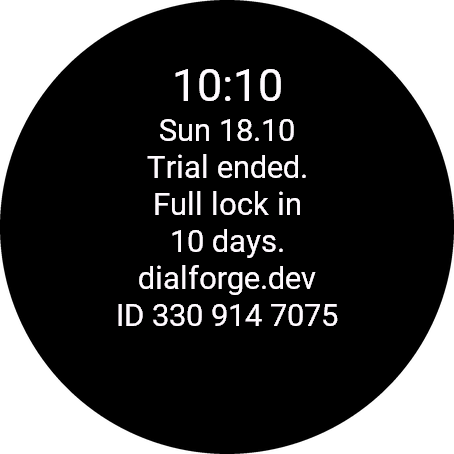
Paste the whole text from the watch, for example ID 123 456 7890. The number is different in every face, so read it in the one you are unlocking.
Your ID, compare it with the watch:
Optional. Tells us which watches our faces run on. It does not change your code.
Code not working on your watch? Write to me and I refund within 14 days.
or with PayPal
In the Facebook or Instagram browser? If the payment window does not open, open this page in Chrome or Safari (three-dot menu, Open in browser).
Payments by Stripe and PayPal. Seller: Mateusz Kolarz, Lublin, Poland.
Thank you! Your code:
Where to paste the code
- The watch checks the code offline, usually within a minute. A face installed by cable has no settings on the phone: it unlocks by itself after the trial, when the watch is connected to the phone. This can take a few hours. If it does not, write to kontakt@dialforge.dev.
We show the code here too. If the e-mail does not arrive (check spam), you can recover the code in the Recover code section with the UID and e-mail from your order. Recover code
More faces
 Retro
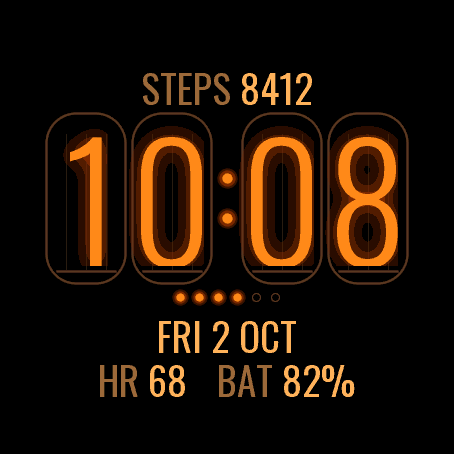
RetroNixie Lamp
5.0 (19)
Four glowing nixie tubes on your wrist
 Retro
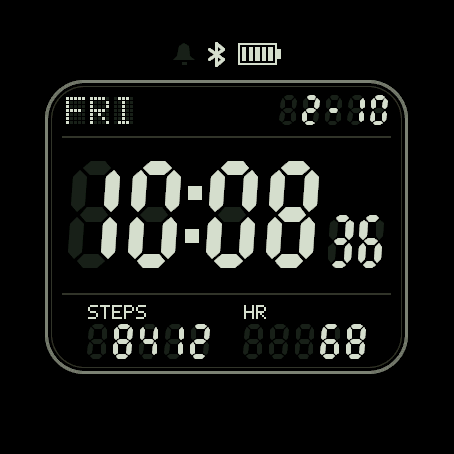
RetroLCD 84
A retro segment LCD, ghost segments and all
 Fun
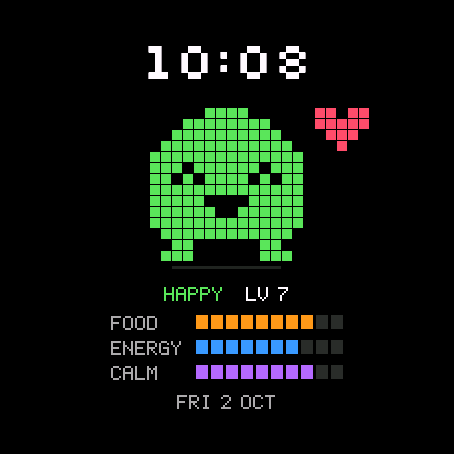
FunPixel Pal
5.0 (10)
A pixel pet that lives your day with you
 Geek
GeekShell Time
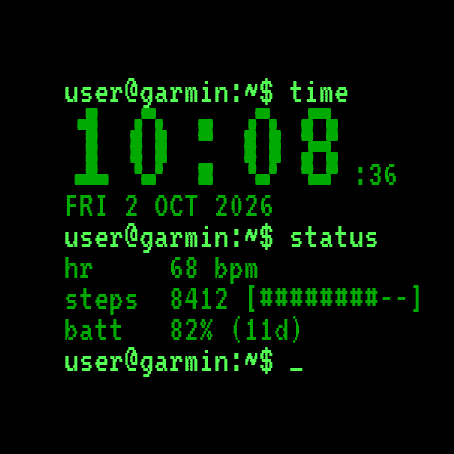
5.0 (11)
Your watch as a terminal session