Unlock
€6.49
One-time payment. No subscription. The code works on the watch whose ID you enter.
- Install the face from Connect IQ (7 days free).
- On the watch: face settings > Buy / Unlock, scan the QR code.
- Pay and paste the code in the face settings.
- Pay.
- Copy the code.
- Paste it in Connect IQ: this face > Settings > Unlock code.
Payment works best in Safari or Chrome: menu (three dots) > Open in browser
Read it in this face, it is not the serial number of the watch.
The code works only in the watch face it was bought for: a Summit Rings code will not work in Summit Tactic.
Your ID, compare it with the watch:
Where do I find the ID?
On the watch: settings of this face > Buy / Unlock (first item). Scan the QR code with your phone or type the 10 digits. The ID is also at the top of the face settings in the Connect IQ app.
Code not working on your watch? Write to me and I will fix it.
Payments by Stripe. Seller: Mateusz Kolarz, Lublin, Poland.
Paid. Code:
We show the code here too. If the e-mail does not arrive (check spam), you can recover the code in the Recover code section with just the Face ID. Recover code
Copying did not work. The code is selected: copy it by hand.
The face unlocks by itself when the watch connects to the phone (usually within an hour; if the trial is still running, the purchase starts working when it ends).
Do not want to wait, or have an older watch? Paste the code in the Connect IQ app:
Connect IQ (or Garmin Connect) > My Device > Watch faces > Radar > Settings > Unlock code > paste > Save
Like it? Rate this face in the Garmin store
Want to try new faces and apps before the release, for free? Join the testers program
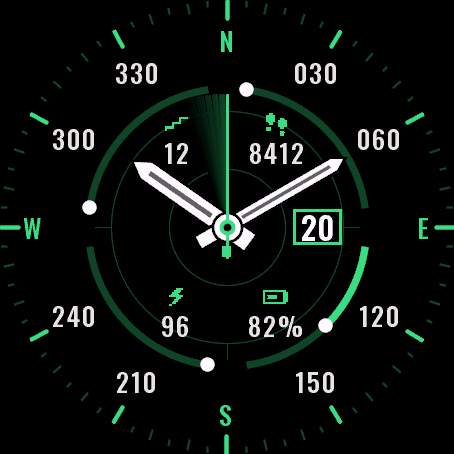
Radar turns your watch into a radar scope. The edge carries a bearing ring (N, 030, 060, E ...), two thin range rings sit around the hands, and four arcs, one in each quarter, fill up with your steps, battery, weekly active minutes and floors, each with a bright blip where it has reached. While the screen is awake, the seconds run around the dial as a sweep with a fading trail. Pick the phosphor colour: green, amber, teal, red and more. It also runs on MIP screens (fenix 6, fenix 7, Forerunner 255 and 955, Enduro) and on Venu X1. An independent face by dialforge.dev, not made by the watch maker.
- Radar scope layout: bearing ring at the edge, range rings and crosshair, analog hands.
- Four quadrant arcs with a blip: steps of your daily goal, battery, weekly active minutes, floors. The value sits inside each quarter.
- Seconds as a radar sweep with a fading trail while the screen is awake (AMOLED); a thin sweep line on MIP.
- Full bearings (000 to 330) or only N, E, S, W.
- Date window right of the hub, optional weekday code next to the day.
- Two optional small fields above and below the hub: heart rate, weather, Body Battery, sunrise and sunset, altitude and many more. On touch screens, hold a field or a quarter to open the matching watch app.
- Phosphor colour from 10 accents (green by default), dial tint Black, Olive, Navy or Desert, hands White, Cream or Lume green.
- Always-on screen on AMOLED: N, E, S, W and thin hands, dimmed and shifted every minute to protect the display.
- Menu in 35 languages, date in the language of the watch.
Settings are in Garmin Connect (Connect IQ, watch face settings) and on the watch under Customise: bearings, range rings, phosphor colour, dial tint, hands, seconds sweep, date window and the two fields.
When the watch has no reading, a field shows -- and its arc stays empty. Garmin does not give watch faces access to HRV status or Training Readiness, so no Connect IQ watch face can show them.
Radar zamienia zegarek w ekran radaru. Na brzegu jest pierścień azymutów (N, 030, 060, E ...), wokół wskazówek dwa cienkie pierścienie odległości, a cztery łuki, po jednym w każdej ćwiartce, wypełniają się krokami, baterią, tygodniowymi minutami aktywności i piętrami, każdy z jasnym punktem echa tam, gdzie doszedł. Gdy ekran jest aktywny, sekundy obiegają tarczę jako wiązka z gasnącym śladem. Kolor luminoforu wybierasz sam: zielony, bursztynowy, morski, czerwony i inne. Działa też na ekranach MIP (fenix 6, fenix 7, Forerunner 255 i 955, Enduro) i na Venu X1. Niezależna tarcza dialforge.dev, nie od producenta zegarka.
- Układ ekranu radaru: pierścień azymutów na brzegu, pierścienie odległości i krzyż, wskazówki analogowe.
- Cztery łuki w ćwiartkach z punktem echa: kroki względem celu dnia, bateria, tygodniowe minuty aktywności, piętra. Wartość jest wewnątrz każdej ćwiartki.
- Sekundy jako wiązka radaru z gasnącym śladem, gdy ekran jest aktywny (AMOLED); na MIP cienka linia wiązki.
- Pełne azymuty (od 000 do 330) albo tylko N, E, S, W.
- Okienko daty na prawo od środka, do wyboru skrót dnia tygodnia obok dnia.
- Dwa małe pola do wyboru nad i pod środkiem: tętno, pogoda, Body Battery, wschód i zachód słońca, wysokość i wiele innych. Na ekranach dotykowych przytrzymaj pole albo ćwiartkę, żeby otworzyć pasującą aplikację zegarka.
- Kolor luminoforu z 10 akcentów (domyślnie zielony), odcień tarczy: czarny, oliwkowy, granatowy albo pustynny, wskazówki: białe, kremowe albo zielone jak luma.
- Ekran wygaszony na AMOLED: N, E, S, W i cienkie wskazówki, przygaszone i przesuwane co minutę, żeby chronić wyświetlacz.
- Menu w 35 językach, data w języku zegarka.
Ustawienia są w Garmin Connect (Connect IQ, ustawienia tarczy) i na zegarku w Dostosuj: azymuty, pierścienie odległości, kolor luminoforu, odcień tarczy, wskazówki, wiązka sekund, okienko daty i dwa pola.
Gdy zegarek nie ma odczytu, pole pokazuje --, a jego łuk zostaje pusty. Garmin nie daje tarczom dostępu do statusu HRV ani gotowości do treningu, więc żadna tarcza Connect IQ ich nie pokaże.
Radar macht aus deiner Uhr einen Radarschirm. Am Rand läuft ein Peilring (N, 030, 060, E ...), zwei dünne Entfernungsringe umgeben die Zeiger, und vier Bögen, je einer pro Viertel, füllen sich mit deinen Schritten, dem Akku, den aktiven Wochenminuten und den Stockwerken, jeweils mit einem hellen Echopunkt dort, wo sie stehen. Solange das Display aktiv ist, laufen die Sekunden als Radarstrahl mit verblassender Spur um das Zifferblatt. Die Phosphorfarbe wählst du selbst: Grün, Bernstein, Petrol, Rot und mehr. Es läuft auch auf MIP-Displays (fenix 6, fenix 7, Forerunner 255 und 955, Enduro) und auf dem Venu X1. Ein unabhängiges Zifferblatt von dialforge.dev, nicht vom Uhrenhersteller.
- Radarschirm-Layout: Peilring am Rand, Entfernungsringe und Fadenkreuz, analoge Zeiger.
- Vier Viertelbögen mit Echopunkt: Schritte im Verhältnis zum Tagesziel, Akku, aktive Wochenminuten, Stockwerke. Der Wert steht in jedem Viertel.
- Sekunden als Radarstrahl mit verblassender Spur, solange das Display aktiv ist (AMOLED); bei MIP eine dünne Strahllinie.
- Volle Peilungen (000 bis 330) oder nur N, E, S, W.
- Datumsfenster rechts neben der Mitte, optional mit Wochentagskürzel neben dem Tag.
- Zwei optionale kleine Felder über und unter der Mitte: Herzfrequenz, Wetter, Body Battery, Sonnenauf- und -untergang, Höhe und viele mehr. Auf Touchscreens öffnest du mit langem Druck auf ein Feld oder ein Viertel die passende Uhren-App.
- Phosphorfarbe aus 10 Akzenten (standardmäßig Grün), Tönung des Zifferblatts Schwarz, Oliv, Marine oder Wüste, Zeiger Weiß, Creme oder Leuchtgrün.
- Always-On-Display bei AMOLED: N, E, S, W und dünne Zeiger, abgedunkelt und jede Minute verschoben, um das Display zu schonen.
- Menü in 35 Sprachen, Datum in der Sprache der Uhr.
Die Einstellungen findest du in Garmin Connect (Connect IQ, Zifferblatt-Einstellungen) und auf der Uhr unter Anpassen: Peilungen, Entfernungsringe, Phosphorfarbe, Tönung des Zifferblatts, Zeiger, Radarstrahl für die Sekunden, Datumsfenster und die zwei Felder.
Wenn die Uhr keinen Messwert hat, zeigt ein Feld -- an und sein Bogen bleibt leer. Garmin gibt Zifferblättern keinen Zugriff auf HRV-Status oder Trainingsbereitschaft, deshalb kann kein Connect-IQ-Zifferblatt sie anzeigen.
Radar transforme votre montre en écran de radar. Le bord porte un anneau d'azimuts (N, 030, 060, E ...), deux fins cercles de distance entourent les aiguilles, et quatre arcs, un par quart, se remplissent avec vos pas, la batterie, les minutes d'activité de la semaine et les étages, chacun avec un point d'écho lumineux là où il est arrivé. Tant que l'écran est actif, les secondes parcourent le cadran en faisceau radar avec une traînée qui s'estompe. Vous choisissez la couleur du phosphore : vert, ambre, turquoise, rouge et plus encore. Il fonctionne aussi sur les écrans MIP (fenix 6, fenix 7, Forerunner 255 et 955, Enduro) et sur le Venu X1. Un cadran indépendant de dialforge.dev, pas du fabricant de la montre.
- Disposition d'écran radar : anneau d'azimuts sur le bord, cercles de distance et réticule, aiguilles analogiques.
- Quatre arcs par quart avec un point d'écho : pas par rapport à l'objectif du jour, batterie, minutes d'activité de la semaine, étages. La valeur est dans chaque quart.
- Secondes en faisceau radar avec traînée qui s'estompe tant que l'écran est actif (AMOLED) ; ligne de faisceau fine sur MIP.
- Azimuts complets (000 à 330) ou seulement N, E, S, W.
- Fenêtre de date à droite du centre, avec en option le code du jour de la semaine à côté du jour.
- Deux petits champs facultatifs au-dessus et au-dessous du centre : fréquence cardiaque, météo, Body Battery, lever et coucher du soleil, altitude et bien d'autres. Sur les écrans tactiles, un appui long sur un champ ou un quart ouvre l'application de la montre correspondante.
- Couleur du phosphore parmi 10 accents (vert par défaut), teinte du cadran noir, olive, marine ou désert, aiguilles blanches, crème ou vert lume.
- Écran toujours allumé sur AMOLED : N, E, S, W et aiguilles fines, atténués et décalés chaque minute pour protéger l'écran.
- Menu en 35 langues, date dans la langue de la montre.
Les réglages se trouvent dans Garmin Connect (Connect IQ, réglages du cadran) et sur la montre sous Personnaliser : azimuts, cercles de distance, couleur du phosphore, teinte du cadran, aiguilles, faisceau des secondes, fenêtre de date et les deux champs.
Quand la montre n'a pas de mesure, un champ affiche -- et son arc reste vide. Garmin ne donne pas aux cadrans l'accès au statut VFC ni à la disponibilité d'entraînement, aucun cadran Connect IQ ne peut donc les afficher.
Radar convierte tu reloj en una pantalla de radar. El borde lleva un anillo de rumbos (N, 030, 060, E ...), dos finos anillos de distancia rodean las agujas y cuatro arcos, uno en cada cuarto, se llenan con tus pasos, la batería, los minutos activos de la semana y los pisos, cada uno con un punto de eco brillante donde ha llegado. Mientras la pantalla está activa, los segundos recorren la esfera como un barrido con una estela que se desvanece. Tú eliges el color del fósforo: verde, ámbar, turquesa, rojo y más. También funciona en pantallas MIP (fenix 6, fenix 7, Forerunner 255 y 955, Enduro) y en el Venu X1. Una esfera independiente de dialforge.dev, no del fabricante del reloj.
- Diseño de pantalla de radar: anillo de rumbos en el borde, anillos de distancia y retícula, agujas analógicas.
- Cuatro arcos por cuarto con un punto de eco: pasos respecto al objetivo diario, batería, minutos activos de la semana, pisos. El valor está dentro de cada cuarto.
- Segundos como barrido de radar con estela que se desvanece mientras la pantalla está activa (AMOLED); en MIP, una línea de barrido fina.
- Rumbos completos (000 a 330) o solo N, E, S, W.
- Ventana de fecha a la derecha del centro, con código del día de la semana opcional junto al día.
- Dos pequeños campos opcionales encima y debajo del centro: frecuencia cardiaca, tiempo, Body Battery, salida y puesta del sol, altitud y muchos más. En pantallas táctiles, mantén pulsado un campo o un cuarto para abrir la aplicación del reloj correspondiente.
- Color del fósforo entre 10 acentos (verde por defecto), tono de la esfera negro, oliva, azul marino o desierto, agujas blancas, crema o verde luma.
- Pantalla siempre activa en AMOLED: N, E, S, W y agujas finas, atenuadas y desplazadas cada minuto para proteger la pantalla.
- Menú en 35 idiomas, fecha en el idioma del reloj.
Los ajustes están en Garmin Connect (Connect IQ, ajustes de la esfera) y en el reloj, en Personalizar: rumbos, anillos de distancia, color del fósforo, tono de la esfera, agujas, barrido de segundos, ventana de fecha y los dos campos.
Cuando el reloj no tiene lectura, un campo muestra -- y su arco queda vacío. Garmin no da a las esferas acceso al estado de VFC ni a la preparación para entrenar, así que ninguna esfera de Connect IQ puede mostrarlos.
Radar maakt van je horloge een radarscherm. Langs de rand loopt een peilring (N, 030, 060, E ...), twee dunne afstandsringen omringen de wijzers en vier bogen, één per kwart, vullen zich met je stappen, de batterij, je actieve minuten van de week en je verdiepingen, elk met een helder echopunt op de plek waar het staat. Zolang het scherm actief is, lopen de seconden als radarstraal met een vervagend spoor rond de wijzerplaat. De fosforkleur kies je zelf: groen, amber, blauwgroen, rood en meer. Het werkt ook op MIP-schermen (fenix 6, fenix 7, Forerunner 255 en 955, Enduro) en op de Venu X1. Een onafhankelijke wijzerplaat van dialforge.dev, niet van de horlogefabrikant.
- Opzet van een radarscherm: peilring aan de rand, afstandsringen en richtkruis, analoge wijzers.
- Vier kwartbogen met een echopunt: stappen ten opzichte van je dagdoel, batterij, actieve minuten van de week, verdiepingen. De waarde staat in elk kwart.
- Seconden als radarstraal met vervagend spoor zolang het scherm actief is (AMOLED); op MIP een dunne stralenlijn.
- Volledige peilingen (000 tot 330) of alleen N, E, S, W.
- Datumvenster rechts van het midden, optioneel met de code van de weekdag naast de dag.
- Twee optionele kleine velden boven en onder het midden: hartslag, weer, Body Battery, zonsopkomst en zonsondergang, hoogte en nog veel meer. Op touchscreens houd je een veld of een kwart ingedrukt om de bijbehorende horloge-app te openen.
- Fosforkleur uit 10 accenten (standaard groen), tint van de wijzerplaat zwart, olijf, marine of woestijn, wijzers wit, crème of lume-groen.
- Altijd-aan-scherm op AMOLED: N, E, S, W en dunne wijzers, gedimd en elke minuut verschoven om het scherm te sparen.
- Menu in 35 talen, datum in de taal van het horloge.
De instellingen staan in Garmin Connect (Connect IQ, instellingen van de wijzerplaat) en op het horloge onder Aanpassen: peilingen, afstandsringen, fosforkleur, tint van de wijzerplaat, wijzers, radarstraal voor de seconden, datumvenster en de twee velden.
Als het horloge geen meting heeft, toont een veld -- en blijft de boog leeg. Garmin geeft wijzerplaten geen toegang tot de HRV-status of trainingsgereedheid, dus geen enkele Connect IQ-wijzerplaat kan ze tonen.
Radarは、あなたの時計をレーダー画面に変えます。縁には方位リング(N、030、060、E ...)があり、針の周りには2本の細い距離リング、そして四分円ごとに1本ずつ、合わせて4本の弧が、歩数、バッテリー、週のアクティブ時間、階数に応じて満たされ、到達した位置に明るいエコーポイントが付きます。画面が点灯している間、秒はレーダーのスイープとして、薄れていく残像を伴って文字盤を一周します。蛍光色は緑、アンバー、ティール、赤などから選べます。MIP画面(fenix 6、fenix 7、Forerunner 255と955、Enduro)とVenu X1でも動作します。dialforge.devの独立したウォッチフェイスで、時計メーカーによるものではありません。
- レーダー画面のレイアウト: 縁の方位リング、距離リングと十字線、アナログ針。
- エコーポイント付きの四分円の弧が4本: 1日の目標に対する歩数、バッテリー、週のアクティブ時間、階数。値は各四分円の内側に表示されます。
- 画面が点灯している間、秒を薄れていく残像付きのレーダースイープで表示(AMOLED)。MIPでは細いスイープ線です。
- 方位は000から330までのフル表示、またはN、E、S、Wのみ。
- 中心の右に日付窓、日付の横に曜日の略称も選べます。
- 中心の上下に選べる小さなデータ欄が2つ: 心拍数、天気、Body Battery、日の出と日の入り、高度など多数。タッチ画面では、欄や四分円を長押しすると対応する時計アプリが開きます。
- 蛍光色は10色のアクセントから選択(初期値は緑)、文字盤の色合いは黒、オリーブ、ネイビー、デザート、針は白、クリーム、ルミグリーン。
- AMOLEDの常時表示: N、E、S、Wと細い針を暗くし、1分ごとに位置をずらして画面を保護します。
- 35言語のメニュー、日付は時計の言語で表示。
設定はGarmin Connect(Connect IQ、ウォッチフェイス設定)と、時計のカスタマイズで行えます: 方位、距離リング、蛍光色、文字盤の色合い、針、秒のスイープ、日付窓、2つのデータ欄。
時計に測定値がないとき、データ欄には--が表示され、その弧は空のままです。GarminはウォッチフェイスにHRVステータスやトレーニングレディネスへのアクセスを許可していないため、Connect IQのウォッチフェイスでは表示できません。
Radar trasforma il tuo orologio in uno schermo radar. Sul bordo c'è un anello di rilevamenti (N, 030, 060, E ...), due sottili anelli di distanza circondano le lancette e quattro archi, uno per ogni quarto, si riempiono con i tuoi passi, la batteria, i minuti attivi della settimana e i piani, ciascuno con un punto di eco luminoso dove è arrivato. Finché lo schermo è attivo, i secondi percorrono il quadrante come una scansione con una scia che sfuma. Il colore del fosforo lo scegli tu: verde, ambra, verde acqua, rosso e altri. Funziona anche su schermi MIP (fenix 6, fenix 7, Forerunner 255 e 955, Enduro) e su Venu X1. Un quadrante indipendente di dialforge.dev, non del produttore dell'orologio.
- Layout da schermo radar: anello di rilevamenti sul bordo, anelli di distanza e mirino, lancette analogiche.
- Quattro archi per quarto con un punto di eco: passi rispetto all'obiettivo del giorno, batteria, minuti attivi della settimana, piani. Il valore è dentro ogni quarto.
- Secondi come scansione radar con scia che sfuma finché lo schermo è attivo (AMOLED); su MIP una sottile linea di scansione.
- Rilevamenti completi (da 000 a 330) oppure solo N, E, S, W.
- Finestra della data a destra del centro, con codice del giorno della settimana facoltativo accanto al giorno.
- Due piccoli campi facoltativi sopra e sotto il centro: frequenza cardiaca, meteo, Body Battery, alba e tramonto, altitudine e molto altro. Sugli schermi touch, tieni premuto un campo o un quarto per aprire l'app dell'orologio corrispondente.
- Colore del fosforo tra 10 accenti (verde di default), tinta del quadrante nero, oliva, blu navy o deserto, lancette bianche, crema o verde luma.
- Schermo sempre attivo su AMOLED: N, E, S, W e lancette sottili, attenuati e spostati ogni minuto per proteggere il display.
- Menu in 35 lingue, data nella lingua dell'orologio.
Le impostazioni sono in Garmin Connect (Connect IQ, impostazioni del quadrante) e sull'orologio in Personalizza: rilevamenti, anelli di distanza, colore del fosforo, tinta del quadrante, lancette, scansione dei secondi, finestra della data e i due campi.
Quando l'orologio non ha una lettura, un campo mostra -- e il suo arco resta vuoto. Garmin non dà ai quadranti l'accesso allo stato HRV né alla prontezza all'allenamento, quindi nessun quadrante Connect IQ può mostrarli.
Radar 把你的手表变成一块雷达屏幕。边缘是方位环(N、030、060、E ...),指针周围有两道细距离环,四条弧线每个象限一条,会随步数、电量、每周活动分钟和楼层而填充,并在到达的位置显示明亮的回波点。屏幕亮起时,秒以带渐隐拖尾的雷达扫描绕表盘一圈。荧光色由你选择:绿色、琥珀色、青绿色、红色等。它也适用于 MIP 屏幕(fenix 6、fenix 7、Forerunner 255 和 955、Enduro)以及 Venu X1。这是 dialforge.dev 的独立表盘,并非手表厂商出品。
- 雷达屏幕布局:边缘的方位环、距离环和十字线、模拟指针。
- 四条带回波点的象限弧:步数相对每日目标、电量、每周活动分钟、楼层。数值显示在每个象限内。
- 屏幕亮起时,秒以带渐隐拖尾的雷达扫描显示(AMOLED);MIP 上是一条细扫描线。
- 完整方位(000 到 330)或仅 N、E、S、W。
- 日期窗口位于中心右侧,可选在日期旁显示星期缩写。
- 中心上方和下方各有一个可选的小数据栏:心率、天气、Body Battery、日出和日落、海拔等。在触屏手表上,长按数据栏或象限即可打开对应的手表应用。
- 荧光色可从 10 种强调色中选择(默认绿色),表盘色调可选黑色、橄榄色、海军蓝或沙漠色,指针可选白色、奶油色或夜光绿。
- AMOLED 常亮屏幕:N、E、S、W 和细指针,调暗并每分钟移位,以保护屏幕。
- 35 种语言的菜单,日期使用手表的语言。
设置位于 Garmin Connect(Connect IQ,表盘设置)以及手表上的“自定义”中:方位、距离环、荧光色、表盘色调、指针、秒针扫描、日期窗口和两个数据栏。
手表没有读数时,数据栏显示 --,对应的弧线保持为空。Garmin 不允许表盘访问 HRV 状态或训练准备度,因此任何 Connect IQ 表盘都无法显示它们。
Radar превращает ваши часы в экран радара. По краю идёт кольцо азимутов (N, 030, 060, E ...), вокруг стрелок два тонких кольца дальности, а четыре дуги, по одной в каждой четверти, заполняются вашими шагами, зарядом, минутами активности за неделю и этажами, каждая со светлой точкой эха там, куда дошла. Пока экран активен, секунды обегают циферблат лучом радара с гаснущим следом. Цвет люминофора выбираете вы: зелёный, янтарный, бирюзовый, красный и другие. Работает и на MIP-экранах (fenix 6, fenix 7, Forerunner 255 и 955, Enduro), и на Venu X1. Независимый циферблат dialforge.dev, не от производителя часов.
- Раскладка как у экрана радара: кольцо азимутов по краю, кольца дальности и перекрестие, аналоговые стрелки.
- Четыре дуги по четвертям с точкой эха: шаги относительно дневной цели, заряд, минуты активности за неделю, этажи. Значение стоит внутри каждой четверти.
- Секунды как луч радара с гаснущим следом, пока экран активен (AMOLED); на MIP тонкая линия луча.
- Полные азимуты (от 000 до 330) или только N, E, S, W.
- Окошко даты справа от центра, по желанию с сокращением дня недели рядом с числом.
- Два необязательных малых поля над центром и под ним: пульс, погода, Body Battery, восход и закат, высота и многое другое. На сенсорных экранах долгое нажатие на поле или четверть открывает соответствующее приложение часов.
- Цвет люминофора из 10 акцентов (по умолчанию зелёный), оттенок циферблата: чёрный, оливковый, тёмно-синий или пустынный, стрелки белые, кремовые или цвета люмы.
- Всегда включённый экран на AMOLED: N, E, S, W и тонкие стрелки, приглушённые и сдвигаемые каждую минуту, чтобы беречь экран.
- Меню на 35 языках, дата на языке часов.
Настройки находятся в Garmin Connect (Connect IQ, настройки циферблата) и на часах в разделе «Настроить»: азимуты, кольца дальности, цвет люминофора, оттенок циферблата, стрелки, луч секунд, окошко даты и два поля.
Когда у часов нет показания, поле показывает --, а его дуга остаётся пустой. Garmin не даёт циферблатам доступ к статусу HRV и готовности к тренировке, поэтому ни один циферблат Connect IQ не может их показать.
Radar transforma seu relógio em uma tela de radar. A borda traz um anel de marcações (N, 030, 060, E ...), dois anéis de distância finos cercam os ponteiros e quatro arcos, um em cada quarto, se enchem com seus passos, a bateria, os minutos ativos da semana e os andares, cada um com um ponto de eco brilhante onde chegou. Enquanto a tela está ativa, os segundos percorrem o mostrador como uma varredura com um rastro que se apaga. Você escolhe a cor do fósforo: verde, âmbar, verde-azulado, vermelho e mais. Também funciona em telas MIP (fenix 6, fenix 7, Forerunner 255 e 955, Enduro) e no Venu X1. Um mostrador independente da dialforge.dev, não do fabricante do relógio.
- Layout de tela de radar: anel de marcações na borda, anéis de distância e mira, ponteiros analógicos.
- Quatro arcos por quarto com um ponto de eco: passos em relação à meta do dia, bateria, minutos ativos da semana, andares. O valor fica dentro de cada quarto.
- Segundos como varredura de radar com rastro que se apaga enquanto a tela está ativa (AMOLED); no MIP, uma linha de varredura fina.
- Marcações completas (000 a 330) ou só N, E, S, W.
- Janela de data à direita do centro, com código do dia da semana opcional ao lado do dia.
- Dois pequenos campos opcionais acima e abaixo do centro: frequência cardíaca, clima, Body Battery, nascer e pôr do sol, altitude e muito mais. Em telas sensíveis ao toque, mantenha pressionado um campo ou um quarto para abrir o app do relógio correspondente.
- Cor do fósforo entre 10 destaques (verde por padrão), tom do mostrador preto, oliva, azul-marinho ou deserto, ponteiros brancos, creme ou verde lume.
- Tela sempre ativa em AMOLED: N, E, S, W e ponteiros finos, escurecidos e deslocados a cada minuto para proteger a tela.
- Menu em 35 idiomas, data no idioma do relógio.
As configurações ficam no Garmin Connect (Connect IQ, configurações do mostrador) e no relógio em Personalizar: marcações, anéis de distância, cor do fósforo, tom do mostrador, ponteiros, varredura dos segundos, janela de data e os dois campos.
Quando o relógio não tem leitura, um campo mostra -- e o arco fica vazio. A Garmin não dá aos mostradores acesso ao status de VFC nem à prontidão para treinar, então nenhum mostrador do Connect IQ consegue exibi-los.
Radar promění vaše hodinky v radarovou obrazovku. Na okraji je prstenec azimutů (N, 030, 060, E ...), kolem ručiček jsou dva tenké kruhy vzdálenosti a čtyři oblouky, po jednom v každé čtvrtině, se plní vašimi kroky, baterií, týdenními aktivními minutami a patry, každý se světlým ozvěnovým bodem tam, kam dosáhl. Dokud je displej aktivní, sekundy obíhají ciferník jako paprsek radaru s doznívající stopou. Barvu luminoforu si vyberete sami: zelená, jantarová, tyrkysová, červená a další. Funguje i na displejích MIP (fenix 6, fenix 7, Forerunner 255 a 955, Enduro) a na Venu X1. Nezávislý ciferník od dialforge.dev, ne od výrobce hodinek.
- Rozvržení jako radarová obrazovka: prstenec azimutů na okraji, kruhy vzdálenosti a záměrný kříž, analogové ručičky.
- Čtyři oblouky ve čtvrtinách s ozvěnovým bodem: kroky vůči dennímu cíli, baterie, týdenní aktivní minuty, patra. Hodnota je uvnitř každé čtvrtiny.
- Sekundy jako paprsek radaru s doznívající stopou, dokud je displej aktivní (AMOLED); na MIP tenká linie paprsku.
- Plné azimuty (000 až 330) nebo jen N, E, S, W.
- Okénko s datem vpravo od středu, volitelně se zkratkou dne v týdnu vedle dne.
- Dvě volitelná malá pole nad a pod středem: tep, počasí, Body Battery, východ a západ slunce, nadmořská výška a mnoho dalších. Na dotykových displejích podržením pole nebo čtvrtiny otevřete odpovídající aplikaci v hodinkách.
- Barva luminoforu z 10 akcentů (výchozí zelená), odstín ciferníku černý, olivový, námořnický nebo pouštní, ručičky bílé, krémové nebo zelené jako luma.
- Stále zapnutý displej u AMOLED: N, E, S, W a tenké ručičky, ztlumené a každou minutu posunuté, aby se displej šetřil.
- Menu ve 35 jazycích, datum v jazyce hodinek.
Nastavení najdete v Garmin Connect (Connect IQ, nastavení ciferníku) a v hodinkách v části Přizpůsobit: azimuty, kruhy vzdálenosti, barva luminoforu, odstín ciferníku, ručičky, paprsek sekund, okénko s datem a dvě pole.
Když hodinky nemají naměřenou hodnotu, pole ukazuje -- a jeho oblouk zůstane prázdný. Garmin nedává ciferníkům přístup ke stavu HRV ani k připravenosti na trénink, takže je žádný ciferník Connect IQ zobrazit nemůže.
Radar transforma o seu relógio num ecrã de radar. A borda tem um anel de marcações (N, 030, 060, E ...), dois anéis de distância finos rodeiam os ponteiros e quatro arcos, um em cada quarto, enchem-se com os seus passos, a bateria, os minutos ativos da semana e os andares, cada um com um ponto de eco brilhante onde chegou. Enquanto o ecrã está ativo, os segundos percorrem o mostrador como um varrimento com um rasto que se apaga. Escolhe a cor do fósforo: verde, âmbar, verde-azulado, vermelho e mais. Também funciona em ecrãs MIP (fenix 6, fenix 7, Forerunner 255 e 955, Enduro) e no Venu X1. Um mostrador independente da dialforge.dev, não do fabricante do relógio.
- Disposição de ecrã de radar: anel de marcações na borda, anéis de distância e mira, ponteiros analógicos.
- Quatro arcos por quarto com um ponto de eco: passos em relação ao objetivo do dia, bateria, minutos ativos da semana, andares. O valor fica dentro de cada quarto.
- Segundos como varrimento de radar com rasto que se apaga enquanto o ecrã está ativo (AMOLED); no MIP, uma linha de varrimento fina.
- Marcações completas (000 a 330) ou só N, E, S, W.
- Janela de data à direita do centro, com código do dia da semana opcional junto ao dia.
- Dois pequenos campos opcionais acima e abaixo do centro: frequência cardíaca, meteorologia, Body Battery, nascer e pôr do sol, altitude e muito mais. Em ecrãs táteis, mantenha premido um campo ou um quarto para abrir a aplicação do relógio correspondente.
- Cor do fósforo entre 10 destaques (verde por predefinição), tom do mostrador preto, oliva, azul-marinho ou deserto, ponteiros brancos, creme ou verde lume.
- Ecrã sempre ativo em AMOLED: N, E, S, W e ponteiros finos, escurecidos e deslocados a cada minuto para proteger o ecrã.
- Menu em 35 idiomas, data no idioma do relógio.
As definições estão no Garmin Connect (Connect IQ, definições do mostrador) e no relógio em Personalizar: marcações, anéis de distância, cor do fósforo, tom do mostrador, ponteiros, varrimento dos segundos, janela de data e os dois campos.
Quando o relógio não tem leitura, um campo mostra -- e o arco fica vazio. A Garmin não dá aos mostradores acesso ao estado de VFC nem à prontidão para treinar, por isso nenhum mostrador do Connect IQ os consegue apresentar.
Radar는 시계를 레이더 화면으로 바꿔 줍니다. 가장자리에는 방위 링(N, 030, 060, E ...)이 있고, 바늘 주위에는 얇은 거리 링 두 개가 있으며, 사분면마다 하나씩 모두 네 개의 호가 걸음 수, 배터리, 주간 활동 시간, 층수에 따라 채워지고 도달한 위치에 밝은 에코 점이 표시됩니다. 화면이 켜져 있는 동안 초는 점점 사라지는 잔상과 함께 레이더 스윕으로 문자판을 돕니다. 형광색은 녹색, 호박색, 청록색, 빨강 등에서 직접 고를 수 있습니다. MIP 화면(fenix 6, fenix 7, Forerunner 255와 955, Enduro)과 Venu X1에서도 작동합니다. dialforge.dev의 독립 워치 페이스이며 시계 제조사가 만든 것이 아닙니다.
- 레이더 화면 레이아웃: 가장자리의 방위 링, 거리 링과 십자선, 아날로그 바늘.
- 에코 점이 있는 사분면 호 4개: 하루 목표 대비 걸음 수, 배터리, 주간 활동 시간, 층수. 값은 각 사분면 안에 표시됩니다.
- 화면이 켜져 있는 동안 초를 사라지는 잔상이 있는 레이더 스윕으로 표시(AMOLED), MIP에서는 얇은 스윕 선.
- 전체 방위(000부터 330까지) 또는 N, E, S, W만 표시.
- 중앙 오른쪽의 날짜 창, 날짜 옆에 요일 약자를 선택해 표시할 수 있습니다.
- 중앙 위아래에 선택 가능한 작은 필드 2개: 심박수, 날씨, Body Battery, 일출과 일몰, 고도 등 다양합니다. 터치 화면에서는 필드나 사분면을 길게 누르면 해당 시계 앱이 열립니다.
- 10가지 강조색 중 형광색 선택(기본값은 녹색), 문자판 색조는 검정, 올리브, 네이비, 사막 중 선택, 바늘은 흰색, 크림, 루미 녹색 중 선택.
- AMOLED 상시 표시 화면: N, E, S, W와 얇은 바늘을 어둡게 하고 화면 보호를 위해 1분마다 위치를 옮깁니다.
- 35개 언어 메뉴, 날짜는 시계 언어로 표시.
설정은 Garmin Connect(Connect IQ, 워치 페이스 설정)와 시계의 맞춤 설정에 있습니다: 방위, 거리 링, 형광색, 문자판 색조, 바늘, 초 스윕, 날짜 창, 두 필드.
시계에 측정값이 없으면 필드에 --가 표시되고 해당 호는 비어 있습니다. Garmin은 워치 페이스에 HRV 상태나 트레이닝 준비도 접근을 허용하지 않으므로 어떤 Connect IQ 워치 페이스도 이를 표시할 수 없습니다.
Radar gör din klocka till en radarskärm. Kanten har en pejlingsring (N, 030, 060, Ö ...), två tunna avståndsringar omger visarna, och fyra bågar, en i varje kvart, fylls av dina steg, batteriet, veckans aktiva minuter och våningar, var och en med en ljus ekopunkt där den har kommit. Medan skärmen är aktiv löper sekunderna runt urtavlan som en radarstråle med ett bleknande spår. Du väljer själv fosforfärg: grön, bärnsten, blågrön, röd och fler. Den fungerar också på MIP-skärmar (fenix 6, fenix 7, Forerunner 255 och 955, Enduro) och på Venu X1. En oberoende urtavla från dialforge.dev, inte från klocktillverkaren.
- Layout som en radarskärm: pejlingsring i kanten, avståndsringar och hårkors, analoga visare.
- Fyra kvartsbågar med en ekopunkt: steg mot dagens mål, batteri, veckans aktiva minuter, våningar. Värdet står inne i varje kvart.
- Sekunder som radarstråle med bleknande spår medan skärmen är aktiv (AMOLED); på MIP en tunn strållinje.
- Fulla pejlingar (000 till 330) eller bara N, E, S, W.
- Datumfönster till höger om mitten, valfri veckodagskod bredvid dagen.
- Två valfria små fält ovanför och under mitten: puls, väder, Body Battery, soluppgång och solnedgång, höjd och många fler. På pekskärmar öppnar du den matchande klockappen genom att hålla in ett fält eller en kvart.
- Fosforfärg bland 10 accenter (grön som standard), urtavlans ton svart, oliv, marin eller öken, visare vita, kräm eller lumegröna.
- Alltid-på-skärm på AMOLED: N, E, S, W och tunna visare, dämpade och förskjutna varje minut för att skona skärmen.
- Meny på 35 språk, datum på klockans språk.
Inställningarna finns i Garmin Connect (Connect IQ, urtavleinställningar) och i klockan under Anpassa: pejlingar, avståndsringar, fosforfärg, urtavlans ton, visare, sekundstråle, datumfönster och de två fälten.
När klockan saknar mätvärde visar ett fält -- och dess båge förblir tom. Garmin ger inte urtavlor tillgång till HRV-status eller träningsberedskap, så ingen Connect IQ-urtavla kan visa dem.
Radar gør dit ur til en radarskærm. Kanten har en pejlering (N, 030, 060, Ø ...), to tynde afstandsringe omgiver viserne, og fire buer, en i hvert kvarter, fyldes op med dine skridt, batteriet, ugens aktive minutter og etager, hver med et lyst ekkopunkt, hvor den er nået til. Mens skærmen er aktiv, løber sekunderne rundt om urskiven som en radarstråle med et falmende spor. Du vælger selv fosforfarven: grøn, rav, blågrøn, rød og flere. Den virker også på MIP-skærme (fenix 6, fenix 7, Forerunner 255 og 955, Enduro) og på Venu X1. En uafhængig urskive fra dialforge.dev, ikke fra urproducenten.
- Layout som en radarskærm: pejlering i kanten, afstandsringe og trådkors, analoge visere.
- Fire kvartbuer med et ekkopunkt: skridt i forhold til dagens mål, batteri, ugens aktive minutter, etager. Værdien står inde i hvert kvarter.
- Sekunder som radarstråle med falmende spor, mens skærmen er aktiv (AMOLED); på MIP en tynd strålelinje.
- Fulde pejlinger (000 til 330) eller kun N, E, S, W.
- Datovindue til højre for midten, valgfri ugedagskode ved siden af dagen.
- To valgfri små felter over og under midten: puls, vejr, Body Battery, solopgang og solnedgang, højde og mange flere. På touchskærme åbner du den tilsvarende ur-app ved at holde på et felt eller et kvarter.
- Fosforfarve blandt 10 accenter (grøn som standard), urskivens tone sort, oliven, marine eller ørken, visere hvide, creme eller lumegrønne.
- Altid tændt skærm på AMOLED: N, E, S, W og tynde visere, dæmpet og flyttet hvert minut for at skåne skærmen.
- Menu på 35 sprog, dato på urets sprog.
Indstillingerne findes i Garmin Connect (Connect IQ, urskiveindstillinger) og på uret under Tilpas: pejlinger, afstandsringe, fosforfarve, urskivens tone, visere, sekundstråle, datovindue og de to felter.
Når uret ikke har en måling, viser et felt -- og dets bue forbliver tom. Garmin giver ikke urskiver adgang til HRV-status eller træningsparathed, så ingen Connect IQ-urskive kan vise dem.
Radar gjør klokken din til en radarskjerm. Kanten har en peilering (N, 030, 060, E ...), to tynne avstandsringer omgir viserne, og fire buer, én i hvert kvarter, fylles opp av skrittene dine, batteriet, ukens aktive minutter og etasjer, hver med et lyst ekkopunkt der den har kommet til. Mens skjermen er aktiv, løper sekundene rundt urskiven som en radarstråle med et falmende spor. Du velger selv fosforfargen: grønn, rav, blågrønn, rød og flere. Den fungerer også på MIP-skjermer (fenix 6, fenix 7, Forerunner 255 og 955, Enduro) og på Venu X1. En uavhengig urskive fra dialforge.dev, ikke fra klokkeprodusenten.
- Oppsett som en radarskjerm: peilering i kanten, avstandsringer og trådkors, analoge visere.
- Fire kvartbuer med et ekkopunkt: skritt mot dagens mål, batteri, ukens aktive minutter, etasjer. Verdien står inne i hvert kvarter.
- Sekunder som radarstråle med falmende spor mens skjermen er aktiv (AMOLED); på MIP en tynn strålelinje.
- Full peiling (000 til 330) eller bare N, E, S, W.
- Datovindu til høyre for midten, valgfri ukedagskode ved siden av dagen.
- To valgfrie små felt over og under midten: puls, vær, Body Battery, soloppgang og solnedgang, høyde og mange flere. På berøringsskjermer åpner du den tilhørende klokkeappen ved å holde inne et felt eller et kvarter.
- Fosforfarge blant 10 aksenter (grønn som standard), urskivens tone svart, oliven, marine eller ørken, viserne hvite, krem eller lumegrønne.
- Alltid på-skjerm på AMOLED: N, E, S, W og tynne visere, dempet og flyttet hvert minutt for å skåne skjermen.
- Meny på 35 språk, dato på klokkens språk.
Innstillingene finner du i Garmin Connect (Connect IQ, urskiveinnstillinger) og på klokken under Tilpass: peilinger, avstandsringer, fosforfarge, urskivens tone, visere, sekundstråle, datovindu og de to feltene.
Når klokken ikke har noen måling, viser et felt -- og buen forblir tom. Garmin gir ikke urskiver tilgang til HRV-status eller treningsberedskap, så ingen Connect IQ-urskive kan vise dem.
Radar 把你的手錶變成一塊雷達螢幕。邊緣是方位環(N、030、060、E ...),指針周圍有兩道細距離環,四條弧線每個象限一條,會隨步數、電量、每週活動分鐘和樓層而填滿,並在到達的位置顯示明亮的回波點。螢幕亮起時,秒以帶漸隱拖尾的雷達掃描繞錶面一圈。螢光色由你選擇:綠色、琥珀色、青綠色、紅色等。它也適用於 MIP 螢幕(fenix 6、fenix 7、Forerunner 255 和 955、Enduro)以及 Venu X1。這是 dialforge.dev 的獨立錶面,並非手錶廠商出品。
- 雷達螢幕版面:邊緣的方位環、距離環和十字線、類比指針。
- 四條帶回波點的象限弧:步數相對每日目標、電量、每週活動分鐘、樓層。數值顯示在每個象限內。
- 螢幕亮起時,秒以帶漸隱拖尾的雷達掃描顯示(AMOLED);MIP 上是一條細掃描線。
- 完整方位(000 到 330)或僅 N、E、S、W。
- 日期視窗位於中心右側,可選在日期旁顯示星期縮寫。
- 中心上方和下方各有一個可選的小資料欄:心率、天氣、Body Battery、日出和日落、海拔等。在觸控螢幕手錶上,長按資料欄或象限即可開啟對應的手錶應用程式。
- 螢光色可從 10 種強調色中選擇(預設綠色),錶面色調可選黑色、橄欖色、海軍藍或沙漠色,指針可選白色、奶油色或夜光綠。
- AMOLED 常亮螢幕:N、E、S、W 和細指針,調暗並每分鐘位移,以保護螢幕。
- 35 種語言的選單,日期使用手錶的語言。
設定位於 Garmin Connect(Connect IQ,錶面設定)以及手錶上的「自訂」中:方位、距離環、螢光色、錶面色調、指針、秒針掃描、日期視窗和兩個資料欄。
手錶沒有讀數時,資料欄顯示 --,對應的弧線保持為空。Garmin 不允許錶面存取 HRV 狀態或訓練準備度,因此任何 Connect IQ 錶面都無法顯示它們。
Radar muuttaa kellosi tutkanäytöksi. Reunalla on suuntakulmarengas (N, 030, 060, E ...), viisarien ympärillä on kaksi ohutta etäisyysrengasta, ja neljä kaarta, yksi jokaisessa neljänneksessä, täyttyvät askelistasi, akusta, viikon aktiivisista minuuteista ja kerroksista, kukin kirkkaalla kaikupisteellä siinä kohdassa, johon se on yltänyt. Kun näyttö on aktiivinen, sekunnit kiertävät kellotaulua tutkakeilana, jolla on himmenevä häntä. Fosforin värin valitset itse: vihreä, meripihka, sinivihreä, punainen ja muita. Toimii myös MIP-näytöillä (fenix 6, fenix 7, Forerunner 255 ja 955, Enduro) ja Venu X1:llä. Riippumaton dialforge.dev-kellotaulu, ei kellon valmistajan tekemä.
- Tutkanäytön asettelu: suuntakulmarengas reunalla, etäisyysrenkaat ja tähtäinristi, analogiset viisarit.
- Neljä neljänneskaarta kaikupisteellä: askeleet päivätavoitteeseen nähden, akku, viikon aktiiviset minuutit, kerrokset. Arvo on kunkin neljänneksen sisällä.
- Sekunnit tutkakeilana himmenevällä hännällä, kun näyttö on aktiivinen (AMOLED); MIP-näytöllä ohut keilaviiva.
- Täydet suuntakulmat (000-330) tai vain N, E, S, W.
- Päivämääräikkuna keskikohdan oikealla puolella, valinnainen viikonpäiväkoodi päivän vieressä.
- Kaksi valinnaista pientä kenttää keskikohdan ylä- ja alapuolella: syke, sää, Body Battery, auringonnousu ja -lasku, korkeus ja monia muita. Kosketusnäytöillä kenttää tai neljännestä pitkään painamalla avautuu vastaava kellosovellus.
- Fosforin väri 10 korostusvärin joukosta (oletuksena vihreä), kellotaulun sävy musta, oliivi, laivastonsininen tai aavikko, viisarit valkoiset, kermanväriset tai lumenvihreät.
- Aina päällä -näyttö AMOLED-laitteilla: N, E, S, W ja ohuet viisarit, himmennettyinä ja minuutin välein siirrettyinä näytön suojaamiseksi.
- Valikko 35 kielellä, päivämäärä kellon kielellä.
Asetukset ovat Garmin Connectissa (Connect IQ, kellotaulun asetukset) ja kellossa kohdassa Mukauta: suuntakulmat, etäisyysrenkaat, fosforin väri, kellotaulun sävy, viisarit, sekuntikeila, päivämääräikkuna ja kaksi kenttää.
Kun kellolla ei ole mittausta, kenttä näyttää -- ja sen kaari jää tyhjäksi. Garmin ei anna kellotauluille pääsyä HRV-tilaan eikä harjoitusvalmiuteen, joten mikään Connect IQ -kellotaulu ei voi näyttää niitä.
Radar zmení vaše hodinky na radarovú obrazovku. Na okraji je prstenec azimutov (N, 030, 060, E ...), okolo ručičiek sú dva tenké kruhy vzdialenosti a štyri oblúky, po jednom v každej štvrtine, sa plnia vašimi krokmi, batériou, týždennými aktívnymi minútami a poschodiami, každý so svetlým ozvenovým bodom tam, kam dosiahol. Kým je displej aktívny, sekundy obiehajú ciferník ako lúč radaru s doznievajúcou stopou. Farbu luminoforu si vyberiete sami: zelená, jantárová, tyrkysová, červená a ďalšie. Funguje aj na displejoch MIP (fenix 6, fenix 7, Forerunner 255 a 955, Enduro) a na Venu X1. Nezávislý ciferník od dialforge.dev, nie od výrobcu hodiniek.
- Rozloženie ako radarová obrazovka: prstenec azimutov na okraji, kruhy vzdialenosti a zameriavací kríž, analógové ručičky.
- Štyri oblúky vo štvrtinách s ozvenovým bodom: kroky voči dennému cieľu, batéria, týždenné aktívne minúty, poschodia. Hodnota je vnútri každej štvrtiny.
- Sekundy ako lúč radaru s doznievajúcou stopou, kým je displej aktívny (AMOLED); na MIP tenká línia lúča.
- Plné azimuty (000 až 330) alebo len N, E, S, W.
- Okienko s dátumom vpravo od stredu, voliteľne so skratkou dňa v týždni vedľa dňa.
- Dve voliteľné malé polia nad a pod stredom: tep, počasie, Body Battery, východ a západ slnka, nadmorská výška a mnohé ďalšie. Na dotykových displejoch podržaním poľa alebo štvrtiny otvoríte príslušnú aplikáciu v hodinkách.
- Farba luminoforu z 10 akcentov (predvolene zelená), odtieň ciferníka čierny, olivový, námornícky alebo púštny, ručičky biele, krémové alebo zelené ako luma.
- Stále zapnutý displej pri AMOLED: N, E, S, W a tenké ručičky, stlmené a každú minútu posunuté, aby sa displej šetril.
- Menu v 35 jazykoch, dátum v jazyku hodiniek.
Nastavenia nájdete v Garmin Connect (Connect IQ, nastavenia ciferníka) a v hodinkách v časti Prispôsobiť: azimuty, kruhy vzdialenosti, farba luminoforu, odtieň ciferníka, ručičky, lúč sekúnd, okienko s dátumom a dve polia.
Keď hodinky nemajú nameranú hodnotu, pole ukazuje -- a jeho oblúk zostane prázdny. Garmin nedáva ciferníkom prístup k stavu HRV ani k pripravenosti na tréning, takže ich žiadny ciferník Connect IQ nemôže zobraziť.
Radar spremeni vašo uro v radarski zaslon. Na robu je obroč azimutov (N, 030, 060, E ...), okoli kazalcev sta dva tanka obroča razdalje, štirje loki, po eden v vsaki četrtini, pa se polnijo z vašimi koraki, baterijo, tedenskimi aktivnimi minutami in nadstropji, vsak s svetlo točko odmeva tam, kamor je prišel. Dokler je zaslon aktiven, sekunde krožijo okoli številčnice kot radarski žarek z bledečo sledjo. Barvo fosforja izberete sami: zelena, jantarna, turkizna, rdeča in druge. Deluje tudi na zaslonih MIP (fenix 6, fenix 7, Forerunner 255 in 955, Enduro) in na Venu X1. Neodvisna številčnica dialforge.dev, ne proizvajalca ure.
- Postavitev kot radarski zaslon: obroč azimutov na robu, obroči razdalje in križ, analogni kazalci.
- Štirje loki v četrtinah s točko odmeva: koraki glede na dnevni cilj, baterija, tedenske aktivne minute, nadstropja. Vrednost je znotraj vsake četrtine.
- Sekunde kot radarski žarek z bledečo sledjo, dokler je zaslon aktiven (AMOLED); na MIP tanka črta žarka.
- Polni azimuti (000 do 330) ali samo N, E, S, W.
- Okence z datumom desno od sredine, po želji s kodo dneva v tednu ob dnevu.
- Dve izbirni majhni polji nad in pod sredino: srčni utrip, vreme, Body Battery, sončni vzhod in zahod, nadmorska višina in še veliko drugega. Na zaslonih na dotik z dolgim pritiskom na polje ali četrtino odprete ustrezno aplikacijo v uri.
- Barva fosforja med 10 poudarki (privzeto zelena), odtenek številčnice črn, olivni, mornarski ali puščavski, kazalci beli, kremni ali zeleni kot luma.
- Vedno vklopljen zaslon pri AMOLED: N, E, S, W in tanki kazalci, zatemnjeni in vsako minuto premaknjeni, da se zaslon varuje.
- Meni v 35 jezikih, datum v jeziku ure.
Nastavitve so v Garmin Connect (Connect IQ, nastavitve številčnice) in v uri pod Prilagodi: azimuti, obroči razdalje, barva fosforja, odtenek številčnice, kazalci, žarek sekund, okence z datumom in obe polji.
Kadar ura nima meritve, polje prikaže -- in njegov lok ostane prazen. Garmin številčnicam ne omogoča dostopa do stanja HRV ali pripravljenosti na trening, zato ju nobena številčnica Connect IQ ne more prikazati.
Radar mengubah jam Anda menjadi layar radar. Di tepi ada cincin arah (N, 030, 060, E ...), dua cincin jarak tipis mengelilingi jarum, dan empat busur, satu di setiap kuadran, terisi oleh langkah, baterai, menit aktif mingguan, dan lantai Anda, masing-masing dengan titik gema yang terang di tempat ia berhenti. Selama layar aktif, detik berputar mengelilingi dial sebagai sapuan radar dengan jejak yang memudar. Warna fosfor bisa Anda pilih sendiri: hijau, kuning ambar, hijau kebiruan, merah, dan lainnya. Juga berjalan di layar MIP (fenix 6, fenix 7, Forerunner 255 dan 955, Enduro) dan di Venu X1. Tampilan jam independen dari dialforge.dev, bukan dari pembuat jam.
- Tata letak layar radar: cincin arah di tepi, cincin jarak dan garis silang, jarum analog.
- Empat busur kuadran dengan titik gema: langkah terhadap target harian, baterai, menit aktif mingguan, lantai. Nilainya ada di dalam setiap kuadran.
- Detik sebagai sapuan radar dengan jejak yang memudar selama layar aktif (AMOLED); di MIP berupa garis sapuan tipis.
- Arah lengkap (000 sampai 330) atau hanya N, E, S, W.
- Jendela tanggal di sebelah kanan pusat, opsional dengan kode hari di samping tanggal.
- Dua kolom kecil opsional di atas dan di bawah pusat: detak jantung, cuaca, Body Battery, matahari terbit dan terbenam, ketinggian, dan banyak lagi. Di layar sentuh, tahan sebuah kolom atau kuadran untuk membuka aplikasi jam yang sesuai.
- Warna fosfor dari 10 aksen (hijau secara default), warna dasar dial hitam, zaitun, biru laut, atau gurun, jarum putih, krem, atau hijau lume.
- Layar selalu aktif di AMOLED: N, E, S, W dan jarum tipis, diredupkan dan digeser setiap menit untuk melindungi layar.
- Menu dalam 35 bahasa, tanggal dalam bahasa jam.
Pengaturan ada di Garmin Connect (Connect IQ, pengaturan tampilan jam) dan di jam pada menu Sesuaikan: arah, cincin jarak, warna fosfor, warna dasar dial, jarum, sapuan detik, jendela tanggal, dan dua kolom.
Saat jam tidak punya data, kolom menampilkan -- dan busurnya tetap kosong. Garmin tidak memberi tampilan jam akses ke status HRV atau kesiapan latihan, jadi tidak ada tampilan jam Connect IQ yang bisa menampilkannya.
A Radar az órádat radarképernyővé változtatja. A szélén azimutgyűrű fut (N, 030, 060, E ...), a mutatók körül két vékony távolsággyűrű van, négy ív pedig, negyedenként egy, megtelik a lépéseiddel, az akkumulátorral, a heti aktív percekkel és az emeletekkel, mindegyik fényes visszhangponttal ott, ahová eljutott. Amíg a kijelző aktív, a másodpercek halványuló nyomú radarsugárként járják körbe a számlapot. A foszfor színét te választod: zöld, borostyán, pávakék, piros és még több. Működik MIP kijelzőkön (fenix 6, fenix 7, Forerunner 255 és 955, Enduro) és a Venu X1-en is. Független számlap a dialforge.dev-től, nem az óragyártótól.
- Radarképernyő-elrendezés: azimutgyűrű a szélén, távolsággyűrűk és szálkereszt, analóg mutatók.
- Négy negyedív visszhangponttal: lépések a napi célhoz képest, akkumulátor, heti aktív percek, emeletek. Az érték minden negyeden belül látszik.
- Másodpercek radarsugárként halványuló nyommal, amíg a kijelző aktív (AMOLED); MIP-en vékony sugárvonal.
- Teljes azimutok (000-tól 330-ig) vagy csak N, E, S, W.
- Dátumablak a középpont jobb oldalán, választható hétköznap-rövidítéssel a nap mellett.
- Két választható kis mező a középpont felett és alatt: pulzus, időjárás, Body Battery, napkelte és napnyugta, magasság és még sok más. Érintőképernyőn egy mező vagy negyed hosszú megnyomásával megnyílik a hozzá tartozó óraalkalmazás.
- Foszforszín 10 kiemelő közül (alapértelmezés szerint zöld), a számlap árnyalata fekete, olíva, tengerészkék vagy sivatagi, a mutatók fehérek, krémszínűek vagy lumazöldek.
- Mindig bekapcsolt kijelző AMOLED-en: N, E, S, W és vékony mutatók, tompítva és percenként eltolva a kijelző védelmében.
- Menü 35 nyelven, a dátum az óra nyelvén.
A beállítások a Garmin Connectben (Connect IQ, számlap-beállítások) és az órán a Testreszabás alatt találhatók: azimutok, távolsággyűrűk, foszforszín, a számlap árnyalata, mutatók, másodpercsugár, dátumablak és a két mező.
Ha az órának nincs mérése, a mező -- jelet mutat, az íve pedig üres marad. A Garmin nem ad a számlapoknak hozzáférést a HRV-állapothoz vagy az edzésre való felkészültséghez, ezért egyetlen Connect IQ számlap sem tudja megjeleníteni őket.
Radar เปลี่ยนนาฬิกาของคุณให้เป็นหน้าจอเรดาร์ ที่ขอบมีวงแหวนทิศทาง (N, 030, 060, E ...) วงแหวนระยะบางสองวงล้อมรอบเข็ม และส่วนโค้งสี่เส้น เส้นละหนึ่งในสี่ส่วน จะเติมเต็มตามก้าว แบตเตอรี่ นาทีที่ออกกำลังรายสัปดาห์ และชั้นของคุณ แต่ละเส้นมีจุดสะท้อนสว่างตรงตำแหน่งที่ไปถึง ขณะที่หน้าจอทำงานอยู่ วินาทีจะวิ่งรอบหน้าปัดเป็นลำแสงเรดาร์พร้อมรอยที่ค่อยๆ จางลง คุณเลือกสีฟอสฟอรัสได้เอง ได้แก่ เขียว เหลืองอำพัน เขียวอมฟ้า แดง และอื่นๆ ใช้ได้กับหน้าจอ MIP (fenix 6, fenix 7, Forerunner 255 และ 955, Enduro) และ Venu X1 ด้วย หน้าปัดอิสระจาก dialforge.dev ไม่ได้ทำโดยผู้ผลิตนาฬิกา
- เลย์เอาต์แบบหน้าจอเรดาร์: วงแหวนทิศทางที่ขอบ วงแหวนระยะและเส้นกากบาท เข็มอนาล็อก
- ส่วนโค้งสี่เส้นในแต่ละส่วนพร้อมจุดสะท้อน: ก้าวเทียบกับเป้าหมายรายวัน แบตเตอรี่ นาทีที่ออกกำลังรายสัปดาห์ ชั้น ค่าจะอยู่ภายในแต่ละส่วน
- วินาทีเป็นลำแสงเรดาร์พร้อมรอยที่ค่อยๆ จางลงขณะที่หน้าจอทำงานอยู่ (AMOLED) บน MIP เป็นเส้นลำแสงบาง
- ทิศทางครบ (000 ถึง 330) หรือเฉพาะ N, E, S, W
- ช่องวันที่ทางขวาของจุดกึ่งกลาง เลือกแสดงตัวย่อวันในสัปดาห์ข้างวันที่ได้
- ช่องข้อมูลเล็กสองช่องที่เลือกได้ เหนือและใต้จุดกึ่งกลาง: อัตราการเต้นของหัวใจ สภาพอากาศ Body Battery เวลาพระอาทิตย์ขึ้นและตก ระดับความสูง และอื่นๆ อีกมาก บนหน้าจอสัมผัส กดค้างที่ช่องหรือส่วนใดส่วนหนึ่งเพื่อเปิดแอปนาฬิกาที่ตรงกัน
- สีฟอสฟอรัสจาก 10 สีเน้น (ค่าเริ่มต้นสีเขียว) โทนหน้าปัดดำ มะกอก น้ำเงินกรมท่า หรือทะเลทราย เข็มสีขาว ครีม หรือเขียวลูม
- หน้าจอแสดงตลอดบน AMOLED: N, E, S, W และเข็มบาง หรี่แสงและเลื่อนตำแหน่งทุกนาทีเพื่อถนอมหน้าจอ
- เมนู 35 ภาษา วันที่ตามภาษาของนาฬิกา
การตั้งค่าอยู่ใน Garmin Connect (Connect IQ การตั้งค่าหน้าปัด) และบนนาฬิกาที่เมนูปรับแต่ง: ทิศทาง วงแหวนระยะ สีฟอสฟอรัส โทนหน้าปัด เข็ม ลำแสงวินาที ช่องวันที่ และสองช่องข้อมูล
เมื่อนาฬิกาไม่มีค่าที่อ่านได้ ช่องจะแสดง -- และส่วนโค้งของช่องนั้นจะว่างอยู่ Garmin ไม่ให้หน้าปัดเข้าถึงสถานะ HRV หรือความพร้อมในการฝึก ดังนั้นไม่มีหน้าปัด Connect IQ ใดแสดงค่าเหล่านี้ได้
Το Radar μετατρέπει το ρολόι σου σε οθόνη ραντάρ. Στην άκρη υπάρχει δακτύλιος αζιμουθίων (N, 030, 060, E ...), δύο λεπτοί δακτύλιοι απόστασης περιβάλλουν τους δείκτες και τέσσερα τόξα, ένα σε κάθε τεταρτημόριο, γεμίζουν με τα βήματά σου, τη μπαταρία, τα εβδομαδιαία λεπτά δραστηριότητας και τους ορόφους, το καθένα με ένα φωτεινό σημείο ηχούς εκεί που έφτασε. Όσο η οθόνη είναι ενεργή, τα δευτερόλεπτα διατρέχουν το καντράν ως σάρωση ραντάρ με σβήνον ίχνος. Το χρώμα του φωσφόρου το επιλέγεις εσύ: πράσινο, κεχριμπαρί, τιρκουάζ, κόκκινο και άλλα. Λειτουργεί και σε οθόνες MIP (fenix 6, fenix 7, Forerunner 255 και 955, Enduro) και στο Venu X1. Ένα ανεξάρτητο καντράν από το dialforge.dev, όχι από τον κατασκευαστή του ρολογιού.
- Διάταξη οθόνης ραντάρ: δακτύλιος αζιμουθίων στην άκρη, δακτύλιοι απόστασης και σταυρόνημα, αναλογικοί δείκτες.
- Τέσσερα τόξα ανά τεταρτημόριο με σημείο ηχούς: βήματα σε σχέση με τον ημερήσιο στόχο, μπαταρία, εβδομαδιαία λεπτά δραστηριότητας, όροφοι. Η τιμή βρίσκεται μέσα σε κάθε τεταρτημόριο.
- Δευτερόλεπτα ως σάρωση ραντάρ με σβήνον ίχνος όσο η οθόνη είναι ενεργή (AMOLED)· σε MIP μια λεπτή γραμμή σάρωσης.
- Πλήρη αζιμούθια (από 000 έως 330) ή μόνο N, E, S, W.
- Παράθυρο ημερομηνίας δεξιά από το κέντρο, προαιρετικά με συντομογραφία ημέρας της εβδομάδας δίπλα στην ημέρα.
- Δύο προαιρετικά μικρά πεδία πάνω και κάτω από το κέντρο: καρδιακός ρυθμός, καιρός, Body Battery, ανατολή και δύση ηλίου, υψόμετρο και πολλά άλλα. Στις οθόνες αφής, πάτημα και κράτημα σε ένα πεδίο ή τεταρτημόριο ανοίγει την αντίστοιχη εφαρμογή του ρολογιού.
- Χρώμα φωσφόρου από 10 τόνους έμφασης (προεπιλογή πράσινο), απόχρωση καντράν μαύρο, ελιά, ναυτικό μπλε ή έρημος, δείκτες λευκοί, κρεμ ή πράσινο lume.
- Πάντα αναμμένη οθόνη σε AMOLED: N, E, S, W και λεπτοί δείκτες, χαμηλωμένοι και μετακινούμενοι κάθε λεπτό για την προστασία της οθόνης.
- Μενού σε 35 γλώσσες, ημερομηνία στη γλώσσα του ρολογιού.
Οι ρυθμίσεις βρίσκονται στο Garmin Connect (Connect IQ, ρυθμίσεις καντράν) και στο ρολόι στην Προσαρμογή: αζιμούθια, δακτύλιοι απόστασης, χρώμα φωσφόρου, απόχρωση καντράν, δείκτες, σάρωση δευτερολέπτων, παράθυρο ημερομηνίας και τα δύο πεδία.
Όταν το ρολόι δεν έχει μέτρηση, ένα πεδίο δείχνει -- και το τόξο του μένει κενό. Η Garmin δεν δίνει στα καντράν πρόσβαση στην κατάσταση HRV ή στην ετοιμότητα προπόνησης, οπότε κανένα καντράν Connect IQ δεν μπορεί να τα εμφανίσει.
Radar pretvara vaš sat u radarski zaslon. Na rubu je prsten azimuta (N, 030, 060, E ...), oko kazaljki su dva tanka prstena udaljenosti, a četiri luka, po jedan u svakoj četvrtini, pune se vašim koracima, baterijom, tjednim aktivnim minutama i katovima, svaki sa svijetlom točkom odjeka tamo gdje je stigao. Dok je zaslon aktivan, sekunde kruže oko brojčanika kao radarska zraka s blijedećim tragom. Boju fosfora odabirete sami: zelena, jantarna, tirkizna, crvena i druge. Radi i na MIP zaslonima (fenix 6, fenix 7, Forerunner 255 i 955, Enduro) i na Venu X1. Neovisni brojčanik tvrtke dialforge.dev, ne proizvođača sata.
- Raspored kao radarski zaslon: prsten azimuta na rubu, prstenovi udaljenosti i nišan, analogne kazaljke.
- Četiri luka u četvrtinama s točkom odjeka: koraci prema dnevnom cilju, baterija, tjedne aktivne minute, katovi. Vrijednost je unutar svake četvrtine.
- Sekunde kao radarska zraka s blijedećim tragom dok je zaslon aktivan (AMOLED); na MIP-u tanka linija zrake.
- Puni azimuti (000 do 330) ili samo N, E, S, W.
- Prozorčić s datumom desno od sredine, po želji s oznakom dana u tjednu uz dan.
- Dva neobavezna mala polja iznad i ispod sredine: puls, vrijeme, Body Battery, izlazak i zalazak sunca, nadmorska visina i još mnogo toga. Na zaslonima osjetljivim na dodir dugim pritiskom na polje ili četvrtinu otvarate odgovarajuću aplikaciju na satu.
- Boja fosfora među 10 naglasaka (zadano zelena), nijansa brojčanika crna, maslinasta, mornarska ili pustinjska, kazaljke bijele, krem ili zelene kao luma.
- Uvijek uključen zaslon na AMOLED-u: N, E, S, W i tanke kazaljke, zatamnjeni i pomaknuti svake minute radi zaštite zaslona.
- Izbornik na 35 jezika, datum na jeziku sata.
Postavke su u Garmin Connectu (Connect IQ, postavke brojčanika) i na satu pod Prilagodi: azimuti, prstenovi udaljenosti, boja fosfora, nijansa brojčanika, kazaljke, zraka sekundi, prozorčić s datumom i dva polja.
Kad sat nema očitanje, polje prikazuje -- a njegov luk ostaje prazan. Garmin brojčanicima ne daje pristup statusu HRV-a ni spremnosti za trening pa ih nijedan Connect IQ brojčanik ne može prikazati.
Radar הופך את השעון שלך למסך מכ"ם. בקצה יש טבעת כיוונים (N, 030, 060, E ...), שתי טבעות טווח דקות מקיפות את המחוגים, וארבע קשתות, אחת בכל רבע, מתמלאות בצעדים, בסוללה, בדקות הפעילות השבועיות ובקומות שלך, כל אחת עם נקודת הד בהירה במקום שאליו הגיעה. כל עוד המסך פעיל, השניות מקיפות את הלוח כסריקת מכ"ם עם שובל דועך. את צבע הזרחן בוחרים בעצמך: ירוק, ענבר, טורקיז, אדום ועוד. הוא עובד גם במסכי MIP (fenix 6, fenix 7, Forerunner 255 ו-955, Enduro) וב-Venu X1. לוח שעון עצמאי של dialforge.dev, לא של יצרן השעון.
- פריסה של מסך מכ"ם: טבעת כיוונים בקצה, טבעות טווח וצלב כוונת, מחוגים אנלוגיים.
- ארבע קשתות רבע עם נקודת הד: צעדים ביחס ליעד היומי, סוללה, דקות פעילות שבועיות, קומות. הערך נמצא בתוך כל רבע.
- שניות כסריקת מכ"ם עם שובל דועך כל עוד המסך פעיל (AMOLED); ב-MIP קו סריקה דק.
- כיוונים מלאים (מ-000 עד 330) או רק N, E, S, W.
- חלון תאריך מימין למרכז, ולבחירה קיצור של יום בשבוע ליד היום.
- שני שדות קטנים לבחירה מעל המרכז ומתחתיו: דופק, מזג אוויר, Body Battery, זריחה ושקיעה, גובה ועוד הרבה. במסכי מגע לחיצה ארוכה על שדה או על רבע פותחת את אפליקציית השעון המתאימה.
- צבע זרחן מתוך 10 הדגשות (ירוק כברירת מחדל), גוון הלוח שחור, זית, כחול כהה או מדבר, מחוגים לבנים, בצבע שמנת או בירוק לומה.
- מסך תמיד דלוק ב-AMOLED: N, E, S, W ומחוגים דקים, עמומים ומוזזים כל דקה כדי להגן על המסך.
- תפריט ב-35 שפות, תאריך בשפת השעון.
ההגדרות נמצאות ב-Garmin Connect (Connect IQ, הגדרות לוח השעון) ובשעון תחת התאמה אישית: כיוונים, טבעות טווח, צבע זרחן, גוון הלוח, מחוגים, סריקת שניות, חלון תאריך ושני השדות.
כשאין לשעון קריאה, השדה מציג -- והקשת שלו נשארת ריקה. Garmin לא נותנת ללוחות שעון גישה למצב HRV או למוכנות לאימון, ולכן שום לוח שעון של Connect IQ לא יכול להציג אותם.
Radar menukar jam anda menjadi skrin radar. Di tepi ada cincin bearing (N, 030, 060, E ...), dua cincin jarak halus mengelilingi jarum, dan empat lengkok, satu pada setiap sukuan, terisi dengan langkah, bateri, minit aktif mingguan dan tingkat anda, masing-masing dengan titik gema yang terang di tempat ia sampai. Semasa skrin aktif, saat bergerak mengelilingi dail sebagai sapuan radar dengan kesan yang pudar. Warna fosfor boleh anda pilih sendiri: hijau, ambar, hijau kebiruan, merah dan banyak lagi. Ia juga berfungsi pada skrin MIP (fenix 6, fenix 7, Forerunner 255 dan 955, Enduro) dan pada Venu X1. Muka jam bebas daripada dialforge.dev, bukan daripada pembuat jam.
- Reka letak skrin radar: cincin bearing di tepi, cincin jarak dan garis silang, jarum analog.
- Empat lengkok sukuan dengan titik gema: langkah berbanding sasaran harian, bateri, minit aktif mingguan, tingkat. Nilainya berada di dalam setiap sukuan.
- Saat sebagai sapuan radar dengan kesan yang pudar semasa skrin aktif (AMOLED); pada MIP satu garisan sapuan nipis.
- Bearing penuh (000 hingga 330) atau hanya N, E, S, W.
- Tetingkap tarikh di sebelah kanan pusat, dengan kod hari dalam minggu pilihan di sebelah tarikh.
- Dua medan kecil pilihan di atas dan di bawah pusat: kadar denyutan jantung, cuaca, Body Battery, matahari terbit dan terbenam, altitud dan banyak lagi. Pada skrin sentuh, tekan lama sesuatu medan atau sukuan untuk membuka aplikasi jam yang sepadan.
- Warna fosfor daripada 10 penonjolan (hijau secara lalai), warna dail hitam, zaitun, biru laut atau gurun, jarum putih, krim atau hijau lume.
- Skrin sentiasa hidup pada AMOLED: N, E, S, W dan jarum nipis, dimalapkan dan dianjakkan setiap minit untuk melindungi skrin.
- Menu dalam 35 bahasa, tarikh dalam bahasa jam.
Tetapan ada dalam Garmin Connect (Connect IQ, tetapan muka jam) dan pada jam di bawah Suaikan: bearing, cincin jarak, warna fosfor, warna dail, jarum, sapuan saat, tetingkap tarikh dan dua medan.
Apabila jam tiada bacaan, medan memaparkan -- dan lengkoknya kekal kosong. Garmin tidak memberi muka jam akses kepada status HRV atau kesediaan latihan, jadi tiada muka jam Connect IQ yang boleh memaparkannya.
Rate this face (only I see the rating)
Permissions and privacy
This product asks the watch for the permissions below. Connect IQ shows them when you install it.
- Sensor history: Reads recent values stored by the watch (for example Body Battery, stress, heart rate, steps trend).Odczytuje ostatnie wartości zapisane przez zegarek (na przykład Body Battery, stres, tętno, trend kroków).
- Your profile: Reads your Garmin profile on the watch (for example age, weight, heart rate zones) to calculate values for you.Odczytuje Twój profil Garmin na zegarku (na przykład wiek, wagę, strefy tętna), żeby liczyć wartości dla Ciebie.
- Watch data (complications): Shows data from other watch features, such as battery or steps, on the face.Pokazuje na tarczy dane z innych funkcji zegarka, takie jak bateria czy kroki.
- Location (GPS): Uses the watch location for distance, speed or sun and moon times. The location is not sent anywhere.Używa lokalizacji zegarka do dystansu, prędkości albo godzin słońca i księżyca. Lokalizacja nigdzie nie jest wysyłana.
- Background process: Lets the app run short tasks in the background, for example reminders.Pozwala aplikacji wykonywać krótkie zadania w tle, na przykład przypomnienia.
- Internet through the phone: Lets the watch make a web request through your phone. Used for the colour service and the unlock check described below and, only if you set up glucose, to read it from your CGM service.Pozwala zegarkowi wysłać zapytanie internetowe przez telefon. Używane do usługi kolorów i sprawdzania kodu odblokowującego, opisanych niżej, a tylko jeśli ustawisz glukozę, także do jej odczytu z Twojej usługi CGM.
Popular colour sets service
Every 6 hours the face downloads the list of popular colour sets from dialforge.dev. If you changed the colour set, it also sends that set's number. The request contains only the number, the face name and the face version. It contains no watch ID, no unlock code and no e-mail. We count choices, not people. Details: privacy policy.Co 6 godzin tarcza pobiera z dialforge.dev listę popularnych zestawów kolorów. Jeśli zmienisz zestaw kolorów, wysyła też jego numer. Zapytanie zawiera tylko ten numer, nazwę tarczy i jej wersję. Nie ma w nim ID zegarka, kodu odblokowującego ani e-maila. Liczymy wybory, nie osoby. Szczegóły: polityka prywatności.
Unlock checkSprawdzanie kodu odblokowującego
After the trial ends and while no code is entered, the face asks dialforge.dev, through your phone, whether there is an unlock code for your watch. It may also ask when you open the Buy / Unlock screen or choose Check payment on the watch, also during the trial. The request contains the watch ID (a number derived from your watch identifier, shown on the lock screen) and the product name, with no e-mail, no name and no location. Details: privacy policy.Po zakończeniu próby, dopóki nie wpiszesz kodu, tarcza pyta przez telefon dialforge.dev, czy jest kod odblokowujący dla Twojego zegarka. Może też zapytać, gdy otworzysz na zegarku ekran Kup / Odblokuj albo wybierzesz sprawdzenie płatności, także w czasie próby. Zapytanie zawiera ID zegarka (liczbę wyliczoną z identyfikatora zegarka, widoczną na ekranie blokady) i nazwę produktu, bez e-maila, imienia i lokalizacji. Szczegóły: polityka prywatności.
Glucose (CGM), only if you set it upGlukoza (CGM), tylko jeśli ją ustawisz
This applies to watches that have the glucose field. If you turn glucose on and enter your details in the face settings, the watch reads the latest value in the background, through your phone, from the service you choose (LibreLinkUp, Dexcom Share or your own Nightscout site). These requests go straight to that service, not to dialforge.dev.Dotyczy zegarków z polem glukozy. Jeśli włączysz glukozę i wpiszesz swoje dane w ustawieniach tarczy, zegarek w tle odczytuje przez telefon najnowszą wartość z wybranej usługi (LibreLinkUp, Dexcom Share albo Twoja strona Nightscout). Te zapytania idą prosto do tej usługi, nie na dialforge.dev.
The full manual and the detailed permission descriptions are available in English and Polish.
More faces
 Tactical
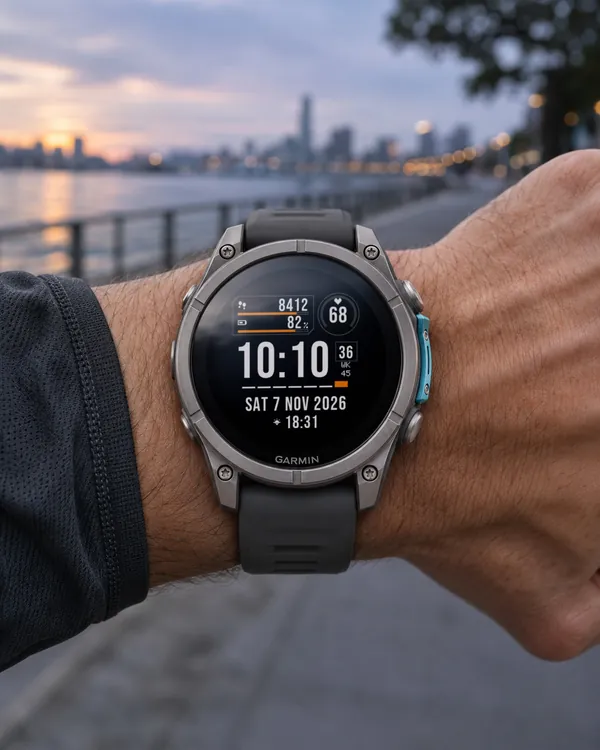
Field Log
5.0 (22)
Tactical data card with progress bars, a round gauge and a week strip
 Military
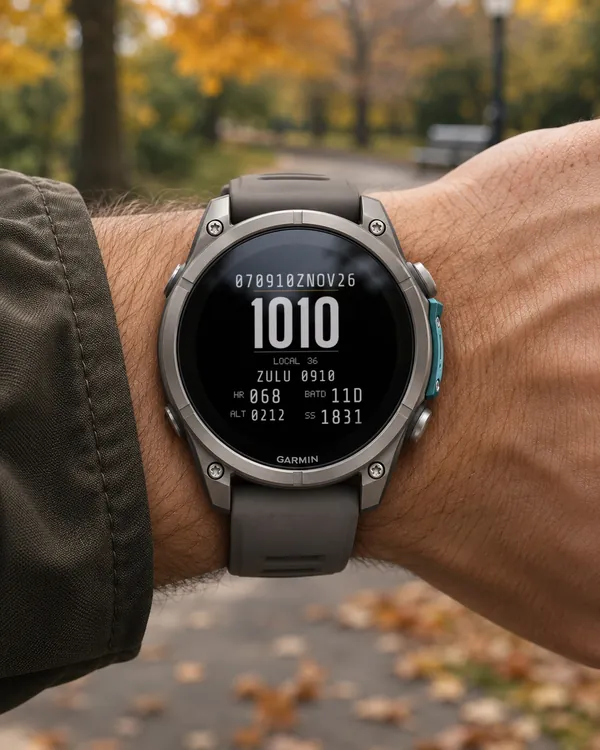
DTG Clock
4.8 (16)
24-hour military time with a date-time group, Zulu time and red night mode
 Aviation
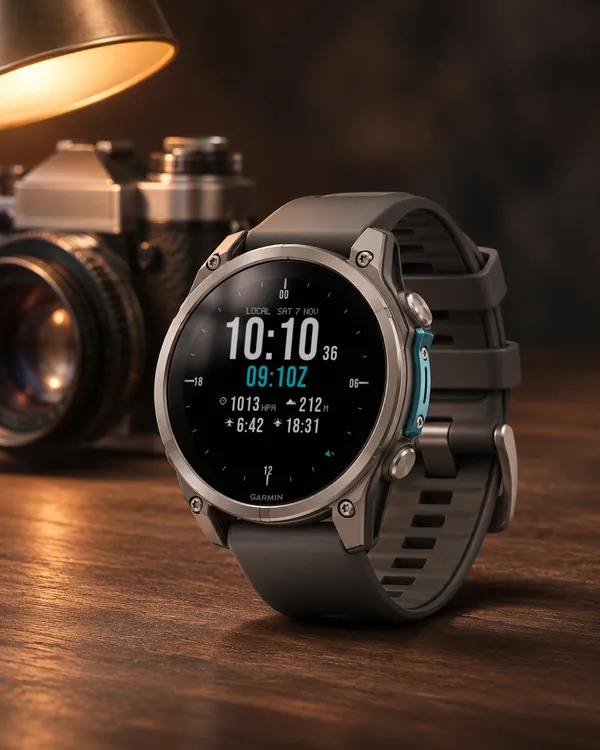
Zulu Chrono
5.0 (18)
Local time and UTC on a 24-hour bezel, with pressure and altitude
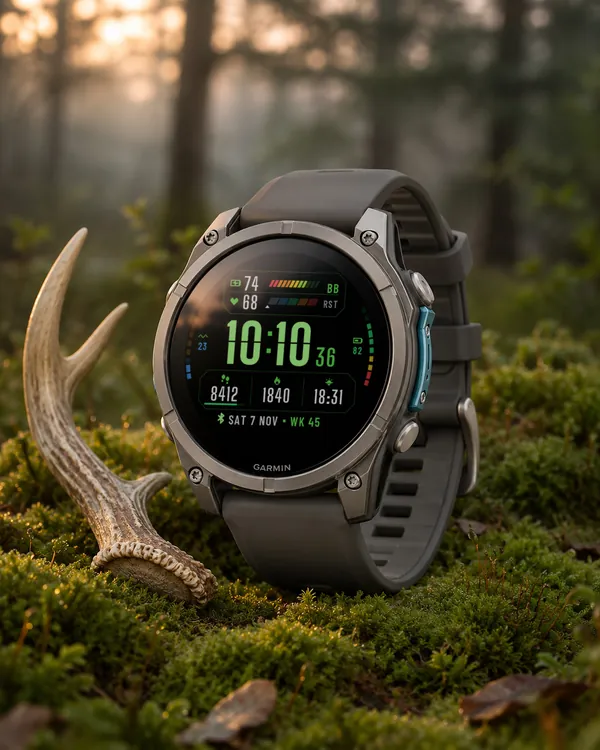 Tactical
Signal Ops
Tactical data panel with colour zone bars for Body Battery and heart rate