Coming soon to Connect IQ
This face will be available in Garmin Connect IQ. You cannot buy it yet. Leave your e-mail and we will write when it is there.
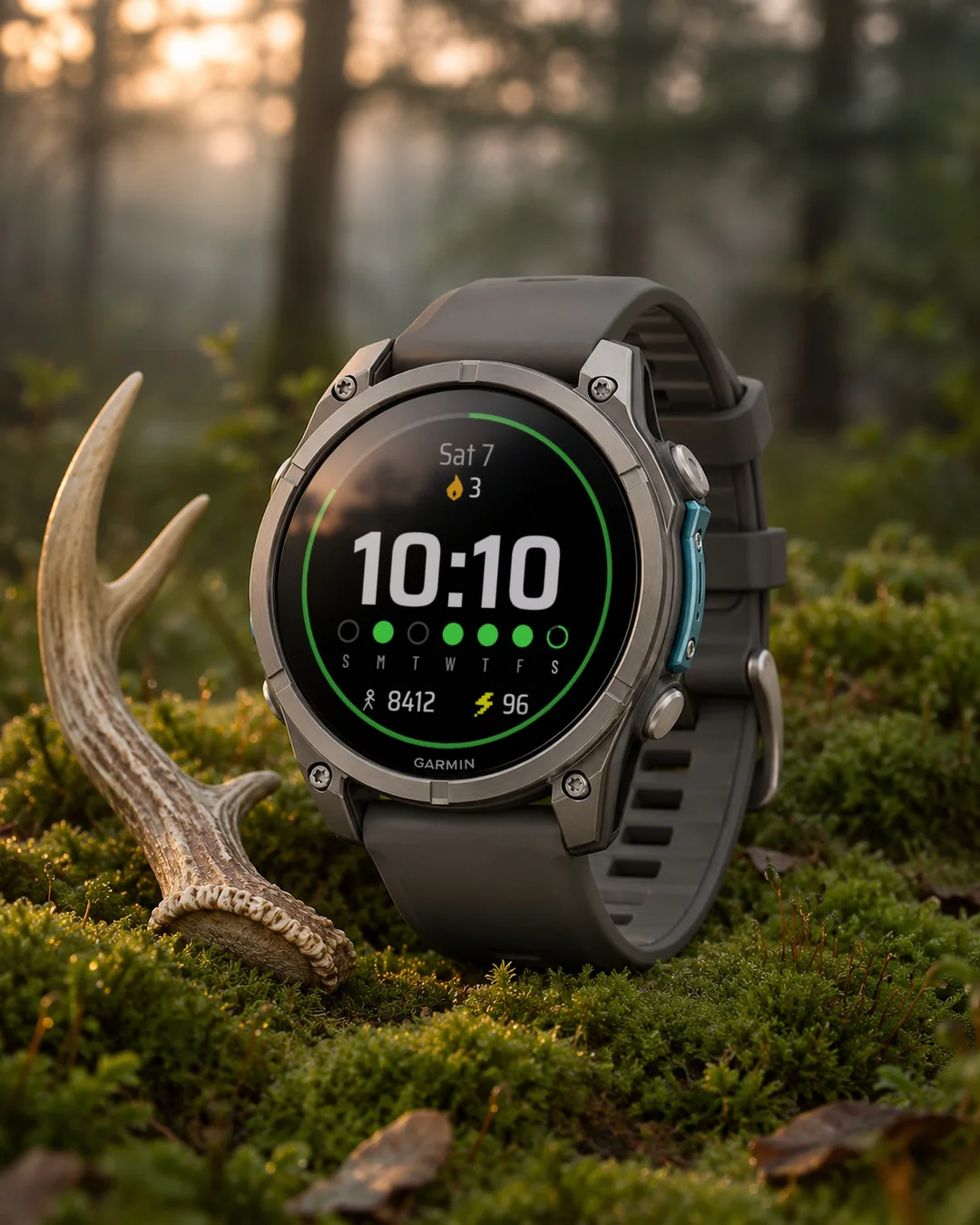
Streak Goals turns your daily step goal into a game you do not want to break. A ring around the edge fills as you walk. Under a big time you see the last 7 days: a filled dot for every day you reached your goal, and a flame on top with the number of days in a row. Skip a day and the streak starts again, so you keep moving. An independent face by dialforge.dev.
- Ring around the edge: today's steps against the goal set in Garmin Connect. It closes when you reach it.
- Streak: the flame shows how many days in a row you reached the step goal. Today counts as soon as you reach it. If you have not yet, the streak up to yesterday stays alive until midnight.
- Last 7 days: six past days and today, with the weekday letter under each one in your language. Filled dot = goal reached, empty ring = missed, today shows its progress.
- A big bold time, 12 or 24 hour like the watch, with the date on top.
- Two fields at the bottom (steps and active minutes by default) and the date on top. Each can show any of 32 kinds of data or stay empty: heart rate, floors, calories, body battery, stress, distance, weather, sunrise and sunset and more.
- Colours for the ring and markers, the time, values, lines and icons. Three sizes of field values.
- Data refresh: a profile (More often, Economy, Less often) or your own interval for each source, with an Off option. The profile lowers how often the face reads data; the watch sensors keep working.
- On touch watches press and hold the flame or the row of days to open your steps, or a field to open its screen.
- MIP screens (Forerunner 255 and 955, fenix 7, Enduro 3) use the 64 colour palette. AMOLED watches get an always-on mode: time and date, the whole face dimmed, or the time only, moved a little every minute.
- Menu in 35 languages, weekday letters in your language.
All settings are in Garmin Connect (Connect IQ, watch face settings), including colours, own intervals and Off for every data source. On the watch: Customise for the three fields, field value size, data refresh profile, battery unit and the always-on screen.
Past days come from the history kept by your watch, so right after a fresh start or a long break the earlier days can be missing for a while. When the watch has no reading, a field shows --.
Streak Goals zamienia dzienny cel kroków w grę, której nie chcesz przerwać. Pierścień wokół brzegu wypełnia się, gdy idziesz. Pod dużą godziną widzisz ostatnie 7 dni: wypełniona kropka za każdy dzień z osiągniętym celem i płomień u góry z liczbą dni z rzędu. Opuścisz dzień, seria zaczyna się od nowa, więc się ruszasz. Niezależna tarcza dialforge.dev.
- Pierścień wokół brzegu: dzisiejsze kroki wobec celu ustawionego w Garmin Connect. Zamyka się, gdy go osiągniesz.
- Seria: płomień pokazuje, ile dni z rzędu osiągnięty został cel kroków. Dzisiaj liczy się od razu po osiągnięciu celu. Jeśli jeszcze go nie masz, seria do wczoraj trwa do północy.
- Ostatnie 7 dni: sześć minionych dni i dzisiaj, z literą dnia tygodnia pod każdym w Twoim języku. Wypełniona kropka = cel osiągnięty, pusty pierścień = nie udało się, dzisiaj pokazuje postęp.
- Duża, gruba godzina, 12- lub 24-godzinna jak w zegarku, a u góry data.
- Dwa pola na dole (domyślnie kroki i minuty aktywności) i data u góry. Każde pokaże dowolną z 32 danych albo zostanie puste: tętno, piętra, kalorie, Body Battery, stres, dystans, pogodę, wschód i zachód słońca i inne.
- Kolory pierścienia i znaczników, godziny, wartości, linii i ikon. Trzy wielkości wartości pól.
- Odświeżanie danych: profil (Częściej, Oszczędny, Rzadziej) albo własny interwał dla każdego źródła, z opcją Wyłączone. Profil zmniejsza liczbę odczytów wykonywanych przez tarczę; czujniki zegarka pracują dalej.
- Na zegarkach dotykowych przytrzymaj płomień lub rząd dni, żeby otworzyć kroki, albo pole, żeby otworzyć jego ekran.
- Ekrany MIP (Forerunner 255 i 955, fenix 7, Enduro 3) używają palety 64 kolorów. Zegarki AMOLED mają tryb ekranu wygaszonego: godzina i data, cała tarcza przygaszona albo sama godzina, przesuwana co minutę.
- Menu w 35 językach, litery dni tygodnia w Twoim języku.
Wszystkie ustawienia są w Garmin Connect (Connect IQ, ustawienia tarczy), także kolory, własne interwały i Wyłączone dla każdego źródła danych. Na zegarku w Dostosuj: trzy pola, wielkość wartości pól, profil odświeżania danych, jednostka baterii i ekran wygaszony.
Minione dni pochodzą z historii zapisanej przez zegarek, więc zaraz po świeżym starcie albo długiej przerwie wcześniejszych dni może chwilę brakować. Gdy zegarek nie ma odczytu, pole pokazuje --.
Streak Goals macht aus deinem täglichen Schrittziel ein Spiel, bei dem du einfach am Ball bleiben willst. Während du dich bewegst, füllt sich der Ring am Rand. Direkt unter der großen Uhrzeit siehst du die letzten 7 Tage: ein ausgefüllter Punkt für jeden Tag mit erreichtem Ziel und darüber eine Flamme mit deiner Serie an aufeinanderfolgenden Tagen. Verpasst du einen Tag, beginnt die Serie von vorn. So bleibst du in Bewegung. Ein unabhängiges Zifferblatt von dialforge.dev.
- Ring am Displayrand: deine heutigen Schritte im Vergleich zum Ziel in Garmin Connect. Er schließt sich, sobald du es geschafft hast.
- Streak: Die Flamme zeigt, wie viele Tage in Folge du dein Schrittziel erreicht hast. Der heutige Tag zählt, sobald du das Ziel schaffst. Bis dahin bleibt deine Serie von gestern bis Mitternacht erhalten.
- Die letzten 7 Tage: sechs vergangene Tage und heute, jeweils mit dem Wochentagskürzel in deiner Sprache. Ausgefüllter Punkt = Ziel erreicht, leerer Kreis = verpasst, und heute siehst du den aktuellen Fortschritt.
- Große, kräftige Uhrzeit, im 12- oder 24-Stunden-Format wie auf deiner Uhr, mit dem Datum direkt darüber.
- Zwei Datenfelder unten (standardmäßig Schritte und aktive Minuten) und das Datum oben. Jedes Feld kann einen von 32 Werten anzeigen oder leer bleiben: Herzfrequenz, Stockwerke, Kalorien, Body Battery, Stress, Distanz, Wetter, Sonnenauf- und -untergang und mehr.
- Wählbare Farben für den Ring, die Markierungen, die Uhrzeit, Werte, Linien und Symbole. Drei Schriftgrößen für die Datenfelder.
- Datenaktualisierung: Wähle ein Profil (Häufiger, Sparmodus, Seltener) oder ein eigenes Intervall für jede Datenquelle, inklusive Aus-Option. Das Profil senkt nur, wie oft das Zifferblatt Werte abruft. Die Sensoren der Uhr laufen ganz normal weiter.
- Bei Touchscreen-Uhren einfach die Flamme oder die Tagesreihe gedrückt halten, um deine Schritte zu öffnen, oder auf ein Datenfeld tippen, um zur passenden Übersicht zu gelangen.
Alle Einstellungen findest du in Garmin Connect (Connect IQ, Zifferblatt-Einstellungen), inklusive Farben, eigener Intervalle und Deaktivierung einzelner Datenquellen. Direkt auf der Uhr: Anpassen für die drei Felder, Schriftgröße der Werte, Aktualisierungsprofil, Akkueinheit und Always-On-Display.
Vergangene Tage stammen aus dem Verlauf deiner Uhr. Nach einem Neustart oder einer längeren Tragepause können frühere Tage daher kurz fehlen. Wenn die Uhr keinen Messwert hat, zeigt das Feld -- an.
Ideen und Wünsche: https://dialforge.dev/faces/streakgoals/ oder über "Entwickler kontaktieren". Du möchtest ein anderes Ziel als Serie verfolgen? Schreib mir einfach, ich lese jede Nachricht.
Streak Goals transforme votre objectif quotidien de pas en un jeu que vous ne voudrez pas briser. Un anneau sur le pourtour se remplit à mesure que vous marchez. Sous l'heure affichée en grand, retrouvez vos 7 derniers jours : un point plein pour chaque jour où vous avez atteint votre objectif, surmonté d'une flamme indiquant le nombre de jours consécutifs. Manquez un jour et la série repart de zéro, parfait pour rester actif au quotidien. Un cadran indépendant signé dialforge.dev.
- Anneau sur le pourtour : vos pas du jour face à l'objectif défini dans Garmin Connect. Il se referme dès que vous l'atteignez.
- Série : la flamme indique le nombre de jours consécutifs où vous avez atteint l'objectif de pas. Aujourd'hui compte dès que vous l'avez atteint. Si ce n'est pas encore fait, votre série jusqu'à hier reste active jusqu'à minuit.
- 7 derniers jours : les six jours passés et aujourd'hui, avec la lettre du jour dans votre langue sous chacun. Point plein = objectif atteint, cercle vide = manqué, le jour en cours montre sa progression.
- L'heure en grand et bien lisible, au format 12 ou 24 heures selon votre montre, avec la date juste au-dessus.
- Deux champs en bas (pas et minutes actives par défaut) et la date en haut. Chacun peut afficher l'une des 32 données au choix ou rester vide : fréquence cardiaque, étages, calories, Body Battery, stress, distance, météo, lever et coucher de soleil et bien plus.
- Couleurs au choix pour l'anneau et les repères, l'heure, les valeurs, les lignes et les icônes. Trois tailles d'affichage pour les valeurs.
- Actualisation des données : choisissez un profil (Plus souvent, Économie, Moins souvent) ou définissez votre propre intervalle pour chaque source, avec une option Désactivé. Le profil réduit la fréquence de lecture du cadran, tandis que les capteurs de la montre continuent de fonctionner normalement.
- Sur les montres tactiles, maintenez le doigt sur la flamme ou la ligne des jours pour ouvrir vos pas, ou sur un champ pour afficher son écran détaillé.
Tous les réglages se font dans Garmin Connect (Connect IQ, paramètres du cadran), y compris les couleurs, vos propres intervalles et l'option Désactivé pour chaque source de données. Directement sur la montre : personnalisation des trois champs, taille des valeurs, profil d'actualisation des données, unité de batterie et écran toujours allumé.
L'historique provient de la mémoire de votre montre. Après un redémarrage ou une longue pause, les jours précédents peuvent donc mettre un peu de temps à s'afficher. Lorsqu'aucune mesure n'est disponible, le champ affiche --.
Idées ou suggestions : https://dialforge.dev/faces/streakgoals/ ou "Contacter le développeur". Vous aimeriez suivre un autre objectif sous forme de série ? Écrivez-moi, je lis chaque message.
Streak Goals convierte tu meta diaria de pasos en un juego que no querrás romper. El anillo del borde se va llenando según caminas. Debajo de la hora en grande tienes los últimos 7 días: un punto relleno por cada día que cumpliste el objetivo y una llama arriba con los días seguidos que llevas. Si te saltas un día la racha vuelve a empezar, así que toca no parar. Una esfera independiente de dialforge.dev.
- Anillo exterior: los pasos de hoy frente al objetivo marcado en Garmin Connect. Se cierra en cuanto lo consigues.
- Racha: la llama indica cuántos días seguidos has cumplido la meta de pasos. El día de hoy cuenta en cuanto llegas. Si aún no lo has hecho, la racha conseguida hasta ayer se mantiene viva hasta medianoche.
- Últimos 7 días: los seis anteriores y hoy, con la inicial del día de la semana debajo en tu idioma. Punto relleno = objetivo cumplido, círculo vacío = no alcanzado, y el día de hoy muestra su progreso.
- Hora en grande y en negrita, en formato de 12 o 24 horas según tengas configurado tu reloj, con la fecha arriba.
- Dos campos abajo (pasos y minutos de actividad por defecto) y la fecha arriba. Cada uno puede mostrar cualquiera de los 32 tipos de datos o quedarse vacío: frecuencia cardíaca, pisos subidos, calorías, Body Battery, estrés, distancia, tiempo meteorológico, salida y puesta de sol y más.
- Colores para el anillo y los marcadores, la hora, los valores, las líneas y los iconos. Tres tamaños para los datos de los campos.
- Actualización de datos: elige un perfil (Más frecuente, Económico, Menos frecuente) o define tu propio intervalo para cada fuente, con opción de Desactivado. El perfil reduce la frecuencia con la que la esfera lee los datos, pero los sensores del reloj siguen funcionando igual.
- En relojes táctiles, mantén pulsada la llama o la fila de días para abrir la vista de pasos, o pulsa en cualquier campo para abrir su pantalla.
- Las pantallas MIP (Forerunner 255 y 955, fenix 7, Enduro 3) aprovechan la paleta de 64 colores. Los relojes AMOLED cuentan con pantalla siempre activa: hora y fecha, la esfera entera atenuada o solo la hora, que se desplaza un poco cada minuto.
Todos los ajustes se configuran en Garmin Connect (Connect IQ, ajustes de la esfera), incluidos los colores, los intervalos personalizados y la opción de desactivar cada dato. Desde el reloj: Personalizar para los tres campos, tamaño de los valores, perfil de actualización, unidad de batería y modo de pantalla siempre activa.
Los días anteriores se toman del historial que guarda el reloj, así que tras reiniciar o después de no usarlo un tiempo es posible que falten datos antiguos al principio. Si el reloj no tiene ninguna lectura, el campo mostrará --.
Ideas y peticiones: https://dialforge.dev/faces/streakgoals/ o en "Contactar con el desarrollador". ¿Quieres seguir otro objetivo como una racha? Escríbeme, leo todos los mensajes.
Streak Goals maakt van je dagelijkse stapdoel een spelletje dat je niet wilt onderbreken. Een ring langs de rand vult zich terwijl je loopt. Onder een grote tijdweergave zie je de afgelopen 7 dagen: een gevulde stip voor elke dag dat je je doel hebt gehaald, en een vlammetje erboven met het aantal dagen op rij. Sla een dag over en de streak begint opnieuw, zodat je lekker in beweging blijft. Een onafhankelijke wijzerplaat van dialforge.dev.
- Ring langs de rand: je stappen van vandaag vergeleken met het doel uit Garmin Connect. De ring sluit zodra je het doel haalt.
- Streak: het vlammetje toont hoeveel dagen op rij je het stapdoel hebt gehaald. Vandaag telt mee zodra je het doel bereikt. Heb je het nog niet gehaald, dan blijft de streak tot gisteren actief tot middernacht.
- Afgelopen 7 dagen: zes eerdere dagen en vandaag, met onder elke dag de beginletter van de weekdag in je eigen taal. Gevulde stip = doel gehaald, open ring = gemist, vandaag toont de voortgang.
- Een grote, duidelijke tijdweergave, in 12- of 24-uursindeling zoals op je horloge, met de datum erboven.
- Twee velden onderin (standaard stappen en actieve minuten) en de datum bovenaan. Elk veld kan 32 soorten gegevens tonen of leeg blijven: hartslag, trappen, calorieën, Body Battery, stress, afstand, weer, zonsopgang en zonsondergang en meer.
- Kleuren voor de ring en markeringen, de tijd, waarden, lijnen en pictogrammen. Drie formaten voor veldwaarden.
- Gegevens verversen: een profiel (Vaker, Zuinig, Minder vaak) of een eigen interval per bron, met een optie voor Uit. Het profiel verlaagt hoe vaak de wijzerplaat gegevens leest; de horlogesensors blijven gewoon werken.
- Op horloges met touchscreen houd je het vlammetje of de rij met dagen ingedrukt om je stappen te openen, of houd een veld ingedrukt om het bijbehorende scherm te openen.
- MIP-schermen (Forerunner 255 en 955, fenix 7, Enduro 3) gebruiken het 64-kleurenpalet. AMOLED-horloges krijgen een always-on stand: tijd en datum, de hele wijzerplaat gedimd, of alleen de tijd, die elke minuut een stukje verschuift.
- Menu in 35 talen, dagletters in je eigen taal.
Alle instellingen vind je in Garmin Connect (Connect IQ, instellingen wijzerplaat), inclusief kleuren, eigen intervallen en Uit voor elke gegevensbron. Op het horloge zelf: Aanpassen voor de drie velden, grootte van veldwaarden, verversingsprofiel, batterij-eenheid en het always-on scherm.
Eerdere dagen komen uit de geschiedenis van je horloge, dus net na een frisse start of een lange pauze kunnen eerdere dagen even ontbreken. Als het horloge geen meting heeft, toont een veld --.
Ideeën en verzoeken: https://dialforge.dev/faces/streakgoals/ of "Contact met ontwikkelaar". Wil je een ander doel als streak bijhouden? Laat het gerust weten, ik lees elk bericht.
Streak Goalsは、毎日の歩数目標を「途切れさせたくないゲーム」に変えてくれるウォッチフェイスです。歩くほど外周のリングが満ちていきます。大きく見やすい時計表示の下には直近7日間の記録が並び、達成した日には丸いドットが点灯。上部の炎アイコンには連続達成日数が刻まれます。1日でもサボると記録はゼロからリスタート。今日も体を動かすモチベーションを保てます。dialforge.devによる個人開発のウォッチフェイスです。
- 外周リング:Garmin Connectで設定した歩数目標に対する進捗を表示。目標を達成するとリングが1周つながります。
- 連続記録(ストリーク):炎のアイコンで目標を達成した連続日数を表示。今日達成するとその場でカウントが増加。未達成の場合でも、昨日までの記録は深夜24時まで保持されます。
- 直近7日間の記録:過去6日間と今日の記録を並べ、下にはお使いの言語で曜日を表示。塗りつぶしの丸は達成、中抜きの丸は未達成、今日分は現在の進捗を示します。
- 太字で見やすい大きな時計表示。本体設定に合わせた12時間または24時間表示に対応し、上部には日付を表示。
- 画面下の2項目(初期設定は歩数と週間運動量)と上部の日付。それぞれ心拍数、上昇階数、カロリー、Body Battery、ストレス、移動距離、天気、日の出・日の入など、32種類のデータから選択可能。非表示にもできます。
- リングや目盛り、時刻、数値、ライン、アイコンのカラーを自由にカスタマイズ。項目の文字サイズは3段階から選べます。
- データ更新頻度:プロファイル(高頻度、エコノミー、低頻度)から選ぶか、項目ごとに個別設定が可能(オフも選択可)。プロファイルはウォッチフェイスの読み込み頻度を抑える機能で、時計本体のセンサーは通常通り動作します。
- タッチ対応モデルなら、炎アイコンや日付列を長押しして歩数画面を開いたり、各項目を長押しして詳細画面を呼び出せます。
- MIP画面(Forerunner 255や955、fenix 7、Enduro 3など)は64色パレットに対応。AMOLEDモデルでは常時表示モード(時刻と日付、全体の減光表示、1分ごとに位置が少し動く時刻のみ表示)に対応しています。
- メニューは35言語に対応、曜日もお使いの言語で表示されます。
カラー設定、各項目の更新間隔、非表示設定など、すべての設定はGarmin Connect(Connect IQ、ウォッチフェイス設定)から変更できます。時計本体からは、3つの表示項目、文字サイズ、更新プロファイル、バッテリー残量単位、常時表示画面をカスタマイズできます。
過去の記録は時計本体に保存された履歴を参照するため、再起動直後や長期間使っていなかった直後は、過去の日付データが一時的に表示されない場合があります。データが取得できない項目には -- と表示されます。
ご意見やご要望はこちらから:https://dialforge.dev/faces/streakgoals/ または「開発者に連絡」。歩数以外の目標でも連続記録したい項目があれば、ぜひメッセージをお送りください。すべて大切に目を通しています。
Streak Goals trasforma il tuo obiettivo giornaliero di passi in una sfida che non vorrai interrompere. L'anello lungo il bordo si riempie mentre cammini. Sotto l'ora a grandi cifre trovi gli ultimi 7 giorni: un cerchietto pieno per ogni giorno in cui hai raggiunto l'obiettivo e una fiamma in alto con il numero di giorni consecutivi. Se salti un giorno la serie riparte da zero, così continui a muoverti. Un quadrante indipendente creato da dialforge.dev.
- Anello lungo il bordo: i passi di oggi rispetto all'obiettivo impostato su Garmin Connect. Si chiude quando lo raggiungi.
- Serie: la fiamma mostra per quanti giorni consecutivi hai centrato l'obiettivo di passi. La giornata di oggi viene conteggiata appena lo raggiungi. Se non ci sei ancora riuscito, la serie fino a ieri resta valida fino a mezzanotte.
- Ultimi 7 giorni: sei giorni passati e oggi, con l'iniziale del giorno della settimana nella tua lingua sotto a ciascuno. Cerchietto pieno = obiettivo raggiunto, anello vuoto = mancato, oggi mostra i tuoi progressi.
- Ora grande e ben visibile, in formato 12 o 24 ore come sull'orologio, con la data in alto.
- Due campi in basso (passi e minuti di intensità come predefiniti) e la data in alto. Ciascuno può mostrare uno qualsiasi tra 32 tipi di dati o restare vuoto: frequenza cardiaca, piani saliti, calorie, Body Battery, stress, distanza, meteo, alba e tramonto e molto altro.
- Colori personalizzabili per anello e indicatori, ora, valori, linee e icone. Tre dimensioni per i valori dei campi.
- Aggiornamento dati: un profilo (Più spesso, Risparmio, Meno spesso) o un intervallo personalizzato per ogni sorgente, con l'opzione Spento. Il profilo riduce la frequenza con cui il quadrante legge i dati: i sensori dell'orologio continuano a funzionare.
- Sui modelli touchscreen, tocca e tieni premuta la fiamma o la riga dei giorni per aprire i passi, oppure tocca un campo per aprire la schermata corrispondente.
- Gli schermi MIP (Forerunner 255 e 955, fenix 7, Enduro 3) sfruttano la tavolozza a 64 colori. Gli orologi AMOLED hanno la modalità always-on: ora e data, intero quadrante attenuato oppure solo l'ora, spostata leggermente ogni minuto.
Tutte le impostazioni sono in Garmin Connect (Connect IQ, impostazioni del quadrante), inclusi colori, intervalli personalizzati e l'opzione Spento per ciascuna sorgente dati. Sull'orologio: Personalizza per i tre campi, dimensione dei valori, profilo di aggiornamento dati, unità della batteria e schermo always-on.
I giorni passati provengono dalla cronologia dell'orologio, quindi subito dopo un riavvio o una lunga pausa i giorni precedenti potrebbero non comparire per un po'. Quando l'orologio non rileva alcun dato, il campo mostra --.
Idee e richieste: https://dialforge.dev/faces/streakgoals/ o "Contatta lo sviluppatore". Vorresti tracciare un altro obiettivo come serie? Scrivimi pure, leggo ogni messaggio.
Streak Goals 让每天的步数目标变成一场停不下来的打卡挑战。外圈的圆环会随着你走动慢慢填满。在大字时间下方,你能看到过去 7 天的记录:达标的那天显示为实心圆点,上方还有一团小火焰,标注着连续达标的天数。只要断了一天挑战就得重新开始,让你每天都更有动力动起来。来自 dialforge.dev 的独立表盘作品。
- 外圈进度环:展示今天的步数与 Garmin Connect 设定目标的差距,达标时圆环会完全闭合。
- 连续打卡:小火焰显示你连续达成步数目标的天数。今天一旦达标就会立即计入;要是还没达成,昨天的连续记录也会一直为你保留到午夜。
- 最近 7 天:包含过去 6 天与今天,下方标有对应语言的星期缩写。实心圆点表示达标,空心圆环表示未达标,今天则会展示当前的进度。
- 醒目的粗体时间,支持手表自带的 12 或 24 小时制,上方显示日期。
- 底部设有两个数据栏(默认显示步数与活动分钟数),顶部为日期。每个数据栏都可以从 32 种数据中自由挑选,或者保持留空:心率、爬楼层数、卡路里、Body Battery、压力、距离、天气、日出日落等等。
- 外环、刻度、时间、数值、线条和图标均可自定配色,数据数值还提供 3 种字号可调。
- 数据刷新策略:可选择预设模式(更频繁、省电、低频),也能为每项数据单独设定刷新间隔,甚至直接关闭。预设模式只会降低表盘读取数据的频率,手表自身的传感器依然正常工作。
- 触摸屏手表支持长按交互:长按火焰图标或 7 天记录行可直接打开步数详情,长按数据栏可打开对应的功能界面。
- MIP 屏幕机型(Forerunner 255 和 955、fenix 7、Enduro 3)采用 64 色调色板。AMOLED 手表则提供息屏常亮模式:可显示时间和日期、全表盘暗光显示,或是仅显示时间并每分钟微移防烧屏。
- 设置菜单支持 35 种语言,星期缩写也会自动匹配你的系统语言。
全部设置均可在 Garmin Connect 中进行(Connect IQ,表盘设置),包括颜色搭配、自定义刷新间隔以及关闭特定数据源。在手表端:可以直接自定义三个数据栏、数值字号、数据刷新模式、电量单位以及息屏常亮显示。
历史天数来自手表保存的运动记录,因此在刚装上表盘或长时间未佩戴后,前几天的记录可能会暂时显示不全。当手表没有读数时,数据栏会显示 --。
建议与反馈:https://dialforge.dev/faces/streakgoals/ 或点击“联系开发者”。想用打卡方式记录其他运动目标?欢迎随时留言,每一条消息我都会认真看。
Streak Goals превращает дневную норму шагов в игру, которую не хочется прерывать. Кольцо по краю экрана заполняется по мере ходьбы. Под крупным временем видны последние 7 дней: закрашенная точка за каждый закрытый день и огонек сверху с числом дней подряд. Стоит пропустить день, и серия начнется сначала, отличный повод не засиживаться. Независимый циферблат от dialforge.dev.
- Кольцо по краю экрана: шаги за сегодня относительно цели, заданной в Garmin Connect. Кольцо замыкается, когда цель взята.
- Серия дней: огонек показывает, сколько дней подряд вы выполняли норму шагов. Сегодняшний день засчитывается сразу после взятия цели. А если цель еще не закрыта, серия до вчерашнего дня держится до самой полуночи.
- Последние 7 дней: шесть прошлых дней и сегодня, с буквой дня недели под каждым на вашем языке. Закрашенная точка: цель выполнена, пустое кольцо: пропуск, сегодня показывает текущий прогресс.
- Крупное жирное время, 12 или 24 часа в формате часов, с датой сверху.
- Два поля внизу (по умолчанию шаги и активные минуты) и дата сверху. В каждом можно настроить любой из 32 видов данных или оставить пустым: пульс, этажи, калории, Body Battery, стресс, дистанция, погода, восход и закат и многое другое.
- Цвета для кольца и делений, времени, значений, линий и иконок. Три размера цифр в полях.
- Обновление данных: готовый профиль (Чаще, Экономичный, Реже) или свой интервал для каждого источника, плюс вариант Отключить. Профиль снижает частоту опроса данных циферблатом, датчики часов продолжают работать как обычно.
- На часах с сенсорным экраном нажмите и удерживайте огонек или полоску дней, чтобы открыть экран шагов, либо удерживайте поле, чтобы перейти к его показателю.
- Экраны MIP (Forerunner 255 и 955, fenix 7, Enduro 3) используют палитру из 64 цветов. Для часов AMOLED есть режим всегда включенного экрана: время и дата, весь циферблат в приглушенном свете или только время с небольшим сдвигом каждую минуту.
- Меню на 35 языках, буквы дней недели на вашем языке.
Все настройки меняются в Garmin Connect (Connect IQ, настройки циферблата), включая цвета, собственные интервалы и отключение любого источника данных. Прямо на часах: настройка трех полей, размера значений, профиля обновления данных, формата батареи и постоянно включенного экрана.
Прошлые дни берутся из истории на часах, поэтому сразу после чистой установки или долгого перерыва предыдущие дни могут появиться не сразу. Если у часов нет текущих измерений, в поле отображается --.
Идеи и пожелания: https://dialforge.dev/faces/streakgoals/ или «Связаться с разработчиком». Хотите собирать серию по другой цели? Напишите, я читаю каждое сообщение.
O Streak Goals transforma sua meta diária de passos em um jogo que você não vai querer perder. O anel ao redor da borda vai se preenchendo conforme você caminha. Logo abaixo das horas em tamanho grande, você vê os últimos 7 dias: uma bolinha preenchida para cada dia em que bateu a meta, e uma chama no topo mostrando quantos dias seguidos você conseguiu. Se pular um dia, a sequência recomeça do zero, incentivando você a continuar em movimento. Um mostrador independente feito por dialforge.dev.
- Anel na borda: passos de hoje em relação à meta definida no Garmin Connect. Ele se fecha assim que você alcança a meta.
- Sequência: a chama mostra quantos dias seguidos você atingiu a meta de passos. O dia de hoje conta assim que você bater a meta. Se ainda não bateu, a sequência até ontem continua valendo até meia-noite.
- Últimos 7 dias: os últimos seis dias e o dia de hoje, com a inicial do dia da semana embaixo no seu idioma. Ponto preenchido = meta batida, círculo vazio = não alcançada, e o dia de hoje mostra o progresso atual.
- Horário grande em destaque, no formato 12 ou 24 horas conforme o relógio, com a data na parte superior.
- Dois campos na parte inferior (passos e minutos ativos por padrão) e a data no topo. Cada um pode exibir qualquer um dos 32 tipos de dados ou ficar vazio: frequência cardíaca, andares, calorias, Body Battery, estresse, distância, clima, nascer e pôr do sol e muito mais.
- Cores personalizáveis para o anel e marcadores, horário, valores, linhas e ícones. Três tamanhos para os valores dos campos.
- Atualização de dados: escolha um perfil (Mais frequente, Econômico, Menos frequente) ou defina seu próprio intervalo para cada fonte, com opção de Desativar. O perfil reduz a frequência com que o mostrador lê os dados, enquanto os sensores do relógio continuam funcionando normalmente.
- Em relógios com tela sensível ao toque, toque e segure a chama ou a linha dos dias para abrir seus passos, ou toque em um campo para abrir a tela correspondente.
Todas as configurações ficam no Garmin Connect (Connect IQ, configurações do mostrador), incluindo cores, intervalos personalizados e a opção de Desativar para cada fonte de dados. No próprio relógio: personalize os três campos, tamanho dos valores, perfil de atualização dos dados, exibição da bateria e a tela sempre ativa.
Os dias anteriores vêm do histórico registrado pelo relógio. Por isso, logo após reiniciar ou ficar um tempo sem usar, os primeiros dias podem não aparecer por um instante. Quando o relógio não tem nenhuma leitura, o campo mostra --.
Streak Goals promění váš denní cíl kroků ve hru, kterou nebudete chtít přerušit. Kroužek po obvodu se plní s každým krokem. Pod velkým časem vidíte posledních 7 dní: plnou tečku za každý splněný den a nahoře plamínek s počtem dní v řadě. Vynecháte den a série začíná od nuly, takže vás to udrží v pohybu. Nezávislý ciferník od dialforge.dev.
- Kroužek po obvodu: dnešní kroky vůči cíli nastavenému v Garmin Connect. Jakmile cíl splníte, kroužek se uzavře.
- Série: plamínek ukazuje, kolik dní v řadě jste splnili cíl kroků. Dnešek se započítá hned, jakmile ho dosáhnete. Pokud ještě ne, série do včerejšího dne zůstává platná až do půlnoci.
- Posledních 7 dní: šest uplynulých dní a dnešek, pod každým písmeno dne v týdnu ve vašem jazyce. Plná tečka = cíl splněn, prázdné kolečko = nesplněno, dnešek ukazuje aktuální stav.
- Výrazný velký čas, 12 nebo 24 hodinový formát podle hodinek, s datem nahoře.
- Dvě pole dole (ve výchozím nastavení kroky a aktivní minuty) a datum nahoře. V každém z nich si můžete zobrazit kterýkoliv z 32 údajů nebo ho nechat prázdné: srdeční tep, patra, kalorie, Body Battery, stres, vzdálenost, počasí, východ i západ slunce a další.
- Barvy pro kroužek i značky, čas, hodnoty, linky a ikonky. Tři velikosti hodnot v polích.
- Obnova dat: přednastavený profil (Častěji, Úsporný, Méně často) nebo vlastní interval pro každý zdroj, případně možnost Vypnuto. Profil omezuje pouze to, jak často ciferník čte data. Senzory hodinek fungují nepřetržitě dál.
- Na dotykových hodinkách stačí podržet plamínek nebo řadu dní a otevře se přehled kroků, podržením libovolného pole pak otevřete jeho podrobnou obrazovku.
- MIP displeje (Forerunner 255 a 955, fenix 7, Enduro 3) využívají paletu 64 barev. Hodinky s AMOLED mají režim trvale zapnutého displeje: čas a datum, celý ztlumený ciferník, případně pouze čas, který se každou minutu nepatrně posune.
- Menu v 35 jazycích, písmena dnů v týdnu v češtině.
Veškerá nastavení najdete v Garmin Connect (Connect IQ, nastavení ciferníku), včetně barev, vlastních intervalů i volby Vypnuto pro každý zdroj dat. Přímo v hodinkách: volba Přizpůsobit pro tři pole, velikost hodnot, profil obnovy dat, jednotka baterie a trvale zapnutý displej.
Předchozí dny čerpají z historie uložené v hodinkách, takže po novém spuštění nebo delší pauze mohou starší dny chvíli chybět. Když hodinky nemají k dispozici žádnou hodnotu, pole zobrazí --.
Nápady a přání: https://dialforge.dev/faces/streakgoals/ nebo "Kontaktovat vývojáře". Chcete jako sérii sledovat jiný cíl? Napište mi, čtu každou zprávu.
O Streak Goals transforma o teu objetivo diário de passos num jogo que não vais querer quebrar. À medida que caminhas, o anel em redor vai preenchendo. Por baixo das horas em tamanho grande, vês os últimos 7 dias: um ponto cheio para cada dia em que atingiste a meta e uma chama no topo com o número de dias seguidos. Se falhares um dia, a sequência recomeça, para que te mantenhas sempre em movimento. Um mostrador independente criado por dialforge.dev.
- Anel à volta: os passos de hoje face ao objetivo definido no Garmin Connect. Fecha quando o atinges.
- Sequência: a chama mostra quantos dias seguidos atingiste a meta de passos. O dia de hoje conta assim que o cumpres. Se ainda não o tiveres feito, a sequência até ontem mantém-se ativa até à meia-noite.
- Últimos 7 dias: os seis dias anteriores e o dia de hoje, com a inicial do dia da semana por baixo na tua língua. Ponto preenchido = objetivo cumprido, círculo vazio = falhado, hoje mostra o progresso atual.
- Horas em formato grande e destacado, em 12 ou 24 horas como no relógio, com a data no topo.
- Dois campos em baixo (passos e minutos ativos por predefinição) e a data no topo. Cada um pode mostrar qualquer um de 32 tipos de dados ou ficar vazio: frequência cardíaca, andares, calorias, Body Battery, stress, distância, meteorologia, nascer e pôr do sol e muito mais.
- Cores para o anel e marcadores, horas, valores, linhas e ícones. Três tamanhos para os valores dos campos.
- Atualização de dados: um perfil (Mais frequente, Económico, Menos frequente) ou o teu próprio intervalo para cada fonte, com a opção Desligado. O perfil reduz a frequência com que o mostrador lê os dados; os sensores do relógio continuam a funcionar.
- Em relógios táteis, prime continuamente a chama ou a linha dos dias para abrir os passos, ou um campo para abrir o respetivo ecrã.
- Os ecrãs MIP (Forerunner 255 e 955, fenix 7, Enduro 3) usam a paleta de 64 cores. Os relógios AMOLED têm modo sempre ligado: horas e data, o mostrador inteiro atenuado ou apenas as horas, com ligeiros desvios a cada minuto.
- Menu em 35 idiomas, iniciais dos dias da semana na tua língua.
Todas as opções são configuradas no Garmin Connect (Connect IQ, definições do mostrador), incluindo cores, intervalos personalizados e a opção Desligado para cada fonte de dados. No relógio: Personalizar para os três campos, tamanho dos valores, perfil de atualização de dados, unidade da bateria e ecrã sempre ligado.
Os dias anteriores vêm do histórico guardado no teu relógio, pelo que logo após reiniciar ou depois de uma longa pausa, os dias anteriores podem não aparecer logo. Quando o relógio não tem nenhuma leitura, o campo mostra --.
Ideias e pedidos: https://dialforge.dev/faces/streakgoals/ ou "Contactar programador". Queres ver outro objetivo acompanhado como sequência de dias? Escreve-me, leio todas as mensagens.
Streak Goals는 매일 걸음 수 목표를 절대 깨뜨리고 싶지 않은 재미있는 게임으로 만들어 줍니다. 걸을 때마다 가장자리의 링이 차오르고, 큼직한 시계 아래로 최근 7일간의 기록이 한눈에 보입니다. 목표를 달성한 날에는 꽉 찬 점이 찍히고, 위쪽의 불꽃 아이콘에는 연속 달성 일수가 표시됩니다. 하루라도 거르면 연속 기록이 처음부터 다시 시작되니 저절로 몸을 움직이게 되죠. dialforge.dev에서 제작한 인디 워치페이스입니다.
- 가장자리 링: Garmin Connect에서 설정한 목표 대비 오늘의 걸음 수입니다. 목표를 채우면 링이 완전히 닫힙니다.
- 연속 달성: 불꽃 아이콘이 걸음 수 목표를 며칠 연속으로 달성했는지 보여줍니다. 오늘 목표를 달성하면 바로 반영되며, 아직 달성 전이라도 어제까지의 기록은 자정까지 그대로 유지됩니다.
- 최근 7일: 지난 6일과 오늘이 표시되며, 각 날짜 아래에 한국어로 요일이 적혀 있습니다. 채워진 점은 목표 달성, 빈 링은 미달성, 오늘은 현재 진행 상황을 나타냅니다.
- 시계 설정에 맞춰 12시간제나 24시간제로 시원하게 표시되는 큼직한 시계, 위쪽에는 날짜가 함께 뜹니다.
- 하단 2개 데이터 필드(기본값은 걸음 수와 운동 시간)와 상단 날짜 표시. 심박수, 오른 층수, 칼로리, Body Battery, 스트레스, 거리, 날씨, 일출 일몰 등 32가지 데이터 중 원하는 것을 띄우거나 깔끔하게 비워둘 수 있습니다.
- 링과 마커, 시간, 수치, 라인, 아이콘까지 원하는 색상으로 변경 가능. 데이터 필드 글자 크기도 3단계로 조절할 수 있습니다.
- 데이터 새로고침: 프로필(자주, 절약, 덜 자주)을 고르거나 데이터 항목별로 갱신 주기를 직접 지정할 수 있으며 꺼둠(Off) 옵션도 있습니다. 프로필 설정은 워치페이스가 데이터를 읽어오는 주기만 줄여주므로 워치 자체 센서는 정상 작동합니다.
- 터치를 지원하는 워치에서는 불꽃이나 날짜 표시줄을 길게 눌러 걸음 수 화면을 열고, 데이터 필드를 길게 눌러 해당 상세 화면으로 바로 이동할 수 있습니다.
- MIP 화면(Forerunner 255 및 955, fenix 7, Enduro 3)에서는 64색 팔레트를 지원합니다. AMOLED 워치에서는 AOD 모드를 지원하여 시간과 날짜 표시, 화면 전체를 어둡게 유지하기, 1분마다 살짝 위치를 바꾸는 시간 전용 표시 중 선택할 수 있습니다.
- 35개 언어 메뉴 지원, 요일 글자도 사용자 언어로 자연스럽게 표시됩니다.
색상, 개별 갱신 주기, 각 데이터 항목 끄기(Off)를 포함한 모든 설정은 Garmin Connect(Connect IQ, 워치페이스 설정)에서 변경할 수 있습니다. 워치 기기 내 설정: 3개 필드 커스텀, 필드 값 크기, 데이터 새로고침 프로필, 배터리 표시 단위, AOD 화면을 바로 꾸밀 수 있습니다.
지난 기록은 워치 자체에 저장된 내역을 불러오므로, 워치를 새로 시작했거나 오랫동안 착용하지 않은 직후에는 이전 기록이 잠시 비어 보일 수 있습니다. 워치에서 측정된 값이 없을 때는 필드에 --로 표시됩니다.
의견 및 문의: https://dialforge.dev/faces/streakgoals/ 또는 "개발자에게 문의하기". 다른 목표도 연속 달성으로 기록하고 싶으신가요? 언제든 메시지를 남겨주세요, 모든 문의를 꼼꼼히 읽고 있습니다.
Streak Goals förvandlar ditt dagliga stegmål till ett spel du inte vill bryta. En ring runt kanten fylls på medan du går. Under den stora klockan ser du de senaste 7 dagarna: en fylld prick för varje dag du nådde målet, och en låga överst med antalet dagar i rad. Missar du en dag börjar sviten om, så att du håller igång. En fristående urtavla från dialforge.dev.
- Ring runt kanten: dagens steg mot målet du ställt in i Garmin Connect. Cirkeln sluts när du når målet.
- Svit: lågan visar hur många dagar i rad du har nått stegmålet. Dagen räknas så fort du når det. Har du inte nått det än hålls sviten fram till igår vid liv fram till midnatt.
- De senaste 7 dagarna: sex tidigare dagar och idag, med veckodagens bokstav under varje dag på ditt språk. Fylld prick = målet nått, tom ring = missat, och idag visar hur långt du har kommit.
- Tydlig och stor tid, 12 eller 24 timmar precis som klockan, med datumet längst upp.
- Två fält längst ner (steg och aktiva minuter som standard) och datumet överst. Varje fält kan visa någon av 32 olika typer av data eller lämnas tomt: puls, våningar, kalorier, Body Battery, stress, distans, väder, soluppgång och solnedgång med mera.
- Färger för ringen och markeringarna, tiden, värdena, linjerna och ikonerna. Tre storlekar för fältvärdena.
- Datauppdatering: välj en profil (Oftare, Ekonomi, Mer sällan) eller ställ in ett eget intervall för varje datakälla, med alternativet Av. Profilen minskar hur ofta urtavlan läser av data, medan klockans sensorer fortsätter att mäta.
- På klockor med pekskärm trycker du och håller in på lågan eller dagsraden för att öppna stegen, eller på ett fält för att öppna dess skärm.
- MIP-skärmar (Forerunner 255 och 955, fenix 7, Enduro 3) använder paletten med 64 färger. Klockor med AMOLED får ett alltid på-läge: tid och datum, hela urtavlan nedtonad, eller bara tiden som flyttas lite varje minut.
- Meny på 35 språk, och veckodagarnas bokstäver på ditt språk.
Alla inställningar görs i Garmin Connect (Connect IQ, inställningar för urtavlan), inklusive färger, egna intervall och Av för varje datakälla. På klockan: Anpassa för de tre fälten, fältvärdenas storlek, profil för datauppdatering, batterienhet och alltid på-skärmen.
Tidigare dagar hämtas från klockans historik, så direkt efter en omstart eller en längre paus kan tidigare dagar saknas en stund. När klockan saknar mätvärde visar ett fält --.
Idéer och önskemål: https://dialforge.dev/faces/streakgoals/ eller "Kontakta utvecklaren". Vill du spåra ett annat mål som en svit? Skriv gärna, jag läser alla meddelanden.
Streak Goals gør dit daglige skridtmål til en leg, du ikke har lyst til at bryde. En ring langs kanten fyldes ud, mens du går. Under et stort klokkeslæt ser du de seneste 7 dage: en udfyldt prik for hver dag, du nåede dit mål, og en flamme øverst med antallet af dage i træk. Springer du en dag over, starter din streak forfra, så du holder dig i gang. En uafhængig urskive fra dialforge.dev.
- Ring langs kanten: dagens skridt målt op mod det mål, du har sat i Garmin Connect. Den lukker sig, når målet er nået.
- Streak: flammen viser, hvor mange dage i træk du har nået skridtmålet. Dagen i dag tæller med, så snart du når det. Har du ikke nået det endnu, holdes din streak frem til i går i live indtil midnat.
- Seneste 7 dage: de foregående seks dage plus i dag, med ugedagens forbogstav under hver på dit eget sprog. Udfyldt prik = mål nået, tom ring = ikke nået, og i dag viser dine løbende fremskridt.
- Et stort, tydeligt klokkeslæt i 12 eller 24 timer ligesom uret, med datoen øverst.
- To felter i bunden (som standard skridt og aktive minutter) og datoen øverst. Hvert felt kan vise op til 32 forskellige slags data eller stå tomt: puls, etager, kalorier, Body Battery, stress, distance, vejr, solopgang, solnedgang og meget mere.
- Farver til ringen og markørerne, klokkeslættet, værdierne, linjerne og ikonerne. Tre størrelser til feltværdier.
- Dataopdatering: vælg en profil (Oftere, Økonomisk, Sjældnere) eller dit eget interval for hver kilde, samt mulighed for at slå det helt fra. Profilen sænker, hvor ofte urskiven henter data, mens urets sensorer måler ufortrødent videre.
- På ure med touchskærm holder du blot fingeren på flammen eller rækken af dage for at se dine skridt, eller på et felt for at åbne det pågældende skærmbillede.
- MIP-skærme (Forerunner 255 og 955, fenix 7, Enduro 3) udnytter paletten med 64 farver. AMOLED-ure får en always-on-tilstand: tid og dato, hele urskiven dæmpet eller kun klokkeslættet, som flyttes en smule hvert minut.
- Menu på 35 sprog, og ugedagsbogstaver på dit eget sprog.
Alle indstillinger klares i Garmin Connect (Connect IQ, indstillinger for urskive), inklusive farver, egne intervaller og Fra for hver datakilde. Direkte på uret: Tilpas de tre felter, værdiernes størrelse, profil for dataopdatering, batterienhed og always-on-skærmen.
Tidligere dage hentes fra urets egen historik, så lige efter en nulstilling eller en længere pause kan de første dage mangle i et stykke tid. Når uret mangler en måling, viser feltet --.
Idéer og ønsker: https://dialforge.dev/faces/streakgoals/ eller "Kontakt udvikler". Vil du have et andet mål som streak? Skriv endelig, jeg læser hver eneste besked.
Streak Goals gjør det daglige skrittmålet ditt om til et spill du ikke vil bryte. En ring langs kanten fylles etter hvert som du går. Under et stort klokkeslett ser du de siste 7 dagene: en fylt prikk for hver dag du nådde målet, og en flamme på toppen med antall dager på rad. Hopper du over en dag, starter streaken på nytt, så her er det bare å holde seg i bevegelse. En uavhengig urskive fra dialforge.dev.
- Ring langs kanten: dagens skritt mot målet du har satt i Garmin Connect. Den lukker seg når du når det.
- Streak: flammen viser hvor mange dager på rad du har nådd skrittmålet. Dagen i dag teller så snart du når målet. Hvis du ikke har nådd det ennå, lever streaken frem til i går videre helt til midnatt.
- De siste 7 dagene: de seks foregående dagene og i dag, med ukedagsbokstav under hver dag på ditt språk. Fylt prikk = nådd mål, tom ring = ikke nådd, og dagen i dag viser fremgangen din.
- Et stort, tydelig klokkeslett i fet skrift, 12 eller 24 timer akkurat som klokken, med datoen øverst.
- To felt nederst (skritt og aktive minutter som standard) og datoen øverst. Hvert felt kan vise en av 32 typer data eller stå tomt: puls, etasjer, kalorier, Body Battery, stress, distanse, vær, soloppgang og solnedgang med mer.
- Farger for ringen og markørene, klokkeslettet, verdiene, linjene og ikonene. Tre størrelser på feltverdiene.
- Dataoppdatering: en profil (Oftere, Økonomisk, Sjeldnere) eller ditt eget intervall for hver kilde, med et Av-valg. Profilen reduserer hvor ofte urskiven leser av data, mens sensorene på klokken fortsetter å fungere som normalt.
- På klokker med berøringsskjerm kan du trykke og holde på flammen eller dagsraden for å åpne skrittene dine, eller trykke på et felt for å åpne skjermen for det feltet.
- MIP-skjermer (Forerunner 255 og 955, fenix 7, Enduro 3) bruker paletten med 64 farger. AMOLED-klokker får alltid-på-modus: klokkeslett og dato, hele urskiven tonet ned, eller kun klokkeslettet, som flyttes litt på hvert minutt.
- Meny på 35 språk, og ukedagsbokstaver på ditt språk.
Alle innstillinger gjøres i Garmin Connect (Connect IQ, innstillinger for urskive), inkludert farger, egne intervaller og Av for hver datakilde. På klokken: Tilpass for de tre feltene, størrelse på feltverdi, profil for dataoppdatering, batterienhet og alltid-på-skjerm.
Tidligere dager hentes fra historikken på klokken din, så rett etter en omstart eller et lengre avbrudd kan tidligere dager mangle en stund. Når klokken ikke har noen måling, viser feltet --.
Ideer og ønsker: https://dialforge.dev/faces/streakgoals/ eller "Kontakt utvikler". Har du et annet mål du vil følge som en streak? Ta kontakt, jeg leser hver eneste melding.
Streak Goals 讓每天的步數目標變成一場讓人停不下來的挑戰。隨著你的步伐,外圈進度環會逐漸填滿。在大字體時間下方,清楚呈現最近 7 天的紀錄:只要達標就會點亮實心圓點,上方還有火焰圖示標示連續達標的天數。一旦中斷就得重頭開始,激勵你每天持續邁步。由 dialforge.dev 獨立開發的錶面。
- 外圈進度環:依據 Garmin Connect 設定的步數目標顯示今日進度,達標時整圈閉合。
- 連續達標紀錄:火焰圖示顯示連續幾天達成步數目標。今日一旦達標立即計入;若尚未達標,昨天的連續紀錄也會為你保留到午夜。
- 最近 7 天:包含過去 6 天與今天,下方以你的語言顯示星期縮寫。實心圓點代表達標,空心圓圈代表未達標,今天則顯示當前累積進度。
- 醒目的大字體時間,支援與手錶一致的 12 或 24 小時制,上方顯示日期。
- 底部兩個自訂欄位(預設為步數與熱血時間),上方為日期。每個欄位可從 32 種數據中自由選擇或保持空白:心率、樓層、卡路里、Body Battery、壓力、距離、天氣、日出日落等等。
- 外圈環、標記、時間、數值、線條與圖示皆可自訂色彩。欄位數值提供三種字型大小。
- 數據更新頻率:提供預設設定檔(頻繁、省電、低頻率)或自行設定各數據來源的更新間隔,亦可選擇關閉。降低頻率僅減少錶面讀取次數,手錶感測器依然正常運作。
- 支援觸控的手錶上,長按火焰圖示或最近 7 天那一列可直接查看步數,長按數據欄位則可開啟對應頁面。
- MIP 螢幕手錶(Forerunner 255 與 955、fenix 7、Enduro 3)支援 64 色調色盤。AMOLED 手錶支援常亮模式:可選時間與日期、全錶面變暗顯示,或僅顯示時間並每分鐘微幅位移防烙印。
- 選單支援 35 種語言,星期縮寫亦會自動對應你的語言。
所有設定皆可在 Garmin Connect 中調整(Connect IQ,錶面設定),包含色彩配置、自訂更新間隔以及各數據來源的關閉選項。手錶端亦可進行個人化設定:自訂三個欄位、數值字型大小、數據更新設定檔、電量單位以及常亮螢幕顯示。
過去幾天的數據來自手錶儲存的歷史紀錄,因此在剛重置或手錶久未使用時,前幾天的紀錄可能會暫時空白。當手錶沒有偵測到數值時,欄位會顯示 --。
任何建議與需求請至:https://dialforge.dev/faces/streakgoals/ 或點擊「聯絡開發者」。想用連續紀錄追蹤其他目標嗎?歡迎隨時寫信給我,每封訊息我都會親自閱讀。
Streak Goals tekee päivittäisestä askeltavoitteesta koukuttavan pelin, jota et halua katkaista. Kehää kiertävä rengas täyttyy sitä mukaa kun askeleita kertyy. Ison kellonajan alapuolella näet viimeiset 7 päivää: täytetty piste jokaiselta tavoitteeseen yltäneeltä päivältä ja liekki yläpuolella kertomassa putken pituuden päivinä. Jos jätät päivän väliin, putki alkaa alusta, joten pysyt liikkeessä. Riippumaton kellotaulu tekijältä dialforge.dev.
- Kehää kiertävä rengas: tämän päivän askeleet suhteessa Garmin Connect -sovelluksessa asetettuun tavoitteeseen. Rengas sulkeutuu, kun saavutat sen.
- Putki: liekki näyttää, kuinka monena peräkkäisenä päivänä saavutit askeltavoitteesi. Tämän päivän suoritus lasketaan heti kun saavutat sen. Jos tavoite on vielä saavuttamatta, eiliseen asti kestänyt putki pysyy voimassa keskiyöhön saakka.
- Viimeiset 7 päivää: kuusi edellistä päivää ja tämä päivä, ja jokaisen alla viikonpäivän kirjain omalla kielelläsi. Täytetty piste = tavoite saavutettu, tyhjä rengas = väliin jäänyt, ja tämä päivä näyttää nykyisen edistymisen.
- Selkeä ja iso kellonaika, 12 tai 24 tunnin muodossa kellon asetusten mukaan, ja päivämäärä yläpuolella.
- Kaksi kenttää alareunassa (oletuksena askeleet ja aktiiviset minuutit) sekä päivämäärä ylhäällä. Kumpikin voi näyttää minkä tahansa 32 eri tiedosta tai olla tyhjä: syke, kerrokset, kalorit, Body Battery, stressi, matka, sää, auringonnousu ja -lasku sekä paljon muuta.
- Värit renkaalle ja merkeille, kellonajalle, arvoille, viivoille ja kuvakkeille. Kolme eri kokoa kenttien arvoille.
- Tietojen päivitys: valmis profiili (Useammin, Säästö, Harvemmin) tai oma päivitysväli jokaiselle lähteelle, mukana myös Pois-vaihtoehto. Profiili harventaa sitä, kuinka usein kellotaulu lukee tietoja, mutta kellon anturit toimivat normaalisti.
- Kosketusnäytöllisissä kelloissa voit avata askelnäkymän painamalla pitkään liekkiä tai päiväriviä, tai avata kentän oman näkymän sitä painamalla.
- MIP-näytöt (Forerunner 255 ja 955, fenix 7, Enduro 3) käyttävät 64 värin palettia. AMOLED-kelloille on aina päällä oleva tila: aika ja päivämäärä, koko kellotaulu himmennettynä tai pelkkä kellonaika, jota siirretään hieman joka minuutti.
Kaikki asetukset löytyvät Garmin Connect -sovelluksesta (Connect IQ, kellotaulun asetukset), mukaan lukien värit, omat päivitysvälit ja Pois-valinta jokaiselle tietolähteelle. Kellossa: Mukauta-valikosta kolme kenttää, kentän arvojen koko, tietojen päivitysprofiili, akun yksikkö sekä aina päällä oleva näyttö.
Menneet päivät haetaan kellon tallentamasta historiasta, joten heti käyttöönoton tai pitkän tauon jälkeen aiempia päiviä voi puuttua hetken aikaa. Jos kellolla ei ole lukemaa, kentässä näkyy --.
Streak Goals premení váš denný cieľ krokov na hru, ktorú nebudete chcieť prerušiť. Kruh po obvode sa postupne plní tým, ako kráčate. Pod veľkým časom vidíte posledných 7 dní: plnú bodku za každý deň, keď ste splnili cieľ, a hore plamienok s počtom dní v rade za sebou. Stačí vynechať jeden deň a séria začína odznova, čo vás udrží v pohybe. Nezávislý ciferník od dialforge.dev.
- Kruh po obvode: dnešné kroky v porovnaní s cieľom nastaveným v Garmin Connect. Uzavrie sa vo chvíli, keď cieľ dosiahnete.
- Séria: plamienok ukazuje, koľko dní v rade za sebou ste splnili cieľ krokov. Dnešok sa započíta hneď, ako ho dosiahnete. Ak ho ešte nemáte, séria do včerajšieho dňa zostáva aktívna až do polnoci.
- Posledných 7 dní: šesť uplynulých dní a dnešok, pod každým s písmenom dňa v týždni vo vašom jazyku. Plná bodka = cieľ splnený, prázdny krúžok = nesplnený, dnešok ukazuje aktuálny postup.
- Veľký výrazný čas, 12 alebo 24-hodinový formát podľa nastavenia hodiniek, s dátumom navrchu.
- Dve polia dole (predvolene kroky a minúty aktivity) a dátum hore. Do každého si môžete vybrať ktorýkoľvek z 32 údajov alebo ho nechať prázdne: tep, poschodia, kalórie, Body Battery, stres, vzdialenosť, počasie, východ a západ slnka a ďalšie.
- Farby pre kruh a značky, čas, hodnoty, linky aj ikony. Tri veľkosti zobrazenia hodnôt v poliach.
- Obnova dát: prednastavený profil (Častejšie, Úsporný, Menej často) alebo vlastný interval pre každý zdroj zvlášť s možnosťou Vypnuté. Profil znižuje frekvenciu čítania údajov ciferníkom, snímače hodiniek merajú ďalej.
- Na dotykových hodinkách stačí podržať prst na plamienku či rade dní a otvoria sa kroky, prípadne ťuknúť na pole a otvorí sa príslušný prehľad.
- MIP displeje (Forerunner 255 a 955, fenix 7, Enduro 3) využívajú paletu 64 farieb. Hodinky s AMOLED majú režim stále zapnutej obrazovky: čas a dátum, stmavený celý ciferník, alebo len čas, ktorý sa každú minútu mierne posunie.
- Menu v 35 jazykoch, písmená dní v týždni vo vašom jazyku.
Všetky nastavenia nájdete v Garmin Connect (Connect IQ, nastavenia ciferníka), vrátane farieb, vlastných intervalov a voľby Vypnuté pre každý zdroj údajov. Priamo na hodinkách: Prispôsobenie pre tri polia, veľkosť hodnôt v poliach, profil obnovy dát, jednotka batérie a stále zapnutý displej.
Predchádzajúce dni vychádzajú z histórie uloženej v hodinkách, takže po novom štarte alebo dlhšej pauze sa minulé dni nemusia hneď zobraziť. Keď hodinky nemajú k dispozícii žiadny údaj, v poli sa zobrazí --.
Nápady a pripomienky: https://dialforge.dev/faces/streakgoals/ alebo "Kontaktovať vývojára". Chcete ako sériu sledovať iný cieľ? Napíšte mi, čítam každú správu.
Streak Goals spremeni vaš dnevni cilj korakov v igro, ki je nočete prekiniti. Obroč okoli roba se polni z vašo hojo. Pod velikim prikazom časa vidite zadnjih 7 dni: polno piko za vsak dan, ko ste dosegli cilj, in plamen na vrhu s številom dni zapored. Če kak dan izpustite, se niz začne znova, zato ostanete v gibanju. Samostojna številčnica od dialforge.dev.
- Obroč okoli roba: današnji koraki glede na cilj, nastavljen v Garmin Connect. Ko ga dosežete, se obroč sklene.
- Niz: plamen prikazuje, koliko dni zapored ste dosegli cilj korakov. Današnji dan šteje takoj, ko dosežete cilj. Če ga še niste, ostane niz do včerajšnjega dne veljaven do polnoči.
- Zadnjih 7 dni: preteklih šest dni in danes, pod vsakim pa je začetnica dneva v vašem jeziku. Polna pika pomeni dosežen cilj, prazen krog zgrešenega, današnji dan pa prikazuje trenutni napredek.
- Velik in poudarjen čas, 12 ali 24 ur kot na uri, z datumom na vrhu.
- Dve polji na dnu (privzeto koraki in aktivne minute) ter datum na vrhu. Vsako lahko prikazuje katero koli od 32 vrst podatkov ali ostane prazno: srčni utrip, nadstropja, kalorije, Body Battery, stres, razdalja, vreme, sončni vzhod in zahod ter še več.
- Barve za obroč in oznake, čas, vrednosti, črte ter ikone. Tri velikosti vrednosti v poljih.
- Osveževanje podatkov: profil (Bolj pogosto, Varčno, Manj pogosto) ali lasten interval za vsak vir, z možnostjo Izklop. Profil zmanjša pogostost branja podatkov na številčnici, senzorji ure pa delujejo naprej.
- Na urah z zaslonom na dotik pritisnite in zadržite plamen ali vrstico z dnevi, da odprete korake, ali polje, da odprete njegov zaslon.
- Zasloni MIP (Forerunner 255 in 955, fenix 7, Enduro 3) uporabljajo barvno paleto 64 barv. Ure AMOLED imajo način vedno vklopljenega zaslona: čas in datum, celotna zatemnjena številčnica ali samo čas, ki se vsako minuto rahlo premakne.
- Meni v 35 jezikih, začetnice dni v tednu v vašem jeziku.
Vse nastavitve so v Garmin Connect (Connect IQ, nastavitve številčnice), vključno z barvami, lastnimi intervali in možnostjo Izklop za vsak vir podatkov. Na uri: Prilagodi za tri polja, velikost vrednosti v poljih, profil osveževanja podatkov, enota baterije in vedno vklopljen zaslon.
Pretekli dnevi se berejo iz zgodovine vaše ure, zato lahko po ponovnem zagonu ali daljšem premoru starejši dnevi za kratek čas manjkajo. Kadar ura nima meritve, polje prikazuje --.
Predlogi in želje: https://dialforge.dev/faces/streakgoals/ ali "Stik z razvijalcem". Želite kot niz spremljati kakšen drug cilj? Pišite, preberem vsako sporočilo.
Streak Goals mengubah target langkah harian jadi permainan seru yang bikin Anda pantang putus. Cincin di sekeliling layar akan terus terisi seiring Anda melangkah. Di bawah angka jam yang besar, Anda bisa melihat 7 hari terakhir: titik penuh untuk hari saat target tercapai, plus ikon api di atas dengan jumlah hari berturut-turut. Lewatkan satu hari dan streak akan mulai lagi dari awal, jadi Anda tetap terpacu untuk terus bergerak. Watch face independen karya dialforge.dev.
- Cincin di sekeliling layar: memantau langkah hari ini terhadap target di Garmin Connect. Lingkarannya akan tertutup penuh saat target tercapai.
- Streak: ikon api menampilkan berapa hari berturut-turut Anda mencapai target langkah. Hari ini langsung dihitung begitu target tembus. Jika belum, streak sampai kemarin akan tetap aktif sampai tengah malam.
- 7 hari terakhir: enam hari kemarin plus hari ini, lengkap dengan inisial nama hari dalam bahasa Anda. Titik penuh = target tercapai, cincin kosong = terlewat, dan hari ini menampilkan progres berjalannya.
- Angka jam tebal dan besar, format 12 atau 24 jam mengikuti jam tangan Anda, dengan tanggal di bagian atas.
- Dua kolom di bagian bawah (langkah dan menit aktif sebagai standar) serta tanggal di bagian atas. Masing-masing kolom bisa menampilkan pilihan dari 32 jenis data atau dibiarkan kosong: detak jantung, lantai, kalori, Body Battery, stres, jarak, cuaca, matahari terbit dan terbenam, serta banyak lagi.
- Pilihan warna untuk cincin dan penanda, angka jam, nilai data, garis, dan ikon. Tersedia tiga ukuran tampilan nilai kolom.
- Pembaruan data: gunakan profil (More often, Economy, Less often) atau atur interval Anda sendiri untuk setiap sumber data, lengkap dengan opsi Off. Profil ini mengurangi frekuensi watch face membaca data, sementara sensor jam tangan tetap bekerja.
- Pada jam tangan layar sentuh, tekan dan tahan ikon api atau deretan hari untuk membuka menu langkah, atau ketuk salah satu kolom untuk membuka layarnya.
- Layar MIP (Forerunner 255 dan 955, fenix 7, Enduro 3) menggunakan palet 64 warna. Jam tangan AMOLED memiliki mode always-on: jam dan tanggal, seluruh layar diredupkan, atau hanya jam saja yang bergeser sedikit setiap menit.
Semua pengaturan ada di Garmin Connect (Connect IQ, pengaturan watch face), termasuk warna, interval kustom, dan opsi Off untuk setiap sumber data. Di jam tangan: menu Customise untuk tiga kolom, ukuran nilai kolom, profil pembaruan data, satuan baterai, dan layar always-on.
Data hari-hari sebelumnya diambil dari riwayat jam tangan Anda, jadi setelah jam baru dinyalakan ulang atau lama tidak dipakai, data hari-hari awal mungkin belum muncul untuk sementara waktu. Saat jam tidak memiliki data pembacaan, kolom akan menampilkan --.
A Streak Goals játékká alakítja a napi lépéscélodat, amit nem akarsz megszakítani. Ahogy gyalogolsz, a szélén lévő gyűrű folyamatosan telik. A nagy időkijelzés alatt látod az elmúlt 7 napot: egy teli pont minden napra, amikor elérted a célt, felette pedig egy láng mutatja az egymást követő napok számát. Ha kihagysz egy napot, a sorozat elölről indul, így mindig mozgásban maradsz. Egy független számlap a dialforge.dev-től.
- Gyűrű a szélén: a mai lépéseid a Garmin Connect alkalmazásban beállított célhoz képest. Bezárul, ha elérted.
- Sorozat: a láng mutatja, hány napja érted el zsinórban a lépéscélt. A mai nap azonnal számít, amint megvan. Ha még nem érted el, a tegnapig tartó sorozat éjfélig él.
- Elmúlt 7 nap: hat korábbi nap és a mai, mindegyik alatt a hét napjának betűjelével a saját nyelveden. Teli pont: elért cél, üres karika: kimaradt, a mai nap pedig a haladást mutatja.
- Nagy, vastag betűs időkijelzés, 12 vagy 24 órás az óra beállítása szerint, felül a dátummal.
- Két adatmező alul (alapértelmezésként a lépések és az aktív percek), felül pedig a dátum. Mindegyik 32 féle adatot mutathat vagy üresen is maradhat: pulzus, emeletek, kalória, Body Battery, stressz, távolság, időjárás, napkelte és napnyugta, és még sok más.
- Választható színek a gyűrűhöz és a jelölőkhöz, az időhöz, az értékekhez, a vonalakhoz és az ikonokhoz. Három méret az adatmezők értékeihez.
- Adatfrissítés: profilok (Gyakrabban, Takarékos, Ritkábban) vagy saját időköz minden forráshoz, kikapcsolási lehetőséggel. A profil csökkenti, milyen gyakran olvassa az adatokat a számlap, miközben az óra érzékelői tovább működnek.
- Érintőképernyős órákon tartsd hosszan nyomva a lángot vagy a napok sorát a lépések megnyitásához, vagy egy mezőt a saját képernyőjének megnyitásához.
- A MIP kijelzők (Forerunner 255 és 955, fenix 7, Enduro 3) a 64 színű palettát használják. Az AMOLED órák mindig bekapcsolt (always-on) módot kapnak: idő és dátum, az egész számlap elhalványítva, vagy csak az idő, percenként kissé elmozdítva.
- Menü 35 nyelven, a napok kezdőbetűi a saját nyelveden.
Minden beállítás a Garmin Connectben érhető el (Connect IQ, számlap beállításai), beleértve a színeket, a saját időközöket és a kikapcsolást minden adatforráshoz. Az órán: testreszabás a három mezőhöz, a mezőértékek mérete, az adatfrissítési profil, az akkumulátor egysége és a mindig bekapcsolt kijelző.
A korábbi napok adatai az óra által mentett előzményekből jönnek, így egy újrakezdés vagy hosszabb szünet után a korábbi napok egy ideig hiányozhatnak. Ha az órának nincs adata, a mezőben -- látható.
Streak Goals เปลี่ยนเป้าหมายก้าวเดินในแต่ละวันให้กลายเป็นเกมสนุกๆ ที่คุณจะไม่อยากให้สถิติหลุด วงแหวนรอบขอบจอจะค่อยๆ เต็มขึ้นตามการเดินของคุณ ใต้ตัวเลขเวลาขนาดใหญ่จะมีแถบแสดงผล 7 วันล่าสุด: จุดทึบสำหรับวันที่เดินครบเป้าหมาย และมีไอคอนเปลวไฟด้านบนพร้อมจำนวนวันต่อเนื่อง หากพลาดไปสักวัน streak ก็จะเริ่มนับหนึ่งใหม่ ช่วยให้คุณมีไฟขยับตัวอยู่ตลอด หน้าปัดนาฬิกาอิสระจาก dialforge.dev
- วงแหวนรอบขอบจอ: แสดงก้าวเดินของวันนี้เทียบกับเป้าหมายที่ตั้งไว้ใน Garmin Connect และจะครบรอบเมื่อคุณเดินถึงเป้า
- Streak: รูปเปลวไฟจะบอกจำนวนวันที่คุณพิชิตเป้าหมายก้าวเดินติดต่อกัน นับรวมของวันนี้ทันทีที่เดินถึงเป้า หรือถ้ายังไม่ถึง สถิติต่อเนื่องจนถึงเมื่อวานจะยังคงอยู่จนถึงเที่ยงคืน
- 7 วันล่าสุด: แสดงย้อนหลัง 6 วันและวันนี้ พร้อมตัวย่อวันประจำสัปดาห์ในภาษาของคุณ โดยจุดทึบ = เดินถึงเป้า, วงกลมโปร่ง = พลาดเป้า, ส่วนของวันนี้จะแสดงความคืบหน้าให้เห็น
- ตัวเลขเวลาขนาดใหญ่ตัวหนา รองรับทั้งแบบ 12 หรือ 24 ชั่วโมงตามการตั้งค่าของนาฬิกา พร้อมแสดงวันที่ด้านบน
- ช่องข้อมูล 2 ช่องด้านล่าง (ค่าเริ่มต้นคือก้าวเดินและนาทีออกกำลังกาย) และวันที่ด้านบน แต่ละช่องสามารถเลือกแสดงข้อมูลได้ถึง 32 แบบ หรือจะเว้นว่างไว้ก็ได้: อัตราการเต้นของหัวใจ, ชั้นที่เดินขึ้น, แคลอรี่, Body Battery, ความเครียด, ระยะทาง, สภาพอากาศ, เวลาพระอาทิตย์ขึ้นและตก และอื่นๆ อีกมากมาย
- ปรับแต่งสีสันได้ทั้งวงแหวน ขีดบอกเวลา ตัวเลขเวลา ค่าข้อมูล เส้นขีด และไอคอน พร้อมปรับขนาดตัวเลขข้อมูลได้ 3 ขนาด
- การอัปเดตข้อมูล: เลือกโปรไฟล์ที่ต้องการ (More often, Economy, Less often) หรือจะกำหนดช่วงเวลาอัปเดตเองสำหรับแต่ละข้อมูลก็ได้ รวมถึงมีตัวเลือก Off ปิดการทำงาน โดยโปรไฟล์จะช่วยลดความถี่ในการอ่านข้อมูลของหน้าปัด แต่วงจรเซนเซอร์ของนาฬิกายังทำงานตามปกติ
- สำหรับนาฬิกาหน้าจอสัมผัส สามารถแตะค้างที่เปลวไฟหรือแถบแสดงวันเพื่อเปิดดูข้อมูลก้าวเดิน หรือแตะค้างที่ช่องข้อมูลเพื่อเปิดหน้าจอนั้นๆ ได้ทันที
- หน้าจอ MIP (Forerunner 255 and 955, fenix 7, Enduro 3) แสดงผลด้วยชุดสี 64 สี ส่วนนาฬิกา AMOLED รองรับโหมด Always-on: เลือกแสดงเวลาและวันที่, หรี่แสงลงทั้งหน้าปัด หรือแสดงเฉพาะเวลาโดยขยับตำแหน่งเล็กน้อยทุกๆ นาทีเพื่อถนอมจอ
- เมนูรองรับ 35 ภาษา พร้อมตัวย่อวันประจำสัปดาห์ในภาษาของคุณ
ตั้งค่าทั้งหมดได้ใน Garmin Connect (Connect IQ, การตั้งค่าหน้าปัดนาฬิกา) ทั้งสีสัน กำหนดช่วงเวลาอัปเดตเอง และตัวเลือก Off สำหรับทุกข้อมูล และสามารถตั้งค่าบนนาฬิกาได้ที่เมนู Customise สำหรับช่องข้อมูลทั้ง 3 ช่อง, ขนาดตัวเลขข้อมูล, โปรไฟล์การอัปเดตข้อมูล, หน่วยแสดงแบตเตอรี่ และหน้าจอ Always-on
ข้อมูลวันก่อนหน้าจะดึงมาจากประวัติที่บันทึกไว้ในนาฬิกา ดังนั้นหลังจากรีสตาร์ตเครื่องใหม่หรือไม่ได้ใส่นาน ข้อมูลของวันก่อนๆ อาจยังไม่แสดงชั่วคราว และหากนาฬิกายังไม่มีค่าที่วัดได้ ช่องข้อมูลจะแสดงเป็น --
Το Streak Goals μετατρέπει τον καθημερινό σου στόχο βημάτων σε ένα παιχνίδι που δεν θέλεις να σταματήσεις. Ένας δακτύλιος στην άκρη γεμίζει καθώς περπατάς. Κάτω από τη μεγάλη ώρα βλέπεις τις τελευταίες 7 ημέρες: μια γεμάτη κουκκίδα για κάθε μέρα που έπιασες τον στόχο σου, και μια φλόγα από πάνω με τον αριθμό των συνεχόμενων ημερών. Αν χάσεις μια μέρα, το σερί ξεκινάει από την αρχή, κρατώντας σε σε κίνηση. Ένα ανεξάρτητο καντράν από το dialforge.dev.
- Δακτύλιος περιμετρικά: τα σημερινά σου βήματα σε σχέση με τον στόχο που έχεις θέσει στο Garmin Connect. Κλείνει μόλις τον πετύχεις.
- Σερί: η φλόγα δείχνει πόσες συνεχόμενες ημέρες έπιασες τον στόχο βημάτων. Η σημερινή μέρα μετράει μόλις τον φτάσεις. Αν δεν τον έχεις πιάσει ακόμα, το σερί μέχρι χθες παραμένει ενεργό μέχρι τα μεσάνυχτα.
- Τελευταίες 7 ημέρες: έξι προηγούμενες μέρες συν η σημερινή, με το αρχικό γράμμα της ημέρας από κάτω στη γλώσσα σου. Γεμάτη κουκκίδα = ο στόχος επετεύχθη, κενός κύκλος = χάθηκε, ενώ η σημερινή μέρα δείχνει την εξέλιξή της.
- Μεγάλη, έντονη ώρα, σε μορφή 12 ή 24 ωρών όπως στο ρολόι σου, με την ημερομηνία επάνω.
- Δύο πεδία στο κάτω μέρος (βήματα και λεπτά δραστηριότητας από προεπιλογή) και η ημερομηνία επάνω. Το καθένα μπορεί να εμφανίσει οποιονδήποτε από τους 32 τύπους δεδομένων ή να μείνει κενό: καρδιακοί παλμοί, όροφοι, θερμίδες, Body Battery, στρες, απόσταση, καιρός, ανατολή και δύση ηλίου και άλλα.
- Χρώματα για τον δακτύλιο, τους δείκτες, την ώρα, τις τιμές, τις γραμμές και τα εικονίδια. Τρία μεγέθη για τις τιμές των πεδίων.
- Ανανέωση δεδομένων: έτοιμα προφίλ (Πιο συχνά, Οικονομία, Λιγότερο συχνά) ή δικό σου χρονικό διάστημα για κάθε πηγή, με επιλογή Απενεργοποίησης. Το προφίλ μειώνει το πόσο συχνά διαβάζει δεδομένα το καντράν, ενώ οι αισθητήρες του ρολογιού συνεχίζουν να λειτουργούν κανονικά.
- Στα ρολόγια αφής, πάτησε παρατεταμένα τη φλόγα ή τη σειρά των ημερών για να ανοίξεις τα βήματά σου, ή ένα πεδίο για να μεταβείς στην αντίστοιχη οθόνη.
Όλες οι ρυθμίσεις γίνονται μέσω του Garmin Connect (Connect IQ, ρυθμίσεις καντράν), συμπεριλαμβανομένων των χρωμάτων, των δικών σου διαστημάτων ανανέωσης και της επιλογής Απενεργοποίησης για κάθε πηγή. Απευθείας στο ρολόι: Προσαρμογή των τριών πεδίων, μέγεθος τιμών, προφίλ ανανέωσης δεδομένων, ένδειξη μπαταρίας και πάντα ενεργή οθόνη.
Οι προηγούμενες ημέρες προέρχονται από το ιστορικό του ρολογιού σου, οπότε μετά από επανεκκίνηση ή μεγάλο διάλειμμα οι παλιότερες ημέρες μπορεί να μην εμφανίζονται προσωρινά. Όταν το ρολόι δεν έχει μέτρηση, το πεδίο δείχνει --.
Ιδέες και προτάσεις: https://dialforge.dev/faces/streakgoals/ ή "Επικοινωνία με τον δημιουργό". Θέλεις να καταγράφεις κάποιον άλλον στόχο ως σερί; Γράψε μου, διαβάζω κάθε μήνυμα.
Streak Goals pretvara tvoj dnevni cilj koraka u igru koju ne želiš prekinuti. Prsten uz rub se puni dok hodaš. Ispod velikog prikaza vremena vidiš zadnjih 7 dana: puna točkica za svaki dan kada postigneš cilj i plamičak na vrhu s brojem dana u nizu. Ako preskočiš dan, niz počinje ispočetka, što te stalno potiče na kretanje. Nezavisan izgled sata koji donosi dialforge.dev.
- Prsten uz rub: današnji koraci u odnosu na cilj postavljen u Garmin Connect. Zatvara se čim ga ostvariš.
- Niz: plamičak pokazuje koliko dana zaredom postižeš cilj koraka. Današnji dan se računa čim ga ostvariš. Ako još nisi, niz do jučer vrijedi sve do ponoći.
- Zadnjih 7 dana: proteklih šest dana i danas, s početnim slovom dana u tjednu na tvom jeziku ispod svakog. Puna točkica = cilj postignut, prazan krug = propušten dan, a današnji dan prikazuje trenutni napredak.
- Veliko i uočljivo vrijeme, u formatu od 12 ili 24 sata kao i na satu, s datumom na vrhu.
- Dva polja na dnu (koraci i minute aktivnosti prema zadanim postavkama) i datum na vrhu. Svako polje može prikazivati bilo koji od 32 podatka ili ostati prazno: puls, katovi, kalorije, Body Battery, stres, udaljenost, vremenska prognoza, izlazak i zalazak sunca i još puno toga.
- Boje za prsten i oznake, vrijeme, vrijednosti, linije i ikone. Tri veličine vrijednosti u poljima.
- Osvježavanje podataka: profil (Češće, Ekonomično, Rjeđe) ili vlastiti interval za svaki izvor, uz opciju Isključeno. Profil smanjuje učestalost kojom izgled sata očitava podatke, dok senzori sata rade bez prekida.
- Na satovima sa zaslonom na dodir pritisni i drži plamičak ili redak s danima za otvaranje koraka, ili polje za otvaranje njegovog zaslona.
- MIP zasloni (Forerunner 255 i 955, fenix 7, Enduro 3) koriste paletu od 64 boje. Satovi s AMOLED zaslonom imaju način rada uvijek uključenog zaslona: vrijeme i datum, cijeli zatamnjeni izgled sata ili samo vrijeme, koje se malo pomakne svake minute.
- Izbornik na 35 jezika, a slova dana u tjednu na tvom jeziku.
Sve postavke nalaze se u Garmin Connect (Connect IQ, postavke izgleda sata), uključujući boje, vlastite intervale i opciju Isključeno za svaki izvor podataka. Na satu: Prilagodi za tri polja, veličinu vrijednosti, profil osvježavanja podataka, jedinicu baterije i uvijek uključeni zaslon.
Prethodni dani preuzimaju se iz povijesti koju bilježi sat, pa nakon prvog pokretanja ili dulje pauze raniji dani mogu neko vrijeme nedostajati. Kada sat nema očitanje, polje prikazuje --.
Ideje i prijedlozi: https://dialforge.dev/faces/streakgoals/ ili "Kontaktiraj programera". Želiš li da se neki drugi cilj prati kao niz? Javi se, čitam svaku poruku.
Streak Goals הופך את יעד הצעדים היומי שלך למשחק שפשוט לא תרצו לשבור. טבעת מסביב למסך מתמלאת ככל שאתם הולכים. מתחת לשעה הגדולה רואים את 7 הימים האחרונים: נקודה מלאה לכל יום שבו הגעתם ליעד, ולהבה מעל שמציגה את מספר הימים ברצף. פספסתם יום? הרצף מתחיל מחדש, וזה בדיוק מה שישאיר אתכם בתנועה. לוח שעון עצמאי מבית dialforge.dev.
- טבעת מסביב למסך: מציגה את צעדי היום מול היעד שהוגדר ב-Garmin Connect, ונסגרת ברגע שהגעתם אליו.
- רצף: הלהבה מציגה כמה ימים ברצף הגעתם ליעד הצעדים. היום הנוכחי נספר מיד עם השגת היעד. אם עדיין לא הגעתם, הרצף עד אתמול נשאר פעיל עד חצות.
- 7 הימים האחרונים: ששת הימים הקודמים והיום, עם אות היום בשבוע מתחת לכל אחד בשפה שלכם. נקודה מלאה = היעד הושג, טבעת ריקה = יום שפוספס, והיום מציג את ההתקדמות הנוכחית.
- תצוגת שעה גדולה ובולטת, 12 או 24 שעות כמו בשעון, עם התאריך למעלה.
- שני שדות בתחתית (צעדים ודקות פעילות כברירת מחדל) והתאריך למעלה. כל שדה יכול להציג כל אחד מתוך 32 סוגי נתונים שונים או להישאר ריק: דופק, קומות, קלוריות, Body Battery, מתח, מרחק, מזג אוויר, זריחה ושקיעה ועוד.
- צבעים לבחירה לטבעת ולסימונים, לשעה, לערכים, לקווים ולאייקונים. שלושה גדלים שונים לתצוגת הערכים בשדות.
- רענון נתונים: בחירה בפרופיל מוגדר (לעתים קרובות יותר, חסכוני, לעתים רחוקות יותר) או מרווח זמן משלכם לכל מקור מידע, כולל מצב Off. הפרופיל מפחית את תדירות קריאת הנתונים על ידי לוח השעון, בזמן שחיישני השעון ממשיכים לעבוד כרגיל.
- בשעוני מסך מגע, לחיצה ארוכה על הלהבה או על שורת הימים פותחת את מסך הצעדים, ולחיצה על שדה נתונים פותחת את המסך שלו.
- מסכי MIP (כמו Forerunner 255 ו-955, fenix 7, Enduro 3) מציגים בפלטת 64 צבעים. שעוני AMOLED מקבלים מצב מסך דולק תמיד: שעה ותאריך, לוח שעון שלם מעומעם, או שעה בלבד שזזה מעט בכל דקה.
- תפריט ב-35 שפות, ואותיות ימי השבוע בשפה שלכם.
כל ההגדרות נמצאות ב-Garmin Connect (תחת Connect IQ, הגדרות לוח שעון), כולל צבעים, מרווחי זמן מותאמים ומצב Off לכל מקור נתונים. ישירות מהשעון: התאמה אישית של שלושת השדות, גודל ערכי השדות, פרופיל רענון הנתונים, תצוגת יחידת הסוללה ומסך דולק תמיד.
נתוני הימים הקודמים נלקחים מההיסטוריה שהשעון שומר, לכן מיד לאחר התקנה ראשונה או הפסקה ארוכה ייתכן שהימים המוקדמים ייעדרו לזמן מה. כשאין לשעון מדידה זמינה, השדה יציג --.
Streak Goals mengubah sasaran langkah harian anda menjadi permainan yang pasti anda tidak mahu putuskan. Bulatan di sekeliling skrin akan terisi semasa anda berjalan. Di bawah paparan masa yang besar, anda dapat melihat 7 hari yang lepas: titik penuh untuk setiap hari sasaran tercapai, serta ikon api di atas bersama jumlah hari berturut-turut. Terlepas sehari dan rekod streak akan bermula semula, jadi anda akan terus kekal aktif bergerak. Muka jam bebas ciptaan dialforge.dev.
- Bulatan di sekeliling skrin: langkah hari ini berbanding sasaran yang ditetapkan dalam Garmin Connect. Bulatan akan tertutup rapat apabila anda mencapainya.
- Streak: ikon api menunjukkan berapa hari berturut-turut anda mencapai sasaran langkah. Hari ini dikira sebaik sahaja anda mencapainya. Jika belum tercapai, rekod streak sehingga semalam kekal aktif sehingga tengah malam.
- 7 hari yang lepas: enam hari sebelumnya dan hari ini, lengkap dengan huruf nama hari dalam bahasa anda di bawah setiap satu. Titik penuh = sasaran tercapai, bulatan kosong = terlepas, hari ini memaparkan kemajuannya.
- Paparan masa yang besar dan jelas, format 12 atau 24 jam mengikut jam anda, dengan tarikh di bahagian atas.
- Dua ruangan di bahagian bawah (langkah dan minit aktif secara lalai) serta tarikh di bahagian atas. Setiap satu boleh memaparkan mana-mana daripada 32 jenis data atau dibiarkan kosong: kadar denyutan jantung, tingkat dinaiki, kalori, Body Battery, stres, jarak, cuaca, waktu matahari terbit dan terbenam, serta banyak lagi.
- Pilihan warna untuk bulatan dan penanda, masa, nilai bacaan, garisan dan ikon. Tiga pilihan saiz untuk nilai bacaan ruangan.
- Kemas kini data: pilihan profil (Lebih kerap, Jimat, Kurang kerap) atau tetapkan selang masa anda sendiri bagi setiap punca data, lengkap dengan pilihan Off. Profil ini mengurangkan kekerapan muka jam membaca data; sensor jam pula kekal berfungsi seperti biasa.
- Bagi jam skrin sentuh, tekan dan tahan pada ikon api atau barisan hari untuk membuka paparan langkah anda, atau sentuh mana-mana ruangan untuk membuka skrinnya.
Semua tetapan boleh diakses dalam Garmin Connect (Connect IQ, tetapan muka jam), termasuk warna, selang masa tersuai dan pilihan Off untuk setiap punca data. Pada jam tangan: pilih Ubah Suai untuk tiga ruangan data, saiz nilai bacaan, profil kemas kini data, unit bateri dan skrin sentiasa hidup.
Rekod hari lepas diambil daripada sejarah simpanan jam anda, jadi sejurus selepas penetapan semula atau rehat yang panjang, data hari sebelumnya mungkin tidak kelihatan untuk seketika. Apabila jam tiada bacaan, ruangan akan memaparkan --.
Idea dan permintaan: https://dialforge.dev/faces/streakgoals/ atau "Hubungi pembangun". Ingin sasaran lain dijejaki sebagai streak? Sila tulis kepada saya, saya membaca setiap mesej.
Permissions and privacy
This product asks the watch for the permissions below. Connect IQ shows them when you install it.
- Sensor history: Reads recent values stored by the watch (for example Body Battery, stress, heart rate, steps trend).Odczytuje ostatnie wartości zapisane przez zegarek (na przykład Body Battery, stres, tętno, trend kroków).
- Your profile: Reads your Garmin profile on the watch (for example age, weight, heart rate zones) to calculate values for you.Odczytuje Twój profil Garmin na zegarku (na przykład wiek, wagę, strefy tętna), żeby liczyć wartości dla Ciebie.
- Watch data (complications): Shows data from other watch features, such as battery or steps, on the face.Pokazuje na tarczy dane z innych funkcji zegarka, takie jak bateria czy kroki.
- Location (GPS): Uses the watch location for distance, speed or sun and moon times. The location is not sent anywhere.Używa lokalizacji zegarka do dystansu, prędkości albo godzin słońca i księżyca. Lokalizacja nigdzie nie jest wysyłana.
This product does not use the internet and sends no data to our servers.
The full manual and the detailed permission descriptions are available in English and Polish.
More faces
 Running
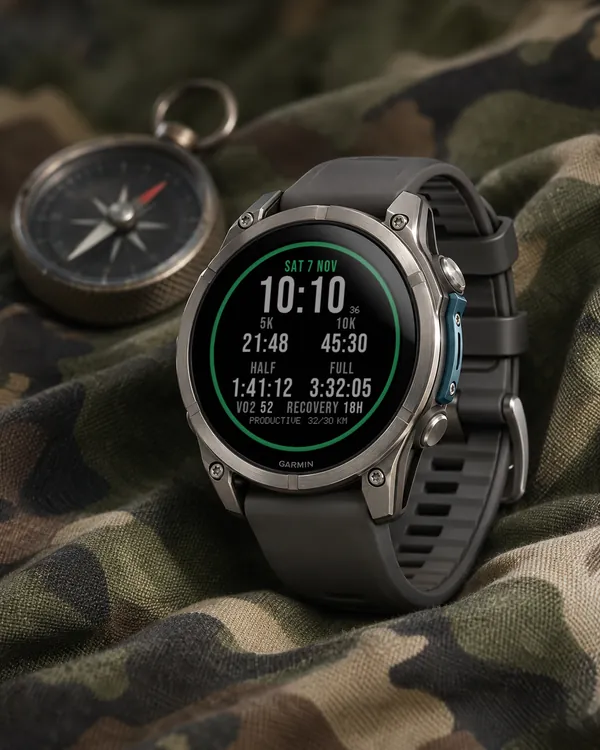
Race Ready
5.0 (17)
Garmin race predictions and weekly mileage right on the face
 Photography
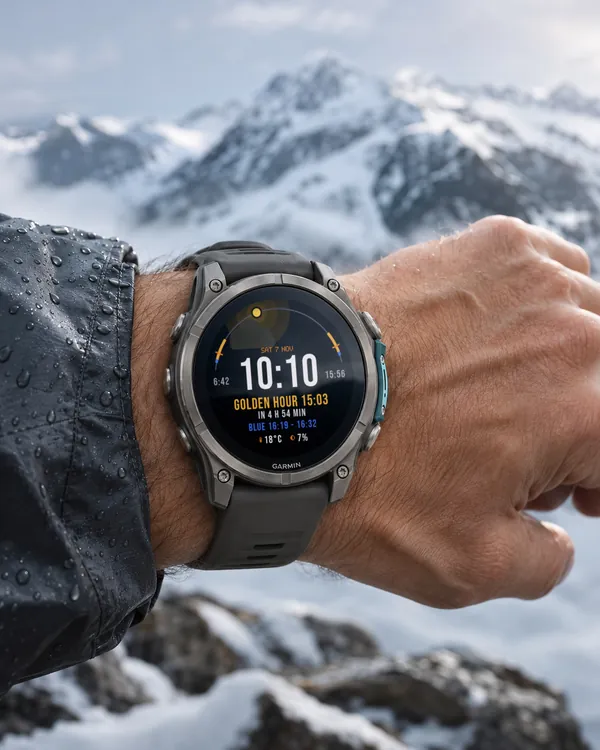
Amber Hour
5.0 (15)
Golden and blue hour countdown with the sun's path across your day
 Readiness
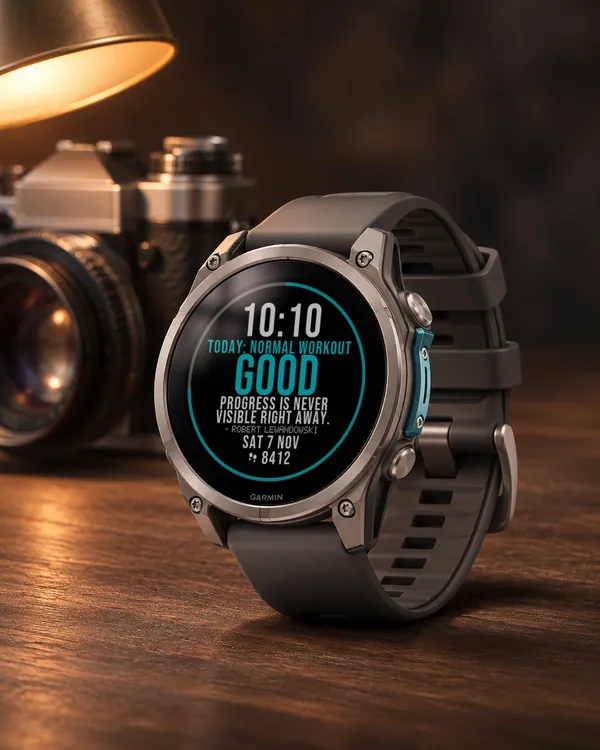
Day Verdict
4.8 (12)
One word for your day: PUSH, STEADY, EASY or REST, from your sleep, Body Battery and recovery
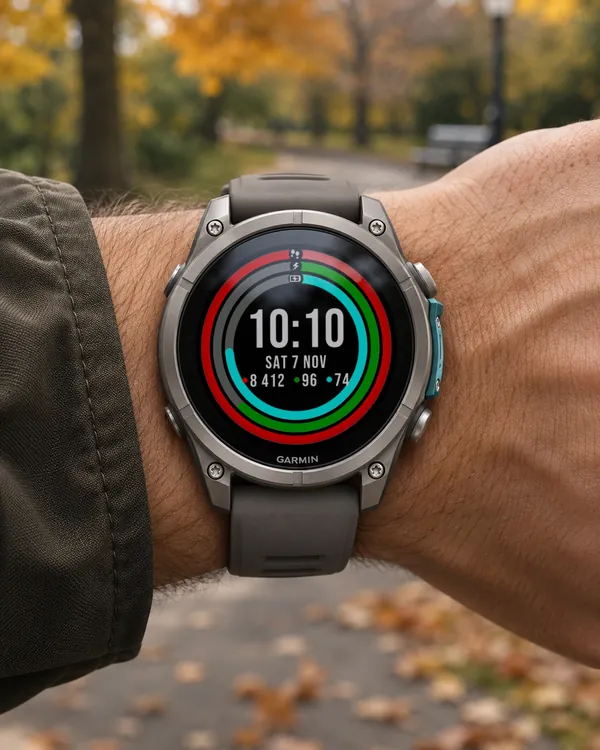 Activity
Ring Day
5.0 (16)
Three activity rings around the time, for people who close their rings