Unlock
€6.49
One-time payment. No subscription. The code works on the watch whose ID you enter.
- Install the face from Connect IQ (7 days free).
- On the watch: face settings > Buy / Unlock, scan the QR code.
- Pay and paste the code in the face settings.
- Pay.
- Copy the code.
- Paste it in Connect IQ: this face > Settings > Unlock code.
Payment works best in Safari or Chrome: menu (three dots) > Open in browser
Read it in this face, it is not the serial number of the watch.
The code works only in the watch face it was bought for: a Summit Rings code will not work in Summit Tactic.
Your ID, compare it with the watch:
Where do I find the ID?
On the watch: settings of this face > Buy / Unlock (first item). Scan the QR code with your phone or type the 10 digits. The ID is also at the top of the face settings in the Connect IQ app.
Code not working on your watch? Write to me and I will fix it.
Payments by Stripe. Seller: Mateusz Kolarz, Lublin, Poland.
Paid. Code:
We show the code here too. If the e-mail does not arrive (check spam), you can recover the code in the Recover code section with just the Face ID. Recover code
Copying did not work. The code is selected: copy it by hand.
The face unlocks by itself when the watch connects to the phone (usually within an hour; if the trial is still running, the purchase starts working when it ends).
Do not want to wait, or have an older watch? Paste the code in the Connect IQ app:
Connect IQ (or Garmin Connect) > My Device > Watch faces > Zone Pulse > Settings > Unlock code > paste > Save
Like it? Rate this face in the Garmin store
Want to try new faces and apps before the release, for free? Join the testers program
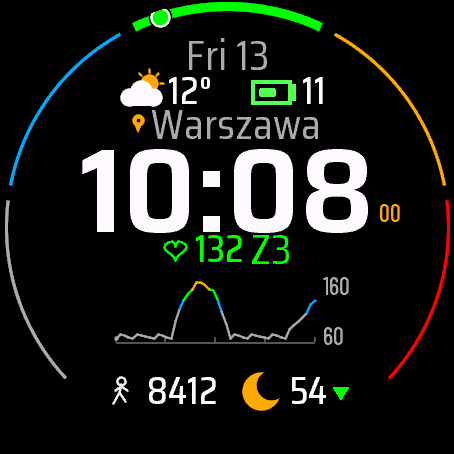
Zone Pulse puts your heart in the middle of the face. Around the edge sits a ring of your five heart rate zones, and a marker shows where your pulse is right now, in the colour of its zone. Under a big time you read the current heart rate with the zone number, and below it a chart of the last 4 hours. Resting heart rate has its own place, with an arrow that tells you if today is above or below your average. An independent face by dialforge.dev.
- Ring of five heart rate zones around the edge: grey, blue, green, orange and red. The marker sits at your current heart rate and the active zone is drawn bold.
- Zones come from the heart rate zones set on your watch. If the watch has none, the face uses percentages of your maximum heart rate (from your age).
- Current heart rate under the time, in the colour of its zone, with the zone number Z1 to Z5.
- Heart rate chart of the last 4 hours, the line coloured by zone, with the highest and lowest value of the period.
- Resting heart rate with a trend arrow: today against your average, when the watch provides both.
- A big time, 12 or 24 hour like the watch, leading zero as you choose. Seconds while the screen is active.
- Four fields: date on top, weather and battery under it, steps at the bottom. Each can show any of 32 kinds of data or stay empty. The town is shown under the weather.
- Colours for the time, accent, date, values, lines and icons. Three sizes of field values.
- Data refresh: a profile (More often, Economy, Less often) or your own interval for each source, with an Off option.
- On touch watches press and hold the chart to open your heart rate, or a field to open its screen.
- MIP screens use the 64 colour palette. AMOLED watches get an always-on mode: time and date, the whole face dimmed, or the time only, moved a little every minute.
- Menu in 35 languages, weekday names in your language.
All settings are in Garmin Connect (Connect IQ, watch face settings), including colours, own intervals and Off for every data source. On the watch: Customise for the four fields, field value size, data refresh profile, battery unit and the always-on screen.
The chart comes from the heart rate history kept by your watch, so after a restart it fills up over the next hours. When the watch has no reading, the value shows --. This is a watch face, not a medical device.
Zone Pulse stawia serce na środku tarczy. Wokół brzegu biegnie pierścień pięciu stref tętna, a znacznik pokazuje, gdzie jest teraz Twój puls, w kolorze jego strefy. Pod dużą godziną widać aktualne tętno z numerem strefy, a niżej wykres z ostatnich 4 godzin. Tętno spoczynkowe ma swoje miejsce i strzałkę, która mówi, czy dziś jest wyżej, czy niżej niż Twoja średnia. Niezależna tarcza dialforge.dev.
- Pierścień pięciu stref tętna wokół brzegu: szara, niebieska, zielona, pomarańczowa i czerwona. Znacznik stoi na aktualnym tętnie, a aktywna strefa jest pogrubiona.
- Strefy pochodzą ze stref tętna ustawionych w zegarku. Jeśli zegarek ich nie ma, tarcza liczy je z procentów tętna maksymalnego (z wieku).
- Aktualne tętno pod godziną, w kolorze swojej strefy, z numerem strefy od Z1 do Z5.
- Wykres tętna z ostatnich 4 godzin, linia w kolorach stref, do tego najwyższa i najniższa wartość z tego czasu.
- Tętno spoczynkowe ze strzałką trendu: dzisiejsze wobec Twojej średniej, gdy zegarek podaje obie wartości.
- Duża godzina, 12- lub 24-godzinna jak w zegarku, zero wiodące do wyboru. Sekundy, gdy ekran jest aktywny.
- Cztery pola: data u góry, pod nią pogoda i bateria, na dole kroki. Każde pokaże dowolną z 32 danych albo zostanie puste. Pod pogodą widać nazwę miejscowości.
- Kolory godziny, akcentu, daty, wartości, linii i ikon. Trzy wielkości wartości pól.
- Odświeżanie danych: profil (Częściej, Oszczędny, Rzadziej) albo własny interwał dla każdego źródła, z opcją Wyłączone.
- Na zegarkach dotykowych przytrzymaj wykres, żeby otworzyć tętno, albo pole, żeby otworzyć jego ekran.
- Ekrany MIP używają palety 64 kolorów. Zegarki AMOLED mają tryb ekranu wygaszonego: godzina i data, cała tarcza przygaszona albo sama godzina, przesuwana co minutę.
- Menu w 35 językach, nazwy dni tygodnia w Twoim języku.
Wszystkie ustawienia są w Garmin Connect (Connect IQ, ustawienia tarczy), także kolory, własne interwały i Wyłączone dla każdego źródła danych. Na zegarku w Dostosuj: cztery pola, wielkość wartości pól, profil odświeżania danych, jednostka baterii i ekran wygaszony.
Wykres pochodzi z historii tętna zapisanej przez zegarek, więc po restarcie zapełnia się przez kolejne godziny. Gdy zegarek nie ma odczytu, wartość pokazuje --. To tarcza zegarka, nie wyrób medyczny.
Zone Pulse stellt dein Herz in die Mitte des Zifferblatts. Am Rand liegt ein Ring mit deinen fünf Herzfrequenzzonen, und eine Markierung zeigt in der Farbe der Zone, wo dein Puls gerade steht. Unter der großen Uhrzeit liest du die aktuelle Herzfrequenz mit der Zonennummer, darunter folgt ein Verlauf der letzten 4 Stunden. Der Ruhepuls hat seinen eigenen Platz, mit einem Pfeil, der dir sagt, ob heute über oder unter deinem Durchschnitt liegt. Ein unabhängiges Zifferblatt von dialforge.dev.
- Ring aus fünf Herzfrequenzzonen am Rand: grau, blau, grün, orange und rot. Die Markierung sitzt bei deiner aktuellen Herzfrequenz, die aktive Zone ist fett gezeichnet.
- Die Zonen stammen aus den Herzfrequenzzonen, die auf deiner Uhr eingestellt sind. Hat die Uhr keine, rechnet das Zifferblatt mit Prozentwerten deiner maximalen Herzfrequenz (aus deinem Alter).
- Aktuelle Herzfrequenz unter der Uhrzeit, in der Farbe ihrer Zone, mit der Zonennummer Z1 bis Z5.
- Pulsverlauf der letzten 4 Stunden, die Linie nach Zonen eingefärbt, mit dem höchsten und niedrigsten Wert des Zeitraums.
- Ruhepuls mit Trendpfeil: heute im Vergleich zu deinem Durchschnitt, wenn die Uhr beide Werte liefert.
- Große Uhrzeit im 12- oder 24-Stunden-Format wie auf der Uhr, die führende Null nach Wunsch. Sekunden, solange das Display aktiv ist.
- Vier Felder: das Datum oben, darunter Wetter und Akku, unten Schritte. Jedes kann einen von 32 Werten anzeigen oder leer bleiben. Der Ort steht unter dem Wetter.
- Farben für Uhrzeit, Akzent, Datum, Werte, Linien und Symbole. Drei Schriftgrößen für die Feldwerte.
- Datenaktualisierung: ein Profil (Häufiger, Sparmodus, Seltener) oder ein eigenes Intervall für jede Datenquelle, inklusive Aus-Option.
- Bei Touchscreen-Uhren den Verlauf gedrückt halten, um deine Herzfrequenz zu öffnen, oder ein Feld, um dessen Ansicht zu öffnen.
- MIP-Displays nutzen die 64-Farben-Palette. AMOLED-Uhren bieten einen Always-On-Modus: Uhrzeit und Datum, das ganze Zifferblatt abgedunkelt oder nur die Uhrzeit, die sich jede Minute etwas verschiebt.
- Menü in 35 Sprachen, Wochentage in deiner Sprache.
Alle Einstellungen findest du in Garmin Connect (Connect IQ, Zifferblatt-Einstellungen), inklusive Farben, eigener Intervalle und Aus für jede Datenquelle. Direkt auf der Uhr: Anpassen für die vier Felder, Schriftgröße der Feldwerte, Aktualisierungsprofil, Akkueinheit und Always-On-Display.
Der Verlauf stammt aus der Pulshistorie deiner Uhr und füllt sich daher nach einem Neustart in den nächsten Stunden wieder. Wenn die Uhr keinen Messwert hat, zeigt der Wert -- an. Dies ist ein Zifferblatt, kein Medizinprodukt.
Zone Pulse place votre cœur au centre du cadran. Sur le pourtour, un anneau réunit vos cinq zones de fréquence cardiaque, et un repère montre où se situe votre pouls en ce moment, dans la couleur de sa zone. Sous la grande heure, vous lisez la fréquence cardiaque actuelle avec le numéro de zone, et en dessous une courbe des 4 dernières heures. La fréquence au repos a sa propre place, avec une flèche qui indique si aujourd'hui est au-dessus ou en dessous de votre moyenne. Un cadran indépendant signé dialforge.dev.
- Anneau de cinq zones cardiaques sur le pourtour : gris, bleu, vert, orange et rouge. Le repère se place sur votre fréquence actuelle et la zone active est tracée en gras.
- Les zones viennent des zones de fréquence cardiaque réglées sur votre montre. Si la montre n'en a pas, le cadran utilise des pourcentages de votre fréquence maximale (calculée d'après votre âge).
- La fréquence cardiaque actuelle sous l'heure, dans la couleur de sa zone, avec le numéro de zone de Z1 à Z5.
- Courbe de fréquence cardiaque des 4 dernières heures, la ligne colorée selon la zone, avec la valeur la plus haute et la plus basse de la période.
- Fréquence au repos avec une flèche de tendance : aujourd'hui par rapport à votre moyenne, quand la montre fournit les deux valeurs.
- L'heure en grand, au format 12 ou 24 heures comme sur la montre, avec ou sans zéro initial selon votre choix. Secondes tant que l'écran est actif.
- Quatre champs : la date en haut, la météo et la batterie en dessous, les pas en bas. Chacun peut afficher l'une des 32 données ou rester vide. La ville s'affiche sous la météo.
- Couleurs de l'heure, de l'accent, de la date, des valeurs, des lignes et des icônes. Trois tailles pour les valeurs des champs.
- Actualisation des données : un profil (Plus souvent, Économie, Moins souvent) ou votre propre intervalle pour chaque source, avec une option Désactivé.
- Sur les montres tactiles, maintenez le doigt sur la courbe pour ouvrir votre fréquence cardiaque, ou sur un champ pour ouvrir son écran.
Tous les réglages se font dans Garmin Connect (Connect IQ, paramètres du cadran), y compris les couleurs, vos propres intervalles et l'option Désactivé pour chaque source de données. Directement sur la montre : personnalisation des quatre champs, taille des valeurs, profil d'actualisation des données, unité de batterie et écran toujours allumé.
La courbe vient de l'historique de fréquence cardiaque conservé par votre montre : après un redémarrage, elle se remplit donc au fil des heures suivantes. Lorsque la montre n'a aucune mesure, la valeur affiche --. C'est un cadran de montre, pas un dispositif médical.
Zone Pulse pone tu corazón en el centro de la esfera. En el borde hay un anillo con tus cinco zonas de frecuencia cardíaca, y una marca muestra dónde está tu pulso ahora mismo, con el color de su zona. Bajo la hora en grande lees la frecuencia cardíaca actual con el número de zona, y debajo un gráfico de las últimas 4 horas. El pulso en reposo tiene su propio sitio, con una flecha que te dice si hoy está por encima o por debajo de tu media. Una esfera independiente de dialforge.dev.
- Anillo de cinco zonas de frecuencia cardíaca en el borde: gris, azul, verde, naranja y rojo. La marca se sitúa en tu frecuencia actual y la zona activa se dibuja en negrita.
- Las zonas salen de las zonas de frecuencia cardíaca configuradas en tu reloj. Si el reloj no tiene ninguna, la esfera usa porcentajes de tu frecuencia máxima (calculada con tu edad).
- Frecuencia cardíaca actual bajo la hora, con el color de su zona y el número de zona de Z1 a Z5.
- Gráfico de frecuencia cardíaca de las últimas 4 horas, con la línea coloreada por zona y el valor más alto y más bajo del periodo.
- Pulso en reposo con flecha de tendencia: el de hoy frente a tu media, cuando el reloj ofrece ambos datos.
- Hora en grande, en formato de 12 o 24 horas como el reloj, con cero inicial a tu elección. Segundos mientras la pantalla está activa.
- Cuatro campos: la fecha arriba, el tiempo y la batería debajo, y los pasos abajo. Cada uno puede mostrar cualquiera de los 32 tipos de datos o quedarse vacío. La localidad aparece bajo el tiempo.
- Colores para la hora, el acento, la fecha, los valores, las líneas y los iconos. Tres tamaños para los valores de los campos.
- Actualización de datos: un perfil (Más frecuente, Económico, Menos frecuente) o tu propio intervalo para cada fuente, con opción de Desactivado.
- En relojes táctiles, mantén pulsado el gráfico para abrir tu frecuencia cardíaca, o un campo para abrir su pantalla.
- Las pantallas MIP usan la paleta de 64 colores. Los relojes AMOLED cuentan con pantalla siempre activa: hora y fecha, la esfera entera atenuada o solo la hora, que se desplaza un poco cada minuto.
Todos los ajustes se configuran en Garmin Connect (Connect IQ, ajustes de la esfera), incluidos los colores, los intervalos personalizados y la opción Desactivado para cada fuente de datos. Desde el reloj: Personalizar para los cuatro campos, tamaño de los valores, perfil de actualización, unidad de batería y pantalla siempre activa.
El gráfico se alimenta del historial de frecuencia cardíaca que guarda tu reloj, así que tras un reinicio se va llenando durante las horas siguientes. Si el reloj no tiene ninguna lectura, el valor muestra --. Es una esfera de reloj, no un producto sanitario.
Zone Pulse zet je hart in het midden van de wijzerplaat. Langs de rand ligt een ring met je vijf hartslagzones, en een markering laat in de kleur van de zone zien waar je hartslag nu zit. Onder een grote tijdweergave lees je de huidige hartslag met het zonenummer, en daaronder een grafiek van de laatste 4 uur. De rusthartslag heeft een eigen plek, met een pijl die laat zien of vandaag boven of onder je gemiddelde ligt. Een onafhankelijke wijzerplaat van dialforge.dev.
- Ring van vijf hartslagzones langs de rand: grijs, blauw, groen, oranje en rood. De markering staat op je huidige hartslag en de actieve zone is vetgedrukt getekend.
- De zones komen uit de hartslagzones die op je horloge zijn ingesteld. Heeft het horloge ze niet, dan rekent de wijzerplaat met percentages van je maximale hartslag (uit je leeftijd).
- Huidige hartslag onder de tijd, in de kleur van de zone, met het zonenummer Z1 tot Z5.
- Hartslaggrafiek van de laatste 4 uur, de lijn gekleurd per zone, met de hoogste en laagste waarde van die periode.
- Rusthartslag met een trendpijl: vandaag tegenover je gemiddelde, als het horloge beide waarden levert.
- Een grote tijdweergave, in 12- of 24-uursindeling zoals op het horloge, met of zonder voorloopnul naar keuze. Seconden zolang het scherm actief is.
- Vier velden: de datum bovenaan, weer en batterij eronder, stappen onderin. Elk veld kan 32 soorten gegevens tonen of leeg blijven. De plaatsnaam staat onder het weer.
- Kleuren voor de tijd, het accent, de datum, waarden, lijnen en pictogrammen. Drie formaten voor veldwaarden.
- Gegevens verversen: een profiel (Vaker, Zuinig, Minder vaak) of een eigen interval per bron, met een optie voor Uit.
- Op horloges met touchscreen houd je de grafiek ingedrukt om je hartslag te openen, of een veld om het bijbehorende scherm te openen.
- MIP-schermen gebruiken het 64-kleurenpalet. AMOLED-horloges krijgen een always-on stand: tijd en datum, de hele wijzerplaat gedimd, of alleen de tijd, die elke minuut een stukje verschuift.
- Menu in 35 talen, namen van de weekdagen in je eigen taal.
Alle instellingen vind je in Garmin Connect (Connect IQ, instellingen wijzerplaat), inclusief kleuren, eigen intervallen en Uit voor elke gegevensbron. Op het horloge zelf: Aanpassen voor de vier velden, grootte van veldwaarden, verversingsprofiel, batterij-eenheid en het always-on scherm.
De grafiek komt uit de hartslaggeschiedenis die je horloge bewaart, dus na een herstart vult hij zich de komende uren weer. Als het horloge geen meting heeft, toont de waarde --. Dit is een wijzerplaat, geen medisch hulpmiddel.
Zone Pulseは、あなたの心拍をウォッチフェイスの中心に据えます。外周には5つの心拍ゾーンのリングが並び、マーカーが今の脈拍の位置をそのゾーンの色で示します。大きな時刻の下には、ゾーン番号つきの現在の心拍、その下には直近4時間のグラフ。安静時心拍には専用の場所があり、今日が平均より高いか低いかを矢印で教えてくれます。dialforge.devによる個人開発のウォッチフェイスです。
- 外周に5つの心拍ゾーンのリング:グレー、青、緑、オレンジ、赤。マーカーは現在の心拍の位置にあり、アクティブなゾーンは太く表示されます。
- ゾーンは時計に設定された心拍ゾーンに基づきます。時計に設定がない場合は、最大心拍数(年齢から算出)の割合で計算します。
- 時刻の下に現在の心拍をゾーンの色で表示し、Z1からZ5のゾーン番号も添えます。
- 直近4時間の心拍グラフ:線はゾーンごとの色で表示され、その期間の最高値と最低値も確認できます。
- トレンド矢印つきの安静時心拍:時計が両方の値を提供する場合、今日と平均を比較します。
- 見やすい大きな時刻表示。時計の設定に合わせた12時間または24時間表示で、先頭のゼロの有無も選べます。画面がアクティブな間は秒も表示します。
- 4つのフィールド:上部に日付、その下に天気とバッテリー、下部に歩数。それぞれ32種類のデータから好きなものを表示でき、空にもできます。天気の下には地名を表示します。
- 時刻、アクセント、日付、数値、ライン、アイコンのカラーを変更可能。フィールドの数値サイズは3段階から選べます。
- データ更新頻度:プロファイル(高頻度、エコノミー、低頻度)から選ぶか、データ項目ごとに更新間隔を自分で設定できます(オフも選択可)。
- タッチ対応モデルなら、グラフを長押しして心拍画面を開いたり、フィールドを長押ししてその画面を開いたりできます。
- MIP画面は64色パレットに対応。AMOLEDモデルでは常時表示モードに対応し、時刻と日付、全体の減光表示、1分ごとに少しだけ位置が動く時刻のみ表示から選べます。
- メニューは35言語に対応、曜日名もお使いの言語で表示されます。
カラー、個別の更新間隔、各データ項目のオフ設定など、すべての設定はGarmin Connect(Connect IQ、ウォッチフェイス設定)から変更できます。時計本体からは「カスタマイズ」で、4つのフィールド、フィールドの数値サイズ、データ更新プロファイル、バッテリー表示単位、常時表示画面を設定できます。
グラフは時計に保存された心拍の履歴をもとにしているため、再起動後は数時間かけて少しずつ埋まっていきます。時計が値を取得できない項目には -- と表示されます。これはウォッチフェイスであり、医療機器ではありません。
Zone Pulse mette il tuo cuore al centro del quadrante. Lungo il bordo c'è un anello con le tue cinque zone di frequenza cardiaca, e un indicatore mostra dove si trova il tuo battito in questo momento, nel colore della sua zona. Sotto l'ora a grandi cifre leggi la frequenza cardiaca attuale con il numero della zona, e sotto ancora un grafico delle ultime 4 ore. Il battito a riposo ha un suo spazio, con una freccia che ti dice se oggi è sopra o sotto la tua media. Un quadrante indipendente creato da dialforge.dev.
- Anello di cinque zone cardiache lungo il bordo: grigio, blu, verde, arancione e rosso. L'indicatore segue la tua frequenza attuale e la zona attiva è disegnata in grassetto.
- Le zone derivano dalle zone di frequenza cardiaca impostate sull'orologio. Se l'orologio non ne ha, il quadrante usa percentuali della tua frequenza massima (calcolata dall'età).
- Frequenza cardiaca attuale sotto l'ora, nel colore della sua zona, con il numero della zona da Z1 a Z5.
- Grafico della frequenza cardiaca delle ultime 4 ore, con la linea colorata per zona e il valore più alto e più basso del periodo.
- Battito a riposo con freccia di tendenza: oggi rispetto alla tua media, quando l'orologio fornisce entrambi i valori.
- Ora grande, in formato 12 o 24 ore come sull'orologio, con lo zero iniziale a scelta. Secondi mentre lo schermo è attivo.
- Quattro campi: la data in alto, meteo e batteria sotto, passi in basso. Ciascuno può mostrare uno tra 32 tipi di dati o restare vuoto. La località compare sotto il meteo.
- Colori per ora, accento, data, valori, linee e icone. Tre dimensioni per i valori dei campi.
- Aggiornamento dati: un profilo (Più spesso, Risparmio, Meno spesso) o un intervallo personalizzato per ogni sorgente, con l'opzione Spento.
- Sui modelli touchscreen, tieni premuto il grafico per aprire la tua frequenza cardiaca, oppure un campo per aprire la sua schermata.
- Gli schermi MIP usano la tavolozza a 64 colori. Gli orologi AMOLED hanno la modalità always-on: ora e data, intero quadrante attenuato oppure solo l'ora, spostata leggermente ogni minuto.
Tutte le impostazioni sono in Garmin Connect (Connect IQ, impostazioni del quadrante), inclusi colori, intervalli personalizzati e l'opzione Spento per ciascuna sorgente dati. Sull'orologio: Personalizza per i quattro campi, dimensione dei valori, profilo di aggiornamento dati, unità della batteria e schermo always-on.
Il grafico proviene dalla cronologia della frequenza cardiaca conservata dall'orologio, quindi dopo un riavvio si riempie nelle ore successive. Quando l'orologio non rileva alcun dato, il valore mostra --. È un quadrante per orologio, non un dispositivo medico.
Zone Pulse 把你的心率放在表盘正中央。边缘是五个心率区间组成的圆环,标记会用对应区间的颜色,指出你此刻的脉搏所在位置。大字时间下方是当前心率和区间编号,再往下是最近 4 小时的图表。静息心率有专属位置,箭头会告诉你今天比平均值高还是低。来自 dialforge.dev 的独立表盘作品。
- 边缘有五个心率区间组成的圆环:灰、蓝、绿、橙、红。标记停在当前心率的位置,当前区间以粗线突出显示。
- 区间来自手表中设置的心率区间。如果手表没有设置,表盘会按最大心率(根据年龄)的百分比计算。
- 时间下方显示当前心率,颜色与所在区间一致,并标出区间编号 Z1 到 Z5。
- 最近 4 小时的心率图表,曲线按区间着色,并标出该时段的最高值和最低值。
- 带趋势箭头的静息心率:手表同时提供两项数据时,对比今天与你的平均值。
- 醒目的大字时间,支持与手表一致的 12 或 24 小时制,可选择是否显示前导零。屏幕亮起时显示秒数。
- 四个数据栏:顶部为日期,下方是天气和电量,底部是步数。每个栏位可从 32 种数据中任选,也可以留空。天气下方会显示所在城市。
- 时间、强调色、日期、数值、线条和图标均可自定义配色。数据数值提供三种字号。
- 数据刷新:可选预设模式(更频繁、省电、低频),也能为每项数据单独设定刷新间隔,甚至直接关闭。
- 触摸屏手表支持长按:长按图表可打开心率界面,长按数据栏可打开对应界面。
- MIP 屏幕采用 64 色调色板。AMOLED 手表提供息屏常亮模式:可显示时间和日期、整个表盘调暗,或仅显示时间并每分钟微移一点位置。
- 设置菜单支持 35 种语言,星期名称也会匹配你的语言。
全部设置均可在 Garmin Connect 中进行(Connect IQ,表盘设置),包括颜色搭配、自定义刷新间隔以及关闭任意数据源。在手表端:可以通过自定义调整四个数据栏、数值字号、数据刷新模式、电量单位以及息屏常亮显示。
图表来自手表保存的心率历史记录,因此重启后会在接下来的几个小时里逐渐填满。当手表没有读数时,数值会显示 --。这是一款表盘,不是医疗设备。
Zone Pulse ставит ваше сердце в центр циферблата. По краю идёт кольцо из пяти пульсовых зон, а маркер показывает, где сейчас ваш пульс, в цвете его зоны. Под крупным временем вы видите текущий пульс с номером зоны, а ниже график за последние 4 часа. У пульса покоя есть своё место и стрелка, которая подсказывает, выше сегодня или ниже вашего среднего значения. Независимый циферблат от dialforge.dev.
- Кольцо из пяти пульсовых зон по краю: серая, синяя, зелёная, оранжевая и красная. Маркер стоит на текущем пульсе, а активная зона выделена жирным.
- Зоны берутся из пульсовых зон, заданных в ваших часах. Если в часах их нет, циферблат считает их по процентам от максимального пульса (по возрасту).
- Текущий пульс под временем, в цвете своей зоны, с номером зоны от Z1 до Z5.
- График пульса за последние 4 часа, линия окрашена по зонам, рядом самое высокое и самое низкое значение за этот период.
- Пульс покоя со стрелкой тренда: сегодняшнее значение в сравнении с вашим средним, если часы дают оба значения.
- Крупное время, 12- или 24-часовое, как в часах, ведущий ноль на ваш выбор. Секунды, пока экран активен.
- Четыре поля: дата сверху, под ней погода и батарея, внизу шаги. Каждое может показывать любой из 32 видов данных или остаться пустым. Название города стоит под погодой.
- Цвета для времени, акцента, даты, значений, линий и значков. Три размера значений в полях.
- Обновление данных: профиль (Чаще, Экономичный, Реже) или свой интервал для каждого источника, плюс вариант Отключить.
- На часах с сенсорным экраном удерживайте график, чтобы открыть пульс, или поле, чтобы открыть его экран.
- Экраны MIP используют палитру из 64 цветов. Часы AMOLED получают режим постоянно включённого экрана: время и дата, весь циферблат приглушён, или только время, которое слегка смещается каждую минуту.
- Меню на 35 языках, названия дней недели на вашем языке.
Все настройки меняются в Garmin Connect (Connect IQ, настройки циферблата), включая цвета, собственные интервалы и отключение любого источника данных. Прямо на часах в разделе настройки: четыре поля, размер значений, профиль обновления данных, единица батареи и постоянно включённый экран.
График строится по истории пульса, которую хранят ваши часы, поэтому после перезагрузки он заполняется в течение следующих часов. Если у часов нет показания, вместо значения отображается --. Это циферблат для часов, а не медицинское устройство.
O Zone Pulse coloca o seu coração no centro do mostrador. Na borda fica um anel com as suas cinco zonas de frequência cardíaca, e um marcador mostra onde está o seu pulso agora, na cor da zona. Abaixo da hora grande você lê a frequência atual com o número da zona e, mais embaixo, um gráfico das últimas 4 horas. A frequência em repouso tem seu próprio espaço, com uma seta que diz se hoje está acima ou abaixo da sua média. Um mostrador independente da dialforge.dev.
- Anel de cinco zonas de frequência cardíaca na borda: cinza, azul, verde, laranja e vermelho. O marcador fica na sua frequência atual e a zona ativa aparece em negrito.
- As zonas vêm das zonas de frequência cardíaca configuradas no seu relógio. Se o relógio não tiver nenhuma, o mostrador usa porcentagens da sua frequência máxima (calculada pela idade).
- Frequência atual abaixo da hora, na cor da sua zona, com o número da zona de Z1 a Z5.
- Gráfico da frequência cardíaca das últimas 4 horas, com a linha colorida por zona e os valores mais alto e mais baixo do período.
- Frequência em repouso com seta de tendência: hoje em comparação com a sua média, quando o relógio fornece os dois valores.
- Hora grande, em 12 ou 24 horas como no relógio, com zero à esquerda opcional. Segundos enquanto a tela está ativa.
- Quatro campos: data em cima, clima e bateria abaixo, passos embaixo. Cada um pode mostrar qualquer um de 32 tipos de dados ou ficar vazio. A cidade aparece abaixo do clima.
- Cores para a hora, destaque, data, valores, linhas e ícones. Três tamanhos para os valores dos campos.
- Atualização de dados: um perfil (Mais frequente, Econômico, Menos frequente) ou seu próprio intervalo para cada fonte, com opção de Desativar.
- Em relógios com tela sensível ao toque, mantenha o gráfico pressionado para abrir sua frequência cardíaca, ou um campo para abrir a tela dele.
- Telas MIP usam a paleta de 64 cores. Relógios AMOLED têm modo sempre ativo: hora e data, o mostrador todo escurecido, ou só a hora, que se move um pouco a cada minuto.
- Menu em 35 idiomas, com os dias da semana no seu idioma.
Todas as configurações ficam no Garmin Connect (Connect IQ, configurações do mostrador), incluindo cores, intervalos personalizados e a opção Desativar para cada fonte de dados. No próprio relógio: personalize os quatro campos, o tamanho dos valores, o perfil de atualização dos dados, a unidade da bateria e a tela sempre ativa.
O gráfico vem do histórico de frequência cardíaca guardado pelo seu relógio, então depois de uma reinicialização ele vai se preenchendo ao longo das próximas horas. Quando o relógio não tem leitura, o valor mostra --. Este é um mostrador de relógio, não um dispositivo médico.
Zone Pulse staví vaše srdce do středu ciferníku. Po obvodu běží kroužek s vašimi pěti tepovými zónami a značka ukazuje, kde je váš tep právě teď, v barvě jeho zóny. Pod velkým časem čtete aktuální tep s číslem zóny a pod ním graf za poslední 4 hodiny. Klidový tep má své vlastní místo a šipku, která říká, zda je dnešek nad nebo pod vaším průměrem. Nezávislý ciferník od dialforge.dev.
- Kroužek pěti tepových zón po obvodu: šedá, modrá, zelená, oranžová a červená. Značka stojí na vašem aktuálním tepu a aktivní zóna je vykreslena tučně.
- Zóny vycházejí z tepových zón nastavených v hodinkách. Pokud je hodinky nemají, ciferník je spočítá z procent maximálního tepu (podle věku).
- Aktuální tep pod časem, v barvě své zóny, s číslem zóny Z1 až Z5.
- Graf tepu za poslední 4 hodiny, čára obarvená podle zón, s nejvyšší a nejnižší hodnotou daného období.
- Klidový tep se šipkou trendu: dnešní hodnota oproti vašemu průměru, pokud hodinky poskytují obojí.
- Velký čas, 12 nebo 24 hodinový formát podle hodinek, úvodní nula podle vaší volby. Sekundy, když je displej aktivní.
- Čtyři pole: nahoře datum, pod ním počasí a baterie, dole kroky. Každé pole zobrazí kterýkoliv z 32 údajů nebo zůstane prázdné. Pod počasím je vidět název místa.
- Barvy pro čas, zvýraznění, datum, hodnoty, linky a ikonky. Tři velikosti hodnot v polích.
- Obnova dat: přednastavený profil (Častěji, Úsporný, Méně často) nebo vlastní interval pro každý zdroj, včetně možnosti Vypnuto.
- Na dotykových hodinkách podržením grafu otevřete svůj tep, podržením pole jeho obrazovku.
- MIP displeje využívají paletu 64 barev. Hodinky s AMOLED mají režim trvale zapnutého displeje: čas a datum, celý ztlumený ciferník, případně pouze čas, který se každou minutu nepatrně posune.
- Menu v 35 jazycích, názvy dnů v týdnu ve vašem jazyce.
Veškerá nastavení najdete v Garmin Connect (Connect IQ, nastavení ciferníku), včetně barev, vlastních intervalů i volby Vypnuto pro každý zdroj dat. Přímo v hodinkách: volba Přizpůsobit pro čtyři pole, velikost hodnot, profil obnovy dat, jednotka baterie a trvale zapnutý displej.
Graf vychází z historie tepu uložené v hodinkách, takže po restartu se v následujících hodinách postupně zaplní. Když hodinky nemají k dispozici žádnou hodnotu, zobrazí se --. Jde o ciferník, nikoli o zdravotnický prostředek.
O Zone Pulse coloca o teu coração no centro do mostrador. À volta da borda há um anel com as tuas cinco zonas de frequência cardíaca, e um marcador mostra onde está o teu pulso neste momento, na cor da zona. Por baixo da hora grande lês a frequência atual com o número da zona e, mais abaixo, um gráfico das últimas 4 horas. A frequência em repouso tem o seu próprio lugar, com uma seta que diz se hoje está acima ou abaixo da tua média. Um mostrador independente da dialforge.dev.
- Anel de cinco zonas de frequência cardíaca na borda: cinzento, azul, verde, laranja e vermelho. O marcador fica na tua frequência atual e a zona ativa aparece a negrito.
- As zonas vêm das zonas de frequência cardíaca definidas no teu relógio. Se o relógio não tiver nenhuma, o mostrador usa percentagens da tua frequência máxima (calculada pela idade).
- Frequência atual por baixo da hora, na cor da tua zona, com o número da zona de Z1 a Z5.
- Gráfico da frequência cardíaca das últimas 4 horas, com a linha colorida por zona e os valores mais alto e mais baixo do período.
- Frequência em repouso com seta de tendência: hoje em comparação com a tua média, quando o relógio fornece os dois valores.
- Hora grande, em 12 ou 24 horas como no relógio, com zero à esquerda à tua escolha. Segundos enquanto o ecrã está ativo.
- Quatro campos: data em cima, meteorologia e bateria por baixo, passos em baixo. Cada um pode mostrar qualquer um de 32 tipos de dados ou ficar vazio. A localidade aparece por baixo da meteorologia.
- Cores para a hora, destaque, data, valores, linhas e ícones. Três tamanhos para os valores dos campos.
- Atualização de dados: um perfil (Mais frequente, Económico, Menos frequente) ou o teu próprio intervalo para cada fonte, com a opção Desligado.
- Em relógios com ecrã tátil, mantém o gráfico premido para abrir a tua frequência cardíaca, ou um campo para abrir o ecrã dele.
- Os ecrãs MIP usam a paleta de 64 cores. Os relógios AMOLED têm modo sempre ligado: hora e data, o mostrador todo esbatido, ou só a hora, que se desloca um pouco a cada minuto.
- Menu em 35 idiomas, com os dias da semana no teu idioma.
Todas as opções são configuradas no Garmin Connect (Connect IQ, definições do mostrador), incluindo cores, intervalos personalizados e a opção Desligado para cada fonte de dados. No relógio: Personalizar para os quatro campos, o tamanho dos valores, o perfil de atualização de dados, a unidade da bateria e o ecrã sempre ligado.
O gráfico vem do histórico de frequência cardíaca guardado pelo teu relógio, por isso, depois de um reinício, vai-se preenchendo ao longo das horas seguintes. Quando o relógio não tem leitura, o valor mostra --. Isto é um mostrador de relógio, não um dispositivo médico.
Zone Pulse는 당신의 심장을 워치페이스 한가운데에 둡니다. 가장자리에는 5개의 심박수 존 링이 있고, 마커가 지금 맥박이 있는 위치를 해당 존의 색으로 알려줍니다. 큼직한 시계 아래에서 존 번호와 함께 현재 심박수를 확인하고, 그 아래에서 최근 4시간의 그래프를 볼 수 있습니다. 안정 시 심박수는 따로 자리가 있고, 오늘이 평균보다 높은지 낮은지 화살표로 알려줍니다. dialforge.dev에서 제작한 인디 워치페이스입니다.
- 가장자리의 5개 심박수 존 링: 회색, 파란색, 초록색, 주황색, 빨간색. 마커는 현재 심박수 위치에 있고, 활성 존은 굵게 표시됩니다.
- 존은 워치에 설정된 심박수 존을 따릅니다. 워치에 설정이 없으면 최대 심박수의 비율(나이 기준)로 계산합니다.
- 시계 아래에 현재 심박수를 해당 존의 색으로 표시하고, Z1부터 Z5까지의 존 번호도 함께 보여줍니다.
- 최근 4시간의 심박수 그래프: 선이 존별 색으로 표시되고, 해당 기간의 최고값과 최저값도 나옵니다.
- 추세 화살표가 있는 안정 시 심박수: 워치가 두 값을 모두 제공할 때 오늘과 평균을 비교해 보여줍니다.
- 시계 설정에 맞는 12시간제 또는 24시간제의 큼직한 시계, 앞자리 0 표시도 선택할 수 있습니다. 화면이 켜져 있는 동안 초도 표시됩니다.
- 4개의 데이터 필드: 위쪽에 날짜, 그 아래에 날씨와 배터리, 아래쪽에 걸음 수. 각 필드에 32가지 데이터 중 원하는 것을 띄우거나 비워둘 수 있고, 날씨 아래에는 지역 이름이 표시됩니다.
- 시간, 강조색, 날짜, 수치, 라인, 아이콘의 색상을 바꿀 수 있고, 필드 수치 크기는 3단계로 조절할 수 있습니다.
- 데이터 새로고침: 프로필(자주, 절약, 덜 자주)을 고르거나 데이터 항목별로 갱신 주기를 직접 지정할 수 있으며 꺼둠(Off) 옵션도 있습니다.
- 터치를 지원하는 워치에서는 그래프를 길게 눌러 심박수 화면을 열고, 데이터 필드를 길게 눌러 해당 화면으로 바로 이동할 수 있습니다.
- MIP 화면은 64색 팔레트를 지원합니다. AMOLED 워치에서는 AOD 모드를 지원하여 시간과 날짜 표시, 화면 전체를 어둡게 유지하기, 1분마다 살짝 위치를 바꾸는 시간 전용 표시 중 선택할 수 있습니다.
- 35개 언어 메뉴 지원, 요일 이름도 사용자 언어로 표시됩니다.
색상, 개별 갱신 주기, 각 데이터 항목 끄기(Off)를 포함한 모든 설정은 Garmin Connect(Connect IQ, 워치페이스 설정)에서 변경할 수 있습니다. 워치 기기에서는 커스텀 메뉴에서 4개 필드, 필드 값 크기, 데이터 새로고침 프로필, 배터리 표시 단위, AOD 화면을 설정할 수 있습니다.
그래프는 워치에 저장된 심박수 기록을 바탕으로 하므로, 재시작 후에는 이후 몇 시간에 걸쳐 차츰 채워집니다. 워치에서 측정된 값이 없을 때는 --로 표시됩니다. 이 제품은 워치페이스이며 의료기기가 아닙니다.
Zone Pulse sätter hjärtat mitt på urtavlan. Längs kanten löper en ring med dina fem pulszoner, och en markör visar var din puls är just nu, i färgen för zonen. Under den stora tiden läser du av aktuell puls med zonens nummer, och under den finns ett diagram över de senaste 4 timmarna. Vilopulsen har sin egen plats, med en pil som visar om dagens värde ligger över eller under ditt medelvärde. En fristående urtavla från dialforge.dev.
- Ring med fem pulszoner längs kanten: grå, blå, grön, orange och röd. Markören står på din aktuella puls och den aktiva zonen är ritad med fet linje.
- Zonerna hämtas från pulszonerna som är inställda på klockan. Om klockan saknar sådana räknar urtavlan med procent av din maxpuls (utifrån din ålder).
- Aktuell puls under tiden, i färgen för sin zon, med zonens nummer Z1 till Z5.
- Pulsdiagram för de senaste 4 timmarna, med linjen färgad efter zon, och periodens högsta och lägsta värde.
- Vilopuls med trendpil: dagens värde mot ditt medelvärde, när klockan ger båda.
- Stor tid, 12 eller 24 timmar precis som klockan, med inledande nolla som du själv väljer. Sekunder när skärmen är aktiv.
- Fyra fält: datum överst, väder och batteri under det, steg längst ner. Varje fält kan visa någon av 32 typer av data eller lämnas tomt. Orten visas under vädret.
- Färger för tiden, accenten, datumet, värdena, linjerna och ikonerna. Tre storlekar för fältvärdena.
- Datauppdatering: en profil (Oftare, Ekonomi, Mer sällan) eller ett eget intervall för varje datakälla, med alternativet Av.
- På klockor med pekskärm trycker du och håller in på diagrammet för att öppna din puls, eller på ett fält för att öppna dess skärm.
- MIP-skärmar använder paletten med 64 färger. Klockor med AMOLED får ett alltid på-läge: tid och datum, hela urtavlan nedtonad, eller bara tiden som flyttas lite varje minut.
- Meny på 35 språk, och veckodagarnas namn på ditt språk.
Alla inställningar görs i Garmin Connect (Connect IQ, inställningar för urtavlan), inklusive färger, egna intervall och Av för varje datakälla. På klockan: Anpassa för de fyra fälten, fältvärdenas storlek, profil för datauppdatering, batterienhet och alltid på-skärmen.
Diagrammet bygger på pulshistoriken som din klocka sparar, så efter en omstart fylls det på under de kommande timmarna. När klockan saknar mätvärde visar värdet --. Det här är en urtavla, inte en medicinteknisk produkt.
Zone Pulse sætter dit hjerte midt på urskiven. Langs kanten ligger en ring med dine fem pulszoner, og en markør viser i zonens farve, hvor din puls er lige nu. Under et stort klokkeslæt aflæser du den aktuelle puls med zonenummeret, og nedenunder en graf over de seneste 4 timer. Hvilepulsen har sin egen plads, med en pil, der fortæller, om i dag ligger over eller under dit gennemsnit. En uafhængig urskive fra dialforge.dev.
- Ring med fem pulszoner langs kanten: grå, blå, grøn, orange og rød. Markøren sidder ved din aktuelle puls, og den aktive zone er tegnet med fed streg.
- Zonerne kommer fra de pulszoner, der er indstillet på uret. Har uret ingen, bruger urskiven procenter af din maksimale puls (ud fra din alder).
- Aktuel puls under klokkeslættet, i farven for sin zone, med zonenummeret Z1 til Z5.
- Pulsgraf over de seneste 4 timer, linjen farvet efter zone, med den højeste og laveste værdi i perioden.
- Hvilepuls med tendenspil: i dag sammenlignet med dit gennemsnit, når uret leverer begge værdier.
- Et stort klokkeslæt i 12 eller 24 timer ligesom uret, med foranstillet nul efter eget valg. Sekunder, mens skærmen er aktiv.
- Fire felter: datoen øverst, vejr og batteri under den, skridt nederst. Hvert felt kan vise en af 32 slags data eller stå tomt. Byen vises under vejret.
- Farver til klokkeslættet, accenten, datoen, værdierne, linjerne og ikonerne. Tre størrelser til feltværdier.
- Dataopdatering: en profil (Oftere, Økonomisk, Sjældnere) eller dit eget interval for hver kilde, samt mulighed for Fra.
- På ure med touchskærm holder du fingeren på grafen for at åbne din puls, eller på et felt for at åbne det pågældende skærmbillede.
- MIP-skærme bruger paletten med 64 farver. AMOLED-ure får en always-on-tilstand: tid og dato, hele urskiven dæmpet eller kun klokkeslættet, som flyttes en smule hvert minut.
- Menu på 35 sprog, og ugedagenes navne på dit eget sprog.
Alle indstillinger klares i Garmin Connect (Connect IQ, indstillinger for urskive), inklusive farver, egne intervaller og Fra for hver datakilde. Direkte på uret: Tilpas de fire felter, værdiernes størrelse, profil for dataopdatering, batterienhed og always-on-skærmen.
Grafen hentes fra den pulshistorik, som uret gemmer, så efter en genstart fyldes den op i løbet af de næste timer. Når uret mangler en måling, viser værdien --. Det er en urskive, ikke medicinsk udstyr.
Zone Pulse setter hjertet ditt midt på urskiven. Langs kanten ligger en ring med de fem pulssonene dine, og en markør viser i sonens farge hvor pulsen din er akkurat nå. Under et stort klokkeslett leser du aktuell puls med sonenummeret, og nedenfor en graf for de siste 4 timene. Hvilepulsen har sin egen plass, med en pil som forteller om i dag ligger over eller under gjennomsnittet ditt. En uavhengig urskive fra dialforge.dev.
- Ring med fem pulssoner langs kanten: grå, blå, grønn, oransje og rød. Markøren står ved pulsen din akkurat nå, og den aktive sonen er tegnet med fet strek.
- Sonene kommer fra pulssonene som er satt på klokken. Har klokken ingen, bruker urskiven prosent av makspulsen din (regnet ut fra alderen din).
- Aktuell puls under klokkeslettet, i fargen til sonen, med sonenummeret Z1 til Z5.
- Pulsgraf for de siste 4 timene, linjen farget etter sone, med høyeste og laveste verdi i perioden.
- Hvilepuls med trendpil: i dag mot gjennomsnittet ditt, når klokken gir begge verdiene.
- Et stort klokkeslett, 12 eller 24 timer som på klokken, med ledende null etter eget valg. Sekunder mens skjermen er aktiv.
- Fire felt: dato øverst, vær og batteri under den, skritt nederst. Hvert felt kan vise en av 32 typer data eller stå tomt. Stedsnavnet vises under været.
- Farger for klokkeslettet, aksenten, datoen, verdiene, linjene og ikonene. Tre størrelser på feltverdiene.
- Dataoppdatering: en profil (Oftere, Økonomisk, Sjeldnere) eller ditt eget intervall for hver kilde, med et Av-valg.
- På klokker med berøringsskjerm trykker og holder du på grafen for å åpne pulsen din, eller på et felt for å åpne skjermen for det.
- MIP-skjermer bruker paletten med 64 farger. AMOLED-klokker får alltid-på-modus: klokkeslett og dato, hele urskiven tonet ned, eller bare klokkeslettet, flyttet litt hvert minutt.
- Meny på 35 språk, og ukedagsnavn på ditt språk.
Alle innstillinger gjøres i Garmin Connect (Connect IQ, innstillinger for urskive), inkludert farger, egne intervaller og Av for hver datakilde. På klokken: Tilpass for de fire feltene, størrelse på feltverdi, profil for dataoppdatering, batterienhet og alltid-på-skjermen.
Grafen kommer fra pulshistorikken som klokken din lagrer, så etter en omstart fylles den opp i løpet av de neste timene. Når klokken ikke har noen måling, viser verdien --. Dette er en urskive, ikke medisinsk utstyr.
Zone Pulse 把你的心率放在錶面正中央。邊緣是五個心率區間組成的圓環,標記會以對應區間的顏色,指出你此刻的脈搏所在位置。大字體時間下方是目前心率與區間編號,再往下是最近 4 小時的圖表。靜息心率有專屬位置,箭頭會告訴你今天比平均值高還是低。由 dialforge.dev 獨立開發的錶面。
- 邊緣有五個心率區間組成的圓環:灰、藍、綠、橙、紅。標記停在目前心率的位置,目前區間以粗線突顯。
- 區間來自手錶中設定的心率區間。若手錶沒有設定,錶面會依最大心率(依年齡推算)的百分比計算。
- 時間下方顯示目前心率,顏色與所在區間一致,並標示區間編號 Z1 到 Z5。
- 最近 4 小時的心率圖表,曲線依區間著色,並標示該時段的最高值與最低值。
- 附趨勢箭頭的靜息心率:手錶同時提供兩項數據時,比較今天與你的平均值。
- 醒目的大字體時間,支援與手錶一致的 12 或 24 小時制,可選擇是否顯示前導零。螢幕亮起時顯示秒數。
- 四個自訂欄位:頂部為日期,下方是天氣與電量,底部是步數。每個欄位可從 32 種數據中自由選擇,也可保持空白。天氣下方會顯示所在城市。
- 時間、強調色、日期、數值、線條與圖示皆可自訂色彩。欄位數值提供三種字型大小。
- 數據更新頻率:提供預設設定檔(頻繁、省電、低頻率),也可自行設定各數據來源的更新間隔,亦可選擇關閉。
- 支援觸控的手錶上,長按圖表可開啟心率頁面,長按數據欄位則可開啟對應頁面。
- MIP 螢幕採用 64 色調色盤。AMOLED 手錶支援常亮模式:可選時間與日期、全錶面變暗顯示,或僅顯示時間並每分鐘微幅位移。
- 選單支援 35 種語言,星期名稱亦會對應你的語言。
所有設定皆可在 Garmin Connect 中調整(Connect IQ,錶面設定),包含色彩配置、自訂更新間隔以及各數據來源的關閉選項。手錶端可在個人化中設定:四個欄位、欄位數值大小、數據更新設定檔、電量單位以及常亮螢幕顯示。
圖表來自手錶儲存的心率歷史紀錄,因此重新啟動後,會在接下來的幾個小時內逐漸填滿。當手錶沒有偵測到數值時,會顯示 --。這是一款錶面,不是醫療器材。
Zone Pulse nostaa sydämesi kellotaulun keskelle. Reunalla kiertää rengas viidestä sykealueestasi, ja merkki näyttää, missä pulssisi on juuri nyt, alueensa värillä. Ison kellonajan alla luet nykyisen sykkeen alueen numeron kera, ja sen alla on kaavio viimeisistä 4 tunnista. Leposykkeellä on oma paikkansa ja nuoli, joka kertoo, onko tämän päivän arvo keskiarvoasi korkeampi vai matalampi. Riippumaton kellotaulu tekijältä dialforge.dev.
- Viiden sykealueen rengas reunalla: harmaa, sininen, vihreä, oranssi ja punainen. Merkki on nykyisen sykkeesi kohdalla ja aktiivinen alue piirretään paksummalla.
- Alueet tulevat kelloon asetetuista sykealueista. Jos kellossa ei ole niitä, kellotaulu laskee ne maksimisykkeen prosenteista (iän mukaan).
- Nykyinen syke kellonajan alla alueensa värillä, alueen numero Z1-Z5 mukana.
- Sykekaavio viimeiseltä 4 tunnilta, viiva alueiden värein, sekä jakson korkein ja matalin arvo.
- Leposyke trendinuolella: tämän päivän arvo suhteessa keskiarvoosi, kun kello antaa molemmat.
- Iso kellonaika, 12 tai 24 tunnin muodossa kellon mukaan, etunolla tai ilman valintasi mukaan. Sekunnit näkyvät, kun näyttö on aktiivinen.
- Neljä kenttää: päivämäärä ylhäällä, sen alla sää ja akku, alhaalla askeleet. Kukin voi näyttää minkä tahansa 32 eri tiedosta tai olla tyhjä. Paikkakunta näkyy sään alla.
- Värit kellonajalle, korostukselle, päivämäärälle, arvoille, viivoille ja kuvakkeille. Kolme eri kokoa kenttien arvoille.
- Tietojen päivitys: valmis profiili (Useammin, Säästö, Harvemmin) tai oma päivitysväli jokaiselle lähteelle, mukana myös Pois-vaihtoehto.
- Kosketusnäytöllisissä kelloissa voit avata sykkeesi painamalla kaaviota pitkään tai avata kentän oman näkymän painamalla sitä pitkään.
- MIP-näytöt käyttävät 64 värin palettia. AMOLED-kelloille on aina päällä oleva tila: aika ja päivämäärä, koko kellotaulu himmennettynä tai pelkkä kellonaika, jota siirretään hieman joka minuutti.
- Valikko 35 kielellä, viikonpäivien nimet omalla kielelläsi.
Kaikki asetukset löytyvät Garmin Connect -sovelluksesta (Connect IQ, kellotaulun asetukset), mukaan lukien värit, omat päivitysvälit ja Pois-valinta jokaiselle tietolähteelle. Kellossa: Mukauta-valikosta neljä kenttää, kenttien arvojen koko, tietojen päivitysprofiili, akun yksikkö sekä aina päällä oleva näyttö.
Kaavio perustuu kellosi tallentamaan sykehistoriaan, joten uudelleenkäynnistyksen jälkeen se täyttyy seuraavien tuntien aikana. Jos kellolla ei ole lukemaa, arvon kohdalla näkyy --. Tämä on kellotaulu, ei lääkinnällinen laite.
Zone Pulse stavia vaše srdce do stredu ciferníka. Po obvode beží kruh s vašimi piatimi tepovými zónami a značka ukazuje, kde je váš tep práve teraz, vo farbe jeho zóny. Pod veľkým časom čítate aktuálny tep s číslom zóny a pod ním graf za posledné 4 hodiny. Pokojový tep má svoje vlastné miesto a šípku, ktorá hovorí, či je dnešok nad alebo pod vaším priemerom. Nezávislý ciferník od dialforge.dev.
- Kruh piatich tepových zón po obvode: sivá, modrá, zelená, oranžová a červená. Značka stojí na vašom aktuálnom tepe a aktívna zóna je vykreslená tučne.
- Zóny vychádzajú z tepových zón nastavených v hodinkách. Ak ich hodinky nemajú, ciferník ich vypočíta z percent maximálneho tepu (podľa veku).
- Aktuálny tep pod časom, vo farbe svojej zóny, s číslom zóny Z1 až Z5.
- Graf tepu za posledné 4 hodiny, čiara zafarbená podľa zón, s najvyššou a najnižšou hodnotou daného obdobia.
- Pokojový tep so šípkou trendu: dnešná hodnota oproti vášmu priemeru, ak hodinky poskytujú obe.
- Veľký čas, 12 alebo 24-hodinový formát podľa hodiniek, úvodná nula podľa vášho výberu. Sekundy, keď je displej aktívny.
- Štyri polia: hore dátum, pod ním počasie a batéria, dole kroky. Každé pole zobrazí ktorýkoľvek z 32 údajov alebo zostane prázdne. Pod počasím je vidieť názov miesta.
- Farby pre čas, zvýraznenie, dátum, hodnoty, linky aj ikony. Tri veľkosti hodnôt v poliach.
- Obnova dát: prednastavený profil (Častejšie, Úsporný, Menej často) alebo vlastný interval pre každý zdroj zvlášť, s možnosťou Vypnuté.
- Na dotykových hodinkách podržaním grafu otvoríte svoj tep, podržaním poľa jeho obrazovku.
- MIP displeje využívajú paletu 64 farieb. Hodinky s AMOLED majú režim stále zapnutej obrazovky: čas a dátum, stmavený celý ciferník, alebo len čas, ktorý sa každú minútu mierne posunie.
- Menu v 35 jazykoch, názvy dní v týždni vo vašom jazyku.
Všetky nastavenia nájdete v Garmin Connect (Connect IQ, nastavenia ciferníka), vrátane farieb, vlastných intervalov a voľby Vypnuté pre každý zdroj údajov. Priamo na hodinkách: Prispôsobenie pre štyri polia, veľkosť hodnôt v poliach, profil obnovy dát, jednotka batérie a stále zapnutý displej.
Graf vychádza z histórie tepu uloženej v hodinkách, takže po reštarte sa v nasledujúcich hodinách postupne zaplní. Keď hodinky nemajú k dispozícii žiadny údaj, zobrazí sa --. Ide o ciferník, nie zdravotnícku pomôcku.
Zone Pulse postavi vaše srce na sredino številčnice. Okoli roba teče obroč petih območij srčnega utripa, oznaka pa kaže, kje je vaš utrip prav zdaj, v barvi njegovega območja. Pod velikim prikazom časa preberete trenutni utrip s številko območja, pod njim pa graf zadnjih 4 ur. Mirovni utrip ima svoje mesto in puščico, ki pove, ali je današnja vrednost nad ali pod vašim povprečjem. Samostojna številčnica od dialforge.dev.
- Obroč petih območij srčnega utripa okoli roba: siva, modra, zelena, oranžna in rdeča. Oznaka stoji pri vašem trenutnem utripu, aktivno območje pa je narisano odebeljeno.
- Območja izhajajo iz območij srčnega utripa, nastavljenih na uri. Če jih ura nima, številčnica uporabi odstotke vašega najvišjega utripa (glede na starost).
- Trenutni utrip pod časom, v barvi svojega območja, s številko območja Z1 do Z5.
- Graf srčnega utripa zadnjih 4 ur, črta je obarvana glede na območje, z najvišjo in najnižjo vrednostjo obdobja.
- Mirovni utrip s puščico trenda: današnja vrednost v primerjavi z vašim povprečjem, kadar ura poda obe.
- Velik prikaz časa, 12 ali 24 ur kot na uri, z vodilno ničlo po vaši izbiri. Sekunde, ko je zaslon aktiven.
- Štiri polja: datum na vrhu, pod njim vreme in baterija, spodaj koraki. Vsako lahko prikazuje katero koli od 32 vrst podatkov ali ostane prazno. Kraj je prikazan pod vremenom.
- Barve za čas, poudarek, datum, vrednosti, črte ter ikone. Tri velikosti vrednosti v poljih.
- Osveževanje podatkov: profil (Bolj pogosto, Varčno, Manj pogosto) ali lasten interval za vsak vir, z možnostjo Izklop.
- Na urah z zaslonom na dotik pritisnite in zadržite graf, da odprete svoj utrip, ali polje, da odprete njegov zaslon.
- Zasloni MIP uporabljajo barvno paleto 64 barv. Ure AMOLED imajo način vedno vklopljenega zaslona: čas in datum, celotna zatemnjena številčnica ali samo čas, ki se vsako minuto rahlo premakne.
- Meni v 35 jezikih, imena dni v tednu v vašem jeziku.
Vse nastavitve so v Garmin Connect (Connect IQ, nastavitve številčnice), vključno z barvami, lastnimi intervali in možnostjo Izklop za vsak vir podatkov. Na uri: Prilagodi za štiri polja, velikost vrednosti v poljih, profil osveževanja podatkov, enota baterije in vedno vklopljen zaslon.
Graf izhaja iz zgodovine srčnega utripa, ki jo hrani vaša ura, zato se po ponovnem zagonu v naslednjih urah postopoma napolni. Kadar ura nima meritve, vrednost prikazuje --. To je številčnica, ne medicinski pripomoček.
Zone Pulse menempatkan jantung Anda di tengah tampilan. Di sekeliling tepi ada cincin lima zona detak jantung, dan sebuah penanda menunjukkan di mana denyut Anda sekarang, dengan warna zonanya. Di bawah jam besar Anda bisa membaca detak jantung saat ini beserta nomor zonanya, dan di bawahnya ada grafik 4 jam terakhir. Detak jantung istirahat punya tempat sendiri, dengan panah yang memberi tahu apakah hari ini di atas atau di bawah rata-rata Anda. Watch face independen dari dialforge.dev.
- Cincin lima zona detak jantung di tepi: abu-abu, biru, hijau, oranye, dan merah. Penanda berada di detak jantung Anda saat ini dan zona yang aktif digambar tebal.
- Zona diambil dari zona detak jantung yang diatur di jam Anda. Jika jam tidak punya, watch face memakai persentase dari detak jantung maksimum Anda (dihitung dari usia).
- Detak jantung saat ini di bawah jam, dengan warna zonanya, lengkap dengan nomor zona Z1 sampai Z5.
- Grafik detak jantung 4 jam terakhir, garisnya diwarnai sesuai zona, lengkap dengan nilai tertinggi dan terendah pada periode itu.
- Detak jantung istirahat dengan panah tren: hari ini dibandingkan rata-rata Anda, jika jam menyediakan kedua nilainya.
- Jam besar, format 12 atau 24 jam seperti di jam tangan, angka nol di depan sesuai pilihan Anda. Detik tampil saat layar aktif.
- Empat kolom: tanggal di atas, cuaca dan baterai di bawahnya, langkah di bagian bawah. Setiap kolom bisa menampilkan salah satu dari 32 jenis data atau dikosongkan. Nama kota tampil di bawah cuaca.
- Warna untuk jam, aksen, tanggal, nilai, garis, dan ikon. Tiga ukuran untuk nilai kolom.
- Pembaruan data: gunakan profil (More often, Economy, Less often) atau atur interval Anda sendiri untuk setiap sumber data, lengkap dengan opsi Off.
- Di jam layar sentuh, tekan dan tahan grafik untuk membuka detak jantung Anda, atau tekan sebuah kolom untuk membuka layarnya.
- Layar MIP memakai palet 64 warna. Jam AMOLED mendapat mode always-on: jam dan tanggal, seluruh tampilan diredupkan, atau hanya jam yang bergeser sedikit setiap menit.
- Menu dalam 35 bahasa, nama hari dalam bahasa Anda.
Semua pengaturan ada di Garmin Connect (Connect IQ, pengaturan watch face), termasuk warna, interval kustom, dan opsi Off untuk setiap sumber data. Di jam tangan: menu Customise untuk empat kolom, ukuran nilai kolom, profil pembaruan data, satuan baterai, dan layar always-on.
Grafik diambil dari riwayat detak jantung yang disimpan jam Anda, jadi setelah dimulai ulang grafik akan terisi dalam beberapa jam berikutnya. Jika jam tidak punya pembacaan, nilai menampilkan --. Ini adalah watch face, bukan perangkat medis.
A Zone Pulse a számlap közepére teszi a szívedet. A szélén egy gyűrű mutatja az öt pulzuszónádat, egy jelölő pedig azt, hol tart éppen a pulzusod, a zónája színében. A nagy időkijelzés alatt az aktuális pulzust olvasod le a zóna számával, alatta pedig az utolsó 4 óra grafikonja látható. A nyugalmi pulzusnak külön helye van, egy nyíllal, amely megmutatja, hogy a mai érték az átlagod felett vagy alatt van. Egy független számlap a dialforge.dev-től.
- Öt pulzuszóna gyűrűje a szélén: szürke, kék, zöld, narancs és piros. A jelölő az aktuális pulzusodnál áll, az aktív zóna vastagon van megrajzolva.
- A zónák az órán beállított pulzuszónákból származnak. Ha az órán nincsenek, a számlap a maximális pulzus százalékaiból számolja őket (a korod alapján).
- Az aktuális pulzus az idő alatt, a zónája színében, a zóna számával Z1-től Z5-ig.
- Pulzusgrafikon az utolsó 4 órából, a vonal zónák szerint színezve, az időszak legmagasabb és legalacsonyabb értékével.
- Nyugalmi pulzus trendnyíllal: a mai érték az átlagodhoz képest, ha az óra mindkettőt megadja.
- Nagy időkijelzés, 12 vagy 24 órás az óra beállítása szerint, a kezdő nulla tetszés szerint. Másodpercek, amíg a kijelző aktív.
- Négy adatmező: felül a dátum, alatta az időjárás és az akkumulátor, alul a lépések. Mindegyik 32 féle adatot mutathat vagy üresen is maradhat. A település neve az időjárás alatt látható.
- Választható színek az időhöz, a kiemeléshez, a dátumhoz, az értékekhez, a vonalakhoz és az ikonokhoz. Három méret az adatmezők értékeihez.
- Adatfrissítés: profilok (Gyakrabban, Takarékos, Ritkábban) vagy saját időköz minden forráshoz, kikapcsolási lehetőséggel.
- Érintőképernyős órákon tartsd hosszan nyomva a grafikont a pulzusod megnyitásához, vagy egy mezőt a saját képernyőjének megnyitásához.
- A MIP kijelzők a 64 színű palettát használják. Az AMOLED órák mindig bekapcsolt (always-on) módot kapnak: idő és dátum, az egész számlap elhalványítva, vagy csak az idő, percenként kissé elmozdítva.
- Menü 35 nyelven, a hét napjainak nevei a saját nyelveden.
Minden beállítás a Garmin Connectben érhető el (Connect IQ, számlap beállításai), beleértve a színeket, a saját időközöket és a kikapcsolást minden adatforráshoz. Az órán: testreszabás a négy mezőhöz, a mezőértékek mérete, az adatfrissítési profil, az akkumulátor egysége és a mindig bekapcsolt kijelző.
A grafikon az órád által őrzött pulzus-előzményekből készül, így újraindítás után a következő órákban fokozatosan telik meg. Ha az órának nincs adata, az érték helyén -- látható. Ez egy számlap, nem orvosi eszköz.
Zone Pulse วางหัวใจของคุณไว้กลางหน้าปัด รอบขอบจอมีวงแหวนโซนหัวใจ 5 โซน และตัวชี้จะบอกว่าชีพจรของคุณอยู่ตรงไหนในตอนนี้ ด้วยสีของโซนนั้น ใต้ตัวเลขเวลาขนาดใหญ่คืออัตราการเต้นของหัวใจปัจจุบันพร้อมหมายเลขโซน และด้านล่างเป็นกราฟ 4 ชั่วโมงล่าสุด อัตราการเต้นขณะพักมีตำแหน่งของตัวเอง พร้อมลูกศรที่บอกว่าวันนี้สูงกว่าหรือต่ำกว่าค่าเฉลี่ยของคุณ หน้าปัดอิสระจาก dialforge.dev
- วงแหวนโซนหัวใจ 5 โซนรอบขอบจอ: เทา น้ำเงิน เขียว ส้ม และแดง ตัวชี้อยู่ที่อัตราการเต้นปัจจุบัน และโซนที่ใช้งานอยู่จะเป็นเส้นหนา
- โซนมาจากโซนหัวใจที่ตั้งไว้ในนาฬิกา หากนาฬิกาไม่มี หน้าปัดจะคำนวณจากเปอร์เซ็นต์ของอัตราการเต้นสูงสุด (จากอายุของคุณ)
- อัตราการเต้นปัจจุบันใต้เวลา ด้วยสีของโซนนั้น พร้อมหมายเลขโซน Z1 ถึง Z5
- กราฟอัตราการเต้นของหัวใจ 4 ชั่วโมงล่าสุด เส้นกราฟใช้สีตามโซน พร้อมค่าสูงสุดและต่ำสุดของช่วงเวลานั้น
- อัตราการเต้นขณะพักพร้อมลูกศรแนวโน้ม: เทียบวันนี้กับค่าเฉลี่ยของคุณ เมื่อนาฬิกามีข้อมูลทั้งสองค่า
- ตัวเลขเวลาขนาดใหญ่ แบบ 12 หรือ 24 ชั่วโมงตามนาฬิกา เลือกแสดงเลขศูนย์นำหน้าได้ และแสดงวินาทีเมื่อหน้าจอทำงาน
- ช่องข้อมูล 4 ช่อง: วันที่ด้านบน สภาพอากาศและแบตเตอรี่ถัดลงมา ก้าวเดินอยู่ด้านล่าง แต่ละช่องแสดงข้อมูลได้ 32 แบบ หรือเว้นว่างไว้ก็ได้ ชื่อเมืองจะแสดงใต้สภาพอากาศ
- ปรับสีได้ทั้งเวลา สีเน้น วันที่ ค่าข้อมูล เส้น และไอคอน พร้อมขนาดตัวเลขในช่องข้อมูล 3 ขนาด
- การอัปเดตข้อมูล: เลือกโปรไฟล์ (More often, Economy, Less often) หรือกำหนดช่วงเวลาเองสำหรับแต่ละข้อมูล รวมถึงตัวเลือก Off
- สำหรับนาฬิกาหน้าจอสัมผัส แตะค้างที่กราฟเพื่อเปิดดูอัตราการเต้นของหัวใจ หรือแตะค้างที่ช่องข้อมูลเพื่อเปิดหน้าจอนั้น
- หน้าจอ MIP ใช้ชุดสี 64 สี ส่วนนาฬิกา AMOLED รองรับโหมด Always-on: เวลาและวันที่ หรี่แสงทั้งหน้าปัด หรือแสดงเฉพาะเวลาโดยขยับตำแหน่งเล็กน้อยทุกนาที
- เมนูรองรับ 35 ภาษา พร้อมชื่อวันในสัปดาห์ในภาษาของคุณ
ตั้งค่าทั้งหมดได้ใน Garmin Connect (Connect IQ, การตั้งค่าหน้าปัด) ทั้งสีสัน ช่วงเวลาอัปเดตเอง และตัวเลือก Off สำหรับทุกข้อมูล และตั้งค่าบนนาฬิกาได้ที่เมนู Customise: ช่องข้อมูลทั้ง 4 ช่อง ขนาดตัวเลขในช่อง โปรไฟล์การอัปเดตข้อมูล หน่วยแบตเตอรี่ และหน้าจอ Always-on
กราฟมาจากประวัติอัตราการเต้นของหัวใจที่นาฬิกาเก็บไว้ ดังนั้นหลังรีสตาร์ท กราฟจะค่อยๆ เต็มขึ้นในอีกไม่กี่ชั่วโมง และหากนาฬิกายังไม่มีค่าที่วัดได้ จะแสดงเป็น -- นี่คือหน้าปัดนาฬิกา ไม่ใช่อุปกรณ์ทางการแพทย์
Το Zone Pulse βάζει την καρδιά σου στο κέντρο του καντράν. Γύρω από το άκρο υπάρχει ένας δακτύλιος με τις πέντε ζώνες καρδιακών παλμών σου και ένας δείκτης δείχνει πού βρίσκεται ο παλμός σου αυτή τη στιγμή, στο χρώμα της ζώνης του. Κάτω από τη μεγάλη ώρα διαβάζεις τους τρέχοντες παλμούς με τον αριθμό της ζώνης και πιο κάτω ένα γράφημα των τελευταίων 4 ωρών. Οι παλμοί ηρεμίας έχουν τη δική τους θέση, με ένα βέλος που σου λέει αν σήμερα είναι πάνω ή κάτω από τον μέσο όρο σου. Ένα ανεξάρτητο καντράν από το dialforge.dev.
- Δακτύλιος πέντε ζωνών καρδιακών παλμών στο άκρο: γκρι, μπλε, πράσινο, πορτοκαλί και κόκκινο. Ο δείκτης βρίσκεται στους τρέχοντες παλμούς και η ενεργή ζώνη σχεδιάζεται με έντονη γραμμή.
- Οι ζώνες προέρχονται από τις ζώνες καρδιακών παλμών που έχουν οριστεί στο ρολόι σου. Αν το ρολόι δεν έχει καμία, το καντράν χρησιμοποιεί ποσοστά των μέγιστων καρδιακών παλμών σου (από την ηλικία).
- Οι τρέχοντες παλμοί κάτω από την ώρα, στο χρώμα της ζώνης τους, με τον αριθμό ζώνης από Z1 έως Z5.
- Γράφημα καρδιακών παλμών των τελευταίων 4 ωρών, με τη γραμμή χρωματισμένη ανά ζώνη και την υψηλότερη και τη χαμηλότερη τιμή της περιόδου.
- Καρδιακοί παλμοί ηρεμίας με βέλος τάσης: το σήμερα σε σχέση με τον μέσο όρο σου, όταν το ρολόι παρέχει και τις δύο τιμές.
- Μεγάλη ώρα, 12ωρη ή 24ωρη όπως στο ρολόι, με αρχικό μηδενικό της επιλογής σου. Δευτερόλεπτα όσο η οθόνη είναι ενεργή.
- Τέσσερα πεδία: η ημερομηνία πάνω, ο καιρός και η μπαταρία από κάτω, τα βήματα στο κάτω μέρος. Κάθε πεδίο μπορεί να δείχνει οποιονδήποτε από 32 τύπους δεδομένων ή να μείνει κενό. Η πόλη εμφανίζεται κάτω από τον καιρό.
- Χρώματα για την ώρα, την έμφαση, την ημερομηνία, τις τιμές, τις γραμμές και τα εικονίδια. Τρία μεγέθη για τις τιμές των πεδίων.
- Ανανέωση δεδομένων: έτοιμα προφίλ (Πιο συχνά, Οικονομία, Λιγότερο συχνά) ή δικό σου χρονικό διάστημα για κάθε πηγή, με επιλογή Απενεργοποίησης.
- Στα ρολόγια με οθόνη αφής πάτησε παρατεταμένα το γράφημα για να ανοίξεις τους παλμούς σου ή ένα πεδίο για να ανοίξεις την οθόνη του.
Όλες οι ρυθμίσεις γίνονται μέσω του Garmin Connect (Connect IQ, ρυθμίσεις καντράν), συμπεριλαμβανομένων των χρωμάτων, των δικών σου διαστημάτων ανανέωσης και της επιλογής Απενεργοποίησης για κάθε πηγή δεδομένων. Απευθείας στο ρολόι, στην Προσαρμογή: τα τέσσερα πεδία, το μέγεθος τιμών, το προφίλ ανανέωσης δεδομένων, η ένδειξη μπαταρίας και η πάντα ενεργή οθόνη.
Το γράφημα προέρχεται από το ιστορικό καρδιακών παλμών που κρατά το ρολόι σου, οπότε μετά από επανεκκίνηση γεμίζει στις επόμενες ώρες. Όταν το ρολόι δεν έχει μέτρηση, η τιμή εμφανίζει --. Αυτό είναι ένα καντράν ρολογιού, όχι ιατρική συσκευή.
Zone Pulse stavlja tvoje srce u sredinu sata. Uz rub teče prsten tvojih pet zona pulsa, a oznaka pokazuje gdje je tvoj puls upravo sada, u boji njegove zone. Ispod velikog prikaza vremena čitaš trenutni puls s brojem zone, a ispod njega grafikon posljednja 4 sata. Puls u mirovanju ima svoje mjesto i strelicu koja kaže je li današnja vrijednost iznad ili ispod tvog prosjeka. Nezavisan izgled sata koji donosi dialforge.dev.
- Prsten od pet zona pulsa uz rub: siva, plava, zelena, narančasta i crvena. Oznaka stoji na tvom trenutnom pulsu, a aktivna zona nacrtana je podebljano.
- Zone dolaze iz zona pulsa postavljenih na satu. Ako ih sat nema, izgled sata računa ih iz postotaka maksimalnog pulsa (prema dobi).
- Trenutni puls ispod vremena, u boji svoje zone, s brojem zone od Z1 do Z5.
- Grafikon pulsa posljednja 4 sata, linija obojena prema zonama, s najvišom i najnižom vrijednošću u tom razdoblju.
- Puls u mirovanju sa strelicom trenda: današnja vrijednost u odnosu na tvoj prosjek, kada sat daje oboje.
- Veliko vrijeme, u formatu od 12 ili 24 sata kao na satu, s vodećom nulom po tvom izboru. Sekunde dok je zaslon aktivan.
- Četiri polja: datum na vrhu, ispod njega vrijeme i baterija, a na dnu koraci. Svako polje može prikazivati bilo koji od 32 podatka ili ostati prazno. Naziv mjesta prikazan je ispod vremenske prognoze.
- Boje za vrijeme, naglasak, datum, vrijednosti, linije i ikone. Tri veličine vrijednosti u poljima.
- Osvježavanje podataka: profil (Češće, Ekonomično, Rjeđe) ili vlastiti interval za svaki izvor, uz opciju Isključeno.
- Na satovima sa zaslonom na dodir pritisni i drži grafikon za otvaranje pulsa ili polje za otvaranje njegovog zaslona.
- MIP zasloni koriste paletu od 64 boje. Satovi s AMOLED zaslonom imaju način rada uvijek uključenog zaslona: vrijeme i datum, cijeli zatamnjeni izgled sata ili samo vrijeme, koje se malo pomakne svake minute.
- Izbornik na 35 jezika, a nazivi dana u tjednu na tvom jeziku.
Sve postavke nalaze se u Garmin Connect (Connect IQ, postavke izgleda sata), uključujući boje, vlastite intervale i opciju Isključeno za svaki izvor podataka. Na satu: Prilagodi za četiri polja, veličinu vrijednosti, profil osvježavanja podataka, jedinicu baterije i uvijek uključeni zaslon.
Grafikon se temelji na povijesti pulsa koju sat bilježi, pa se nakon ponovnog pokretanja puni tijekom sljedećih sati. Kada sat nema očitanje, vrijednost prikazuje --. Ovo je izgled sata, a ne medicinski proizvod.
Zone Pulse שם את הלב שלכם במרכז לוח השעון. סביב הקצה יש טבעת של חמשת אזורי הדופק שלכם, וסמן מראה איפה הדופק נמצא עכשיו, בצבע של האזור שלו. מתחת לשעה הגדולה אפשר לקרוא את הדופק הנוכחי עם מספר האזור, ומתחתיו גרף של 4 השעות האחרונות. לדופק המנוחה יש מקום משלו, עם חץ שמראה אם היום הוא מעל או מתחת לממוצע שלכם. לוח שעון עצמאי של dialforge.dev.
- טבעת של חמישה אזורי דופק בקצה: אפור, כחול, ירוק, כתום ואדום. הסמן נמצא בדופק הנוכחי שלכם והאזור הפעיל מוצג מודגש.
- האזורים נלקחים מאזורי הדופק שהוגדרו בשעון שלכם. אם אין כאלה בשעון, לוח השעון משתמש באחוזים מהדופק המרבי שלכם (לפי הגיל).
- הדופק הנוכחי מתחת לשעה, בצבע האזור שלו, עם מספר האזור מ-Z1 עד Z5.
- גרף דופק של 4 השעות האחרונות, הקו צבוע לפי אזורים, עם הערך הגבוה ביותר והנמוך ביותר בתקופה.
- דופק מנוחה עם חץ מגמה: היום לעומת הממוצע שלכם, כאשר השעון מספק את שני הערכים.
- שעה גדולה, בפורמט 12 או 24 שעות כמו בשעון, עם אפס מוביל לפי בחירתכם. שניות כשהמסך פעיל.
- ארבעה שדות: תאריך למעלה, מזג אוויר וסוללה מתחתיו, צעדים למטה. כל שדה יכול להציג כל אחד מ-32 סוגי נתונים או להישאר ריק. שם העיר מופיע מתחת למזג האוויר.
- צבעים לשעה, לצבע הדגשה, לתאריך, לערכים, לקווים ולסמלים. שלושה גדלים לערכי השדות.
- רענון נתונים: פרופיל (לעתים קרובות יותר, חסכוני, לעתים רחוקות יותר) או מרווח זמן משלכם לכל מקור מידע, כולל מצב Off.
- בשעונים עם מסך מגע לחצו לחיצה ארוכה על הגרף כדי לפתוח את הדופק שלכם, או על שדה כדי לפתוח את המסך שלו.
- מסכי MIP משתמשים בפלטה של 64 צבעים. בשעוני AMOLED יש מצב מסך דולק תמיד: שעה ותאריך, כל לוח השעון מעומעם, או השעה בלבד, שזזה מעט בכל דקה.
- תפריט ב-35 שפות, שמות ימות השבוע בשפה שלכם.
כל ההגדרות נמצאות ב-Garmin Connect (תחת Connect IQ, הגדרות לוח שעון), כולל צבעים, מרווחי זמן מותאמים ומצב Off לכל מקור נתונים. ישירות מהשעון, בהתאמה אישית: ארבעת השדות, גודל ערכי השדות, פרופיל רענון הנתונים, יחידת הסוללה ומסך דולק תמיד.
הגרף מבוסס על היסטוריית הדופק ששומר השעון שלכם, ולכן אחרי הפעלה מחדש הוא מתמלא במהלך השעות הבאות. כשאין לשעון קריאה, הערך מציג --. זהו לוח שעון, לא מכשיר רפואי.
Zone Pulse meletakkan jantung anda di tengah muka jam. Di sekeliling tepi ada bulatan lima zon degupan jantung anda, dan penanda menunjukkan di mana denyutan anda sekarang, dalam warna zonnya. Di bawah waktu yang besar anda boleh membaca degupan jantung semasa bersama nombor zon, dan di bawahnya ada carta 4 jam terakhir. Degupan jantung rehat mempunyai tempat tersendiri, dengan anak panah yang memberitahu sama ada hari ini lebih tinggi atau lebih rendah daripada purata anda. Muka jam bebas daripada dialforge.dev.
- Bulatan lima zon degupan jantung di tepi: kelabu, biru, hijau, oren dan merah. Penanda berada pada degupan jantung anda sekarang dan zon aktif dilukis tebal.
- Zon diambil daripada zon degupan jantung yang ditetapkan pada jam anda. Jika jam tiada zon, muka jam menggunakan peratusan degupan jantung maksimum anda (dikira daripada umur).
- Degupan jantung semasa di bawah waktu, dalam warna zonnya, bersama nombor zon Z1 hingga Z5.
- Carta degupan jantung 4 jam terakhir, garisnya diwarnai mengikut zon, dengan nilai tertinggi dan terendah bagi tempoh itu.
- Degupan jantung rehat dengan anak panah aliran: hari ini berbanding purata anda, apabila jam menyediakan kedua-dua nilai.
- Waktu yang besar, format 12 atau 24 jam seperti pada jam, sifar di hadapan mengikut pilihan anda. Saat dipaparkan semasa skrin aktif.
- Empat ruangan: tarikh di atas, cuaca dan bateri di bawahnya, langkah di bahagian bawah. Setiap ruangan boleh memaparkan mana-mana satu daripada 32 jenis data atau dibiarkan kosong. Nama bandar dipaparkan di bawah cuaca.
- Warna untuk waktu, aksen, tarikh, nilai, garisan dan ikon. Tiga saiz untuk nilai ruangan.
- Kemas kini data: pilihan profil (Lebih kerap, Jimat, Kurang kerap) atau tetapkan selang masa anda sendiri bagi setiap punca data, lengkap dengan pilihan Off.
- Pada jam skrin sentuh, tekan dan tahan carta untuk membuka degupan jantung anda, atau tekan satu ruangan untuk membuka skrinnya.
- Skrin MIP menggunakan palet 64 warna. Jam AMOLED mendapat mod sentiasa hidup: waktu dan tarikh, seluruh muka jam dimalapkan, atau waktu sahaja yang beralih sedikit setiap minit.
- Menu dalam 35 bahasa, nama hari dalam bahasa anda.
Semua tetapan boleh diakses dalam Garmin Connect (Connect IQ, tetapan muka jam), termasuk warna, selang masa tersuai dan pilihan Off untuk setiap punca data. Pada jam tangan: pilih Ubah Suai untuk empat ruangan data, saiz nilai bacaan, profil kemas kini data, unit bateri dan skrin sentiasa hidup.
Carta ini datang daripada sejarah degupan jantung yang disimpan oleh jam anda, jadi selepas dimulakan semula ia akan terisi dalam beberapa jam berikutnya. Apabila jam tiada bacaan, nilai memaparkan --. Ini ialah muka jam, bukan peranti perubatan.
Rate this face (only I see the rating)
Permissions and privacy
This product asks the watch for the permissions below. Connect IQ shows them when you install it.
- Sensor history: Reads recent values stored by the watch (for example Body Battery, stress, heart rate, steps trend).Odczytuje ostatnie wartości zapisane przez zegarek (na przykład Body Battery, stres, tętno, trend kroków).
- Your profile: Reads your Garmin profile on the watch (for example age, weight, heart rate zones) to calculate values for you.Odczytuje Twój profil Garmin na zegarku (na przykład wiek, wagę, strefy tętna), żeby liczyć wartości dla Ciebie.
- Watch data (complications): Shows data from other watch features, such as battery or steps, on the face.Pokazuje na tarczy dane z innych funkcji zegarka, takie jak bateria czy kroki.
- Location (GPS): Uses the watch location for distance, speed or sun and moon times. The location is not sent anywhere.Używa lokalizacji zegarka do dystansu, prędkości albo godzin słońca i księżyca. Lokalizacja nigdzie nie jest wysyłana.
This product does not use the internet and sends no data to our servers.
The full manual and the detailed permission descriptions are available in English and Polish.