Coming soon to Connect IQ
This face will be available in Garmin Connect IQ. You cannot buy it yet. Leave your e-mail and we will write when it is there.
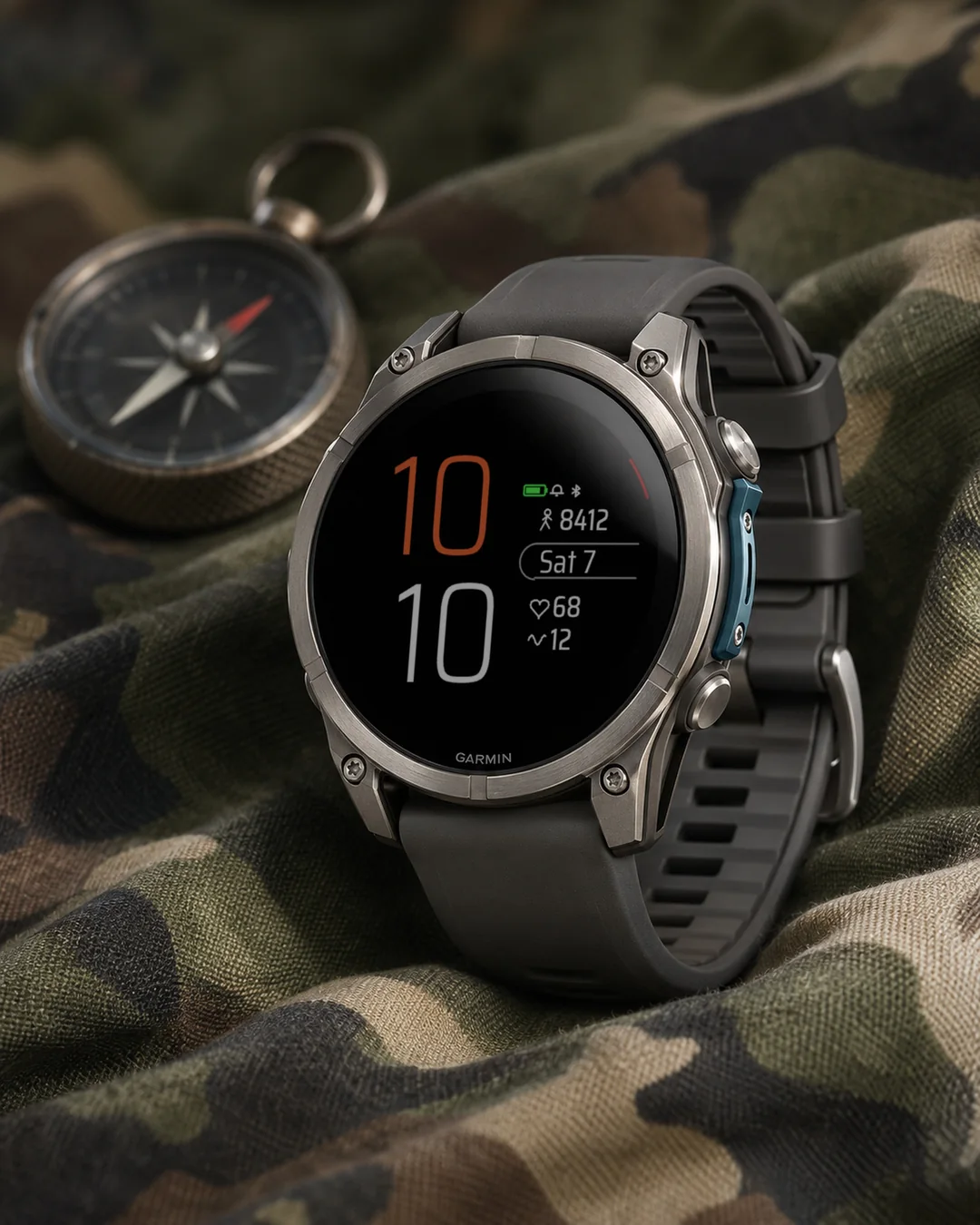
Classic 645 brings back the look of the old Forerunner 645 watch face. Black background, two huge thin numbers on the left (the hour in orange, the minutes in white under it) and a calm column of data on the right. Made for people with a Forerunner 965, 265, 255 or 955, a fenix or a Venu, who still miss it. This is an independent face by dialforge.dev, not made or endorsed by Garmin.
- Right column: steps, the date in a rounded outline with two long lines (weekday and day of the month, for example Wed 2), heart rate and floors.
- A row of small icons on top: the battery in green, a bell when an alarm is set and Bluetooth when the phone is connected. A thin red mark sits on the edge of round screens.
- Each of the four fields can show any of 32 kinds of data or stay empty: body battery, stress, calories, distance, altitude, pressure, weather, sunrise and sunset, time zones and more.
- Colours for the hour (orange by default), the minutes, values, icons, lines and the battery. Three sizes of field values.
- Data refresh: a profile (More often, Economy, Less often) or your own interval for each source, with an Off option. The profile lowers how often the face reads data; the watch sensors keep working. The biggest influence on the battery comes from the backlight, heart rate monitoring and GPS, which the watch controls, so the difference is usually small.
- On touch watches press and hold a field to open the matching Garmin screen (steps, calendar, heart rate).
- MIP screens (Forerunner 255 and 955, fenix 7, Enduro 3) use the 64 colour palette and lines that read well in the sun. AMOLED watches get an always-on mode: time and date, the whole face dimmed, or the time only, moved a little every minute.
- Menu in 35 languages, weekday in your language, 12 or 24 hour time like the watch.
All settings are in Garmin Connect (Connect IQ, watch face settings), including own intervals and Off for every data source. On the watch: Customise for the four fields, field value size, data refresh profile, battery unit and the always-on screen.
When the watch has no reading, the field shows --. Weather needs the phone connected from time to time.
Classic 645 przywraca wygląd starej tarczy z Forerunnera 645. Czarne tło, po lewej dwie ogromne, cienkie liczby (godzina na pomarańczowo, a pod nią minuty na biało) i spokojna kolumna danych po prawej. Dla tych, którzy mają Forerunnera 965, 265, 255 lub 955, fenixa albo Venu i dalej za nią tęsknią. To niezależna tarcza dialforge.dev, nie jest wykonana ani zatwierdzona przez Garmin.
- Kolumna po prawej: kroki, data w zaokrąglonej obwódce z dwiema długimi liniami (dzień tygodnia i dzień miesiąca, na przykład Śr 2), tętno i piętra.
- Na górze rząd małych ikon: bateria na zielono, dzwonek, gdy ustawiony jest budzik, i Bluetooth, gdy telefon jest połączony. Na okrągłych ekranach przy brzegu jest cienki czerwony znacznik.
- Każde z czterech pól pokaże dowolną z 32 danych albo zostanie puste: Body Battery, stres, kalorie, dystans, wysokość, ciśnienie, pogodę, wschód i zachód słońca, strefy czasowe i inne.
- Kolory godziny (domyślnie pomarańczowy), minut, wartości, ikon, linii i baterii. Trzy wielkości wartości pól.
- Odświeżanie danych: profil (Częściej, Oszczędny, Rzadziej) albo własny interwał dla każdego źródła, z opcją Wyłączone. Profil zmniejsza liczbę odczytów wykonywanych przez tarczę; czujniki zegarka pracują dalej. Największy wpływ na baterię mają podświetlenie, pomiar tętna i GPS, którymi steruje zegarek, więc różnica jest zwykle niewielka.
- Na zegarkach dotykowych przytrzymaj pole, żeby otworzyć odpowiedni ekran Garmina (kroki, kalendarz, tętno).
- Ekrany MIP (Forerunner 255 i 955, fenix 7, Enduro 3) używają palety 64 kolorów i linii, które dobrze czyta się w słońcu. Zegarki AMOLED mają tryb ekranu wygaszonego: godzina i data, cała tarcza przygaszona albo sama godzina, przesuwana co minutę.
- Menu w 35 językach, dzień tygodnia w Twoim języku, godzina 12- lub 24-godzinna jak w zegarku.
Wszystkie ustawienia są w Garmin Connect (Connect IQ, ustawienia tarczy), także własne interwały i Wyłączone dla każdego źródła danych. Na zegarku w Dostosuj: cztery pola, wielkość wartości pól, profil odświeżania danych, jednostka baterii i ekran wygaszony.
Gdy zegarek nie ma odczytu, pole pokazuje --. Pogoda wymaga, żeby telefon był co jakiś czas połączony.
Classic 645 bringt den Look des alten Forerunner-645-Zifferblatts zurück. Schwarzer Hintergrund, links zwei riesige, dünne Zahlen (die Stunde in Orange, darunter die Minuten in Weiß) und rechts eine ruhige Datenspalte. Für alle mit einer Forerunner 965, 265, 255 oder 955, einer fenix oder einer Venu, die es noch vermissen. Das ist ein unabhängiges Zifferblatt von dialforge.dev, nicht von Garmin hergestellt oder zugelassen.
- Rechte Spalte: Schritte, das Datum in einem abgerundeten Rahmen mit zwei langen Zeilen (Wochentag und Tag des Monats, zum Beispiel Mi 2), Herzfrequenz und Etagen.
- Oben eine Reihe kleiner Symbole: der Akku in Grün, eine Glocke bei gestelltem Wecker und Bluetooth bei verbundenem Smartphone. Auf runden Displays sitzt am Rand eine dünne rote Markierung.
- Jedes der vier Felder zeigt eine von 32 Datenarten oder bleibt leer: Body Battery, Stress, Kalorien, Distanz, Höhe, Druck, Wetter, Sonnenaufgang und Sonnenuntergang, Zeitzonen und mehr.
- Farben für Stunde (standardmäßig Orange), Minuten, Werte, Symbole, Linien und Akku. Drei Größen für die Feldwerte.
- Datenaktualisierung: ein Profil (Häufiger, Sparsam, Seltener) oder ein eigenes Intervall für jede Quelle, mit der Option Aus. Das Profil verringert, wie oft das Zifferblatt Daten liest, die Sensoren der Uhr arbeiten weiter. Den größten Einfluss auf den Akku haben Beleuchtung, Herzfrequenzmessung und GPS, die die Uhr steuert, daher ist der Unterschied meist gering.
- Auf Touch-Uhren ein Feld gedrückt halten, um den passenden Garmin-Bildschirm zu öffnen (Schritte, Kalender, Herzfrequenz).
- MIP-Displays (Forerunner 255 und 955, fenix 7, Enduro 3) nutzen die 64-Farben-Palette und Linien, die in der Sonne gut lesbar sind. AMOLED-Uhren bekommen einen Always-on-Modus: Uhrzeit und Datum, das ganze Zifferblatt gedimmt, oder nur die Uhrzeit, jede Minute ein Stück verschoben.
- Menü in 35 Sprachen, Wochentag in deiner Sprache, 12- oder 24-Stunden-Zeit wie auf der Uhr.
Alle Einstellungen findest du in Garmin Connect (Connect IQ, Einstellungen des Zifferblatts), auch eigene Intervalle und Aus für jede Datenquelle. Auf der Uhr unter Anpassen: die vier Felder, Größe der Feldwerte, Profil der Datenaktualisierung, Akku-Einheit und der Always-on-Bildschirm.
Wenn die Uhr keinen Messwert hat, zeigt das Feld --. Für das Wetter muss das Smartphone von Zeit zu Zeit verbunden sein.
Classic 645 ramène l'allure de l'ancien cadran du Forerunner 645. Fond noir, deux énormes chiffres fins à gauche (l'heure en orange, les minutes en blanc dessous) et une colonne de données bien calme à droite. Pour ceux qui ont une Forerunner 965, 265, 255 ou 955, une fenix ou une Venu et qui le regrettent encore. C'est un cadran indépendant de dialforge.dev, ni fabriqué ni approuvé par Garmin.
- Colonne de droite : les pas, la date dans un cadre arrondi avec deux longues lignes (jour de la semaine et jour du mois, par exemple mer 2), la fréquence cardiaque et les étages.
- En haut, une rangée de petites icônes : la batterie en vert, une cloche quand une alarme est réglée et le Bluetooth quand le téléphone est connecté. Sur les écrans ronds, un fin repère rouge se trouve au bord.
- Chacun des quatre champs peut afficher l'une des 32 données ou rester vide : Body Battery, stress, calories, distance, altitude, pression, météo, lever et coucher du soleil, fuseaux horaires et plus.
- Couleurs pour l'heure (orange par défaut), les minutes, les valeurs, les icônes, les lignes et la batterie. Trois tailles pour les valeurs des champs.
- Actualisation des données : un profil (Plus souvent, Économique, Moins souvent) ou votre propre intervalle pour chaque source, avec l'option Désactivé. Le profil réduit la fréquence de lecture des données par le cadran, les capteurs de la montre continuent de travailler. L'éclairage, la mesure du pouls et le GPS, gérés par la montre, pèsent le plus sur la batterie, la différence reste donc souvent faible.
- Sur les montres tactiles, maintenez un champ appuyé pour ouvrir l'écran Garmin correspondant (pas, calendrier, fréquence cardiaque).
- Les écrans MIP (Forerunner 255 et 955, fenix 7, Enduro 3) utilisent la palette de 64 couleurs et des lignes bien lisibles au soleil. Les montres AMOLED ont un mode toujours actif : heure et date, tout le cadran atténué, ou l'heure seule, déplacée un peu chaque minute.
- Menu en 35 langues, jour de la semaine dans votre langue, heure sur 12 ou 24 heures comme la montre.
Tous les réglages se trouvent dans Garmin Connect (Connect IQ, réglages du cadran), y compris vos propres intervalles et Désactivé pour chaque source de données. Sur la montre, dans Personnaliser : les quatre champs, la taille des valeurs, le profil d'actualisation, l'unité de la batterie et l'écran toujours actif.
Quand la montre n'a pas de mesure, le champ affiche --. La météo demande que le téléphone soit connecté de temps en temps.
Classic 645 recupera el aspecto de la antigua esfera del Forerunner 645. Fondo negro, dos números enormes y finos a la izquierda (la hora en naranja y debajo los minutos en blanco) y una columna de datos tranquila a la derecha. Para quienes tienen un Forerunner 965, 265, 255 o 955, un fenix o un Venu y todavía la echan de menos. Es una esfera independiente de dialforge.dev, no creada ni aprobada por Garmin.
- Columna derecha: pasos, la fecha en un marco redondeado con dos líneas largas (día de la semana y día del mes, por ejemplo mié 2), pulsaciones y pisos.
- Arriba, una fila de iconos pequeños: la batería en verde, una campana cuando hay alarma y Bluetooth cuando el teléfono está conectado. En las pantallas redondas hay una fina marca roja en el borde.
- Cada uno de los cuatro campos puede mostrar cualquiera de 32 tipos de datos o quedar vacío: Body Battery, estrés, calorías, distancia, altitud, presión, tiempo, amanecer y atardecer, zonas horarias y más.
- Colores para la hora (naranja por defecto), los minutos, los valores, los iconos, las líneas y la batería. Tres tamaños para los valores de los campos.
- Actualización de datos: un perfil (Más a menudo, Ahorro, Menos a menudo) o tu propio intervalo para cada fuente, con la opción Desactivado. El perfil reduce la frecuencia con la que la esfera lee datos; los sensores del reloj siguen funcionando. Lo que más influye en la batería es la luz de fondo, la medición del pulso y el GPS, que controla el reloj, así que la diferencia suele ser pequeña.
- En relojes táctiles, mantén pulsado un campo para abrir la pantalla de Garmin correspondiente (pasos, calendario, pulsaciones).
- Las pantallas MIP (Forerunner 255 y 955, fenix 7, Enduro 3) usan la paleta de 64 colores y líneas que se leen bien al sol. Los relojes AMOLED tienen modo siempre activo: hora y fecha, toda la esfera atenuada o solo la hora, desplazada un poco cada minuto.
- Menú en 35 idiomas, día de la semana en tu idioma, hora de 12 o 24 horas como en el reloj.
Todos los ajustes están en Garmin Connect (Connect IQ, ajustes de la esfera), incluidos intervalos propios y Desactivado para cada fuente de datos. En el reloj, en Personalizar: los cuatro campos, tamaño de los valores, perfil de actualización de datos, unidad de la batería y la pantalla siempre activa.
Cuando el reloj no tiene lectura, el campo muestra --. El tiempo necesita que el teléfono esté conectado de vez en cuando.
Classic 645 brengt het uiterlijk van de oude wijzerplaat van de Forerunner 645 terug. Zwarte achtergrond, links twee reusachtige dunne cijfers (het uur in oranje, de minuten in wit eronder) en rechts een rustige kolom met gegevens. Gemaakt voor wie een Forerunner 965, 265, 255 of 955, een fenix of een Venu heeft en haar nog steeds mist. Dit is een onafhankelijke wijzerplaat van dialforge.dev, niet gemaakt of goedgekeurd door Garmin.
- Kolom rechts: stappen, de datum in een afgeronde omlijsting met twee lange regels (weekdag en dag van de maand, bijvoorbeeld wo 2), hartslag en verdiepingen.
- Bovenaan een rij kleine pictogrammen: de batterij in groen, een belletje als er een wekker staat en Bluetooth als de telefoon verbonden is. Op ronde schermen staat een dun rood streepje aan de rand.
- Elk van de vier velden kan een van 32 soorten gegevens tonen of leeg blijven: Body Battery, stress, calorieën, afstand, hoogte, luchtdruk, weer, zonsopkomst en zonsondergang, tijdzones en meer.
- Kleuren voor het uur (standaard oranje), de minuten, waarden, pictogrammen, lijnen en de batterij. Drie groottes voor de veldwaarden.
- Gegevens vernieuwen: een profiel (Vaker, Zuinig, Minder vaak) of een eigen interval voor elke bron, met een optie Uit. Het profiel verlaagt hoe vaak de wijzerplaat gegevens leest, terwijl de sensoren van het horloge blijven werken. De grootste invloed op de batterij komt van achtergrondverlichting, hartslagmeting en gps, die het horloge aanstuurt, dus het verschil is meestal klein.
- Houd op horloges met aanraakscherm een veld ingedrukt om het bijbehorende Garmin-scherm te openen (stappen, agenda, hartslag).
- MIP-schermen (Forerunner 255 en 955, fenix 7, Enduro 3) gebruiken het palet van 64 kleuren en lijnen die in de zon goed leesbaar zijn. AMOLED-horloges krijgen een altijd-aan-modus: tijd en datum, de hele wijzerplaat gedimd, of alleen de tijd, elke minuut een stukje verschoven.
- Menu in 35 talen, weekdag in je eigen taal, 12- of 24-uursklok zoals op het horloge.
Alle instellingen staan in Garmin Connect (Connect IQ, instellingen van de wijzerplaat), ook eigen intervallen en Uit voor elke gegevensbron. Op het horloge: Aanpassen voor de vier velden, grootte van de veldwaarden, profiel voor gegevensvernieuwing, batterij-eenheid en het altijd-aan-scherm.
Als het horloge geen meting heeft, toont het veld --. Voor het weer moet de telefoon af en toe verbonden zijn.
Classic 645 は、昔の Forerunner 645 の文字盤を再現したウォッチフェイスです。黒い背景の左側に細くて特大の数字を 2 つ並べ (時はオレンジ、その下の分は白)、右側には落ち着いたデータの列を配置します。Forerunner 965、265、255、955、fenix、Venu をお使いで、あの文字盤が恋しい方のために作りました。dialforge.dev の独立したウォッチフェイスで、Garmin が作成または承認したものではありません。
- 右の列に、歩数、丸い枠に 2 本の長い行で入れた日付 (曜日と日、例: 水 2)、心拍数、階数を表示します。
- 上部に小さなアイコンが並び、バッテリーは緑、アラーム設定中はベル、スマートフォン接続中は Bluetooth を表示します。丸い画面では縁に細い赤いマークが入ります。
- 4 つのフィールドには、32 種類のデータのどれでも表示でき、空にもできます。Body Battery、ストレス、カロリー、距離、高度、気圧、天気、日の出と日の入り、タイムゾーンなどです。
- 時 (初期設定はオレンジ)、分、値、アイコン、線、バッテリーの色を変えられます。フィールドの値は 3 段階のサイズから選べます。
- データ更新: プロファイル (頻繁、節約、低頻度) か、データソースごとの独自の間隔を選べ、オフにもできます。プロファイルはフェイスがデータを読み取る頻度を下げ、時計のセンサーは動き続けます。バッテリーへの影響が最も大きいのは、時計が制御するバックライト、心拍数の測定、GPS なので、差は通常小さくなります。
- タッチ操作の時計では、フィールドを長押しすると対応する Garmin の画面 (歩数、カレンダー、心拍数) が開きます。
- MIP 画面 (Forerunner 255 と 955、fenix 7、Enduro 3) では 64 色パレットと、日差しの下でも読みやすい線を使います。AMOLED の時計には常時表示モードがあり、時刻と日付、フェイス全体を暗くした表示、または毎分少しずつ位置を動かす時刻のみの表示が選べます。
- 35 言語のメニュー、お使いの言語の曜日、時計と同じ 12 時間または 24 時間表示。
すべての設定は Garmin Connect (Connect IQ、ウォッチフェイスの設定) にあり、独自の間隔や各データソースのオフもそこで設定できます。時計ではカスタマイズから、4 つのフィールド、フィールドの値のサイズ、データ更新プロファイル、バッテリーの単位、常時表示画面を設定します。
時計に測定値がないときは、フィールドに -- と表示されます。天気は、ときどきスマートフォンと接続している必要があります。
Classic 645 riporta l'aspetto del vecchio quadrante del Forerunner 645. Sfondo nero, a sinistra due enormi cifre sottili (l'ora in arancione, i minuti in bianco sotto) e a destra una colonna di dati ordinata. Pensato per chi ha un Forerunner 965, 265, 255 o 955, un fenix o un Venu e ne sente ancora la mancanza. È un quadrante indipendente di dialforge.dev, non realizzato né approvato da Garmin.
- Colonna a destra: passi, la data in un riquadro arrotondato con due righe lunghe (giorno della settimana e giorno del mese, per esempio Mer 2), frequenza cardiaca e piani.
- In alto una fila di piccole icone: la batteria in verde, una campanella quando c'è una sveglia e il Bluetooth quando il telefono è collegato. Sugli schermi rotondi, sul bordo, c'è un sottile segno rosso.
- Ognuno dei quattro campi può mostrare uno dei 32 tipi di dati o restare vuoto: Body Battery, stress, calorie, distanza, altitudine, pressione, meteo, alba e tramonto, fusi orari e altro.
- Colori per l'ora (di default arancione), i minuti, i valori, le icone, le linee e la batteria. Tre dimensioni per i valori dei campi.
- Aggiornamento dei dati: un profilo (Più spesso, Risparmio, Meno spesso) o un intervallo tuo per ogni fonte, con l'opzione Disattivato. Il profilo riduce la frequenza con cui il quadrante legge i dati, mentre i sensori dell'orologio continuano a funzionare. Sulla batteria influiscono di più retroilluminazione, misurazione del battito e GPS, che controlla l'orologio, quindi la differenza è di solito piccola.
- Sugli orologi touch tieni premuto un campo per aprire la schermata Garmin corrispondente (passi, calendario, frequenza cardiaca).
- Gli schermi MIP (Forerunner 255 e 955, fenix 7, Enduro 3) usano la tavolozza a 64 colori e linee che si leggono bene al sole. Gli orologi AMOLED hanno una modalità sempre attiva: ora e data, tutto il quadrante attenuato, oppure solo l'ora, spostata un po' ogni minuto.
- Menu in 35 lingue, giorno della settimana nella tua lingua, ora a 12 o 24 ore come sull'orologio.
Tutte le impostazioni sono in Garmin Connect (Connect IQ, impostazioni del quadrante), con intervalli personalizzati e Disattivato per ogni fonte di dati. Sull'orologio: Personalizza per i quattro campi, dimensione dei valori, profilo di aggiornamento dei dati, unità della batteria e schermo sempre attivo.
Quando l'orologio non ha una lettura, il campo mostra --. Il meteo richiede che il telefono sia collegato di tanto in tanto.
Classic 645 找回了旧款 Forerunner 645 表盘的样子。黑色背景,左边是两个超大的细体数字(橙色小时,下面是白色分钟),右边是一列安静的数据。适合有 Forerunner 965、265、255 或 955、fenix 或 Venu,却仍然怀念它的人。这是 dialforge.dev 的独立表盘,并非 Garmin 制作或认可。
- 右侧一列:步数,圆角框里的日期(两行长文字:星期和几号,例如 周三 2),心率和楼层。
- 顶部一排小图标:绿色的电量,设置闹钟时出现的铃铛,手机连接时出现的蓝牙。圆形屏幕的边缘有一道细细的红色标记。
- 四个字段都可以显示 32 种数据中的任意一种,也可以留空:Body Battery、压力、卡路里、距离、海拔、气压、天气、日出日落、时区等。
- 小时(默认橙色)、分钟、数值、图标、线条和电量都可以选颜色。字段数值有三种大小。
- 数据刷新:配置(更频繁、节能、较少)或为每个来源自定义间隔,并有关闭选项。配置会降低表盘读取数据的频率,手表传感器继续工作。对电量影响最大的是背光、心率监测和 GPS,它们由手表控制,因此差别通常很小。
- 在触屏手表上,长按某个字段即可打开对应的 Garmin 界面(步数、日历、心率)。
- MIP 屏幕(Forerunner 255 和 955、fenix 7、Enduro 3)使用 64 色调色板和在阳光下也易读的线条。AMOLED 手表有息屏常亮模式:显示时间和日期,整个表盘调暗,或只显示时间,并且每分钟稍微移动一点位置。
- 菜单支持 35 种语言,星期使用你的语言,12 或 24 小时制与手表一致。
所有设置都在 Garmin Connect 中(Connect IQ,表盘设置),包括自定义间隔和每个数据来源的关闭选项。在手表上:通过自定义来设置四个字段、字段数值大小、数据刷新配置、电量单位和息屏常亮。
当手表没有读数时,字段显示 --。天气需要手机时不时连接一下。
Classic 645 возвращает вид старого циферблата Forerunner 645. Чёрный фон, слева две огромные тонкие цифры (час оранжевым, под ним минуты белым) и спокойная колонка данных справа. Для тех, у кого Forerunner 965, 265, 255 или 955, fenix или Venu и кто всё ещё скучает по нему. Это независимый циферблат dialforge.dev, он не создан и не одобрен компанией Garmin.
- Колонка справа: шаги, дата в скруглённой рамке с двумя длинными строками (день недели и число, например ср 2), пульс и этажи.
- Сверху ряд маленьких значков: батарея зелёным, колокольчик, когда установлен будильник, и Bluetooth, когда телефон подключён. На круглых экранах у края есть тонкая красная метка.
- Каждое из четырёх полей может показывать любой из 32 типов данных или оставаться пустым: Body Battery, стресс, калории, расстояние, высоту, давление, погоду, восход и закат, часовые пояса и другое.
- Цвета для часа (по умолчанию оранжевый), минут, значений, значков, линий и батареи. Три размера значений полей.
- Обновление данных: профиль (Чаще, Экономия, Реже) или свой интервал для каждого источника, с вариантом Выкл. Профиль уменьшает частоту чтения данных циферблатом, а датчики часов продолжают работать. Наибольшее влияние на батарею оказывают подсветка, измерение пульса и GPS, которыми управляют часы, поэтому разница обычно невелика.
- На часах с сенсорным экраном нажмите и удерживайте поле, чтобы открыть соответствующий экран Garmin (шаги, календарь, пульс).
- Экраны MIP (Forerunner 255 и 955, fenix 7, Enduro 3) используют палитру из 64 цветов и линии, которые хорошо читаются на солнце. У часов с AMOLED есть режим always-on: время и дата, весь циферблат приглушён или только время, каждую минуту немного смещаемое.
- Меню на 35 языках, день недели на вашем языке, 12- или 24-часовой формат времени, как в часах.
Все настройки находятся в Garmin Connect (Connect IQ, настройки циферблата), включая собственные интервалы и Выкл для каждого источника данных. На часах: Настроить для четырёх полей, размера значений полей, профиля обновления данных, единицы батареи и экрана always-on.
Когда у часов нет показаний, поле показывает --. Для погоды нужно, чтобы телефон время от времени был подключён.
O Classic 645 traz de volta o visual do antigo mostrador do Forerunner 645. Fundo preto, dois números finos e enormes à esquerda (a hora em laranja, os minutos em branco embaixo) e uma coluna tranquila de dados à direita. Feito para quem tem um Forerunner 965, 265, 255 ou 955, um fenix ou um Venu e ainda sente falta dele. Este é um mostrador independente da dialforge.dev, não feito nem aprovado pela Garmin.
- Coluna à direita: passos, a data em um contorno arredondado com duas linhas compridas (dia da semana e dia do mês, por exemplo qua 2), frequência cardíaca e andares.
- No alto, uma fileira de ícones pequenos: a bateria em verde, um sino quando há um alarme definido e o Bluetooth quando o celular está conectado. Nas telas redondas, há uma marca vermelha fina na borda.
- Cada um dos quatro campos pode mostrar qualquer um de 32 tipos de dados ou ficar vazio: Body Battery, estresse, calorias, distância, altitude, pressão, clima, nascer e pôr do sol, fusos horários e mais.
- Cores para a hora (laranja por padrão), os minutos, os valores, os ícones, as linhas e a bateria. Três tamanhos para os valores dos campos.
- Atualização de dados: um perfil (Com mais frequência, Economia, Com menos frequência) ou seu intervalo para cada fonte, com a opção Desativado. O perfil reduz a frequência com que o mostrador lê dados, e os sensores do relógio continuam funcionando. A maior influência na bateria vem da luz de fundo, da medição da frequência cardíaca e do GPS, que o relógio controla, então a diferença costuma ser pequena.
- Nos relógios com tela sensível ao toque, mantenha um campo pressionado para abrir a tela correspondente da Garmin (passos, calendário, frequência cardíaca).
- As telas MIP (Forerunner 255 e 955, fenix 7, Enduro 3) usam a paleta de 64 cores e linhas fáceis de ler no sol. Os relógios AMOLED têm um modo sempre ligado: hora e data, o mostrador inteiro escurecido, ou só a hora, deslocada um pouco a cada minuto.
- Menu em 35 idiomas, dia da semana no seu idioma, hora em 12 ou 24 horas como no relógio.
Todas as configurações ficam no Garmin Connect (Connect IQ, configurações do mostrador), incluindo intervalos próprios e Desativado para cada fonte de dados. No relógio: Personalizar para os quatro campos, tamanho dos valores, perfil de atualização de dados, unidade da bateria e tela sempre ligada.
Quando o relógio não tem leitura, o campo mostra --. O clima precisa que o celular esteja conectado de vez em quando.
Classic 645 vrací vzhled starého ciferníku Forerunner 645. Černé pozadí, vlevo dvě obří tenká čísla (hodina oranžově, pod ní minuty bíle) a klidný sloupec dat vpravo. Pro všechny s Forerunner 965, 265, 255 nebo 955, fenix či Venu, kterým starý vzhled pořád chybí. Je to nezávislý ciferník od dialforge.dev, nevytvořený ani neschválený společností Garmin.
- Pravý sloupec: kroky, datum v zaoblené obrubě se dvěma dlouhými řádky (den v týdnu a den v měsíci, například St 2), tep a patra.
- Nahoře řada malých ikon: baterie zeleně, zvonek při nastaveném budíku a Bluetooth při připojeném telefonu. Na kulatých displejích je u okraje tenká červená značka.
- Každé ze čtyř polí zobrazí libovolný z 32 druhů dat, nebo zůstane prázdné: Body Battery, stres, kalorie, vzdálenost, nadmořskou výšku, tlak, počasí, východ a západ slunce, časová pásma a další.
- Barvy hodiny (výchozí oranžová), minut, hodnot, ikon, čar a baterie. Tři velikosti hodnot v polích.
- Obnovování dat: profil (Častěji, Úsporný, Méně často) nebo vlastní interval pro každý zdroj, s možností Vypnuto. Profil snižuje, jak často ciferník čte data, senzory hodinek fungují dál. Největší vliv na baterii mají podsvícení, měření tepu a GPS, které řídí hodinky, takže rozdíl bývá malý.
- Na dotykových hodinkách podržte pole a otevře se příslušná obrazovka Garminu (kroky, kalendář, tep).
- Displeje MIP (Forerunner 255 a 955, fenix 7, Enduro 3) používají paletu 64 barev a čáry dobře čitelné na slunci. Hodinky AMOLED mají režim always-on: čas a datum, celý ciferník ztlumený, nebo jen čas, každou minutu mírně posunutý.
- Menu ve 35 jazycích, den v týdnu ve vašem jazyce, 12hodinový nebo 24hodinový čas jako v hodinkách.
Všechna nastavení najdete v Garmin Connect (Connect IQ, nastavení ciferníku), včetně vlastních intervalů a Vypnuto pro každý zdroj dat. V hodinkách v Přizpůsobit: čtyři pole, velikost hodnot v polích, profil obnovování dat, jednotka baterie a always-on obrazovka.
Když hodinky nemají žádnou hodnotu, pole ukáže --. Počasí vyžaduje, aby byl telefon čas od času připojen.
O Classic 645 traz de volta o aspeto do antigo mostrador do Forerunner 645. Fundo preto, dois números enormes e finos à esquerda (a hora a laranja e, por baixo, os minutos a branco) e uma coluna calma de dados à direita. Feito para quem tem um Forerunner 965, 265, 255 ou 955, um fenix ou um Venu e ainda sente a falta dele. Este é um mostrador independente do dialforge.dev, não foi feito nem aprovado pela Garmin.
- Coluna à direita: passos, a data num contorno arredondado com duas linhas compridas (dia da semana e dia do mês, por exemplo qua 2), frequência cardíaca e andares.
- Em cima, uma fila de ícones pequenos: a bateria a verde, um sino quando há um alarme definido e Bluetooth quando o telemóvel está ligado. Nos ecrãs redondos há uma marca vermelha fina na margem.
- Cada um dos quatro campos pode mostrar qualquer um de 32 tipos de dados ou ficar vazio: Body Battery, stresse, calorias, distância, altitude, pressão, tempo, nascer e pôr do sol, fusos horários e mais.
- Cores para a hora (laranja por predefinição), os minutos, os valores, os ícones, as linhas e a bateria. Três tamanhos para os valores dos campos.
- Atualização de dados: um perfil (Com mais frequência, Economia, Com menos frequência) ou o teu próprio intervalo para cada fonte, com a opção Desativado. O perfil reduz a frequência com que o mostrador lê dados, e os sensores do relógio continuam a funcionar. A maior influência na bateria vem da luz de fundo, da medição da frequência cardíaca e do GPS, que o relógio controla, por isso a diferença costuma ser pequena.
- Nos relógios com ecrã tátil, mantém premido um campo para abrir o ecrã Garmin correspondente (passos, calendário, frequência cardíaca).
- Os ecrãs MIP (Forerunner 255 e 955, fenix 7, Enduro 3) usam a paleta de 64 cores e linhas que se leem bem ao sol. Os relógios AMOLED têm um modo sempre ligado: hora e data, o mostrador todo esbatido, ou só a hora, deslocada um pouco a cada minuto.
- Menu em 35 idiomas, dia da semana no teu idioma, hora de 12 ou 24 horas como no relógio.
Todas as definições estão no Garmin Connect (Connect IQ, definições do mostrador), incluindo intervalos próprios e Desativado para cada fonte de dados. No relógio: Personalizar para os quatro campos, tamanho dos valores, perfil de atualização de dados, unidade da bateria e ecrã sempre ligado.
Quando o relógio não tem leitura, o campo mostra --. O tempo precisa que o telemóvel esteja ligado de vez em quando.
Classic 645는 예전 Forerunner 645 워치 페이스의 모습을 되살렸습니다. 검은 배경, 왼쪽에 아주 큰 얇은 숫자 두 개(시는 주황색, 그 아래 분은 흰색), 오른쪽에 차분한 데이터 열이 있습니다. Forerunner 965, 265, 255, 955, fenix 또는 Venu를 쓰면서 아직도 그 워치 페이스가 그리운 분을 위해 만들었습니다. dialforge.dev의 독립 워치 페이스이며 Garmin이 만들거나 승인한 것이 아닙니다.
- 오른쪽 열: 걸음 수, 둥근 테두리 안에 긴 두 줄로 표시되는 날짜(요일과 일, 예: 수 2), 심박수, 층수.
- 위쪽에 작은 아이콘 한 줄: 초록색 배터리, 알람이 설정되면 종, 휴대폰이 연결되면 Bluetooth. 원형 화면에서는 가장자리에 얇은 빨간 표시가 있습니다.
- 네 개의 필드에는 32가지 데이터 중 무엇이든 표시하거나 비워 둘 수 있습니다. Body Battery, 스트레스, 칼로리, 거리, 고도, 기압, 날씨, 일출과 일몰, 시간대 등이 있습니다.
- 시(기본값은 주황색), 분, 값, 아이콘, 선, 배터리의 색을 바꿀 수 있습니다. 필드 값 크기는 세 가지입니다.
- 데이터 갱신: 프로필(더 자주, 절약, 덜 자주) 또는 소스별로 직접 정한 간격을 쓸 수 있고, 끄기 옵션도 있습니다. 프로필은 워치 페이스가 데이터를 읽는 빈도를 낮추며, 워치 센서는 계속 작동합니다. 배터리에 가장 큰 영향을 주는 것은 워치가 제어하는 백라이트, 심박수 측정, GPS이므로 차이는 보통 작습니다.
- 터치 워치에서는 필드를 길게 누르면 해당하는 Garmin 화면(걸음 수, 캘린더, 심박수)이 열립니다.
- MIP 화면(Forerunner 255 및 955, fenix 7, Enduro 3)은 64색 팔레트와 햇빛 아래에서도 잘 읽히는 선을 사용합니다. AMOLED 워치에는 상시 표시 모드가 있습니다: 시간과 날짜, 전체 페이스를 어둡게 하거나 시간만 표시하며 매분 조금씩 위치를 옮깁니다.
- 35개 언어의 메뉴, 내 언어로 표시되는 요일, 워치와 같은 12시간 또는 24시간 시계.
모든 설정은 Garmin Connect(Connect IQ, 워치 페이스 설정)에 있으며, 직접 정한 간격과 모든 데이터 소스의 끄기도 여기서 설정합니다. 워치에서는 사용자 지정에서 네 개의 필드, 필드 값 크기, 데이터 갱신 프로필, 배터리 단위, 상시 표시 화면을 설정합니다.
워치에 측정값이 없으면 필드에 --가 표시됩니다. 날씨는 가끔 휴대폰이 연결되어 있어야 합니다.
Classic 645 ger tillbaka utseendet från den gamla urtavlan i Forerunner 645. Svart bakgrund, två jättestora tunna siffror till vänster (timmen i orange, minuterna i vitt under) och en lugn kolumn med data till höger. Gjord för dig som har en Forerunner 965, 265, 255 eller 955, en fenix eller en Venu och fortfarande saknar den. Det här är en oberoende urtavla från dialforge.dev, inte tillverkad eller godkänd av Garmin.
- Kolumnen till höger: steg, datumet i en rundad ram med två långa rader (veckodag och dag i månaden, till exempel ons 2), puls och våningar.
- Överst en rad med små ikoner: batteriet i grönt, en klocka när ett alarm är ställt och Bluetooth när telefonen är ansluten. På runda skärmar sitter ett tunt rött märke vid kanten.
- Vart och ett av de fyra fälten kan visa vilken som helst av 32 datatyper eller vara tomt: Body Battery, stress, kalorier, distans, höjd, tryck, väder, soluppgång och solnedgång, tidszoner och mer.
- Färger för timmen (orange som standard), minuterna, värdena, ikonerna, linjerna och batteriet. Tre storlekar för fältvärdena.
- Datauppdatering: en profil (Oftare, Sparläge, Mer sällan) eller ett eget intervall för varje källa, med alternativet Av. Profilen minskar hur ofta urtavlan läser data, medan klockans sensorer fortsätter att arbeta. Störst påverkan på batteriet har bakgrundsljus, pulsmätning och GPS, som klockan styr, så skillnaden är oftast liten.
- Tryck och håll på ett fält på klockor med pekskärm för att öppna motsvarande Garmin-skärm (steg, kalender, puls).
- MIP-skärmar (Forerunner 255 och 955, fenix 7, Enduro 3) använder paletten med 64 färger och linjer som är lätta att läsa i solen. AMOLED-klockor får ett alltid-på-läge: klockan och datum, hela urtavlan dämpad, eller bara klockan, flyttad lite varje minut.
- Meny på 35 språk, veckodag på ditt språk, 12- eller 24-timmarsklocka som i klockan.
Alla inställningar finns i Garmin Connect (Connect IQ, urtavlans inställningar), även egna intervall och Av för varje datakälla. På klockan: Anpassa för de fyra fälten, storleken på fältvärdena, profil för datauppdatering, batterienhet och alltid-på-skärmen.
När klockan inte har något värde visar fältet --. Vädret kräver att telefonen är ansluten då och då.
Classic 645 bringer udseendet fra den gamle Forerunner 645-urskive tilbage. Sort baggrund, to kæmpe tynde tal til venstre (timen i orange, minutterne i hvid under den) og en rolig søjle med data til højre. Til dig med en Forerunner 965, 265, 255 eller 955, en fenix eller en Venu, som stadig savner den. Det er en uafhængig urskive fra dialforge.dev, ikke lavet eller godkendt af Garmin.
- Højre søjle: skridt, datoen i en afrundet ramme med to lange linjer (ugedag og dag i måneden, for eksempel ons 2), puls og etager.
- Øverst en række små ikoner: batteriet i grønt, en klokke når en alarm er sat og Bluetooth når telefonen er forbundet. På runde skærme sidder et tyndt rødt mærke ved kanten.
- Hvert af de fire felter kan vise en af 32 slags data eller være tomt: Body Battery, stress, kalorier, distance, højde, tryk, vejr, solopgang og solnedgang, tidszoner og mere.
- Farver til timen (orange som standard), minutterne, værdier, ikoner, linjer og batteriet. Tre størrelser til feltværdierne.
- Dataopdatering: en profil (Oftere, Sparsom, Sjældnere) eller dit eget interval for hver kilde, med valget Fra. Profilen mindsker, hvor ofte urskiven læser data, urets sensorer arbejder videre. Størst indflydelse på batteriet har baggrundslys, pulsmåling og GPS, som uret styrer, så forskellen er som regel lille.
- På ure med touchskærm kan du holde et felt nede for at åbne den tilsvarende Garmin-skærm (skridt, kalender, puls).
- MIP-skærme (Forerunner 255 og 955, fenix 7, Enduro 3) bruger paletten med 64 farver og linjer, der er lette at læse i solen. AMOLED-ure får en always-on-tilstand: tid og dato, hele urskiven dæmpet, eller kun tiden, flyttet lidt hvert minut.
- Menu på 35 sprog, ugedag på dit sprog, 12- eller 24-timers tid som på uret.
Alle indstillinger findes i Garmin Connect (Connect IQ, urskiveindstillinger), også egne intervaller og Fra for hver datakilde. På uret under Tilpas: de fire felter, størrelse på feltværdier, profil for dataopdatering, batteriets enhed og always-on-skærmen.
Når uret ikke har en måling, viser feltet --. Vejret kræver, at telefonen er forbundet en gang imellem.
Classic 645 gir deg tilbake utseendet til den gamle urskiven på Forerunner 645. Svart bakgrunn, to digre tynne tall til venstre (timen i oransje, minuttene i hvitt under) og en rolig kolonne med data til høyre. Laget for deg som har en Forerunner 965, 265, 255 eller 955, en fenix eller en Venu og fortsatt savner den. Dette er en uavhengig urskive fra dialforge.dev, ikke laget eller godkjent av Garmin.
- Kolonnen til høyre: skritt, datoen i en avrundet ramme med to lange linjer (ukedag og dag i måneden, for eksempel ons. 2), puls og etasjer.
- Øverst en rad med små ikoner: batteriet i grønt, en bjelle når en alarm er stilt og Bluetooth når telefonen er koblet til. På runde skjermer ligger det et tynt rødt merke i kanten.
- Hvert av de fire feltene kan vise en av 32 datatyper eller stå tomt: Body Battery, stress, kalorier, avstand, høyde, trykk, vær, soloppgang og solnedgang, tidssoner og mer.
- Farger for timen (oransje som standard), minuttene, verdiene, ikonene, linjene og batteriet. Tre størrelser på feltverdiene.
- Dataoppdatering: en profil (Oftere, Sparemodus, Sjeldnere) eller ditt eget intervall for hver kilde, med valget Av. Profilen reduserer hvor ofte urskiven leser data, mens sensorene i klokken fortsetter å jobbe. Størst innvirkning på batteriet har bakgrunnslys, pulsmåling og GPS, som klokken styrer, så forskjellen er vanligvis liten.
- På klokker med berøringsskjerm trykker og holder du på et felt for å åpne den tilhørende Garmin-skjermen (skritt, kalender, puls).
- MIP-skjermer (Forerunner 255 og 955, fenix 7, Enduro 3) bruker paletten med 64 farger og linjer som er lette å lese i sol. AMOLED-klokker får en alltid-på-modus: klokkeslett og dato, hele urskiven dempet, eller bare klokkeslettet, flyttet litt hvert minutt.
- Meny på 35 språk, ukedag på ditt språk, 12- eller 24-timers klokke som på klokken.
Alle innstillinger finnes i Garmin Connect (Connect IQ, urskiveinnstillinger), også egne intervaller og Av for hver datakilde. På klokken: Tilpass for de fire feltene, størrelsen på feltverdiene, profil for dataoppdatering, batterienhet og alltid-på-skjermen.
Når klokken ikke har noen avlesning, viser feltet --. Været krever at telefonen er koblet til av og til.
Classic 645 找回了舊款 Forerunner 645 錶面的樣子。黑色背景,左邊是兩個超大的細體數字(橙色小時,下面是白色分鐘),右邊是一列安靜的資料。適合有 Forerunner 965、265、255 或 955、fenix 或 Venu,卻仍然懷念它的人。這是 dialforge.dev 的獨立錶面,並非 Garmin 製作或認可。
- 右側一列:步數,圓角框裡的日期(兩行長文字:星期和幾號,例如 週三 2),心率和樓層。
- 頂部一排小圖示:綠色的電量,設定鬧鐘時出現的鈴鐺,手機連線時出現的藍牙。圓形螢幕的邊緣有一道細細的紅色標記。
- 四個欄位都可以顯示 32 種資料中的任意一種,也可以留空:Body Battery、壓力、卡路里、距離、海拔、氣壓、天氣、日出日落、時區等。
- 小時(預設橙色)、分鐘、數值、圖示、線條和電量都可以選顏色。欄位數值有三種大小。
- 資料更新:設定檔(較頻繁、省電、較少)或為每個來源自訂間隔,並有關閉選項。設定檔會降低錶面讀取資料的頻率,手錶感測器繼續運作。對電量影響最大的是背光、心率監測和 GPS,它們由手錶控制,因此差別通常很小。
- 在觸控手錶上,長按某個欄位即可開啟對應的 Garmin 畫面(步數、行事曆、心率)。
- MIP 螢幕(Forerunner 255 和 955、fenix 7、Enduro 3)使用 64 色調色盤和在陽光下也易讀的線條。AMOLED 手錶有螢幕常亮模式:顯示時間和日期,整個錶面調暗,或只顯示時間,並且每分鐘稍微移動一點位置。
- 選單支援 35 種語言,星期使用你的語言,12 或 24 小時制與手錶一致。
所有設定都在 Garmin Connect 中(Connect IQ,錶面設定),包括自訂間隔和每個資料來源的關閉選項。在手錶上:透過自訂來設定四個欄位、欄位數值大小、資料更新設定檔、電量單位和螢幕常亮。
當手錶沒有讀數時,欄位會顯示 --。天氣需要手機偶爾連線一下。
Classic 645 tuo takaisin vanhan Forerunner 645 -kellotaulun ilmeen. Musta tausta, vasemmalla kaksi valtavaa ohutta lukua (tunti oranssina ja sen alla minuutit valkoisena) ja oikealla rauhallinen tietopalsta. Sinulle, jolla on Forerunner 965, 265, 255 tai 955, fenix tai Venu ja jolla on sitä vielä ikävä. Tämä on dialforge.devin itsenäinen kellotaulu, jota Garmin ei ole tehnyt eikä hyväksynyt.
- Oikea palsta: askeleet, päivämäärä pyöristetyssä kehyksessä kahdella pitkällä rivillä (viikonpäivä ja kuukauden päivä, esimerkiksi ke 2), syke ja kerrokset.
- Ylhäällä rivi pieniä kuvakkeita: akku vihreänä, kello kun herätys on asetettu ja Bluetooth kun puhelin on yhdistetty. Pyöreillä näytöillä reunassa on ohut punainen merkki.
- Jokainen neljästä kentästä näyttää minkä tahansa 32 tietolajista tai voi olla tyhjä: Body Battery, stressi, kalorit, matka, korkeus, ilmanpaine, sää, auringonnousu ja -lasku, aikavyöhykkeet ja muuta.
- Värit tunnille (oletuksena oranssi), minuuteille, arvoille, kuvakkeille, viivoille ja akulle. Kolme kokoa kenttien arvoille.
- Tietojen päivitys: profiili (Useammin, Säästö, Harvemmin) tai oma aikaväli jokaiselle lähteelle, ja vaihtoehto Pois. Profiili vähentää sitä, kuinka usein kellotaulu lukee tietoja, kellon anturit toimivat edelleen. Akkuun vaikuttavat eniten taustavalo, sykemittaus ja GPS, joita kello ohjaa, joten ero on yleensä pieni.
- Kosketuskelloissa pidä kenttää painettuna avataksesi vastaavan Garmin-näytön (askeleet, kalenteri, syke).
- MIP-näytöt (Forerunner 255 ja 955, fenix 7, Enduro 3) käyttävät 64 värin palettia ja viivoja, jotka näkyvät hyvin auringossa. AMOLED-kelloissa on aina päällä -tila: aika ja päivämäärä, koko kellotaulu himmennettynä tai vain aika, joka siirtyy hieman joka minuutti.
- Valikko 35 kielellä, viikonpäivä omalla kielelläsi, 12 tai 24 tunnin aika kuten kellossa.
Kaikki asetukset ovat Garmin Connectissa (Connect IQ, kellotaulun asetukset), myös omat aikavälit ja Pois jokaiselle tietolähteelle. Kellossa kohdassa Muokkaa: neljä kenttää, kenttien arvojen koko, tietojen päivitysprofiili, akun yksikkö ja aina päällä oleva näyttö.
Kun kellolla ei ole lukemaa, kenttä näyttää --. Sää vaatii, että puhelin on yhdistettynä aina silloin tällöin.
Classic 645 vracia vzhľad starého ciferníka z Forerunnera 645. Čierne pozadie, vľavo dve obrovské tenké čísla (hodina oranžovou a pod ňou minúty bielou) a pokojný stĺpec údajov vpravo. Pre tých, ktorí majú Forerunner 965, 265, 255 alebo 955, fenix či Venu a stále ho postrádajú. Je to nezávislý ciferník od dialforge.dev, nie je vyrobený ani schválený spoločnosťou Garmin.
- Stĺpec vpravo: kroky, dátum v zaoblenom rámiku s dvoma dlhými riadkami (deň v týždni a deň v mesiaci, napríklad st 2), tep a poschodia.
- Hore rad malých ikon: batéria zelenou, zvonček, keď je nastavený budík, a Bluetooth, keď je telefón pripojený. Na okrúhlych displejoch je pri okraji tenká červená značka.
- Každé zo štyroch polí môže ukázať ktorýkoľvek z 32 typov údajov alebo zostať prázdne: Body Battery, stres, kalórie, vzdialenosť, nadmorskú výšku, tlak, počasie, východ a západ slnka, časové pásma a ďalšie.
- Farby pre hodinu (predvolene oranžová), minúty, hodnoty, ikony, čiary a batériu. Tri veľkosti hodnôt v poliach.
- Obnovenie údajov: profil (Častejšie, Úsporný, Menej často) alebo vlastný interval pre každý zdroj, s možnosťou Vypnuté. Profil znižuje, ako často ciferník číta údaje, a senzory hodiniek pracujú ďalej. Najväčší vplyv na batériu majú podsvietenie, meranie tepu a GPS, ktoré riadia hodinky, takže rozdiel je zvyčajne malý.
- Na dotykových hodinkách podržte pole a otvorí sa príslušná obrazovka Garminu (kroky, kalendár, tep).
- Displeje MIP (Forerunner 255 a 955, fenix 7, Enduro 3) používajú paletu 64 farieb a čiary, ktoré sú na slnku dobre čitateľné. Hodinky s AMOLED majú režim stále zapnuté: čas a dátum, celý ciferník stlmený, alebo len čas, každú minútu mierne posunutý.
- Ponuka v 35 jazykoch, deň v týždni vo vašom jazyku, 12-hodinový alebo 24-hodinový čas ako v hodinkách.
Všetky nastavenia sú v Garmin Connect (Connect IQ, nastavenia ciferníka), vrátane vlastných intervalov a možnosti Vypnuté pre každý zdroj údajov. Na hodinkách: Prispôsobiť pre štyri polia, veľkosť hodnôt v poliach, profil obnovenia údajov, jednotku batérie a displej stále zapnutý.
Keď hodinky nemajú žiadnu hodnotu, pole ukazuje --. Počasie potrebuje, aby bol telefón raz za čas pripojený.
Classic 645 vrača videz starega kazalčnika Forerunnerja 645. Črno ozadje, levo dve ogromni tanki številki (ura oranžno, pod njo minute belo) in miren stolpec podatkov desno. Za vse, ki imate Forerunner 965, 265, 255 ali 955, fenix ali Venu in ga še vedno pogrešate. To je neodvisen kazalčnik dialforge.dev, ki ga Garmin ni izdelal ali odobril.
- Desni stolpec: koraki, datum v zaobljenem okvirju z dvema dolgima vrsticama (dan v tednu in dan v mesecu, na primer sre 2), srčni utrip in nadstropja.
- Zgoraj vrsta majhnih ikon: baterija v zeleni barvi, zvonec, ko je nastavljen alarm, in Bluetooth, ko je telefon povezan. Na okroglih zaslonih je ob robu tanka rdeča oznaka.
- Vsako od štirih polj lahko prikaže katero koli od 32 vrst podatkov ali ostane prazno: Body Battery, stres, kalorije, razdaljo, nadmorsko višino, tlak, vreme, sončni vzhod in zahod, časovne pasove in več.
- Barve za uro (privzeto oranžna), minute, vrednosti, ikone, črte in baterijo. Tri velikosti vrednosti polj.
- Osveževanje podatkov: profil (Pogosteje, Varčno, Redkeje) ali lasten interval za vsak vir, z možnostjo Izklopljeno. Profil zmanjša, kako pogosto kazalčnik bere podatke, senzorji ure pa delujejo naprej. Največji vpliv na baterijo imajo osvetlitev ozadja, merjenje srčnega utripa in GPS, ki jih nadzoruje ura, zato je razlika običajno majhna.
- Na urah z zaslonom na dotik pridržite polje, da se odpre ustrezen Garminov zaslon (koraki, koledar, srčni utrip).
- Zasloni MIP (Forerunner 255 in 955, fenix 7, Enduro 3) uporabljajo paleto 64 barv in črte, ki so na soncu dobro berljive. Ure AMOLED imajo način vedno vklopljeno: čas in datum, celoten kazalčnik zatemnjen ali samo čas, vsako minuto malo premaknjen.
- Meni v 35 jezikih, dan v tednu v vašem jeziku, 12-urni ali 24-urni čas kot na uri.
Vse nastavitve so v aplikaciji Garmin Connect (Connect IQ, nastavitve kazalčnika), tudi lastni intervali in Izklopljeno za vsak vir podatkov. Na uri: Prilagodi za štiri polja, velikost vrednosti polj, profil osveževanja podatkov, enoto baterije in zaslon, ki je vedno vklopljen.
Ko ura nima meritve, polje prikaže --. Vreme zahteva, da je telefon občasno povezan.
Classic 645 menghadirkan kembali tampilan jam Forerunner 645 yang lama. Latar hitam, dua angka tipis yang sangat besar di kiri (jam berwarna oranye, menit berwarna putih di bawahnya), dan kolom data yang tenang di kanan. Dibuat untuk kamu yang punya Forerunner 965, 265, 255 atau 955, fenix, atau Venu, tetapi masih merindukannya. Ini tampilan jam independen dari dialforge.dev, tidak dibuat atau disetujui oleh Garmin.
- Kolom kanan: langkah, tanggal dalam bingkai membulat dengan dua baris panjang (hari dan tanggal, misalnya Rab 2), detak jantung, dan lantai.
- Deretan ikon kecil di atas: baterai berwarna hijau, lonceng saat alarm aktif, dan Bluetooth saat ponsel terhubung. Di layar bulat ada tanda merah tipis di tepi.
- Masing-masing dari empat bidang bisa menampilkan salah satu dari 32 jenis data atau dikosongkan: Body Battery, stres, kalori, jarak, ketinggian, tekanan, cuaca, matahari terbit dan terbenam, zona waktu, dan lainnya.
- Warna untuk jam (default oranye), menit, nilai, ikon, garis, dan baterai. Tiga ukuran nilai bidang.
- Pembaruan data: profil (Lebih sering, Hemat, Lebih jarang) atau interval sendiri untuk setiap sumber, dengan opsi Mati. Profil mengurangi seberapa sering tampilan jam membaca data, sementara sensor jam tetap bekerja. Pengaruh terbesar pada baterai berasal dari lampu latar, pemantauan detak jantung, dan GPS yang dikendalikan jam, jadi selisihnya biasanya kecil.
- Di jam layar sentuh, tekan dan tahan sebuah bidang untuk membuka layar Garmin yang sesuai (langkah, kalender, detak jantung).
- Layar MIP (Forerunner 255 dan 955, fenix 7, Enduro 3) memakai palet 64 warna dan garis yang terbaca jelas di bawah matahari. Jam AMOLED punya mode selalu menyala: waktu dan tanggal, seluruh tampilan diredupkan, atau hanya waktu yang bergeser sedikit setiap menit.
- Menu dalam 35 bahasa, hari dalam bahasamu, waktu 12 atau 24 jam seperti di jam.
Semua pengaturan ada di Garmin Connect (Connect IQ, pengaturan tampilan jam), termasuk interval sendiri dan Mati untuk setiap sumber data. Di jam: Sesuaikan untuk empat bidang, ukuran nilai bidang, profil pembaruan data, satuan baterai, dan layar selalu menyala.
Jika jam tidak punya data bacaan, bidang menampilkan --. Cuaca membutuhkan ponsel yang sesekali terhubung.
A Classic 645 visszahozza a régi Forerunner 645 számlap megjelenését. Fekete háttér, bal oldalon két hatalmas vékony szám (az óra narancsban, alatta a percek fehérben) és jobbra egy nyugodt adatoszlop. Azoknak, akiknek Forerunner 965, 265, 255 vagy 955, fenix vagy Venu órájuk van, és még mindig hiányolják. Ez a dialforge.dev független számlapja, amelyet nem a Garmin készített, és nem is hagyott jóvá.
- Jobb oszlop: lépések, a dátum lekerekített keretben két hosszú sorral (a hét napja és a hónap napja, például Sze 2), pulzus és emeletek.
- Fent kis ikonok sora: az akkumulátor zölden, egy csengő, ha van beállított ébresztő, és Bluetooth, ha a telefon csatlakoztatva van. A kerek kijelzőkön vékony piros jelölés van a szélén.
- A négy mező mindegyike a 32 adattípus bármelyikét mutatja, vagy üres marad: Body Battery, stressz, kalória, távolság, magasság, légnyomás, időjárás, napkelte és napnyugta, időzónák és más.
- Színek az órához (alapból narancs), a percekhez, értékekhez, ikonokhoz, vonalakhoz és az akkumulátorhoz. Három méret a mezők értékeihez.
- Adatfrissítés: egy profil (Gyakrabban, Takarékos, Ritkábban) vagy saját időköz minden forráshoz, Ki opcióval. A profil csökkenti, milyen gyakran olvassa az adatokat a számlap, az óra szenzorai tovább működnek. Az akkumulátorra a háttérvilágítás, a pulzusmérés és a GPS hat a legjobban, ezeket az óra vezérli, ezért a különbség általában kicsi.
- Érintőképernyős órákon tartsa nyomva a mezőt a megfelelő Garmin-képernyő megnyitásához (lépések, naptár, pulzus).
- A MIP kijelzők (Forerunner 255 és 955, fenix 7, Enduro 3) a 64 színű palettát és napfényben jól olvasható vonalakat használnak. Az AMOLED órák always-on módot kapnak: idő és dátum, az egész számlap tompítva, vagy csak az idő, percenként kissé arrébb téve.
- Menü 35 nyelven, a hét napja a saját nyelvén, 12 vagy 24 órás idő, mint az órán.
Minden beállítás a Garmin Connectben található (Connect IQ, a számlap beállításai), a saját időközök és a Ki opció is minden adatforráshoz. Az órán a Testreszabás menüben: a négy mező, a mezőértékek mérete, az adatfrissítés profilja, az akkumulátor egysége és az always-on képernyő.
Ha az órának nincs mérése, a mező ezt mutatja: --. Az időjáráshoz kell, hogy a telefon időnként csatlakoztatva legyen.
Classic 645 นำหน้าตาของหน้าปัด Forerunner 645 รุ่นเก่ากลับมา พื้นหลังสีดำ ตัวเลขบางขนาดใหญ่มากสองตัวทางซ้าย (ชั่วโมงสีส้ม และนาทีสีขาวอยู่ข้างล่าง) และคอลัมน์ข้อมูลที่ดูสงบทางขวา เหมาะสำหรับคนที่มี Forerunner 965, 265, 255 หรือ 955, fenix หรือ Venu และยังคิดถึงมันอยู่ นี่คือหน้าปัดอิสระจาก dialforge.dev ไม่ได้สร้างหรือรับรองโดย Garmin
- คอลัมน์ทางขวา: จำนวนก้าว วันที่ในกรอบมุมมนที่มีสองบรรทัดยาว (วันในสัปดาห์และวันที่ เช่น พ. 2) อัตราการเต้นของหัวใจ และจำนวนชั้น
- ด้านบนมีแถวไอคอนเล็ก ๆ: แบตเตอรี่สีเขียว กระดิ่งเมื่อตั้งปลุกไว้ และ Bluetooth เมื่อเชื่อมต่อโทรศัพท์อยู่ บนหน้าจอกลมมีเครื่องหมายสีแดงบาง ๆ ที่ขอบ
- ทั้งสี่ช่องแสดงข้อมูลได้ทุกชนิดจาก 32 ชนิด หรือเว้นว่างไว้ก็ได้: Body Battery ความเครียด แคลอรี ระยะทาง ความสูง ความดันอากาศ สภาพอากาศ เวลาดวงอาทิตย์ขึ้นและตก เขตเวลา และอื่น ๆ
- เลือกสีของชั่วโมง (ค่าเริ่มต้นเป็นสีส้ม) นาที ค่าต่าง ๆ ไอคอน เส้น และแบตเตอรี่ได้ ค่าในช่องมีสามขนาด
- รีเฟรชข้อมูล: โปรไฟล์ (บ่อยขึ้น, ประหยัด, น้อยลง) หรือช่วงเวลาที่คุณกำหนดเองสำหรับแต่ละแหล่งข้อมูล โดยมีตัวเลือกปิด โปรไฟล์จะลดความถี่ที่หน้าปัดอ่านข้อมูล ส่วนเซนเซอร์ของนาฬิกายังทำงานต่อไป ปัจจัยที่ส่งผลต่อแบตเตอรี่มากที่สุดคือแสงพื้นหลัง การวัดอัตราการเต้นของหัวใจ และ GPS ซึ่งนาฬิกาเป็นผู้ควบคุม ดังนั้นความแตกต่างมักไม่มากนัก
- บนนาฬิกาแบบสัมผัส ให้แตะค้างที่ช่องเพื่อเปิดหน้าจอ Garmin ที่ตรงกัน (จำนวนก้าว ปฏิทิน อัตราการเต้นของหัวใจ)
- หน้าจอ MIP (Forerunner 255 และ 955, fenix 7, Enduro 3) ใช้จานสี 64 สีและเส้นที่อ่านได้ชัดเจนกลางแดด นาฬิกา AMOLED มีโหมดแสดงผลตลอดเวลา: เวลาและวันที่ หน้าปัดทั้งหมดหรี่ลง หรือแสดงเฉพาะเวลาที่ขยับเล็กน้อยทุกนาที
- เมนู 35 ภาษา วันในสัปดาห์เป็นภาษาของคุณ เวลาแบบ 12 หรือ 24 ชั่วโมงตามนาฬิกา
การตั้งค่าทั้งหมดอยู่ใน Garmin Connect (Connect IQ, การตั้งค่าหน้าปัด) รวมถึงช่วงเวลาที่กำหนดเองและตัวเลือกปิดสำหรับทุกแหล่งข้อมูล บนนาฬิกา: ปรับแต่ง สำหรับสี่ช่อง ขนาดของค่าในช่อง โปรไฟล์การรีเฟรชข้อมูล หน่วยของแบตเตอรี่ และหน้าจอแสดงผลตลอดเวลา
เมื่อนาฬิกาไม่มีค่าที่อ่านได้ ช่องจะแสดง -- สภาพอากาศต้องเชื่อมต่อโทรศัพท์เป็นครั้งคราว
Το Classic 645 φέρνει πίσω την εμφάνιση του παλιού καντράν του Forerunner 645. Μαύρο φόντο, δύο τεράστιοι λεπτοί αριθμοί αριστερά (η ώρα με πορτοκαλί και από κάτω τα λεπτά με λευκό) και μια ήρεμη στήλη δεδομένων δεξιά. Για όσους έχουν Forerunner 965, 265, 255 ή 955, fenix ή Venu και το νοσταλγούν ακόμα. Είναι ένα ανεξάρτητο καντράν του dialforge.dev, που δεν έχει κατασκευαστεί ούτε εγκριθεί από την Garmin.
- Δεξιά στήλη: βήματα, η ημερομηνία σε στρογγυλεμένο περίγραμμα με δύο μεγάλες γραμμές (ημέρα της εβδομάδας και ημέρα του μήνα, για παράδειγμα Τετ 2), παλμοί και όροφοι.
- Πάνω μια σειρά από μικρά εικονίδια: η μπαταρία με πράσινο, ένα κουδούνι όταν έχει οριστεί ξυπνητήρι και Bluetooth όταν το κινητό είναι συνδεδεμένο. Στις στρογγυλές οθόνες υπάρχει μια λεπτή κόκκινη ένδειξη στην άκρη.
- Κάθε ένα από τα τέσσερα πεδία δείχνει οποιοδήποτε από 32 είδη δεδομένων ή μένει κενό: Body Battery, άγχος, θερμίδες, απόσταση, υψόμετρο, πίεση, καιρό, ανατολή και δύση ηλίου, ζώνες ώρας και άλλα.
- Χρώματα για την ώρα (πορτοκαλί από προεπιλογή), τα λεπτά, τις τιμές, τα εικονίδια, τις γραμμές και τη μπαταρία. Τρία μεγέθη για τις τιμές των πεδίων.
- Ανανέωση δεδομένων: προφίλ (Πιο συχνά, Οικονομικό, Πιο σπάνια) ή δικό σας διάστημα για κάθε πηγή, με επιλογή Ανενεργό. Το προφίλ μειώνει πόσο συχνά το καντράν διαβάζει δεδομένα, οι αισθητήρες του ρολογιού συνεχίζουν να δουλεύουν. Τη μεγαλύτερη επίδραση στη μπαταρία έχουν ο φωτισμός, η μέτρηση παλμών και το GPS, που τα ελέγχει το ρολόι, οπότε η διαφορά είναι συνήθως μικρή.
- Στα ρολόγια αφής κρατήστε πατημένο ένα πεδίο για να ανοίξει η αντίστοιχη οθόνη της Garmin (βήματα, ημερολόγιο, παλμοί).
- Οι οθόνες MIP (Forerunner 255 και 955, fenix 7, Enduro 3) χρησιμοποιούν παλέτα 64 χρωμάτων και γραμμές που διαβάζονται καλά στον ήλιο. Τα ρολόγια AMOLED έχουν λειτουργία always-on: ώρα και ημερομηνία, ολόκληρο το καντράν αμυδρό ή μόνο η ώρα, που μετακινείται λίγο κάθε λεπτό.
- Μενού σε 35 γλώσσες, ημέρα της εβδομάδας στη γλώσσα σας, ώρα 12ωρη ή 24ωρη όπως στο ρολόι.
Όλες οι ρυθμίσεις βρίσκονται στο Garmin Connect (Connect IQ, ρυθμίσεις καντράν), και τα δικά σας διαστήματα και το Ανενεργό για κάθε πηγή δεδομένων. Στο ρολόι στην Προσαρμογή: τα τέσσερα πεδία, μέγεθος τιμών πεδίων, προφίλ ανανέωσης δεδομένων, μονάδα μπαταρίας και η οθόνη always-on.
Όταν το ρολόι δεν έχει μέτρηση, το πεδίο δείχνει --. Ο καιρός χρειάζεται το κινητό να είναι συνδεδεμένο κατά διαστήματα.
Classic 645 vraća izgled starog brojčanika Forerunnera 645. Crna pozadina, lijevo dva golema tanka broja (sat narančasto, ispod njega minute bijelo) i mirni stupac podataka desno. Za one koji imaju Forerunner 965, 265, 255 ili 955, fenix ili Venu i još ga žale. Ovo je neovisni brojčanik tvrtke dialforge.dev, nije izrađen niti odobren od strane Garmina.
- Desni stupac: koraci, datum u zaobljenom okviru s dva duga retka (dan u tjednu i dan u mjesecu, na primjer sri 2), puls i katovi.
- Gore je red malih ikona: baterija zeleno, zvono kad je postavljen alarm i Bluetooth kad je mobitel povezan. Na okruglim zaslonima uz rub je tanka crvena oznaka.
- Svako od četiri polja prikazuje bilo koju od 32 vrste podataka ili ostaje prazno: Body Battery, stres, kalorije, udaljenost, visinu, tlak, vrijeme, izlazak i zalazak sunca, vremenske zone i još toga.
- Boje za sat (zadano narančasta), minute, vrijednosti, ikone, linije i bateriju. Tri veličine vrijednosti polja.
- Osvježavanje podataka: profil (Češće, Štedljivo, Rjeđe) ili vlastiti interval za svaki izvor, uz opciju Isključeno. Profil smanjuje koliko često brojčanik čita podatke, senzori sata rade dalje. Najveći utjecaj na bateriju imaju pozadinsko osvjetljenje, mjerenje pulsa i GPS, kojima upravlja sat, pa je razlika obično mala.
- Na satovima s dodirom zadržite prst na polju da otvorite odgovarajući Garminov zaslon (koraci, kalendar, puls).
- MIP zasloni (Forerunner 255 i 955, fenix 7, Enduro 3) koriste paletu od 64 boje i linije koje se dobro čitaju na suncu. AMOLED satovi imaju always-on način: vrijeme i datum, cijeli brojčanik zatamnjen ili samo vrijeme, pomaknuto malo svake minute.
- Izbornik na 35 jezika, dan u tjednu na vašem jeziku, 12- ili 24-satno vrijeme kao na satu.
Sve postavke su u Garmin Connectu (Connect IQ, postavke brojčanika), uključujući vlastite intervale i Isključeno za svaki izvor podataka. Na satu u Prilagodi: četiri polja, veličina vrijednosti polja, profil osvježavanja podataka, jedinica baterije i always-on zaslon.
Kad sat nema očitanje, polje prikazuje --. Vrijeme traži da mobitel povremeno bude povezan.
Classic 645 מחזיר את המראה של לוח השעון הישן של Forerunner 645. רקע שחור, שתי ספרות דקות וענקיות משמאל (השעה בכתום, ומתחתיה הדקות בלבן) ועמודת נתונים רגועה מימין. מיועד למי שיש לו Forerunner 965, 265, 255 או 955, fenix או Venu, ועדיין מתגעגע אליו. זהו לוח שעון עצמאי של dialforge.dev, שלא נוצר ולא אושר על ידי Garmin.
- עמודה ימנית: צעדים, התאריך במסגרת מעוגלת עם שתי שורות ארוכות (יום בשבוע ויום בחודש, למשל ד׳ 2), דופק וקומות.
- למעלה שורה של סמלים קטנים: סוללה בירוק, פעמון כשמוגדר שעון מעורר, ו-Bluetooth כשהטלפון מחובר. במסכים עגולים יש סימן אדום דק בקצה.
- כל אחד מארבעת השדות יכול להציג אחד מ-32 סוגי נתונים או להישאר ריק: Body Battery, מתח, קלוריות, מרחק, גובה, לחץ, מזג אוויר, זריחה ושקיעה, אזורי זמן ועוד.
- צבעים לשעה (כתום כברירת מחדל), לדקות, לערכים, לסמלים, לקווים ולסוללה. שלושה גדלים לערכי השדות.
- רענון נתונים: פרופיל (לעיתים קרובות יותר, חיסכון, לעיתים רחוקות יותר) או מרווח משלך לכל מקור, עם אפשרות כבוי. הפרופיל מפחית את תדירות קריאת הנתונים, וחיישני השעון ממשיכים לפעול. ההשפעה הגדולה ביותר על הסוללה נובעת מתאורה אחורית, ממדידת דופק וממערכת GPS, שהשעון שולט בהם, ולכן ההבדל בדרך כלל קטן.
- בשעונים עם מסך מגע, לחיצה ארוכה על שדה פותחת את מסך Garmin המתאים (צעדים, לוח שנה, דופק).
- מסכי MIP (Forerunner 255 ו-955, fenix 7, Enduro 3) משתמשים בפלטה של 64 צבעים ובקווים שקריאים היטב בשמש. בשעוני AMOLED יש מצב תצוגה תמידית: שעה ותאריך, כל הלוח מעומעם, או רק השעה, שזזה מעט בכל דקה.
- תפריט ב-35 שפות, יום בשבוע בשפה שלך, שעון של 12 או 24 שעות כמו בשעון.
כל ההגדרות נמצאות ב-Garmin Connect (Connect IQ, הגדרות לוח השעון), כולל מרווחים משלך והאפשרות כבוי לכל מקור נתונים. בשעון: התאמה אישית לארבעת השדות, לגודל ערכי השדות, לפרופיל רענון הנתונים, ליחידת הסוללה ולמסך התצוגה התמידית.
כשאין לשעון קריאה, השדה מציג --. מזג האוויר דורש שהטלפון יהיה מחובר מדי פעם.
Classic 645 membawa kembali rupa wajah jam Forerunner 645 yang lama. Latar hitam, dua digit nipis yang sangat besar di kiri (jam berwarna oren, minit berwarna putih di bawahnya) dan lajur data yang tenang di kanan. Dibuat untuk anda yang memiliki Forerunner 965, 265, 255 atau 955, fenix atau Venu, tetapi masih rindukannya. Ini wajah jam bebas daripada dialforge.dev, tidak dibuat atau diluluskan oleh Garmin.
- Lajur kanan: langkah, tarikh dalam bingkai bulat dengan dua baris panjang (hari minggu dan hari dalam bulan, contohnya Rab 2), kadar denyutan jantung dan tingkat.
- Satu baris ikon kecil di atas: bateri berwarna hijau, loceng apabila penggera ditetapkan, dan Bluetooth apabila telefon disambungkan. Pada skrin bulat terdapat tanda merah nipis di tepi.
- Setiap satu daripada empat medan boleh menunjukkan mana-mana daripada 32 jenis data atau dibiarkan kosong: Body Battery, stres, kalori, jarak, ketinggian, tekanan udara, cuaca, matahari terbit dan terbenam, zon waktu dan lain-lain.
- Warna untuk jam (oren secara lalai), minit, nilai, ikon, garisan dan bateri. Tiga saiz nilai medan.
- Muat semula data: profil (Lebih kerap, Jimat, Kurang kerap) atau selang anda sendiri untuk setiap sumber, dengan pilihan Mati. Profil mengurangkan kekerapan wajah jam membaca data, manakala penderia jam terus berfungsi. Pengaruh terbesar pada bateri datang daripada lampu latar, pemantauan kadar denyutan jantung dan GPS, yang dikawal jam, jadi perbezaannya biasanya kecil.
- Pada jam skrin sentuh, tekan dan tahan sesuatu medan untuk membuka skrin Garmin yang sepadan (langkah, kalendar, kadar denyutan jantung).
- Skrin MIP (Forerunner 255 dan 955, fenix 7, Enduro 3) menggunakan palet 64 warna dan garisan yang jelas dibaca di bawah matahari. Jam AMOLED mendapat mod sentiasa hidup: masa dan tarikh, seluruh wajah jam dimalapkan, atau masa sahaja, dianjak sedikit setiap minit.
- Menu dalam 35 bahasa, hari minggu dalam bahasa anda, masa 12 atau 24 jam seperti pada jam.
Semua tetapan terdapat dalam Garmin Connect (Connect IQ, tetapan wajah jam), termasuk selang sendiri dan Mati untuk setiap sumber data. Pada jam: Suaikan untuk empat medan, saiz nilai medan, profil muat semula data, unit bateri dan skrin sentiasa hidup.
Apabila jam tiada bacaan, medan memaparkan --. Cuaca memerlukan telefon disambungkan dari semasa ke semasa.
Permissions and privacy
This product asks the watch for the permissions below. Connect IQ shows them when you install it.
- Sensor history: Reads recent values stored by the watch (for example Body Battery, stress, heart rate, steps trend).Odczytuje ostatnie wartości zapisane przez zegarek (na przykład Body Battery, stres, tętno, trend kroków).
- Your profile: Reads your Garmin profile on the watch (for example age, weight, heart rate zones) to calculate values for you.Odczytuje Twój profil Garmin na zegarku (na przykład wiek, wagę, strefy tętna), żeby liczyć wartości dla Ciebie.
- Watch data (complications): Shows data from other watch features, such as battery or steps, on the face.Pokazuje na tarczy dane z innych funkcji zegarka, takie jak bateria czy kroki.
- Location (GPS): Uses the watch location for distance, speed or sun and moon times. The location is not sent anywhere.Używa lokalizacji zegarka do dystansu, prędkości albo godzin słońca i księżyca. Lokalizacja nigdzie nie jest wysyłana.
This product does not use the internet and sends no data to our servers.
The full manual and the detailed permission descriptions are available in English and Polish.
More faces
 Dashboard
Panel HUD
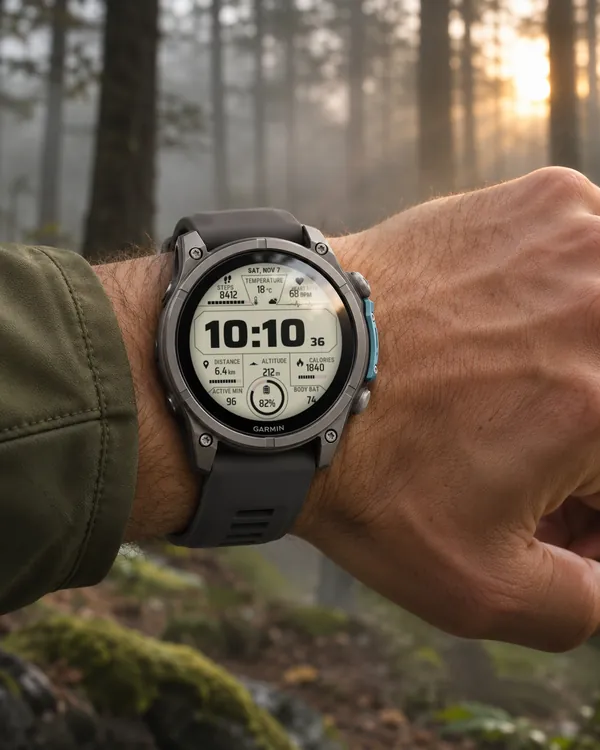
A data dashboard with nine panels around a big time panel: steps, temperature
 Big Hour
Data Deck
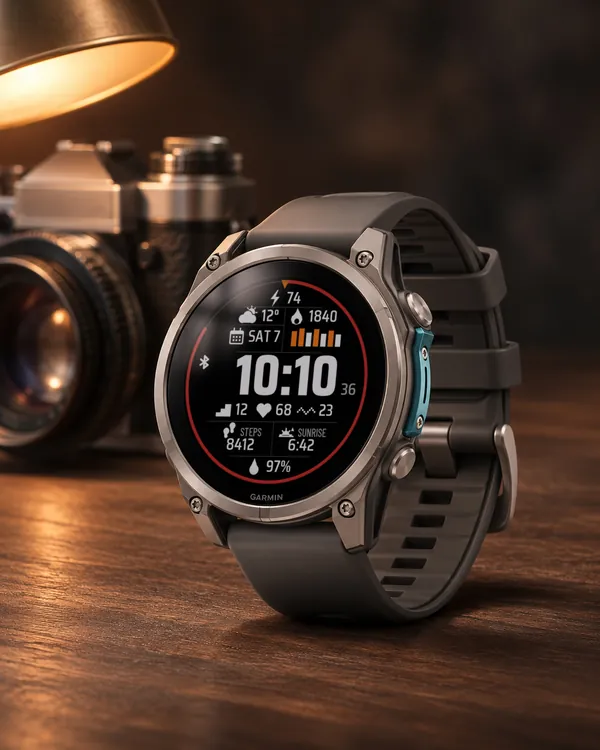
A big time in the middle and ten fields of data around it
 Hunter
 Deer
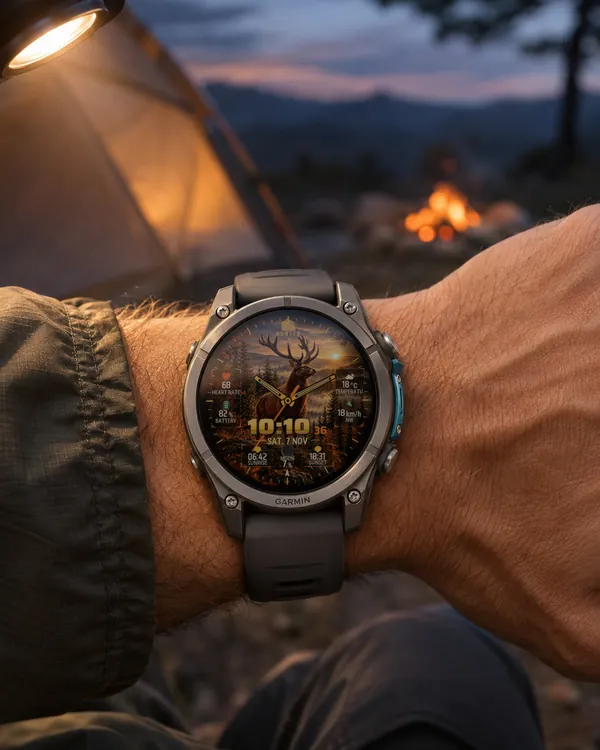
A watch face for hunters: a stag on a rock in an autumn forest at sunset fills the screen
 StreakSoon in Connect IQ too
Streak Goals
A watch face that turns your daily step goal into a streak