Unlock
€6.49
One-time payment. No subscription. The code works on the watch whose ID you enter.
- Install the face from Connect IQ (7 days free).
- On the watch: face settings > Buy / Unlock, scan the QR code.
- Pay and paste the code in the face settings.
- Pay.
- Copy the code.
- Paste it in Connect IQ: this face > Settings > Unlock code.
Payment works best in Safari or Chrome: menu (three dots) > Open in browser
Read it in this face, it is not the serial number of the watch.
The code works only in the watch face it was bought for: a Summit Rings code will not work in Summit Tactic.
Your ID, compare it with the watch:
Where do I find the ID?
On the watch: settings of this face > Buy / Unlock (first item). Scan the QR code with your phone or type the 10 digits. The ID is also at the top of the face settings in the Connect IQ app.
Code not working on your watch? Write to me and I will fix it.
Payments by Stripe. Seller: Mateusz Kolarz, Lublin, Poland.
Paid. Code:
We show the code here too. If the e-mail does not arrive (check spam), you can recover the code in the Recover code section with just the Face ID. Recover code
Copying did not work. The code is selected: copy it by hand.
The face unlocks by itself when the watch connects to the phone (usually within an hour; if the trial is still running, the purchase starts working when it ends).
Do not want to wait, or have an older watch? Paste the code in the Connect IQ app:
Connect IQ (or Garmin Connect) > My Device > Watch faces > Week Run > Settings > Unlock code > paste > Save
Like it? Rate this face in the Garmin store
Want to try new faces and apps before the release, for free? Join the testers program
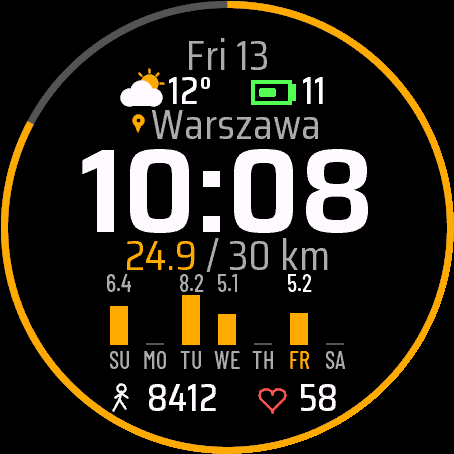
Week Run counts the distance of your whole week. Set a goal, 30 km by default, and the ring around the edge fills with every run and every walk. Under a big time you see seven bars, one for each day of the week, with the distance above each bar. A rest day leaves its bar empty, so you see at once where the kilometres came from. An independent face by dialforge.dev.
- Ring around the edge: this week's distance against your weekly goal (10 to 150, default 30). It closes when you reach it.
- Seven bars for the days of the week, starting on the first day of the week set on your watch. Each bar shows the distance of that day, today is marked in the accent colour.
- The week total above the bars, for example 24.9 / 30 km. Kilometres or miles follow the unit set on the watch.
- Distance counts everything the watch records: runs, walks and the steps of the day.
- A big time, 12 or 24 hour like the watch, leading zero as you choose.
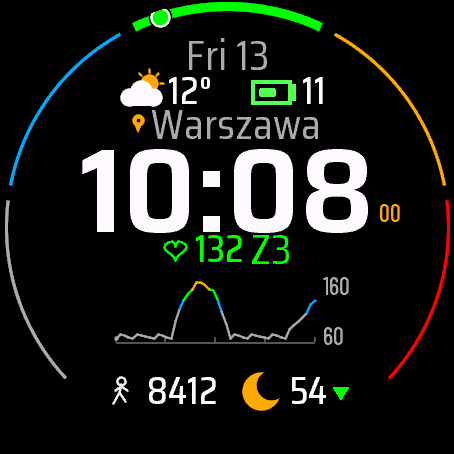
- Five fields: date on top, weather and battery under it, steps and heart rate at the bottom. Each can show any of 32 kinds of data or stay empty. The town is shown under the weather.
- Colours for the ring and bars, the time, date, values, lines and icons. Three sizes of field values.
- Data refresh: a profile (More often, Economy, Less often) or your own interval for each source, with an Off option.
- On touch watches press and hold the bars to open your distance, or a field to open its screen.
- MIP screens use the 64 colour palette. AMOLED watches get an always-on mode: time and date, the whole face dimmed, or the time only, moved a little every minute.
- Menu in 35 languages, weekday names in your language.
All settings are in Garmin Connect (Connect IQ, watch face settings), including colours, own intervals and Off for every data source. On the watch: Customise for the five fields, the weekly goal, field value size, data refresh profile, battery unit and the always-on screen.
Past days come from the 7 day history kept by your watch, so right after a fresh start or a long break the earlier days of the week can be empty for a while. When the watch has no reading, a field shows --.
Week Run liczy dystans całego tygodnia. Ustawiasz cel, domyślnie 30 km, a pierścień wokół brzegu wypełnia się z każdym biegiem i spacerem. Pod dużą godziną stoi siedem słupków, po jednym na każdy dzień tygodnia, z dystansem nad słupkiem. Dzień odpoczynku zostawia pusty słupek, więc od razu widać, skąd wzięły się kilometry. Niezależna tarcza dialforge.dev.
- Pierścień wokół brzegu: dystans tego tygodnia wobec tygodniowego celu (od 10 do 150, domyślnie 30). Zamyka się, gdy cel osiągniesz.
- Siedem słupków na dni tygodnia, od pierwszego dnia tygodnia ustawionego w zegarku. Każdy słupek pokazuje dystans tego dnia, dzisiejszy dzień jest w kolorze akcentu.
- Suma tygodnia nad słupkami, na przykład 24.9 / 30 km. Kilometry albo mile zgodnie z jednostką ustawioną w zegarku.
- Dystans liczy wszystko, co zapisuje zegarek: biegi, spacery i kroki z całego dnia.
- Duża godzina, 12- lub 24-godzinna jak w zegarku, zero wiodące do wyboru.
- Pięć pól: data u góry, pod nią pogoda i bateria, na dole kroki i tętno. Każde pokaże dowolną z 32 danych albo zostanie puste. Pod pogodą widać nazwę miejscowości.
- Kolory pierścienia i słupków, godziny, daty, wartości, linii i ikon. Trzy wielkości wartości pól.
- Odświeżanie danych: profil (Częściej, Oszczędny, Rzadziej) albo własny interwał dla każdego źródła, z opcją Wyłączone.
- Na zegarkach dotykowych przytrzymaj słupki, żeby otworzyć dystans, albo pole, żeby otworzyć jego ekran.
- Ekrany MIP używają palety 64 kolorów. Zegarki AMOLED mają tryb ekranu wygaszonego: godzina i data, cała tarcza przygaszona albo sama godzina, przesuwana co minutę.
- Menu w 35 językach, nazwy dni tygodnia w Twoim języku.
Wszystkie ustawienia są w Garmin Connect (Connect IQ, ustawienia tarczy), także kolory, własne interwały i Wyłączone dla każdego źródła danych. Na zegarku w Dostosuj: pięć pól, cel tygodniowy, wielkość wartości pól, profil odświeżania danych, jednostka baterii i ekran wygaszony.
Minione dni pochodzą z 7-dniowej historii zapisanej przez zegarek, więc zaraz po świeżym starcie albo długiej przerwie wcześniejsze dni tygodnia mogą chwilę być puste. Gdy zegarek nie ma odczytu, pole pokazuje --.
Week Run zählt die Strecke deiner ganzen Woche. Du legst ein Ziel fest, standardmäßig 30 km, und der Ring am Rand füllt sich mit jedem Lauf und jedem Spaziergang. Unter der großen Uhrzeit siehst du sieben Balken, einen für jeden Wochentag, mit der Strecke darüber. Ein Ruhetag lässt seinen Balken leer, so erkennst du sofort, woher die Kilometer kamen. Ein unabhängiges Zifferblatt von dialforge.dev.
- Ring am Displayrand: die Strecke dieser Woche im Vergleich zu deinem Wochenziel (10 bis 150, Standard 30). Er schließt sich, sobald du es erreicht hast.
- Sieben Balken für die Wochentage, beginnend mit dem Wochenstart, der auf deiner Uhr eingestellt ist. Jeder Balken zeigt die Strecke des Tages, der heutige Tag ist in der Akzentfarbe markiert.
- Die Wochensumme über den Balken, zum Beispiel 24.9 / 30 km. Kilometer oder Meilen richten sich nach der Einheit auf deiner Uhr.
- Gezählt wird alles, was die Uhr aufzeichnet: Läufe, Spaziergänge und die Schritte des ganzen Tages.
- Große Uhrzeit im 12- oder 24-Stunden-Format wie auf der Uhr, die führende Null nach Wunsch.
- Fünf Datenfelder: das Datum oben, darunter Wetter und Akku, unten Schritte und Herzfrequenz. Jedes kann einen von 32 Werten anzeigen oder leer bleiben. Der Ort steht unter dem Wetter.
- Farben für Ring und Balken, Uhrzeit, Datum, Werte, Linien und Symbole. Drei Schriftgrößen für die Feldwerte.
- Datenaktualisierung: ein Profil (Häufiger, Sparmodus, Seltener) oder ein eigenes Intervall für jede Datenquelle, inklusive Aus-Option.
- Bei Touchscreen-Uhren die Balken gedrückt halten, um deine Strecke zu öffnen, oder ein Feld, um dessen Ansicht zu öffnen.
- MIP-Displays nutzen die 64-Farben-Palette. AMOLED-Uhren bieten einen Always-On-Modus: Uhrzeit und Datum, das ganze Zifferblatt abgedunkelt oder nur die Uhrzeit, die sich jede Minute etwas verschiebt.
- Menü in 35 Sprachen, Wochentage in deiner Sprache.
Alle Einstellungen findest du in Garmin Connect (Connect IQ, Zifferblatt-Einstellungen), inklusive Farben, eigener Intervalle und Aus für jede Datenquelle. Direkt auf der Uhr: Anpassen für die fünf Felder, das Wochenziel, Schriftgröße der Werte, Aktualisierungsprofil, Akkueinheit und Always-On-Display.
Vergangene Tage stammen aus dem 7-Tage-Verlauf deiner Uhr. Direkt nach einem Neustart oder einer längeren Pause können frühere Tage der Woche daher eine Weile leer sein. Wenn die Uhr keinen Messwert hat, zeigt ein Feld -- an.
Week Run compte la distance de toute votre semaine. Fixez un objectif, 30 km par défaut, et l'anneau sur le pourtour se remplit à chaque course et à chaque marche. Sous la grande heure, vous voyez sept barres, une pour chaque jour de la semaine, avec la distance au-dessus. Un jour de repos laisse sa barre vide : on voit tout de suite d'où viennent les kilomètres. Un cadran indépendant signé dialforge.dev.
- Anneau sur le pourtour : la distance de la semaine face à votre objectif hebdomadaire (de 10 à 150, 30 par défaut). Il se referme quand vous l'atteignez.
- Sept barres pour les jours de la semaine, à partir du premier jour de la semaine réglé sur votre montre. Chaque barre indique la distance du jour, aujourd'hui est marqué avec la couleur d'accent.
- Le total de la semaine au-dessus des barres, par exemple 24.9 / 30 km. Kilomètres ou miles selon l'unité réglée sur la montre.
- La distance compte tout ce que la montre enregistre : courses, marches et pas de la journée.
- L'heure en grand, au format 12 ou 24 heures comme sur la montre, avec ou sans zéro initial selon votre choix.
- Cinq champs : la date en haut, la météo et la batterie en dessous, les pas et la fréquence cardiaque en bas. Chacun peut afficher l'une des 32 données ou rester vide. La ville s'affiche sous la météo.
- Couleurs de l'anneau et des barres, de l'heure, de la date, des valeurs, des lignes et des icônes. Trois tailles pour les valeurs des champs.
- Actualisation des données : un profil (Plus souvent, Économie, Moins souvent) ou votre propre intervalle pour chaque source, avec une option Désactivé.
- Sur les montres tactiles, maintenez le doigt sur les barres pour ouvrir votre distance, ou sur un champ pour ouvrir son écran.
- Les écrans MIP utilisent la palette 64 couleurs. Les montres AMOLED disposent d'un mode toujours allumé : heure et date, cadran entier assombri, ou heure seule légèrement décalée chaque minute.
- Menu en 35 langues, noms des jours de la semaine dans votre langue.
Tous les réglages se font dans Garmin Connect (Connect IQ, paramètres du cadran), y compris les couleurs, vos propres intervalles et l'option Désactivé pour chaque source de données. Directement sur la montre : personnalisation des cinq champs, objectif hebdomadaire, taille des valeurs, profil d'actualisation des données, unité de batterie et écran toujours allumé.
Les jours passés viennent de l'historique de 7 jours conservé par votre montre. Juste après un redémarrage ou une longue pause, les premiers jours de la semaine peuvent donc rester vides un moment. Lorsque la montre n'a aucune mesure, le champ affiche --.
Week Run cuenta la distancia de toda tu semana. Fija un objetivo, 30 km por defecto, y el anillo del borde se llena con cada carrera y cada paseo. Bajo la hora en grande ves siete barras, una por cada día de la semana, con la distancia encima. Un día de descanso deja su barra vacía, así que ves al instante de dónde salieron los kilómetros. Una esfera independiente de dialforge.dev.
- Anillo exterior: la distancia de esta semana frente a tu objetivo semanal (de 10 a 150, por defecto 30). Se cierra cuando lo consigues.
- Siete barras para los días de la semana, empezando por el primer día de la semana configurado en tu reloj. Cada barra muestra la distancia de ese día y hoy se marca con el color de acento.
- El total de la semana sobre las barras, por ejemplo 24.9 / 30 km. Kilómetros o millas según la unidad del reloj.
- La distancia cuenta todo lo que registra el reloj: carreras, paseos y los pasos del día.
- Hora en grande, en formato de 12 o 24 horas como el reloj, con cero inicial a tu elección.
- Cinco campos: la fecha arriba, el tiempo y la batería debajo, y los pasos y la frecuencia cardíaca abajo. Cada uno puede mostrar cualquiera de los 32 tipos de datos o quedarse vacío. La localidad aparece bajo el tiempo.
- Colores para el anillo y las barras, la hora, la fecha, los valores, las líneas y los iconos. Tres tamaños para los valores de los campos.
- Actualización de datos: un perfil (Más frecuente, Económico, Menos frecuente) o tu propio intervalo para cada fuente, con opción de Desactivado.
- En relojes táctiles, mantén pulsadas las barras para abrir tu distancia, o un campo para abrir su pantalla.
- Las pantallas MIP usan la paleta de 64 colores. Los relojes AMOLED cuentan con pantalla siempre activa: hora y fecha, la esfera entera atenuada o solo la hora, que se desplaza un poco cada minuto.
- Menú en 35 idiomas y nombres de los días de la semana en tu idioma.
Todos los ajustes se configuran en Garmin Connect (Connect IQ, ajustes de la esfera), incluidos los colores, los intervalos personalizados y la opción Desactivado para cada fuente de datos. Desde el reloj: Personalizar para los cinco campos, el objetivo semanal, tamaño de los valores, perfil de actualización, unidad de batería y pantalla siempre activa.
Los días anteriores se toman del historial de 7 días que guarda el reloj, así que justo después de reiniciar o de una pausa larga, los primeros días de la semana pueden aparecer vacíos un rato. Si el reloj no tiene ninguna lectura, el campo muestra --.
Week Run telt de afstand van je hele week. Stel een doel in, standaard 30 km, en de ring langs de rand vult zich bij elke run en elke wandeling. Onder een grote tijdweergave zie je zeven balken, een voor elke dag van de week, met de afstand erboven. Een rustdag laat zijn balk leeg, zodat je meteen ziet waar de kilometers vandaan kwamen. Een onafhankelijke wijzerplaat van dialforge.dev.
- Ring langs de rand: de afstand van deze week tegenover je weekdoel (10 tot 150, standaard 30). De ring sluit zodra je het doel haalt.
- Zeven balken voor de dagen van de week, beginnend op de eerste dag van de week die op je horloge is ingesteld. Elke balk toont de afstand van die dag, vandaag staat in de accentkleur.
- Het weektotaal boven de balken, bijvoorbeeld 24.9 / 30 km. Kilometers of mijlen volgen de eenheid van je horloge.
- De afstand telt alles wat het horloge registreert: runs, wandelingen en de stappen van de dag.
- Een grote tijdweergave, in 12- of 24-uursindeling zoals op het horloge, met of zonder voorloopnul naar keuze.
- Vijf velden: de datum bovenaan, weer en batterij eronder, stappen en hartslag onderin. Elk veld kan 32 soorten gegevens tonen of leeg blijven. De plaatsnaam staat onder het weer.
- Kleuren voor de ring en balken, de tijd, datum, waarden, lijnen en pictogrammen. Drie formaten voor veldwaarden.
- Gegevens verversen: een profiel (Vaker, Zuinig, Minder vaak) of een eigen interval per bron, met een optie voor Uit.
- Op horloges met touchscreen houd je de balken ingedrukt om je afstand te openen, of een veld om het bijbehorende scherm te openen.
- MIP-schermen gebruiken het 64-kleurenpalet. AMOLED-horloges krijgen een always-on stand: tijd en datum, de hele wijzerplaat gedimd, of alleen de tijd, die elke minuut een stukje verschuift.
- Menu in 35 talen, namen van de weekdagen in je eigen taal.
Alle instellingen vind je in Garmin Connect (Connect IQ, instellingen wijzerplaat), inclusief kleuren, eigen intervallen en Uit voor elke gegevensbron. Op het horloge zelf: Aanpassen voor de vijf velden, het weekdoel, grootte van veldwaarden, verversingsprofiel, batterij-eenheid en het always-on scherm.
Eerdere dagen komen uit de geschiedenis van 7 dagen die je horloge bewaart, dus net na een frisse start of een lange pauze kunnen eerdere dagen van de week even leeg zijn. Als het horloge geen meting heeft, toont een veld --.
Week Runは、1週間ぶんの距離をまとめてカウントするウォッチフェイスです。目標を設定(初期値は30 km)すると、ランニングやウォーキングのたびに外周のリングが満ちていきます。大きな時刻の下には曜日ごとの7本のバーが並び、それぞれの上にその日の距離を表示。休息日のバーは空のままなので、週の距離をどの日で積み上げたのかがひと目でわかります。dialforge.devによる個人開発のウォッチフェイスです。
- 外周リング:今週の距離を週間目標(10~150、初期値30)に対して表示。目標を達成するとリングが閉じます。
- 曜日ごとの7本のバー:時計に設定した週の開始日から並びます。各バーにその日の距離を表示し、今日はアクセントカラーで強調されます。
- バーの上に週間合計を表示。例:24.9 / 30 km。キロメートルかマイルかは時計の単位設定に従います。
- 距離には、ランニング、ウォーキング、1日の歩数など、時計が記録したすべてが含まれます。
- 見やすい大きな時刻表示。時計の設定に合わせた12時間または24時間表示で、先頭のゼロの有無も選べます。
- 5つのフィールド:上部に日付、その下に天気とバッテリー、下部に歩数と心拍数。それぞれ32種類のデータから好きなものを表示でき、空にもできます。天気の下には地名を表示します。
- リングとバー、時刻、日付、数値、ライン、アイコンのカラーを変更可能。フィールドの数値サイズは3段階から選べます。
- データ更新頻度:プロファイル(高頻度、エコノミー、低頻度)から選ぶか、データ項目ごとに更新間隔を自分で設定できます(オフも選択可)。
- タッチ対応モデルなら、バーを長押しして距離画面を開いたり、フィールドを長押ししてその画面を開いたりできます。
- MIP画面は64色パレットに対応。AMOLEDモデルでは常時表示モードに対応し、時刻と日付、全体の減光表示、1分ごとに少しだけ位置が動く時刻のみ表示から選べます。
- メニューは35言語に対応、曜日名もお使いの言語で表示されます。
カラー、個別の更新間隔、各データ項目のオフ設定など、すべての設定はGarmin Connect(Connect IQ、ウォッチフェイス設定)から変更できます。時計本体からは「カスタマイズ」で、5つのフィールド、週間目標、フィールドの数値サイズ、データ更新プロファイル、バッテリー表示単位、常時表示画面を設定できます。
過去の日の記録は時計に保存された7日間の履歴を参照するため、再起動直後や長期間使っていなかった直後は、週の前半の日が一時的に空になる場合があります。時計が値を取得できない項目には -- と表示されます。
ご意見やご要望はこちらから:https://dialforge.dev/faces/weekrun/ または「開発者に連絡」。月間目標や別の週の区切りが欲しい場合も、ぜひメッセージをお送りください。すべて目を通しています。
Week Run conta la distanza di tutta la tua settimana. Imposti un obiettivo, 30 km di default, e l'anello lungo il bordo si riempie a ogni corsa e a ogni camminata. Sotto l'ora a grandi cifre vedi sette barre, una per ogni giorno della settimana, con la distanza sopra. Un giorno di riposo lascia la barra vuota, così capisci subito da dove arrivano i chilometri. Un quadrante indipendente creato da dialforge.dev.
- Anello lungo il bordo: la distanza di questa settimana rispetto al tuo obiettivo settimanale (da 10 a 150, predefinito 30). Si chiude quando lo raggiungi.
- Sette barre per i giorni della settimana, a partire dal primo giorno della settimana impostato sull'orologio. Ogni barra mostra la distanza del giorno, oggi è evidenziato con il colore di accento.
- Il totale della settimana sopra le barre, ad esempio 24.9 / 30 km. Chilometri o miglia secondo l'unità impostata sull'orologio.
- La distanza conta tutto ciò che l'orologio registra: corse, camminate e passi della giornata.
- Ora grande, in formato 12 o 24 ore come sull'orologio, con lo zero iniziale a scelta.
- Cinque campi: la data in alto, meteo e batteria sotto, passi e frequenza cardiaca in basso. Ciascuno può mostrare uno tra 32 tipi di dati o restare vuoto. La località compare sotto il meteo.
- Colori per anello e barre, ora, data, valori, linee e icone. Tre dimensioni per i valori dei campi.
- Aggiornamento dati: un profilo (Più spesso, Risparmio, Meno spesso) o un intervallo personalizzato per ogni sorgente, con l'opzione Spento.
- Sui modelli touchscreen, tieni premute le barre per aprire la tua distanza, oppure un campo per aprire la sua schermata.
- Gli schermi MIP usano la tavolozza a 64 colori. Gli orologi AMOLED hanno la modalità always-on: ora e data, intero quadrante attenuato oppure solo l'ora, spostata leggermente ogni minuto.
- Menu in 35 lingue, nomi dei giorni della settimana nella tua lingua.
Tutte le impostazioni sono in Garmin Connect (Connect IQ, impostazioni del quadrante), inclusi colori, intervalli personalizzati e l'opzione Spento per ciascuna sorgente dati. Sull'orologio: Personalizza per i cinque campi, obiettivo settimanale, dimensione dei valori, profilo di aggiornamento dati, unità della batteria e schermo always-on.
I giorni passati provengono dalla cronologia di 7 giorni conservata dall'orologio, quindi subito dopo un riavvio o una lunga pausa i primi giorni della settimana possono restare vuoti per un po'. Quando l'orologio non rileva alcun dato, il campo mostra --.
Week Run 会累计你整整一周的运动距离。设定好目标(默认 30 km),每次跑步或步行都会让外圈圆环不断填满。大字时间下方有七根进度条,对应一周中的每一天,条上方标出当天的距离。休息日的进度条保持空白,所以这一周的里程来自哪几天,一眼就能看出来。来自 dialforge.dev 的独立表盘作品。
- 外圈圆环:展示本周距离与每周目标(10 到 150,默认 30)的对比,达标时圆环闭合。
- 七根进度条对应一周七天,从手表设置的每周第一天开始排列。每根进度条显示当天的距离,今天用强调色标出。
- 进度条上方显示本周总距离,例如 24.9 / 30 km。公里或英里跟随手表的单位设置。
- 距离会统计手表记录的全部内容:跑步、步行以及一整天的步数。
- 醒目的大字时间,支持与手表一致的 12 或 24 小时制,可选择是否显示前导零。
- 五个数据栏:顶部为日期,下方是天气和电量,底部是步数和心率。每个栏位可从 32 种数据中任选,也可以留空。天气下方会显示所在城市。
- 圆环和进度条、时间、日期、数值、线条与图标均可自定义配色。数据数值提供三种字号。
- 数据刷新:可选预设模式(更频繁、省电、低频),也能为每项数据单独设定刷新间隔,甚至直接关闭。
- 触摸屏手表支持长按:长按进度条可打开距离详情,长按数据栏可打开对应界面。
- MIP 屏幕采用 64 色调色板。AMOLED 手表提供息屏常亮模式:可显示时间和日期、整个表盘调暗,或仅显示时间并每分钟微移一点位置。
- 设置菜单支持 35 种语言,星期名称也会匹配你的语言。
全部设置均可在 Garmin Connect 中进行(Connect IQ,表盘设置),包括颜色搭配、自定义刷新间隔以及关闭任意数据源。在手表端:可以通过自定义调整五个数据栏、每周目标、数值字号、数据刷新模式、电量单位以及息屏常亮显示。
过去几天的数据来自手表保存的 7 天历史记录,因此刚重新启动或长时间未佩戴后,本周前面几天可能会暂时显示为空。当手表没有读数时,数据栏会显示 --。
建议与反馈:https://dialforge.dev/faces/weekrun/ 或点击“联系开发者”。想要月度目标或不同的每周起始日?欢迎随时留言,每一条消息我都会认真看。
Week Run считает дистанцию за всю неделю. Задайте цель (по умолчанию 30 км), и кольцо по краю экрана будет заполняться с каждой пробежкой и каждой прогулкой. Под крупным временем расположены семь полосок, по одной на каждый день недели, а над каждой видна дистанция за этот день. День отдыха оставляет полоску пустой, поэтому сразу понятно, за счет чего набрались километры. Независимый циферблат от dialforge.dev.
- Кольцо по краю экрана: дистанция за эту неделю относительно недельной цели (от 10 до 150, по умолчанию 30). Кольцо замыкается, когда цель взята.
- Семь полосок по дням недели, начиная с первого дня недели, заданного в часах. Каждая полоска показывает дистанцию за свой день, сегодняшний день выделен акцентным цветом.
- Итог недели над полосками, например 24.9 / 30 км. Километры или мили зависят от единиц, выбранных в часах.
- В дистанцию входит все, что записывают часы: пробежки, прогулки и шаги за весь день.
- Крупное время в формате 12 или 24 часа, как в часах, с ведущим нулем по вашему выбору.
- Пять полей: дата сверху, под ней погода и батарея, внизу шаги и пульс. В каждом можно настроить любой из 32 видов данных или оставить пустым. Под погодой отображается название города.
- Цвета для кольца и полосок, времени, даты, значений, линий и иконок. Три размера значений в полях.
- Обновление данных: профиль (Чаще, Экономичный, Реже) или свой интервал для каждого источника, плюс вариант Отключить.
- На часах с сенсорным экраном нажмите и удерживайте полоски, чтобы открыть экран дистанции, либо удерживайте поле, чтобы перейти к его показателю.
- Экраны MIP используют палитру из 64 цветов. Для часов AMOLED есть режим всегда включенного экрана: время и дата, весь циферблат в приглушенном свете или только время с небольшим сдвигом каждую минуту.
- Меню на 35 языках, названия дней недели на вашем языке.
Все настройки меняются в Garmin Connect (Connect IQ, настройки циферблата), включая цвета, собственные интервалы и отключение любого источника данных. Прямо на часах в разделе настройки: пять полей, недельная цель, размер значений, профиль обновления данных, формат батареи и постоянно включенный экран.
Прошлые дни берутся из истории за 7 дней, которую хранят часы, поэтому сразу после чистой установки или долгого перерыва первые дни недели могут какое-то время быть пустыми. Если у часов нет текущих измерений, в поле отображается --.
Идеи и пожелания: https://dialforge.dev/faces/weekrun/ или «Связаться с разработчиком». Хотите месячную цель или другое начало недели? Напишите, я читаю каждое сообщение.
O Week Run conta a distância da sua semana inteira. Defina uma meta, 30 km por padrão, e o anel na borda se preenche a cada corrida e a cada caminhada. Abaixo da hora em tamanho grande você vê sete barras, uma para cada dia da semana, com a distância acima de cada uma. Um dia de descanso deixa a barra vazia, então você vê na hora de onde vieram os quilômetros. Um mostrador independente feito por dialforge.dev.
- Anel na borda: a distância desta semana em relação à sua meta semanal (de 10 a 150, padrão 30). Ele se fecha quando você a alcança.
- Sete barras para os dias da semana, começando no primeiro dia da semana definido no seu relógio. Cada barra mostra a distância do dia, e hoje aparece na cor de destaque.
- O total da semana acima das barras, por exemplo 24.9 / 30 km. Quilômetros ou milhas conforme a unidade definida no relógio.
- A distância conta tudo o que o relógio registra: corridas, caminhadas e os passos do dia.
- Hora grande, em formato 12 ou 24 horas como no relógio, com zero à esquerda a seu critério.
- Cinco campos: data no topo, clima e bateria abaixo, passos e frequência cardíaca na parte inferior. Cada um pode exibir qualquer um dos 32 tipos de dados ou ficar vazio. A cidade aparece abaixo do clima.
- Cores para o anel e as barras, hora, data, valores, linhas e ícones. Três tamanhos para os valores dos campos.
- Atualização de dados: um perfil (Mais frequente, Econômico, Menos frequente) ou seu próprio intervalo para cada fonte, com opção de Desativar.
- Em relógios com tela sensível ao toque, toque e segure as barras para abrir sua distância, ou um campo para abrir a tela dele.
- Telas MIP usam a paleta de 64 cores. Relógios AMOLED contam com modo sempre ativo: hora e data, o mostrador inteiro esmaecido ou apenas a hora, que se move ligeiramente a cada minuto.
- Menu em 35 idiomas, com os nomes dos dias da semana no seu idioma.
Todas as configurações ficam no Garmin Connect (Connect IQ, configurações do mostrador), incluindo cores, intervalos personalizados e a opção Desativar para cada fonte de dados. No próprio relógio: personalize os cinco campos, a meta semanal, tamanho dos valores, perfil de atualização dos dados, unidade da bateria e a tela sempre ativa.
Os dias anteriores vêm do histórico de 7 dias guardado pelo relógio. Por isso, logo após reiniciar ou ficar um tempo sem usar, os primeiros dias da semana podem aparecer vazios por um instante. Quando o relógio não tem nenhuma leitura, o campo mostra --.
Week Run počítá vzdálenost celého vašeho týdne. Nastavíte si cíl, ve výchozím stavu 30 km, a kroužek po obvodu se plní s každým během i každou procházkou. Pod velkým časem vidíte sedm sloupců, jeden pro každý den v týdnu, a nad každým vzdálenost. Den odpočinku nechá sloupec prázdný, takže hned poznáte, odkud se kilometry vzaly. Nezávislý ciferník od dialforge.dev.
- Kroužek po obvodu: vzdálenost tohoto týdne vůči vašemu týdennímu cíli (10 až 150, výchozí 30). Jakmile cíl splníte, kroužek se uzavře.
- Sedm sloupců pro dny v týdnu, od prvního dne týdne nastaveného v hodinkách. Každý sloupec ukazuje vzdálenost daného dne, dnešek je označen barvou zvýraznění.
- Součet za týden nad sloupci, například 24.9 / 30 km. Kilometry nebo mi podle jednotky nastavené v hodinkách.
- Do vzdálenosti se počítá vše, co hodinky zaznamenají: běhy, procházky i kroky z celého dne.
- Velký čas, 12 nebo 24 hodinový formát podle hodinek, úvodní nula podle vaší volby.
- Pět polí: nahoře datum, pod ním počasí a baterie, dole kroky a srdeční tep. Každé pole zobrazí kterýkoliv z 32 údajů nebo zůstane prázdné. Pod počasím je vidět název místa.
- Barvy pro kroužek a sloupce, čas, datum, hodnoty, linky a ikonky. Tři velikosti hodnot v polích.
- Obnova dat: přednastavený profil (Častěji, Úsporný, Méně často) nebo vlastní interval pro každý zdroj, včetně možnosti Vypnuto.
- Na dotykových hodinkách podržením sloupců otevřete svou vzdálenost, podržením pole jeho obrazovku.
- MIP displeje využívají paletu 64 barev. Hodinky s AMOLED mají režim trvale zapnutého displeje: čas a datum, celý ztlumený ciferník, případně pouze čas, který se každou minutu nepatrně posune.
- Menu v 35 jazycích, názvy dnů v týdnu ve vašem jazyce.
Veškerá nastavení najdete v Garmin Connect (Connect IQ, nastavení ciferníku), včetně barev, vlastních intervalů i volby Vypnuto pro každý zdroj dat. Přímo v hodinkách: volba Přizpůsobit pro pět polí, týdenní cíl, velikost hodnot, profil obnovy dat, jednotka baterie a trvale zapnutý displej.
Předchozí dny čerpají ze 7denní historie uložené v hodinkách, takže po novém spuštění nebo delší pauze mohou dřívější dny týdne chvíli chybět. Když hodinky nemají k dispozici žádnou hodnotu, pole zobrazí --.
O Week Run conta a distância da tua semana inteira. Define um objetivo, 30 km por predefinição, e o anel junto ao limite do ecrã vai preenchendo a cada corrida e a cada caminhada. Por baixo das horas em tamanho grande, vês sete barras, uma para cada dia da semana, com a distância por cima. Um dia de descanso deixa a barra vazia, por isso vês logo de onde vieram os quilómetros. Um mostrador independente criado por dialforge.dev.
- Anel à volta: a distância desta semana face ao teu objetivo semanal (de 10 a 150, predefinição 30). Fecha quando o atinges.
- Sete barras para os dias da semana, a começar no primeiro dia da semana definido no teu relógio. Cada barra mostra a distância do dia e o dia de hoje fica na cor de destaque.
- O total da semana acima das barras, por exemplo 24.9 / 30 km. Quilómetros ou milhas conforme a unidade definida no relógio.
- A distância conta tudo o que o relógio regista: corridas, caminhadas e os passos do dia.
- Horas em formato grande, em 12 ou 24 horas como no relógio, com zero à esquerda à tua escolha.
- Cinco campos: a data no topo, meteorologia e bateria por baixo, passos e frequência cardíaca em baixo. Cada um pode mostrar qualquer um de 32 tipos de dados ou ficar vazio. A localidade aparece por baixo da meteorologia.
- Cores para o anel e as barras, horas, data, valores, linhas e ícones. Três tamanhos para os valores dos campos.
- Atualização de dados: um perfil (Mais frequente, Económico, Menos frequente) ou o teu próprio intervalo para cada fonte, com a opção Desligado.
- Em relógios táteis, prime continuamente as barras para abrir a tua distância, ou um campo para abrir o respetivo ecrã.
- Os ecrãs MIP usam a paleta de 64 cores. Os relógios AMOLED têm modo sempre ligado: horas e data, o mostrador inteiro atenuado ou apenas as horas, com ligeiros desvios a cada minuto.
- Menu em 35 idiomas, nomes dos dias da semana na tua língua.
Todas as opções são configuradas no Garmin Connect (Connect IQ, definições do mostrador), incluindo cores, intervalos personalizados e a opção Desligado para cada fonte de dados. No relógio: Personalizar para os cinco campos, o objetivo semanal, tamanho dos valores, perfil de atualização de dados, unidade da bateria e ecrã sempre ligado.
Os dias anteriores vêm do histórico de 7 dias guardado no teu relógio, pelo que logo após reiniciar ou depois de uma longa pausa, os primeiros dias da semana podem ficar vazios durante algum tempo. Quando o relógio não tem nenhuma leitura, o campo mostra --.
Week Run은 한 주 전체의 이동 거리를 계산해 주는 워치페이스입니다. 목표를 정하면(기본값 30 km) 달리거나 걸을 때마다 가장자리의 링이 차오릅니다. 큼직한 시계 아래에는 요일별로 7개의 막대가 있고, 막대마다 그날의 거리가 위에 표시됩니다. 쉬는 날은 막대가 비어 있어서 거리가 어느 날에 쌓였는지 한눈에 알 수 있습니다. dialforge.dev에서 제작한 인디 워치페이스입니다.
- 가장자리 링: 이번 주 거리를 주간 목표(10~150, 기본값 30) 대비로 보여주며, 목표를 채우면 링이 닫힙니다.
- 요일별 막대 7개: 워치에 설정한 한 주의 시작 요일부터 표시됩니다. 막대마다 그날의 거리가 나오고, 오늘은 강조 색상으로 표시됩니다.
- 막대 위에 주간 합계 표시, 예: 24.9 / 30 km. 킬로미터와 마일은 워치의 단위 설정을 따릅니다.
- 거리에는 러닝, 걷기, 하루 걸음 수 등 워치가 기록하는 모든 활동이 포함됩니다.
- 시계 설정에 맞는 12시간제 또는 24시간제의 큼직한 시계, 앞자리 0 표시도 선택할 수 있습니다.
- 5개의 데이터 필드: 위쪽에 날짜, 그 아래에 날씨와 배터리, 아래쪽에 걸음 수와 심박수. 각 필드에 32가지 데이터 중 원하는 것을 띄우거나 비워둘 수 있고, 날씨 아래에는 지역 이름이 표시됩니다.
- 링과 막대, 시간, 날짜, 수치, 라인, 아이콘의 색상을 바꿀 수 있고, 필드 수치 크기는 3단계로 조절할 수 있습니다.
- 데이터 새로고침: 프로필(자주, 절약, 덜 자주)을 고르거나 데이터 항목별로 갱신 주기를 직접 지정할 수 있으며 꺼둠(Off) 옵션도 있습니다.
- 터치를 지원하는 워치에서는 막대를 길게 눌러 거리 화면을 열고, 데이터 필드를 길게 눌러 해당 화면으로 바로 이동할 수 있습니다.
- MIP 화면은 64색 팔레트를 지원합니다. AMOLED 워치에서는 AOD 모드를 지원하여 시간과 날짜 표시, 화면 전체를 어둡게 유지하기, 1분마다 살짝 위치를 바꾸는 시간 전용 표시 중 선택할 수 있습니다.
- 35개 언어 메뉴 지원, 요일 이름도 사용자 언어로 표시됩니다.
색상, 개별 갱신 주기, 각 데이터 항목 끄기(Off)를 포함한 모든 설정은 Garmin Connect(Connect IQ, 워치페이스 설정)에서 변경할 수 있습니다. 워치 기기에서는 커스텀 메뉴에서 5개 필드, 주간 목표, 필드 값 크기, 데이터 새로고침 프로필, 배터리 표시 단위, AOD 화면을 설정할 수 있습니다.
지난 기록은 워치에 저장된 7일간의 내역을 불러오므로, 워치를 새로 시작했거나 오랫동안 착용하지 않은 직후에는 한 주의 앞쪽 날짜가 잠시 비어 보일 수 있습니다. 워치에서 측정된 값이 없을 때는 필드에 --로 표시됩니다.
의견 및 문의: https://dialforge.dev/faces/weekrun/ 또는 "개발자에게 문의하기". 월간 목표나 다른 요일 시작 방식이 필요하신가요? 언제든 메시지를 남겨주세요, 모든 문의를 꼼꼼히 읽고 있습니다.
Week Run räknar distansen för hela din vecka. Ställ in ett mål, 30 km som standard, och ringen runt kanten fylls på med varje löptur och varje promenad. Under den stora klockan ser du sju staplar, en för varje veckodag, med distansen ovanför. En vilodag lämnar sin stapel tom, så du ser direkt var kilometrarna kom ifrån. En fristående urtavla från dialforge.dev.
- Ring runt kanten: veckans distans mot ditt veckomål (10 till 150, standard 30). Ringen sluts när du når målet.
- Sju staplar för veckodagarna, med början på den första veckodagen som är inställd på klockan. Varje stapel visar dagens distans, och idag är markerad med accentfärgen.
- Veckans summa ovanför staplarna, till exempel 24.9 / 30 km. Kilometer eller miles följer enheten som är inställd på klockan.
- Distansen räknar allt klockan registrerar: löpturer, promenader och dagens steg.
- Stor tid, 12 eller 24 timmar precis som klockan, med inledande nolla som du själv väljer.
- Fem fält: datum överst, väder och batteri under det, steg och puls längst ner. Varje fält kan visa någon av 32 typer av data eller lämnas tomt. Orten visas under vädret.
- Färger för ringen och staplarna, tiden, datumet, värdena, linjerna och ikonerna. Tre storlekar för fältvärdena.
- Datauppdatering: en profil (Oftare, Ekonomi, Mer sällan) eller ett eget intervall för varje datakälla, med alternativet Av.
- På klockor med pekskärm trycker du och håller in på staplarna för att öppna din distans, eller på ett fält för att öppna dess skärm.
- MIP-skärmar använder paletten med 64 färger. Klockor med AMOLED får ett alltid på-läge: tid och datum, hela urtavlan nedtonad, eller bara tiden som flyttas lite varje minut.
- Meny på 35 språk, och veckodagarnas namn på ditt språk.
Alla inställningar görs i Garmin Connect (Connect IQ, inställningar för urtavlan), inklusive färger, egna intervall och Av för varje datakälla. På klockan: Anpassa för de fem fälten, veckomålet, fältvärdenas storlek, profil för datauppdatering, batterienhet och alltid på-skärmen.
Tidigare dagar hämtas från den 7 dagar långa historiken som klockan sparar, så direkt efter en omstart eller en längre paus kan veckans tidigare dagar vara tomma en stund. När klockan saknar mätvärde visar ett fält --.
Week Run tæller distancen for hele din uge. Sæt et mål, som standard 30 km, og ringen langs kanten fyldes ud ved hvert løb og hver gåtur. Under et stort klokkeslæt ser du syv søjler, en for hver ugedag, med distancen oven over. En hviledag lader sin søjle stå tom, så du med det samme kan se, hvor kilometerne kom fra. En uafhængig urskive fra dialforge.dev.
- Ring langs kanten: ugens distance målt op mod dit ugemål (10 til 150, som standard 30). Den lukker sig, når målet er nået.
- Syv søjler for ugens dage, med start på den første ugedag, der er indstillet på uret. Hver søjle viser dagens distance, og i dag er markeret med accentfarven.
- Ugens samlede distance over søjlerne, for eksempel 24.9 / 30 km. Kilometer eller miles følger den enhed, der er indstillet på uret.
- Distancen tæller alt, hvad uret registrerer: løb, gåture og dagens skridt.
- Et stort klokkeslæt i 12 eller 24 timer ligesom uret, med foranstillet nul efter eget valg.
- Fem felter: datoen øverst, vejr og batteri under den, skridt og puls nederst. Hvert felt kan vise en af 32 slags data eller stå tomt. Byen vises under vejret.
- Farver til ringen og søjlerne, klokkeslættet, datoen, værdierne, linjerne og ikonerne. Tre størrelser til feltværdier.
- Dataopdatering: en profil (Oftere, Økonomisk, Sjældnere) eller dit eget interval for hver kilde, samt mulighed for Fra.
- På ure med touchskærm holder du fingeren på søjlerne for at åbne din distance, eller på et felt for at åbne det pågældende skærmbillede.
- MIP-skærme bruger paletten med 64 farver. AMOLED-ure får en always-on-tilstand: tid og dato, hele urskiven dæmpet eller kun klokkeslættet, som flyttes en smule hvert minut.
- Menu på 35 sprog, og ugedagenes navne på dit eget sprog.
Alle indstillinger klares i Garmin Connect (Connect IQ, indstillinger for urskive), inklusive farver, egne intervaller og Fra for hver datakilde. Direkte på uret: Tilpas de fem felter, ugemålet, værdiernes størrelse, profil for dataopdatering, batterienhed og always-on-skærmen.
Tidligere dage hentes fra urets historik over 7 dage, så lige efter en nulstilling eller en længere pause kan ugens første dage mangle et stykke tid. Når uret mangler en måling, viser et felt --.
Week Run teller distansen for hele uken din. Sett et mål, som standard 30 km, så fylles ringen langs kanten for hver løpetur og hver gåtur. Under et stort klokkeslett ser du sju søyler, én for hver ukedag, med distansen over hver søyle. En hviledag lar søylen stå tom, så du ser med en gang hvor kilometerne kom fra. En uavhengig urskive fra dialforge.dev.
- Ring langs kanten: distansen denne uken mot ukemålet ditt (10 til 150, standard 30). Den lukker seg når du når målet.
- Sju søyler for ukedagene, med start på den første dagen i uken som er satt på klokken. Hver søyle viser distansen for dagen, og dagen i dag er markert med aksentfargen.
- Ukesummen over søylene, for eksempel 24.9 / 30 km. Kilometer eller mi følger enheten som er satt på klokken.
- Distansen teller alt klokken registrerer: løpeturer, gåturer og skrittene fra hele dagen.
- Et stort klokkeslett, 12 eller 24 timer som på klokken, med ledende null etter eget valg.
- Fem felt: dato øverst, vær og batteri under den, skritt og puls nederst. Hvert felt kan vise en av 32 typer data eller stå tomt. Stedsnavnet vises under været.
- Farger for ringen og søylene, klokkeslettet, datoen, verdiene, linjene og ikonene. Tre størrelser på feltverdiene.
- Dataoppdatering: en profil (Oftere, Økonomisk, Sjeldnere) eller ditt eget intervall for hver kilde, med et Av-valg.
- På klokker med berøringsskjerm trykker og holder du på søylene for å åpne distansen din, eller på et felt for å åpne skjermen for det.
- MIP-skjermer bruker paletten med 64 farger. AMOLED-klokker får alltid-på-modus: klokkeslett og dato, hele urskiven tonet ned, eller bare klokkeslettet, flyttet litt hvert minutt.
- Meny på 35 språk, og ukedagsnavn på ditt språk.
Alle innstillinger gjøres i Garmin Connect (Connect IQ, innstillinger for urskive), inkludert farger, egne intervaller og Av for hver datakilde. På klokken: Tilpass for de fem feltene, ukemålet, størrelse på feltverdi, profil for dataoppdatering, batterienhet og alltid-på-skjermen.
Tidligere dager hentes fra 7-dagers historikken på klokken din, så rett etter en omstart eller et lengre opphold kan de tidligere dagene i uken mangle en stund. Når klokken ikke har noen måling, viser feltet --.
Week Run 會累計你整整一週的運動距離。設定好目標(預設 30 km),每次跑步或步行都會讓外圈圓環持續填滿。大字體時間下方有七根長條,對應一週中的每一天,上方標示當天的距離。休息日的長條保持空白,這一週的里程來自哪幾天,一眼就能看出來。由 dialforge.dev 獨立開發的錶面。
- 外圈圓環:顯示本週距離與每週目標(10 到 150,預設 30)的對比,達標時圓環閉合。
- 七根長條對應一週七天,從手錶設定的每週第一天開始排列。每根長條顯示當天的距離,今天以強調色標示。
- 長條上方顯示本週總距離,例如 24.9 / 30 km。公里或英里依手錶的單位設定而定。
- 距離會統計手錶記錄的所有內容:跑步、步行以及一整天的步數。
- 醒目的大字體時間,支援與手錶一致的 12 或 24 小時制,可選擇是否顯示前導零。
- 五個自訂欄位:頂部為日期,下方是天氣與電量,底部是步數與心率。每個欄位可從 32 種數據中自由選擇,也可保持空白。天氣下方會顯示所在城市。
- 圓環與長條、時間、日期、數值、線條與圖示皆可自訂色彩。欄位數值提供三種字型大小。
- 數據更新頻率:提供預設設定檔(頻繁、省電、低頻率),也可自行設定各數據來源的更新間隔,亦可選擇關閉。
- 支援觸控的手錶上,長按長條可開啟距離頁面,長按數據欄位則可開啟對應頁面。
- MIP 螢幕採用 64 色調色盤。AMOLED 手錶支援常亮模式:可選時間與日期、全錶面變暗顯示,或僅顯示時間並每分鐘微幅位移。
- 選單支援 35 種語言,星期名稱亦會對應你的語言。
所有設定皆可在 Garmin Connect 中調整(Connect IQ,錶面設定),包含色彩配置、自訂更新間隔以及各數據來源的關閉選項。手錶端可在個人化中設定:五個欄位、每週目標、欄位數值大小、數據更新設定檔、電量單位以及常亮螢幕顯示。
過去幾天的數據來自手錶儲存的 7 天歷史紀錄,因此在剛重置或久未使用後,本週前幾天的紀錄可能會暫時空白。當手錶沒有偵測到數值時,欄位會顯示 --。
任何建議與需求請至:https://dialforge.dev/faces/weekrun/ 或點擊「聯絡開發者」。想要月目標或不同的每週起始日嗎?歡迎隨時來信,每則訊息我都會親自閱讀。
Week Run laskee koko viikkosi matkan. Aseta tavoite, oletuksena 30 km, ja kehää kiertävä rengas täyttyy jokaisesta juoksusta ja kävelystä. Ison kellonajan alapuolella näet seitsemän palkkia, yhden jokaiselle viikonpäivälle, ja matkan palkin yläpuolella. Lepopäivä jättää palkin tyhjäksi, joten näet heti, mistä kilometrit kertyivät. Riippumaton kellotaulu tekijältä dialforge.dev.
- Kehää kiertävä rengas: tämän viikon matka suhteessa viikkotavoitteeseesi (10 - 150, oletus 30). Rengas sulkeutuu, kun saavutat tavoitteen.
- Seitsemän palkkia viikonpäiville, alkaen kellosta asetetusta viikon ensimmäisestä päivästä. Jokainen palkki näyttää kyseisen päivän matkan, ja tämä päivä on merkitty korostusvärillä.
- Viikon yhteismatka palkkien yläpuolella, esimerkiksi 24.9 / 30 km. Kilometrit tai mi kellon yksikköasetuksen mukaan.
- Matkaan lasketaan kaikki, mitä kello tallentaa: juoksut, kävelyt ja koko päivän askeleet.
- Iso kellonaika, 12 tai 24 tunnin muodossa kellon mukaan, etunolla tai ilman valintasi mukaan.
- Viisi kenttää: päivämäärä ylhäällä, sen alla sää ja akku, alhaalla askeleet ja syke. Kukin voi näyttää minkä tahansa 32 eri tiedosta tai olla tyhjä. Paikkakunta näkyy sään alla.
- Värit renkaalle ja palkeille, kellonajalle, päivämäärälle, arvoille, viivoille ja kuvakkeille. Kolme eri kokoa kenttien arvoille.
- Tietojen päivitys: valmis profiili (Useammin, Säästö, Harvemmin) tai oma päivitysväli jokaiselle lähteelle, mukana myös Pois-vaihtoehto.
- Kosketusnäytöllisissä kelloissa voit avata matkasi painamalla pitkään palkkeja tai avata kentän oman näkymän painamalla sitä pitkään.
- MIP-näytöt käyttävät 64 värin palettia. AMOLED-kelloille on aina päällä oleva tila: aika ja päivämäärä, koko kellotaulu himmennettynä tai pelkkä kellonaika, jota siirretään hieman joka minuutti.
- Valikko 35 kielellä, viikonpäivien nimet omalla kielelläsi.
Kaikki asetukset löytyvät Garmin Connect -sovelluksesta (Connect IQ, kellotaulun asetukset), mukaan lukien värit, omat päivitysvälit ja Pois-valinta jokaiselle tietolähteelle. Kellossa: Mukauta-valikosta viisi kenttää, viikkotavoite, kentän arvojen koko, tietojen päivitysprofiili, akun yksikkö sekä aina päällä oleva näyttö.
Menneet päivät haetaan kellon tallentamasta 7 päivän historiasta, joten heti käyttöönoton tai pitkän tauon jälkeen viikon aiemmat päivät voivat olla hetken tyhjiä. Jos kellolla ei ole lukemaa, kentässä näkyy --.
Week Run počíta vzdialenosť celého vášho týždňa. Nastavíte si cieľ, predvolene 30 km, a kruh po obvode sa plní s každým behom aj každou prechádzkou. Pod veľkým časom vidíte sedem stĺpcov, jeden pre každý deň v týždni, a nad každým vzdialenosť. Deň odpočinku nechá stĺpec prázdny, takže hneď vidíte, odkiaľ sa kilometre vzali. Nezávislý ciferník od dialforge.dev.
- Kruh po obvode: vzdialenosť tohto týždňa v porovnaní s vaším týždenným cieľom (10 až 150, predvolene 30). Uzavrie sa, keď cieľ dosiahnete.
- Sedem stĺpcov pre dni v týždni, od prvého dňa týždňa nastaveného v hodinkách. Každý stĺpec ukazuje vzdialenosť daného dňa, dnešok je označený farbou zvýraznenia.
- Súčet za týždeň nad stĺpcami, napríklad 24.9 / 30 km. Kilometre alebo mi podľa jednotky nastavenej v hodinkách.
- Do vzdialenosti sa počíta všetko, čo hodinky zaznamenajú: behy, prechádzky aj kroky z celého dňa.
- Veľký čas, 12 alebo 24-hodinový formát podľa hodiniek, úvodná nula podľa vášho výberu.
- Päť polí: hore dátum, pod ním počasie a batéria, dole kroky a tep. Každé pole zobrazí ktorýkoľvek z 32 údajov alebo zostane prázdne. Pod počasím je vidieť názov miesta.
- Farby pre kruh a stĺpce, čas, dátum, hodnoty, linky aj ikony. Tri veľkosti hodnôt v poliach.
- Obnova dát: prednastavený profil (Častejšie, Úsporný, Menej často) alebo vlastný interval pre každý zdroj zvlášť, s možnosťou Vypnuté.
- Na dotykových hodinkách podržaním stĺpcov otvoríte svoju vzdialenosť, podržaním poľa jeho obrazovku.
- MIP displeje využívajú paletu 64 farieb. Hodinky s AMOLED majú režim stále zapnutej obrazovky: čas a dátum, stmavený celý ciferník, alebo len čas, ktorý sa každú minútu mierne posunie.
- Menu v 35 jazykoch, názvy dní v týždni vo vašom jazyku.
Všetky nastavenia nájdete v Garmin Connect (Connect IQ, nastavenia ciferníka), vrátane farieb, vlastných intervalov a voľby Vypnuté pre každý zdroj údajov. Priamo na hodinkách: Prispôsobenie pre päť polí, týždenný cieľ, veľkosť hodnôt v poliach, profil obnovy dát, jednotka batérie a stále zapnutý displej.
Predchádzajúce dni vychádzajú zo 7-dňovej histórie uloženej v hodinkách, takže po novom štarte alebo dlhšej pauze môžu skoršie dni týždňa chvíľu chýbať. Keď hodinky nemajú k dispozícii žiadny údaj, v poli sa zobrazí --.
Week Run šteje razdaljo vašega celotnega tedna. Nastavite cilj, privzeto 30 km, in obroč okoli roba se polni z vsakim tekom in vsakim sprehodom. Pod velikim prikazom časa vidite sedem stolpcev, po enega za vsak dan v tednu, nad vsakim pa razdaljo. Dan počitka pusti stolpec prazen, zato takoj vidite, od kod so prišli kilometri. Samostojna številčnica od dialforge.dev.
- Obroč okoli roba: razdalja tega tedna glede na vaš tedenski cilj (od 10 do 150, privzeto 30). Ko cilj dosežete, se obroč sklene.
- Sedem stolpcev za dneve v tednu, od prvega dne v tednu, nastavljenega na uri. Vsak stolpec prikazuje razdaljo tistega dne, današnji dan pa je označen z barvo poudarka.
- Seštevek tedna nad stolpci, na primer 24.9 / 30 km. Kilometri ali mi glede na enoto, nastavljeno na uri.
- V razdaljo se šteje vse, kar ura zabeleži: teki, sprehodi in koraki celega dne.
- Velik prikaz časa, 12 ali 24 ur kot na uri, z vodilno ničlo po vaši izbiri.
- Pet polj: datum na vrhu, pod njim vreme in baterija, spodaj koraki in srčni utrip. Vsako lahko prikazuje katero koli od 32 vrst podatkov ali ostane prazno. Kraj je prikazan pod vremenom.
- Barve za obroč in stolpce, čas, datum, vrednosti, črte ter ikone. Tri velikosti vrednosti v poljih.
- Osveževanje podatkov: profil (Bolj pogosto, Varčno, Manj pogosto) ali lasten interval za vsak vir, z možnostjo Izklop.
- Na urah z zaslonom na dotik pritisnite in zadržite stolpce, da odprete svojo razdaljo, ali polje, da odprete njegov zaslon.
- Zasloni MIP uporabljajo barvno paleto 64 barv. Ure AMOLED imajo način vedno vklopljenega zaslona: čas in datum, celotna zatemnjena številčnica ali samo čas, ki se vsako minuto rahlo premakne.
- Meni v 35 jezikih, imena dni v tednu v vašem jeziku.
Vse nastavitve so v Garmin Connect (Connect IQ, nastavitve številčnice), vključno z barvami, lastnimi intervali in možnostjo Izklop za vsak vir podatkov. Na uri: Prilagodi za pet polj, tedenski cilj, velikost vrednosti v poljih, profil osveževanja podatkov, enota baterije in vedno vklopljen zaslon.
Pretekli dnevi se berejo iz 7-dnevne zgodovine vaše ure, zato lahko po ponovnem zagonu ali daljšem premoru starejši dnevi v tednu za kratek čas manjkajo. Kadar ura nima meritve, polje prikazuje --.
Week Run menghitung jarak sepanjang minggu Anda. Atur target, standarnya 30 km, dan cincin di sekeliling layar akan terisi setiap kali Anda berlari atau berjalan. Di bawah angka jam yang besar, ada tujuh bar, satu untuk setiap hari dalam seminggu, dengan jarak di atas masing-masing bar. Hari istirahat membuat bar-nya kosong, jadi Anda langsung tahu dari mana asal kilometernya. Watch face independen karya dialforge.dev.
- Cincin di sekeliling layar: jarak minggu ini terhadap target mingguan Anda (10 sampai 150, standar 30). Cincin tertutup penuh saat target tercapai.
- Tujuh bar untuk hari-hari dalam seminggu, dimulai dari hari pertama dalam minggu yang diatur di jam tangan. Setiap bar menampilkan jarak hari itu, dan hari ini ditandai dengan warna aksen.
- Total minggu ini di atas bar, misalnya 24.9 / 30 km. Kilometer atau mi mengikuti satuan yang diatur di jam tangan.
- Jarak menghitung semua yang direkam jam tangan: lari, jalan kaki, dan langkah sepanjang hari.
- Angka jam besar, format 12 atau 24 jam mengikuti jam tangan Anda, dengan angka nol di depan sesuai pilihan.
- Lima kolom: tanggal di atas, cuaca dan baterai di bawahnya, langkah dan detak jantung di bagian bawah. Masing-masing bisa menampilkan salah satu dari 32 jenis data atau dibiarkan kosong. Nama kota ditampilkan di bawah cuaca.
- Pilihan warna untuk cincin dan bar, angka jam, tanggal, nilai data, garis, dan ikon. Tersedia tiga ukuran tampilan nilai kolom.
- Pembaruan data: gunakan profil (More often, Economy, Less often) atau atur interval Anda sendiri untuk setiap sumber data, lengkap dengan opsi Off.
- Pada jam tangan layar sentuh, tekan dan tahan bar untuk membuka jarak Anda, atau tekan dan tahan salah satu kolom untuk membuka layarnya.
- Layar MIP menggunakan palet 64 warna. Jam tangan AMOLED memiliki mode always-on: jam dan tanggal, seluruh layar diredupkan, atau hanya jam saja yang bergeser sedikit setiap menit.
- Menu dalam 35 bahasa, nama hari ditampilkan dalam bahasa Anda.
Semua pengaturan ada di Garmin Connect (Connect IQ, pengaturan watch face), termasuk warna, interval kustom, dan opsi Off untuk setiap sumber data. Di jam tangan: menu Customise untuk lima kolom, target mingguan, ukuran nilai kolom, profil pembaruan data, satuan baterai, dan layar always-on.
Data hari-hari sebelumnya diambil dari riwayat 7 hari di jam tangan Anda, jadi setelah jam dinyalakan ulang atau lama tidak dipakai, data hari-hari awal minggu mungkin kosong untuk sementara waktu. Saat jam tidak memiliki data pembacaan, kolom akan menampilkan --.
A Week Run az egész heted távolságát számolja. Állíts be egy célt, alapértelmezésként 30 km, és a szélén lévő gyűrű minden futással és sétával telik. A nagy időkijelzés alatt hét oszlopot látsz, a hét minden napjához egyet, mindegyik felett a megtett távolsággal. A pihenőnap üresen hagyja az oszlopot, így rögtön látszik, honnan jöttek a kilométerek. Egy független számlap a dialforge.dev-től.
- Gyűrű a szélén: az e heti távolság a heti célodhoz képest (10 és 150 között, alapértelmezés 30). Bezárul, ha eléred a célt.
- Hét oszlop a hét napjaihoz, az órán beállított hét első napjától kezdve. Mindegyik az adott nap távolságát mutatja, a mai napot pedig a kiemelő szín jelöli.
- A heti összeg az oszlopok felett, például 24.9 / 30 km. Kilométer vagy mi, az órán beállított mértékegység szerint.
- A távolságba minden beleszámít, amit az óra rögzít: futások, séták és a nap lépései.
- Nagy időkijelzés, 12 vagy 24 órás az óra beállítása szerint, a kezdő nulla tetszés szerint.
- Öt adatmező: felül a dátum, alatta az időjárás és az akkumulátor, alul a lépések és a pulzus. Mindegyik 32 féle adatot mutathat vagy üresen is maradhat. A település neve az időjárás alatt látható.
- Választható színek a gyűrűhöz és az oszlopokhoz, az időhöz, a dátumhoz, az értékekhez, a vonalakhoz és az ikonokhoz. Három méret az adatmezők értékeihez.
- Adatfrissítés: profilok (Gyakrabban, Takarékos, Ritkábban) vagy saját időköz minden forráshoz, kikapcsolási lehetőséggel.
- Érintőképernyős órákon tartsd hosszan nyomva az oszlopokat a távolságod megnyitásához, vagy egy mezőt a saját képernyőjének megnyitásához.
- A MIP kijelzők a 64 színű palettát használják. Az AMOLED órák mindig bekapcsolt (always-on) módot kapnak: idő és dátum, az egész számlap elhalványítva, vagy csak az idő, percenként kissé elmozdítva.
- Menü 35 nyelven, a hét napjainak nevei a saját nyelveden.
Minden beállítás a Garmin Connectben érhető el (Connect IQ, számlap beállításai), beleértve a színeket, a saját időközöket és a kikapcsolást minden adatforráshoz. Az órán: testreszabás az öt mezőhöz, a heti cél, a mezőértékek mérete, az adatfrissítési profil, az akkumulátor egysége és a mindig bekapcsolt kijelző.
A korábbi napok adatai az óra által őrzött 7 napos előzményekből jönnek, így egy újrakezdés vagy hosszabb szünet után a hét korábbi napjai egy ideig üresek lehetnek. Ha az órának nincs adata, a mezőben -- látható.
Week Run นับระยะทางตลอดทั้งสัปดาห์ของคุณ ตั้งเป้าหมายได้เอง ค่าเริ่มต้นคือ 30 km แล้ววงแหวนรอบขอบจอจะเต็มขึ้นทุกครั้งที่วิ่งหรือเดิน ใต้ตัวเลขเวลาขนาดใหญ่มีแท่ง 7 แท่ง แทนแต่ละวันในสัปดาห์ พร้อมระยะทางแสดงเหนือแต่ละแท่ง วันพักจะปล่อยแท่งว่างไว้ จึงเห็นทันทีว่ากิโลเมตรมาจากวันไหน หน้าปัดอิสระจาก dialforge.dev
- วงแหวนรอบขอบจอ: แสดงระยะทางของสัปดาห์นี้เทียบกับเป้าหมายรายสัปดาห์ (10 ถึง 150 ค่าเริ่มต้น 30) และจะครบรอบเมื่อถึงเป้า
- แท่ง 7 แท่งแทนวันในสัปดาห์ เริ่มจากวันแรกของสัปดาห์ที่ตั้งไว้ในนาฬิกา แต่ละแท่งแสดงระยะทางของวันนั้น และวันนี้จะใช้สีเน้น
- ยอดรวมของสัปดาห์แสดงอยู่เหนือแท่ง เช่น 24.9 / 30 km โดยกิโลเมตรหรือไมล์จะเป็นไปตามหน่วยที่ตั้งไว้ในนาฬิกา
- ระยะทางนับทุกอย่างที่นาฬิกาบันทึก: การวิ่ง การเดิน และก้าวเดินตลอดวัน
- ตัวเลขเวลาขนาดใหญ่ รองรับทั้งแบบ 12 หรือ 24 ชั่วโมงตามนาฬิกา เลือกแสดงเลขศูนย์นำหน้าได้
- ช่องข้อมูล 5 ช่อง: วันที่ด้านบน สภาพอากาศและแบตเตอรี่อยู่ถัดลงมา ก้าวเดินและอัตราการเต้นของหัวใจอยู่ด้านล่าง แต่ละช่องแสดงข้อมูลได้ถึง 32 แบบ หรือเว้นว่างไว้ก็ได้ ชื่อเมืองจะแสดงใต้สภาพอากาศ
- ปรับสีได้ทั้งวงแหวนและแท่ง เวลา วันที่ ค่าข้อมูล เส้น และไอคอน พร้อมขนาดตัวเลขข้อมูล 3 ขนาด
- การอัปเดตข้อมูล: เลือกโปรไฟล์ (More often, Economy, Less often) หรือกำหนดช่วงเวลาเองสำหรับแต่ละข้อมูล รวมถึงตัวเลือก Off
- สำหรับนาฬิกาหน้าจอสัมผัส แตะค้างที่แท่งเพื่อเปิดดูระยะทาง หรือแตะค้างที่ช่องข้อมูลเพื่อเปิดหน้าจอนั้น
- หน้าจอ MIP ใช้ชุดสี 64 สี ส่วนนาฬิกา AMOLED รองรับโหมด Always-on: เวลาและวันที่, หรี่แสงทั้งหน้าปัด หรือแสดงเฉพาะเวลาโดยขยับตำแหน่งเล็กน้อยทุกนาที
- เมนูรองรับ 35 ภาษา พร้อมชื่อวันในสัปดาห์ในภาษาของคุณ
ตั้งค่าทั้งหมดได้ใน Garmin Connect (Connect IQ, การตั้งค่าหน้าปัด) ทั้งสีสัน ช่วงเวลาอัปเดตเอง และตัวเลือก Off สำหรับทุกข้อมูล และตั้งค่าบนนาฬิกาได้ที่เมนู Customise: ช่องข้อมูลทั้ง 5 ช่อง เป้าหมายรายสัปดาห์ ขนาดตัวเลขข้อมูล โปรไฟล์การอัปเดตข้อมูล หน่วยแบตเตอรี่ และหน้าจอ Always-on
ข้อมูลวันก่อนหน้าดึงมาจากประวัติ 7 วันที่นาฬิกาเก็บไว้ ดังนั้นหลังเริ่มใช้ใหม่หรือหยุดใช้นาน วันแรกๆ ของสัปดาห์อาจว่างอยู่ชั่วคราว และหากนาฬิกายังไม่มีค่าที่วัดได้ ช่องข้อมูลจะแสดงเป็น --
Το Week Run μετράει την απόσταση ολόκληρης της εβδομάδας. Ορίζεις στόχο, 30 km από προεπιλογή, και ο δακτύλιος στην άκρη γεμίζει με κάθε τρέξιμο και κάθε βόλτα. Κάτω από τη μεγάλη ώρα βλέπεις επτά μπάρες, μία για κάθε μέρα της εβδομάδας, με την απόσταση πάνω από την καθεμία. Μια μέρα ξεκούρασης αφήνει την μπάρα της άδεια, οπότε φαίνεται αμέσως από πού προήλθαν τα χιλιόμετρα. Ένα ανεξάρτητο καντράν από το dialforge.dev.
- Δακτύλιος στην άκρη: η απόσταση αυτής της εβδομάδας σε σχέση με τον εβδομαδιαίο στόχο σου (10 έως 150, προεπιλογή 30). Κλείνει μόλις τον πετύχεις.
- Επτά μπάρες για τις ημέρες της εβδομάδας, ξεκινώντας από την πρώτη ημέρα της εβδομάδας που έχεις ορίσει στο ρολόι. Κάθε μπάρα δείχνει την απόσταση της ημέρας, ενώ η σημερινή είναι στο χρώμα έμφασης.
- Το σύνολο της εβδομάδας πάνω από τις μπάρες, για παράδειγμα 24.9 / 30 km. Χιλιόμετρα ή μίλια ανάλογα με τη μονάδα που έχει το ρολόι.
- Η απόσταση μετράει ό,τι καταγράφει το ρολόι: τρεξίματα, βόλτες και τα βήματα της ημέρας.
- Μεγάλη ώρα, σε μορφή 12 ή 24 ωρών όπως στο ρολόι, με αρχικό μηδενικό κατά επιλογή.
- Πέντε πεδία: η ημερομηνία επάνω, κάτω της ο καιρός και η μπαταρία, στο κάτω μέρος τα βήματα και οι καρδιακοί παλμοί. Το καθένα μπορεί να εμφανίσει οποιονδήποτε από τους 32 τύπους δεδομένων ή να μείνει κενό. Κάτω από τον καιρό εμφανίζεται η πόλη.
- Χρώματα για τον δακτύλιο και τις μπάρες, την ώρα, την ημερομηνία, τις τιμές, τις γραμμές και τα εικονίδια. Τρία μεγέθη για τις τιμές των πεδίων.
- Ανανέωση δεδομένων: έτοιμα προφίλ (Πιο συχνά, Οικονομία, Λιγότερο συχνά) ή δικό σου χρονικό διάστημα για κάθε πηγή, με επιλογή Απενεργοποίησης.
- Στα ρολόγια αφής, πάτησε παρατεταμένα τις μπάρες για να ανοίξεις την απόστασή σου, ή ένα πεδίο για να μεταβείς στην αντίστοιχη οθόνη.
- Οι οθόνες MIP χρησιμοποιούν την παλέτα 64 χρωμάτων. Στα ρολόγια AMOLED υπάρχει λειτουργία πάντα ενεργής οθόνης: ώρα και ημερομηνία, ολόκληρο το καντράν σε χαμηλό φωτισμό, ή μόνο η ώρα, που μετακινείται ελαφρώς κάθε λεπτό.
- Μενού σε 35 γλώσσες, ονόματα ημερών στη γλώσσα σου.
Όλες οι ρυθμίσεις γίνονται μέσω του Garmin Connect (Connect IQ, ρυθμίσεις καντράν), συμπεριλαμβανομένων των χρωμάτων, των δικών σου διαστημάτων ανανέωσης και της επιλογής Απενεργοποίησης για κάθε πηγή δεδομένων. Απευθείας στο ρολόι, στην Προσαρμογή: τα πέντε πεδία, ο εβδομαδιαίος στόχος, το μέγεθος τιμών, το προφίλ ανανέωσης δεδομένων, η ένδειξη μπαταρίας και η πάντα ενεργή οθόνη.
Οι προηγούμενες ημέρες προέρχονται από το ιστορικό 7 ημερών που κρατά το ρολόι σου, οπότε μετά από επανεκκίνηση ή μεγάλο διάλειμμα οι πρώτες ημέρες της εβδομάδας μπορεί να μένουν προσωρινά κενές. Όταν το ρολόι δεν έχει μέτρηση, το πεδίο δείχνει --.
Ιδέες και προτάσεις: https://dialforge.dev/faces/weekrun/ ή "Επικοινωνία με τον δημιουργό". Θέλεις μηνιαίο στόχο ή διαφορετική αρχή εβδομάδας; Γράψε μου, διαβάζω κάθε μήνυμα.
Week Run broji udaljenost tvog cijelog tjedna. Postaviš cilj, zadano 30 km, a prsten uz rub puni se sa svakim trčanjem i svakom šetnjom. Ispod velikog prikaza vremena vidiš sedam stupaca, po jedan za svaki dan u tjednu, a iznad svakog udaljenost. Dan odmora ostavlja stupac praznim pa odmah vidiš odakle su došli kilometri. Nezavisan izgled sata koji donosi dialforge.dev.
- Prsten uz rub: udaljenost ovog tjedna u odnosu na tvoj tjedni cilj (od 10 do 150, zadano 30). Zatvara se čim ga ostvariš.
- Sedam stupaca za dane u tjednu, počevši od prvog dana u tjednu postavljenog na satu. Svaki stupac prikazuje udaljenost tog dana, a današnji dan označen je bojom isticanja.
- Zbroj tjedna iznad stupaca, na primjer 24.9 / 30 km. Kilometri ili mi prema jedinici postavljenoj na satu.
- U udaljenost se računa sve što sat bilježi: trčanja, šetnje i koraci tijekom cijelog dana.
- Veliko vrijeme, u formatu od 12 ili 24 sata kao na satu, s vodećom nulom po tvom izboru.
- Pet polja: datum na vrhu, ispod njega vrijeme i baterija, a na dnu koraci i puls. Svako polje može prikazivati bilo koji od 32 podatka ili ostati prazno. Naziv mjesta prikazan je ispod vremenske prognoze.
- Boje za prsten i stupce, vrijeme, datum, vrijednosti, linije i ikone. Tri veličine vrijednosti u poljima.
- Osvježavanje podataka: profil (Češće, Ekonomično, Rjeđe) ili vlastiti interval za svaki izvor, uz opciju Isključeno.
- Na satovima sa zaslonom na dodir pritisni i drži stupce za otvaranje udaljenosti ili polje za otvaranje njegovog zaslona.
- MIP zasloni koriste paletu od 64 boje. Satovi s AMOLED zaslonom imaju način rada uvijek uključenog zaslona: vrijeme i datum, cijeli zatamnjeni izgled sata ili samo vrijeme, koje se malo pomakne svake minute.
- Izbornik na 35 jezika, a nazivi dana u tjednu na tvom jeziku.
Sve postavke nalaze se u Garmin Connect (Connect IQ, postavke izgleda sata), uključujući boje, vlastite intervale i opciju Isključeno za svaki izvor podataka. Na satu: Prilagodi za pet polja, tjedni cilj, veličinu vrijednosti, profil osvježavanja podataka, jedinicu baterije i uvijek uključeni zaslon.
Prošli dani preuzimaju se iz 7-dnevne povijesti koju bilježi sat, pa nakon prvog pokretanja ili dulje pauze raniji dani u tjednu mogu neko vrijeme nedostajati. Kada sat nema očitanje, polje prikazuje --.
Week Run סופר את המרחק של כל השבוע שלכם. מגדירים יעד, ברירת המחדל 30 ק"מ, והטבעת בקצה המסך מתמלאת עם כל ריצה וכל הליכה. מתחת לשעה הגדולה רואים שבע עמודות, אחת לכל יום בשבוע, ומעל כל עמודה המרחק של אותו יום. יום מנוחה משאיר את העמודה ריקה, כך שרואים מיד מאיפה הגיעו הקילומטרים. לוח שעון עצמאי מבית dialforge.dev.
- טבעת בקצה המסך: מרחק השבוע מול היעד השבועי שלכם (10 עד 150, ברירת מחדל 30). היא נסגרת ברגע שהגעתם ליעד.
- שבע עמודות לימי השבוע, החל מהיום הראשון בשבוע שהוגדר בשעון. כל עמודה מציגה את המרחק של אותו יום, והיום הנוכחי מסומן בצבע ההדגשה.
- סך השבוע מעל העמודות, למשל 24.9 / 30 ק"מ. קילומטרים או מיילים לפי היחידה שהוגדרה בשעון.
- המרחק סופר כל מה שהשעון מתעד: ריצות, הליכות וצעדי היום.
- שעה גדולה, 12 או 24 שעות כמו בשעון, עם אפס מוביל לפי בחירתכם.
- חמישה שדות: תאריך למעלה, מתחתיו מזג אוויר וסוללה, ולמטה צעדים ודופק. כל שדה יכול להציג כל אחד מתוך 32 סוגי נתונים או להישאר ריק. שם העיר מופיע מתחת למזג האוויר.
- צבעים לטבעת ולעמודות, לשעה, לתאריך, לערכים, לקווים ולאייקונים. שלושה גדלים לערכי השדות.
- רענון נתונים: פרופיל (לעתים קרובות יותר, חסכוני, לעתים רחוקות יותר) או מרווח זמן משלכם לכל מקור מידע, כולל מצב Off.
- בשעוני מסך מגע, לחיצה ארוכה על העמודות פותחת את מסך המרחק, ולחיצה ארוכה על שדה פותחת את המסך שלו.
- מסכי MIP מציגים בפלטת 64 צבעים. שעוני AMOLED מקבלים מצב מסך דולק תמיד: שעה ותאריך, לוח שעון שלם מעומעם, או שעה בלבד שזזה מעט בכל דקה.
- תפריט ב-35 שפות, ושמות ימי השבוע בשפה שלכם.
כל ההגדרות נמצאות ב-Garmin Connect (תחת Connect IQ, הגדרות לוח שעון), כולל צבעים, מרווחי זמן מותאמים ומצב Off לכל מקור נתונים. ישירות מהשעון, בהתאמה אישית: חמשת השדות, היעד השבועי, גודל ערכי השדות, פרופיל רענון הנתונים, יחידת הסוללה ומסך דולק תמיד.
הימים הקודמים נלקחים מהיסטוריית 7 הימים שהשעון שומר, לכן מיד לאחר הפעלה חדשה או הפסקה ארוכה ייתכן שהימים המוקדמים של השבוע יהיו ריקים לזמן מה. כשאין לשעון מדידה זמינה, השדה יציג --.
Week Run mengira jarak sepanjang minggu anda. Tetapkan sasaran, lalai 30 km, dan bulatan di sekeliling skrin akan terisi dengan setiap larian dan setiap perjalanan. Di bawah paparan masa yang besar, anda dapat melihat tujuh bar, satu untuk setiap hari dalam seminggu, dengan jarak di atas setiap bar. Hari rehat membiarkan bar kosong, jadi anda terus nampak dari mana datangnya kilometer itu. Muka jam bebas ciptaan dialforge.dev.
- Bulatan di sekeliling skrin: jarak minggu ini berbanding sasaran mingguan anda (10 hingga 150, lalai 30). Bulatan akan tertutup rapat apabila sasaran dicapai.
- Tujuh bar untuk hari dalam seminggu, bermula pada hari pertama minggu yang ditetapkan pada jam. Setiap bar memaparkan jarak hari itu, dan hari ini ditandakan dengan warna penekanan.
- Jumlah minggu di atas bar, contohnya 24.9 / 30 km. Kilometer atau mi mengikut unit yang ditetapkan pada jam.
- Jarak mengira semua yang dirakam oleh jam: larian, perjalanan dan langkah sepanjang hari.
- Paparan masa yang besar, format 12 atau 24 jam mengikut jam anda, dengan sifar di hadapan mengikut pilihan anda.
- Lima ruangan: tarikh di atas, cuaca dan bateri di bawahnya, langkah dan kadar denyutan jantung di bahagian bawah. Setiap satu boleh memaparkan mana-mana daripada 32 jenis data atau dibiarkan kosong. Nama bandar dipaparkan di bawah cuaca.
- Pilihan warna untuk bulatan dan bar, masa, tarikh, nilai bacaan, garisan dan ikon. Tiga pilihan saiz untuk nilai bacaan ruangan.
- Kemas kini data: pilihan profil (Lebih kerap, Jimat, Kurang kerap) atau tetapkan selang masa anda sendiri bagi setiap punca data, lengkap dengan pilihan Off.
- Pada jam skrin sentuh, tekan dan tahan bar untuk membuka jarak anda, atau tekan dan tahan mana-mana ruangan untuk membuka skrinnya.
- Skrin MIP menggunakan palet 64 warna. Jam AMOLED dilengkapi mod sentiasa hidup: masa dan tarikh, seluruh muka jam dimalapkan, atau paparan masa sahaja yang dialihkan sedikit setiap minit.
- Menu dalam 35 bahasa, nama hari dalam bahasa anda.
Semua tetapan boleh diakses dalam Garmin Connect (Connect IQ, tetapan muka jam), termasuk warna, selang masa tersuai dan pilihan Off untuk setiap punca data. Pada jam tangan: pilih Ubah Suai untuk lima ruangan data, sasaran mingguan, saiz nilai bacaan, profil kemas kini data, unit bateri dan skrin sentiasa hidup.
Rekod hari lepas diambil daripada sejarah 7 hari yang disimpan oleh jam anda, jadi sejurus selepas penetapan semula atau rehat yang panjang, data hari awal minggu mungkin kosong seketika. Apabila jam tiada bacaan, ruangan akan memaparkan --.
Rate this face (only I see the rating)
Permissions and privacy
This product asks the watch for the permissions below. Connect IQ shows them when you install it.
- Sensor history: Reads recent values stored by the watch (for example Body Battery, stress, heart rate, steps trend).Odczytuje ostatnie wartości zapisane przez zegarek (na przykład Body Battery, stres, tętno, trend kroków).
- Your profile: Reads your Garmin profile on the watch (for example age, weight, heart rate zones) to calculate values for you.Odczytuje Twój profil Garmin na zegarku (na przykład wiek, wagę, strefy tętna), żeby liczyć wartości dla Ciebie.
- Watch data (complications): Shows data from other watch features, such as battery or steps, on the face.Pokazuje na tarczy dane z innych funkcji zegarka, takie jak bateria czy kroki.
- Location (GPS): Uses the watch location for distance, speed or sun and moon times. The location is not sent anywhere.Używa lokalizacji zegarka do dystansu, prędkości albo godzin słońca i księżyca. Lokalizacja nigdzie nie jest wysyłana.
This product does not use the internet and sends no data to our servers.
The full manual and the detailed permission descriptions are available in English and Polish.